Notepad3: New Notepad on Windows Insider 21337
There are problems trying to replace the new Notepad provided with Windows Insider 21337.
I have tried to manually insert the registry keys:
Windows Registry Editor Version 5.00
[HKEY_CLASSES_ROOT\*\OpenWithList\notepad3.exe]
@=""
[HKEY_CLASSES_ROOT\Applications\notepad3.exe]
"AppUserModelID"="Notepad3"
[HKEY_CLASSES_ROOT\Applications\notepad3.exe\shell]
[HKEY_CLASSES_ROOT\Applications\notepad3.exe\shell\open]
[HKEY_CLASSES_ROOT\Applications\notepad3.exe\shell\open\command]
@="\"D:\\Eseguibili\\File\\Notepad3\\Notepad3.exe\" %1"
[HKEY_LOCAL_MACHINE\SOFTWARE\Microsoft\Windows NT\CurrentVersion\Image File Execution Options\notepad.exe]
"Debugger"="\"D:\\Eseguibili\\File\\Notepad3\\Notepad3.exe\" /z"
[HKEY_LOCAL_MACHINE\SOFTWARE\WOW6432Node\Microsoft\Windows NT\CurrentVersion\Image File Execution Options\notepad.exe]
"Debugger"="\"D:\\Eseguibili\\File\\Notepad3\\Notepad3.exe\" /z"
but it gave me a horrible error on first launch and I had to revert back to default Notepad.
 tormento
All 12 comments
The released Beta Build is 19043.899 (21H1) [2021-03-15].
The rollout for Dev-Preview Build 21337.101 (21H2) [2021-03-19].
We got feedback, that NP3 is working for beta build "21H1" 👍.
Did you have any problems before this dev-preview between 19043 and 21337 ?
 RaiKoHoff
on 21 Mar 2021
RaiKoHoff
on 21 Mar 2021
I am currently under 21337 and I don't use the setup version of Notepad3. When a new version is out, I usually unpack the archive, and use the x64 version. To replace the Windows Notepad, I inserted the Registry Keys you posted, modified according to my paths.
Since 21337, when launching a text file I receive the following error:
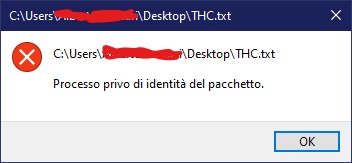
i.e. "The process has no package identity." and I have to restore Windows Notepad with:
Windows Registry Editor Version 5.00
[-HKEY_CLASSES_ROOT\*\OpenWithList\notepad3.exe]
[-HKEY_CLASSES_ROOT\Applications\notepad3.exe]
[-HKEY_LOCAL_MACHINE\SOFTWARE\Microsoft\Windows NT\CurrentVersion\Image File Execution Options\notepad.exe]
[-HKEY_LOCAL_MACHINE\SOFTWARE\WOW6432Node\Microsoft\Windows NT\CurrentVersion\Image File Execution Options\notepad.exe]
Before 21337, i.e. newer Windows Notepad, everything was working fine.
tormento
on 21 Mar 2021
Hello @tormento ,
If you find a little time, could you please try these 2 versions: 🤔
- Notepad3 PortableApps version: Notepad3Portable_5.21.321.1_beta.paf.exe.7z or newer, see 1st list in issue #1129 (make sure to try it as a pure PortableApps ".exe" file (by simply removing the extension ".7z")).
- Notepad3 Portable version: Notepad3_5.21.321.1_beta.7z or newer, see the 2nd list in issue #1129 (make sure you choose the x64 version).
 hpwamr
on 21 Mar 2021
hpwamr
on 21 Mar 2021
Hello @tormento ,
We have add with PR #3199 "experimental DarkMode support for Win10 Insider 21Hx Dev-Preview"
There is no guarantee that this experimental change will solve your problem. 🤔
Feel free to test the "BETA/RC PortableApps", version "Notepad3Portable_5.21.321.1_beta.paf" or newer, see 1st list in issue #1129.
"Notepad3Portable BETA/RC PortableApps" version can be used with or without ".7z" extension.
Also, feel free to test the "BETA/RC Setup", version "Notepad3_5.21.321.1_beta_Setup" or newer, see the 2nd list in issue #1129.
Comments and suggestions are welcome... 😃
hpwamr
on 21 Mar 2021
Hello,
I have tried both the portable (not the paf) version and the setup and both fail to correctly replace Notepad.
Please, if you find any time, try the latest insider build to reproduce the problem.
tormento
on 22 Mar 2021
Please, if you find any time, try the latest insider build to reproduce the problem.
Well, my advice is that as an "Insider Tester" you report this issue to "Windows 10 Insider Development" first. 🤔
hpwamr
on 22 Mar 2021
@hpwamr it's a change in the original Notepad and perhaps registry as it's now a Windows Store app. There is nothing to report to Insider Hub, we just need to find the new working registry modifications. :)
tormento
on 22 Mar 2021
I think that, with the change of "Notepad being now an Windows Store App", the former Method of registering a "debugger" for the original Notepad.exe to bypass the system call to original Notepad.exe, calling Notepad3.exe does not work anymore 🤔.
A new method (Win10 version dependent) has to be found (for Installer/Setup too). 🤔
RaiKoHoff
on 22 Mar 2021
@RaiKoHoff if you need a registry dump or anything else, just ask me.
tormento
on 22 Mar 2021
Maybe this will force us to do it the "official way": Registering a default app for a file type or protocol.
This will definitely costs more effort for Installer/Setup (file-type selector to change (open / edit protocol).
(http://woshub.com/managing-default-file-associations-in-windows-10/)
RaiKoHoff
on 22 Mar 2021
Maybe this will force us to do it the "official way": Registering a default app for a file type or protocol.
Hello @RaiKoHoff , @rizonesoft ,
Maybe it's time to bring out an old idea: https://github.com/rizonesoft/Notepad3/issues/191#issuecomment-347869484 ? 🤔
Also #2094 : Maybe, this request will be added in the long-awaited "Administration Tool" (#455 , #597 , #800, #2214) ? 🤔
hpwamr
on 22 Mar 2021
Also a typical task performed by Setup/Installer.
RaiKoHoff
on 22 Mar 2021
Related issues
 ggordon-vispero
·
3Comments
ggordon-vispero
·
3Comments
 wmsrww
·
3Comments
wmsrww
·
3Comments
 craigo-
·
4Comments
craigo-
·
4Comments
 omega32
·
3Comments
hpwamr
·
4Comments
omega32
·
3Comments
hpwamr
·
4Comments
Most helpful comment
I think that, with the change of "Notepad being now an Windows Store App", the former Method of registering a "debugger" for the original Notepad.exe to bypass the system call to original Notepad.exe, calling Notepad3.exe does not work anymore 🤔.
A new method (Win10 version dependent) has to be found (for Installer/Setup too). 🤔