Notepad3: Beta 3.18.107.809: Three issues re: schemes
Three issues regarding the new implementation of schemes (refer issue #262). There may be some overlap between them, hence reporting them all at once...
Issue 1: Hierarchy not being correctly applied
As I understand it, the proposed style hierarchy looks like this:
- Default Text / Default Style
- Default Text / {all other applicable styles}
- (If current scheme is not "Default Text") {Current Scheme} / Default
- (If current scheme is not "Default Text") {Current Scheme} / {all other applicable styles}
There is a problem with Step 4 - it does not seem to inherit settings from Step 3.
Steps to reproduce:
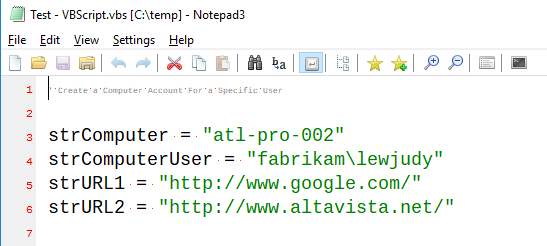
- Open a VBScript file with a comment, e.g.:
' Create a Computer Account For a Specific User

strComputer = "atl-pro-002"
strComputerUser = "fabrikam\lewjudy"
strURL1 = "http://www.google.com/"
strURL2 = "http://www.altavista.net/"
- Confirm font size for Default Text / Default Style (e.g. 10)
- View -> Customize Schemes -> VBScript / Default -> Font: select size 14 (resultant: "size:+4"), OK
- View -> Customize Schemes -> VBScript / Comment -> Font: select size 10 (resultant: "size:-4; fore:#808080"), OK
- Result: comment is too small (possibly 6pt: the resultant of 10-4?)
Issue 2: Stepping through & changing styles does not pull through inheritance until they are applied
Steps to reproduce:
- Confirm font size for Default Text / Default Style (e.g. 10)
- View -> Customize Schemes -> VBScript / Default -> Font: increase the size by 2 (resultant: "size:+2", for size 12)
- Click
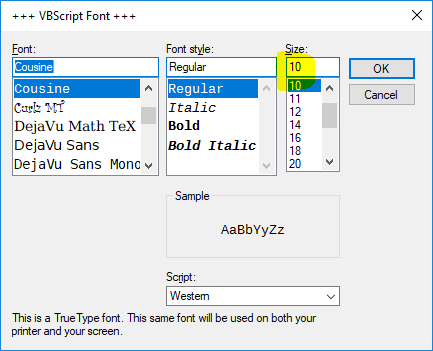
>(forward arrow) to move to "Comment", then clickFont - Result: the preloaded font size is 10, even though it should have inherited size 12. (Possible solution: the Font button should recalculate the style?)
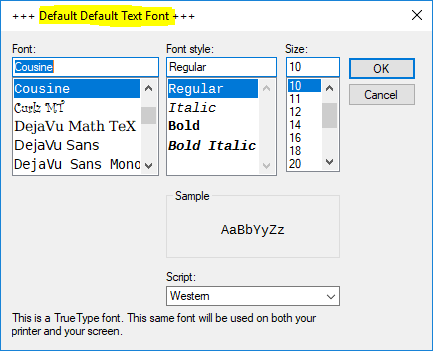
Issue 3: "+++ Default Default Text Font +++"?
Steps to reproduce:
- Open file of scheme "Default Text" (or use new buffer)
View->Customize Schemes...-> VBScript / Default- Click
Font - Result (what is this?):
 craigo-
All 43 comments
@craigo- New beta version 3.18.108.811 should have a fix for 1.) and an enhancement for 3.)
For issue 2.) i am still working on a solution ...
Thanks for emitting these issues :smile:
 RaiKoHoff
on 8 Jan 2018
RaiKoHoff
on 8 Jan 2018
Issues 1 and 3 are confirmed fixed in beta 3.18.108.811. Thanks.
craigo-
on 8 Jan 2018
@craigo- Issue 2.) should be fixed (changing style by Arrow-Keys or by Click-in-Tree applies a preview
You will find also the Change, you proposed for the "Customizing Schemes..." UI regarding "hierarchical relative font sizing" - all in beta version 3.18.109.812.
There maybe new (ore old?) bugs, due to major code changes for "Customizing Schemes..." dialog... :grimacing:
Update: fixed bug with reset button (new beta 3.18.109.813)
RaiKoHoff
on 9 Jan 2018
Good stuff, @RaiKoHoff. I'm liking it.
Have resumed testing with beta build 3.18.109.815. I will give it a thorough workout, as there have been significant changes.
One thing that stands out is "2nd Default Style".
1. "2nd Default Style" shows as inheriting "Default Text" style
This is incorrect (as are all the "2nd" Styles):
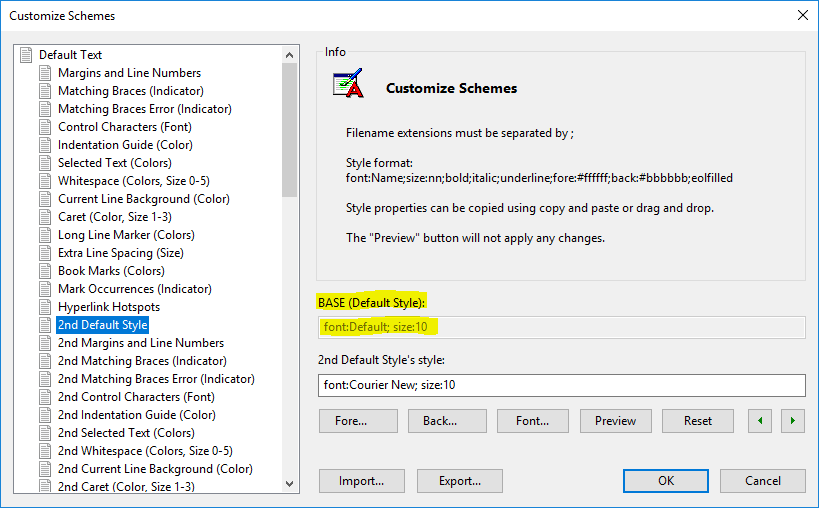
i.e. "2nd Default Style" does not inherit its style from the "Default Text" scheme. It is completely separate, isn't it?
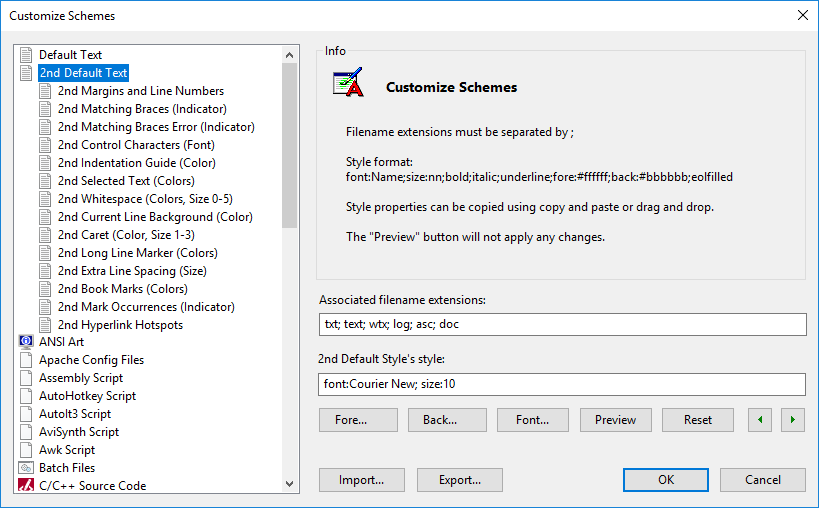
2. "2nd Default Text" scheme hierarchy not displayed the same as "Default Text" scheme hierarchy
The "2nd Default Text" hasn't received the same UI hierarchy treatment as the "Default Text" scheme, and probably needs to. Ideally, I think it should have its own scheme "2nd Default Text", directly under "Default Text" (perhaps with the "Associated Filename Extensions" inherited from the "Default Text" scheme and greyed out?), e.g.:
craigo-
on 9 Jan 2018
You are right, the "2nd Default Text" is somehow integrated in Default Text and needs a special handling.
I will think about.
RaiKoHoff
on 10 Jan 2018
Thanks. It's probably not a trivial task... e.g. all other schemes inherit from either "Default Text" or "2nd Default", based on what is currently selected under the View menu. (I'll make a note to document that in the "Customize Schemes" documentation.) (Done - @rizonesoft please refer the updated doc on Dropbox Paper.)
craigo-
on 10 Jan 2018
@craigo- : New beta version is available (3.18.110.818):
- 2nd Default Style is now made a separate Lexer, I think the
Associated filename ext.can be enabled, so you are able to define another set to start the 2nd Lexer by extension (oh, I forgot to set Use 2nd Style CheckBox in that case :grimacing:) - Disadvantage: Prior configuration of 2nd Default Style (.ini Settings) are not considered, cause the .ini settings sections for Schemes are generated by lexer & style names ...
RaiKoHoff
on 10 Jan 2018
@craigo- : and the winner is:
>
perhaps with the "Associated Filename Extensions" inherited from the "Default Text" scheme and greyed out !
Beta version 3.18.110.819
RaiKoHoff
on 10 Jan 2018
I think the Associated filename ext. can be enabled, so you are able to define another set to start the 2nd Lexer by extension
Heheh, I was wondering how that was going to work out!
craigo-
on 10 Jan 2018
... me too 🤔
RaiKoHoff
on 10 Jan 2018
It's looking really good, @RaiKoHoff. Very consistent.
Now that "2nd Default Text" is its own scheme/lexer, wondering whether it could be identified as such in the status bar?
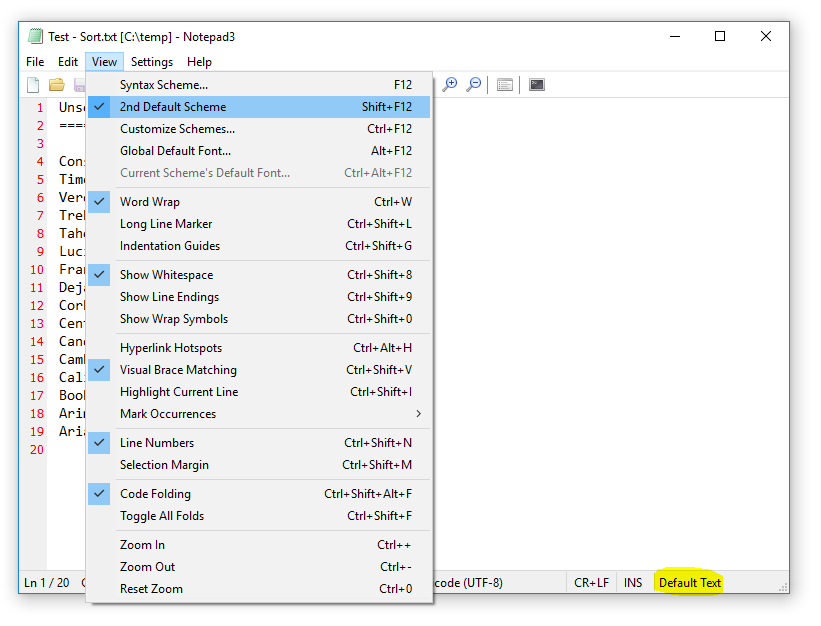
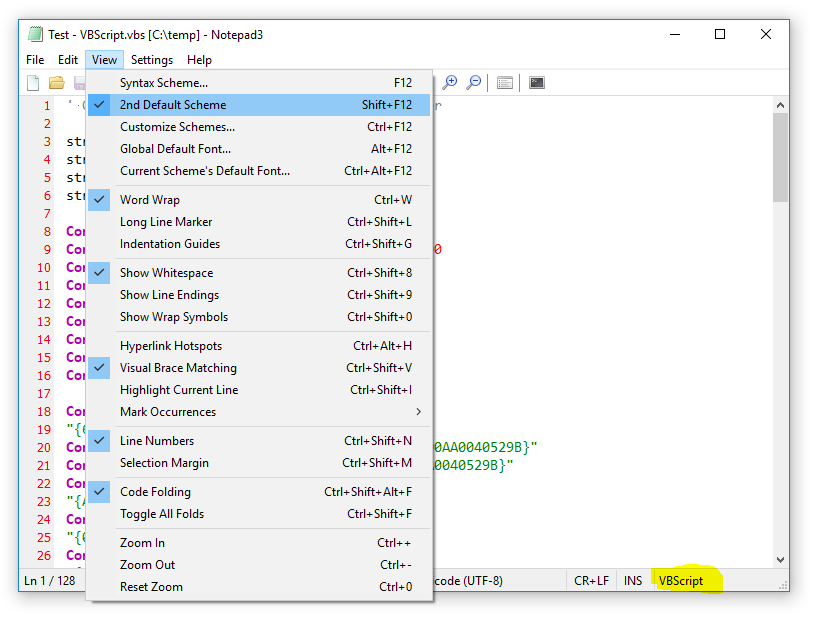
...and extrapolating this a little further, a feature suggestion. How about we also denote in the status bar if subsequent schemes are currently using the "2nd Default Text" scheme? e.g. for VBScript, could we have the status bar say "VBScript [2nd]"? (It could remain at "VBScript" when "2nd Default Text" is off...)
[EDIT] Actually, perhaps a better way to do this would be to have a separate status bar indicator for when "2nd Default Text" is on... Perhaps "2ND" that behaves the same as "INS" (greyed out or active), located between the current INS and Scheme/Lexer indicators?
craigo-
on 10 Jan 2018
e voilà : beta version 3.18.110.821
[EDIT] and beta version 3.18.111.822 as dbl-clickable status bar item 2ND/STD (my preferred option)
RaiKoHoff
on 10 Jan 2018
@craigo- : please give me a trigger if the development branch of "Hierarchical Scheme" feature can be send as a Pull Request to NP3's master.
RaiKoHoff
on 11 Jan 2018
Will do, within the next 18 hours. Looking forward to testing beta build 822.
craigo-
on 11 Jan 2018
@rizonesoft : Regarding the release schedule (#213):
I would like to have this feature in place for 13. Jan. '18 (no PR yet), if @craigo- gives a go.
This feature ignores (by design) old settings for "2nd Default Text" scheme, which should be prominent in Release Notes or announcement :grimacing:
RaiKoHoff
on 11 Jan 2018
Am liking (and preferring) the separate indicator in beta build 822+. And the double-click to toggle the feature is genius! 👍
Some feedback...
1. Element Widths in Status Bar
My most common setup is to arrange the Notepad3 window to be just under half the width of a 1600x900 laptop display (e.g. width around 763 pixels). Good for arranging two Notepad3 windows side-by-side. At this width, the status bar is a little cramped. Comparing beta builds 803 (top) vs 825 (bottom):
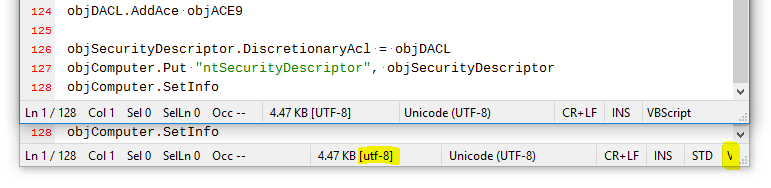
The result is that the scheme is not visible. Wondering if we could steal some width from some of the elements (e.g. size, encoding, line endings, insert, STD/2ND) to give more space for the scheme?
I also note that sometime between betas 803 and 825, the size/encoding text changed from upper to lower case (highlighted). It looks a bit messy having "UTF-8" in differing cases. Perhaps change this back to upper case?
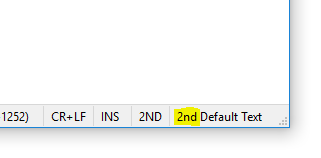
2. The "2nd" in "2nd Default Text" is redundant
I didn't make this very clear in my request above, but now that we have a dedicated indicator for STD/2ND, we don't really need the "2nd" in "2nd Default Text". Perhaps remove? This could be useful especially in light of point 1. above.
3. Line Height Change?
Not a huge thing, but I have now noticed that somewhere between betas 803 and 825, using Cousine as the default font results in a difference in line height. Is this a bug?
Steps to reproduce:
- Unpack pristine copies of beta 803 and beta 825
- Open the same multiple line file in each (e.g. VBScript)
View -> Global Default Font...in each, change to Cousine Regular 10,OK:
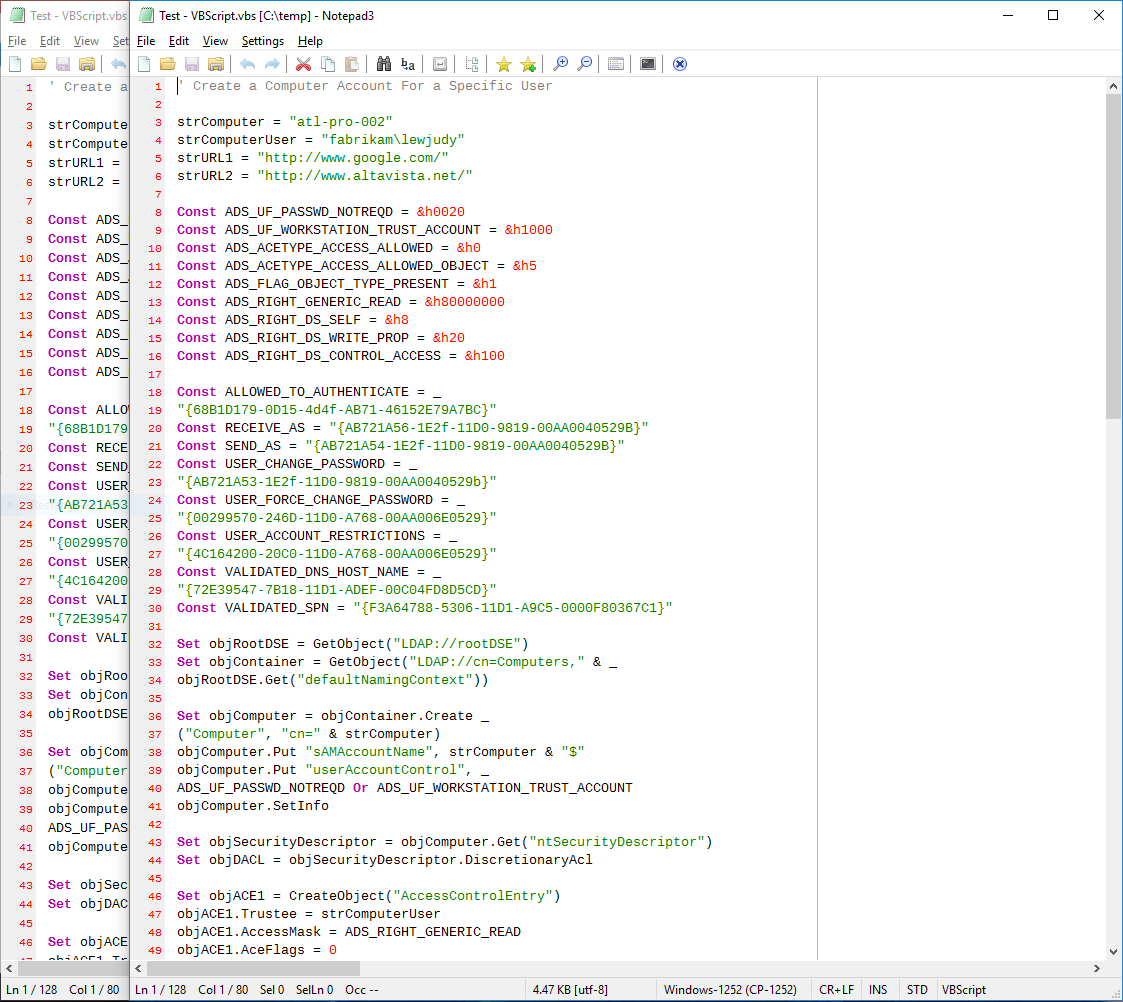
Note that beta 825 (right) has a reduced line height compared to beta 803 (left)... For the same window height, beta 803 displays 46+ lines and beta 825 displays 49 lines. Why the discrepancy when using the Cousine font, whereas Consolas is the same?
craigo-
on 11 Jan 2018
@craigo- : changed stuff for point 1.) and fixed point 2.) - please try beta version 3.18.112.826.
I did some research on point 3.), but did not find the reason 🤔
[EDIT] The double-click has been already in there for "CODEPAGE", "CR-LF" and "INS/OVR", so why not "STD/2ND" too 😁 .
RaiKoHoff
on 12 Jan 2018
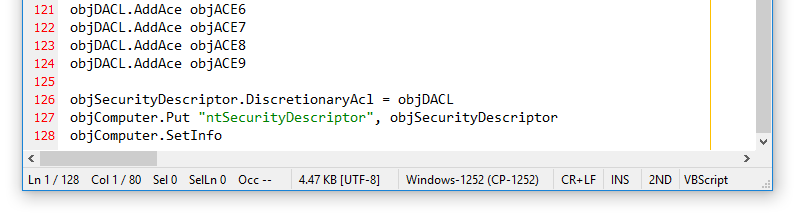
Cheers, @RaiKoHoff. Beta build 826 with those width constraints looks much better - points 1 and 2 are resolved:
Just a quick report of a regression: beta build 826 is not saving a Global Default Font change in the Default Text scheme.
Steps to reproduce (pristine portable version):
View->Global Default Font...- Change to something other than the default, e.g. Lucida Console, Regular, 10
- Close and re-open Notepad3
View->Global Default Font...
... the font reverts back to the default. You can verify this using View -> Customize Schemes... -> "Default Text".
NB:
- This also occurs if you change the font using the "Customize Schemes" UI
- This does not occur for scheme "2nd Default Text"
craigo-
on 12 Jan 2018
Cheers @craigo- , last issue has been due to renaming 2nd Default Text to Default Text (for display in status bar). Saving the settings uses the lexer's name as section name for styles:
Default Text saves its base font Default Style in section Default Text
2nd Default Text overrides section Default Text and writes its base font as 2nd Default Style.
Now on loading time Default Text searches for base font Default Style and does not find it (it has been replaced by 2nd Default Style), so it uses its fallback (font:Default).
I like to revert this and I think it is OK to see the redundant information "2ND | 2nd Default text" in status bar - it is consistent with scheme display in Customize Schemes...
RaiKoHoff
on 12 Jan 2018
@craigo- : By the way, for documentation:
Hard-coded style: font:Default := 'Consolas' if available else it is set to 'Lucida Console'.
RaiKoHoff
on 12 Jan 2018
@RaiKoHoff @craigo- Where in the documentation would you like me to ad the above line. Please update the docs on Paper accordingly. BTW. I'm loving the idea behind DropBox Paper, will soon write a little tutorial for people to contribute docs using Paper. Thanks @craigo-
 rizonesoft
on 12 Jan 2018
rizonesoft
on 12 Jan 2018
Cheers @craigo- , last issue has been due to renaming 2nd Default Text to Default Text (for display in status bar).
Was wondering why I was not seeing this problem in beta builds 819-820... It turns out it was a bug. Toggling View -> 2nd Default Scheme was not updating the scheme name in the status bar!
I see your point about name consistency with the "Customize Schemes" UI - especially when double-clicking on that status bar element opens the schemes list with the current scheme selected. I'm OK with the scheme's full name being used in the status bar... But can you please make it look nice with an app window width of 763 pixels? 😄
craigo-
on 12 Jan 2018
@rizonesoft, there is already a note in there regarding what font Notepad3 uses when none is defined; I just didn't know about the failover to Lucida Console. I'll update the Dropbox Paper document. NB: I also made a change in there regarding "2nd Default Text" that I see hasn't yet made it to your website...
@RaiKoHoff, I saw your note regarding documenting indicator styles - yes, that would be good to include. Also, some notes about what styles can be applied and what cannot (with reference to the setting "UseOldStyleBraceMatching"). I'll work on it when I'm able.
craigo-
on 12 Jan 2018
@craigo- , you are an indispensable member of the Notepad3 development team.
Feel free to check latest changes on new beta version 3.18.112.827.
RaiKoHoff
on 12 Jan 2018
With regards to Point 3 in my comment above (line height change)... Is it anything to do with Point 2 of this issue?
craigo-
on 12 Jan 2018
OK, last issue for the night...
Beta build 827... When "2nd Default Scheme" is selected, and the file/buffer scheme is "2nd Default Text", double-clicking on the the scheme indicator in the status bar preselects the "Default Text" scheme. It should select the "2nd Default Text" scheme.
Steps to reproduce:
- Open a .txt file
- Turn on "2nd Default Scheme" (either by clicking
View->2nd Default Schemeor double-clicking the "STD" status bar indicator) - Verify that:
- The font styling changes appropriately
- The scheme indicator in the status bar changes to "2nd Default Text"
- Double-click the scheme indicator in the status bar
...the preselected scheme is "Default Text".
craigo-
on 12 Jan 2018
P.S. beta build 827's status bar horizontal sizing looks great, even under fairly challenging circumstances - thank you :smile:

craigo-
on 12 Jan 2018
... Beta version 3.18.112.828 available ...
RaiKoHoff
on 12 Jan 2018
@rizonesoft , @craigo- I am going to send PR for version ß3.18.112.828
RaiKoHoff
on 12 Jan 2018
@craigo- Thanks, I will update the docs now. I agree with @RaiKoHoff, you are an indispensable member of the Notepad3 development team. You and @RaiKoHoff are awesome people to have on board. I would like to ad you ( @craigo- ) to my credits section on Rizonesoft, what name and link would you like me to use. @RaiKoHoff also let me know if your name and link is Ok.
Finally, If you guys can think of anybody else I should add, please tell me.
rizonesoft
on 12 Jan 2018
Hang on @RaiKoHoff, that last issue is not quite fixed in beta build 828. It works fine the first time (following reproduction steps 1-4 above), but if you then open another .txt file, 2nd Default Text is selected but double-clicking on the scheme in the status bar goes back to preselecting "Default Text".
craigo-
on 12 Jan 2018
Hello Derick,
thank you very much :-)
I like to have my full name less prominent in the web.
I would appreciate it, if you replace it with my GitHub alias (RaiKoHoff).
Best regards and happy coding,
Rainer
2018-01-12 11:45 GMT+01:00 Derick Payne notifications@github.com:
@craigo- https://github.com/craigo- Thanks, I will update the docs now.
I agree with @RaiKoHoff https://github.com/raikohoff, you are an
indispensable member of the Notepad3 development team. You and @RaiKoHoff
https://github.com/raikohoff are awesome people to have on board. I
would like to ad you ( @craigo- https://github.com/craigo- ) to my
credits section on Rizonesoft, what name and link would you like me to use.
@RaiKoHoff https://github.com/raikohoff also let me know if your name
and link is Ok.Finally, If you guys can think of anybody else I should add, please tell
me.[image: capture]
https://user-images.githubusercontent.com/8640728/34871368-0af71f9e-f796-11e7-871f-b5c39828f028.PNG—
You are receiving this because you were mentioned.
Reply to this email directly, view it on GitHub
https://github.com/rizonesoft/Notepad3/issues/279#issuecomment-357205666,
or mute the thread
https://github.com/notifications/unsubscribe-auth/AIZfzlkynwqfLZVVUzZBQg5zNBEaKdM-ks5tJzfBgaJpZM4RWIa9
.
RaiKoHoff
on 12 Jan 2018
what name and link would you like me to use
Thank you very much, Derick. That is very kind, I appreciate it.
craigo will be fine. It might even encourage me to add something to my GitHub profile :smile:
craigo-
on 12 Jan 2018
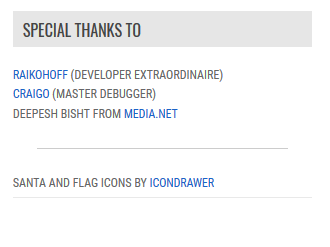
@RaiKoHoff @craigo- Anybody else I need to mention? What about @lhmouse?
rizonesoft
on 12 Jan 2018
@craigo- : As always, you are right: please do a short smoke-test on beta version 3.18.112.829
RaiKoHoff
on 12 Jan 2018
I would say yes. @lhmouse has written some great documentation and their expertise concerning regular expressions is invaluable. A contribution easily as valuable as mine.
craigo-
on 12 Jan 2018
@rizonesoft : suggestions from @lhmouse have been indispensable too.
Notepad3 would not be on current level without him :grin:
RaiKoHoff
on 12 Jan 2018
please do a short smoke-test on beta version 3.18.112.829
Bug confirmed squashed. We are Go for Release! 😃
craigo-
on 12 Jan 2018
OK: PR #297 is corresponding to beta version 3.18.112.829
[EDIT] @rizonesoft : keep in mind, that old settings of "2nd Default Text" are not loaded anymore.
Best practice: load .ini (Ctrl-F7) search for section [Default Text], put a line with content [2nd Default Text] before the first line of this section which starts with "2nd ...", ensure "Save Settings on Exit" is off and save that changed .ini file.
RaiKoHoff
on 12 Jan 2018
@rizonesoft @RaiKoHoff @craigo- Your respect will be appreciated. (>w<)
Similarly to others', LH_Mouse looks good.
 lhmouse
on 12 Jan 2018
lhmouse
on 12 Jan 2018
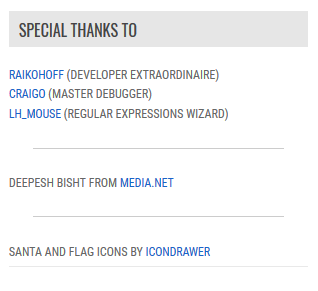
@lhmouse Respect is what the Notepad3 community is all about and you deserve it. Final credits box below. Please do not hesitate to give suggestions. Wish I could do more to show my appreciation.
rizonesoft
on 12 Jan 2018
@craigo- I updated the docs at https://www.rizonesoft.com/documents/notepad3/custom-schemes/ When you have some time, you can check if everything is correct?
rizonesoft
on 12 Jan 2018
@rizonesoft just a few comments/corrections for you to review and enact - in the Dropbox Paper document.
Will close this issue, as more or less everything is resolved. (I'll open another issue for the one remaining point: Line Height Change.)
craigo-
on 14 Jan 2018
Related issues
craigo-
·
3Comments
 vvyoko
·
3Comments
vvyoko
·
3Comments
 hpwamr
·
3Comments
hpwamr
·
3Comments
 dlong500
·
3Comments
dlong500
·
3Comments
 RaffaeleBianc0
·
3Comments
RaffaeleBianc0
·
3Comments
Most helpful comment
@craigo- , you are an indispensable member of the Notepad3 development team.
Feel free to check latest changes on new beta version 3.18.112.827.