Notepad3: Some txt files cant “open”?
Sorry for my english.
it not cant open, but i dont konw how to explanation
it have 2 sates
1,koolproxy.txt , open it cant display anything.
2,139.txt ,it have some chinese byte but cant display normal,maybe it make by android(i cant confirm),maybe is the encoding bugs?
the files:
https://www.dropbox.com/s/j7zihq35z3b2ffq/txt.zip?dl=0
download it then test
you can just drag it to the browser like ie or chrome to test.
 vvyoko
All 3 comments
File "139.txt": There are too few Chinese characters for a reliable encoding detection (in this case GB18030). The mix with "English/ASCII" characters let the Encoding detector assume a UTF-8 encoding, which is prefered for those mixed cases (see: http://utf8everywhere.org/).
The solution for your problem: just recode to GB18030 (Ctrl+Shift+F10).
(Giving more characters to the encoding detector will produce the correct result: just duplicate the text for testing this)
File "koolproxy.txt": works fine for me.
But: You will get a dialog for "really open this large file".
WARNING: if you check "Don't display this message again." AND press "No", then Notepad3 will not open any large files again!!!
(Solution: Open the configuration (Ctrl+F7), search for [Suppressed Messages] and delete entry "MsgFileSizeWarning=..."
 RaiKoHoff
on 2 Jul 2019
RaiKoHoff
on 2 Jul 2019
Feel free to test beta version _5.19.704.2383_Oniguruma (for beta channel access see #1129).
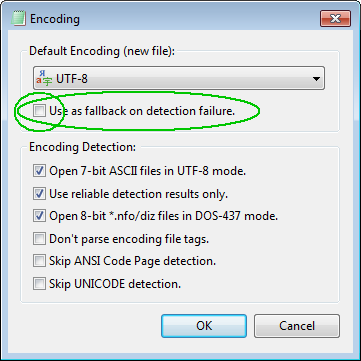
Disable "Use as fallback on detection failure." if you like to get your local code-page as encoding fallback.
RaiKoHoff
on 4 Jul 2019
Hello @vvyoko ,
As far as I'm concerned, I think you (as requester) can close this issue...
 hpwamr
on 27 Sep 2019
hpwamr
on 27 Sep 2019
Related issues
 craigo-
·
4Comments
craigo-
·
4Comments
 kofifus
·
4Comments
kofifus
·
4Comments
 RaffaeleBianc0
·
3Comments
RaffaeleBianc0
·
3Comments
 dlong500
·
3Comments
dlong500
·
3Comments
 omega32
·
3Comments
omega32
·
3Comments
Most helpful comment
File "139.txt": There are too few Chinese characters for a reliable encoding detection (in this case GB18030). The mix with "English/ASCII" characters let the Encoding detector assume a UTF-8 encoding, which is prefered for those mixed cases (see: http://utf8everywhere.org/).
The solution for your problem: just recode to GB18030 (
Ctrl+Shift+F10).(Giving more characters to the encoding detector will produce the correct result: just duplicate the text for testing this)
File "koolproxy.txt": works fine for me.
But: You will get a dialog for "really open this large file".
WARNING: if you check "Don't display this message again." AND press "
No", then Notepad3 will not open any large files again!!!(Solution: Open the configuration (
Ctrl+F7), search for[Suppressed Messages]and delete entry "MsgFileSizeWarning=..."