v729 Vanilla Notepad3
Probably part of previously mentioned issues.
Change font of some file type
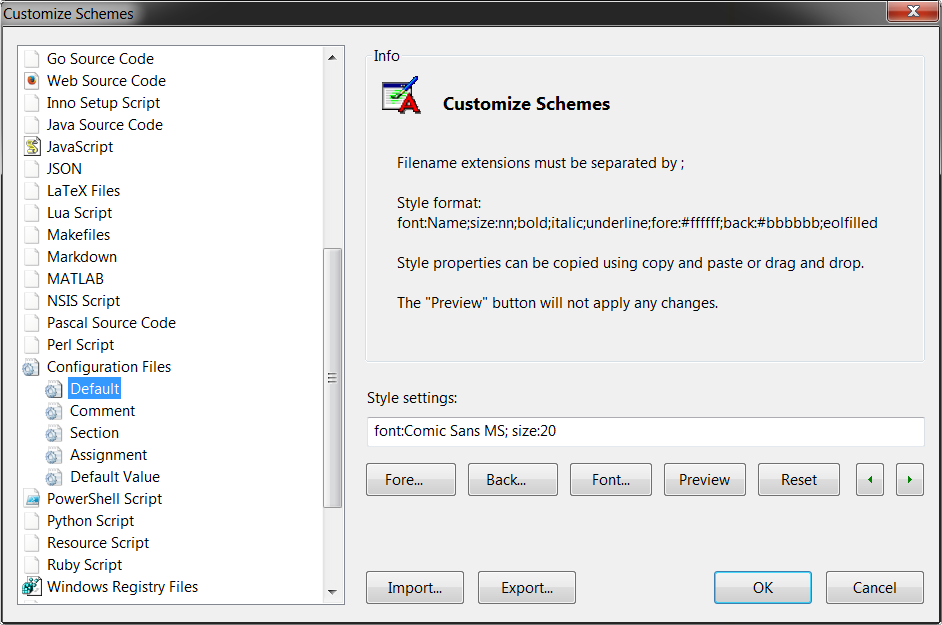
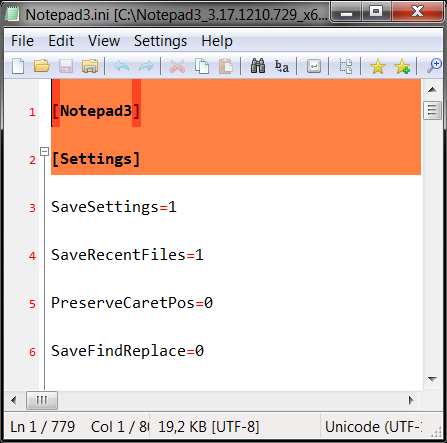
Open file of that type and notice the line height
Revert

After revert correct settings are applied, this affects preview also in customize schemes dialog (needs to be pressed twice to see changes).
 ghost
ghost
All 36 comments
Most of the bugs reported here are fixed in the latest beta (3.17.1215.748), i.e.:
- line height (second image)
- only applying font after reverting (third image)
BUT... we have a new bug. Going through the same steps using beta beta build 748, while the line height bug doesn't occur, the font styling doesn't get applied at all (screenshot below taken after applying and then reviewing the scheme change:

 craigo-
on 16 Dec 2017
craigo-
on 16 Dec 2017
... exactly a show stopper
 RaiKoHoff
on 16 Dec 2017
RaiKoHoff
on 16 Dec 2017
I found the problem. Beta version available (3.17.1216.750).
One feature/side-effect, that has been introduced with this solution is,
Menu Default Font... will apply the selected settings to both: Default Texts Default and Current Lexers Default simultaneously. (To separate them, you have to use "Customize Schemes...").
RaiKoHoff
on 17 Dec 2017
Out and about right now. I see why you did this @RaiKoHoff... But as an alternative, could we clear any default font setting in the current scheme when setting default font? That sits better in my head rather than stamping a default font onto whatever scheme happens to be current.
I’d like to see how our upstream software handled this... will test when able.
craigo-
on 17 Dec 2017
You are right, this is the better behavior.
Beta version available (3.17.1217.751)
RaiKoHoff
on 17 Dec 2017
Tested beta build 751: bug squashed and works as described. Good stuff, @RaiKoHoff - thanks.
As promised, I tested how Notepad2 4.2.25 and Notepad2-mod 4.2.25r998 behaved under these circumstances. They both handle changing the current scheme style correctly. For both programs, View -> Default Font sets the Default Text scheme's Default Style and leaves the current scheme style alone... In the situation described above where the current scheme style overrides the default style, it therefore appears to do nothing. I prefer how we have chosen to handle this scenario.
craigo-
on 17 Dec 2017
I like the behavior as we do it also.
One issue is left open:
Setting the "Default Font..." will now clear the colors of the current
lexer's default too. Mhhh...
Am 17.12.2017 11:04 schrieb "craigo-" notifications@github.com:
Tested: bug squashed and works as described. Good stuff, @RaiKoHoff
https://github.com/raikohoff - thanks.As promised, I tested how Notepad2 4.2.25 and Notepad2-mod 4.2.25r998
behaved under these circumstances. They both handle changing the current
scheme style correctly. For both programs, View -> Default Font sets the
Default Text scheme's Default Style and leaves the current scheme style
alone... In the situation described above where the current scheme style
overrides the default style, it therefore appears to do nothing. I prefer
how we have chosen to handle this scenario.—
You are receiving this because you were mentioned.
Reply to this email directly, view it on GitHub
https://github.com/rizonesoft/Notepad3/issues/236#issuecomment-352244533,
or mute the thread
https://github.com/notifications/unsubscribe-auth/AIZfzqCjX_fZl0oUJE8VE1qQRy2qwbMBks5tBOcPgaJpZM4REYzb
.
RaiKoHoff
on 17 Dec 2017
Some brainstorming... Some of these might be considered somewhat controversial - thought I'd throw them out there and see what you think. In no particular order:
- Perhaps the as-delivered schemes should not have any customisation of the default style?
- Make the
Default Fontmenu option go straight to the "Customize Schemes" UI, with "Default Text -> Default Style" highlighted - Remove the
Default Fontmenu option and make people use the "Customize Schemes" UI - If the current scheme is not "Default Text", popup: "Do you also want to apply this to the current scheme ("{current_scheme}")? (Yes / No / (tickbox: don't show this again)" - with corresponding setting, perhaps under the "Settings" menu
- Change the meaning of the
Default Fontcommand to target the current scheme. Alongside this, change the View menu wording fromDefault FonttoDefault Font - {Current_Scheme}, e.g.Default Font - Default TextorDefault Font - Configuration Filesso the user knows what they are changing - Revert to the way Notepad2 and Notepad2-mod behave:
View -> Default Fontonly changes Default Text / Default Style
And, as this is starting to look like a fairly significant change, for the pending release perhaps we simply adopt the last option and make Notepad3 behave like its upstream counterparts..?
craigo-
on 17 Dec 2017
The problem i have with the upstream behavior is (last of your bullet points):
I change the View -> Default Font... and nothing happens (cause the current scheme overrides the global default font - which is the correct behavior to do so).
Point one: I agree, the initially delivered lexer schemes should not have any settings for default text (and rely on global default settings). It is up to the user, to change this per lexer scheme. I am going to change this (except for ANSI Art, they rely on a specific font).
Point two: Nice idea, but not that easy (for me, I am less experienced in developing UI stuff :-/) and we should use this week to settle down the Christmas Version ;-)
Point three: Simple and easy, I like that 2nd ;-) - Don't know what the community thinks about...
Point four: This would be less impact on implementation, and the user will be aware of the things that will happen to the schemes configuration. I like this idea in 1st place, cause the user has the option to change one or both and does not wonder why nothing happens to the view.
Point five: Easy to implement. Impact is less than Point three - cause the menu entry does not disappear.
Point six: see intro of this comment.
@rizonesoft : What do you think ?
RaiKoHoff
on 18 Dec 2017
A beta version (3.17.1218.753) is available, which implements Bullet Point 4 (suppressible dialog to set current scheme default text style also). (No Pull Request (PR) yet).
RaiKoHoff
on 18 Dec 2017
NB: in beta build 751 we have the return of some weird font selection bugs. For example (pristine portable version used):
Open Notepad3, add some text:
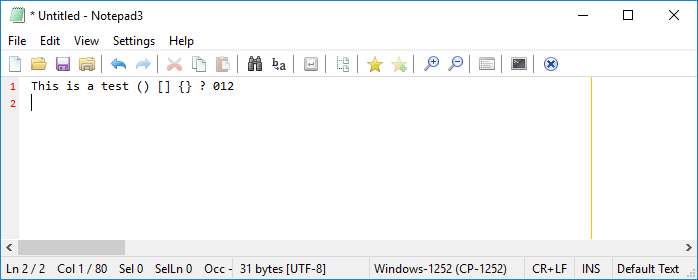
(Font styling currently correct.)View -> Default Font...: change to Courier New, Regular, 10, OK:
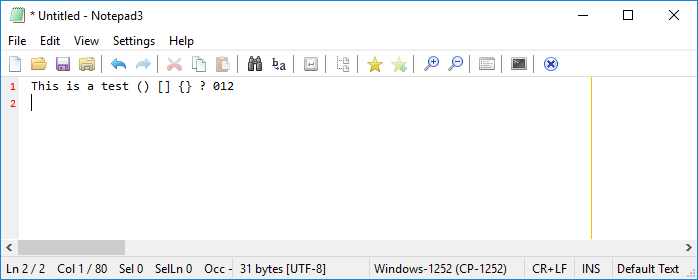
NB: not Courier New!View -> Default Font...:
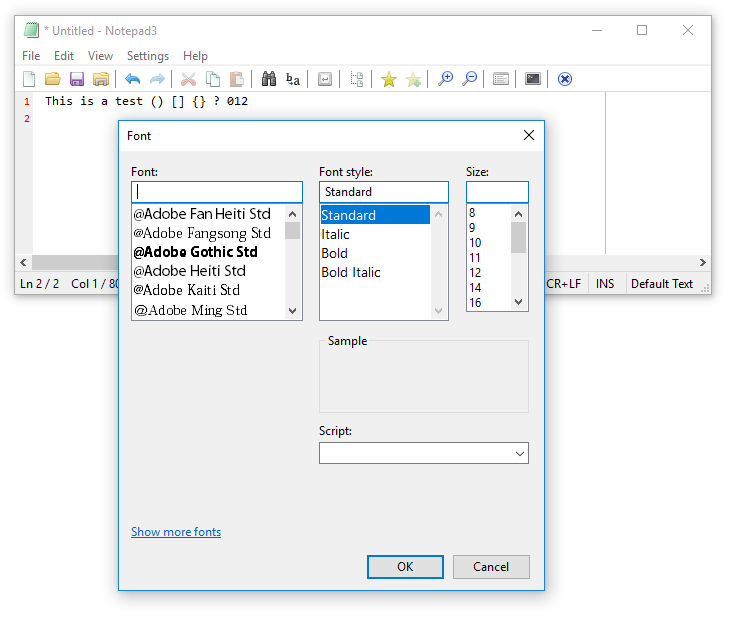
NB: Font blank, Size blank, Script blank
(The same problems do not occur with beta build 753, but I will address that build in a separate comment.)
craigo-
on 19 Dec 2017
Your reported issue (beta build 751) has been fixed in beta build 753.
Regarding build 753:
Default Font... 's new dialog for applying font settings to current scheme default text also:
Checking Don't ask again and pressing No should lead to upstream behavior (until the suppressed dialog settings are cleared from .ini file).
RaiKoHoff
on 19 Dec 2017
Cool. Good to give this new idea a bit of a tryout. Just wanted to flag that behaviour in beta build 751 in case the path we are going down with beta build 753 is not where we decide we're headed.
Beta build 753:
When the current scheme is "Default Text" (as is the case with e.g. a brand new buffer), the "Apply to current scheme" dialogue appears but is redundant in this context; selecting Yes or No does the same thing. Wondering if the dialogue could be bypassed in this situation?
Two more thoughts, regrettably not yet fully-formed:
Wondering if the Option 4 dialogue should offer to clear the current scheme (if not "Default Text") rather than write to it - for reasons already discussed..?
Another option:
- In the
View -> Default Font...dialogue, include a radio button:
Apply to scheme:
( ) Default Text
( ) Current Scheme ('{current_scheme}')
( ) Default Text AND Current Scheme ('{current_scheme}')
( ) Default Text - clear Current Scheme ('{current_scheme}')
Notes:
- The radio button is greyed out if the current scheme is "Default Text".
- Which option to preselect? The first?
- Not sure if the third/fourth options are necessary (probably one or the other, if any?)
craigo-
on 19 Dec 2017
A new beta (1219.754) is out, where the issue from beta build 753 is fixed.
(redundant popup on default text).
- Adding an option to InfoBox of "Option 4": would make sense.
I don't want to extend the InfoBox yet (stability of Christmas Release). - Another option: very nice and most flexible idea:
The Font Selection Dialog is a system dialog with very restricted configuration possibilities.
We have to design a complete new dialog for this ... :-/
(Did i mention, that i am not an experienced UI developer - :-O)
RaiKoHoff
on 19 Dec 2017
A new beta (1219.755) is out, enhancing Option 5 a little bit. It is not that bad ... :-)
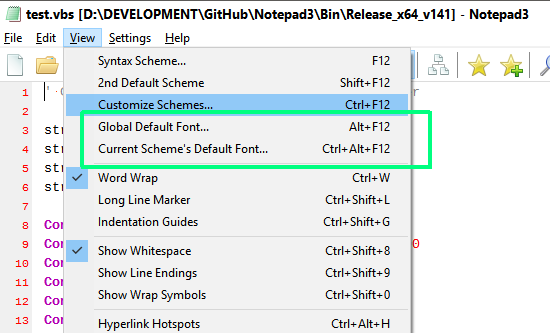
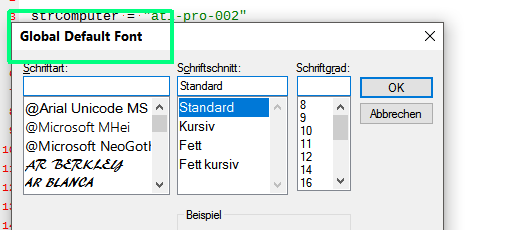
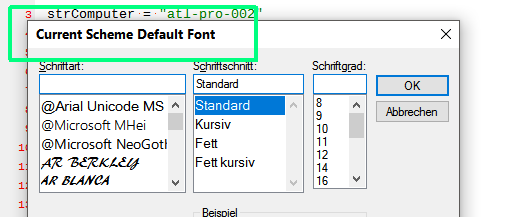
(And some bug fixes ...)
RaiKoHoff
on 19 Dec 2017
I'm quite liking your implementation in beta build 756, @RaiKoHoff. It's simple, easy to understand, and will solve the problem without breaking with tradition too much.
One problem (I think...) When you have a file open with a scheme that is not "Default Text", setting the global default font ends up setting the current scheme's default font instead. I think that since the menu option is quite explicit in this case, it should do what it says and update the Default Text scheme. (It also then behaves like its upstream counterparts.)
Steps to reproduce:
- Open a document whose scheme is not "Default Text", e.g. VBScript
- View -> Global Default Font...
- Set the font, OK
- Inspect via View -> Customize Schemes...
- Confirm that the font change was stored in VBScript / Default, rather than Default Text / Default Style
I also noticed that in the font selection dialogue, the "Script" drop-down is greyed out and the "Show more fonts" link has disappeared. Not that I'm particularly missing either of these elements, but what is the reason for these changes?
craigo-
on 20 Dec 2017
Upps, you are right, my fault - please check new beta 3.17.1220.757.
Million thanx for testing 👍 .
RaiKoHoff
on 20 Dec 2017
Thanks, that is confirmed fixed.
You also fixed something else at the same time that I was writing up: View -> Global Default Font... now correctly preselects the font defined in the "Default Text" style, when another font is defined in the current scheme (e.g. "ANSI Art"). Well done!
craigo-
on 20 Dec 2017
@RaiKoHoff, beta build 757 seems to have made the cursor disappear! Beta build 756 does not have this problem...
craigo-
on 20 Dec 2017
Yes, I fixed some more stuff. One point was, that I have seen, that relative size definitions (size:-2) are based on the given default text size (or 10 if not supplied). This could lead to discrepancies, e.g. for line numbers vs. current scheme font size. So I refactored it to accept a base size dynamically. That means, that i have to add a reasonable base size value to all places, the GetSize() method is called from.
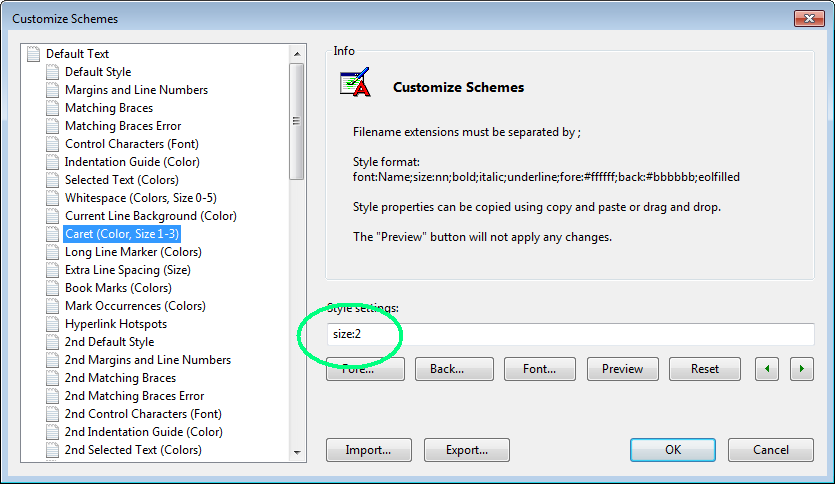
I choose the wrong base for Caret Size. I wonder, why I did not recognized it on my smoke-test quick-view. :-/
Please use this workaround until fixed:
RaiKoHoff
on 20 Dec 2017
I have to fix another bug too: relative sizes are not written back to string as relative sizes, but as result values (base +/- rel_value). That is not intended.
The "Script" (charset) font style has been removed accidentally while playing around with font dialog features (you may select foreground color, underline and strikeout effects too, but strikeout is not supported by Scintilla styles, underline is drawn in "whites-pace" color (see Config Schema) and they can only be switched on together).
By the way: did you ever try to hold Shift-Key down while opening "Default Font..." (an already historically hidden feature).
RaiKoHoff
on 20 Dec 2017
Thanks for the workaround - caret restored.
Do you plan to restore the "Script" dropdown and "View more fonts" link?
No, I have not discovered a Shift + "Default Font..." hidden feature... And having tried it, I still don't know what it is supposed to do..?
craigo-
on 20 Dec 2017
I plan to restore the "Script" drop-down,
but "View more fonts" does not work together with option combination:
"screen and printer fonts" & "what you see is what you get (wysiwyg)" option,
they are mutually exclusive.
The Shift + "Default Font..." hidden feature pops up the font dialog, with mono-spaced fonts only ...
RaiKoHoff
on 20 Dec 2017
What a great tip! I will find that very handy.
We must ensure it's in our documentation repository! (Scuttles off to see if it already is...)
craigo-
on 20 Dec 2017
@craigo- Sorry about the delay in creating the docs. Will start this weekend.
 rizonesoft
on 21 Dec 2017
rizonesoft
on 21 Dec 2017
@craigo- : I am going to prepare a PR for the Christmas edition, containing the new "Dual Default Font..." feature. A fix around the "incremental" size definition (... size:+2 , size:-2 ...) eats up a lot of time :-/.
The pure Default Font... setting dialog tries to preserve the "incremental" style. It does only display the resulting sizes, but the title bar gives a hint, that it is based on incremental calculation (++ <title> ++)
Please, please test thoroughly the stuff around Custom Schemes... (the refactoring was a huge impact).
The PR's coresponding beta version is 3.17.1220.758.
@craigo- : Do You think you can extract a documentation of all this stuff in this thread for @rizonesoft ?
Thank You so much... :+1:
(P.S.: using the "title adaption hook" flag for the Font Selection dialog, disables the help hotspot - sorry for that)
RaiKoHoff
on 21 Dec 2017
@RaiKoHoff, @rizonesoft: Re: documentation... I'll have a go. My free time up till January 5 is quite limited...
craigo-
on 21 Dec 2017
@craigo- : sure, thanks for your help so far 😃
RaiKoHoff
on 21 Dec 2017
most of the comments was TLDR, but just a friendly remainder - KISS ;)
ghost
on 21 Dec 2017
Beta build 758 Bug 1: Problems changing/rendering Default Font within 2nd Default Scheme
When 2nd Default Scheme is selected, Global Default Font and Current Scheme's Default Font changes "Default Style" rather than "2nd Default Style"
Steps to reproduce (Pristine unpacked portable version):
- Enter text into the buffer with easily recognisable differences between fonts, e.g.
This is a test Il10?(renders in correct font: Consolas Regular 10) View->Global Default Font...(Preselected font is correct: Consolas Regular 10)- Set to different font, e.g. Cousine Regular 10,
OK(renders in correct font: Cousine Regular 10) View->Second Default Scheme(renders in correct font: Courier New)- View -> Global Default Font... (Preselected font is incorrect: Cousine Regular 10, that chosen previously. Should be Courier New Regular 10):
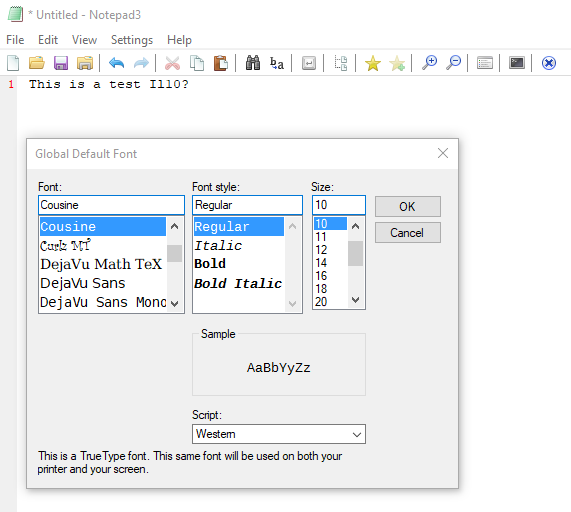
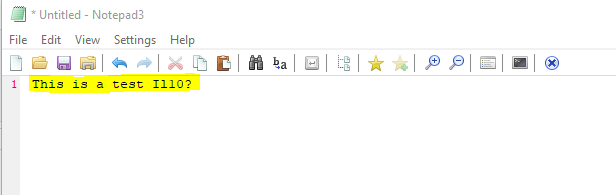
- Set to different Font, e.g. Consolas Regular 16,
OK(renders in incorrect font: Courier New):
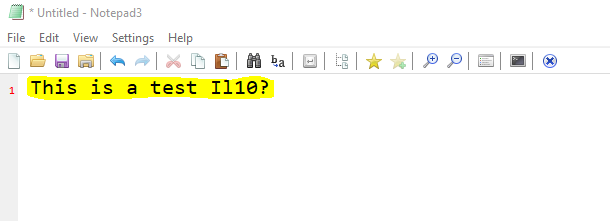
- View ->
2nd Default Scheme(turn off) (renders in incorrect font: Consolas Regular 16):
craigo-
on 21 Dec 2017
Beta version 3.17.1222.763 available, to fix bug in ß.758
@craigo- : Very detailed bug description 👍 - perfect.
RaiKoHoff
on 22 Dec 2017
Not a lot of time to report this one, so it won't be as detailed as the previous :)
Beta Build 764 Bug 1: preselected font in 2nd Default Scheme incorrect when selecting View -> Current Scheme's Default Font
Steps to reproduce:
- Pristine Portable: standard font selections for default (Consolas Regular 10) and 2nd default (Courier New Regular 10)
- Turn on 2nd default
- With scheme "Default Text" (e.g. with brand new buffer) - renders in Courier New Regular 10 (correct)
View->Current Scheme's Default Font...: preloads Consolas Regular 10. Incorrect? Is it grabbing this from "Default Text" rather than "2nd Default Text"?- Load VBScript file (scheme: "VBScript") - renders in Courier New Regular 10 (correct)
- View -> Current Scheme's Default Font: preloads Courier New Regular 10 (correct)
craigo-
on 22 Dec 2017
Good finding!
@craigo- : feel free to switch to beta build 3.17.1223.765 - again thanx for testing
RaiKoHoff
on 23 Dec 2017
@craigo- @ghost Please confirm fixed and close this issue. New release available on the Notepad3 download page. 😸 Find the change log on the Notepad3 update page. 😺 Thanks for testing!
rizonesoft
on 23 Dec 2017
I cannot close as this is not my issue... But everything reported to date is fixed (@RaiKoHoff: I like the new greying-out of the Current Scheme's Default Font menu option when the current scheme is "Default Text" 👍).
If I find anything else, I'll raise separate issues.
craigo-
on 25 Dec 2017
@craigo- : it has been a logical decision with lowest impact... 😄
I agree: further problems of scheme handling should be addressed in new issues ...
RaiKoHoff
on 26 Dec 2017
Related issues
 hpwamr
·
4Comments
hpwamr
·
4Comments
 tzleon
·
3Comments
craigo-
·
4Comments
hpwamr
·
3Comments
tzleon
·
3Comments
craigo-
·
4Comments
hpwamr
·
3Comments
 dlong500
·
3Comments
dlong500
·
3Comments