Notepad3: feature suggestion: the simple math calculation result come out when press "Enter" keystroke
Hi Team,
as the title showed, 1 feature suggestion:
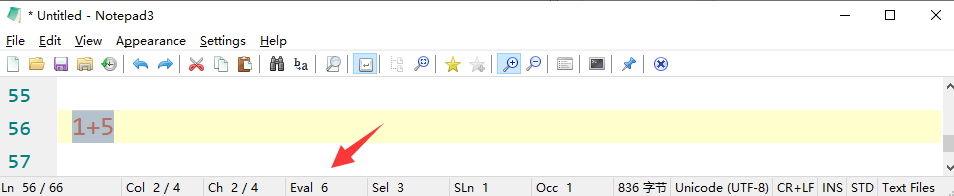
currently i know the result will display as "Eval" value in the status bar;
e.g. as the screenshot showed;
while how about, or can it display the result directly(also the formula itself and "=" symbol) in the text content(not in the status bar)?
e.g.:
"
1+2=3
8/2=4
35=15
24÷8=3
3(1+5)=18
...
"
the benefit/purpose is to display the calculation formula, and the result both together to show how the result is out.
by the way, Microsoft Office Onenote application do have this funtion since long time ago, and i open this application from my Windows task bar from time to time, mainly for this purpose, if Notepad3 can achieve this funtion, then surely it weigh more in my heart than Onenote in this point.
what it can expected currently is the 5 ways to calculate/combination:
+
-
x
÷
()
plus
minus
division
multiplication
parentheses
thank you for your possible consideration.
Notepad3 (x64) v5.20.902.1 rc (dkt1-amr)
Compiler: MS Visual C++ 2019 v16.7.(1-2) (VC v1927)
OS Version: Windows 10 Version 1909 (Build 18363)
 bravo-hero
All 51 comments
The "Keystroke" you requested is the question mark (?). If it is inserted immediate after the equal sign ( 1+2=_?_ ), it is replaced instantly by the result (if Calculate Tiny-Expressions option is active).
Expression calculation also allows rectangular (column) selections.
Double-Click Status Bar "Eval"-Segment will copy the result to clipboard.
Supported math calculations are:
- _abs (calls to fabs), acos, asin, atan, atan2, ceil, cos, cosh, exp, floor, ln (calls to log), log (calls to log10), log10, pow, sin, sinh, sqrt, tan, tanh_
- also logical expressions (e.g. 1 && !0 =?).
 RaiKoHoff
on 10 Sep 2020
RaiKoHoff
on 10 Sep 2020
I was unaware of this nice functionality, after testing, just a query though, should this work when using a multi cursor?
 jupester
on 10 Sep 2020
jupester
on 10 Sep 2020
@jupester : I think you are talking about "multi-selection"?
If it is not working (rectangular selection is a kind of multi selection), I think I can make it work ... 🤔
RaiKoHoff
on 10 Sep 2020
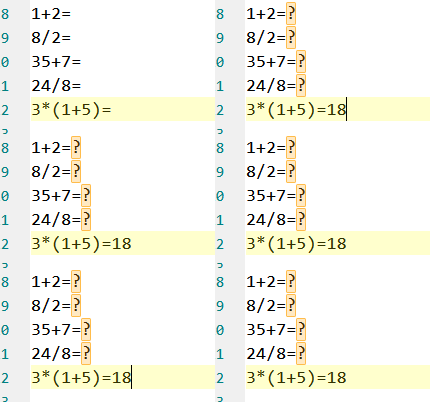
I meant multi-cursor, at least I think that is what is is called, eg. make a rectangular selection like you say, press jump to end, creates multi-cursors, or alternatively use ctrl or alt and create multi-cursors after many = signs and then press ?
Here is a quick (crudely made...) example
jupester
on 10 Sep 2020
Ah, yes I see what you meant. No, that will not work - will be some more work than the current multi/rectangular-selection feature 🤔
RaiKoHoff
on 10 Sep 2020
@RaiKoHoff oh, what a nice feature, i never knew it previously.
what else i can expect? :-)
just now i tried it, and maybe just 2 enhancements:
it support "/", but not "÷"(both stand for the division), while Onenote support both;
for convience purpose, i think "Enter" would be nicer to add, not replace the question mark (?), maybe some other users already used to it already), while for me, Enter just means bigger to stroke, and 1 stroke, while question mark (?) means 2 stroke together(Shift+/?) as in the common keyboard showed.
thank you for the explanation, love your tool day by day, i use it almost daily. :-)
bravo-hero
on 10 Sep 2020
it support "/", but not "÷"(both stand for the division), while Onenote support both;
The character "÷" (Alt+0247) is not present on most Windows keyboards. 🤔
On the other hand, the character ":" (colon) is commonly used to replace division character "/".
And the character "x" (x lower case) is also commonly used to replace the multiplication character "*".
for convenience purpose, i think "Enter" would be nicer to add, not replace the question mark (?)
Not sure if "Enter" is possible, which in Notepad3 is means "End of Line", (EOL moves the cursor both down to the next line and to the beginning of that line)?
Also, not sure either that an "Alt+Enter" combination would be possible? 🤔
 hpwamr
on 10 Sep 2020
hpwamr
on 10 Sep 2020
Hello @bravo-hero , @jupester ,
Feel free to test the "BETA/RC" version "Notepad3Portable_5.20.911.1_rc.paf" or higher, see below or issue #1129.
"Notepad3Portable BETA/RC paf" version can be used with or without ".7z" extension.
To update "Notepad3 Setup" version with the latest features/fixes from the "BETA/RC" version, see issue #1105.
Also, feel free to test the "BETA/RC" version "Notepad3_5.20.829.2_Setup_rc" or higher, see below or issue #1129.
Comments and suggestions are welcome... 😃
hpwamr
on 11 Sep 2020
@hpwamr #1129 regarding this, i have a question since long-time ago, which bug/enhancement is fixed or added in each builds? i.e. the update log? where can it be related to each build?
bravo-hero
on 11 Sep 2020
@hpwamr #1129 regarding this, i have a question since long-time ago, which bug/enhancement is fixed or added in each builds? i.e. the update log? where can it be related to each build?
Not sure if
"Enter"is possible, which in Notepad3 is means"End of Line", (EOL moves the cursor both down to the next line and to the beginning of that line)?
this is ok, since Onenote is the same functionality for this;
Also, not sure either that an
"Alt+Enter"combination would be possible? 🤔
this is not ok, as it still got 2 strokes together, no convenience.
all in all, the "Enter" alone is the best choice as far as i can see, what we need is the result and end of 1 line, that's ok totally(just as above mentioned).
bravo-hero
on 11 Sep 2020
@RaiKoHoff: No worries about the multi cursor support, I thought it was a long shot but thought I'd inquire anyway. I just tried the new 911 build, and noticed that even when you have "Settings | Calculate Tiny-Expressions" disabled, we still get automatic calculations in the document, is that correct, does that setting only apply to the status bar?
BTW thanks for alerting me to this TinyExpr feature.
jupester
on 11 Sep 2020
regarding this, i have a question since long-time ago, which bug/enhancement is fixed or added in each builds? i.e. the update log? where can it be related to each build?
This legitimate request has been answered on: #2593
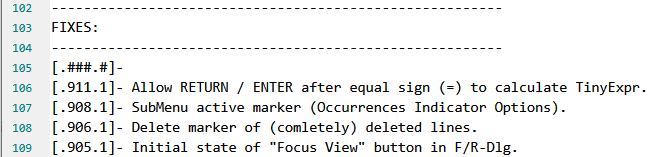
The Changes.text logfile can be found:
- In Github.com at this address: https://github.com/rizonesoft/Notepad3/blob/master/Build/Changes.txt
- Notepad3 Setup and Portable (zip): in directory "Docs":
\Notepad3\Docs - Notepad3Portable (paf.exe) in directory Docs:
\Notepad3Portable\App\Notepad3\Docs
hpwamr
on 11 Sep 2020
I just tried the new 911 build, and noticed that even when you have "Settings | Calculate Tiny-Expressions" disabled, we still get automatic calculations in the document, is that correct, does that setting only apply to the status bar?
Hello @RaiKoHoff ,
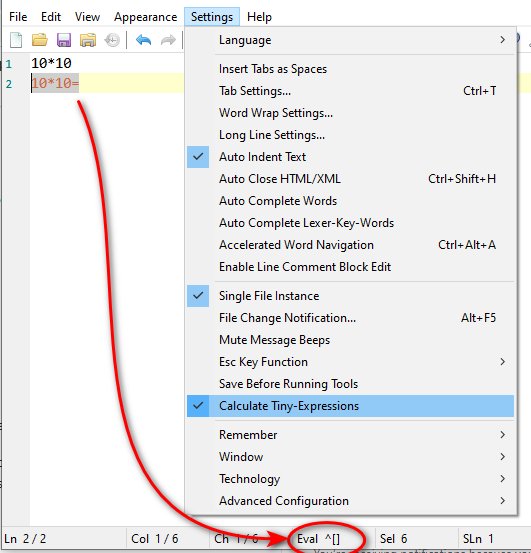
I addition, I've noticed that the "Eval" does not work if the sign equal "="is selectioned.
In following my example,
- first line is ok,
- second line is :
Eval ^[]
hpwamr
on 11 Sep 2020
On the other hand, the character ":" (colon) is commonly used to replace division character "/".
And the character"x"(x lower case) is also commonly used to replace the multiplication character"*".
Hi @RaiKoHoff ,
- The character
":"(colon) is added as an alternate character. 👍
Suggestions: 🤔
- Can the character
"÷"(Alt+0247) also be added as an alternate character? - Can the character
"×"(Alt+0215) also be added as an alternate character? - Can the character
"x"(x lower case) also be added as an alternate character?
hpwamr
on 11 Sep 2020
what a live, prompt, effective team here...you guys amazed me each time.
bravo-hero
on 11 Sep 2020
ok, just now tested the 911.1 rc, the Enter is ok, but 1 small point: it's expected to go the new line automatically(as Onenote did), while currently stay at the End of Line...
the reason is obvious: after the calcluation, nothing need to do in the same line, we always need to go the new line.
bravo-hero
on 11 Sep 2020
the reason is obvious: after the calculation, nothing need to do in the same line, we always need to go the new line.
Precisely because it gives the possibility of adding something after the result, my preference goes to a "2 steps Enter" : 🤔
- After the "=" sign, the First "Enter" to get the result.
- And a Second "Enter" to go to the new line (EOL).
hpwamr
on 11 Sep 2020
Hi, here the TODOs:
TinyExpr only allows ASCII (no UNICODE) characters for the expression - sorry.
So I have to make a "translation" before feeding it into that engine - if this will happen before upcoming release depends on complexity ... 🤔.
- [x] disable "
=?" and "=<ENTER>" calculation, if option id OFF - [-] _not:_ use "x" alternate to "*" operator (mul) - see explanation below.
- [x] make equal sign (
=) accepted as part of the expression to calculate
(only on right-hand side, no following chars except spaces and '?' allowed !) - [x] using "
=?" will stay on line, "=<ENTER>" will insert result and do a new-line. - [-] _not:_ multi-cursor "
=?" is a long shot, nothing for RC phase - maybe after Release. - [-] _not:_ unicode-tiny-expr to support "
×" and "÷" - see explanation below - [ ] something forgotten 🤔 ...
Explanation for rejecting change requests above:
Normal characters are used in TinyExpr for variables.
They can be internally defined for calculating formulas.
E.g. Add a dialog to Notepad3 where the variable are defined: e.g. x=7, y=5.
Then Notepad3 could calculate an expression like sqrt(x^2+y^2)=?, while changing the values of variables, the result will change. Currently this is not implemented, but the expression evaluation shown an error, cause the variable names are not defined internally ...
RaiKoHoff
on 11 Sep 2020
Hello @bravo-hero , @jupester ,
Feel free to test the "BETA/RC" version "Notepad3Portable_5.20.911.2_rc.paf" or higher, see below or issue #1129.
"Notepad3Portable BETA/RC paf" version can be used with or without ".7z" extension.
To update "Notepad3 Setup" version with the latest features/fixes from the "BETA/RC" version, see issue #1105.
Also, feel free to test the "BETA/RC" version "Notepad3_5.20.829.2_Setup_rc" or higher, see below or issue #1129.
Comments and suggestions are welcome... 😃
hpwamr
on 11 Sep 2020
just now tested the 911.2_rc.paf, and the Enter with both the result and the new line works like charm, just exactly as OneNote, so i've tried to unpin Onenote from my task bar, just use notepad3 more for this point. :-)
btw,
the possibility of adding something after the result
if so, at least need 1 space to be added :-)
- After the "=" sign, the First "Enter" to get the result.
- And a Second "Enter" to go to the new line (EOL).
the result is there already as the EOL, this(the result) is the purpose of that line, hence i need to go the new line then, anyway, this is not something i like personally, maybe i have used with Onenote's style already. :-)
thank you team.
bravo-hero
on 12 Sep 2020
and the Enter with both the result and the new line works like charm,
- If using
"=?"it will insert the result and it will stay on the line, - If using
"=<ENTER>"it will insert the result and it will create a new line. - If using
"=<Shift+ENTER>"it will NOT insert a result and it will create a new line. - If using
"=<Ctrl+ENTER>"it will NOT insert a result and it will create a new line above it.
hpwamr
on 12 Sep 2020
Hello @bravo-hero , @jupester ,
Feel free to test the "BETA/RC" version "Notepad3Portable_5.20.912.1_rc.paf" or higher, see below or issue #1129.
"Notepad3Portable BETA/RC paf" version can be used with or without ".7z" extension.
To update "Notepad3 Setup" version with the latest features/fixes from the "BETA/RC" version, see issue #1105.
Also, feel free to test the "BETA/RC" version "Notepad3_5.20.829.2_Setup_rc" or higher, see below or issue #1129.
Comments and suggestions are welcome... 😃
hpwamr
on 12 Sep 2020
@RaiKoHoff @hpwamr
hi team,
1 quick notice: just aware that: "%" is not supported to calculate, what a big lose! :- )
e.g.:
100*0.25=25
this is ok to do;
100*25%=
this is nothing out for the result;
pls advice.
bravo-hero
on 14 Sep 2020
Hi,
the single % is reserved for the modulo operation, like it is usual in Programming languages (7%3=1).
To have a calculation as percent, you may either use the function call ( 100*percent(25)=25 ) or, a little bit simpler, "escape" the modulo sign by copying (100*25%%=25).
RaiKoHoff
on 14 Sep 2020
oh...complicated to know that.
as a normal user, i think it's more used for the calculation, not for that kind of coding(don't know what "modulo operation"is used for actually), which i never thought of :-)
so it won't change, or can we add an option to choose the default behavior in the setting?
thank you.
bravo-hero
on 15 Sep 2020
@bravo-hero : For a programmer (which is NP3 targeting), the '%' (modulo op) is the "normal" operation, the percentage (accountant) meaning is less for calculation than for value display. So, I think we should stay with the designed behaviour.
RaiKoHoff
on 15 Sep 2020
so it won't change, or can we add an option to choose the default behavior in the setting?
Hello @bravo-hero ,
100*25%=
Feel free to test the "BETA/RC" version "Notepad3Portable_5.20.916.1_beta.paf" or higher, see below or issue #1129.
"Notepad3Portable BETA/RC paf" version can be used with or without ".7z" extension.
To update "Notepad3 Setup" version with the latest features/fixes from the "BETA/RC" version, see issue #1105.
Comments and suggestions are welcome... 😃
hpwamr
on 16 Sep 2020
@bravo-hero : For a programmer (which is NP3 targeting), the '
%' (modulo op) is the "normal" operation, the percentage (accountant) meaning is less for calculation than for value display. So, I think we should stay with the designed behaviour.
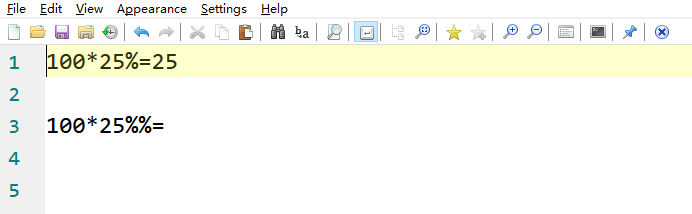
it passed in the newest version (Notepad3Portable_5.20.918.2_beta.paf.exe.7z -s) currently.
@hpwamr i thought it won't be fixed as @RaiKoHoff replied above like that, and i didn't expect it then.
but...what? you guys still fix this issue for me(and some other uses like me)?
oh...my...what else can i say?...THANK YOU, GUYS.
bravo-hero
on 19 Sep 2020
After thinking a little bit about the problem and analyzing the TinyExpr code I got an idea to support both % operator interpretations - hope that I didn't miss an expression, where this interpretation leads to wrong results... 🤔.
RaiKoHoff
on 19 Sep 2020
I tried to introduce a context analysis for '%' operator in TinyExpr:
if a number is next on right-hand-side of '%' operator it must be a modulo operator, else it is a percent operator.
RaiKoHoff
on 21 Sep 2020
Hello @bravo-hero ,
100*25%=25👍Keep in mind, that now in "TinyExpr"
%% as percent operatoris deprecated (see #2868).
100*25%%= (= invalid percent operator)
As far as I'm concerned, I think you (requester) can close this issue...
Feel free to test the "BETA/RC" version "Notepad3Portable_5.20.921.1_beta.paf" or higher, see below or issue #1129.
"Notepad3Portable BETA/RC paf" version can be used with or without ".7z" extension.
To update "Notepad3 Setup" version with the latest features/fixes from the "BETA/RC" version, see issue #1105.
Comments and suggestions are welcome... 😃
hpwamr
on 21 Sep 2020
hi @RaiKoHoff @hpwamr
i didn't expect this, but here is the scenario, when the length of the calculation result is too long, as it shows: >=7 bit, then it will display as the scientific notation(just as in Office Excel application), it isn't wrong, but...just looks meaningless as for a normal user as me, what it's expected is: display all the bits straight forward, as it explained in the screenshot: "comma" maybe no need, just for reference here.

thank you
bravo-hero
on 27 Sep 2020
Hello @bravo-hero ,
Feel free to test the "BETA/RC" version "Notepad3Portable_5.20.927.2_beta.paf" or higher, see below or issue #1129.
"Notepad3Portable BETA/RC paf" version can be used with or without ".7z" extension.
To update "Notepad3 Setup" version with the latest features/fixes from the "BETA/RC" version, see issue #1105.
Comments and suggestions are welcome... 😃
hpwamr
on 27 Sep 2020
hi @hpwamr tested and passed, it works like charm.
thank you team.
bravo-hero
on 28 Sep 2020
Hello @RaiKoHoff ,
Strange result, no ? 😬

hpwamr
on 28 Sep 2020
Due to increasing the the allowed integer width (before switching to mantissa/exponent format) the display width of floating point calculation has also been increased.
Maybe we can reduce the display, if the number has a fractional floating-point part ?
Reducing to 3 or 4 digits for fractional part ?
RaiKoHoff
on 28 Sep 2020
2.2+2.2=4.40000000000000035527      (4.4)
5.5-1.2=4.29999999999999982236      (4.3)
1.65*1.65=2.72249999999999969802    (2.7225)
1.2*1.2*1.2=1.72799999999999998046  (1.728)
8.8/2.5=3.52000000000000046185      (3.52)
1.2+25%=1.44999999999999995559      (1.5)
1.2*25%=0.299999999999999988898     (0.3)
2^1.2=2.29739670999406975227        (2,29739670999407001359)
Yes, full display width also shows internal floating-point precision errors - the drawback of limited precision.
Upcoming PR will fix this by rounding to 6 digit for fractional part (commonly used).
RaiKoHoff
on 28 Sep 2020
Hi @RaiKoHoff ,
This simple calculation does not give the same result given by a simple calculator ? 🤔
1.2+25%=1.44999999999999995559 (1.45) <--> Calculator = (1.5)
hpwamr
on 28 Sep 2020
Hi @hpwamr : 25% = 25 per one-hundred = 25/100 = 0.25; 1.2+0.25=1.45 !?
What your calculator is (implicitly) calculating is: 1.2 + (1.2 * 0.25) = 1.5
Ed.: Win10-Calculator (Mode: Standard) also calculates like the simple calculator, but for TinyExpr we should stay with the current scientific calculation.
(By the way, Win10-Calculator in Standard-Mode also calculates "1+2×3=9" which is wrong in my understanding of math,
switching to scientific mode it calculates correct 1+2×3=7 ! )
RaiKoHoff
on 28 Sep 2020
Hi @RaiKoHoff
I know, that's the big difference with a simple calculator where it implicitly adds 25% of the previous number !
I specifically mentioned it just to attract the attention of TinyExp users. 😃
hpwamr
on 28 Sep 2020
I confirm taht the PR #2914 corrects the above issue https://github.com/rizonesoft/Notepad3/issues/2775#issuecomment-699848697 .
A new build will follow, asap.
2.2+2.2=4.4     (4.4)
5.5-1.2=4.3     (4.3)
1.65*1.65=2.7225    (2.7225)
1.2*1.2*1.2=1.728   (1.728)
8.8/2.5=3.52        (3.52)
1.2+25%=1.45        (1.5 simple calculator; 1.45 scentific calculator)
1.2*25%=0.3     (0.3)
2^1.2=2.297397      (2,29739670999407001359)
and i downloaded and tested the Notepad3Portable_5.20.927.2_beta.paf.exe, test out to ensure my doubt:
- there's no sub-menu issue in this version;
- there's no occurrence issue;
- there's no slow response issue;
anyway, just with the
...
6.5-1.2=5.29999999999999982236
...
kind of issue.
bravo-hero
on 28 Sep 2020
@bravo-hero : Please open a different issue for this case - it does not fit into this one.
RaiKoHoff
on 28 Sep 2020
@RaiKoHoff ok, done.
bravo-hero
on 28 Sep 2020
"Notepad3Portable_5.20.928.1_beta.paf" is freezing #2916 and replaced with "Notepad3Portable_5.20.928.2_beta.paf"
Hello @bravo-hero s,
Feel free to test the "BETA/RC" version "Notepad3Portable_5.20.928.2_beta.paf" or higher, see below or issue #1129.
"Notepad3Portable BETA/RC paf" version can be used with or without ".7z" extension.
To update "Notepad3 Setup" version with the latest features/fixes from the "BETA/RC" version, see issue #1105.
Comments and suggestions are welcome... 😃
hpwamr
on 28 Sep 2020
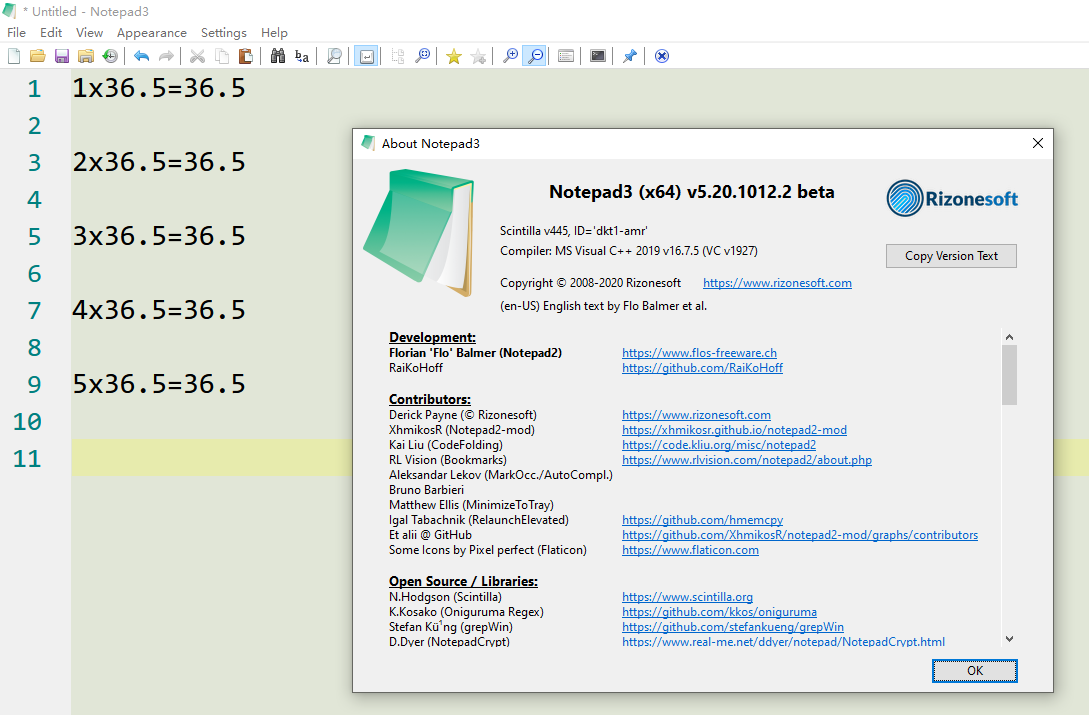
things become interesting, my team @RaiKoHoff @hpwamr
as the screenshot, still got calculation issue...don't know why...it's kind of surprising me, since i thought we've fixed all the math issue here. ^^
On the other hand, the character ":" (colon) is commonly used to replace division character "/".
And the character"x"(x lower case) is also commonly used to replace the multiplication character"*".
i think this is not added yet?
Hi @RaiKoHoff ,
- The character
":"(colon) is added as an alternate character. 👍Suggestions: 🤔
- Can the character
"÷"(Alt+0247) also be added as an alternate character?- Can the character
"×"(Alt+0215) also be added as an alternate character?- Can the character
"x"(x lower case) also be added as an alternate character?
can these 3 also be added to compatible with some one like me or others around the world?
all in all, i think why recall this issue back is: we used to use the above mentioned pattern to do the math calcuation, not the international standard like "*", "/" etc.
bravo-hero
on 19 Oct 2020
- Can the character
"×"(Alt+0215) also be added as an alternate character?
5*5=25
5×5=25          "×" with (Alt+0215)
- Can the character
"x"(x lower case) also be added as an alternate character?
x5=5             "x" (x lower case) is reserved for "Intern System Variable" and for "hex number"
0xAF=175
0xAF+25=200
0xAF*0xAF=30625
The lower-case Latin letter x is sometimes used in place of the multiplication sign. This is considered incorrect in mathematical writing. (https://en.wikipedia.org/wiki/Multiplication_sign#Similar_notations)
RaiKoHoff
on 24 Oct 2020
The lower-case Latin letter x is sometimes used in place of the multiplication sign. This is considered incorrect in mathematical writing. (https://en.wikipedia.org/wiki/Multiplication_sign#Similar_notations)
Can you add binary number and octal prefix as C++ 14 and Python 3, 0b 0o.
0b1111=15
0o17=15
0x0F=15
 nobk
on 20 Dec 2020
nobk
on 20 Dec 2020
Can you add binary number and octal prefix as C++ 14 and Python 3, 0b 0o.
Hello @nobk ,
This issue #2775 is closed and already contains 50 posts.
Could you please open a new issue for your request. 🤔
Thank you,
hpwamr
on 20 Dec 2020
Related issues
 craigo-
·
4Comments
craigo-
·
4Comments
 rizonesoft
·
4Comments
rizonesoft
·
4Comments
 valhristov
·
3Comments
valhristov
·
3Comments
 RaffaeleBianc0
·
3Comments
bravo-hero
·
3Comments
RaffaeleBianc0
·
3Comments
bravo-hero
·
3Comments
Most helpful comment
After thinking a little bit about the problem and analyzing the TinyExpr code I got an idea to support both
%operator interpretations - hope that I didn't miss an expression, where this interpretation leads to wrong results... 🤔.