How to reproduce
1.input "123" in the first line.
2.input "456" in the second line.
3.enter "ctrl+z"
Previous behavior
Undo the second step.In other words, "456" will be eraser. But "123" also be eraser.
 wsrf16
All 49 comments
Yeah I just want to confirm this bug, using the current .2595 build I have been having some really strange issues with the Undo log, it jumps back in massive increments only sometimes.
 jupester
on 23 Aug 2019
jupester
on 23 Aug 2019
 leeoniya
on 23 Aug 2019
leeoniya
on 23 Aug 2019
I see, going by that linked issue then it looks like this change could actually be intentional, for me the way I work it is unusable as is, the undo behavior seems really inconsistent, and in my workflow it has really slowed me down and caused me to have to redo a lot of work, because you press undo thinking it has just undone one step, then you continue working and changing the document and it has actually undone like 20 steps all over the document which are out of view so they become lost because I have continued working after the undo, I have been frustratingly affected like this a lot.
If you are going to keep it as is, I personally feel this has to be optional, or I will end up having to stick with an old build, which I really don't want to do, the old behavior I never had an issue with.
jupester
on 23 Aug 2019
It seems to be a bug ?
 hpwamr
on 23 Aug 2019
hpwamr
on 23 Aug 2019
We are following the Scintilla default:
Sequences of typing or deleting are compressed into single transactions to make it easier to undo and redo at a sensible level of detail.
We can add an option to switch this behavior to split up the "typed sequence", but what should be the criteria for splitting the sequence?
- a (configurable) timeout value (suggestion from #1421)
- a space/blank splitting
- a line-break splitting
- all of the above (menu electable each)
 RaiKoHoff
on 26 Aug 2019
RaiKoHoff
on 26 Aug 2019
Yeah it is a tricky thing to get right for everyone, and for the most part the undo works ok, but only occasionally it suddenly undoes multiple lines that are spread out, because it isn't always consistent is the main issue I have, I still feel there could be a bug here, only because it only occurs sometimes, and it is definitely not the same behavior as a couple months ago.
For me I think undoing of 1 line at a time MAX would be suitable, but still keeping the current behavior of undoing tabs etc in single steps too, but that might not suit everyone.
jupester
on 26 Aug 2019
For me I think undoing of 1 line at a time MAX would be suitable
👍
leeoniya
on 26 Aug 2019
For me I think undoing of 1 line at a time MAX would be suitable, but still keeping the current behavior of undoing tabs etc in single steps too, but that might not suit everyone.
For me too, it seems to me a reasonable choice ! 👍 😃
hpwamr
on 26 Aug 2019
For me I think undoing of 1 line at a time MAX would be suitable, but still keeping the current behavior of undoing tabs etc in single steps too, but that might not suit everyone.
Maybe it can be a good choice. But it is not for somebody who types words in single line.
Is it better to add an option to switch single transactions? We can refer to some other softwares.
eg. Office Words,Github and so on.
wsrf16
on 27 Aug 2019
Feel free to test development beta version _5.19.827.2598_BETA.
(for beta channel access, see: #1129)
- New menu entry (
Edit->Miscellaneous->Split Undo Typing Sequence on Line Breaks)
(this beta en-US, en-GB, de-DE yet - suggestions for better wording or other position in menu are always welcome :grin:) - New setting (
Notepad3.ini: [Settings2] UndoRedoSplitTimeout=0)
if set to zero (0), timeout is OFF, else if a value in [ms] is given, this "typing chars timeout" is used to break the undo typing sequence collection.
The initial default values are chosen to preserve the "old" undo behavior.
RaiKoHoff
on 27 Aug 2019
The unit of UndoRedoSplitTimeout is seconds?
Can we add a choice undo by one step?Neither line break nor timeout.
One step means a key press action on the keyboard.
As it is in notepad2.
wsrf16
on 27 Aug 2019
Thank you for adding the option, I haven't extensively tested it yet, but am still seeing my original issue, I have finally found some steps though to invoke it, so maybe you can see what I have been trying to explain, originally I was noticing it with line breaks, but it happens with tabs too, that is that the behavior changes during a session, and you have to close & reopen Notepad3 to get it back to the "normal" behavior, or sometimes it comes good after a while somehow, this inconsistency is still my issue.
- Open Notepad3.txt with the cursor in the top left position press tab 3 times.
- Press Undo 3 times, and you should be back at the first position because each undo does 1 tab.
- Now do any block selection and press tab
- Press Undo, document should be back at original
- Now put a heap of random tabs anywhere over multiple lines.
- Press Undo
- Notice now all tabs over many lines are undone in 1 step.
In the above example I have used tabs as the example, and block selection to invoke the issue, but something else must trigger it besides block selection because I know it has happened to me before during times when I haven't used block selection, and it still happens with line breaks substituted in the above steps, and the new option enabled.
jupester
on 27 Aug 2019
@wsrf16 : Timeout value is in milliseconds [ms]. Feel free to test beta version _5.19.827.2600_BETA and set timeout value to less than 20 (but not zero (0)), e.g. 1 or 10. This will trigger a undo unit for each modification.
RaiKoHoff
on 27 Aug 2019
@jupester : Confirmed that TAB/Indentation in combination with selection still has some bugs :cry:
Ed.: Feel free to test dev beta ver _5.19.827.2601_BETA (found at least one bug).
RaiKoHoff
on 27 Aug 2019
works great so far. i'm using UndoRedoSplitTimeout=500 & Split Undo Typing Sequence on Line Breaks (this option name could probably be shortened to "Split Undo/Redo on Line Breaks").
using this combo there's a small bug though where NP3 considers the first char of each line (except the last line) to be its own sequence which it undoes separately. (off by 1 error?)
it would also be nice to surface the UndoRedoSplitTimeout in the UI next to the other one. i dont think it's obscure enough to live only in the ini config.
leeoniya
on 27 Aug 2019
Just to be clear, the issue I was originally seeing, and am describing in my previous post doesn't just affect "tabs/indentation", I was having whole pages of scripting/coding undone in a single step from all over the document which contained tabs/linebreaks/indentation etc.
OK, tried the new .2601 build, some initial observations:
1) If you follow the same steps as in my previous post but where I used "block selection", use a multi-line cursor instead it still triggers the bug, there are maybe still other ways to trigger it too, I will report back if I find any, but unless you try pressing undo after every few operations it is hard to narrow it down.
These 3 seem to only happen with the new line break setting enabled:
edit: This may be helpful info?: just noticed that once the 1) bug above is triggered in a session the following 3 issues are also not present
2) Another thing I noticed is that if you select say 3 whole lines (Shift+Down arrow 3 times) then move them with Ctrl+Down arrow, then use the undo, the selection rectangle keeps flashing on and off between undos which is new behavior.
3) If you select 3 lines using the same method as above then press delete, then press undo, their selection is lost, and the cursor goes back to the 1st position in the document, this is also new behavior.
4) If you have no selection and press Ctrl+X to cut a line, then press undo the cursor returns to the first position in the document.
I will report back if I notice anything else, still haven't had time to test much. I am hopeful I won't need the new setting enabled if the original bug gets fixed because it seems it could change a lot of the old behavior.
jupester
on 28 Aug 2019
@jupester : Thank you for testing - your detailed report is very helpful to narrow down the problem(s).
Ed.(2): New development beta version (_5.19.828.2603_BETA) available.
RaiKoHoff
on 28 Aug 2019
New development beta version (_5.19.828.2604_BETA):
Remark: Config Key name of "undo transaction timeout" changed:
UndoRedoSplitTimeout-> UndoTransactionTimeout
Ed.: Remark 2: The multi select then TAB undo transaction (Bug 1.) is still present - searching ...
RaiKoHoff
on 28 Aug 2019
Shall we close the transaction function?
wsrf16
on 28 Aug 2019
@wsrf16 : Sorry, for capturing this issue for slightly other discussion.
@jupester , @leeoniya : Maybe we can continue the "debugging" discussion along with issue #1421 and close this issue?
RaiKoHoff
on 28 Aug 2019
@RaiKoHoff Oh! It doesn't my meaning. I want to close the "typed sequence" function so that one char can be undo one time instead of sequence. Feel free to discuss this issue here.😃
wsrf16
on 28 Aug 2019
@wsrf16 :rofl: misunderstood you
Yes, set [Settings2] UndoTransactionTimeout=1
This should break the transaction block for each character and enable a single character undo.
New development beta version (_5.19.828.2605_BETA) available.
RaiKoHoff
on 28 Aug 2019
I have tested .2605 quite a lot and so far have not found any real issues, I originally tested .2604 and as you later mentioned the main bug was still there, and now in the new build I haven't encountered it, I will start using it as my daily editor again and see if anything crops up, but already it looks like a huge improvement to me, so thanks for resolving this issue. Also after limited testing I am finding having the new line break option enabled seems to be ideal for me and my workflow.
jupester
on 29 Aug 2019
@wsrf16 🤣 misunderstood you
Yes, set[Settings2] UndoTransactionTimeout=1
This should break the transaction block for each character and enable a single character undo.
New development beta version (_5.19.828.2605_BETA) available.
Perfect!
wsrf16
on 29 Aug 2019
for me on 2605, 500ms + line break splitting is the sweet spot. works great so far.
leeoniya
on 29 Aug 2019
Hello @leeoniya ,
Thanks for your interest and your contributions to Notepad3. 😃
I would like to add you in the "Acknowledgments" list of Notepad3.
Do you agree ? 😉
hpwamr
on 12 Sep 2019
sure, though i don't feel like i've really done all that much. 🤣
leeoniya
on 12 Sep 2019
Hello @wsrf16 ,
Thanks for your interest and your contributions to Notepad3. 😃
I would like to add you in the "Acknowledgments" list of Notepad3.
Do you agree ? 😉
hpwamr
on 19 Sep 2019
As far as I am concerned, this issue may be closed....
hpwamr
on 19 Sep 2019
Hello @wsrf16 ,
Thanks for your interest and your contributions to Notepad3. 😃
I would like to add you in the "Acknowledgments" list of Notepad3.
Do you agree ? 😉
@hpwamr With pleasure.😃
wsrf16
on 19 Sep 2019
I wonder when we can receive the next release version. A month has passed.
wsrf16
on 20 Sep 2019
@wsrf16 : if CR #1114 is designed and implemented, we should have a next release (depending on OK from @hpwamr and of cause @rizonesoft)
RaiKoHoff
on 20 Sep 2019
Using various builds of the last few weeks beta releases I have been having random issues with this issue cropping up again where NP3 randomly undoes a massive increment of undo steps, I haven't been able to track down reproducible steps yet, it is very random again.
I will keep trying to find a way to invoke the behavior, I just thought I would mention it to keep you in the loop and to be mindful because it is very easy to lose a lot of the document.
It only ever seems to happen after a document has been open for ages with lots of changes undo/redo steps cut/pastes etc, and then an undo seems to go back to last saved state like a revert I think, I am surprised no one else has noticed it.
jupester
on 16 Dec 2019
@jupester : maybe related to #1089.
RaiKoHoff
on 16 Dec 2019
Using various builds of the last few weeks beta releases I have been having random issues with this issue cropping up again where NP3 randomly undoes a massive increment of undo steps, I haven't been able to track down reproducible steps yet, it is very random again.
I will keep trying to find a way to invoke the behavior, I just thought I would mention it to keep you in the loop and to be mindful because it is very easy to lose a lot of the document.
It only ever seems to happen after a document has been open for ages with lots of changes undo/redo steps cut/pastes etc, and then an undo seems to go back to last saved state like a revert I think, I am surprised no one else has noticed it.
It remains a puzzle. I can not know which step it go back to after ctrl +z. Maybe it did not be fixed absolutely.
At first it seems normal. But It turn to unpredictable after lots of operations.
wsrf16
on 16 Dec 2019
@RaiKoHoff : Yeah I think you could be right, I frustratingly still can't get 100% reproducible steps, but one thing that I have noticed is that I can't reproduce the issue when I freshly open a document and don't save it and make 100's of undo steps, but alternatively if I have opened a document, made changes, (for example to a script file) and then saved and executed it (maybe multiple times), then come back and made some more changes with some undo steps, then eventually it does a revert type amount of undo steps at some random time.
So long story short the issue doesn't seem to be present until after at least one save operation, but still doesn't present immediately (or always) though.
It is really driving me crazy and loss of major document changes has occurred many times, I am encountering the issue everyday, so if there is any investigating of the code to identify a possible link between the issue you linked and this issue, that you could do, if it wouldn't be too time consuming, it would be appreciated.
Thanks.
jupester
on 24 Jan 2020
@jupester : Okay, if I find some time, I will try to hunt this issue down by code investigation of this changed part of undo/redo behavior.
RaiKoHoff
on 24 Jan 2020
I am not sure if this is another sign of an issue, unfortunately not sure exactly how it happened, but somehow just using normal editing commands (no recode etc), I got in this situation:
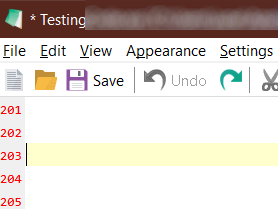
Notice that there is a file dirty marker, but the undo button is disabled, I'm not sure if I have seen this before, but I could be mistaken, and it isn't relevant, I just thought I would mention it though just in case.
jupester
on 25 Jan 2020
Notepad3 (64-bit) v5.20.305.2 RC2 (venom-pc)
Compiler: MS Visual C++ 2019 v16.4.(4-5) (VC v1924)
OS Version: Windows 10 Version 1909 (Build 18363)
Scintilla v431
Oniguruma v6.9.4
- Locale: en-US (CP:'ANSI (CP-936)')
- Current Encoding = 'Unicode (UTF-8) Signature'
- Screen-Resolution = 2560 x 1600 [pix]
- Display-DPI = 192 x 192 (Scale: 200%).
- Rendering-Technology = 'GDI'
- Zoom = 120%.
- Process is elevated.
- User is in Admin-Group.
- Current Lexer: 'Text Files'
It still exists.
wsrf16
on 16 Mar 2020
Hello @wsrf16 , I can not reproduce your issue ? 🤔
You are using the Notepad3 Installer RC2 version.
If you follow #1105 , you can also update your installer version with the last RC3 version #1129 (for more information, see the 3 pinned issues on top of this "Issues Tab").
Feel free to test the RC version "Notepad3Portable_5.20.315.1_RC3.paf.exe.7z" or higher.
See "Notepad3 BETA-channel access #1129" or here Notepad3Portable_5.20.315.1_RC3.paf.exe.7z.7z
Note: "Notepad3Portable RC" can be used in "2 flavors", see with or without extension ".7z".
Your comments and suggestions are welcome... 😃
hpwamr
on 16 Mar 2020
I didn't change (except possible unknown side-effects from other changes) anything on undo/redo engine, so I don't expect a difference regarding this behavior between 5.20.305 and 5.20.315.
But to get a debug handle on this issue, I need a workflow to reproduce it reliable ... 😞
RaiKoHoff
on 16 Mar 2020
I recommend to close this issue, cause the original issue has been solved by suggested configuration.
@jupester : Please open another issue for the "randomly cropping selection blocks" bug. Try to describe as best as possible (and steps to reproduce it and/or description(s) you gave above).
RaiKoHoff
on 16 Mar 2020
@jupester : Please open another issue for the "randomly cropping selection blocks" bug. Try to describe as best as possible (and steps to reproduce it and/or description(s) you gave above).
It still exists.
Hello @RaiKoHoff . I think this request has to be addressed to: @wsrf16 ? 🤔
hpwamr
on 16 Mar 2020
@hpwamr : No, maybe both 😉
(The original "123\r\n456" issue has been solved with [Settings2] UndoTransactionTimeout=1 resp. Edit->Miscellaneous->Split Undo Transactions at Line-Breaks).
RaiKoHoff
on 16 Mar 2020
I will leave it up to @wsrf16 to close this issue, but FYI I am still seeing the issue constantly, yet still can't lock down 100% reproducible steps, I will give a quick rundown of the issue and the best steps to try to invoke it FWIW below before this issue is closed.
If you keep a document open and make changes and save it many times with lots of undo redo steps and normal editing in between the issue will arise eventually (the issue being: suddenly jumping back 100s of undo steps). I am still constantly testing different configurations trying to get steps to invoke it, I don't think it has ever happened while I have had "Split Undo Transactions at Line Breaks" disabled, so my feeling currently is that somehow the issue is only present with that setting enabled. (My Default)
@RaiKoHoff: I think you misinterpreted my last post, I don't have an issue with "cropping selection blocks" only the random massive undo step bug.
jupester
on 16 Mar 2020
I do not know how to reproduce it.But it actually undo more than one step when I press ctrl+z once. It doesn't happen every time.(UndoTransactionTimeout=0)
wsrf16
on 18 Mar 2020
@wsrf16 : UndoTransactionTimeout=0 means NO transaction break, so Scintillas groups consecutive insertions or deletions together for a single undo/redo commit (see your very first comment of this issue). To break this grouping, you should set UndoTransactionTimeout=1 ?
RaiKoHoff
on 18 Mar 2020
@wsrf16 : Did UndoTransactionTimeout=1 solve your problem, or why are you closing this issue?
RaiKoHoff
on 18 Mar 2020
@wsrf16 : Did
UndoTransactionTimeout=1solve your problem, or why are you closing this issue?
I set UndoTransactionTimeout=1.Then repeat to do/undo.So far I have not reproduce it.
wsrf16
on 18 Mar 2020
Related issues
 dlong500
·
3Comments
dlong500
·
3Comments
 omega32
·
3Comments
omega32
·
3Comments
 tzleon
·
3Comments
tzleon
·
3Comments
 rizonesoft
·
4Comments
rizonesoft
·
4Comments
 valhristov
·
3Comments
valhristov
·
3Comments
Most helpful comment
@hpwamr With pleasure.😃