Notepad3: Documentation for Notepad3
The plan is to finish the online documentation for Notepad3 by the second coming release the 5th of January 2018. I adapt the documents located in the docs folder supplied by @RaiKoHoff and the Notepad2 docs located here and here.
However, I'm not a RegEx export and would like to ask @lhmouse to please write when he has some free time, a RegEx tutorial for Notepad3? Then if anybody has ideas regarding documentation that can be adapted for Notepad3 or if you want the write on a topic, please help the community with your knowledge?
 rizonesoft
All 30 comments
Which format will you use/accept, HTML, Markdown, plain text or others?
Personally I prefer a few examples rather than unattractive documentation. Is this an option?
 lhmouse
on 18 Dec 2017
lhmouse
on 18 Dec 2017
The original documentation of Onigmo is here.
lhmouse
on 18 Dec 2017
@lhmouse You can choose any format. I prefer text, but if you would like to use Word, it is welcome also. I prefer examples also. It is always better to learn by example. 😉
rizonesoft
on 18 Dec 2017
I will also adapt the Onigmo documentation, but would also add a few examples like you said.
rizonesoft
on 18 Dec 2017
Learning by example is my preferred style too... :wink:
A separate documentation for the batch encryption and decryption tool (np3encrypt.exe) would be fine too. I have seen a bad voting for NP3 having no documentation for this somehow suspicious executable (Trojan to hijack your HD by encryption ...)
@rizonesoft : I can provide a plain text file which you may transform to your style.
 RaiKoHoff
on 18 Dec 2017
RaiKoHoff
on 18 Dec 2017
Since NP3 is based on Notepad2-mod, there are 2 more documentation pages:
RaiKoHoff
on 18 Dec 2017
@lhmouse : as you might have seen, I put the word boundary hints (\< \>) back to regex help dialog in NP3. Using the look-around assertions for them you provide (including a simple check that they are not escaped (no check for double esc, ...)).
And add a hint for \b too.
RaiKoHoff
on 18 Dec 2017
@rizonesoft : Did you consider to polish the GitHub Front Page too?
RaiKoHoff
on 18 Dec 2017
- Fundamental Regular Expression Examples
- Plaintext
samplematchessample, as well as the fourth word inthis is a sample line of text. - Delimiters
^matches the beginning of a line. For example,^thewill match the firsttheinthe earth revolves around the sun, but not the second one.
$matches the end of a line (EOL). For example,business$will match the secondbusinessinbusiness is business, but not the first one.
\bmatches either boundary of a word. That is, where on its left there is an alphabetic character, a decimal digit or an underscore and on its right there is no such character, or vice versa. For example,\bbackward\bwill match the integral wordbackwardbut not the part inbackwardsinas an adverb 'backward' is identical to 'backwards'. - Wildcards
.matches a single character that is not an end of line. Hencea.will match the first two characters inappleand the third to fourth ones inorange.
\dmatches a decimal digit. That is, from0to9.
\Dmatches the complement of\d. That is, anything that is not a decimal digit.
\smatches a whitespace character. Usually this matches a space, a Tab or an EOL.
\Smatches the complement of\S. That is, anything that is not a whitespace character.
\wmatches a character that is an alphabetic character, a decimal digit, or an underscore. This matches characters that form identifiers in a number of programming languages including C and Java.
\Wmatches the complement of\w. That is, anything that is not an alphabetic character, a decimal digit, or an underscore.
[...]where...is a series of characters (the first one shall not be^) matches any of (but not none of) the characters within the brackets. For example,[aeiou]will match any vowel characters inthe quick brown fox jumps over the lazy dog. A hyphen can be used to designate a closed interval in which all characters will match. For example,[a-d0-4]matches any ofabcd01234.
[^...]matches the complement of[...]. That is, anything other than the series of characters specified. - Disjunction
|is a binary operator specifying that exactly one of its side shall match. For example,yes|nomatches eitheryesorno. This operator has a lower priority than character junctions, ergo, the example above is not meant to matchyesooryeno. - Quantifiers
{N}means to match the operand preceding it repeatedly, up to exactly N times. For example,ap{2}lesayspis to be matches twice so it will matchapple, andb.{2}awill match the first four characters inbanana.
{N,}means to match the operand preceding it repeatedly, at least N times. The match is determinated to be the longest string that contains at least N consecutive copies of the operand qualified. For example,b.{2,}awill match the entire wordbanana, despite the sub-string matchbana.
{N,}?is similar to{N,}?, but matches the shortest string. For example,b.{2,}?awill match the sub-stringbanainbanana.
{N,M}means to match the operand preceding it repeatedly, at least N times but at most M times. The match is determinated to be the longest string of such quantity. For example,b.{4,6}awill match the first eight characters inbanananana.
{N,M}?is similar to{N,M}?, but matches the shortest string. For example,b.{4,6}?awill match the first six characters inbanananana.
?is the same as{0,1}. It effectively means 'this operand is optional'.
+is the same as{1,}. It effectively means 'this operand is required, but there can be more than one, and I want as many as possible'.
+?is the same as{1,}?. It effectively means 'this operand is required, but there can be more than one, and I want as few as possible'.
*is the same as{0,}. It effectively means 'this operand is optional, but there can be more than one, and I want as many as possible'.
*?is the same as{0,}?. It effectively means 'this operand is optional, but there can be more than one, and I want as few as possible'. - Escape Sequences
\tmatches a Tab.
\rmatches a carriage return (CR).
\nmatches a line feed (LF).
\\matches a plain forwardslash. - Groups
(...)where...is an arbitrary sub-expression makes that sub-expression an integral operand. For example,ap{2}lewill matchapplebecause the{2}quantifier applies to the single characterppreceding it, andba(na){2}will matchbananabecause this time it is the group consisting ofnathat is to be matched. When a group matches some characters, the group is said to capture those characters. When replacing by regular expression, the special placeholder\Nwhere N is a positive integer designates the characters captured by the Nth group. For example, replacinga(.)(z?)(a)with\3\2\1inbananaresults inbanna. Because the sub-stringanais a match (try removing parentheses to find it out), and the first group capturesn, the second group captures no characters (becausezis not a match and has to be matched zero times), the third group captures a literala, then the sub-string is replaced with\3\2\1which isan. Groups are numbered in the order that their opening brackets appear. Hence, as long as((a)(b))?cmatchesabc, the first group is made up of the outermost brackets and capturesab, the second group capturesaand the third group capturesb.
(?:...)is an uncapturing group. It is not assigned a number and has no effect on subscripting of capturing groups. It is otherwise identical to a capturing group. For example, as long as(?:(a)(b))?cmatchesabc, the first group capturesaand the second group capturesb. There is not a third group.
- Compound Regular Expression Examples
Word boundaries are omitted for simplification. If you would like to use these patterns in public projects, you probably need to qualify them with proper word boundaries.
- To match either boolean constant, that is,
trueorfalse:(true|false) - To match any fixed-width integer type in
, that is, int8_t,int16_t,int32_t,int64_t, as well as their unsigned counterparts:u?int(8|16|32|64)_t - To match an identifier or keyword in C or Java, that is, anything begins with an ASCII letter or an underscore, optionally followed by a series of others, each of which will match
\w: [A-Za-z_]\w* - To match a preprocesser directive in C, that is, a line initiated by a
#optionally preceded by whitespaces and terminated by an unescaped EOL:^[ \t]*#(.*[^\\])?$ - To match a string literal in C or Java, that is, a series of unescaped or escaped characters wrapped by a pair of double qoutes:
"([^\\]|(\\.))*?" - To match a DOS path:
[A-Za-z]:(\\[^\\/:*?"<>|]*)*
- Advanced Regular Expression Examples
- Assertions
(?=...)is called a positive lookahead assertion. It matches zero characters by requiring the string following it to match the pattern specified. For example,p(?=p)will match the secondpinpineapple, but none of the others.
(?!...)is called a negative lookahead assertion. It matches zero characters by forbidding the string following it to match the pattern specified. For example,p(?!p)will match the first and thirdpinpineapple, but not the second.
(?<=...)is called a positive lookbehind assertion. It matches zero characters by requiring the string preceding it to match the pattern specified. For example,(?<=a)pwill match the secondpinpineapple, but none of the others.
(?<!...)is called a negative lookbehind assertion. It matches zero characters by forbidding the string preceding it to match the pattern specified. For example,(?<!a)pwill match the first and thirdpinpineapple, but not the second. - Backreferences
\Nwhere N is a positive integer is called a backreference. A backreference requires a part of the string be identical to another part of itself (which is by then a literal string rather than a regular expression) without knowing what the part is first. For example,(.{2})\1matches two arbitrary characters first then another copy of them, hence will matchaabb,ababor even$*$*, but will not matchabac.
lhmouse
on 18 Dec 2017
@rizonesoft Is this OK? You can view and copy the MD source by clicking the Edit comment icon in the upper right corder.
lhmouse
on 18 Dec 2017
@RaiKoHoff I considered using Github pages. As soon as I have ample time, I will look into polishing the front page a little.
rizonesoft
on 18 Dec 2017
@RaiKoHoff I will implement the Notepad2-mod docs also, thanks.
rizonesoft
on 18 Dec 2017
@lhmouse Thanks, you are a rockstar. 🎆
rizonesoft
on 18 Dec 2017
My pleasure. :tada:
lhmouse
on 18 Dec 2017
@RaiKoHoff @lhmouse Notepad3 documentation will be implemented here: https://www.rizonesoft.com/documents/ Acceptable?
rizonesoft
on 18 Dec 2017
No objection.
lhmouse
on 18 Dec 2017
Thanks again @lhmouse
rizonesoft
on 18 Dec 2017
Perfect place.
RaiKoHoff
on 18 Dec 2017
A hidden Notepad2 feature that @RaiKoHoff just brought to my attention that I never knew about...
View -> rightshift-click {Global | Current Scheme's} Default Font...: filters the font list to only display monospaced fonts. Also works for the Font... button in "Customize Schemes"!
 craigo-
on 20 Dec 2017
craigo-
on 20 Dec 2017
Thanks @craigo- I'm starting with the documentation this weekend. I will make sure this tip is included.
rizonesoft
on 21 Dec 2017
@craigo- , @rizonesoft : Sorry, maybe my hint was not precise, must be:
View -> left-click {Global | Current Scheme's} Default Font... while holding Shift-Key down. :smiley:
RaiKoHoff
on 21 Dec 2017
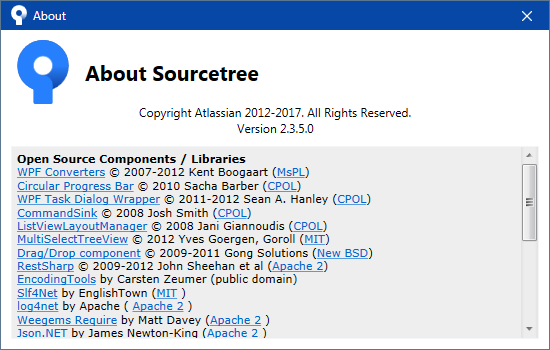
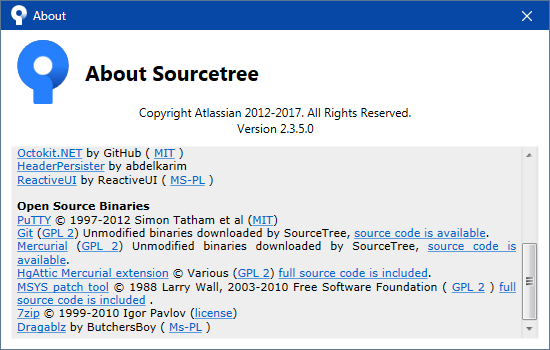
I am wondering, if we can fulfill the 3rd party library licenses (Scintilla, onigmo, encryption, uthash, (source code contributors), if we extend the "About" dialog like this:
RaiKoHoff
on 21 Dec 2017
@RaiKoHoff That looks amazing. I'm busy with the documentation and would like to get the documents done before the 23rd. I'm not sure if I'll get the time to implement a new about box. Would you be able to implement a new dialog (as per example above) before the 23rd or maybe a planned upgrade for the 5th?
rizonesoft
on 21 Dec 2017
@rizonesoft : unfortunately not, I will be busy with latest fixes for Christmas release ... :-\
So maybe for 5th or later (depending on feedback response of Christmas edition) ...
RaiKoHoff
on 21 Dec 2017
@RaiKoHoff thanks.
rizonesoft
on 21 Dec 2017
@rizonesoft, @RaiKoHoff: I have started writing up some documentation on Notepad3 schemes - shared with you using Dropbox Paper.
craigo-
on 8 Jan 2018
@craigo- Thanks. Looks awesome. I'll implement the documentation a little later today.
rizonesoft
on 8 Jan 2018
@craigo- A very promising beginning of documentation of this complex feature. :+1:
RaiKoHoff
on 8 Jan 2018
@craigo- See now, you are not finished yet. As soon as its complete, I will update the Notepad3 documentation.
rizonesoft
on 8 Jan 2018
Added Documentation link to the Wiki pages.
rizonesoft
on 25 Apr 2018
Related issues
craigo-
·
4Comments
 hpwamr
·
3Comments
hpwamr
·
3Comments
 dlong500
·
3Comments
dlong500
·
3Comments
 vvyoko
·
3Comments
vvyoko
·
3Comments
 wmsrww
·
3Comments
wmsrww
·
3Comments
Most helpful comment
@rizonesoft, @RaiKoHoff: I have started writing up some documentation on Notepad3 schemes - shared with you using Dropbox Paper.