Notepad3 5.18.1003.1309 RC Released
You can download the new Notepad3 RC here: https://www.rizonesoft.com/downloads/notepad3/. Just scroll down to the bottom of the page for the download links. Please test it thoroughly and report any bug you find. Suggestions are also welcome. 😉
 rizonesoft
All 29 comments
@rizonesoft : Great stuff :smiley: - one remark: In the distribution packages, you may omit the language directory for "en-US" (lng\en-US). It is build for consistency reasons, but not needed in a distribution, cause it is included in Notepad3.exe. So, if the complete "lng" directory is deleted, Nototepad3 will work with build-in "en-US" language as a fallback solution.
 RaiKoHoff
on 8 Oct 2018
RaiKoHoff
on 8 Oct 2018
@rizonesoft : a 2nd remark: in the .zip-packages, there is no initial "Notepad3.ini" file. Notepad3 can work without an initial settings file, but the advanced user has no information about possible options of settings section [Settings2], for example WebTemplate1= :astonished: .
RaiKoHoff
on 8 Oct 2018
Hello @RaiKoHoff ,
What do you think about adding the RC version in the "Release" tab? :thinking:
 hpwamr
on 8 Oct 2018
hpwamr
on 8 Oct 2018
Sorry for closing. Finger to big with a Smartphone :laughing:
hpwamr
on 8 Oct 2018
@RaiKoHoff I will omit the "en-US" (lng\en-US) in the next RC release and also remember to include the Notepad3.ini file. On suggestion from my side if you do not mind. I think by default the High-DPI toolbar should be selected. Looks funny with the bigger font and small toolbar? Would you agree? 😉
rizonesoft
on 8 Oct 2018
Hello @rizonesoft
Do you have already a list of all the changes?
PS: I've already posted the RC in "NsaneForums"
hpwamr
on 8 Oct 2018
@hpwamr Compiling a list will take some time. Will let you know as soon as I'm finished. 😉
rizonesoft
on 8 Oct 2018
@rizonesoft : The High-DPI toolbar is automatically selected, if the the screen resolution is beyond Full-HD (1920 x 1080) which the the majority of users have. We can make it auto-selected, if it is equal Full-HD (or higher), then it will effect a lot more users. As this is easy to configure, we can go for it.
RaiKoHoff
on 9 Oct 2018
@RaiKoHoff I think we go for it. 😉 Would it be possible to do the same with the font size?
rizonesoft
on 9 Oct 2018
@rizonesoft : Yes, we can do it for the initial default base font size to: 10p, if >= Full-HD -> 11p ?
RaiKoHoff
on 9 Oct 2018
From Saturday I can check the new relative settings (High-DPI toolbar and default base fonts) on my:
Laptop : 1366x768 and Desktop : 1920x1080 :wink:
hpwamr
on 9 Oct 2018
You can download the new Notepad3 RC here: https://www.rizonesoft.com/downloads/notepad3/. Just scroll down to the bottom of the page for the download links. Please test it thoroughly and report any bug you find. Suggestions are also welcome. 😉
After clicking the https://www.rizonesoft.com/download/6536/ link on the subpage you have provided, there is no download of Notepad3_5.18.1003.1309_Setup.exe file, and a redirect to https://www.rizonesoft.com/downloads
 Dziubek
on 9 Oct 2018
Dziubek
on 9 Oct 2018
@Dziubek I fixed the link, please test it again?
rizonesoft
on 10 Oct 2018
Thank you, everything has returned to normal
@Dziubek I fixed the link, please test it again?
rizonesoft
Dziubek
on 10 Oct 2018
From Saturday I can check the new relative settings (High-DPI toolbar and default base fonts) on my:
Laptop : 1366x768 and Desktop : 1920x1080 😉
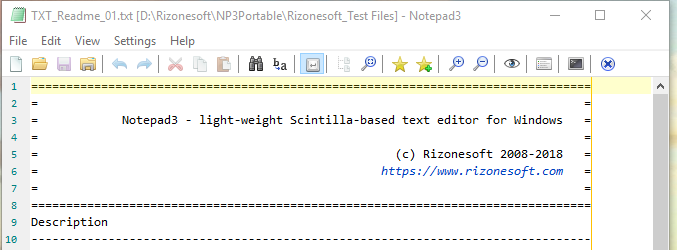
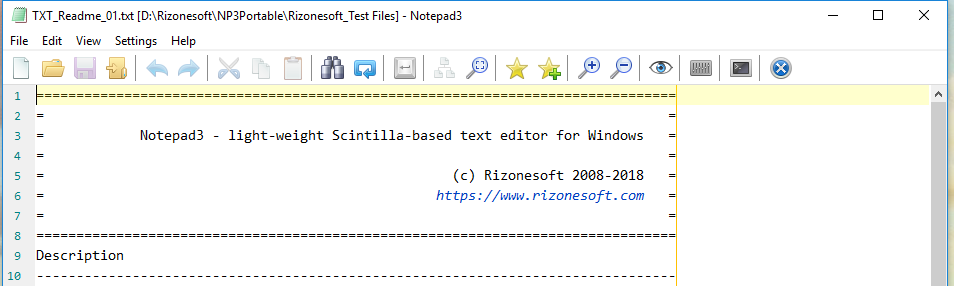
The tested version: Notepad3 (64-bit) RC v5.18.1011.131 is displayed correctly according the new relative settings (High-DPI toolbar and default base fonts) . 👍
Laptop : 1366x768
Desktop : 1920x1080
hpwamr
on 13 Oct 2018
Hello @rizonesoft and @RaiKoHoff
Personally, I'm not happy with the change of the default font from size 10 to 11 😒 because there is negative impact on the "printer output" ! 😳
Eg: Printing of 1 (one) page of the Notepad3 "Readme.txt" : 🧐
-- From my Laptop (10p.) -> 59 lines printed 👍
-- From my Desktop (11p.) -> 37 lines printed ( with 15 lines wrapped) 👎And also personally I don't like and don't need bigger characters (but also less characters per line !!) on my screen (24" - 1920x1080) !
This is my "+/-" experience, with the font size changes! 🤔
I'm voting to keep a standard Global Default Font... of 10 points for all screen !
hpwamr
on 15 Oct 2018
I am happy with the bigger base font size of 11pt. for all the screen resolutions I use.
The printing is another question, I am using this in very very rare cases (normal Text, I use a Textprocessor (Word or LibreOffice), Source Code, I don't print, it changes too frequently: "the print-out is out of date, when the printer finishes it 🤣).
But I prepare a beta, where the print-out is independant from base font setting, only depending on choosen magnification in printer dialog.
Then you have no WYSIWYG but this was never the purpose of Notepad3, it is the businesses of a Wordprocessor.
RaiKoHoff
on 15 Oct 2018
Please test development beta version _RC_5.18.1015.1316.
RaiKoHoff
on 15 Oct 2018
Hello @RaiKoHoff
Just a quick question, did you see this problem https://github.com/rizonesoft/Notepad3/issues/710#issuecomment-429772631 unresolved with RC_5.18.1015.1316 ? 🤔
hpwamr
on 15 Oct 2018
But I prepare a beta, where the print-out is independant from base font setting, only depending on choosen magnification in printer dialog.
Tested Notepad3 (64-bit) RC v5.18.1015.1316, much better ! 👍
Now, the base printer font is "10pt". modifiable with the Printer Zoom Magnification and it is independent of the Display fonts. 👍 ❤️
hpwamr
on 15 Oct 2018
I am happy with the bigger base font size of 11pt. for all the screen resolutions I use.
Well, I'm still from the old school, I have to learn new habits. 🤣
hpwamr
on 15 Oct 2018
@hpwamr :
I can not reproduce the smaller "HyperLink" font size with the default settings - How did you create this ?
RaiKoHoff
on 15 Oct 2018
I'm happy with the default font size changing to 11pt. I always changed Consolas to 11pt anyway (when I use this font).
I am a little less happy with changing how printing works. Sure, Notepad3 is not a WYSIWYG editor per se, but I think the baseline should be that it 'does what it says on the tin'. If the user sets the font size to 14pt, by default I believe Notepad3 should put toner/ink on paper at 14pt. I can see users trying to change the printer output size by changing the font size (as you do with pretty much every other application), and getting confused as to why the printer output is not changing. Put another way, I don't think it is particularly clear that to change the print output size, you must use the zoom command in the Page Setup dialogue.
I think having a setting to fix print output at a certain size is a good idea, but I'd make it optional and not the default.
 craigo-
on 16 Oct 2018
craigo-
on 16 Oct 2018
There is another WYSIWYG issue: Printer zooming level and Notepad3 window zooming level are (currently?) not related. If font sizes should correlate, then zoom level should also correlate ?
Ed.: On the other hand, monitor sizes grew over the last years, resulting in an increased value for screen font sizes, while a DIN A4 or US Letter paper format is still the same, so why should the font sizes correlate?
RaiKoHoff
on 16 Oct 2018
Microsoft Office uses the term "zoom" for the window, and "scaling" for print. The two functions work independently. I'm sure Notepad3 could behave the same way. Perhaps we could also adopt the same terminology?
Display DPI increases are today largely offset by OS display scaling, are they not? Such that an 11pt font on a 1440x900 display from ten years ago looks roughly the same size as an 11pt font on a 4K display today?
craigo-
on 16 Oct 2018
Scintilla uses the term "zoom" for the EditCtrl (window) and the term "magnification" for the print. Yes, we can adopt to it (my preference is magnification).
To clarify the argument above: While the monitor/screen sizes/resolutions and additional DPI scaling combinations can vary a lot, the paper size did not - so why couple the corresponding font sizes ?
RaiKoHoff
on 16 Oct 2018
Please check development beta version _RC_5.18.1016.1318.
Changes: initial default print magnification/scaling (former: zoom) is chosen according to initial default (factory) base font size (100% if font is 10pt, 91% if font is 11pt).
So the user gets an good initial print-out and can select another scaling (which is persisted and restored) if he like. Hope that will satisfy everybody.
RaiKoHoff
on 16 Oct 2018
Changes: initial default print magnification/scaling (former: zoom) is chosen according to initial default (factory) base font size (100% if font is 10pt, 91% if font is 11pt).
Hope that will satisfy everybody.
It works as expected.... Nice compromise... 👍 😆
hpwamr
on 16 Oct 2018
As far as I am concerned, this issue may be closed....
hpwamr
on 3 Dec 2018
Related issues
 valhristov
·
3Comments
hpwamr
·
3Comments
valhristov
·
3Comments
hpwamr
·
3Comments
 ggordon-vispero
·
3Comments
hpwamr
·
3Comments
craigo-
·
4Comments
ggordon-vispero
·
3Comments
hpwamr
·
3Comments
craigo-
·
4Comments
Most helpful comment
Please check development beta version _RC_5.18.1016.1318.
Changes: initial default print magnification/scaling (former: zoom) is chosen according to initial default (factory) base font size (100% if font is 10pt, 91% if font is 11pt).
So the user gets an good initial print-out and can select another scaling (which is persisted and restored) if he like. Hope that will satisfy everybody.