Notepad3: Wrong encoding with Notepad3 (64-bit) v5.20.305.2 RC2
I am going thru some issue when I open txt with non ANSII characters inside.
coro_1007.zip
When you open the attachment, you can find:
DGSource("E:\in\1_32 choristes, Les I ragazzi del coro DVD\coro.dgi")
Where is x97 instead of —
Notepad3 (64-bit) v5.20.305.2 RC2 (venom-pc)
Compiler: MS Visual C++ 2019 v16.4.(4-5) (VC v1924)
OS Version: Windows 10 Version 1909 (Build 19592)
Scintilla v431
Oniguruma v6.9.4
- Locale: en-US (CP:'ANSI (CP-1252)')
- Current Encoding = 'Unicode (UTF-8)'
- Screen-Resolution = 1920 x 1080 [pix]
- Display-DPI = 96 x 96 (Scale: 100%).
- Rendering-Technology = 'GDI'
- Zoom = 100%.
- Process is not elevated
- User is in Admin-Group.
- Current Lexer: 'AviSynth Script'
 tormento
All 21 comments
Hello @tormento ,
We have worked a lot of work in the area of "Encoding detection".
I think your problem is solved in the latest RC3 versions. 👍
Feel free to test the RC version "Notepad3Portable_5.20.328.2_RC3.paf.exe.7z" or higher.
See "Notepad3 BETA-channel access #1129" or here Notepad3Portable_5.20.328.2_RC3.paf.exe.7z.7z
Note1: "Notepad3Portable RC" can be used in "2 flavors", see with or without extension ".7z".
Note2: If you follow #1105, you can also update your Notepad3 Installer version with the latest Beta version #1129 (for more information, see the pinned issue on top of this "Issues Tab").
Your comments and suggestions are welcome... 😃
 hpwamr
on 28 Mar 2020
hpwamr
on 28 Mar 2020
Thanks, I replaced the x64 exe file from the paf and seems to be working now.
In case I will go thru more issues, will keep you informed.
tormento
on 28 Mar 2020
Another error while displaying:
5
00:19:02,047 --> 00:19:04,641
ACCRA attraccherࠡ a Port Howat.
where rࠡ is rxE0
Instead of:
5
00:19:02,047 --> 00:19:04,641
ACCRA attraccherà a Port Howat.
It seems there is some issue with UTF-8 with and without BOM too.
tormento
on 28 Mar 2020
Hello @tormento ,
I'm waiting for advice from the developer.
It seems to me that your text is corrupt.
I corrected it manually and saved it in encoding "UTF-8" (no signature). VTS_01_0.Italian.F(utf-8).srt.zip
hpwamr
on 28 Mar 2020
Hi @hpwamr !
Probably yes, the last file was generated by a subtitle grabber called SubRip (you can find it on VideoHelp), that can generate Unicode 8, 16 with and without signature.
Here is almost night, let me have today to make some trial and error. Perhaps I could send also some output to you to test.
tormento
on 28 Mar 2020
Here is almost night, let me have today to make some trial and error. Perhaps I could send also some output to you to test.
Yes, I can examine the files where you are having issues. 🤔
hpwamr
on 28 Mar 2020
Is seems, that the file with UTF-8 Signature (VTS_01_0.Italian F.srt) has been corrupted by violence. If forcing a file reload as ANSI (CP-1252, western Europe), you get correct text with the wrong 3-Byte UTF-8 Signature at the beginning. So it seems that an UTF-8 Signature has been but in front of an ANSI file without converting the text properly (like Frankenstein's Monster).
Every text editor will try to load it as UTF-8 Signature, cause they rely on the Signature, - then they will get garbage characters in text body, cause this is not UTF-8 but ANSI.
Ed.: Wondering, how you produced this Frankenstein's file ?
The other file (VTS_01_0.Italian F_(utf-8).srt) seems to be a valid UTF-8 file and it is loaded perfectly (with current RC's) as UTF.8 (92% reliability).
(Ed.: Did not check, if v5.20.305.2 RC2 is corrupted regarding encoding detection)
 RaiKoHoff
on 28 Mar 2020
RaiKoHoff
on 28 Mar 2020
Here is almost night, let me have today to make some trial and error.
Hello @tormento ,
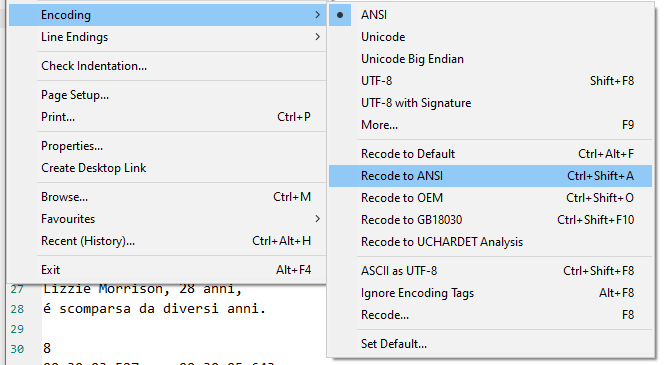
Here, I've recovered your garbage text with Notepad3 (64-bit) v5.20.328.2 RC3) and saved a copy in CP-1252 and in UFT-8 encoding: VTS_01_0.Italian.F.corrected.srt.zip.
_Steps to follow:_
- Open your garbage text, go to "Encoding and select "Recode to ANSI"
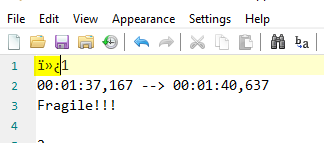
- Remove those unwanted characters (rest of the "signature" of UTF-8)
- Save your text (the encoding is CP-1252 or Windows-1252)
If you want to convert it to UFT-8 (my preference) 😃
- Open again your corrected ANSI text, go to "Encoding and select "UTF-8"
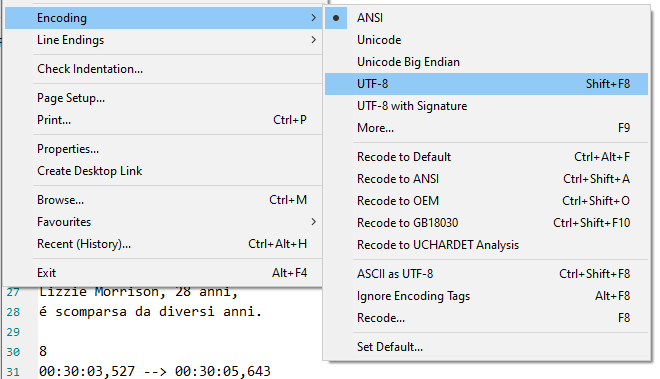
- Save your text (the encoding is "UTF-8")
hpwamr
on 29 Mar 2020
@hpwamr : Maybe we should separate the "Encoding -> Recode" items (which means, "reload the file and try to interpret it as it has been encoded as <XYZ-Encoding>") from the "Encoding -><XYZ-Encoding>" items (which means take current document and transform it according to <XYZ-Encoding>.
Last item may create garbage characters, if you try to convert Unicode characters to ANSI, cause ANSI encoding can not carry Unicode characters (except ASCII and their Code-Page specific characters). Zufuliu separates these 2 concerns more clearly ... 🤔
Renaming from "Re-Encode" to "Reload as if <XYZ-Encoded>" would be more precise. 🤔
RaiKoHoff
on 29 Mar 2020
Dear @hpwamr
here you can find attached all the encodings SupRip can output, i.e. UTF8/UTF16-LE/BOM/Unix/Windows. I did not post-OCR correct them to have pure output.
I still find errors in:
UTF8 BOM unix break.srt
UTF8 BOM windows break.srt
Enjoy! ;)
P.S: Aside from bugs, do you suggest me to use UTF8 with or without BOM?
tormento
on 29 Mar 2020
Hello @tormento : regarding the "UTF-8 Everywhere", the recommendation is NO BOM/SIG - (see here: http://utf8everywhere.org/#faq.boms).
(By the way: BOM (Byte Order Mark) is derived from UTF-16 LE/BE, where you have a 2-Byte encoding for each character (wide character - wchar) where you have to define how to interpret the 2 Bytes (Low-Byte High-Byte or vice versa, as for "Little-Endian (LE)" vs. "Big-Endian (BE)" machines).
For UTF-8 there is no "Byte-Order-Ambiguity", it is a Multi-Byte-Encoding, 1-Byte (ASCII), 2-Byte, 3-Byte sequences (Code-Point) are well defined. The first 3 Bytes of a file may be defined to sign the file as "following byte-stream should be interpreted as UTF-8 text", so it is no BOM (is does not define a Byte ordering), it is more a Signature (SIG) to ease the encoding detection of a byte-stream - but this is a Microsoft thing only - and they are moving (Visual Studio) more and more from their UTF-16LE to UTF-8.
RaiKoHoff
on 29 Mar 2020
@RaiKoHoff thanks!
tormento
on 29 Mar 2020
Hello @tormento ,
I confirm that the modern and more universal way is "UTF-8" (NO BOM/Signature). 😏
You can convert all your "samples files" into "UTF-8" if you follow the above: "_Steps to follow_" (just when the file is correctly displayed, go directly to the last step: [go to "Encoding and select "UTF-8"]).
hpwamr
on 29 Mar 2020
@tormento : thank you for providing us with your example files. 👍
Again, there is a strange file (UTF8 BOM windows break.srt) in your set of examples

The debug information (NP3 titlebar) stated:
UTF-8 SIG (so there should be no doubt about, we will interpret it as UTF-8 encoding),
but analysis of byte-stream says [Invalid UTF-8], which means there are bytes-sequences in the stream, which are not valid UTF-8 (resulting in corrupted characters, if interpreted as UTF-8).
Which means, it is somehow artificially created 😲.
You can do that with Notepad3: Load the valid ANSI file, then switch encoding to UTF-8 SIG, which is always sensible, since UTF-8 can carry all ANSI, then forcing an ASCII -> UTF-8 (Ctrl-Shift-F8), which reloads the file and forces the byte-stream to be interpreted as UTF-8 (which it is not), that produces garbage characters, then save the file as UTF-8 SIG, which saints the garbage chars as being correct ???
RaiKoHoff
on 29 Mar 2020
Dear @RaiKoHoff
perhaps it's a problem of SubRip, that I use really seldom.
I will keep you informed if I will find some other app giving me some strange Unicode files to deal with.
Thanks for all!
tormento
on 29 Mar 2020
Hello @tormento ,
As far as I'm concerned, I think you (requester) can close this issue...
hpwamr
on 29 Mar 2020
tormento
on 30 Mar 2020
UCHARDET Encoding Detector is about 92% sure, that this file is ANSI.
And, as in every statistical analysis (where UCHARDET is based on), you can find or construct exceptions, which are outside of the statistical majority. Your file has only very few chars to define it as Unicode (à,ò)
Unfortunately, the 92% is just the reliability level, we trust UCHARDET analysis - in this case, it was too low:
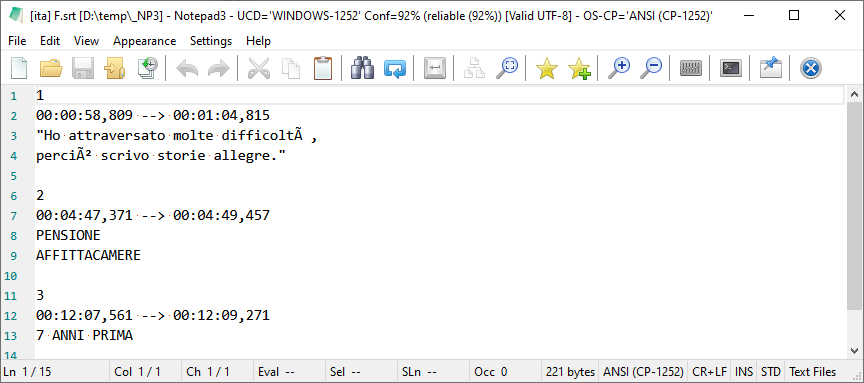
The option you have:
Ctrl+Shift+F8: Fast reload as UTF-8- Increase the confidence by increasing the reliability level:
[Settings2] AnalyzeReliableConfidenceLevel= 92 -> 95 - Decrease the ANSI Code-Page Bonus
[Settings2] LocaleAnsiCodePageAnalysisBonus= 33 -> 0 - Switch off UCHARDET Encoding Analysis completely:
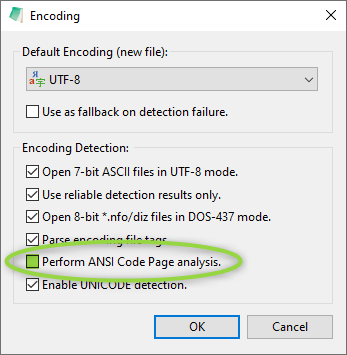
Only if you mostly work with UTF-8 files.
RaiKoHoff
on 30 Mar 2020
@RaiKoHoff thanks for your support and efforts. I understand the point. Perhaps other editors don't use detector or have higher confidence rate. I will close the issue.
P.S: What do you use to create commented screenshots?
tormento
on 31 Mar 2020
@tormento : I know that Notepad++ uses UCHARDET detector too, but a version with other statistical training data and maybe other parameters. We decided to make the screws user adjustable, according to his needs.
The used screenshot tool is Screenpresso .
RaiKoHoff
on 31 Mar 2020
P.S: What do you use to create commented screenshots?
I'm very happy with FastStone Capture. 😃
hpwamr
on 31 Mar 2020
Related issues
 RaffaeleBianc0
·
3Comments
hpwamr
·
4Comments
RaffaeleBianc0
·
3Comments
hpwamr
·
4Comments
 zb-z
·
3Comments
hpwamr
·
3Comments
zb-z
·
3Comments
hpwamr
·
3Comments
 bravo-hero
·
3Comments
bravo-hero
·
3Comments
Most helpful comment
Dear @RaiKoHoff
perhaps it's a problem of SubRip, that I use really seldom.
I will keep you informed if I will find some other app giving me some strange Unicode files to deal with.
Thanks for all!