Notepad3: Feature request: Multiple word editing
I just went from notepad2-mod to notepad3 .
Taking a look at other possibilities in that change of notepad2-mod, I also found notepad2e, with the feature of multiple word editing, and I do not know if notepad3 implements it (at least I have not found anything).
https://github.com/ProgerXP/Notepad2e#new-edit-selection
Would there be a possibility of having that characteristic? , or at least something like that
Thx
 pantantrollo
All 37 comments
Related Issue #1236
 RaiKoHoff
on 28 May 2019
RaiKoHoff
on 28 May 2019
Feel free to test experimental version _5.19.529.2235_Oniguruma (in XpErImEnTaL sub folder).
(Beta channel access: see #1129)
I didn't copy Notepd2e's behaviour, but use the Multi-Selection features as Scintilla designs it.
Notepad2e wraps it with lots of code for indicator handling, which is not necessary (IMO).
So you get a consistent (with standard selection) set and extent selection behavior, using the Ctrl+ key instead of the Shift+ key for the standard selections. (Ctrl+ is Scintillas default modifier for multi-selection - Ctrl + Click-Draw/Left/Right/Up/Down.
If you have a simple selection (and Mark Occurrences OFF), and you press Crtl+Shift+SPACEBAR, Notepad3 selects (multi-selection) all occurrences (case sensitive) of this selection in the document.
If Mark Occurrences is ON, Notepad3 tries to select the same marked occurrences on Crtl+Shift+SPACEBAR (hopefully 🤔). Beware of Mark Occurrences mode Mark Visible Only, then, you only get the marked occurrences in the current view (displayed area) selected.
The Sel xxx section in the Statusbar adds a #(hash) char to indicate the number of multi-selections (for normal stream selections, it is the number of selected chars).
XpErImEnTaL : Alpha state - currently not part of master branch (upcoming release candidate/release)
RaiKoHoff
on 29 May 2019
Ok, thanks, (sorry for my english)
I did not find the v.5.19.529.2235_Oniguruma I downloaded the 5.19.529.2231_Oniguruma, but to prove I imagine it is worth it.
pantantrollo
on 30 May 2019
I did not find the v.5.19.529.2235_Oniguruma I downloaded the 5.19.529.2231_Oniguruma, but to prove I imagine it is worth it.
Hello @RaiKoHoff , the "v2235 Alpha file" is only uploaded in "Dropbox Experimental" :confused:
Hello @pantantrollo ,
Now you can find it in "Microsoft OneDrive/Share_Place/Experimental" too. 😉
 hpwamr
on 30 May 2019
hpwamr
on 30 May 2019
New version _5.19.530.2236_ONIGURUMA is uploaded, new features:
- Multi-Select current word (
Ctrl+Shift+Spc) ifMark Occurrencesis OFF or in mode "Match Whole Word Only -> Match Current Word"
If we have a Multi-Selection:
Ctrl+Alt+F2: Move "Main Selection" (the slightly darker one of the multi-selections) to the next selectionCtrl+Alt+Shift+F2: Like the above - in the other (previous selection) direction
RaiKoHoff
on 30 May 2019
Perfect, quite more than what I requested and something overwhelming 😉 (many options to be able to play)
If we have a Multi-Selection:
Ctrl+Alt+F2: Move "Main Selection" (the slightly darker one of the multi-selections) to the next selectionCtrl+Alt+Shift+F2: Like the above - in the other (previous selection) direction
Very useful to follow the changes reialized
I have tried some combinations, and without having seen everything thoroughly, I think there is a small bug in the edition, when the options that I leave in the image are selected.

Once pressed Ctrl + Shift + Spc, i start editing well, but only the first letter of all the words found, then only edit the current line (I do not know if I came to explain well, sorry)
Thank you very much for the changes offered
pantantrollo
on 30 May 2019
Thank you for testing, please check "Match Current Word" mode with new beta version _5.19.531.2237_ONIGURUMA.
RaiKoHoff
on 31 May 2019
ok, all fine in this 5.19.531.2237_ONIGURUMA
pantantrollo
on 31 May 2019
Hello,
I keep downloading the latest "Oniguruma" versions of the experimental folder. I understand that at some point, these characteristics that are only in these versions, will end in the other branches (RC)
it is right?
pantantrollo
on 9 Jun 2019
@pantantrollo : Yes - currently we have a feature freeze on the master branch, cause we are preparing a Release version (Release Candidate (RC) 1 is already published, RC2 in prparation) - means only bug-fixes are allowed for master branch.
But this should not stop the development, so the further development is in parallel on "ONIGURUMA" branch, which will be merged into the master branch after release of the "stable" version.
RaiKoHoff
on 9 Jun 2019
@pantantrollo : Please test the configurable "Multi Edit Indicator" feature - active in experimental alpha/beta version _5.19.611.2249_Oniguruma. (default orange round_boxon added/deleted chars).
RaiKoHoff
on 11 Jun 2019
hello,
I found inside the folder "Xperimental":
Notepad3Portable_5.19.611.2249_RC2.paf.exe.7z
Notepad3Portable_5.19.611.2248_Oniguruma.paf.exe.7z
I downloaded the two
the 2249_RC2 in the "Xperimental" folder, does not have multiedition and the .2248_Oniguruma, I have not found anything you can configure about "Multi Edit Indicator" that you comment.
(Maybe also because my English is very bad, I did not understand you very well 😄 )
pantantrollo
on 11 Jun 2019
@pantantrollo : sorry, wrong file picked for upload - corrected just now
RaiKoHoff
on 11 Jun 2019
Hello @pantantrollo ,
It is a little mistake with the upload of Notepad3Portable_5.19.611.2249_Oniguruma.paf.exe.7z
Don't worry @RaiKoHoff Is going to correct it. :wink:
hpwamr
on 11 Jun 2019
Sorry for the delay
Tested the last "_Oniguruma", I noticed the change of color in the edition with ctrl+shift+space and also when the editing is done in block, with alt+mouse click
What I have not found (I may have misunderstood) is the form of configuration that you mentioned in the previous paragraphs:
https://github.com/rizonesoft/Notepad3/issues/1126#issuecomment-500845611
pantantrollo
on 14 Jun 2019
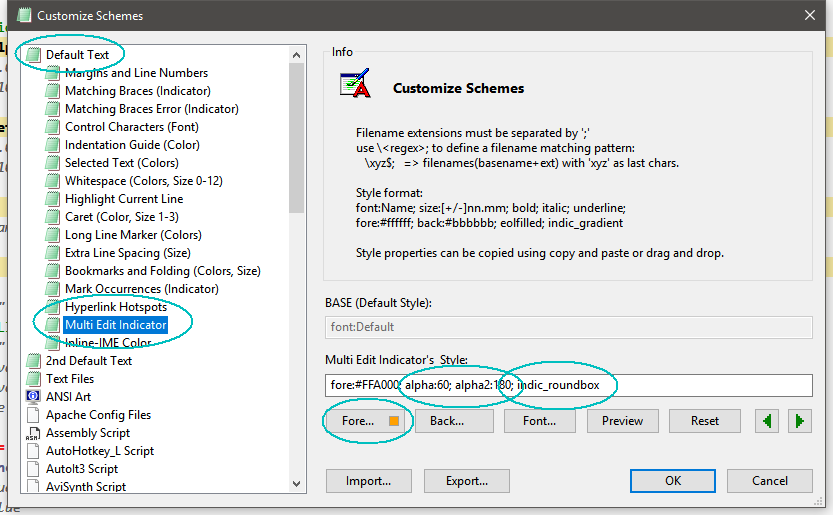
RaiKoHoff
on 14 Jun 2019
👍 , thx 😄
pantantrollo
on 14 Jun 2019
Hint for the indicator style: Scintillas Doc: https://www.scintilla.org/ScintillaDoc.html#SCI_INDICSETSTYLE
RaiKoHoff
on 14 Jun 2019
hey,
I'm still testing the versions that are published in the beta channel.
I have gone from the so called "_Oniguruma" to the "_DEV" (I have skipped the ones named as "_MUI", I do not really know what the difference is).
For now, nothing broken, everything ok 😄 ,
thx
pantantrollo
on 13 Jul 2019
I have gone from the so called "_Oniguruma" to the "_DEV" (I have skipped the ones named as "_MUI", I do not really know what the difference is).
Hello @pantantrollo ,
FYI: don't worry, the sources files are identical... 🤔
See: https://github.com/rizonesoft/Notepad3/issues/1129#issue-434643529
Note:
To avoid interference with RaiKoHoff "Beta Build Numbering", I chose to start my "Beta Build version" with another series of numbers, but don't worry, the sources files are identical... 😃
And also: https://github.com/rizonesoft/Notepad3/issues/1274#issuecomment-508944654
Yes, for our "convenience and to avoid interference", there are several sets of "build" numbers, but don't worry, the sources files are identical and the final release is unique... 😉
hpwamr
on 14 Jul 2019
Hello @pantantrollo,
the build name extensions (_Oniguruma, _MUI, _DEV, _RCn) reflect specialties of current development.
When we decide to release a version, the master branch are internally seen as "feature freeze". That means, only bug-fixes are allowed to be merged (committed). Beta builds of this master branch should be marked as "release candidates (RCs)" (name extension _RC) until final release.
Development of new features are made on a separate branch (e.g. the switch to the Oniguruma RegEx engine) - builds from this branches are named accordingly.
During release candidate phase, there may be beta versions with different features (_RCs & _NewFeature), after release, all beta builds (except (e)xperimental new feature branches) are build from the master branch.
But you are right, the beta-build names should reflect that.
@hpwamr : We should name our different beta build with the same name extensions and similar build numbers. Suggestion: extension "_BETA". On every beta build publishing, we should have merged the sources from master before and set the build number accordingly (Versions\build.txt, res\Notepad3.exe.manifest.conf and src\VersionEx.h). Before publishing a beta version, we should pull current master into the local development branch, set build-number accordingly, check the build, commit the changes for the beta build and publish the beta build then.
Exception: Xperimental build, based on branches which are not yet merged/committed to the master may have different naming and build numbers.
RaiKoHoff
on 14 Jul 2019
Thanks to both, @hpwamr and @RaiKoHoff , for the explanations 😃
I am not up to date on development themes, and sometimes, it can be a bit overwhelming to try to understand how an application and its phases are built, (I'm still devoting time to the github platform itself 😔 ), even so, thanks for the time dedicated (which is always what we lack)
pantantrollo
on 14 Jul 2019
We should name our different beta build with the same name extensions and similar build numbers.
Suggestion: extension "_BETA"....
Hello @RaiKoHoff ,
I agree 100% with your proposal... 👍
From now on, my build will be integrated into your "Beta Build Numbering" with the word "BETA" at the end, in order to clear up any possible confusion for our Notepad3 users/testers. 😃
hpwamr
on 14 Jul 2019
I have to say, this is an awesome feature, and I am really utilizing it, functionally it works great, some minor observations though:
If you select a word backwards, from the end to the start, then invoke multi-word edit, the cursor ends up being at the start of the word in the active block, but at the end of the non-active blocks..
If you invoke the multi-edit mode then use the up/down arrow keys, do you think it should cancel the multi-word edit?, what happens currently is that you keep multiple cursors until ESC is pressed, I can understand it working like that with horizontal movement, but maybe not vertical?, although this could possibly be useful in certain situation though, and isn't an issue for me, just an observation.
 jupester
on 2 Sep 2019
jupester
on 2 Sep 2019
@jupester :
- point 1. will be fixed on next beta
- this is the standard bahavior provided by Scintilla component,
I have no preferences on this topic, so lets stay with it until a strong complaint occures
RaiKoHoff
on 2 Sep 2019
Hello @pantantrollo ,
As far as I'm concerned, I think you (requester) can close this issue...
hpwamr
on 28 Jul 2020
ok, thank you very much for everything.
pantantrollo
on 28 Jul 2020
The mark occurrences visible only option with multi-edit doesn't seem to work anymore, it always seems to selects all occurrences.
I haven't gone back through the builds to find out when it stopped, but it definitely used to work, so it seems like a regression.
Also when using the C+A+F2 shortcuts to skip through the matches in multi edit mode, if the match is outside the current viewport the document isn't scrolled, do you think it should be?
jupester
on 1 Aug 2020
@jupester : If you do "Multi-Select All Matches Ctrl+Shift+Spc", for safety reasons, really all matches are selected for edit (even if you are in "only visible occurrences" mode. Most users don't want to edit only the visible ones, in 99% of use-cases you want to edit all. But we are open to discuss this.
The selected text should scroll to be visible - this is a regression.
Ctrl-Alt-F2 should work - except the scroll to visible ?
RaiKoHoff
on 1 Aug 2020
You previously explained it as:
https://github.com/rizonesoft/Notepad3/issues/1126#issuecomment-497034959
If
Mark Occurrencesis ON, Notepad3 tries to select the same marked occurrences onCrtl+Shift+SPACEBAR(hopefully 🤔). Beware ofMark OccurrencesmodeMark Visible Only, then, you only get the marked occurrences in the current view (displayed area) selected.
and that is how I remember it working and used it like that to replace vars in only 1 subroutine at a time, anyway I am not fussed I will just be sure from now on that the expected behavior will be to mod all occurrences document wide.
jupester
on 1 Aug 2020
Hello @jupester ,
_Important note:_ ONLY the "en-US" and "de-DE" version are up-to-date, other languages will follow ASAP ! 😏
Feel free to test the "Portable BETA/RC paf" version "Notepad3Portable_5.20.801.1_BETA.paf" or higher.
See the issue "Notepad3 BETA/RC-channel access #1129" or hereunder:
_Note1:_ The "Notepad3Portable_paf" version can be used in "2 flavors", see with or without extension ".7z".
_Note2:_ If you follow the instructions of #1105 , you can update your "Notepad3 Setup" version with the latest features/fixes of the "Portable BETA/RC paf" version (see #1129).
Your comments and suggestions are welcome... 😃
hpwamr
on 1 Aug 2020
@jupester : You are right, I wrote this comment, because at implementation time, I have been already aware of this issue.
The Mark Visible Only feature has been introduced for display performance reasons (reactive user-interface (UI)) only.
On adding the feature of "select and edit all (visible) occurrences" later, this became an issue, which I commented accordingly.
Meanwhile I got the opinion, that this is not the expected behavior on doing a "Multi-Select All Matches Ctrl+Shift+Spc".
Since Mark Visible Only is not exact, I am free to cache or preemptive mark more occurrences (outside display area) to speed up display behavior on scrolling.
So this markers (only visible) should not be used for other operations than displaying them.
To get an exact method for your workflow, you should use "replace in selection", even if this is slightly more complicated.
RaiKoHoff
on 2 Aug 2020
Okay, lets stay with Multi-Select All Matches Ctrl+Shift+Spc will select edit all matches of the whole document 👍
RaiKoHoff
on 2 Aug 2020
Hello @jupester ,
_Important note:_ ONLY the "en-US" and "de-DE" version are up-to-date, other languages will follow ASAP ! 😏
Feel free to test the "Portable BETA/RC paf" version "Notepad3Portable_5.20.802.1_BETA.paf" or higher.
See the issue "Notepad3 BETA/RC-channel access #1129" or hereunder:
_Note1:_ The "Notepad3Portable_paf" version can be used in "2 flavors", see with or without extension ".7z".
_Note2:_ If you follow the instructions of #1105 , you can update your "Notepad3 Setup" version with the latest features/fixes of the "Portable BETA/RC paf" version (see #1129).
Your comments and suggestions are welcome... 😃
hpwamr
on 2 Aug 2020
OK the scroll issue seems resolved, as for the Match Visible, no worries I only brought it up because it was a change in behavior so I assumed regression.
This topic seems closable.
jupester
on 3 Aug 2020
Hello @pantantrollo ,
As far as I'm concerned, I think you (requester) can close this issue...
hpwamr
on 8 Aug 2020
🆗
pantantrollo
on 9 Aug 2020
Related issues
 craigo-
·
3Comments
craigo-
·
3Comments
 omega32
·
3Comments
omega32
·
3Comments
 vvyoko
·
3Comments
vvyoko
·
3Comments
 rizonesoft
·
4Comments
hpwamr
·
3Comments
rizonesoft
·
4Comments
hpwamr
·
3Comments