Notepad3: Garbage characters in Japanese menu
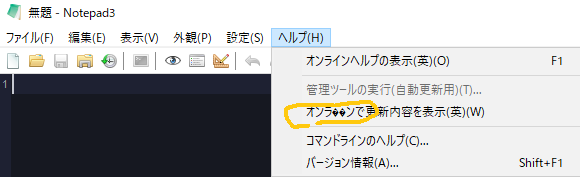
One item of Japanese menu help is garbled. Since only one place is garbled, I feel that it is not an overall problem. There is a version without garbled characters after updating the Japanese file.
There was no problem if I compiled it with VS2019. There is no problem in the same place in Korean and Chinese.
- Garbled: Notepad3 RC_5.20.218.2 (Release)
- Garbled: Notepad3Portable_5.20.218.1_RC1.paf.exe.7z
- Garbled: Notepad3Portable_5.20.217.2_XP.paf.exe.7z Xperimental Builds
- No problem: Notepad3Portable_5.20.217.1_BETA.paf.exe.7z Xperimental Builds
 maboroshin
All 6 comments
Hello @rizonesoft ,
It's related to issue #1732 (Garbages characters with UTF-8 in: Belarusian, Russian, Japanese and Chinese,...)
Best Derick, please contact me or @RaiKoHoff for fixes. :thinking:
 hpwamr
on 18 Feb 2020
hpwamr
on 18 Feb 2020
Thank you! I understand.
This is a Visual Studio 2019 issue. Japanese people can guess and read this menu.
maboroshin
on 18 Feb 2020
Feel free to test the RC2 prototype version "Notepad3Portable_5.20.219.1_RC2.paf.exe.7z" or higher.
See "Notepad3 BETA-channel access issue #1129" or here Notepad3Portable_5.20.219.1_RC2.paf.exe.7z.
Note: "Notepad3Portable RC2" can be used in "2 flavors" (with or without the extension ".7z").
Your comments and suggestions are welcome... 😃
 RaiKoHoff
on 19 Feb 2020
RaiKoHoff
on 19 Feb 2020
The problem was fixed.👍
maboroshin
on 19 Feb 2020
@rizonesoft : Need to patch resource compiler dll (rcdll.dll) in the Win10 SDK (v10.0.18362) on deployment machine.
RaiKoHoff
on 19 Feb 2020
Hello @maboroshin ,
As far as I'm concerned, I think you (requester) can close this issue...
hpwamr
on 19 Feb 2020
Related issues
hpwamr
·
4Comments
 craigo-
·
3Comments
craigo-
·
3Comments
 valhristov
·
3Comments
valhristov
·
3Comments
 blackcrack
·
3Comments
blackcrack
·
3Comments
 rizonesoft
·
4Comments
rizonesoft
·
4Comments
Most helpful comment
@rizonesoft : Need to patch resource compiler dll (rcdll.dll) in the Win10 SDK (v10.0.18362) on deployment machine.