Notepad3: Window position settings not honored after Relaunch Elevated
Whenever I use the "Relaunch Elevated" option, Notepad3 resets it window position and size.
Even though I can actually _save_ window size & position when elevated, these settings will only be honored when NOT elevated.
I'm saving my settings to notepad3.ini next to notepad3.exe.
Notepad3 (64-bit) v5.19.815.2595
Compiler: MS Visual C++ 2019 v16.2.(0-2) (VC v1922)
OS Version: Windows 10 Version 1809 (Build 17763)
Locale: en-US (Codepage: 'ANSI (CP-1252)')
Scintilla v420
Oniguruma v6.9.3
UChardet v2018.09.27
TinyExpr v2018.05.11
UTHash v2.1.0
 ltGuillaume
All 41 comments
Hello @ltGuillaume ,
When you use the "Relaunch Elevated" option, Notepad3 re-reads its internal coded settings and uses the default coded initial position and size.
The solution is to adjust your preferred position and size and use "Save as Default Position" in position Menu.
Then, a new key "DefaultWindowPosition=" is added in Notepad3.ini in [Settings2] section.
PS: "Clear saved Default Position", delete this key and restore its initial position and size.
It reminds me of a discussion on this topic at #469

 hpwamr
on 31 Aug 2019
hpwamr
on 31 Aug 2019
Thanks for the quick response. It does leave me confused about the reason for this behavior, though: it seems that all of my cusstom settings are correctly loaded into an elevated instance of Notepad3, except for the window size/position.
- I have a specific size&position set for the current resolution, but an elevated instance does not use it. Why? It still uses the same settings otherwise, so it doesn't make sense not to use the position settings.
- If I save the settings (including position) from an elevated instance, the window size&position from the elevated instance is reproduced in a non-elevated instance, but NOT in an elevated instance. That makes even less sens, I would say.
- Could you tell me what exactly is that default position then? I would say it should be the window size&position that's used when no resolution-specific settings are found. But what does it actually do?
_I would say that it'd be even better if "Relaunch Elevated" actually means that the file contents, caret position and window size&position are passed on to the elevated instance irrespective of the default/current resolution window settings, since this feature oftentimes is used because of a situation that can only be described as "ah crap, I have this file all set up and positioned where I want it to test things out, but now I can't save it because Np3 isn't elevated yet ==> let's relaunch and put it exactly where it was before"._
If there actually is documentation to be found about this, then I apologize, as I couldn't find it.
ltGuillaume
on 31 Aug 2019
it seems that all of my cusstom settings are correctly loaded into an elevated instance of Notepad3, except for the window size/position.
You right, it's strange. 🤔
Maybye @RaiKoHoff has a better explanation than me ?
hpwamr
on 1 Sep 2019
@RaiKoHoff I almost lost all my settings just now (luckily I had a backup).
I just went into elevated mode within v5.19.902.2615 BETA and ALL my settings got reset. I don't even have "Save settings on exit" enabled, and still this happened.
ltGuillaume
on 4 Sep 2019
I don't know if I tried the first thing before, but
- Running Notepad3 as administrator (via Windows context menu) does honor the window size/position settings
- Using File -> Launch -> Relaunch Elevated does not
ltGuillaume
on 9 Sep 2019
Relaunch elevated restarts Notepad3 with elevated rights, providing the given command line arguments plus a temporary stored file of current document plus current position arguments.
But there were little bugs in it.
(try cmdln: .../Nopepad3.exe /pos 100,100,640,400,0) (last number is maximized(1) or not(0))
Hope that I fixed it, could not test under Win10 yet, but feel free to test dev beta ver _5.19.911.2624_BETA.
 RaiKoHoff
on 11 Sep 2019
RaiKoHoff
on 11 Sep 2019
I just tried .2624 in Windows 10 1809: opened up Np3, typed some letters, didn't save, then relaaunched elevated. Result:
- The position is kept
- The typed letters were gone
The following happened only the first time I tried. I cannot reproduce it, even though it did happen before with previous versions.
- All settings, other than the positioning, were reset upon relaunching elevated
- All previous settings in notepad3.ini were gone upon closing Np3, even though I have NOT set Np3 to save settings on exit
ltGuillaume
on 11 Sep 2019
If Save Settings on Exit has NOT been activated, it is a problem to preserve current (changed) settings between process switching.
On the other hand, if Save Settings on Exit IS activated, a Relaunch Elevated will save the current settings to Notepad3.ini silently between process switching.
I think this limitations are okay - aren't they?
Feel free to test dev beta ver _5.19.911.2625_BETA.
RaiKoHoff
on 11 Sep 2019
If Save Settings on Exit has NOT been activated, it is a problem to preserve current (changed) settings between process switching.
I'm not expecting it to preserve any settings that were changed in the running instance, I'm expecting the elevated instance to NOT reset all settings. It just happened again, by the way, so it's definitely reproducable.
I think the elevated instance doesn't have access to notepad3.ini yet when starting, so it starts with all the defaults. Then, when closing, it will overwrite the original notepad3.ini, since the default is to save settings on exit. That would make it a timing issue (kind of a race condition) between the instance closing (and writing to the .ini) and the opening instance reading from the .ini.
ltGuillaume
on 11 Sep 2019
@ltGuillaume : you might be be right (race conditions are sometimes hard to debug).
I make a sensible code change anyway to prevent this particular race condition - hope that fixes the problem.
Feel free to test dev beta ver _5.19.912.2626_BETA.
RaiKoHoff
on 12 Sep 2019
That seems to do the trick! The typed letters are now kept and the settings were preserved in about 20 tests so far. Thanks!
ltGuillaume
on 12 Sep 2019
I missed to save the settings now completely before relaunching elevated.
Please test dev beta ver _5.19.912.2627_BETA too, if saving now before relaunch does not raise the race-condition again 🤔
RaiKoHoff
on 12 Sep 2019
It seemed to work fine without "Save Settings On Exit", but when I _enabled_ this option (OR I searched for something and then elevated, with the option Remember Search Pattern) I found that the problem reappeared. Np3 started with default settings when aftering using Relaunch Elevated, and when closing the elevated instance, I got this:
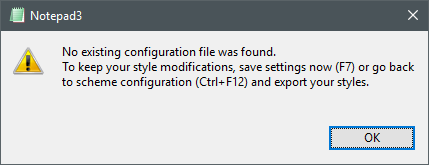
The settings file was NOT overwritten, however.
(I guess it goes without saying that I've disabled UAC prompts, otherwise (I assume) this race condition will be less likely not occur.)
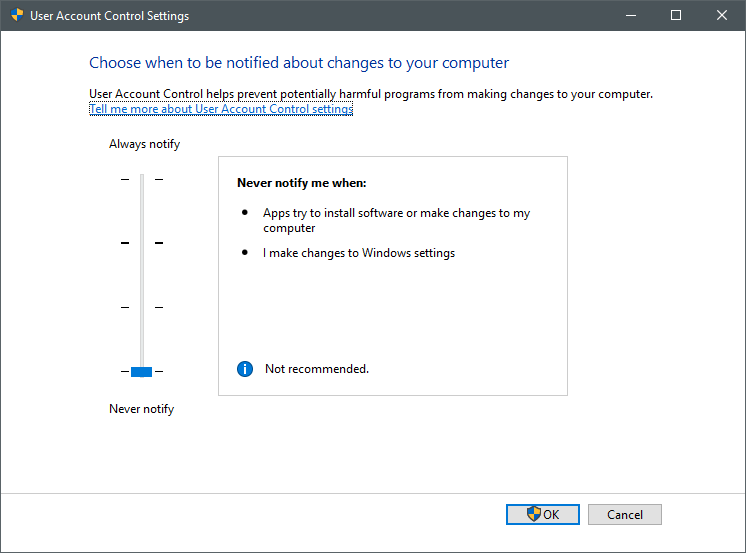
ltGuillaume
on 12 Sep 2019
@ltGuillaume : Ah yes - I was wondering, how fast this guy was, entering the passphrase for elevated credentials to trigger that race-condition :rofl:
By the way: Are you using the portable or the setup installation?
RaiKoHoff
on 12 Sep 2019
Hello @ltGuillaume ,
Thanks for your interest and your contributions to Notepad3. 😃
I would like to add you in the "Acknowledgments" list of Notepad3.
Do you agree ? 😉
hpwamr
on 12 Sep 2019
@RaiKoHoff Haha, thought you'd wonder 😎 And yes, I'm using a portable instance of Np3 😃
@hpwamr Cool, I'd be honored 😃
ltGuillaume
on 12 Sep 2019
Okay, things will become easy, if we don't need to save the current (changed - but not saved) settings.
It seems, that the SimpleIni file writer does not finish file saving when new instance is launched, even if this is done in the same thread in sequence ... :thinking: - strange.
If we can live with the small inconvenience mentioned above, I am going to revert this change.
RaiKoHoff
on 12 Sep 2019
I'm just spitballing here, but maybe SimpleIni is threaded itself and there is some callback to wait for when the file writer is finished? Or perhaps it has to do with Windows cache that has to be flushed first?
Otherwise, it's ok to revert the changes, but I can imagine that you'd especially want to reuse te search patterns after you elevated Np3. Those would be gone if the INI isn't saved beforehand.
ltGuillaume
on 12 Sep 2019
SimpleIni uses standard _wfopen_s() and related file stream methods within the same thread. But there are obviously some internal (underlying) transaction mechanisms (MS ext: 'c' mode modifier, which enables a "commit" on fflush() :eyes: ).
I am giving a last try, for a "SaveSettings before Relaunch" doing this "commit-flush" before close ...
Ed.: Please test dev beta ver _5.19.912.2628_BETA :eyes:
RaiKoHoff
on 12 Sep 2019
Sorry, with 2628 after 6 tries or so, I got a new issue when "Save Settings On Exit" was enabled (so you'll probably get the same thing when any of the "Remember ..." options are enabled).
Options were reset like before, but now all kinds of useless preferences were added (without value). Attached are the .ini files before and after running elevated.
1-Notepad3-beforeElevate.ini.txt
2-Notepad3-afterElevate.ini.txt
ltGuillaume
on 12 Sep 2019
... a 2nd try for "commit-flush" solution + SEE_MASK_WAITFORINPUTIDLE (wait a little time for launched process to initialize before terminating caller) ... :thinking:
-> _5.19.912.2629_BETA
RaiKoHoff
on 12 Sep 2019
Save Settings On Exit = DISABLED
Remember Search Patterns = ENABLED
I just tried 2632 and with the second try, I got a reset Np3 (_with_ the contents of the document when unelevated). After closing, almost all of my settings were overwritten again.
The second and third time my settings were ignored by the elevated instance, it did not overwrite them with the default settings 🤔
When I searched for something in the unelevated instance, then elevated, the settings were reset and when closing the elevated instance, I got
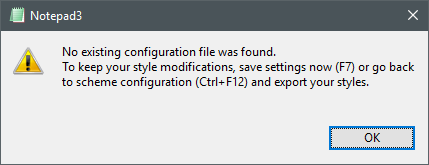
_Some_ settings (all found under [Settings], apart from HighDpiToolBar) were either removed from the .ini or reset.
ltGuillaume
on 13 Sep 2019
I'm guessing only a hard-coded delay of .25s-.5s or so would clear up this particular annoyance, even though it's dirty a hack. For those who have UAC enabled (most) they wouldn't really see the delay, because the UAC prompt is already slow and annoying AF, whereas I'm guessing those who have the UAC prompt disabled would rather be sure to keep their settings intact.
ltGuillaume
on 13 Sep 2019
@ltGuillaume : There are more problems around this issue (Save Settings & Relaunch Elevated), analysis is going on...
RaiKoHoff
on 15 Sep 2019
All right, thanks! Let me know when things are changed in a new build and I'll test it 👍
ltGuillaume
on 15 Sep 2019
Feel free to test dev beta ver _5.19.916.2633_BETA.
@hpwamr : some major rework on settings-file handling was done - your test-skills are challenged.
RaiKoHoff
on 16 Sep 2019
I wrote a little script to repeat the steps I described in https://github.com/rizonesoft/Notepad3/issues/1581#issuecomment-530361815 with and without Remember Settings On Exit and I cannot reproduce the erroneous behavior anymore with 2633! 👍 👍
ltGuillaume
on 16 Sep 2019
What I did see happen was that empty INI sections were added, like [C# Source Code] or [Coffeescript], even though there were no items grouped under it, since I only use the default settings for these schemes.
ltGuillaume
on 16 Sep 2019
What I did see happen was that empty INI groups were added, like
[C# Source Code]or[Coffeescript], even though there were no items grouped under it, since I only use the default settings for these schemes.
In a pristine Notepad3.ini all "Lexers [Sections] name" are added to force a predetermined order. 🤔
hpwamr
on 16 Sep 2019
@hpwamr I just tested it with a newly generated .ini file and that is definitely not the case here: only the sections for schemes I modified were added, nothing else.
ltGuillaume
on 16 Sep 2019
The canonical order of (empty) style sections should only be created for Styles Export (button from schemes dialog), or if a Notepad3.ini file is created from scratch.
Last part is has been lost by latest refactoring - I will fix that.
Ed.: Feel free to test dev beta ver _5.19.916.2634_BETA.
RaiKoHoff
on 16 Sep 2019
Great! Thx 😃
ltGuillaume
on 16 Sep 2019
A variant of this issue has reappeared since RC3 (and the latest beta):
I still use trusty old Regshot on a regular basis. It opens up two notepads (one for an undo and one for a redo registry entries file) directly after each other. You can recreate this situation easily with a batch file containing:
start notepad3.exe
start notepad3.exe
Since RC3, I constantly get this error:
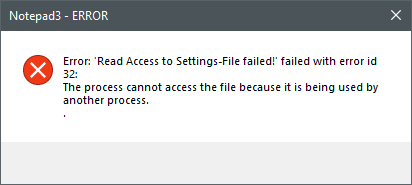
Often, but not always, this also means that one of the instances has been started with the default settings.
ltGuillaume
on 21 Mar 2020
Feel free to test the RC version "Notepad3Portable_5.20.321.4_RC3.paf.exe.7z" or higher.
See "Notepad3 BETA-channel access #1129" or here Notepad3Portable_5.20.321.4_RC3.paf.exe.7z.7z.
Note: "Notepad3Portable RC" can be used in "2 flavors", see with or without extension ".7z".
RaiKoHoff
on 21 Mar 2020
Thank you sir! Looks like it works perfectly fine again for two files.
Out of curiosity, I tried opening more than 2 files this way, and (on my system) starting from 7 files, Np3 started to exhibit the same behavior again. Eventually, it also corrupted its .ini file.
ltGuillaume
on 21 Mar 2020
😲 I tried to start 50+ instances (v5.20.321.4_RC3) this way and have no issue anymore.
(by the way, this messagebox has been removed in this version (no need anylonger), so you can't see it again in this case ?)
RaiKoHoff
on 21 Mar 2020
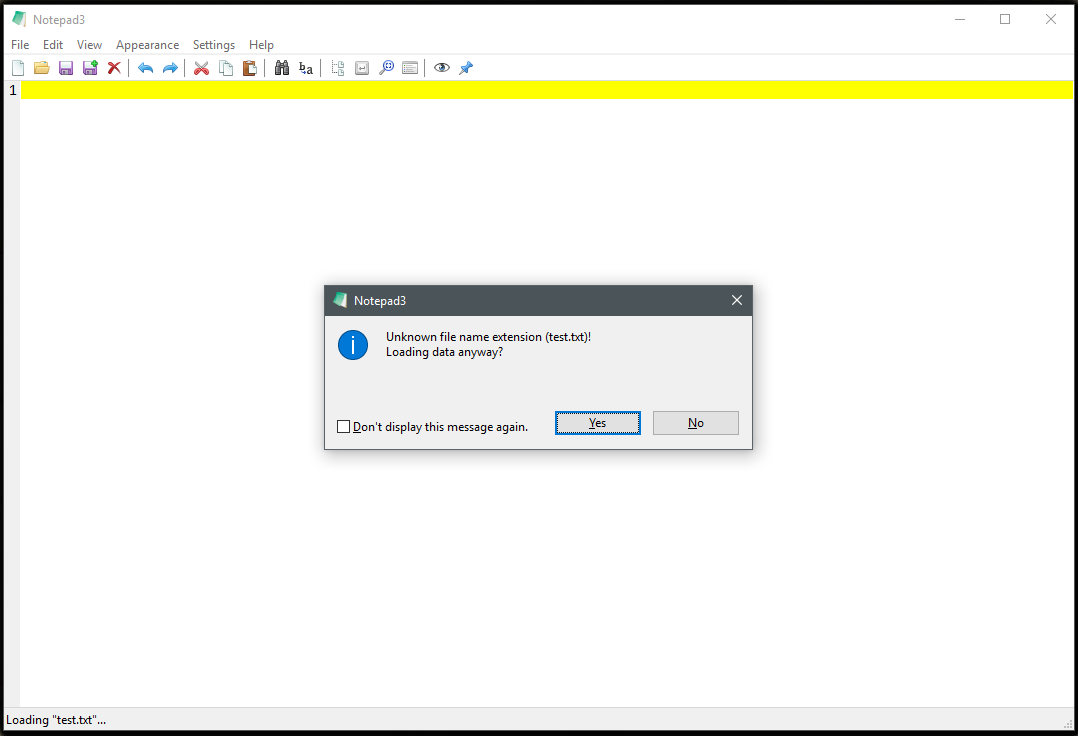
I didn't see the dialog anymore, that's true. In fact, what's now happening is that my color scheme isn't applied to some of the Notepad3 instances, while some of these instances also show a dialog with "Unknown file name extension (test.txt)! Loading data anyway?". Strange stuff, and probably quite difficult to reproduce on different systems. Just now I tried to put Notepad3 and the text file to be opened (which was empty this time) on a RAM drive in order to minimize the test being influenced by the storage device. Of the 50 instances, about 30 popped up without proper theme and almost all of those 30 with that warning.
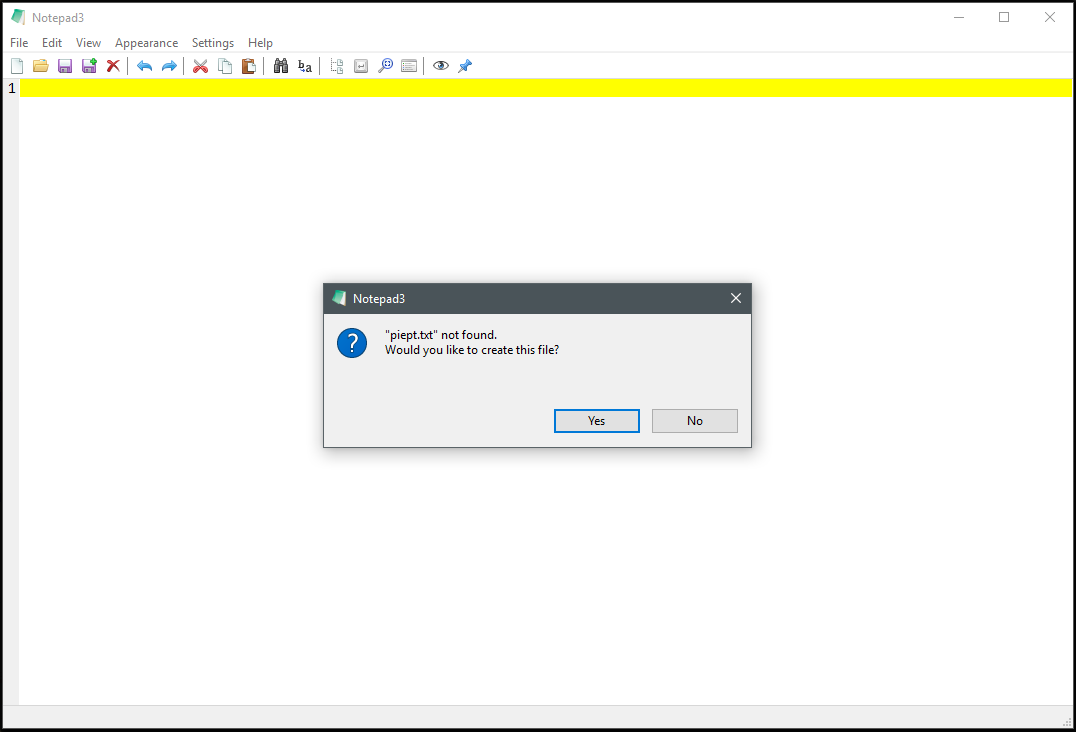
The same happens with the theme when I try to open a non-existing file:
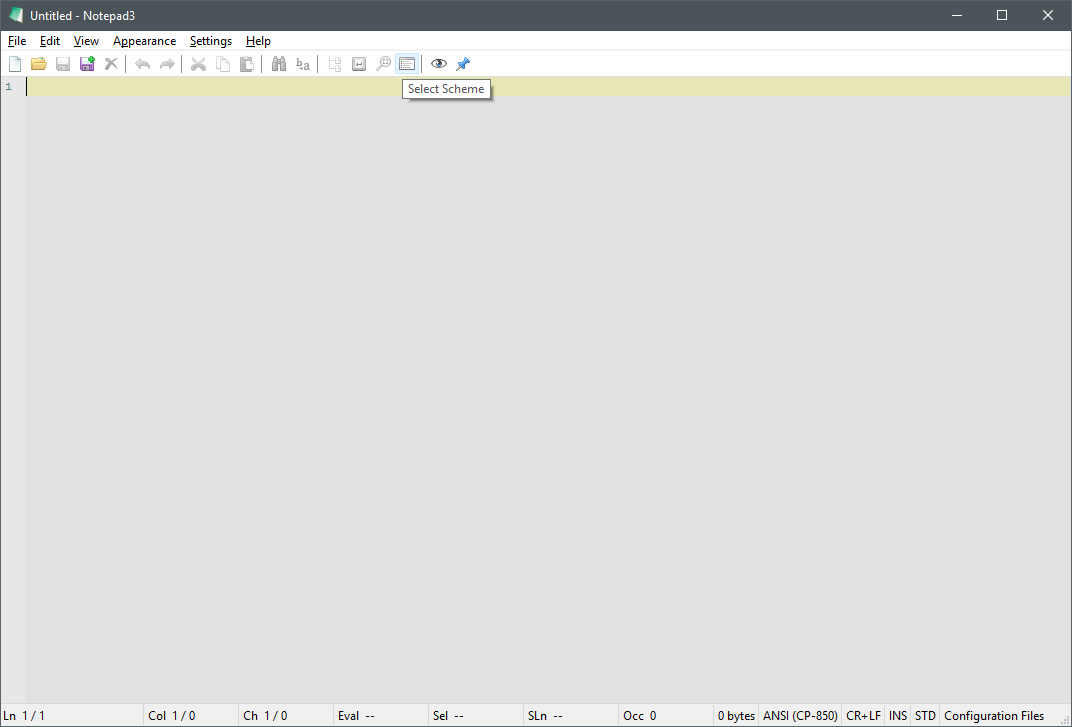
Proper theme should be:
Notepad3 (64-bit) v5.20.321.4 RC3 (nebukadn)
Compiler: MS Visual C++ 2019 v16.5.0 (VC v1925)
OS Version: Windows 10 Version 1709 (Build 16299)
Scintilla v432
Oniguruma v6.9.4
- Locale: en-US (CP:'ANSI (CP-850)')
- Current Encoding = 'ANSI (CP-850)'
- Screen-Resolution = 1920 x 1080 [pix]
- Display-DPI = 96 x 96 (Scale: 100%).
- Rendering-Technology = 'GDI'
- Zoom = 100%.
- Process is not elevated
- User is in Admin-Group.
- Current Lexer: 'Configuration Files'
I'm already very happy with the change made before and we're now just examining a fringe case, so if it can be solved, great, otherwise it's something probably no-one will ever run into anyway.
ltGuillaume
on 21 Mar 2020
Every hint shows, that something is not working 100% as it should, even if it is hard to reproduce.
All instance should synchronize them self, while reading from and writing to the same .ini-file... 🤔
RaiKoHoff
on 21 Mar 2020
Strange stuff. Maybe you could reproduce it when using a RAM drive as well? I'm just using ImDisk.
ltGuillaume
on 21 Mar 2020
@ltGuillaume : I found a bug regarding the .ini-file reader/writer locking mechanism, a major rework was necessary. I brought back the fatal error message boxes (which should not occur, except in weird circumstance, else this is a bug, which I have to follow up.
Startup a big bunch of instances is slowed down a little bit, cause all instances have to synchronize their concurrent .ini-file access ... this is not considered a bug, single instance startup should be fast enough.
Feel free to test the RC version "Notepad3Portable_5.20.323.1_RC3.paf.exe.7z" or higher.
See "Notepad3 BETA-channel access #1129" or here Notepad3Portable_5.20.323.1_RC3.paf.exe.7z.7z.
Note: "Notepad3Portable RC" can be used in "2 flavors", see with or without extension ".7z".
RaiKoHoff
on 23 Mar 2020
Yesss, you did it! Works perfectly fine now, thank you so much! Closing the issue again :-)
ltGuillaume
on 23 Mar 2020
Related issues
 ggordon-vispero
·
3Comments
ggordon-vispero
·
3Comments
 wmsrww
·
3Comments
wmsrww
·
3Comments
 valhristov
·
3Comments
valhristov
·
3Comments
 zb-z
·
3Comments
zb-z
·
3Comments
 rizonesoft
·
4Comments
rizonesoft
·
4Comments
Most helpful comment
@RaiKoHoff Haha, thought you'd wonder 😎 And yes, I'm using a portable instance of Np3 😃
@hpwamr Cool, I'd be honored 😃