Notepad3 always try to write the settings file on exit
Disable "Save Settings On Exit" on Notepad3 5.20.414.1 or 5.20.615.1, Notepad3 will still try to write the settings file on exit.
In this case, if copy Notepad3 into C:\Windows, an error will be found on each Notepad3 exit:
Error 'AcquireWriteFileLock(C:\Windows\notepad.ini): INVALID FILE HANDLE!', cause: Access is denied. (ID: 5)
Notepad3 5.20.305.2 or older version does not have this error on each exit.
 zmx01403137
All 33 comments
Disable "Save Settings On Exit" on Notepad3 5.20.414.1 or 5.20.615.1, Notepad3 will still try to write the settings file on exit.
Hello @zmx01403137 ,
I can not reproduce your issue, Notepad3 respects correctly: checked/unchecked "Save Settings On Exit". 🤔
Feel free to test the "Portable RC1 paf" version "Notepad3Portable_5.20.626.1_RC1.paf" or higher.
See the issue "Notepad3 BETA/RC-channel access #1129" or hereunder:
_Note1:_ The "Notepad3Portable_paf" version can be used in "2 flavors", see with or without extension ".7z".
_Note2:_ If you follow the instructions in issue #1105 , you can update your "Notepad3 Setup" version with the latest features/fixes of the "Portable BETA/RC paf" version (see issue #1129).
Also, feel free to test the "Setup RC1" version "Notepad3_5.20.621.1_Setup_RC1" or higher.
See the issue "Notepad3 BETA/RC-channel access #1129" or hereunder:
Your comments and suggestions are welcome... 😃
 hpwamr
on 27 Jun 2020
hpwamr
on 27 Jun 2020
I have noticed the same behavior as the OP.
Also as a related issue, Notepad3 totally ignores any attribs of the existing ini file (such as read-only) and when it re-writes the ini file, it does so without replacing any of the existing file attributes, if they were set, this seems less than desirable to me.
 jupester
on 27 Jun 2020
jupester
on 27 Jun 2020
Notepad3 must be the owner of it's Notepad3.ini file.
There are some configurations, which need to be communicated to other Notepad3 instances started after any running instance changes e.g. Reuse Window ore Single File Instance. These configurations are maintained in the .ini-file. Some other convenience options are also persisted immediately on activation/deactivation (e.g. don't show this dialog again, preferred Language, explicit remember window position, ... or the Save Settings on Exit itself ).
Save Settings on Exit (which is the default, if a .ini-file exist) targets only a subset of settings and does not disable the write access necessity on exit in general. Maybe a better name would be "Persist all Changed Settings on Exit" - but this is too long.
A workaround when putting Notepad3.exe into a place, which is or should not be writable for the normal user, is to put a "redirection" into the (readable) side-by-side Notepad3.ini:
Like for Setup/Installer (trying to resolve environment vars):
[Notepad3]
Notepad3.ini=%APPDATA%\Rizonesoft\Notepad3\Notepad3.ini
or the PortableApps distribution:
[Notepad3]
Notepad3.ini=%NOTEPAD3_PORTABLE_SETTINGS%\Notepad3.ini
So, as the owner of the file, Notepad3.exe tries to set the correct file attributes for it's needs.
For convenience reasons, Notepad3.exe will work without an .ini-file in a write-protected place using default settings.
But you should not expect a normal behavior in this case (e.g. changing the Reuse Window option).
 RaiKoHoff
on 28 Jun 2020
RaiKoHoff
on 28 Jun 2020
Discussion: To get back the old behavior (silently ignoring the write-ini-file-errors),
I can disable the Lock-File-Failure-Message (in Release build), which would stop the pop-up.
But this will not change the fact, that some options will not work (e.g. changing behavior of "Reuse Window")
RaiKoHoff
on 28 Jun 2020
Discussion: To get back the old behavior (silently ignoring the write-ini-file-errors),
I can disable the Lock-File-Failure-Message (in Release build), which would stop the pop-up.
I think the "Lock-File" was issued to solve this problem: #1862, right?
I'm not a fan of disabling the "Lock-File-Failure-Message", because if you use/install Notepad3 in an unconventional way (not as designed), it seems normal to me that Notepad3 will issue a message when its own Notepad3.ini is not accessible. 🤔
hpwamr
on 28 Jun 2020
No, the "Lock-File" Mechanism has been introduced to manage concurrent write/read access on the one and only .ini-file from multiple Notepad3 instances running in parallel.
RaiKoHoff
on 28 Jun 2020
The problem here is more, the assumption, that "Don't Save on Exit" will not write to the .ini-file in general - this is not (and will not be) the case.
RaiKoHoff
on 28 Jun 2020
RaiKoHoff , thanks for the details.
To reuse Windows, why not create a sub profile file into user directory for each user (e.g. %APPDATA%/Notepad3)?
This will be more better for Multi-user environment.
- If %APPDATA%/Notepad3/*.ini does not exist, just use the settings in Notepad3.ini with same directory of Notepad3.exe.
- If %APPDATA%/Notepad3/.ini exists, use the Windows settings in %APPDATA%/Notepad3/.ini instead of original Notepad3.ini.
zmx01403137
on 7 Jul 2020
@zmx01403137 :
Just create a side-by-side Notepad3.ini file in Notepad3's write protected directory with following "redirection" content only:
[Notepad3]
Notepad3.ini=%APPDATA%\Rizonesoft\Notepad3\Notepad3.ini
And voilà, you get what you describe (private profile for each user of the system).
RaiKoHoff
on 7 Jul 2020
In the past I always had my INI file +R read only, because I am always testing pre-rel versions of NP3 and didn't want to lose my settings and custom INI notes (which has happened in the past) during testing, and since I rarely change my base settings, and when I do, I only want them to be changed for that particular session it worked fine like that until recently.
I really dislike the INI file being written every time I close NP3 which could be hundreds of times per day, which at least in my case is very unnecessary, I understand why you implemented it, but as things are currently, is there any way I can get back to not having the ini file written every time I close NP3?, or can you make that possible.
jupester
on 11 Jul 2020
With PR #2500 Notepad3 will respect a read-only file-attribute set on it's .ini-file.
(A read-only attribute will disable menu options, which need write-access to the .ini configuration storage)
Ed.: a forced Save Settings Now (F7) will ignore and remove the read-only attribute.
RaiKoHoff
on 11 Jul 2020
Points which may be worth to discuss:
- Disable
Save Settings Now (F7)command if .ini-settings-file is read-only ? - Don't override read-only attribute of .ini-settings-file, but show error message instead on
Save Settings Now (F7) - An enabled
Save Settings on Exit(SaveSettings=truekey-value in .ini-file) will remove read-only attribute of .ini-file after initial load. - (points which I missed in this contect ... ?)
RaiKoHoff
on 11 Jul 2020
Hello @jupester ,
Feel free to test the "Portable RC1 paf" version "Notepad3Portable_5.20.711.1_RC2.paf" or higher.
See the issue "Notepad3 BETA/RC-channel access #1129" or hereunder:
_Note1:_ The "Notepad3Portable_paf" version can be used in "2 flavors", see with or without extension ".7z".
_Note2:_ If you follow the instructions in issue #1105 , you can update your "Notepad3 Setup" version with the latest features/fixes of the "Portable BETA/RC paf" version (see issue #1129).
Also, feel free to test the "Setup RC2" version "Notepad3_5.20.710.1_Setup_RC2" or higher.
See the issue "Notepad3 BETA/RC-channel access #1129" or hereunder:
Your comments and suggestions are welcome... 😃
hpwamr
on 11 Jul 2020
Okay, latest beta throws a warning (yes/no dialog), if Save Settings Now (F7) is going to override a read-only attributed configuration file.
RaiKoHoff
on 14 Jul 2020
Hello @zmx01403137 ,
As far as I'm concerned, I think you (requester) can close this issue...
hpwamr
on 29 Jul 2020
Apologies for the late reply, I have been living off the grid.
Thanks so much for your change @RaiKoHoff, I will continue testing but as of now I am very content as things are currently, I very much appreciate the changes. Thank you.
jupester
on 1 Aug 2020
I just wanted to confirm something, the "Save before running Tools" is disabled now because I use RO, is that absolutely necessary? it is ok if it is, I just thought that the saving of the current document shouldn't be affected by the ini file being RO? I made use of this previously.
Another thing that I have noticed as new behavior I just wanted to confirm was intended, previously I could have a document open and then rename the file (in a external file manager) while it was open in NP3, then save it in NP3, and get a new file with the same original filename, I found this useful and a quick way for me for creating a backup when the changes I was making ended up becoming extensive.
New behavior is that when I perform the same steps, I get a dialog warning the "file is read only, save as a new name", NP3 must sense the file is missing and assume read only or something along those lines . Now I can continue by pressing yes and then yes in the next file save dialog, which will re-save it with the original filename, but that is an extra 2 steps now, I just wanted to confirm if this was expected, I fear it may because of my above request.
O/T: Just as some feedback, I am not a fan of the new save confirmation dialog, it has gone back to being all out of proportions, I know it was changed a while ago and then it went back to being nice again but now it has changed back to the new custom design again for some reason, maybe because I use 120DPI it is exacerbated (I haven't tested 100) but way too much blank space again IMO.
jupester
on 2 Aug 2020
O/T: Just as some feedback, I am not a fan of the new save confirmation dialog, it has gone back to being all out of proportions, I know it was changed a while ago and then it went back to being nice again but now it has changed back to the new custom design again for some reason, maybe because I use 120DPI it is exacerbated (I haven't tested 100) but way too much blank space again IMO.
Hello @RaiKoHoff ,
Indeed, the save dialog box does not expand proportionally (more in height than in large), it seems to be the same behavior for the About dialog ? 🤔
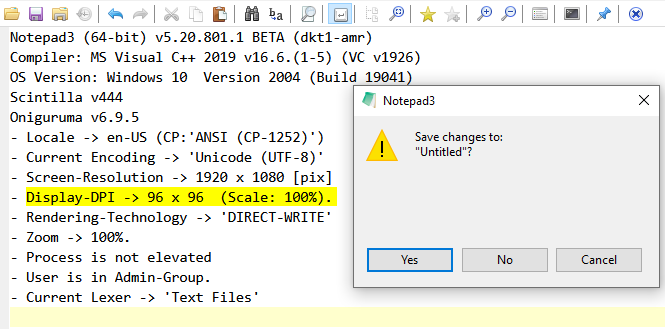
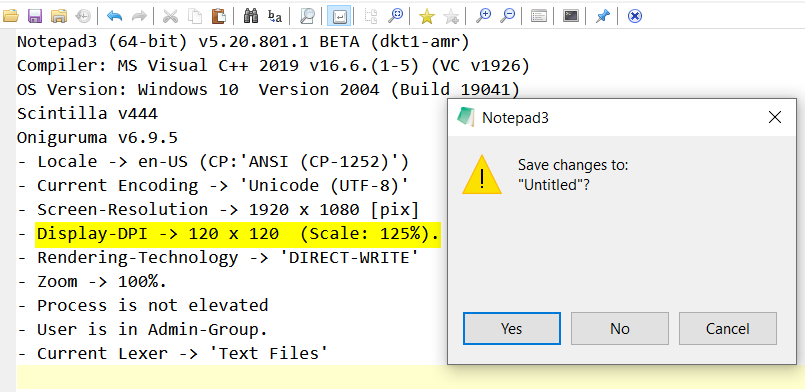


hpwamr
on 2 Aug 2020
Hello,
Save before running Toolsdisabled on read-only configuration file is obviously a regression - it will be fixed soon.- Seems, that on refactoring the save file operations, a not-exists file is misinterpreted as read-only - I will review and change this to old behavior.
- Yes, the "new" save confirmation dialog is based on Notepad3's custom Info-Box dialog, which is quite static, especially regarding the text display area (hard reserved space for longer text/path + space for optional "don't display this message again checkbox"). The old dialog was based on the system's MessageBox API, with very limited control plus unwanted side-effects (center box, message beep, hiding menu bar, ...). The advantage of system's MessageBox was the dynamically adapted size of the text area.
The one dis dvantage of system's MessageBox is the some what blurry text DPI scaling property:
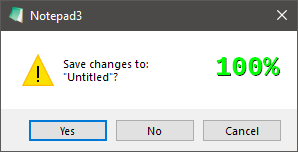
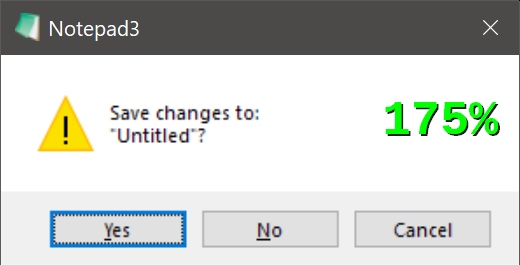
Notepad3's InfoBox:
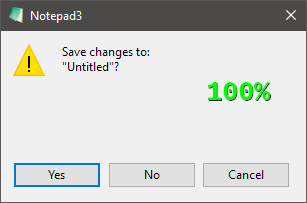
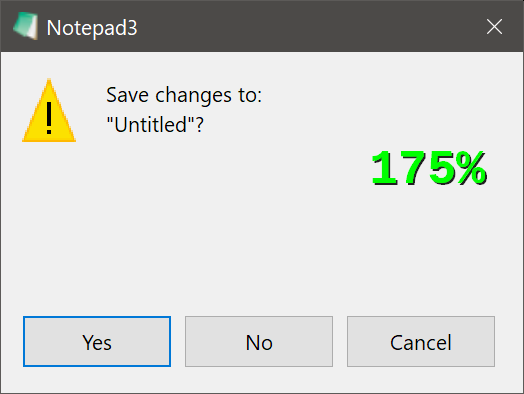
For the next Beta, I am going to switch the save confirmation MessageBox type dependent on the Mute Message Beeps option (cause I can't switch them OFF for old MessageBox):
Mute Message BeepsON => custom (static text) InfoBoxMute Message BeepsOFF=> system's (dynamic text) MessageBox
Open to discuss other behavior.
- @hpwamr : You are right regarding the x/y (width/height) relation suggested by the system notification on WM_DPICHANGED seems not to result in a visual proportional scaling of the dialog 🤔. I am going to make some more tests.
RaiKoHoff
on 2 Aug 2020
...
- @hpwamr : the Notepd3 title in About-Box is written after system scaled the box without knowledge of title width.
So I have to customize the the width (condensed) to fit (same for all languages) into the box.
I will tell you the place to play around with these font settings, so you can find the best setting for all languages ...
RaiKoHoff
on 2 Aug 2020
3. The one disadvantage of system's MessageBox is the some what blurry text DPI scaling property:
My opinion is that blurry text is "not acceptable" ? 🤔
hpwamr
on 2 Aug 2020
So I have to customize the the width (condensed) to fit (same for all languages) into the box.
I will tell you the place to play around with these font settings, so you can find the best setting for all languages ...
Yes, I'm aware that I need to check all languages, especially the "Customize Schemes" dialog box. 👍
hpwamr
on 2 Aug 2020
Ok I tried v5.20.802.1, and "Save before running Tools" is now enabled, great, but point #2 from your above list is still the same, I still get confirmation dialog if file is renamed while open, maybe you haven't got around to it yet.
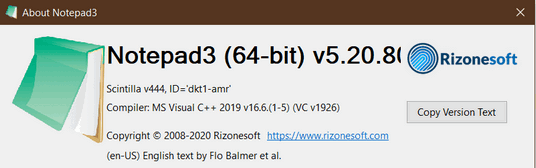
OT: Got the old confirmation dialog back again, much better IMO, I noticed that you mentioned that one of the issues with using it was screen instead of window center (non issue for me), there are probably reasons I am unaware of but I thought I would mention that zufuliu np2 uses similar dialog and it somehow works on window center, maybe because you use MUI dialog you can't use that type though, or there are probably other reasons I am unaware of just thought it worth mentioning anyway, as for the blurriness at 175% it looks acceptable to me, also FYI my About dialog became worse:
jupester
on 3 Aug 2020
@jupester :
- Oh sorry, while struggling with this 🙊 DPI-Awareness stuff, totally forgot about the "read-only while file removed" stuff. Try to put it into next commit...
- The system's MessageBox save confirmation should be centered in main-window (is done via hook procedure). I think the only issues left are "non mutable message beep" and "blurry text for high DPI screens" - if you can live with this, we will give the current configuration (active if message beeps are not muted) a try ...
RaiKoHoff
on 3 Aug 2020
Can not reproduce the title issue (screen resolution is FullHD (1920x1080):
- Screen-Resolution -> 1920 x 1080 [pix]
- Display-DPI -> 96 x 96 (Scale: 100%).
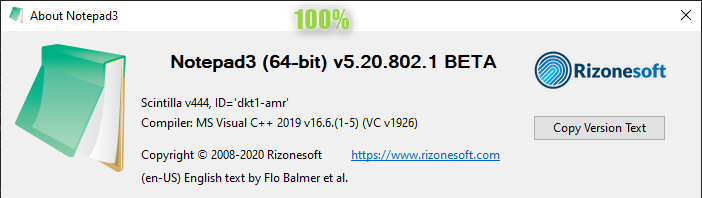
- Screen-Resolution -> 1920 x 1080 [pix]
- Display-DPI -> 168 x 168 (Scale: 175%).
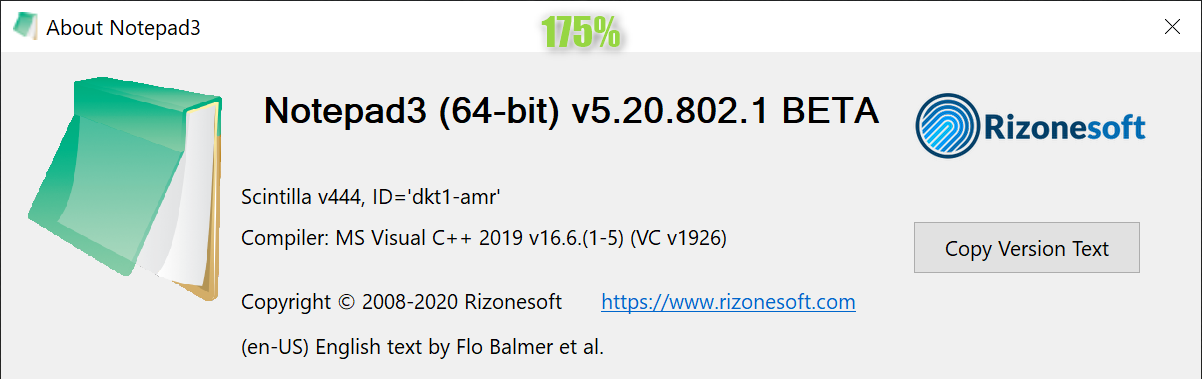
RaiKoHoff
on 3 Aug 2020
maybe because I use 120DPI
I only mentioned 175 because of @hpwamr's previous comment, I use 1920x1080x120, sorry for any confusion, maybe it is reproducible for you at that resolution.
jupester
on 3 Aug 2020
Regarding DPI-Awareness: We will still have some issues for older systems (<= Win10 v1607 ):
https://stackoverflow.com/questions/62188168/dpi-scaling-a-complete-dialog-box-from-resource
RaiKoHoff
on 3 Aug 2020
I am using 2004. Anyway I am not fussed about the about box if you can't reproduce it, I only mentioned it because we had migrated to that topic, otherwise I would have never posted a screenshot or raised it as a concern, but FYI in my previous NP3 version from a couple days ago the text fit in the dialog.
jupester
on 3 Aug 2020
- Screen-Resolution -> 1920 x 1080 [pix]
- Display-DPI -> 168 x 168 (Scale: 175%).
Hello @RaiKoHoff ,
I've also windows 2004.
I do NOT understand how you have this correct picture ?
Please, see ALL my Scaled pictures at:
https://github.com/rizonesoft/Notepad3/issues/2567#issuecomment-667890756 😬
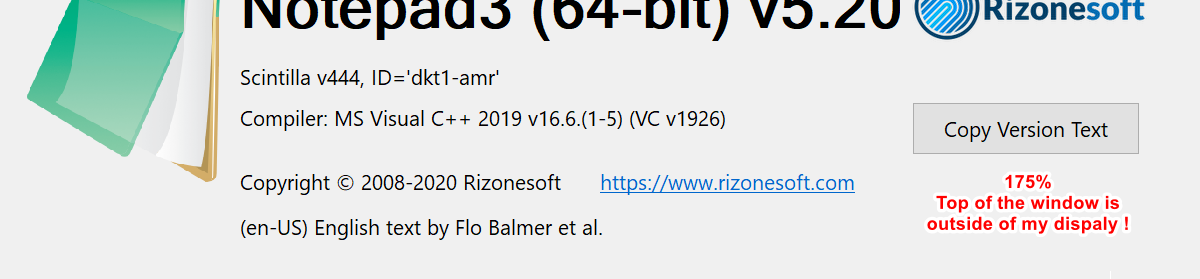
hpwamr
on 3 Aug 2020
- Oh sorry, while struggling with this 🙊 DPI-Awareness stuff, totally forgot about the "read-only while file removed" stuff. Try to put it into next commit...
Hello @jupester ,
_Important note:_ ONLY the "en-US" and "de-DE" version are up-to-date, other languages will follow ASAP ! 😏
Feel free to test the "Portable BETA/RC paf" version "Notepad3Portable_5.20.803.1_BETA.paf" or higher.
See the issue "Notepad3 BETA/RC-channel access #1129" or hereunder:
_Note1:_ The "Notepad3Portable_paf" version can be used in "2 flavors", see with or without extension ".7z".
_Note2:_ If you follow the instructions of #1105 , you can update your "Notepad3 Setup" version with the latest features/fixes of the "Portable BETA/RC paf" version (see #1129).
Your comments and suggestions are welcome... 😃
hpwamr
on 3 Aug 2020
OK tested 803 with "read-only while file removed" and no confirmation again, thanks, so all raised issues resolved I think.
2\. The system's MessageBox save confirmation should be centered in main-window
Cannot confirm this, mine is displayed screen center, not that I mind either way, but just to be clear, if I enable mute beeps, then that dialog is window center but the nice original system dialog you just enabled again is displayed screen center for me.
jupester
on 4 Aug 2020
Hello @zmx01403137 , @jupester ,
Feel free to test the "Portable BETA/RC paf" version "Notepad3Portable_5.20.808.1_beta.paf" or higher.
See the issue "Notepad3 BETA/RC-channel access #1129" or hereunder:
_Note1:_ The "Notepad3Portable_paf" version can be used in "2 flavors", see with or without extension ".7z".
_Note2:_ If you follow the instructions of #1105 , you can update your "Notepad3 Setup" version with the latest features/fixes of the "Portable BETA/RC paf" version (see #1129).
Also, feel free to test the "Setup BETA/RC" version "Notepad3_5.20.805.1_Setup_beta" or higher.
See the issue "Notepad3 BETA/RC-channel access #1129" or hereunder:
Your comments and suggestions are welcome... 😃
hpwamr
on 8 Aug 2020
Hello @zmx01403137 ,
As far as I'm concerned, I think you (requester) can close this issue...
hpwamr
on 8 Aug 2020
Related issues
 zb-z
·
3Comments
hpwamr
·
3Comments
zb-z
·
3Comments
hpwamr
·
3Comments
 RaffaeleBianc0
·
3Comments
hpwamr
·
3Comments
RaffaeleBianc0
·
3Comments
hpwamr
·
3Comments
 blackcrack
·
3Comments
blackcrack
·
3Comments
Most helpful comment
@zmx01403137 :
Just create a side-by-side Notepad
3.inifile in Notepad3's write protected directory with following "redirection" content only:And voilà, you get what you describe (private profile for each user of the system).