Notepad3: Encoding Detection: file with single UTF-8 character detected as Windows-1258
Notepad3 (64-bit) v5.19.1205.2695 BETA
Windows 10 Enterprise 1809 x64
I have a number of text files with very few UTF-8 characters. Sometimes only one. A sample is attached. On line 22, the word should read "Précis:" (with an accented e).
Using a pristine copy of the above Notepad3 version to open the sample file, Notepad3 detects the encoding as Windows-1258 and the accented character gets messed up:

I went back to older Notepad3 versions:
- Notepad3 (64-bit) v5.19.304.1632 XpErImEnTaL:
- Correctly detects encoding as UTF-8 and displays the accented character correctly
- Encoding Detection Output:
UCHARDET='WINDOWS-1258' Conf=0% || CED='Unicode (UTF-8)' (reliable)
- Notepad3 (64-bit) v5.19.304.1634 XpErImEnTaL:
- Correctly detects encoding as UTF-8 and displays the accented character correctly
- Encoding Detection Output:
UCHARDET='WINDOWS-1258' Conf=72% || CED='Unicode (UTF-8)' (reliable)
- Notepad3 (64-bit) v5.19.305.1636 XpErImEnTaL:
- Incorrectly detects encoding as Windows-1258 and messes up the accented character
- Encoding Detection Output:
UCHARDET='WINDOWS-1258' Conf=72% || CED='Unicode (UTF-8)' (reliable)
All other subsequent Notepad3 builds I tested detected the encoding incorrectly. I also tested pristine versions of the latest builds of Notepad2 and Notepad2-mod; they detected the encoding correctly.
NB: all testing was done with pristine copies of each version, with no file encoding history.
I'm hoping this is not too much of an edge case, and that including the sample can improve Notepad3's encoding detection accuracy.
 craigo-
All 28 comments
Hello @craigo-
Please be patient, because for personal reasons, @RaiKoHoff is taking a break.... 😞😞
PS: it seems to be related with the issue reported on #1831 👍
 hpwamr
on 17 Dec 2019
hpwamr
on 17 Dec 2019
All good.
I did read #1831 before posting, but thought it sufficiently different to open a separate issue. But if the root cause is the same, happy to close this issue and roll my findings into #1831, if you prefer?
craigo-
on 18 Dec 2019
NO please, your complete analyse is precious too ! 💯
hpwamr
on 18 Dec 2019
Here a short list of text editors that open the file with a correct UTF-8 detection !!! 😃
- Noteapd++, Editpad Lite 7, Editplus, Notepad2, Notepad2e, Notepad2-mod,
Notepad2-zfuliu and VS Code,!!! - Just SciTE does NOT recognized the UTF-8 encoding correctly ! 😟
hpwamr
on 30 Dec 2019
Hello @RaiKoHoff ,
I would like to add to this issue a well-known text build_np3portableapp.cmd encoded in UTF-8 with ONLY ONE non-ASCII character "delims=¶" on line 33 in this "shorted" batch file.
- This text is open faultily as "ISO-8859-7 (Greek)" with Notepad3 : "delims=ΒΆ"
- This text is open correctly as "UTF-8" with Notepad3 if I add an encoding tag ":: encoding: UTF-8"
- This text is open correctly as "UTF-8" with Noteapd++, Editpad Lite 7, Editplus, Notepad2, Notepad2e, Notepad2-mod, Notepad2-zfuliu and VS Code,!!!
In attachment: build_np3portableapp.zip
hpwamr
on 4 Jan 2020
Too few characters for reliable detection ...
 RaiKoHoff
on 14 Jan 2020
RaiKoHoff
on 14 Jan 2020
Too few characters for reliable detection ...
Hello @RaiKoHoff ,
I hear good you plausible explanation, but why all those text editors https://github.com/rizonesoft/Notepad3/issues/1848#issuecomment-569692566 can do it ? 🤔
hpwamr
on 14 Jan 2020
Hi @hpwamr : maybe they focus on UTF-8 and don't have an advanced encoding detection.
Just set [Settings2] AnalyzeReliableConfidenceLevel=80
which means use only 80% reliable (and higher) detection results,
and:
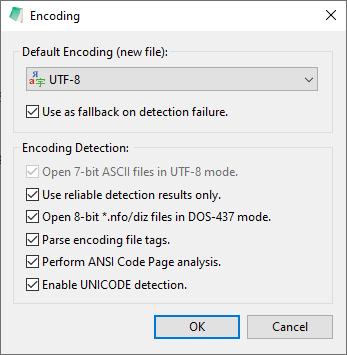
to tune Notepad3 more into UTF-8 detection results (most files now will be UTF-8, if they have valid UTF-8 encoding).
If you encounter good experiences, we can make this the default settings ...
RaiKoHoff
on 14 Jan 2020
If you encounter good experiences, we can make this the default settings ...
If will try for while "Use UTF-8 as fallback on detection failure" 🤔
and experiment with AnalyzeReliableConfidenceLevel
First test with actual default "AnalyzeReliableConfidenceLevel=50"
hpwamr
on 14 Jan 2020
New experimental test with:
UseDefaultForFileEncoding=true
SaveRecentFiles=false
DevDebugMode=1
AnalyzeReliableConfidenceLevel=66
With #1147 as a reference, I'm trying to understand Notepad3's encoding detection process. Can you please confirm my thinking regarding the scenario below?

With the following default settings:
- Use [default encoding: UTF-8] as fallback on detection failure: OFF
- Use reliable detection results only: ON
- Parse encoding file tags: ON
...and the following non-default settings:
- [Settings2] DevDebugMode=1 (to expose the encoding detection result)
- [Settings2] AnalyzeReliableConfidenceLevel=80
Is this what should happen?
- The file is analysed and the UCD result of 72% is deemed not reliable, i.e. detection failure
- The default UTF-8 encoding is not used on detection failure
- The file has no encoding file tags
- There is no entry in Notepad3's file history
Therefore, shouldn't Notepad3 use the OS codepage ANSI (CP-1252) and open the file using that encoding? Because it looks like it is using UCD's detection regardless of it being classified as unreliable. (Not that it would help in this instance, since the file is not CP-1252 either...)
Edit: the above is done with Notepad3 (64-bit) v5.20.114.2707 BETA. If I do the same using the earlier Notepad3 (64-bit) v5.20.113.2703 BETA, I get this:

- The file is analysed and the UCD result of 72% is deemed reliable (bug?)
- The default UTF-8 encoding is not used on detection failure (but this isn't detection failure)
- The file has no encoding file tags
- There is no entry in Notepad3's file history
In this instance:
- If the detection is deemed reliable, shouldn't the file be be opened with the (incorrectly) detected encoding of Windows-1258?
- If the detection is deemed unreliable (i.e. the title text is a bug), shouldn't the file be opened with the (incorrect) OS codepage CP-1252?
In any case, I'm not sure how Notepad3 has opened as UTF-8 instead, and therefore displays the accented e correctly!
craigo-
on 15 Jan 2020
Edit: the above is done with Notepad3 (64-bit) v5.20.114.2707 BETA. If I do the same using the earlier Notepad3 (64-bit) v5.20.113.2703 BETA, I get this:
Hello @craigo- ,
Are you sure of the test version number Notepad3 (64-bit) v5.20.113.2703 BETA , because I can not reproduce your second picture with the correct displaying of the "é". 😕
hpwamr
on 15 Jan 2020
@craigo- : First of all: The Analyze Debug Msg in the titlebar (reliability) has been fixed meanwhile.
Your description is absolutely correct for former versions of Notepad3, meanwhile we decide to "modernize" Notepad3 to prefer UTF-8 over local system Code-Page internally:
if Analysis-Result is not reliable, check if UTF-8 encoding would be valid for this file. If answer is 'yes it would be valid' then prefer UTF-8 over local ANSI Code-Page.
Discussion: Better use local systems's ANSI Code-Page ?
Compromise: Use UTF-8 over ANSI, if valid _and_ 'Open 7-bit ASCII files in UTF-8 mode' is checked' ?
RaiKoHoff
on 15 Jan 2020
My opinion is: "UTF-8" is really the way of the future, just look at Linux and all XML documents and also all modern websites that have adopted it unconditionally.
This seems essential to me in the case of mixed multilingual documents (European, Cyrillic and Asian).
hpwamr
on 15 Jan 2020
After thinking a little bit, I think to have an option for this would be a good idea, so:
Using the Open 7-bit ASCII files in UTF-8 mode option expresses the wish to go more to UTF-8 than to ANSI CP (pure 7-bit ASCII files can be encoded as UTF-8 or ANSI - they share the same first (127) character (ASCII) representation - so I will use this switch to use UTF-8 over local ANSI CP as detection fallback.
RaiKoHoff
on 15 Jan 2020
Are you sure of the test version number
Notepad3 (64-bit) v5.20.113.2703 BETA, because I can not reproduce your second picture with the correct displaying of the "é". 😕
Yes, I'm sure. I have just repeated the test with a new pristine copy of build 2703 and the results are the same.
Note that I did change the [Settings2] "AnalyzeReliableConfidenceLevel" to 80. Leaving it at the default (50?) results in the file being opened with the incorrect Windows-1258 encoding:

(Note that the debug info in build 2703 incorrectly classifies the UCD result as reliable; this appears to be fixed in build 2707.)
Another possibly is your Recent (History) file list, see if there is a persistent entry there? c.f. #1884.
craigo-
on 15 Jan 2020
@craigo- : First of all: The Analyze Debug Msg in the titlebar (reliability) has been fixed meanwhile.
Thanks for that, it was a bit confusing!
Discussion: Better use local systems's ANSI Code-Page ?
Well, it wouldn't have helped in this case :smile:
Compromise: Use UTF-8 over ANSI, if valid _and_ '
Open 7-bit ASCII files in UTF-8 mode' is checked' ?
It sounds like this would get to the correct result.
My opinion is: "UTF-8" is really the way of the future, just look at Linux and all XML documents and also all modern websites that have adopted it unconditionally.
This seems essential to me in the case of mixed multilingual documents (European, Cyrillic and Asian).
I agree. I have been changing Notepad{2|2-mod|3} to default to UTF-8 encoding for years; I was happy to see it become Notepad3's default some time ago (one less configuration change for me).
Using the
Open 7-bit ASCII files in UTF-8 modeoption expresses the wish to go more to UTF-8 than to ANSI CP
As long as we have:
- Clear wording for all options (including their interplay)
- Sane defaults
I'll be happy. Seems like the UI could stand a refresh?
craigo-
on 15 Jan 2020
Note that I did change the [Settings2] "AnalyzeReliableConfidenceLevel" to 80. Leaving it at the default (50?) results in the file being opened with the incorrect Windows-1258 encoding:
Hello @craigo- , --> "AnalyzeReliableConfidenceLevel=80"
Now I understand why I can not reproduce it with Build_703. 😉
With "AnalyzeReliableConfidenceLevel=80", a UCHARDET detection of "Conf=72%" is NOT accepted and Notepad3 returns to its "Default encoding (new file):" (which in pristine = UTF-8). 😃
For info: the since Build_2707 the confidence default is: "AnalyzeReliableConfidenceLevel=66"
hpwamr
on 16 Jan 2020
For info: the since Build_2707 the confidence default is: "AnalyzeReliableConfidenceLevel=66"
Hello @craigo- ,
With Build_709, the new confidence default is: "AnalyzeReliableConfidenceLevel=70"
Feel free to test the BETA version "Notepad3Portable_5.20.116.2709_BETA.paf.exe.7z" or higher.
See "Notepad3 BETA-channel access #1129" or here Notepad3Portable_5.20.116.2709_BETA.paf.exe.7z.
Note: "Notepad3Portable BETA" can be used in "2 flavors" (with or without the extension ".7z").
Your comments and suggestions are always welcome... 😃
hpwamr
on 16 Jan 2020
Build 2709 out-of-box encoding detection:

- UCD's 67% guess of WINDOWS-1250 does not meet the new 70% threshold, i.e. not reliable
- UCD's result is not used (3rd tickbox)
- The default UTF-8 encoding is not used on detection failure (1st tickbox)
- The file has no encoding file tags (5th tickbox)
- There is no entry in Notepad3's file history
Open 7-bit ASCII files in UTF-8 modeON (2nd tickbox) now results in the file encoding being assumed to be UTF-8- The encoding choice works 🎉
Not having read the code, is the above ordering how Notepad3's encoding detection works in practice? If it is (or even if it is not), I'm wondering if the ordering of the encoding options could better reflect this, i.e. the tickboxes are 'processed in order'. This is what I was meaning above regarding a UI refresh. For example:
- Move the top tickbox in with the other options under "Encoding Detection" and reorder as follows (or whatever order Notepad3 actually uses):
- Use reliable detection results only
- Use Default Encoding (above) as fallback on detection failure
- Open 8-bit *.nfo/diz files in DOS-437 mode
- Parse encoding file tags
- Perform ANSI Code Page analysis
- Enable UNICODE detection
- Open 7-bit ASCII files in UTF-8 mode
With "AnalyzeReliableConfidenceLevel=80", a UCHARDET detection of "Conf=72%" is NOT accepted and Notepad3 returns to its "Encoding Default" (which in pristine = UTF-8). 😃
Is this right? (I think this refers to my Step 6, 2nd tickbox.) Does it then use the Default Encoding (whatever that is set to), or does it _always_ use UTF-8? Or is this describing what happens in Step 3 (1st tickbox) if the setting is enabled?
craigo-
on 16 Jan 2020
With "AnalyzeReliableConfidenceLevel=80", a UCHARDET detection of "Conf=72%" is NOT accepted and Notepad3 returns to its "Encoding Default (new file):" (which in pristine = UTF-8). 😃
Is this right? (I think this refers to my Step 6, 2nd tickbox.) Does it then use the Default Encoding (whatever that is set to), or does it _always_ use UTF-8? Or is this describing what happens in Step 3 (1st tickbox) if the setting is enabled
My understanding is that the "Default encoding" is determined by "Default encoding (new file):"
For a test, please, change the "Default encoding (new file):" UTF-8 "to ANSI (CP-1252) and a detection failure will pass from UTF-8 to Windows-1252!
hpwamr
on 16 Jan 2020
Ah, but that's cheating... Setting Default Encoding to "ANSI (CP-1252)" then sets _and enforces_ "Use as fallback on detection failure". Not sure why this is...
A better test is to set Default Encoding to something like "Western European (DOS-850)":

The final encoding choice is UTF-8.
craigo-
on 16 Jan 2020
The behavior should be
(if Perform ANSI Code Page detection and Use reliable detection results only is active):
- If detection result is reliable (or "
Use reliable det..." is deactivated):
then use it! - else, if detection result is not reliable:
then:
- if
Use as fallback on detection failureis active:
useDefault Encoding (new file)setting! - else:
- if
Open 7-bit ASCII files in UTF-8 modeis active:
use UTF-8! _(user prefers UTF-8 also for pure ASCII, which can be UTF-8 or any ANSI)_ - else:
use system's local ANSI Code-Page!
- if
- if
(Maybe Use reliable detection results only should be correlated (sub point) with Perform ANSI Code Page detection and be ghosted, if detection is deactivated).
RaiKoHoff
on 17 Jan 2020
Hello @craigo- ,
Feel free to test the BETA version "Notepad3Portable_5.20.131.2720_BETA.paf.exe.7z" or higher.
See "Notepad3 BETA-channel access #1129" or here Notepad3Portable_5.20.131.2720_BETA.paf.exe.7z.
Note: "Notepad3Portable BETA" can be used in "2 flavors" (with or without the extension ".7z").
Your comments and suggestions are always welcome... 😃
hpwamr
on 31 Jan 2020
Notepad3 (64-bit) v5.20.131.2720 BETA & v5.20.202.2721 BETA:
The modified UCHARDET threshold results in the correct encoding type being used for this file. Thanks.
NB: A very small change request... In the case of an unreliable UCD result, could you please add a space between the word 'reliable' and the open bracket - to match the display for a reliable result?


craigo-
on 3 Feb 2020
NB: A very small change request... In the case of an unreliable UCD result, could you please add a space between the word 'reliable' and the open bracket - to match the display for a reliable result?
Hello @RaiKoHoff , the mini correction is done. 😉
hpwamr
on 4 Feb 2020
Thanks, @hpwamr.
We're done here 😄
craigo-
on 4 Feb 2020
Hello @craigo- ,
Feel free to test the BETA version "Notepad3Portable_5.20.204.2722_BETA.paf.exe.7z" or higher.
See "Notepad3 BETA-channel access #1129" or here Notepad3Portable_5.20.204.2722_BETA.paf.exe.7z.
Note: "Notepad3Portable BETA" can be used in "2 flavors" (with or without the extension ".7z").
Your comments and suggestions are welcome... 😃
hpwamr
on 4 Feb 2020
Related issues
 RaffaeleBianc0
·
3Comments
RaffaeleBianc0
·
3Comments
 zb-z
·
3Comments
hpwamr
·
4Comments
hpwamr
·
3Comments
zb-z
·
3Comments
hpwamr
·
4Comments
hpwamr
·
3Comments
 tzleon
·
3Comments
tzleon
·
3Comments