Notepad3: Are there any trick/option for search and mark all lines with same word ?
Check this feature:
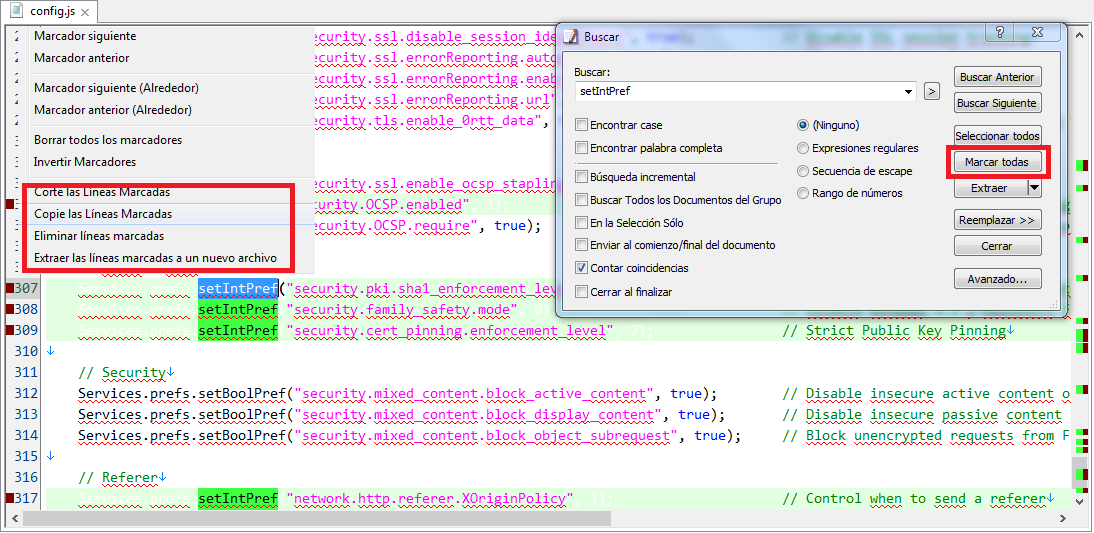
Searching a word and push "mark all", will select and mark all lines with same result.
Now, pressing over the mark will appear a context menu with options, like: "select all marked", "delete all marked", "copy all marked", etc...
Can do this with notepad3 ? or can implement this ? Thz
Regards.
 Mitezuss
All 42 comments
If you have enabled "Menu -> View -> Mark Occurrences" (e.g. Match Whole Word Only -> Match Selected Word). Select a word and press "Menu -> Edit -> Miscellaneous -> Multi-Select All Matches (Ctrl+Shift+Spc)" you are able to edit all occurrences. If you press "Backspace", all occurrences are cleared or you can move the cursor around and insert something ...
Be careful, if "Match Visible Only" is active: then you will edit the "visible occurrences" only!
 RaiKoHoff
on 11 Feb 2020
RaiKoHoff
on 11 Feb 2020
Good, but have a problem:
I can select all the line (shift+end) and copy, but:
Why do not copy the \r\n ?
Mitezuss
on 13 Feb 2020
This is by design and most (all?) text editors work like that. The line ends before (and not after) the line-break. To get the line-breaks copied too, you have to proceed to the next line (shift+down).
Ed.: Or, in case of multi-selection (shift+end, shift+right_arrow).
RaiKoHoff
on 14 Feb 2020
no further response - assumed as fixed.
RaiKoHoff
on 1 May 2020
Hi, can you implement this? :
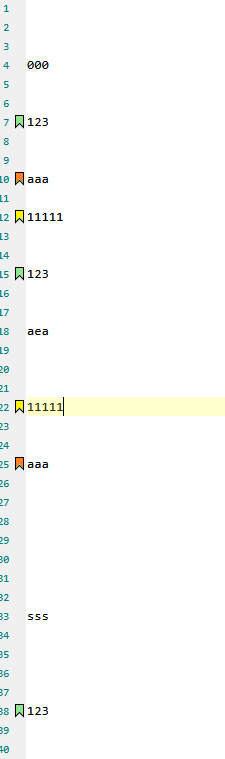
I really miss this funtion:
- Search a word and mark (bookmarked) ALL lines with that word.
- Search another word and add anothers marks for lines with this new word (without remove the bookmarkeds, be nice colored =d)
@RaiKoHoff
Your solution (_Select a word and press "Menu -> Edit -> Miscellaneous -> Multi-Select All Matches (Ctrl+Shift+Spc)_) is fine only if i wanna copy to extract thats lines, but not if i wanna work and edit that lines (in the document, without lose the "marked" of lines)
I hope I explained (hate my english -.-, i can read easily but do not write good -.-)
Regards
Mitezuss
on 17 Aug 2020
New feature request.
RaiKoHoff
on 18 Aug 2020
I see this "Book Marker" feature as an extension to the Focused-View feature:
@Mitezuss :
Feel free to test the "BETA/RC" version "Notepad3Portable_5.20.819.2_beta.paf" or higher (see below or issue #1129).
Please help to optimize the Workflow (for above version):
- Use All Occurrences Marking of e.g. a Word and press
Focused-Viewbutton orCtrl-Alt+V.
All focused lines get an additional new Bookmark, which stays if theFocused-Viewis switched back to normal view (toggle by button orCtrl-Alt+V). - Select another word and repeat the
Ctrl-Alt+Vtoggle: anotherBookMarkerper focused line is created (up to 8 different types possible - more: 1st type is cleared and re-used). - Navigate through BookMarks: Next(
F2), Previous(Shift-F2) - if current line has a BookMark, the type is used for navigation. If not, next/prev Std-BookMark is searched, if not set, next/prev "Focused-View-BookMark" is searched. - Toggle BookMark (
Left-ClickorCtrl-F2) will clear this bookmark (Std-BM) or all of this type (Focused-View-BM). - Clear All BookMarks (
Alt+F2) should do what it says. - Remark: Disable BookMark-Margin will activate transparent coloring of bookmarked line .
Questions:
- Do we need a color configuration for the "Focused-View-BookMarks" (Std-BM can be configured) (disadvantage: overwhelming config)
- Are we missing some (workflow) handling regarding this "Focused-View-Bookmark" feature
- Do we need to make this additional "Focused-View" feature optional?
- ... ???
RaiKoHoff
on 19 Aug 2020
- Remark: Disable BookMark-Margin will activate transparent coloring of bookmarked line .
Can add a option (hidden or not on .ini [settings2] or whatever) for use both: BookMark-Margin and line color?
Can add:
- Right-Click over the BookMarker for "Copy, Cut or Delete" all Marked Lines.
- "Mark" to search dialog box ? (without need to click Focused-View, just click on "Mark" (without toggle the view): not need click 2 time to expand)
PS: i will keep testing. Thank
Mitezuss
on 20 Aug 2020
Disable BookMark-Margin will activate transparent coloring of bookmarked line by Scintilla internal automatic.
To have both markers additional logic and double number of limited marker-IDs have to be implemented.
In addition, I think it is too much for just marking the occurrences.
The idea to bundle this feature with the "Focused-View" prevents us for creating new buttons, menu entries and Shortcuts (we don't have useful Shortcuts available) for the small inconvenience of double-click/double-press-shortcut.
Advantage too: You can easily see which is the given color for this marker series (in focused view).
So, IMHO, the advantages of current solution outvote the small inconvenience.
The Bookmark-Context-Menu is worth to think about ...
RaiKoHoff
on 20 Aug 2020
Upcoming beta version will add the Bookmark-Margin-Context menu.
New internal switch [Settings2]FocusViewMarkerMode (default -> 1):
- 0 = OFF
- 1 = STD (if Bookmark-Margin is shown, use marker symbol - if hidden, use alpha-blend color line background)
- 2 = NO_MARGIN (use alpha-blend color line background regardless if BM-Margin is shown or hidden)
RaiKoHoff
on 21 Aug 2020
Hello @Mitezuss ,
Feel free to test the "BETA/RC" version "Notepad3Portable_5.20.821.1_beta.paf" or higher, see below or issue #1129.
The "Notepad3Portable BETA/RC paf" version can be used with or without ".7z" extension.
To update the "Notepad3 Setup" version with the latest features/fixes from the "BETA/RC" version, see issue #1105.
Also, feel free to test the "BETA/RC" version "Notepad3_5.20.813.1_Setup_beta" or higher, see below or issue #1129.
Comments and suggestions are welcome... 😃
 hpwamr
on 21 Aug 2020
hpwamr
on 21 Aug 2020
Hi,
if you click several times on focus-view:
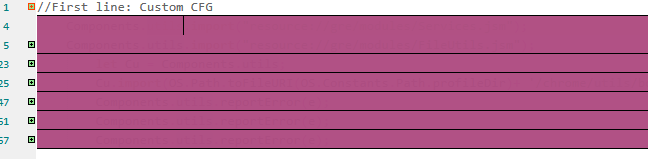
regards
Mitezuss
on 21 Aug 2020
@Mitezuss : Yes, you are running out of markers:
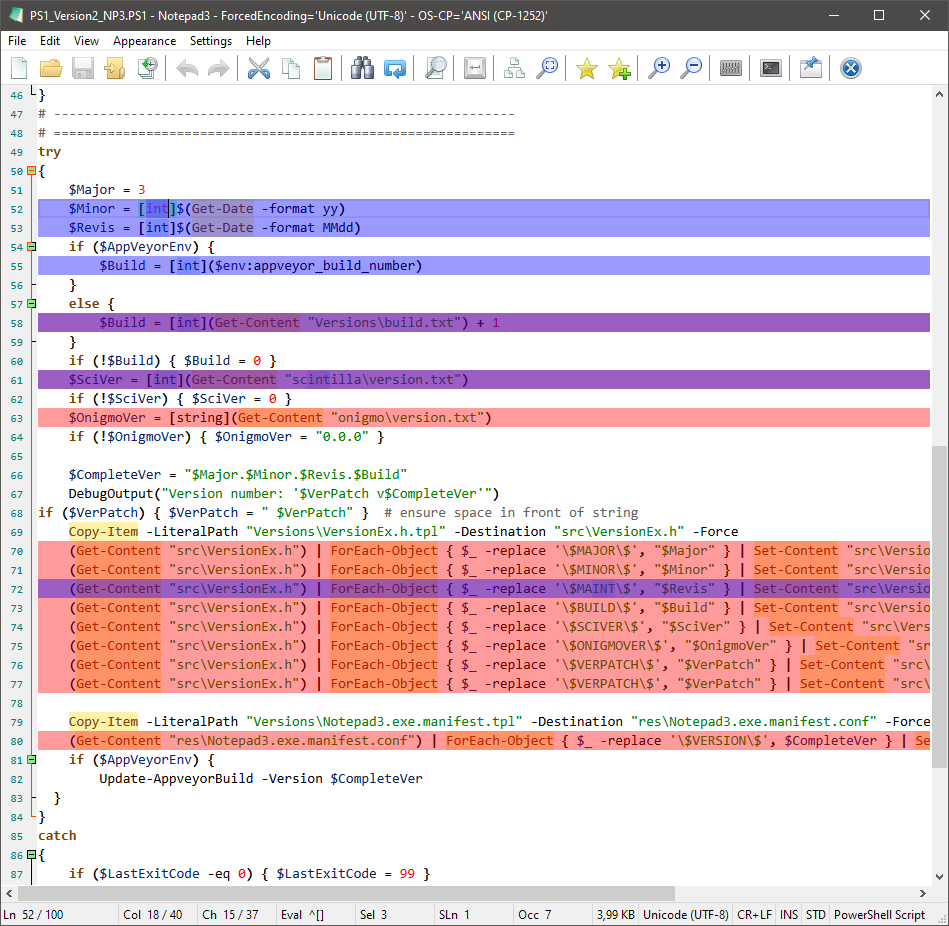
There are 8 different markers available. If you want to to mark a 2nd word (with different marker) and the word is in the same line as the 1st word is, the markers are laid over each other. In case of bookmark-margin symbols, the last one wins - in case of alpha-blend (transparent) line-background, the colors are combined accordingly,
So you get the "violet" color if all 8 transparent marker colors are set on the same line.
If all 8 markers are in use, the 1st one is always used for a new mark (the old 1st one is removed), but you will not see any change anymore, except the marked word is in another line.
In your case you marked the same pattern 8+ times.
Ed.: Each new Bookmark overlay reduces the transparency, so the text vanishes.
- 1st: "Content" -> red
- 2nd: "int" -> blue
- lines with "Content" and "int" -> violett
RaiKoHoff
on 22 Aug 2020
I came across some odd behaviour in version 5.20.822.2 beta, and figured it had something to do with this feature.
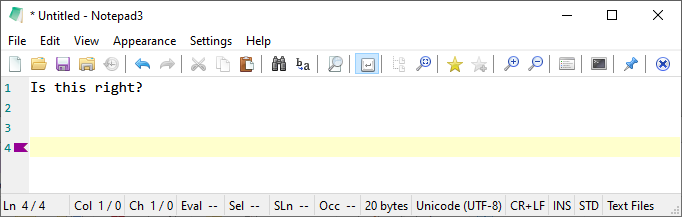
With a pristine installation, start a new buffer, type something and follow with 2-3 presses of the Enter key - you get a purple sideways bookmark:
...which if you turn off Bookmark Margin, turns the whole line purple:
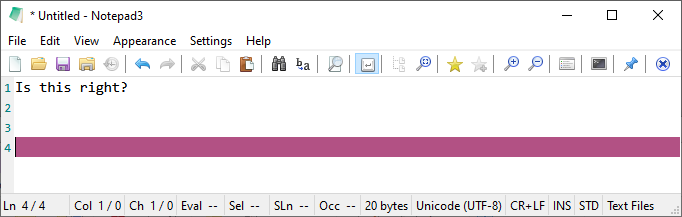
Is this the intended behaviour? If so, I foresee it is going to cause out-of-box confusion... What is it supposed to do?
 craigo-
on 23 Aug 2020
craigo-
on 23 Aug 2020
Of cause, the sudden appearance of the bookmark is not intended.
The switching from margin-bookmark to line-background bookmark type on hiding bookmark margin is intended.
RaiKoHoff
on 23 Aug 2020
Hello @craigo- ,
Feel free to test the "BETA/RC" version "Notepad3Portable_5.20.823.1_beta.paf" or higher, see below or issue #1129.
"Notepad3Portable BETA/RC paf" version can be used with or without ".7z" extension.
To update "Notepad3 Setup" version with the latest features/fixes from the "BETA/RC" version, see issue #1105.
Also, feel free to test the "BETA/RC" version "Notepad3_5.20.822.1_Setup_beta" or higher, see below or issue #1129.
Comments and suggestions are welcome... 😃
hpwamr
on 23 Aug 2020
I was just testing the new beta v5.20.823.1 and if I select a word then invoke the find dialog that word is auto-bookmarked immediately, that doesn't seem right to me.
Also FYI the same thing described above also happens even after I have set the ini key FocusViewMarkerMode=0, as well, which as far as I can tell, currently doesn't seem to disable the new feature at all, I was under the impression that it it should?
 jupester
on 24 Aug 2020
jupester
on 24 Aug 2020
Notepad3 (x64) v5.20.823.1 beta:
The behaviour where margin bookmarks or line highlighting occurs as I described is gone - thanks.
I can confirm @jupester's findings and agree that the behaviour seems a little odd.
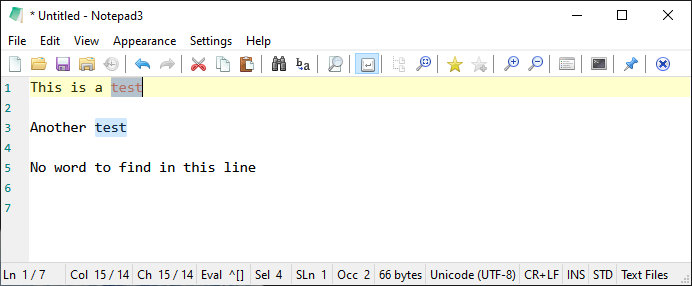
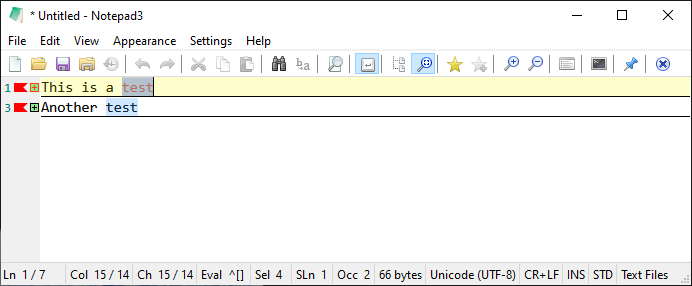
Also, if the bookmarks/highlights are supposed to be tied to the Focused View feature, why do the bookmarks/highlights persist when Focused View is toggled off?
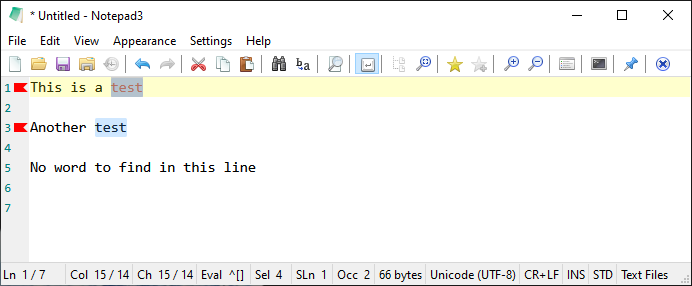
Highlight a word in the buffer:
Toggle Focused View on, bookmarks appear:
Toggle Focused View off, bookmarks remain:
craigo-
on 24 Aug 2020
If someone uses the "Focused View", he/she might like to find the previously focused lines in an easy way when he decided to toggle back to the full text (editable) view.
The latest Beta supports now several modes of the "Focus View":
Margin-Bookmarkonly (turned toLine-Background-Bookmarkif margin is hidden)Line-Background-Bookmarkonly (margin hidden or not)- One of mode 1 or 2 combined with folding.
So, you can use the bookmark-focused-view w/o folding.
In addition to that, you can optionally have a close coupled Margin-Arrows-Bookmark for each Occurrences-Indicator.
Use Bookmark-Context-Menu to clear occurrences-marker (or margin-bookmark-left-click).
Use Alt-F2 to clear all occurence markers (except the coupled margin-arrows).
Hotkey Alt-F2 clears normal Bookmarks, if no occurrences-marker are in use.
RaiKoHoff
on 24 Aug 2020
Not sure if you were replying to me, but please re-read my last comment. I understand what craigo- has screenshotted as being the desired behavior of this new feature, and is working how I think you intended, but what I am describing as an issue is that:
- I haven't even invoked focused view (only opened the find dialog) and am getting bookmarks created.
- The FocusViewMarkerMode=0 disable switch isn't changing any behavior as far as I can tell.
I used Focused view extensively in the past as well as user set bookmarks, and my default settings never have the selection margin showing, so having a rainbow effect in my document isn't desired and creates extra tasks for me having to clear them, so I really hope you can incorporate a disable switch so I can get back to previous behavior.
jupester
on 24 Aug 2020
@jupester : ahrghhh - I see what you mean - this was not intended - that has to be fixed ... 🤔
RaiKoHoff
on 24 Aug 2020
Hello @jupester , @craigo-
Notice: ONLY the "en-US" and "de-DE" version are up-to-date, the other languages will follow ASAP ! 😏
Feel free to test the "BETA/RC" version "Notepad3Portable_5.20.824.1_beta.paf" or higher, see below or issue #1129.
"Notepad3Portable BETA/RC paf" version can be used with or without ".7z" extension.
To update "Notepad3 Setup" version with the latest features/fixes from the "BETA/RC" version, see issue #1105.
Also, feel free to test the "BETA/RC" version "Notepad3_5.20.822.1_Setup_beta" or higher, see below or issue #1129.
Comments and suggestions are welcome... 😃
hpwamr
on 24 Aug 2020
Un pequeño bug:
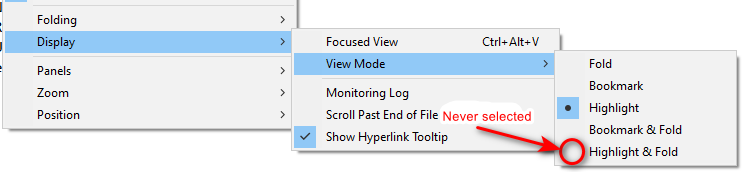
Si se selecciona "Resaltar & Pliegue", funciona como es debido, sin embargo no queda seleccionado sino que se selecciona "Resaltar"
"Marcador & Resaltar", no se puede cierto ?
Saludos.
Little Bug:
If you select: Highlight & Fold
Work as expected but re-select just "Highlight"
Mitezuss
on 25 Aug 2020
If you select: Highlight & Fold
Hello @Mitezuss , Your're right ! 👍
Hello @RaiKoHoff , Highlight & Fold is never selected !
hpwamr
on 25 Aug 2020
Hello @Mitezuss ,
Feel free to test the "BETA/RC" version "Notepad3Portable_5.20.825.2_beta.paf" or higher, see below or issue #1129.
"Notepad3Portable BETA/RC paf" version can be used with or without ".7z" extension.
To update "Notepad3 Setup" version with the latest features/fixes from the "BETA/RC" version, see issue #1105.
Also, feel free to test the "BETA/RC" version "Notepad3_5.20.822.1_Setup_beta" or higher, see below or issue #1129.
Comments and suggestions are welcome... 😃
hpwamr
on 25 Aug 2020
maybe a bug:
Text:
    <uses-permission android:name="
    <uses-permission android:name="
    <uses-permission android:name="
If i select "permission" and press the button "Focus-view" all is bookmarked (so work fine)
But if i select "uses-permission" and press the button, nothing happen
Mitezuss
on 26 Aug 2020
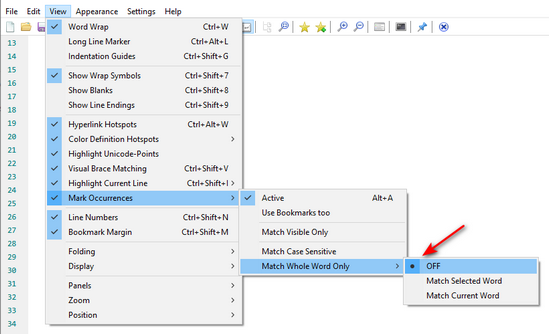
It not a bug, it's the setting: "Match Selected Word"
For example: If in Search (Ctrl+F) --> if you Search String is "permiss" goto button --> Focused View --> OK
To have the same result in "Display Plain text" for "permiss", you have to set --> "Match All Whole Word Only" --> "Off"
hpwamr
on 26 Aug 2020
The Focused-View is related to the Mark Occurrences mode:
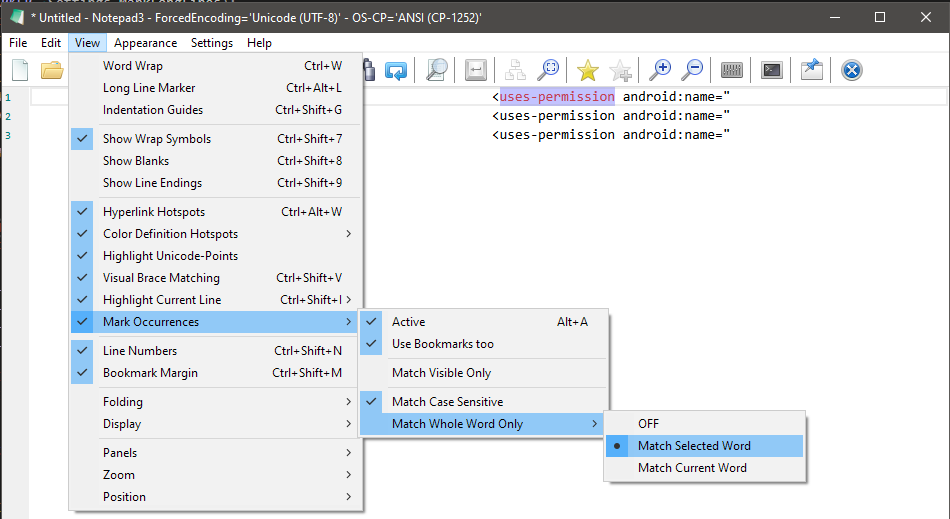
The Mark Occurrences mode must be active, to use the Focused-View.
You have 3 Mark Occurrences modes for "Whole Word Only Matching":
- Mark occurrences matching the selected word (default)
- Mark occurrences matching the current word (word at caret position)
- OFF
No. 1 and 2 should be obvious. OFF means: "_don't care for whole word, but indicate occurrences matching the selected text_".
You are using the default mode (1.), while your intention is using mode "OFF"
Using the F/R-Dialog, the behavior of the Occurrences Marking matches the specified find-pattern (ignoring "Whole Word Mode". Here, you can also mark occurrences of matching regular expression (and focus the view on it).
REMARK:
In your case, "uses-permission" is not a single (whole) word, but two words separated by "-".
You can activate the Menu->Settings->Accelerated Word Navigation which only uses the space (plus characters configured in [Settings2] ExtendedWhiteSpaceChars= ) as a word separator. In this case you get "
RaiKoHoff
on 26 Aug 2020
Hi @RaiKoHoff,
- select word
- press focus
- delete line
(the color/mark is keep) - undo
(bad mark)
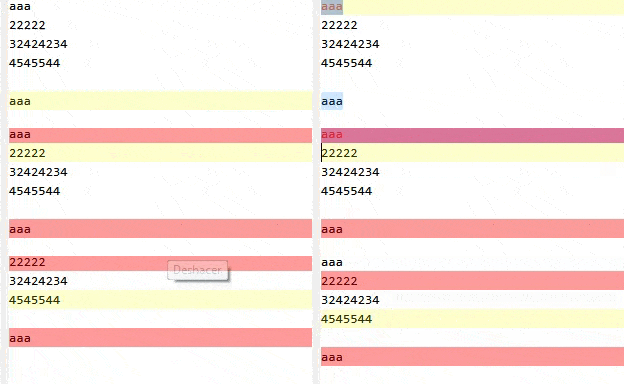
should work like that or is a bug? (the bookmark should be delete too)
Mitezuss
on 31 Aug 2020
Unfortunately, there is no undo/redo history of the occurrence bookmarks, like for selection.
Maybe if the line is deleted, the bookmarks should be deleted too 🤔.
RaiKoHoff
on 31 Aug 2020
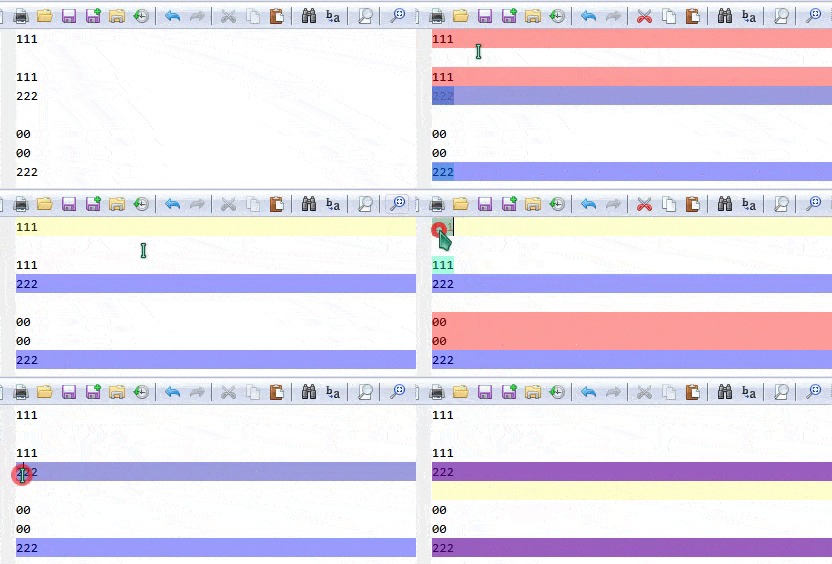
check this:
- mark a word
- mark another word
- click 7 time (there are 8 color,right ?)
the first bookmark disappear, and just have 1 "free" bookmark (color) for use
- try to add anothers bookmark, see what happend
Mitezuss
on 1 Sep 2020
Small correction to your analysis: "the first bookmark disappear" - yes, but you got no "free" marker, cause this first one is reused to mark the current occurrence. Then, if no other marker is "freed", this "marker-number-1" is reused for every next try of occurrence marking (Focus View).
Current bug: Pressing Focus View occupies a marker while there is nothing to mark 👎
Maybe current behavior is confusing. I am going to change it:
- If no occurrence marker is available anymore:
Focus Viewwill not delete the first one, but just do no highlight/bookmark anymore (to keep old marks, cause the intention is to mark the new occurrence, not to reuse an old marker). - I am thinking about a message box warning in this case (optional "don't show again checkbox? ") ? 🤔
RaiKoHoff
on 2 Sep 2020
Hi, the Focus-View in search box, is working ?
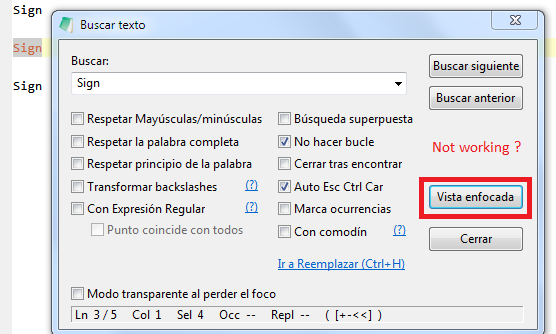
I press and nothing happen
Mitezuss
on 5 Sep 2020
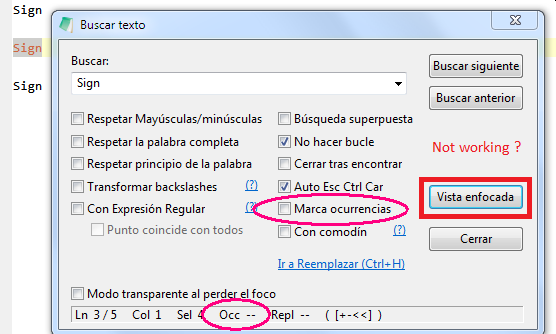
"Focus View" is hard coupled to "Occurrences Marking" - if this is switched OFF, it can't find anything to focus on!
(Maybe disabling that button for this case would make sense ;-))
RaiKoHoff
on 5 Sep 2020
"Focus View" is hard coupled to "Occurrences Marking" - if this is switched OFF, it can't find anything to focus on!
Hello @RaiKoHoff ,
This seems to be a very old bug: when "Occurrences Marking" is "Unchecked", then the Focused View button should
be "grayed out ".
- It happens correctly when you have unchecked it.
- But when you restart the dialog box (or go to Replace), the
Focused Viewbutton is active again.
hpwamr
on 5 Sep 2020
Hola @Mitezuss ,
¿Ha visto el mensaje: https://github.com/rizonesoft/Notepad3/issues/2750#issuecomment-686443656 ?
hpwamr
on 5 Sep 2020
Feel free to test the "BETA/RC" version "Notepad3Portable_5.20.905.1_rc.paf" or higher, see below or issue #1129.
"Notepad3Portable BETA/RC paf" version can be used with or without ".7z" extension.
To update "Notepad3 Setup" version with the latest features/fixes from the "BETA/RC" version, see issue #1105.
Also, feel free to test the "BETA/RC" version "Notepad3_5.20.829.2_Setup_rc" or higher, see below or issue #1129.
Comments and suggestions are welcome... 😃
hpwamr
on 5 Sep 2020
@hpwamr
Hola, recién leo #2750.
Si, claro, con mucho gusto =)
Respecto:
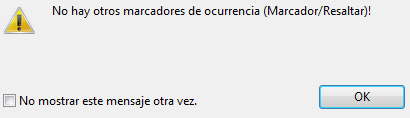
Podría ser:
¡Se alcanzó el máximo de marcadores disponibles!
ó
¡No hay más marcadores disponibles!
@RaiKoHoff
Hi,
Maybe if the line is deleted, the bookmarks should be deleted too :thinking:
Can be fixed or can not be fixed or maybe will be fixed ? (for close this issue).
Regards
Mitezuss
on 6 Sep 2020
Hope, I found all places where lines are deleted (completely) -> PR #2761.
Remarks:
- Markers should be deleted, if complete line is deleted (incl. line-break char(s) <- show EOLs for debug).
- For merged lines, Markers should be merged too.
- Deleted Markers ban not be undone.
RaiKoHoff
on 6 Sep 2020
Hope, I found all places where lines are deleted (completely) -> PR #2761.
Feel free to test the "BETA/RC" version "Notepad3Portable_5.20.906.1_rc.paf" or higher, see below or issue #1129.
"Notepad3Portable BETA/RC paf" version can be used with or without ".7z" extension.
To update "Notepad3 Setup" version with the latest features/fixes from the "BETA/RC" version, see issue #1105.
Also, feel free to test the "BETA/RC" version "Notepad3_5.20.829.2_Setup_rc" or higher, see below or issue #1129.
Comments and suggestions are welcome... 😃
hpwamr
on 6 Sep 2020
@RaiKoHoff
Thank =), now work fine !
Mitezuss
on 7 Sep 2020
@RaiKoHoff
Hi, just a little suggestion:
Can set this order: (or some like)
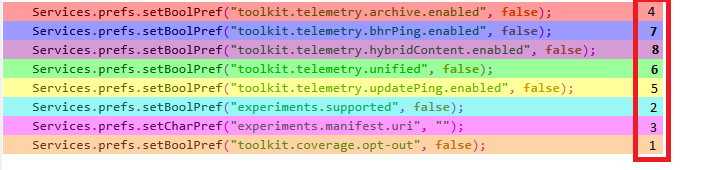
Current is:

Note: 6 and 8 is so simil or maybe i have bad eyes xD
Regards
Mitezuss
on 21 Sep 2020
Related issues
 ggordon-vispero
·
3Comments
hpwamr
·
4Comments
ggordon-vispero
·
3Comments
hpwamr
·
4Comments
 tzleon
·
3Comments
tzleon
·
3Comments
 blackcrack
·
3Comments
blackcrack
·
3Comments
 bravo-hero
·
3Comments
bravo-hero
·
3Comments
Most helpful comment
The
Focused-Viewis related to theMark Occurrencesmode:The
Mark Occurrencesmode must be active, to use theFocused-View.You have 3
Mark Occurrencesmodes for "Whole Word Only Matching":No. 1 and 2 should be obvious.
OFFmeans: "_don't care for whole word, but indicate occurrences matching the selected text_".You are using the default mode (1.), while your intention is using mode "
OFF"Using the F/R-Dialog, the behavior of the Occurrences Marking matches the specified find-pattern (ignoring "Whole Word Mode". Here, you can also mark occurrences of matching regular expression (and focus the view on it).
REMARK:
In your case, "uses-permission" is not a single (whole) word, but two words separated by "-".
You can activate the
Menu->Settings->Accelerated Word Navigationwhich only uses thespace(plus characters configured in[Settings2] ExtendedWhiteSpaceChars=) as a word separator. In this case you get "