Notepad3: Saving an "encoding" change in a protected environment enters a loop
Tested with Notepad3 (64-bit) v5.19.1122.2684 BETA
- open:
C:\Program Files\Notepad3\minipath.ini - change encoding from
UTF-8toUTF-8 Signature - save file change ask to start an elevated session
- start elevated and save file
- save file change ask to start an elevated session
- start elevated and save file
- etc...
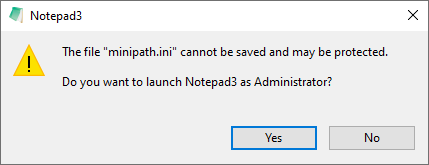
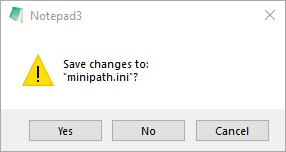
 hpwamr
All 28 comments
Feel free to dev beta ver _5.19.1123.2686_BETA.
 RaiKoHoff
on 23 Nov 2019
RaiKoHoff
on 23 Nov 2019
Hello @RaiKoHoff , unfortunately, it's not good ! 😬
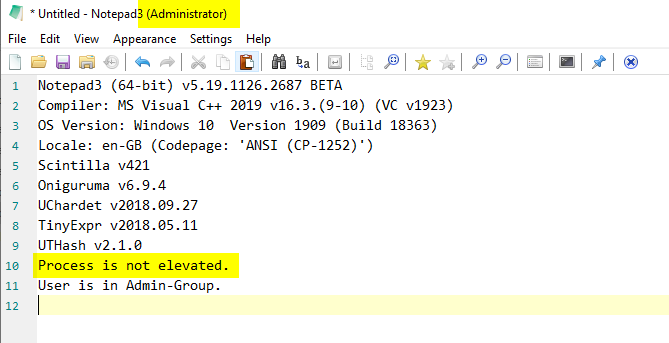
- All Notepad3 session is started as "Administrator" !
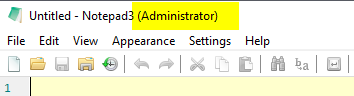
- In a Protected environment , I all kind of save produces this error !
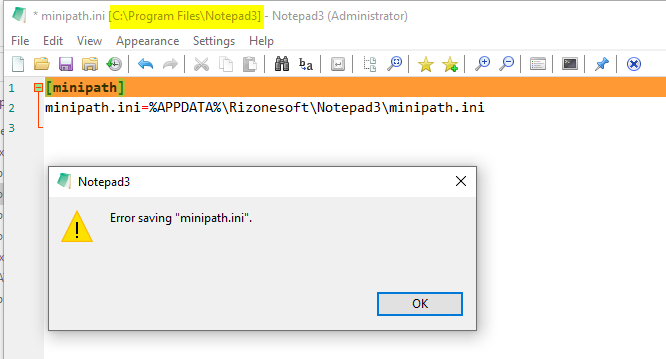
EDIT (24/11/2019) ,
Hello @RaiKoHoff , also issue with Minipath ! 🤔
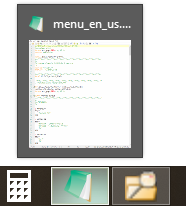
With version v2675, Minipath opens each new file in a same Notepad3 window (see picture):
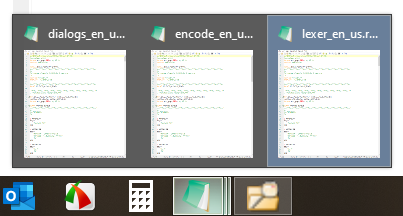
With version v2676, Minipath opens each new file in a new Notepad3 window (see picture):
hpwamr
on 23 Nov 2019
Hello @RaiKoHoff ,
I just tested your not yet published PR.
The result is NOT good. 😉
hpwamr
on 26 Nov 2019
@hpwamr : Please read https://docs.microsoft.com/en-us/windows/security/identity-protection/user-account-control/how-user-account-control-works
Especially:
A user that is a member of the Administrators group can log on, browse the Web, and read e-mail while using a standard user access token. When the administrator needs to perform a task that requires the administrator access token, Windows 10 automatically prompts the user for approval. This prompt is called an elevation prompt, and its behavior can be configured by using the Local Security Policy snap-in (Secpol.msc) or Group Policy.
So a user can be in the Admin-Group but the process he started is still not elevated.
This is the situation you are reporting as "NOT good" ?
RaiKoHoff
on 26 Nov 2019
So a user can be in the Admin-Group but the process he started is still not elevated.
This is the situation you are reporting as "NOT good" ?
No it's not that !! 😖
I totally agree that Notepad3 is launched is as not elevated, even though I'm in the Admin-Group.
But look at here, when I normally run Notepad3, it displays "Administrator" in the top bar! 😁
hpwamr
on 26 Nov 2019
Okay, "Administrator" is shown, if either the user is in Admin-Group or the process is elevated - maybe we should be more specific here.
RaiKoHoff
on 26 Nov 2019
In addition, Minipath is not working as habitually ! see _EDIT (24/11/2019)_ in : https://github.com/rizonesoft/Notepad3/issues/1804#issuecomment-557799749
hpwamr
on 26 Nov 2019
Please open a 2nd issue for that
RaiKoHoff
on 26 Nov 2019
Okay, "Administrator" is shown, if either the user is in Admin-Group
Since years, I'm been in Admin-Group, and the word "Administrator" was only showed when I've relaunched Notepad3 in Elevated process.... 😉
hpwamr
on 26 Nov 2019
Please open a 2nd issue for that
OK, but this issue is appeared with your latest PR (version v2676,) !!!
hpwamr
on 26 Nov 2019
@hpwamr : I am working on it - if I find time - we are still talking about beta versions ...
Maybe you should change the (Administrator) -> (Elevated) (all languages) and I will change the condition to IsProcessElevated() only.
RaiKoHoff
on 26 Nov 2019
I'm trying to understand all those issues. 🤔
What I want is to recover Notepad3 and Minipath as before your PR #1806 , with the same functioning for "Administrator" as before. 😕
hpwamr
on 26 Nov 2019
-> PR #1812 , for MiniPath communication, I have to dig a little deeper ...
RaiKoHoff
on 26 Nov 2019
OK, after the debugging, I will modify the line "Administrator" to "Elevated" for all languages. 😃
hpwamr
on 26 Nov 2019
Hello @RaiKoHoff
Tested Notepad3 (64-bit) v5.19.1126.2687 BETA
- When relaunched, the word "Elevated" in top bar appears correctly. 👍
- In a protected environment, "Save with Original Date" is NOT working correctly because when it relaunches Notepad3, the original date is lost. 👎
- Minipath is not ok, because it always opens several Notepad3 windows. 👎
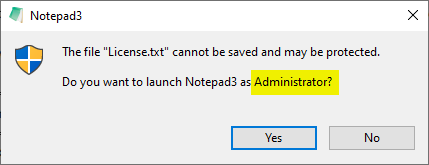
- Suggestion to change "Administrator" to "an Elevated Notepad3" for the following dialog ? 🤔
hpwamr
on 27 Nov 2019
- Okay :+1:
- I will try to find a solution for that ...
- MiniPath =>Notepad3 is (now) okay, as it now respects the
Notepad3->Menu->Settings->Window->Reuse Windowconfiguration.
Please report, if not. - Next PR will have this change ...
RaiKoHoff
on 27 Nov 2019
3. MiniPath =>Notepad3 is (now) okay, as it now respects the
Notepad3->Menu->Settings->Window->Reuse Windowconfiguration.
Please report, if not.
Hello @RaiKoHoff
Once again, you are right! 😃
- YES, "Reuse window" solves my problem. 👍
- I think that before, this function with Minipath active was defective! 😉
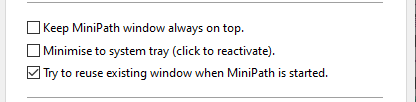
- My confusion also came from the following parameter that now I see that it applies to the Minipath window and not the Notepad3 window!
hpwamr
on 27 Nov 2019
Feel free to test development beta version _5.19.1127.2688_BETA.
@hpwamr : Ed.: "existing window" means MiniPath's window in this case
(if 'MiniPath' is restarted again ...)
RaiKoHoff
on 27 Nov 2019
Maybe Notepad3's "Reuse Window" option may need a Hotkey/Shortcut (but which :eyes:) ?
RaiKoHoff
on 27 Nov 2019
My confusion also came from the following parameter that now I see that it applies to the Minipath window and not the Notepad3 window!
Ed.: "existing window" means MiniPath's window in this case
(if 'MiniPath' is restarted again ...)
Yes that is !
It was my confusion because before the communication Minipath/Notepad3 was faulty ! 😉
Personally, I do not reclaim a Hotkey/Shortcut... 👀
hpwamr
on 27 Nov 2019
I will try to find a solution for that ...
Tested Notepad3 (64-bit) v5.19.1127.2688 BETA
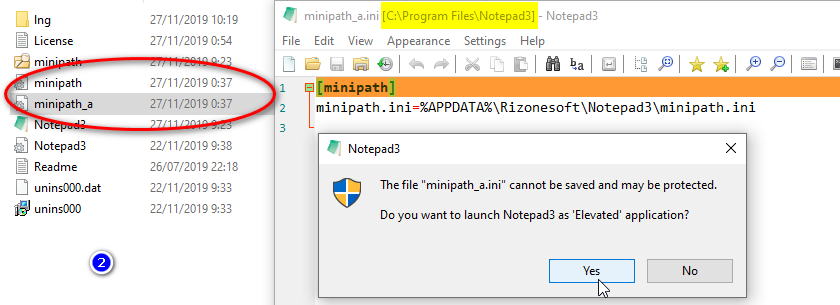
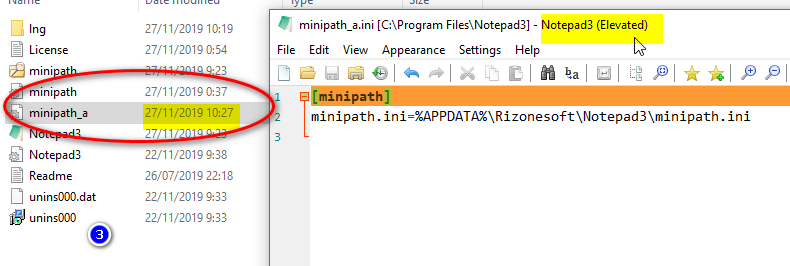
Here a 3 pictures to describe the process:
- In a protected "C:\Program FilesNotepad3", open a copy of Minipath.ini
- Activate "Save with Original File Date/Time"
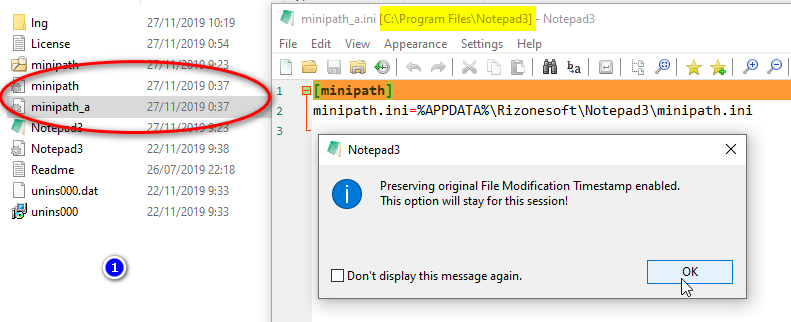
- Accept to start as "Elevated application"
- Before any editing, the time is changed..
hpwamr
on 27 Nov 2019
I will try to find a solution for that ...
Hello @RaiKoHoff ,
Questions/suggestion ?
- Would not be an "Auto Elevate Without Relaunch #1695" a better solution in a "Protected environment" ?
- Idem to open/save "protected big files"
hpwamr
on 27 Nov 2019
@hpwamr : As stated in comment https://github.com/rizonesoft/Notepad3/issues/1695#issuecomment-554581355
there is no such thing as "_Auto Elevate Without Relaunch_" - Windows does _not allow_ a "_self elevation_", the elevation is always a "_relaunch with elevated rights_".
Ed.: Another question is how the document (and state) is transferred to the re-launched (elevated) instance ...
RaiKoHoff
on 27 Nov 2019
Feel free to test dev beta ver _5.19.1127.2689_BETA.
(currently I am not able to test the 'elevation' stuff at my workstation ... :grin:)
RaiKoHoff
on 27 Nov 2019
- I will try to find a solution for that ...
Tested: Notepad3 (64-bit) v5.19.1127.26898 BETA
All seems to be OK ! 👍
Thank you for your incredible involvement in the Notepad3 project... 🥇 😃
hpwamr
on 27 Nov 2019
Maybe
Notepad3's "Reuse Window" option may need a Hotkey/Shortcut (but which 👀) ?
Hello @RaiKoHoff ,
I was at looking for an accelerator key.
What do you think about : Crtl+Shift+0
MENUITEM "&Reuse Window\tCrtl+Shift+0", IDM_VIEW_REUSEWINDOW
    "0",            IDM_VIEW_RESETZOOM,              VIRTKEY, CONTROL, NOINVERT
    "0",            IDM_VIEW_REUSEWINDOW,            VIRTKEY, SHIFT, CONTROL, NOINVERT
@hpwamr : As you might have seen, changed your suggestion to Ctrl+Alt+L, cause Ctrl+Shift+0 does not find its way to Notepad3's message loop - must be intercepted before ?
RaiKoHoff
on 28 Nov 2019
Hi @RaiKoHoff ,
I just test Ctrl+Alt+L . 😬
My suggestion is: 😃
- Use Ctrl+Shift+L for toggle "Menu: Reuse Window" option.
- Inversion of Accelerator key Ctrl+Alt+L with Ctrl+Shift+L
hpwamr
on 28 Nov 2019
Related issues
 ghost
·
36Comments
ghost
·
36Comments
 MelchiorGaspar
·
31Comments
MelchiorGaspar
·
31Comments
 craigo-
·
79Comments
craigo-
·
79Comments
 bravo-hero
·
51Comments
bravo-hero
·
51Comments
 ltGuillaume
·
41Comments
ltGuillaume
·
41Comments
Most helpful comment
Tested:
Notepad3 (64-bit) v5.19.1127.26898 BETAAll seems to be OK ! 👍
Thank you for your incredible involvement in the Notepad3 project... 🥇 😃