Notepad3: printing issue, text file prints text ultra small... so as to be unreadable
using version, Notepad 3 (v5.19.327.1665)(Portable)(DevBuild)(x64)
I went to print part of a text file and the text size is UN-readablly small...
Windows 7 ULTIMATE SP1 x64
ask for what ever else you need.. k.
 MelchiorGaspar
All 31 comments
I can not reproduce this issue.
Attached, you will find a FreePDF (Printer Device) printout from a fresh installed Development-Version of its configuration .ini. It looks great :thinking:
Notepad3.ini.pdf
 RaiKoHoff
on 29 Mar 2019
RaiKoHoff
on 29 Mar 2019
Hello @MelchiorGaspar
I've tested the printing with "Notepad3 (64-bit) v5.19.328.1666 develop"and Win10 Pro.
I can not reproduce your issue.
Question: Are you sure to use the "Notepad3.ini (6,46 KB)" that accompanies "Notepad3 (v5.19.327.1665)" because many changes have occurred in the area of "Notepad3.ini" 🤔
 hpwamr
on 29 Mar 2019
hpwamr
on 29 Mar 2019
here is my settings file for testing...
Notepad3.ini.zip
when I take the same text file and open it in Notepad++ and print from that program it prints fine...
so its not my printer or printer settings...
MelchiorGaspar
on 29 Mar 2019
@MelchiorGaspar : Your PrintZoom=10 means: scale print out to 10% of its original size.
Set it to 100(%) (or what ever fits to your needs), then you will be fine...

RaiKoHoff
on 29 Mar 2019
ooh my... I wonder how that happened, that is how my settings got changed because I didn't change it...
when did u guys add that feature? or was it already there in Flo's NP2..
ok its fixed now, @RaiKoHoff thx for taking the time to look through my settings file..
closed.
MelchiorGaspar
on 29 Mar 2019
Yes the Zooming (Visual and Printing) has been changed from Notepad2 to Notepad3, also the meaning of the .ini-file values. There is a new version tag (SettingsVersion=1) in the .ini-file, which should cover that issue:
- old version: reading and translating old value to new one,
- writing new value with new version tag.
Maybe there has been something mixed up.
RaiKoHoff
on 29 Mar 2019
ooh ok... I will have to manually review my settings file then I guess...
MelchiorGaspar
on 29 Mar 2019
Sorry for this inconvenience 🙄
RaiKoHoff
on 29 Mar 2019
Hello @MelchiorGaspar ,
I know, it's hard to hear, but if you want to take advantage of all the NEW features added in the BETAS, it's really better to start with the latest PRISTINE Notepad.ini and Minipath.ini.
Latest Notepad.ini and Minipath.ini files (2019-03-13) : Latest INI files_2019-03-13.zip
hpwamr
on 29 Mar 2019
When Notepad3 stores its values to .ini file, it optimizes its settings stored (default values are cleared away).
It will not touch keys, which are not longer used, so you don't know, if there is some garbage left in the .ini-file ...
RaiKoHoff
on 29 Mar 2019
thx but I have a highly configed ini file... so it would be a pain to start from scratch... again...
@RaiKoHoff hmm... what to do...
MelchiorGaspar
on 29 Mar 2019
@MelchiorGaspar : a temp. dir, with a uptodate Notepad3.exe, and put your .ini file there.
start Notepad3, and delete the Notepad3.ini and save the file again from Notepad3.
Add the lost sections (like [Settings2], [Suppressed Messages], [Recent Files], [Recent Find], [Recent Replace],). See attached file (done from your provided .zip above).
And check, if everything works as expected ... 🤔 - Then you can use this file ...
Notepad3.zip
RaiKoHoff
on 29 Mar 2019
Hi @MelchiorGaspar ,
Important tip: Make sure that your Notepad3.ini file is: "UTF-16 LE BOM" 🤔
hpwamr
on 29 Mar 2019
it does appear to be that, "UTF-16 LE BOM" ...
why though?
MelchiorGaspar
on 29 Mar 2019
@MelchiorGaspar
Because on Dropbox: Notepad3Portable_5.19.329.1667..., 1668... and 1669... are UTF-8... 😬
The internals routines, are not working correctly if the Notepad3.ini is not "UTF-16 LE BOM"
E.g.: to save/read foreign characters (Chinese, Russian, etc..)
hpwamr
on 29 Mar 2019
ooh ok..
MelchiorGaspar
on 30 Mar 2019
this print zoom issue has come up again.. I went to print something important in a text file....
I checked the ini file and found that PrintZoom=100 was missing so I added back in..
that didn't help either...
The ini file is UTF-8 BOM encoding...
@hpwamr u mentioned just above needing UTF16 BOM,
how do I update my ini file without messing it up?
EDIT:
I am using v5.20.616.1_RC1
MelchiorGaspar
on 18 Jun 2020
Helllo @MelchiorGaspar ,
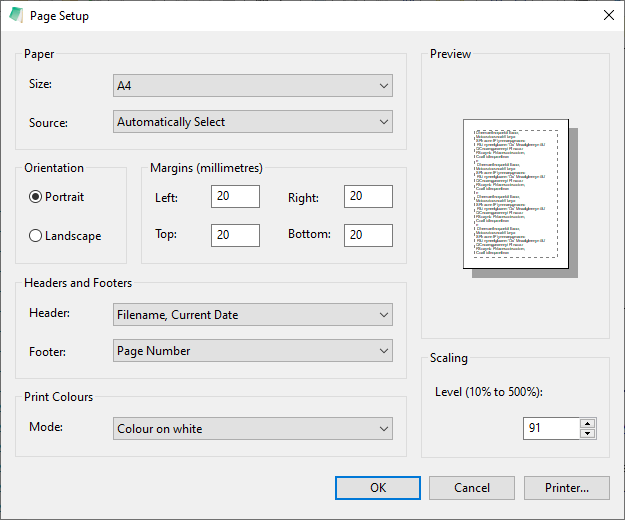
Out-of-the-Box, the the print zoom is 91% (the purpose of this is to print standard in font 10).
@hpwamr u mentioned just above needing UTF16 BOM,
Maybe you may have missed some issues, but for a long time, ALL .ini files are encoded "Unicode (UTF-8) Signature".
We have deleted/added/modified many keys in the ini files. 😃
To avoid "strange behaviors", I advise you to save your Notepad3.ini and do a new installation with replacement of the ini files.
Then you can add your essential modified parameters (reading the issue #1105 may help). 🤔
hpwamr
on 18 Jun 2020
@hpwamr
Out-of-the-Box, the the print zoom is 91% (the purpose of this is to print standard in font 10).
even so... I have noted that my zoom was at 100 where I left it but no PrintZoom was in the ini file.. unlike when I added it the last time I fixed up the ini a bit...
I have not had any issues keeping up to date with NP3 betas till now... I don't know where or when it stopped working right... but PrintZoom is not working right...
even though its set to 100% zoom its still printing very tiny... please investigate and fix...
I checked to see if the ini is being updated for PrintZoom.. I tested by changing it to 91% and saving the ini and then checked the ini... it did change that value... BUT it didn't help... I did a test print and it was still super tiny print...
idk whats wrong, but I will test the last stable build... v5.20.414.1
printed fine with the default ini and said version of NP3..
will test with my configured ini and said stable version..
AND BEHOLD it printed fine too lol... so something is wrong within NP3 in one of these betas
MelchiorGaspar
on 18 Jun 2020
even though its set to 100% zoom its still printing very tiny... please investigate and fix...
Please, see issue #705 ,
Out of the Box, the font 10p. or font 11p. is depending of your Display resolution:
- If the Display resolution is less than 1920 x 1080, the font is 10p. and the Printer Scaling Level is 100%
- If the Display resolution is equal or more than 1920 x 1080, the font is 11p. and the Printer Scaling Level is 91%
As can see the "Printer Scaling Level" is a scaling of your "current font", if your current font is 8p, your print will be x% of 8p.
"Printer Scaling Level"t is customization from: 10% till 500%. 🤔
hpwamr
on 18 Jun 2020
ooh... I looked at issue 705 but it was not all that helpful to me... sorry..
but still did u read all of my last comment? I added more testing results..
I just tested v5.20.617.2_RC1, yesterday's build and it too has this print issue...
Notepad 3 (v5.20.414.1)(Portable)(x64) works fine like it should..
I am reverting back to stable build for now...
I just tested build
Notepad 3 (v5.20.429.3_BETA)(Portable)(DevBuild)(x64)
and it printed fine too with my ini
I will test more versions and report back..
Notepad 3 (v5.20.515.1_BETA)(Portable)(DevBuild)(x64), printed fine
Notepad 3 (v5.20.609.1_BETA)(Portable)(DevBuild)(x64), printed VERY tiny
these too are the oldest betas I have stored on my system..
MelchiorGaspar
on 18 Jun 2020
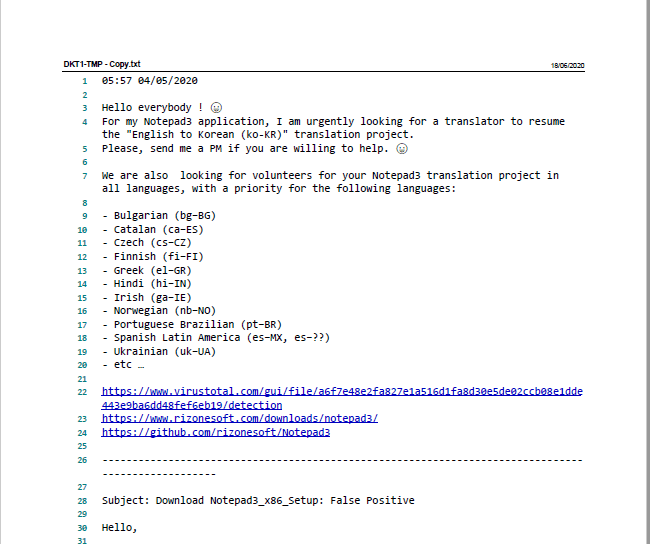
Hello @MelchiorGaspar , @RaiKoHoff ,
Your right, it's a bug in our BETA !!! 😬
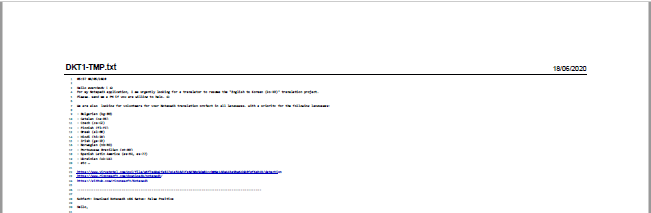
It should be:
hpwamr
on 18 Jun 2020
huwayy I am right lol,
I hope u guys can fix it... ;-)
MelchiorGaspar
on 18 Jun 2020
Hello @MelchiorGaspar ,
Feel free to test the "Portable RC1 paf" version "Notepad3Portable_5.20.618.1_RC1.paf" or higher.
See the issue "Notepad3 BETA-channel access #1129" or hereunder:
_Note1:_ The "Notepad3Portable_paf" version can be used in "2 flavors", see with or without extension ".7z".
_Note2:_ If you follow the instructions in issue #1105 , you can update your "Notepad3 Setup" version with the latest features/fixes of the "Portable BETA paf" version (see issue #1129).
Your comments and suggestions are welcome... 😃
hpwamr
on 18 Jun 2020
Hello @MelchiorGaspar ,
As far as I'm concerned, I think you (requester) can close this issue...
hpwamr
on 18 Jun 2020
Ok tested.. its working normally again... so what was wrong?
and since it was reproducible this time could u remove that label and add an appropriate one ..
and since it appears to be fixed this time I will close it..
MelchiorGaspar
on 18 Jun 2020
and since it was reproducible this time could u remove that label and add an appropriate one ..
"not reproducible" concerns the first part of this _multi-issues post:_ https://github.com/rizonesoft/Notepad3/issues/1094#issuecomment-477898701 🤔
Next time, better to open a new issue with referencing a previous issue, instead of reopen an old issue ! 😏
hpwamr
on 18 Jun 2020
ooh ok... will do.
MelchiorGaspar
on 18 Jun 2020
Ok tested.. its working normally again... so what was wrong?
A bug reveals by last Scintilla update: c71fc18b4135e7ed0884db47fef062cc1e4336c5
hpwamr
on 18 Jun 2020
Ok tested.. its working normally again... so what was wrong?
A bug reveals by last Scintilla update: c71fc18
ooh ok KOOL! so nothing to serious... lol ;-)
MelchiorGaspar
on 18 Jun 2020
Your comments and suggestions are welcome... 😃
hpwamr
on 18 Jun 2020
Related issues
 RaffaeleBianc0
·
3Comments
RaffaeleBianc0
·
3Comments
 dlong500
·
3Comments
hpwamr
·
4Comments
dlong500
·
3Comments
hpwamr
·
4Comments
 craigo-
·
3Comments
craigo-
·
3Comments
 omega32
·
3Comments
omega32
·
3Comments
Most helpful comment
huwayy I am right lol,
I hope u guys can fix it... ;-)