Notepad3: Cannot use menu or status bar to toggle STD/2ND
Notepad3 (64-bit) develop v4.18.509.1029, freshly unpacked and pristine.
When selecting View -> 2nd Default Text, or its corresponding keyboard shortcut Shift + F12, the menu item is ticked and the the status bar element changes to "2ND", but the font does not change accordingly and the style in the status bar still says "Default Font".
I get the same behaviour when double-clicking on the "STD" element in the status bar.
Using this build, in order to change the style/lexer I have to double-click on the style element.
Perhaps a regression from this work on issue 478 (comment)?
 craigo-
All 26 comments
This seems designed behavior.
Test results (branch master):
- If the active syntax scheme is set to Default Text then the _Default Text_ scheme is used unconditionally, despite the 2nd Default Text option.
- If the active syntax scheme is set to 2nd Default Text then the _2nd Default Text_ scheme is used unconditionally, despite the 2nd Default Text option.
- Only when the active syntax scheme is set to something else, will the 2nd Default Text option take effect, and it works as expected, always.
 lhmouse
on 10 May 2018
lhmouse
on 10 May 2018
That's not how I understand it should work. @RaiKoHoff?
craigo-
on 10 May 2018
Yes it has been designed as @lhmouse described it.
The problem: "Default Text" describes the styling of STD, "2nd Default Text" describes the styling of 2ND.
Lexers styling: 1st the styling of STD|2ND is set as a basic styling, then the Lexers style settings are applied.
So if you define STD together with "2nd Default Text", all styling settings are overridden by "2nd Default Text", this means switching STD/2ND will have no effect, cause all STD|2ND style settings are always overridden by Lexers style settings (here "2nd Default Text").
All other non default Lexers are no problem, cause they all have disjunctive (compared to STD/2ND) styling settings.
My first approach to solve this problem, was to synchronize "Default Text" with STD and "2nd Default Text" with 2ND. So switching one, switches the other also. But this gives me a bad feeling on usage.
So I decided to leave it as it is in .1029.
Meanwhile I think a better solution would be:
I one of the "(2nd) Default Text" lexers is chosen, the STD|2ND field should be cleared/empty and switching by double-click (and menu) is disabled.
 RaiKoHoff
on 10 May 2018
RaiKoHoff
on 10 May 2018
Please test development beta "_develop_4.18.510.1030" (better solution)
RaiKoHoff
on 10 May 2018
Looks good to me.
lhmouse
on 11 May 2018
I have comments, but am time-poor to write them... Please keep this open for the time being.
craigo-
on 13 May 2018
Firstly, with develop builds 1030-1032, when using the Default Text or 2nd Default Text styles/lexers, we now have a strange blank area in the status bar where the STD/2ND indicator would normally be:

@RaiKoHoff, I have read and reread your explanation above and I am still not clear on what the problem was that this solution needed to solve. Was this discussed in another issue that I missed?
Walk with me for a moment... Here is how I understood that the style hierarchy behaves, visualised as layers (e.g. like PhotoShop/GIMP... You can also visualise the styles hierarchy as working similar to CSS).
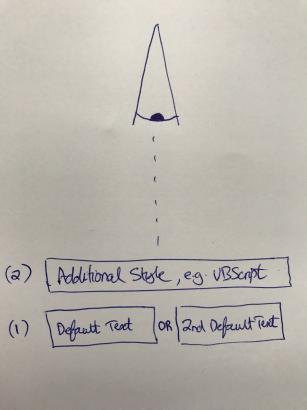
The first, base layer is either "Default Text" or "2nd Default Text", and is applied first. There may or may not be a second layer based on the software's or the user's scheme choice, applied second.
Each of the two layers defines both a default style (applied first) and additional styles e.g. "Margins and Line Numbers" (applied second).
So, for any given lexer, the styling hierarchy goes like this:
- "Default Text" OR "2nd Default Text":
(a) Default Style
(b) Other style - 0 or 1 of any other scheme:
(a) Default Style
(b) Other style
I am pretty sure we agree..?
What it looks like to me that has happened, is that in the absence of any other scheme from point 2 above, it is now unnecessarily more difficult to swap between the two default text schemes... and the greying out of the menu command subtly suggests that it is not even possible.
The problem: "Default Text" describes the styling of
STD, "2nd Default Text" describes the styling of2ND.
I see it more as: STD tells you that you are using "Default Text" as the base style; 2ND tells you that you are using "2nd Default Text" as the base style. It is always going to be one or the other.
Lexers styling: 1st the styling of
STD|2NDis set as a basic styling, then the Lexers style settings are applied.
Agreed.
So if you define
STDtogether with "2nd Default Text", all styling settings are overridden by "2nd Default Text",
Here is where I think someone (me?) is not understanding something properly. STD is just an indicator, saying that the base style is set to "Default Text". The same for 2ND and "2nd Default Text". The two styles are always defined, but only one is ever in effect.
this means switching
STD/2NDwill have no effect, cause allSTD|2NDstyle settings are always overridden by Lexers style settings (here "2nd Default Text").`
I don't think all Default Text / 2nd Default text style settings are always overridden by lexers style settings. In the styling hierarchy as I understand it, style settings are inherited (they follow the above hierarchy) and cumulative (the last setting overwrites previous settings). Specifically, the only style settings that are overridden by later lexers are those that are specifically defined in the later lexer. If "Default Text" defines a base font and/or colour, and a later schemes styling does not define a font and/or colour, the settings in "Default Text" apply.
craigo-
on 14 May 2018
Firstly, with develop builds 1030-1032, when using the Default Text or 2nd Default Text styles/lexers, we now have a strange blank area in the status bar where the STD/2ND indicator would normally be:
@craigo- Well done, I didn't notice this "strange empty area" between 2 vertical bars. 😃
 hpwamr
on 14 May 2018
hpwamr
on 14 May 2018
( shortening in text: "Default Text" -> DT and "2nd Default Text" -> 2ndDT )
@ craigo : Your description of the mechanism is correct. The main problem is DT and 2ndDT both define "the" base font style for other lexers, overriding the base style chosen by STD/2ND.
Yes, the empty area is intended, cause for DT and 2nDT the "switchable indicator STD/2ND" is redundant (must be STD for DT and 2ND for 2ndDT), so both have to be synchronized in case of DT/2nDT lexers. No syncing means undefined behavior for combos "STD/2ndDT" and "2ND/DT" (which overrides the other?). So in case of default text lexers no indicator is shown or switchable.
Allow switching STD/2ND by double-click/menu, this would break following workflows:
Assuming "lexer C++ with 2ND", switching lexer temporary to DT would switch to "STD/DT" (sync.),
switching back to C++ would result in combination "C++ with STD" - which is not wanted. (STD/2ND setting is remembered, even between sessions).
Or in case of e.g. "STD/DT" switching to 2ND will switch lexer to "2ndDT" - switching STD will not switch other lexers => inconsistency.
So I decided to clear/disable the indicator in case of "DT/2ndDT".
RaiKoHoff
on 14 May 2018
Suggestion: Remove 2ndDT from lex schemes and re-enable the option for DT? This way DT w/o 2ndDT is effectively DT and DT w/ 2ndDT is effectively 2ndDT, and since the 2ndDT is removed there will be no confusion.
lhmouse
on 14 May 2018
@lhmouse : But I like to Customize Scheme... the 2ndDT and all lexers I am able to customize, I like to see in my lexer selection box too ... 😀.
Alternative: Show the STD/2ND indicator, synchronized with DT/2ndDT but disabled ?
Ed.:
(=> what should happen to indicator (which is also the persisted base style setting for other lexers) when selecting a non-default lexer )
Alternative 2 : Show the STD/2ND indicator, un-synchronized and not disabled along with DT/2ndDT.
(=> switching STD/2ND while DT/2ndDT is loaded will have no effect, except changing the base style for non default lexers.)
RaiKoHoff
on 14 May 2018
Making it synchronize with the scheme indicator seems more natural to me. That is, switching from STD to 2ND while DT is active will automatically activate 2ndDT, and vice versa.
BTW who is this @hpwamr ? XD
lhmouse
on 15 May 2018
Please test "_develop_4.18.516.993", if this feels better now.
"This" @hpwamr is a friend and a highly appreciated regression tester.
RaiKoHoff
on 16 May 2018
OK, I'm seeing the problem clearer now - thank you.
I first started trying to map out the best ways to deal with all these scenarios. Most of them were simple, but ones like @RaiKoHoff described were not.
I then tried out these scenarios with good ol' Notepad2, and the problems discussed above don't happen - because "2nd Default Text" is not a separate scheme, at the same level as "Default Text". It is just a tickbox toggle of the same scheme.
Guess who suggested that we have "2nd Default Text" as a separate scheme? Me (Issue 279 - comment). I'm now thinking that wasn't such a great idea.
If we reverted back to the situation where we have one scheme ("Default Text") that incorporated the two "Default" and "2nd Default" styles, wouldn't that fix all of this?
The only tricky part I can see is how to display the Default Style element. I still maintain that it is a good idea to separate out the Default Style from the rest of the styles (because of the hierarchical difference), but how to display two of them within the one scheme? Probably the simplest way would be to show the two styles' child styles as another level deep:
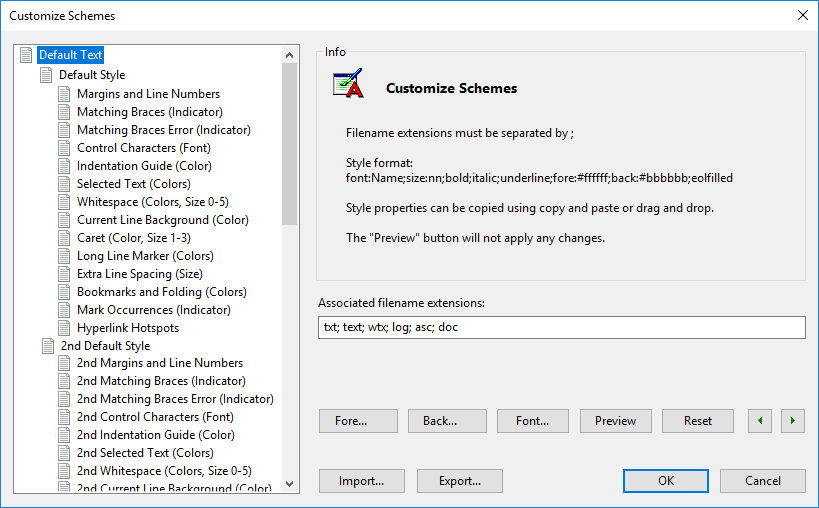
(I still think having the double-clickable status bar indicator is useful, though.)
craigo-
on 16 May 2018
@craigo- : Your suggestion is good engineering work (and a nice Customize Schemes.. Mock),
but it will complicate stuff, especially within code base, not mention reintroducing instability ... :fearful: .
I can live quite well with the small inconsistency, the "Sync. Solution" of version "_develop_4.18.516.993" implements for DT/2ndDT. The solution, you are suggesting, has an inconsistency too: DT is the only lexer, which has a 2nd Style - the Indicator (STD/2ND) then leads to "I want to have 2nd styles for other lexers too).
My vote: stay with solution "4.18.516.993".
RaiKoHoff
on 16 May 2018
DT is the only lexer, which has a 2nd Style - the Indicator (STD/2ND) then leads to "I want to have 2nd styles for other lexers too).
@RaiKoHoff , "4.18.516.993" looks good ! 😃
I've a suggestion: the goal is to maintain a better consistency with the other lexers. 🤔
- The facts: All lexers, except "DT's" have a indicator "STD/2ND" to show whitch style is used !
- I suggest to display also "STD/2ND" in the "small empty field" for "DT's" styles.
- BUT for better consistency with the other lexers, I also suggest to display only ONCE "DT" (Default Text) for the 2 styles "STD/2ND" (bc, it's overloaded to display |"2ND"| "2nd Default Text"|) 🤔
hpwamr
on 16 May 2018
Following @hpwamr suggestion: please check development beta "_develop_4.18.517.995".
RaiKoHoff
on 17 May 2018
Hello @RaiKoHoff , my suggestion is nearly same as v.995, BUT not exactly ! 🤔
For better consistency with the other lexers, its: "STD/2ND" with once "DT" (Default Text) . 😃
- |"STD"| "Default Text"|
- |"2ND"|"Default Text"|
hpwamr
on 17 May 2018
@hpwamr : Yes, not following exactly your suggestion, but I don't like the idea to introduce a 3rd indicator state and I like the fluent reading more "STD | Default Text" and "2ND | Default Text" looks better :smile: .
RaiKoHoff
on 17 May 2018
but I don't like the idea to introduce a 3rd indicator state
Maybe, I didn't express my idea correctly.... ? No, I don't want to introduce 3rd state ! 🤔
But I wanted say exactly the same change as you said your next sentence: >>>"I like the fluent reading more "STD | Default Text" and "2ND | Default Tex...<<<"
@RaiKoHoff Sorry about v.995 but I didn't see that there are 2 versions v.995. :sleepy:
I was trying and testing with "Notepad3 (64-bit) develop v3.18.427.995" ! 😬
Never mind, Notepad3 (64-bit) develop v4.18.517.995 responds exactly to my suggestion. 👍 ❤️
Thanks RaiKoHoff 😃
As far as I am concerned, this issue may be closed.
hpwamr
on 17 May 2018
I don't have a consistency problem with "Default Text" being the only scheme that has two mirrored lists of styles. That's a feature that makes Notepad2|3 great. This scheme is the basis for all schemes and has the additional feature of having two states. Perhaps this could be emphasised in the documentation. Perhaps also the UI could emphasise this a little more... I might consider having the "Default Text" scheme(s) in capitals to suggest there is a difference.
Re: 2ND | Default Text in preference to 2ND | 2nd Default Text... I recall that I brought this up in Issue 488 (comment, point 2). @RaiKoHoff gave the reason why he didn't think it should be done that way (consistency), which I agreed with. It's been brought up again and this time changed, resulting in the originally-discussed inconsistency. Of course, were there to only be a single "Default Text" scheme, there would be no inconsistency...
@hpwamr is right, the issue raised here is dealt with. My discussion is perhaps falling out of the scope of this issue, so perhaps I should open a new issue regarding this?
craigo-
on 17 May 2018
@craigo- : That is right, and the reasons are still valid. After several rounds on Default-Text handling and statusbar optimizations, I change my mind on the little left over inconsistency. I can live with the little inconsistency, thinking Notepad3 (64-bit) develop v4.18.517.995 is the best solution for that issue.
If you don't think so, please open a new issue ...
RaiKoHoff
on 19 May 2018
Closing this issue, resolved to my satisfaction 😄
craigo-
on 31 May 2018
Hello @RaiKoHoff,
Test version: Notepad3 (64-bit) TinyExpr v4.18.813.1055
When a Scheme is selected (eg: "Batch files" of opening of a file ".bat"), a double click on the Status bar opens the Scheme dialog with the correct Scheme selected. (see img)
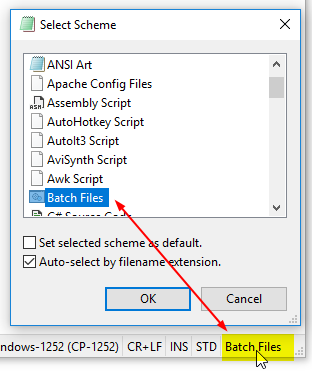
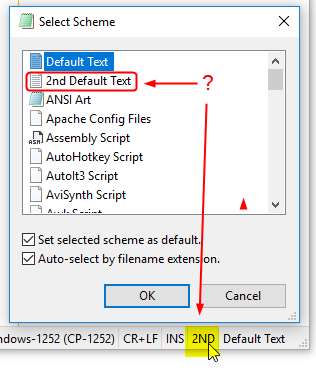
But when the Alternate Scheme "2nd Default Text" is selected, this Scheme is correctly ticked in menu View, and the edit text is correctly adapted according the 2nd Default Text, but a double click on the Status bar opens the Scheme dialog with **Default Text** selected instead of 2nd Default Text ? 🤔
hpwamr
on 14 Aug 2018
Please check current development beta: _TinyExpr_4.18.814.1056
Selecting Language Parameter:
[Settings2] PreferedLanguageLocaleName changed to PreferredLanguageLocaleName ('rr')
New Fractional-Font-Size dialog available (if Direct2D/DirectWrite is enabled) (experimental)
New Font dialog: -> new strings for language translations ... 🤔
RaiKoHoff
on 14 Aug 2018
Tested version: Notepad3 (64-bit) TinyExpr v4.18.815.1057
- Alternate Scheme
"2nd Default Text"is now correctly selected. 👍 ❤️
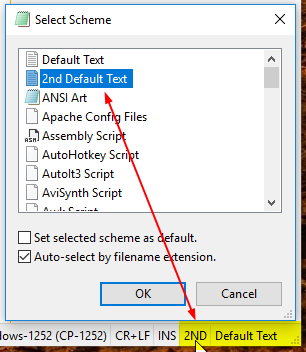
As far as I am concerned, this issue may be closed again !
hpwamr
on 15 Aug 2018
Related issues
 RaffaeleBianc0
·
3Comments
RaffaeleBianc0
·
3Comments
 vvyoko
·
3Comments
vvyoko
·
3Comments
 rizonesoft
·
4Comments
rizonesoft
·
4Comments
 bravo-hero
·
3Comments
hpwamr
·
3Comments
bravo-hero
·
3Comments
hpwamr
·
3Comments
Most helpful comment
@craigo- : That is right, and the reasons are still valid. After several rounds on Default-Text handling and statusbar optimizations, I change my mind on the little left over inconsistency. I can live with the little inconsistency, thinking
Notepad3 (64-bit) develop v4.18.517.995is the best solution for that issue.If you don't think so, please open a new issue ...