Notepad3: Selection and Caret Position Consistency
As tested in the latest beta to date (3.18.125.841).
@RaiKoHoff:
(By the way: What should be the correct position of the caret after operation? At the beginning of the selection, where it has been, or at the end of the replaced selection, to be able to step further in text, or depending on operation type 🤔 mhhh?)
@craigo-:
Good last question. I retried the "Compress Whitespace" function with a right-to-left selection (caret at beginning), and the result is the caret moves to the selection end. That seems weird to me.
Both Notepad2 and Notepad2-mod retain the caret position as it stands after making the selection (at least for the "Compress Whitespace" function); that seems logical to me.
Functions Tested and Result:
- Cut: OK
- Duplicate Line: OK
- Enclose Selection (all): Caret wrong for right-to-left selection
- Pad with Spaces: OK
- Strip First/Last Character: Does nothing when selection is less than a full line. Could it? (Notepad2* does nothing also...)
- Strip Trailing Blanks: OK
- Compress Whitespace: Caret wrong for right-to-left selection
- Merge Blank Lines: OK
- Remove Blank Lines: OK
- Modify Lines: OK
- Align Lines: OK
- Sort Lines: OK
- Convert (Case): OK
- Tabify Selection: OK
- Untabify Selection: OK
- Tabify Indent: OK
- Untabify Indent: OK
- Insert -> HTML/XML Tag: Caret wrong for right-to-left selection
- Line Comment: Does not preserve selection or caret position. Work needed here?
- URL Encode: OK
- URL Decode: OK
- Char to Hex: Caret wrong for right-to-left selection
- Hex to Char: Caret wrong for right-to-left selection
- Select to Matching Brace: Always moves caret to end (Should it? Up for discussion? Were there problems with making selections part of the Undo/Redo list?)
- Bookmarks -> Toggle: OK
 craigo-
All 5 comments
@craigo- : Nice :+1: Highly appreciated :smiley:
Reward: Beta 3.18.126.843 to test
 RaiKoHoff
on 26 Jan 2018
RaiKoHoff
on 26 Jan 2018
Thanks, @RaiKoHoff.
Beta build 843:
- Strip First/Last Character: It now does something (and reverse selection retains caret position) - all good. With a selection, I was sort of expecting this function to work on the selection rather than the entire line. I don't know how useful either option would be..? (Also see below)
- Line Comment: Having no selection now results in the comment character being selected (undesirable). Otherwise, good.
- All other functions that were previously OK are still OK
- All other functions that were previously report as needing work are now OK
Regarding the above comment concerning "Strip First/Last Character"... I am trying to figure out some base rules/guidelines regarding how certain functions should work in certain circumstances. Guidelines like this would assist when deciding on how these functions should work, and make them easier to document.
For example, is there (could there be) consistency around how a Block function operates with no selection? With a selection? Currently, there are more examples of Block functions working one way rather than the other, but it is not completely consistent. If you guys have any views on this, I'd be glad to hear them...
Keeping the above comments here for completeness, but will move this conversation to a separate issue... It needn't hold up the closure of this one.
craigo-
on 26 Jan 2018
Beta Build 3.18.128.846... The "Line Comment" function works as expected when there is no selection, but it is now behaving badly when there is a selection.
Steps to Reproduce:
- Save the following as an AutoIt file (.au3) and open in Notepad3:
;Page Margins: 10mm everywhere
Send("!f")
Sleep(300)
Send("t")
;Sleep(300)
- Select lines 2 & 3, in either direction:
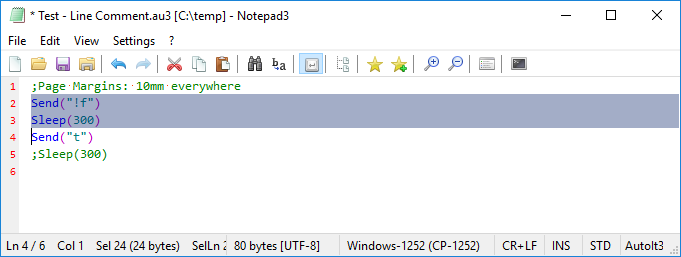
- Press
Ctrl+Q(problem: the selection does not include the first comment character):
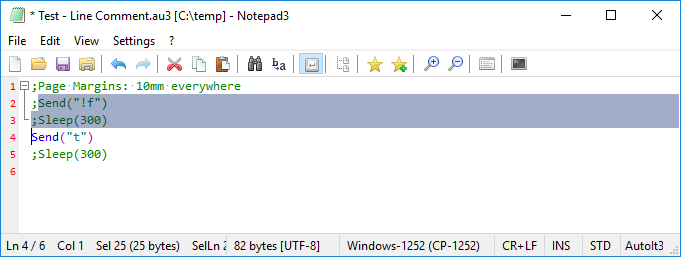
- Undo all and select the contents of line 5, but not the line ending:
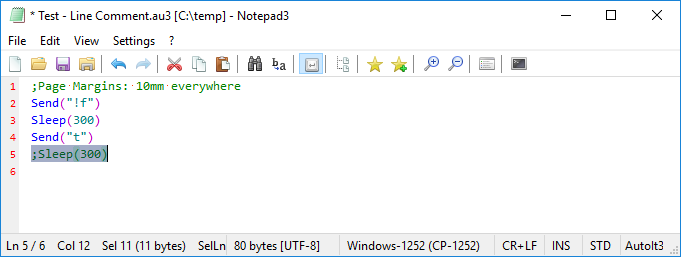
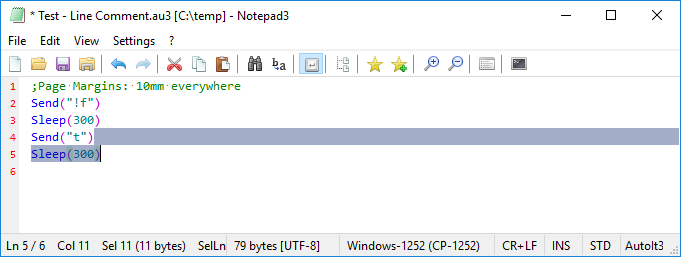
- Press
Ctrl+Q(problem: the selection now includes some of the previous line):
craigo-
on 28 Jan 2018
I see. Please try beta version: 3.18.129.847.
RaiKoHoff
on 29 Jan 2018
Have done so. Perfect. Thanks.
Issue resolved, ready to close.
craigo-
on 29 Jan 2018
Related issues
 ghost
·
36Comments
ghost
·
36Comments
 zmx01403137
·
33Comments
zmx01403137
·
33Comments
 pantantrollo
·
37Comments
pantantrollo
·
37Comments
 rizonesoft
·
29Comments
rizonesoft
·
29Comments
 MelchiorGaspar
·
30Comments
MelchiorGaspar
·
30Comments