Hi, I like the new look of files uwp very much but I have some feedback on 0.7.3 and will list it here.
Sorry, have currently no time to create a new issue for every one... Please tick them if they are already fixed/edit my comment to link existing issues.
- [ ] showing the properties of a folder and clicking on the close button of the properties minimizes files uwp in the background sometimes (and leads to unintended behaviour)
- [x] using the selection buttons on the bottom right crashes files uwp (when in a folder) #274
- [x] the buttons on the bottom right could get unvisible when on the new tab page aka "Home"
- [x] The "Home" Button doesn't work (at least it doesn't navigate back to the new tab view) but instead shows the current folder again
- [x] right-clicking on an item in a folder crashes files uwp when not selecting the item first #532
- [x] the expand to fullscreen button of the file or folders properties window seems to be unnecessary (and destroys the layout when used)
- [x] when opening a picture with the microsoft photos app, I am not able to switch to the next item in the list but have to double click on the next item instead to open that in a new instance of the photos app? (probably not a new issue) #524
- [x] if I open a folder inside e.g. the documents folder, wasn't the idea to still highlight the documents section on the left side? instead the local disc C: is highlighted. (probably also another issue) #525
- [x] cannot close a new tab with "ctrl+w"
- [x] When the window is too narrow to show all tabs there are navigation buttons shown. Instead I would suggest that you first disable the tab description and show only the icons (and shrink down the width of the tabs to the sice of the icons)
Only if there are too many tabs to show all in the row on top (only with icons), I would suggest that you show those navigation buttons and use them to cycle through the tabs (without having to select a tab afterwards; kind of comparable to the shortcut "ctrl+tab" or "ctrl+shift+tab".) #526 - [x] hovering over clickable elements is always white in dark mode but not for other tabs, is this intentional?
- [x] like you show that a folder is selectable in the navigation bar, you could also highlight the whole navigation bar when hovering over it to make for the user visible that you can click on the navigation bar to edit the path #534
- [x] when typing a path into the navigation bar and pressing enter, the new directory gets opened but I think it would be better to directly escaping the navigation bar like it is in the file explorer (would also look better) #535
- [x] right clicking in the navigation bar still doesn't work
 szaimen
All 18 comments
@yaichenbaum I could offer to create a new issue for every item in the list but I would then just copy over the text from each item. Is this okay for you?
szaimen
on 7 Apr 2020
using the selection buttons on the bottom right crashes files uwp (when in a folder)
Selection options are not yet implemented, that is why #274 is still open
the buttons on the bottom right could get unvisible when on the new tab page aka "Home"
Great feedback, I will check that item off when I get to it.
hovering over clickable elements is always white in dark mode but not for other tabs, is this intentional?
We are using the default styles from WinUI, I believe they are working on the accessibility aspect but I don't think they shipped that out yet.
I would appreciate if you opened a separate issue for the following items, I will try to respond to the other items in your list with more information about which things we will address.
- when opening a picture with the microsoft photos app, I am not able to switch to the next item in the list but have to double click on the next item instead to open that in a new instance of the photos app? (probably not a new issue)
- if I open a folder inside e.g. the documents folder, wasn't the idea to still highlight the documents section on the left side? instead the local disc C: is highlighted. (probably also another issue)
 yaichenbaum
on 7 Apr 2020
yaichenbaum
on 7 Apr 2020
I would appreciate if you opened a separate issue for the following items.
done 👍
szaimen
on 8 Apr 2020
the expand to fullscreen button of the file or folders properties window seems to be unnecessary (and destroys the layout when used)
@szaimen Can you share a screenshot of what you see? It is possible that different version of Windows will have different behaviors in this area.
yaichenbaum
on 8 Apr 2020
the buttons on the bottom right could get unvisible when on the new tab page aka "Home"
Great feedback, I will check that item off when I get to it.
I think that applies also to the "plus" button on the top right.
szaimen
on 8 Apr 2020
@szaimen Can you share a screenshot of what you see? It is possible that different version of Windows will have different behaviors in this area.
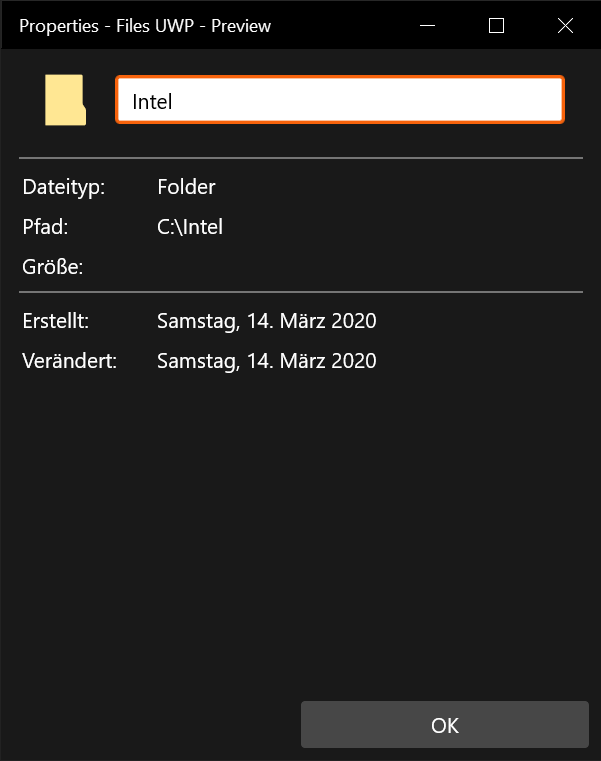
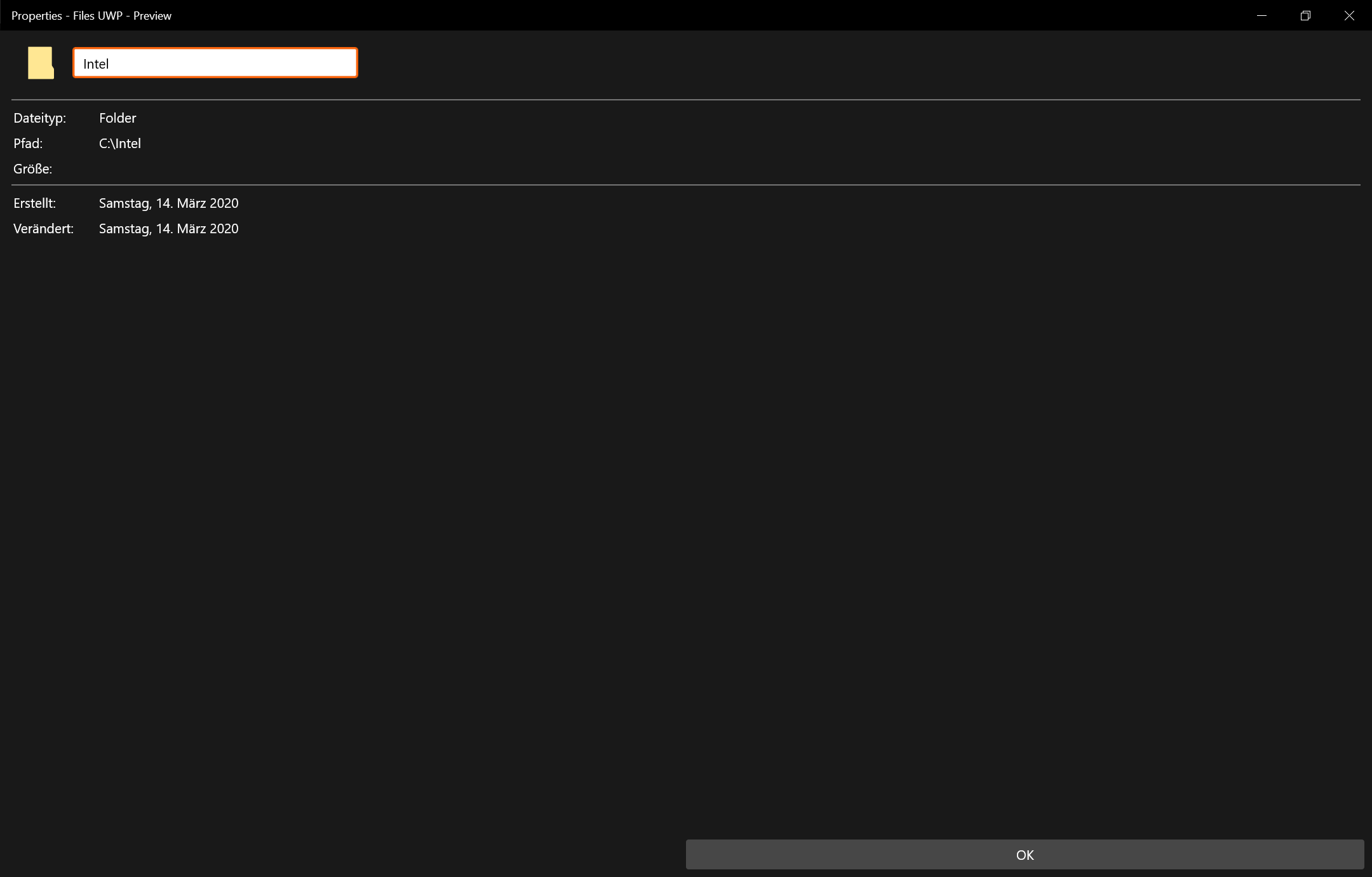
szaimen
on 8 Apr 2020
showing the properties of a folder and clicking on the close button of the properties minimizes files uwp in the background sometimes (and leads to unintended behaviour)
I can't reproduce this, what version of Windows are you using?
yaichenbaum
on 8 Apr 2020
I can't reproduce this, what version of Windows are you using?
Windows 10 1909
szaimen
on 8 Apr 2020
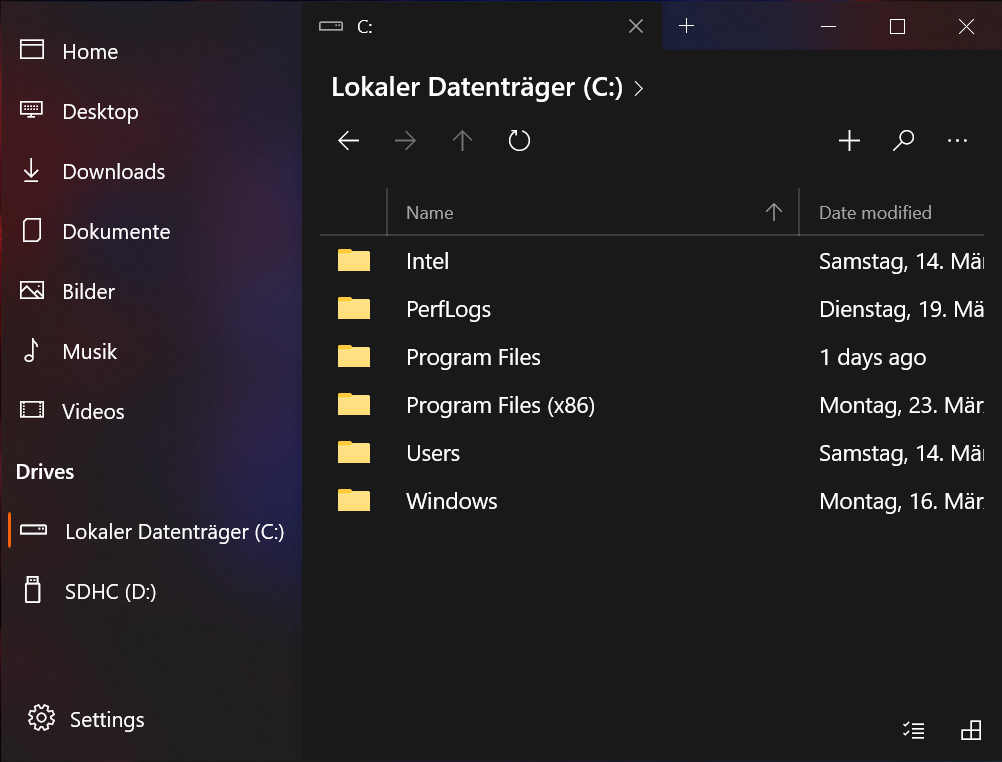
BTW: I think the new design looks already really awesome with the acrylic sidebar:
szaimen
on 8 Apr 2020
the expand to fullscreen button of the file or folders properties window seems to be unnecessary (and destroys the layout when used)
Unfortunately we don't have control over the window, however we will work on making this dialog more responsive.
right-clicking on an item in a folder crashes files uwp when not selecting the item first
Would you be able to open a separate issue for this one?
yaichenbaum
on 8 Apr 2020
Would you be able to open a separate issue for this one?
Done 👍
szaimen
on 8 Apr 2020
like you show that a folder is selectable in the navigation bar, you could also highlight the whole navigation bar when hovering over it to make for the user visible that you can click on the navigation bar to edit the path
Can you create a separate issue for this as well? I think a discussion would be helpful.
yaichenbaum
on 8 Apr 2020
like you show that a folder is selectable in the navigation bar, you could also highlight the whole navigation bar when hovering over it to make for the user visible that you can click on the navigation bar to edit the path
Can you create a separate issue for this as well? I think a discussion would be helpful.
Done 👍
szaimen
on 8 Apr 2020
when typing a path into the navigation bar and pressing enter, the new directory gets opened but I think it would be better to directly escaping the navigation bar like it is in the file explorer (would also look better)
Can you please open another issue for this one?
yaichenbaum
on 8 Apr 2020
when typing a path into the navigation bar and pressing enter, the new directory gets opened but I think it would be better to directly escaping the navigation bar like it is in the file explorer (would also look better)
Can you please open another issue for this one?
Done 👍
szaimen
on 8 Apr 2020
We really appreciate all the time you took to create all these issues, we hope to have a release ready in a few hours which will address many of these issues.
yaichenbaum
on 8 Apr 2020
showing the properties of a folder and clicking on the close button of the properties minimizes files uwp in the background sometimes (and leads to unintended behaviour)
@duke7553 I am not able to reproduce this, are you able to reproduce it and if yes, is there anything we can do about it?
yaichenbaum
on 8 Apr 2020
@szaimen v0.7.5 is now in certification, I am going to be closing this issue since everything was either addressed or transferred to new issues. I just want to thank you again for all your feedback which has been really helpful in improving the quality of the app.
yaichenbaum
on 8 Apr 2020
Related issues
 duke7553
·
75Comments
duke7553
·
75Comments
 BuraChuhadar
·
23Comments
BuraChuhadar
·
23Comments
 ghost
·
50Comments
ghost
·
50Comments
 TyJOrtiz
·
36Comments
TyJOrtiz
·
36Comments
 rashil2000
·
24Comments
rashil2000
·
24Comments
Most helpful comment
@szaimen v0.7.5 is now in certification, I am going to be closing this issue since everything was either addressed or transferred to new issues. I just want to thank you again for all your feedback which has been really helpful in improving the quality of the app.