Files: Bring Support Of Dynamic Shell Context Menus
Is your feature request related to a problem? Please describe.
Alright I have finally finished my investigation around dynamic shell context menus. I found it very difficult overall with incomplete Windows API documentations and unanswered questions under Stack Overlow regarding bringing support of dynamic shell context menus. So instead of full support of dynamic shell context menus, I think it can be supported as scanning all CLSIDs under the registry and then provide the user to select an application to execute under the settings page. This feature would bring support of shell context menus for applications like 7-zip, notepad++ and other types of applications which doesn't use static shell context menu.
Describe the solution you'd like
I would like to start implementing dynamic shell content menus. This will allow files UWP to fully support of Windows Explorer's context menu. The idea I am proposing is first known dynamic shell context menus can be stored in an XML file as a database and implement them manually for each application then the unknown ones can be added later or provide the user under the settings tab to let them choose automatically to create additional context menu items per file or folder item.
Describe alternatives you've considered
I investigated to query dynamic shell context menu by using PowerShell. That didn't give enough information to parse and execute the shell context menu. I found out that not all the items are being listed under the PowerShell script. I also used COM implementation under Windows Forms and that however can be implemented only under a Windows Forms application. I also tried using Shell32.DLL to parse the context menu. There is no documentation at least from Microsoft's sites how to parse submenu items from different applications such as 7-Zip. Stack overflow site is also full of unanswered questions around this.
Additional context
Please assign this to me so that I can work on it. Any feedback is welcome.
 BuraChuhadar
All 23 comments
Issue-Label Bot is automatically applying the label feature_request to this issue, with a confidence of 0.54. Please mark this comment with :thumbsup: or :thumbsdown: to give our bot feedback!
Links: app homepage, dashboard and code for this bot.
![issue-label-bot[bot] picture](https://avatars2.githubusercontent.com/in/27079?v=4&s=40) issue-label-bot[bot]
on 11 Jul 2020
issue-label-bot[bot]
on 11 Jul 2020
@BuraChuhadar While this might work, we would like to make the experience as seamless as possible without asking the user to configure it to work properly. Perhaps @ADeltaX or @gave92 have some other ideas to help make this work more seamlessly.
 yaichenbaum
on 12 Jul 2020
yaichenbaum
on 12 Jul 2020
I investigated this as well and you can get all the items of the context menu through Win32 api such as QueryContextMenu, GetMenuItemInfo and the like and than using InvokeCommand to execute one of the actions.
I have some working code I can share.
The flow might look like this:
User right-clicks on file in uwp app -> fulltrust process enumerates context-menu for file -> uwp app shows context menu -> user clicks -> fulltrust process executes command
Note: the code gets all the context-menu items including "Open With", "Copy", "Properties", for these I guess we'll want to use our implementation and not delegate command execution to windows explorer.
EDIT
I uploaded here some example code to test parsing the context-menu. To test this:
- Clone branch
- Change
PATH_TO_FILE_OR_FOLDERon this line to point to a file or folder on your HDD - Set "Files.Launcher" project as startup project in Visual Studio
- Run it
It should show a window with the found context menu items.
 gave92
on 12 Jul 2020
gave92
on 12 Jul 2020
@gave92 I checked your code and it is perfect! One thing I couldn't find out before about is around the hSubMenu object. I can see that you added that feature as well.
This then how can be incorporated into Files-UWP:
1- Look at the CommandString of the context menu items then eliminate open, copy, properties and other menu items we are not interested of.
2- The implementation I put in place for static context menu items we have the CommandString of the registry entry itself. So it can be matched with this parser to skip parsing for those items. For example, "Computer\HKEY_CLASSES_ROOT*\shell\VSCode" under the registry "VSCode" is the CommandString and when it is being parsed under IContextMenu.CommandString method it returns "VSCode". So in short static context menu's IContextMenu.CommandString is the registry's name itself. This way static menu items can be skipped during this parsing.
3- Finally bring the set context menu items as list of strings and make the communication back and forth to invoke the verbs.
So my question is do you want to continue on implementing this or I am happy to take your branch and make the changes I proposed above?
Also if you have other approaches feel free to share.
BuraChuhadar
on 12 Jul 2020
@BuraChuhadar thanks a lot! I'm glad you like this approach.
A couple of notes:
1- Yeah hopefully CommandString is enough to eliminate all those (not every item has a CommandString)
2- If possible I don't think we should have two separate implementations for getting context menu items (registry and IContextMenu. The IContextMenu method also gets the static context menu items, so perhaps we can just use that?
3- Code included also parses the icon as a Bitmap, perhaps we can pass that too. The communication takes a little care as to invoke some items you have keep a reference to the IContextMenu around and call InvokeCommand with the ID of the item (many do not have a Verb)
If you agree I could finish the "Win32 side" of the communication in the Files.Launcher project and you could do the "UWP side" of things?
EDIT
I added an (untested) commit that adds support in the fulltrust process for getting the context-menu and invoking an item.
LoadContextMenu returns a JSON-encoded form of the Common.IWin32ContextMenu interface with all the parsed info from context-menu, including the Icon as a Base64 string. You can select to get either the standard or the extended context menu (if user presses Shift key)
ExecAndCloseContextMenu to invoke a specific item given it's ID and free resources
Feel free to take it/edit it/throw it away :) Or if you have any questions just let me know.
gave92
on 12 Jul 2020
@gave92 sounds good we can definitely get rid of the old static context menu code. I don't see an issue there. Once you have an update around the Win32 implementation then I can do the UWP part. I would suggest let's use this ticket under both implementations.
I want to be mindful around the icons part especially flyout context menu doesn't support bitmap images yet. So I might leave the menu items without an icon.
BuraChuhadar
on 12 Jul 2020
@BuraChuhadar great than, I think the Win32 implementation is complete now as it offers a way to return the context-menu as json string and a way to invoke a context-menu item.
If the proposed interface does not suits your needs, just le me know (or change it yourself)
gave92
on 12 Jul 2020
@gave92 After enumerating all the custom shell menu items for a specific file type when right-clicking a file, store the items in memory and when the user right-clicks on another file with the same file type, load it from there instead of enumerating using the Full Trust component. This could improve performance. Also, I want to point out that whenever you're accessing Desktop-specific API in UWP, always check whether that type or method is present before accessing it. This will ensure that it's easier to port Files UWP to non-desktop editions of Windows such as Xbox or even Windows 10X. Windows 10X would be a little hard since we've to deal with containers and stuff like that.
 Jaiganeshkumaran
on 14 Jul 2020
Jaiganeshkumaran
on 14 Jul 2020
@Jaiganeshkumaran I wouldn't do that because the context menu also depends on which folder the file is in. For example if you right click on .txt file inside OneDrive folder the menu will be different from the menu for a .txt file a in normal folder.
whenever you're accessing Desktop-specific API in UWP
Currently we're not using any of those I think. All Win32 stuff is done in the fulltrust component which is just not supported in Xbox so that's not a problem.
For Windows 10X I still haven't understood if you can have a package with UWP + Win32 component.
gave92
on 14 Jul 2020
For Windows 10X I still haven't understood if you can have a package with UWP + Win32 component.
I'm almost positive you cannot have them yet.
 duke7553
on 16 Jul 2020
duke7553
on 16 Jul 2020
We'll have to come up with a way later on to publish for Windows 10X without the FullTrust process.
duke7553
on 16 Jul 2020
@gave92 By desktop-specific API, I mean by the Windows Runtime APIs that only work on Desktop like the API to launch a full trust component. These APIs don't work on other device families and would crash. So we should check if the type is present on that device using the Windows.Foundation.ApiInformation class. Otherwise, the app would crash on runtime on those devices. Regarding Windows 10X, you can't really create an MSIX that has both UWP + Win32 component since all components run in containers and the Win32 component is essentially a Hyper-V virtual machine.
Jaiganeshkumaran
on 16 Jul 2020
@Jaiganeshkumaran It seems like WinUI Desktop would fill that gap well.
duke7553
on 16 Jul 2020
@BuraChuhadar I'm curious :) did you have the chance to work on this?
gave92
on 25 Jul 2020
@gave92 sorry it has been a busy couple of days. I started to work on a little bit. I will update here once I am done.
BuraChuhadar
on 26 Jul 2020
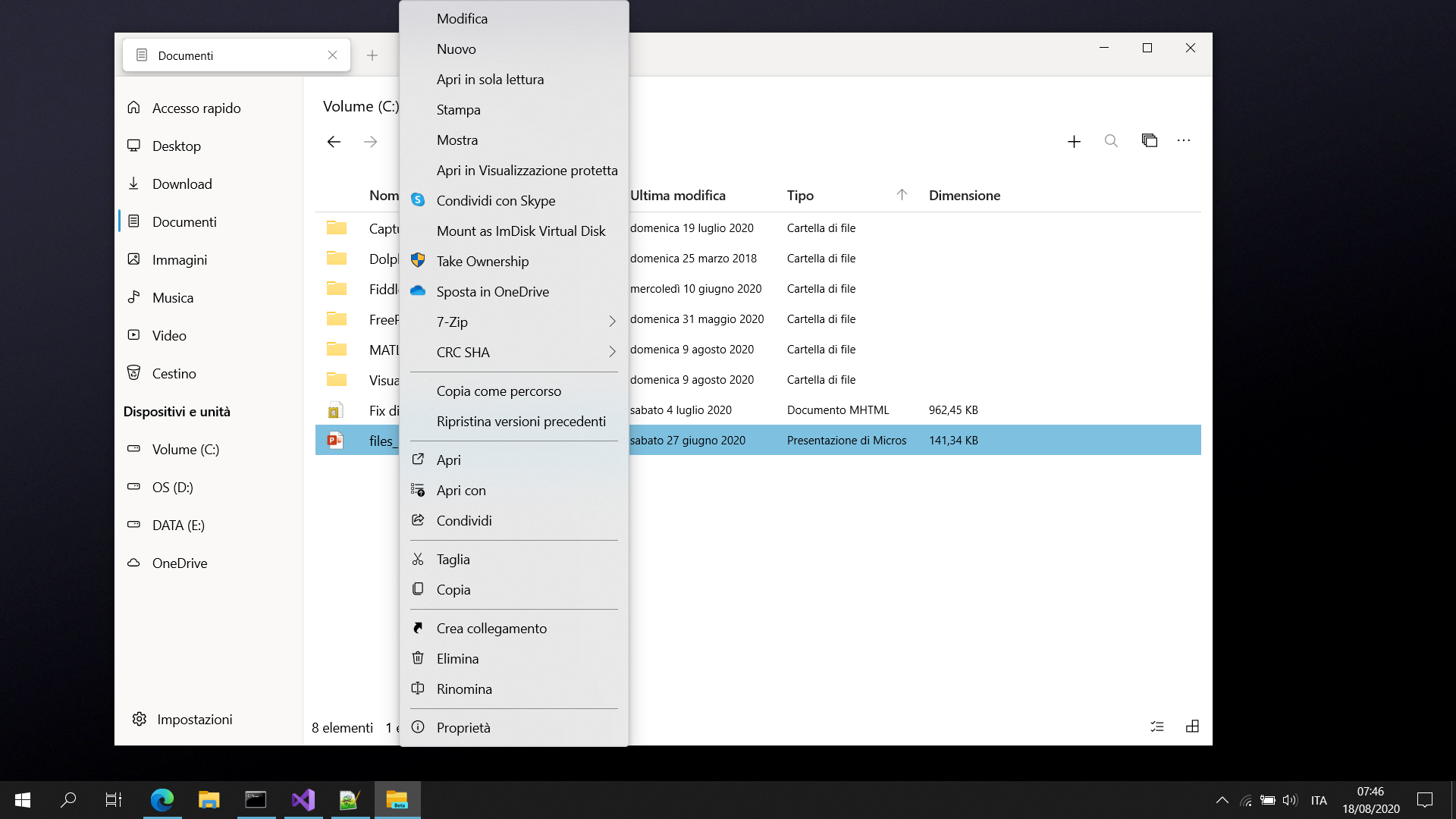
Hello all, I'd like to share some preliminary results of what is possible with the approach we are following to implement this feature.
This is what I'm getting right-clicking on a folder inside OneDrive:

There's Open in Visual Studio, 7-Zip submenu and OneDrive actions (e.g "free up space", "always keep on this device") and they work :)
gave92
on 18 Aug 2020
@gave92 What about icons for custom shell menu items?
Jaiganeshkumaran
on 18 Aug 2020
@Jaiganeshkumaran Should be possible to add them but there's a small issue. Currently I get the icons as byte arrays and I can convert them easily to BitmapImage, unfortunately MenuFlyoutItem wants a BitmapIcon instead and BitmapIcon cannot be created from byte array :/ You can probably a make a custom MenuFlyoutItem though
gave92
on 18 Aug 2020
@gave92 BitmapIcon supports loading PNG images from local app Uri. We could save it in LocalFolder and then set the URI source to ms-appdata://local/
https://docs.microsoft.com/en-us/uwp/api/windows.ui.xaml.controls.bitmapicon?view=winrt-19041
Jaiganeshkumaran
on 18 Aug 2020
@Jaiganeshkumaran Yup icons work, thanks!
gave92
on 18 Aug 2020
@gave92 Thank you for all your great work on implementing this feature in #1754.
yaichenbaum
on 24 Aug 2020
hello everyone, I apologize for the radio silence as I have been dealing with some life/work issues and couldn't get to this work. I really appreciate @gave92 for implementing this feature this looks really nice.
BuraChuhadar
on 12 Sep 2020
hello everyone, I apologize for the radio silence as I have been dealing with some life/work issues and couldn't get to this work. I really appreciate @gave92 for implementing this feature this looks really nice.
@BuraChuhadar Thank you for the update, we really appreciate all the work and time you put into the right click context menu and implementing a solid foundation for others to build off of. Enhancing the context menu has been of the most requested features since the project started and it would not be as good as it is today without the work you and @gave92 did.
yaichenbaum
on 13 Sep 2020
Related issues
Jaiganeshkumaran
·
24Comments
 ArttuLai
·
24Comments
ArttuLai
·
24Comments
 TyJOrtiz
·
36Comments
TyJOrtiz
·
36Comments
 XPoppyX
·
18Comments
XPoppyX
·
18Comments
 tsvietOK
·
30Comments
tsvietOK
·
30Comments
Most helpful comment
@gave92 sorry it has been a busy couple of days. I started to work on a little bit. I will update here once I am done.