Reading through the code I've noticed that in Files/View Models/ItemViewModel.cs ThumbnailMode.ListView is used, this makes sense given that the files within a folder are listed.
However I've noticed that ThumbnailMode.SingleItem is more likely to return the same icon used in File Explorer.
Is there a reason as to why ListView is used instead of SingleItem? In terms of icon support for as many file types as possible would it not be better to use SingleItem? From what I can see, SingleItem has support for custom thumbnail handlers. These thumbnail handlers are usually registered by the software associated with the file type. Therefore IMO it would be a lot simpler to use SingleItem and thus leave the icon handling to the associated software instead of attempting to add custom support in Files UWP for all possible file types.
Here's an example:
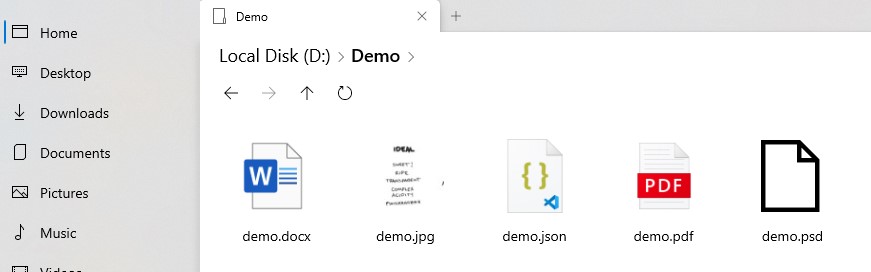
Using ThumbnailMode.ListView
var Thumbnail = await matchingStorageItem.GetThumbnailAsync(ThumbnailMode.ListView, thumbnailSize, ThumbnailOptions.UseCurrentScale);
Using ThumbnailMode.SingeItem
var Thumbnail = await matchingStorageItem.GetThumbnailAsync(ThumbnailMode.SingleItem, thumbnailSize, ThumbnailOptions.UseCurrentScale);
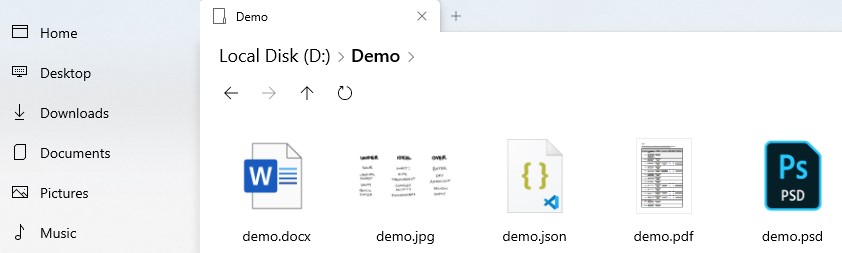
As you can see, using SingleItem returned the correct icon for demo.psd (Adobe Photoshop document) whereas the currently used ListView returned the default file icon.
Another thing to note is the icon difference for demo.pdf, ListView returned the standard icon associated with pdfs while SingleItem returned a 'Thumbnail' from a custom shell thumbnail handler installed on my system. The advantage of this as noted above is that it allows users to use the File Explorer shell thumbnail handlers that are already installed on their system without the developers of Files UWP having to add 'plugin' support for icons for non-standard file types.
 Dylan-Osborne
All 3 comments
@Dylan-Osborne Wow. Thanks for this discovery!
I'll keep it in mind when making future changes to the filesystem ViewModel, and will gauge the performance impact.
 duke7553
on 9 May 2020
duke7553
on 9 May 2020
@Dylan-Osborne Do you think it would be beneficial to return the extended properties synchronously instead as well? I'm looking to improve the performance and resource usage of the thumbnail loading, and wanted a second opinion.
duke7553
on 9 May 2020
@duke7553 To be honest I've got no idea on how the performance and resource usage would differ between sync and async in this scenario. I've never done any work in UWP projects before and I'm not too sure of the underlying API's, so I'd prefer not to give incorrect advice.
Dylan-Osborne
on 9 May 2020
Related issues
 BuraChuhadar
·
23Comments
BuraChuhadar
·
23Comments
 KaKi87
·
31Comments
KaKi87
·
31Comments
 TyJOrtiz
·
36Comments
TyJOrtiz
·
36Comments
 ArttuLai
·
24Comments
ArttuLai
·
24Comments
 szaimen
·
18Comments
szaimen
·
18Comments
Most helpful comment
@duke7553 To be honest I've got no idea on how the performance and resource usage would differ between sync and async in this scenario. I've never done any work in UWP projects before and I'm not too sure of the underlying API's, so I'd prefer not to give incorrect advice.