Files: Tracking of keyboard/mouse shortcuts
- [x] alt+enter to show the properties for the current selected folder(s) and/or file(s)
- [x] ctrl+n for new window
- [x] CTRL + TAB to cycle between tabs
- [x] ctrl+w to close tab
- [x] Delete key for delete
- [x] alt+f, alt+h, alt+l for file/home/layout ribbons
- [x] ALT + LEFT , ALT + RIGHT for history navigation
- [x] CTRL + SHIFT + N for new item
- [x] Enter button to open an item
- [x] CTRL + C, CTRL + V, CTRL + F for their respective commands
- [x] CTRL + T for new tab
- [x] ctrl+[shift]+tab to switch tabs
- [x] Typing a letter to jump to a file/folder
- [x] ctrl+r to refresh
- [x] ctrl+f4 to close tab
- [x] [?] Mouse side buttons for history navigation
- [x] CTRL + L to place focus in the address bar
- [ ] ctrl+shift+t to restore a recently closed tab or a recently closed window with all its tabs.
- [x] alt+d for address bar (address since old)
- [x] the file pane should be selected by default, otherwise hotkeys like ctrl+a don't work.
- [ ] esc to defocus search box.
- [ ] CTRL + E to place focus in the search bar
- [x] Ctrl + scroll up: Grid view
- [x] Ctrl + scroll down: List view
 ghost
ghost
All 50 comments
I want to add something to this issue: My mouse (Logitech G603) features side-buttons in order to go back and forth. These buttons don't work in File UWP yet and I'd would be really great, if mouses that have such buttons are supported. Hope the issue got clear. Thanks for the great app! :)
 StrongholdFan
on 16 Feb 2019
StrongholdFan
on 16 Feb 2019
My checklist:
- [x] Delete key for delete
- [x] ALT + LEFT , ALT + RIGHT for history navigation
[?] Mouse side buttons for history navigation
Remarks: Attempt to map these buttons to a key failed to fire the event with my mouse.
[x] Enter button to open an item
[x] CTRL + T for new tab
[x] CTRL + SHIFT + N for new item
[x] CTRL + C, CTRL + V, CTRL + F for their respective commands
[x] CTRL + W to close the tab
[x] CTRL + TAB to cycle between tabs
 duke7553
on 18 Feb 2019
duke7553
on 18 Feb 2019
Don't know if this is fixed yet, but I think Alt + LEFT and Alt + RIGHT is a better way to go when navigating history. It's used in the original explorer and in most web browsers. Also allows for future group-selection when icons are in a tile layout (I assume something like that should be implemented in the future)
 mtourj
on 11 Mar 2019
mtourj
on 11 Mar 2019
Ctrl + shift + n to create a new folder would be great to have (essential for me)
 eduardopatricio
on 22 May 2019
eduardopatricio
on 22 May 2019
- [x] ctrl + c (copy)
- [x] ctrl + v (paste)
- [x] ctrl + f (put focus on search box)
 yaichenbaum
on 22 May 2019
yaichenbaum
on 22 May 2019
I updated my list
duke7553
on 28 May 2019
Instead of ctrl + shift + a for a new item it should be ctrl + shift + n as @eduardopatricio said, that's the current behavior in file explorer.
yaichenbaum
on 28 May 2019
@yaichenbaum Correct, that was a mistake
duke7553
on 28 May 2019
@yaichenbaum I actually discovered the CTRL + C (Copy) accelerator was almost always blocked by a copy function specific to the row's text. After removing this, the event should always work as expected now. Oh, and I also finally removed the ugly black focus indicator around the DataGrid cells to match Windows Explorer. These changes will be in the next snapshot.
duke7553
on 28 May 2019
That's awesome, I kind of assumed it wasn't that simple to remove that black focus indicator and even took a quick look to see if I can tweak it but did not see a way. I love seeing the progress you are making.
yaichenbaum
on 28 May 2019
@yaichenbaum I thought that too until I realized I can simply override the hardcoded style of the DataGrid.
<controls:DataGrid.Resources>
        <SolidColorBrush x:Key="DataGridCellFocusVisualPrimaryBrush" Color="Transparent"/>
        <SolidColorBrush x:Key="DataGridCellFocusVisualSecondaryBrush" Color="Transparent"/>
</controls:DataGrid.Resources>
duke7553
on 28 May 2019
May I add
- CTRL + L to place focus in the address bar
- CTRL + E to place focus in the search bar
 shaykalyan
on 2 Aug 2019
shaykalyan
on 2 Aug 2019
Perhaps have a large checklist at the top of this issue to keep track? (plus a second list of rejected suggestion)
I've got some suggestions here:
- history next/prev keyboard keys
- ctrl+n for new window
- alt+d for address bar (address since old)
- f6 for address bar
- ctrl+[shift]+tab to switch tabs
- ctrl+w to close tab
- ctrl+f4 to close tab
- in address bar, show full path once clicked, not simple 'downloads'. This currently makes it hard to copy the path of the current folder without using the toolbar button.
- the file pane should be selected by default, otherwise hotkeys like ctrl+a don't work.
- esc to defocus search box.
- ctrl+r to refresh
- alt+f, alt+h, alt+l for file/home/layout ribbons
 Efreak
on 2 Sep 2019
Efreak
on 2 Sep 2019
I would really like to get these:
- [x] ctrl+n for new window
- [x] ctrl+[shift]+tab to switch tabs
- [x] ctrl+w to close tab
- [x] ctrl+r to refresh
- [x] alt+enter to show the properties for the current selected folder(s) and/or file(s) (https://github.com/duke7553/files-uwp/issues/259)
- [ ] ctrl+shift+t to restore a recently closed tab or a recently closed window with all its tabs.
 szaimen
on 31 Oct 2019
szaimen
on 31 Oct 2019
@yaichenbaum I looked at your list and found three times:
ctrl+[shift]+tab to switch tabs
Otherwise really nice list!
szaimen
on 2 Nov 2019
Possible additional shortcuts to be considered could be:
- [x] a shortcut for renaming? (don't know if there is already an existing one, maybe you should think about a shortcut that makes sense if nothing exists. I have currently no idea for that)
- [x] backspace for the last directory
- [x] alt+UP for going up in directory?
Other shortcuts that are inspired by macos and could work at least in the list view since they have no function there in the moment and could be used to navigate folders and files (in theorie much easier then the current situation):
- [ ] RIGHT to open a folder or file (additionally to enter) in list view
- [ ] LEFT to go back to the last directory or for going up in directory in list view
szaimen
on 8 Nov 2019
@szaimen There is a shortcut for renaming already implemented - F2
Backspace is already implemented
Alt + Up is already implemented but it only works when the file area is focused at the moment.
There will be issues with "right" and "left" since when there is a grid view for items and those keys will be needed to switch focus on files and folders with the keyboard.
yaichenbaum
on 8 Nov 2019
There will be issues with "right" and "left" since when there is a grid view for items and those keys will be needed to switch focus on files and folders with the keyboard.
I agree, so maybe just adding these shortcuts to the list view and not to the grid view?
szaimen
on 8 Nov 2019
There is a shortcut for renaming already implemented - F2
I don't know if a Function-key is appropriate at the current time because I know many devices and keyboards that have other shortcuts on these buttons as default. So maybe it would be appropriate to consider another additional one maybe with "alt" + "another key" or "ctrl" + "another key"?
szaimen
on 8 Nov 2019
F2 is the behavior in File Explorer, about having other shortcuts on those keys that's what the FN key is for.
yaichenbaum
on 8 Nov 2019
F2 is the behavior in File Explorer, about having other shortcuts on those keys that what the FN key is for.
Yes, I know that but I just find it inconsistent to use.
(it is bad to reach and at least for me just to use in combination with the fn-key.)
The only shortcut, that I could imagine since almost every combination is already used is "ctrl+q" but this has other features in other programs.
Maybe also "ctrl+e" could be considered -> the "e" could stand for editing (aka renaming), but is already planned for searching (although it doesn't make sense imo to have ctrl+f and ctrl+e for the same behavoir, since they are neighbours on a keyboard and ctrl+f is more widely used for searching...)
Another possibility for this shortcut could probably be "ctrl+." (Ctrl + Dot-key) or "ctrl+enter".
But if you don't want this, I will accept it.
szaimen
on 8 Nov 2019
[?] Mouse side buttons for history navigation
Remarks: Attempt to map these buttons to a key failed to fire the event with my mouse.
Any update on that?
Also, can this issue be renamed to keyboard / mouse shortcuts? I actually wanted to create an issue about mouse navigation because I didn't find one at first.
 R3voA3
on 7 Jan 2020
R3voA3
on 7 Jan 2020
@duke7553 Can we get to @R3voA3's request in the next update?
yaichenbaum
on 9 Jan 2020
I would like to, but I'm unsure which key code represents the mouse side buttons.
duke7553
on 10 Jan 2020
@R3voA3 I believe I got it setup for navigating with the mouse buttons but I don't have a mouse to test with, are you interested in building from the source code and testing?
If you are able to test this out, you should use the v07.1-changes branch since that is where the changes have been made.
yaichenbaum
on 29 Jan 2020
@yaichenbaum I am getting this error
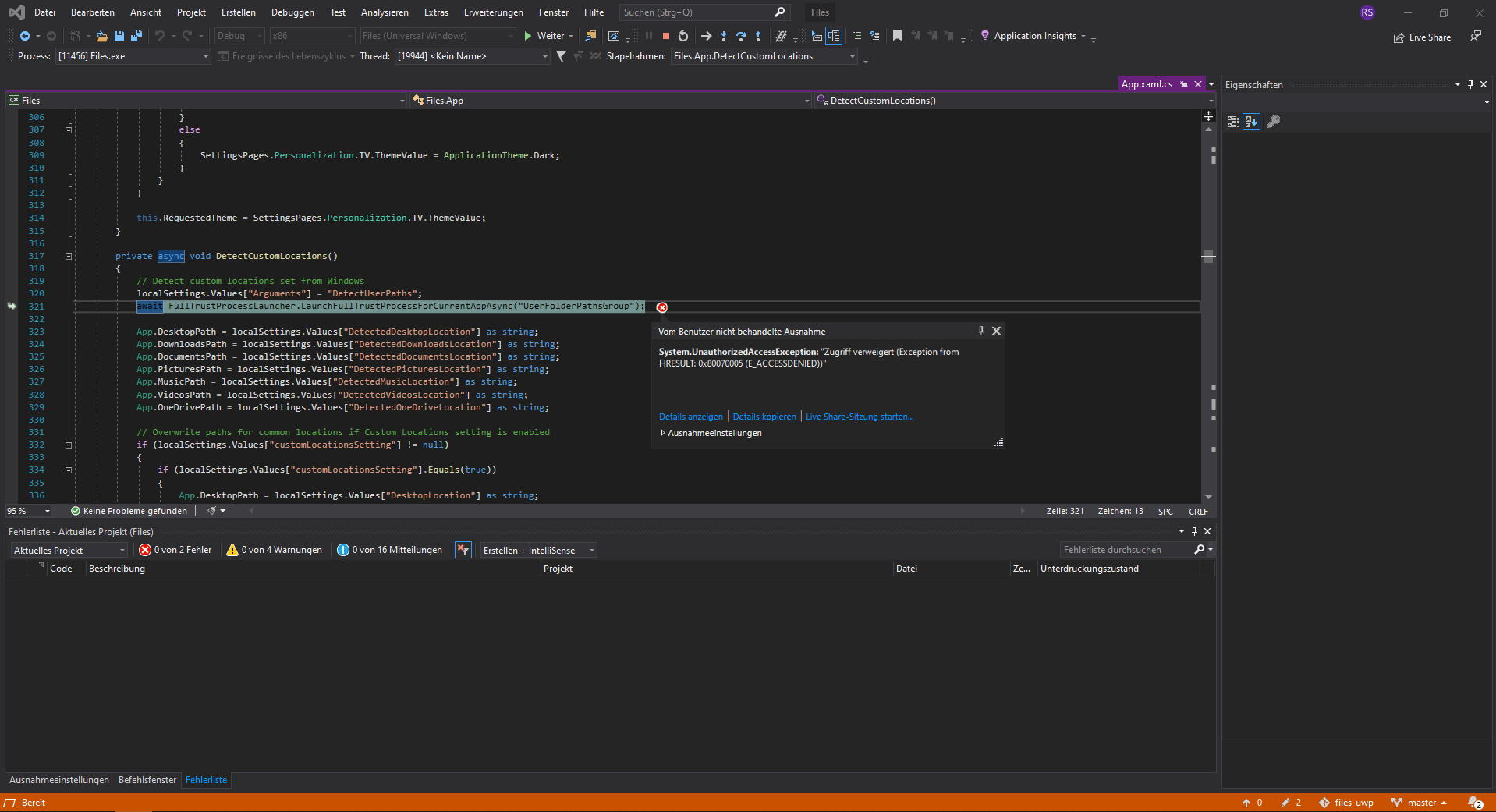
System.UnauthorizedAccessException
  HResult=0x80070005
  Nachricht = Zugriff verweigert (Exception from HRESULT: 0x80070005 (E_ACCESSDENIED))
  Quelle = System.Private.CoreLib
  Stapelüberwachung:
   bei System.Runtime.ExceptionServices.ExceptionDispatchInfo.Throw()
   bei System.Runtime.CompilerServices.TaskAwaiter.ThrowForNonSuccess(Task task)
   bei System.Runtime.CompilerServices.TaskAwaiter.HandleNonSuccessAndDebuggerNotification(Task task)
   bei System.Runtime.CompilerServices.TaskAwaiter.GetResult()
   bei Files.App.<DetectCustomLocations>d__50.MoveNext() in C:\Users\xxxxx\Source\Repos\files-uwp\Files\App.xaml.cs: Zeile321
shortly after I started the debugging.
Since I have no clue how to fix that I can not test the new changes.
R3voA3
on 29 Jan 2020
@R3voA3 I would try enabling file permissions in the privacy setting in Windows.
yaichenbaum
on 29 Jan 2020
Thanks for the tip, but that didn't help.
R3voA3
on 29 Jan 2020
@R3voA3 Make sure to use the v07.1-changes branch, it looks like you are using master.
yaichenbaum
on 29 Jan 2020
I cloned the 07.1 branch into visual studio.
R3voA3
on 29 Jan 2020
You can switch branches on the bottom right of the status bar in Visual Studio.
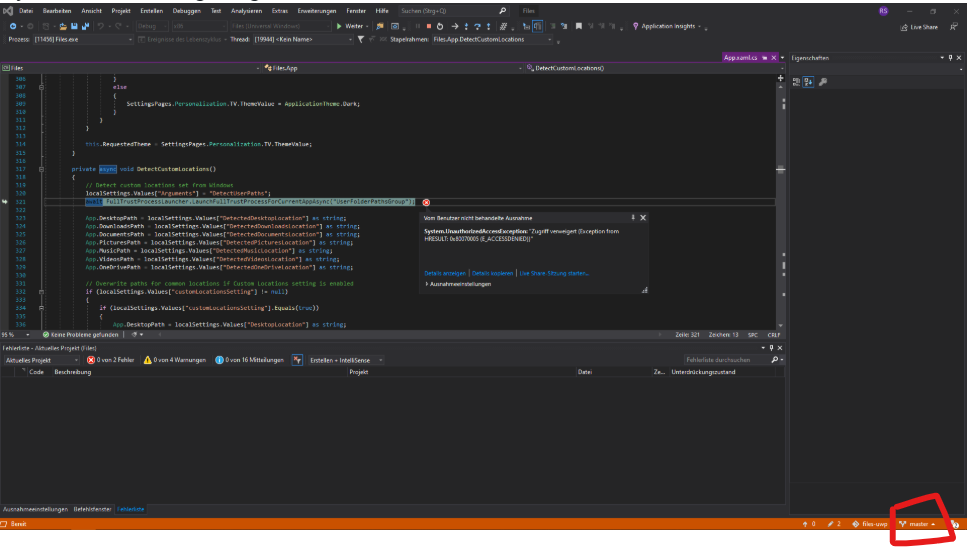
yaichenbaum
on 29 Jan 2020
Alright, now it's working.
Unfortunately, the mouse navigation doesn't seem to work. Pressing the side buttons when hovering over a folder, only opens them.
R3voA3
on 29 Jan 2020
Ok, thanks for letting me know. I will need to spend some more time on this.
yaichenbaum
on 29 Jan 2020
Moving this from #387
The biggest issue I find with the usability of Files UWP is the missing controls that I'm used to.
these are the controls I'd like to see added:
- Back and forward buttons on the mouse to be integrated.
- Middle click (clicking scroll wheel) to open in new tab.
- CTRL+MiddleClick or Shift+MiddleClick to open in new window.
yaichenbaum
on 29 Jan 2020
@yaichenbaum There is an app on the MS Store called Math Solver (https://www.microsoft.com/store/productId/9WZDNCRFJ47X) which uses mouse navigation. Maybe you can get in contact with him?
R3voA3
on 2 Feb 2020
@R3voA3 I have the right code, I just need to get the events in the right place but the problem is I need a mouse to test with 😀
I will see if I can get my hands on one in the near future so I can get this working.
yaichenbaum
on 2 Feb 2020
I can test it again, if you made some changes.
R3voA3
on 2 Feb 2020
@R3voA3 thanks for the offer, I will let you know when there is something new to test.
yaichenbaum
on 2 Feb 2020
@R3voA3 I made a small change, I don't know if it will work or not but feel free to try again.
yaichenbaum
on 2 Feb 2020
@yaichenbaum Alright, navigating back works, although there is a noticeable delay between the pressing of the button and the actually navigation. Navigating forth doesn't seem to work yet.
Edit: The delay seems to only happend when navigating back to the home page.
R3voA3
on 3 Feb 2020
@R3voA3 Can you test again if it's working to use the mouse buttons for navigation?
yaichenbaum
on 22 Apr 2020
Works fine with the latest Store version. @yaichenbaum
R3voA3
on 23 Apr 2020
In v0.9.2.0, alt+left/right not work correctly, sometimes they behavior like TAB key pressed and the focus moved.
And mouse back/forward button will make a left click event in window.
 imReker
on 10 Jun 2020
imReker
on 10 Jun 2020
Can there be an option to customize the current keyboard shortcuts?
 AbelTheGeorge
on 19 Jun 2020
AbelTheGeorge
on 19 Jun 2020
@AbelTheGeorge Customizing keyboard shortcuts is something we are looking into supporting.
yaichenbaum
on 19 Jun 2020
Customizing keyboard shortcuts is something we are looking into supporting.
similar to microsoft edge chromium
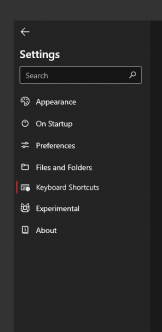
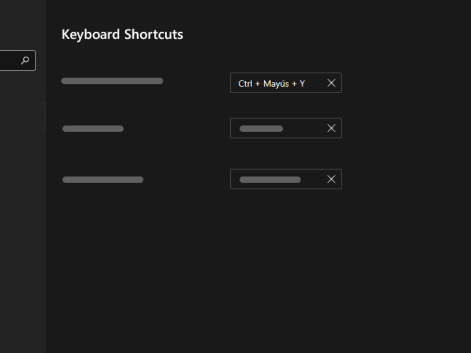
 XPoppyX
on 3 Aug 2020
XPoppyX
on 3 Aug 2020
@XPoppyX Can you open a separate issue with the concept you shared?
yaichenbaum
on 6 Aug 2020
@XPoppyX Can you open a seperate issue with the concept you shared?
ok
XPoppyX
on 6 Aug 2020
Whenever I try to select multiple files using the Ctrl+space bar, it doesn't work, only Ctrl+left mouse click.
 ZoroNasr
on 4 Sep 2020
ZoroNasr
on 4 Sep 2020
With the exception of one shortcut #2117, all items in this issue have been resolved. Moving forward, requests for new shortcuts should get their own issue.
yaichenbaum
on 19 Oct 2020
Related issues
 tsvietOK
·
30Comments
R3voA3
·
18Comments
tsvietOK
·
30Comments
R3voA3
·
18Comments
 calloncampbell
·
28Comments
calloncampbell
·
28Comments
 SOI7
·
22Comments
XPoppyX
·
36Comments
SOI7
·
22Comments
XPoppyX
·
36Comments
Most helpful comment
Don't know if this is fixed yet, but I think Alt + LEFT and Alt + RIGHT is a better way to go when navigating history. It's used in the original explorer and in most web browsers. Also allows for future group-selection when icons are in a tile layout (I assume something like that should be implemented in the future)