Files: Apparently not able to use folders in another drive as replacements for Music and Videos
Describe the bug
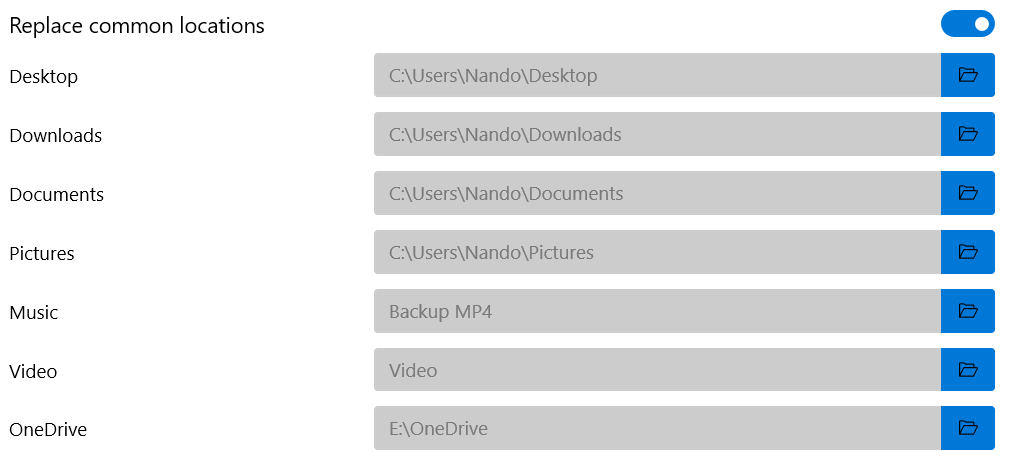
I have my songs and videos in another HDD that isn't C:, but when I change the path of common locations in Files it ignores the new paths and still opens the Music and Videos folders in C:
To Reproduce
Go to Settings, enable "Replace common locations", change the default path of Music/Videos to another folder that isn't in C:
Desktop:
- Windows 10 1909
- App version: v0.7.2.0
Additional context
In the Settings view, those paths don't have the drive initial letter, unlike those located in C:, however OneDrive doesn't seem to be affected
 SOI7
SOI7
All 22 comments
Thank you for opening this issue.
 yaichenbaum
on 22 Mar 2020
yaichenbaum
on 22 Mar 2020
@SOI7 What happens if instead of replacing the locations from the settings page in Files UWP, you change the actual library location in Windows? This should fix the issue and will also make sure you have a consistent experience with file dialogs throughout other applications in Windows.
yaichenbaum
on 2 Apr 2020
I can't do that. I have an SSD with limited GBs as my OS drive and an external HDD for bigger files, so I always try to have all my non necessary files on the HDD
SOI7
on 2 Apr 2020
You don't need to move the files, from Files Explorer you can set a custom location for the library folders and Files UWP with automatically use that new location.
https://winaero.com/blog/default-save-location-library-windows-10/
yaichenbaum
on 2 Apr 2020
Ah, now I see. Then let me test this
SOI7
on 2 Apr 2020
Changing the save location for libraries, like that article suggested, doesn't solve the issue. Files still uses the Library stored in C:
SOI7
on 2 Apr 2020
Did you turn off the setting to use custom locations in the settings page of Files UWP?
yaichenbaum
on 3 Apr 2020
Yeah
SOI7
on 3 Apr 2020
There is a potential fix coming in v0.7.3 but you will need to reset the app to test it. Sorry about the inconvenience.
yaichenbaum
on 3 Apr 2020
@SOI7 Can you check if this is resolved with v0.7.4?
yaichenbaum
on 8 Apr 2020
Could you upload an installer package, please? I uninstalled the UWP definitions for Visual Studio because they take so much space and it's not worth it to keep them on my disk just to install an app now and then
SOI7
on 8 Apr 2020
@SOI7 The store is already up to v0.7.5 so you should be able to test from there.
yaichenbaum
on 8 Apr 2020
@yaichenbaum Updated to 0.7.5. The option to change default Favorites location is gone from Settings... am I doing something wrong? As it is now, Favorites folders still redirect me to those in C:
SOI7
on 8 Apr 2020
@SOI7 If you reset the app, does it take you to the correct location?
yaichenbaum
on 8 Apr 2020
Nope, still C:
Also, now OneDrive shows my educational account folder instead of the personal one
SOI7
on 8 Apr 2020
Which directories is it not detecting correctly?
yaichenbaum
on 8 Apr 2020
Videos and OneDrive atm
SOI7
on 8 Apr 2020
I need also to clarify that those are the only ones besides Music that I have on my secondary HDD, so I can't tell atm if the other Favorites are working properly or not since I can't manually change the default folders in Files anymore
SOI7
on 8 Apr 2020
@SOI7 Can you check if the paths in HKEY_CURRENT_USER\SOFTWARE\Microsoft\Windows\CurrentVersion\Explorer\User Shell Folders match what you set in File Explorer?
yaichenbaum
on 8 Apr 2020
Well, surprisingly they don't. Videos, for example, is %USERPROFILE%\Videos instead of E:\Videos
SOI7
on 8 Apr 2020
Changing the parameter in Regedit solved the issue in Files. I'd still bring custom locations back, though, but that's up to you
SOI7
on 8 Apr 2020
We don't plan on bringing it back as that would require the app modifying the registry, however at some point we will try to get the app to launch the File Explorer dialog's for changing the paths.
yaichenbaum
on 8 Apr 2020
Related issues
 calloncampbell
·
28Comments
calloncampbell
·
28Comments
 Jaiganeshkumaran
·
24Comments
Jaiganeshkumaran
·
24Comments
 rashil2000
·
24Comments
rashil2000
·
24Comments
 szaimen
·
18Comments
szaimen
·
18Comments
 duke7553
·
75Comments
duke7553
·
75Comments