Facebook-for-woocommerce: Matching Facebook pixel content_ids and Facebook catalogue product id
WooCommerce version: Version 3.5.4
WordPress version: Version 5.0.3
Plugin version : Version 1.9.5
The URL of my website: https://avtmbijouterienomade.com/
The URL of my Facebook Page: https://www.facebook.com/avtmbijouterienomade/
The URLs of where I took screenshot(s):
- https://www.facebook.com/products/catalogs/2326148337603930/events/sources/1045349172291993?eventType=ViewContent
- https://avtmbijouterienomade.com/boutique/boucles-doreilles-argent-originales/pique-ethnique/
Hi there ! I hope I can get an answer from you since I dodnt find any in other issues open in this forum.
I am having problems to match the product id in my Facebook catalogue and the content_id generated by the Facebook pixel itself. Without that I cannot use dynamic remarketing ads…
Here is an example. On a product on my website such as “pique ethnique” you get from the pixel these informations :
fbq(‘track’, ‘ViewContent’, {
“content_ids”: “[\”wc_post_id_4638\”]”,
But in the Facebook catalogue you get only this:
So clearly there are additional letters that shouldn't be in the content_ids : “wc_post_id_”.


Is there any way I can remove these from the Facebook pixel information? Otherwise I cannot use dynamic ads on Facebook
Thank you very much for your answer.
Best regards,
Laurine from AVTM Bijouterie Nomade

 AVTMBijouterieNomade
All 24 comments
I succeeded to change my catalogues ids to get :


HELP !
AVTMBijouterieNomade
on 4 Feb 2019
Automated Support Message
Hello,
Thanks for your interest in our plugin! Our developer team tries to provide personal support on GitHub whenever possible.
If you have a feature request or feedback for the developers, reply with Feature Request or Feedback.
If you are a developer or have a question for the developers related to code, reply with Developer Question.
If you are running ads with us, reply with Advertiser.
If you have encountered a bug or a problem with the plugin, keep reading for information that can help you resolve the issue yourself or provide us details we need to help you.
Search Existing Issues
First, please search our issues to see if your problem has been reported before.
There may already be a workaround or a solution to your problem. You can use the search bar near the top of our issues page. Be sure to search both _open_ and _closed_ issues.
If you do find a similar issue, leave a comment on that issue instead of creating a new one. Your comment helps us prioritize which existing issues are important and urgent.
Common Resolution Methods
If you are experiencing a problem or bug and have not found any similar issue, please try the following:
- Upgrade to the latest version of the plugin
- Try to
Resyncproducts using the button on the plugin config page - Reset the plugin by selecting
Manage Settings > Advanced Options > Deletefrom the configuration page of the plugin and setting up again - Try deactivating other plugins that you think may be interfering, then reset and set up again
Necessary Information
If the above steps did not help, please provide the following information in your next comment in order for us to debug your problem:
- WooCommerce version
- WordPress version
- Plugin version (please note: we only support up-to-date versions of the plugin)
- A screenshot of where you see the problem (for example: if it is on Facebook, provide a screenshot of Facebook, if it is on WooCommerce, provide a screenshot of WooCommerce. You can provide multiple screenshots if the problem relates to different screens.)
- The URL of your website
- The URL of your Facebook Page
- The URL(s) of where you took your screenshot(s)
- If applicable, detailed steps you took in order to see the problem
Please include Debug Ready in your reply so our automated system can note your issue for manual review. Please be aware that due to a high volume of issues, we may not be able to respond immediately.
Response Time
We prioritize issues with the tags Advertiser or Multiple Reports.
For issues that have the tags Debug Ready, Feature Request or Developer Question, we aim to respond within 30 days.
If you have not responded to our automated message with one of the above phrases, such as Debug Ready, we may close your issue after 30 days. If a Feature Request is inactive (without new requests, messages or pull requests) for 6 months, we may close it.
Please note that we are not always able to provide support for issues related to interaction from other plugins with this plugin or related to the Facebook advertising interface. To get support related to Facebook ads, try visiting the Facebook Ads Help Center.
For more information on our response times, visit Facebook Support on GitHub.
Thank you,
The Facebook Dev Team
 jieminz22
on 5 Feb 2019
jieminz22
on 5 Feb 2019
Advertiser
AVTMBijouterieNomade
on 5 Feb 2019
Debug ready
AVTMBijouterieNomade
on 5 Feb 2019
The situation keep evolving, I now get 100% of "add to cart" and "purchase", but still 0% of "views".. This is very weird, how possible ?
AVTMBijouterieNomade
on 7 Feb 2019
Hi @AVTMBijouterieNomade,
Can you take a look at https://github.com/facebookincubator/facebook-for-woocommerce/issues/783 and see if helps?
jieminz22
on 8 Feb 2019
I check this topic already. I am using a free plugin to generate a feed and upload my catalogue. I tried uploading my catalogue through the pixel but it is not working (telling me that it is "not ready" because I didnt install the micro-data tags... ).
Also in this topic you have shared, someone is saying: "I think I have had the same problem but I was able to solve it by customizing the plugin code." So...
AVTMBijouterieNomade
on 9 Feb 2019
Here is the update. My content-ids and item_group_ids are the same and matching the code :
fbq('track', 'ViewContent', {
"source": "woocommerce",
"version": "3.5.4",
"pluginVersion": "1.9.5",
"content_name": "Base Ethnique",
"content_ids": "[\"wc_post_id_1206\"]",
"content_type": "product_group",
"value": "42",
"currency": "EUR"
});
Facebook Tag helper is telling me this however:
We detected event code but the pixel has not activated for this event, so no information was sent to Facebook. This could be due to an error in the code, but could also occur if the pixel fires on a dynamic event such as a button click.
AVTMBijouterieNomade
on 9 Feb 2019
Also I noticed that when I arrive on a product page, Facebook Tag Helper is not telling me : Microdata Automatically Detected, while on purchase and add to cart it does. The problem might comes from there ?
AVTMBijouterieNomade
on 9 Feb 2019
And I think there is an ERROR in the code indeed, I corrected it (**):
File: wp-content/plugins/facebook-for-woocommerce/facebook-commerce-events-tracker.php
96 // if any product is a variant, fire the pixel with
// content_type: product_group
$content_type = 'product_group';
184 global $post;
$product = wc_get_product($post->ID);
$content_type = 'product';
189 // if product is a variant, fire the pixel with content_type: product_group
if (WC_Facebookcommerce_Utils::is_variation_type($product->get_type())) {
$content_type = 'product_group';
AVTMBijouterieNomade
on 9 Feb 2019
So this seem to have fixed the issue now. I close this topic but I hope you will correct this code error in your next update of the plugin. And I am disapointed to see that I didnt get any answer to my questions when I needed it.
AVTMBijouterieNomade
on 12 Feb 2019
Countless updates later and no fix...
 PhilWaldmann
on 7 Aug 2019
PhilWaldmann
on 7 Aug 2019
for version 1.9.15, changing line 228 to product, 235 to product_group also fixes the issue, BUT:
the most important is to change is_variation_type to is_variable_type as the viewed product is of type variable, and it contains variations (that are not tracked!)
 morvy
on 12 Aug 2019
morvy
on 12 Aug 2019
Hello,
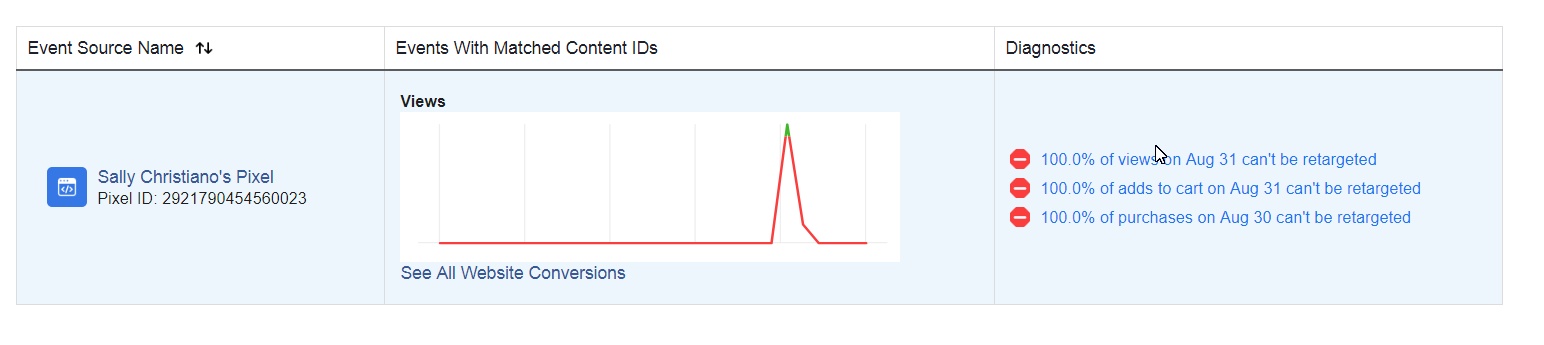
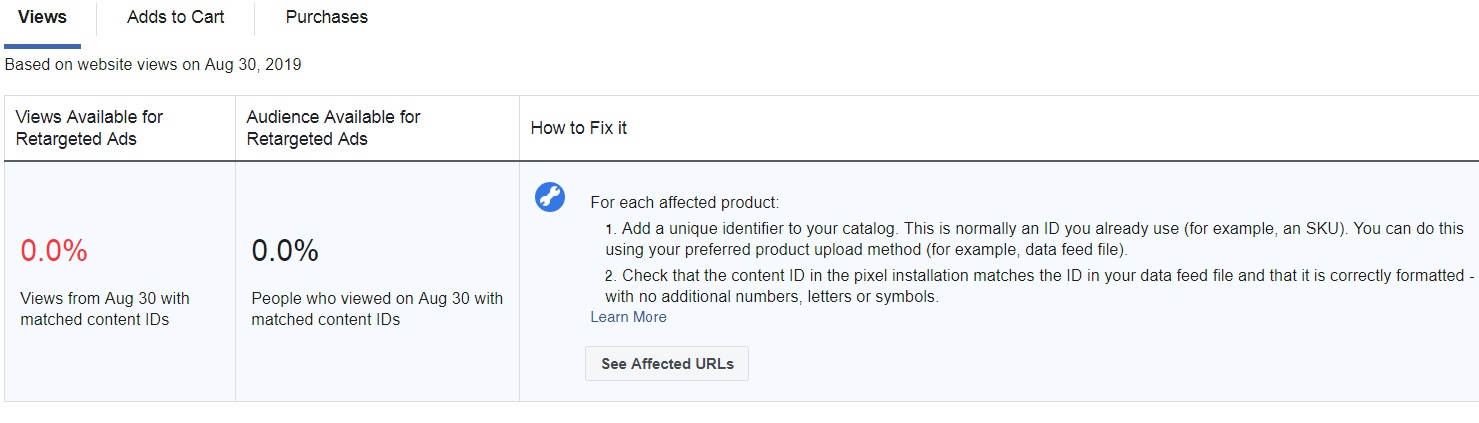
I am getting the issue as i am using facebook for woocommerce plugin. Attaching a screen shot below please check it.
 mustafadlf52
on 1 Sep 2019
mustafadlf52
on 1 Sep 2019
mustafadlf52
on 1 Sep 2019
Mustafa, check out what I wrote up and try doing it
AVTMBijouterieNomade
on 2 Sep 2019
i have already try this but error is still there
mustafadlf52
on 3 Sep 2019
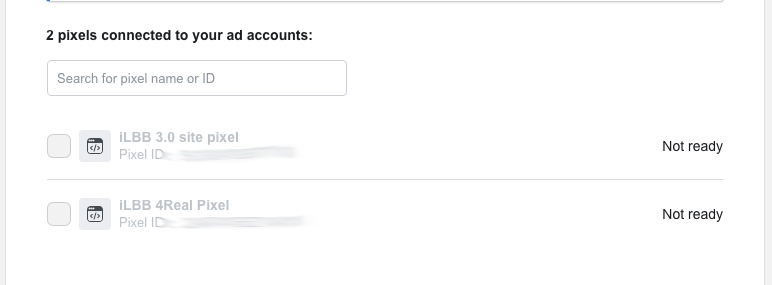
My pixel is firing and capturing events, my microdata "looks great", my woocommerce store is setup, but my pixel still says it's "not ready" when I try to add it as a Product Data Source in Catalog Manager. @AVTMBijouterieNomade I tried your fix. Any advice?
 thiscoderighthere
on 25 May 2020
thiscoderighthere
on 25 May 2020
I dont understand exactly the problem. Maybe you can send me a screenshot so I can see ? Also when u set up a pixel, it may take a while before you see any information on Facebook Page Manager. I think it took up to 2 to 3 weeks maybe more for me.
AVTMBijouterieNomade
on 25 May 2020



thiscoderighthere
on 25 May 2020
If u installed it recently you just need to wait a bit longer.
AVTMBijouterieNomade
on 25 May 2020
If u installed it recently you just need to wait a bit longer.
Ok I will try that. Thanks
thiscoderighthere
on 25 May 2020
Waiting didn't help... but I did figure it out. The Microdata checker tool is garbage. It will tell you your microdata "looks great" when it does not. Edited the PHP on my own to include all of the required metadata, it pulls with my pixel now. I win.
thiscoderighthere
on 2 Jun 2020
I have the same issue, is there a fix better than "Edited the PHP on my own" planned?
 marcyves
on 3 Sep 2020
marcyves
on 3 Sep 2020
Related issues
 DeeJ
·
32Comments
DeeJ
·
32Comments
 Copterview
·
44Comments
Copterview
·
44Comments
 boutzamat
·
72Comments
boutzamat
·
72Comments
 sm7uge
·
37Comments
sm7uge
·
37Comments
 neshby
·
39Comments
neshby
·
39Comments