Facebook-for-woocommerce: Products are synced and visible in inventory but do not appear in shop
No matter how ofter I repeat, with private of business account, new pixels or old ones, since I deleted the upload once, it never show the option to push the synced products into the shop. Also there is no info how to move products from inventory to shop either.
The tick box shown in video, show products in shop, does not appear in the 1.6.5
 Copterview
All 44 comments
Hello,
Thanks for writing in. It would help to have a link to the video you are referring to, or a screenshot of what you see with an arrow pointing to the missing element.
Assuming you are talking about the shops option, it may be the case that you or your page are blacklisted from using shops, in this case the tick box (we call it a slider) to move items into the shop is not shown. This can happen if you are in one of the following countries : North Korea, Cuba, Iran, Syria.
Unfortunately this is the policy of the shops team, and there is not much we can do to change that. If you are not in one of those countries and you are experiencing this, please give us some information about your page (link to page or page id) and we can investigate why your page is in the blacklist or maybe there is some other bug.
 dmitridr
on 3 Nov 2017
dmitridr
on 3 Nov 2017
Dear Dimitri,
Thanks for your response.
I am in Germany and my page (privately managed) does have an shop. It is simply empty. When I activate the tool it syncs the products and I can click the link to check if the upload worked.
I am happy to send a screenshot, but I have no idea what to show.
Here is my Facebook page
http://prntscr.com/h5lx6o http://prntscr.com/h5lx6o
The only product is added manually. Currently managed privately, I also tied with the business manager with no success.
Here is my Woocommerce shop on Wordpress
http://prntscr.com/h5lxje http://prntscr.com/h5lxje
And the products are successfully sync in a fb catalogue
http://prntscr.com/h5mfnk http://prntscr.com/h5mfnk
But as said, the shop on my page stay empty there is nil info how to link the assets tot he shop.
Hope the helps for an analysis.
Best
Michael
On 3. Nov 2017, at 00:46, Dmitri Dranishnikov notifications@github.com wrote:
Hello,
Thanks for writing in. It would help to have a link to the video you are referring to, or a screenshot of what you see with an arrow pointing to the missing element.
Assuming you are talking about the shops option, it may be the case that you or your page are blacklisted from using shops, in this case the tick box (we call it a slider) to move items into the shop is not shown. This can happen if you are in one of the following countries : North Korea, Cuba, Iran, Syria.
Unfortunately this is the policy of the shops team, and there is not much we can do to change that. If you are not in one of those countries and you are experiencing this, please give us some information about your page (link to page or page id) and we can investigate why you are in the blacklist or maybe there is some other bug.
—
You are receiving this because you authored the thread.
Reply to this email directly, view it on GitHub https://github.com/facebookincubator/facebook-for-woocommerce/issues/134#issuecomment-341590879, or mute the thread https://github.com/notifications/unsubscribe-auth/AMZXYj7TIfRuKCb42pvGugTqUikM52zmks5sylRggaJpZM4QP5qp.
Copterview
on 3 Nov 2017
Im having this same problem also and created a new issue for this but seems it is common.
Is there a way to fix this? I have removed the store, the collections, re added the pixels too, recyncd but nothing, what is happening on the facebook side that is not allowing this?
Thanks.
 jcnieves
on 4 Nov 2017
jcnieves
on 4 Nov 2017
I also have the same problem. For some reason it is showing 6 out of 421 products. If i update a product manually in woocommerce it eventually will appear in the facebook shop. But i do not want to manually sync 421 products
 micb11
on 7 Nov 2017
micb11
on 7 Nov 2017
Hi @Copterview unfortunately I checked our internal blacklist, and it seems that your page had been blacklisted by our shops team at some past point in time, I am not sure why. I've whitelisted your page since you clearly have a self-serve shop already.
Please try to go through setup again, be sure to set the shop selector to 'on' on the final step before hitting finish. You should see a warning that your existing shop will be overwritten.
dmitridr
on 7 Nov 2017
@jcnieves @micb11 Sounds like a completely different problem. This problem was one of the shop not even appearing at all or even being an option, due to our blacklist. Let's move the discussion of your problem into the other issue you that one of you mentioned I think it's #136
dmitridr
on 7 Nov 2017
Mine works fine now. Thanks.
jcnieves
on 7 Nov 2017
@dmitridr So far I can never reach the screen to set the shop selector. It simply shows all pages and never offer the shop selector.
So what is my current solution:
- Delete all settings in woo plugin
- Use delete_all_settings(); on js console
- Uninstall plugin
- Download latest version
- Upload and activate plugin
- Initiate the setup
After this procedure, the shop selector appeared again and I received the warning, that I have to dare 24h until the products are visible.
Sounds promising.

Copterview
on 8 Nov 2017
@Copterview, are you still experiencing an issue? It looks like the shop might have been disabled on your end.
 tahoff
on 10 Nov 2017
tahoff
on 10 Nov 2017
Yes, it is a nightmare. Product are now in my shop on the management site. But the shop does not appear in the visitors view and since ten day most product show processing.
I din’t disable the shop. Shop button is on in templates. There is no other way as I know to manage the shops appearance. All other errors appeared after I started to use your tool. Sorry for that bad news.
But many functions are buggy since then. I.E. In my Facebook mobile app, my managed paged doesn’t appear anymore and when I switch to visitor view, the link to switch back to management view is broken. Didn’t expect Facebook being so buggy.
Michael
On 10. Nov 2017, at 21:31, Adam Hoff notifications@github.com wrote:
@Copterview https://github.com/copterview, are you still experiencing an issue? It looks like the shop might have been disabled on your end.
—
You are receiving this because you were mentioned.
Reply to this email directly, view it on GitHub https://github.com/facebookincubator/facebook-for-woocommerce/issues/134#issuecomment-343578203, or mute the thread https://github.com/notifications/unsubscribe-auth/AMZXYl6zecpHbjg9735HuRac5-AUm0Dzks5s1LKWgaJpZM4QP5qp.
Copterview
on 15 Nov 2017
I managed to solve my problem by hiding the shop and then republishing it. After that the message went away. The plugin then started to process the products but after a while is stopped processing them. If I manually go into a product and update on the woocommerce site it will then appear on facebook. But there still seems to be a syncing issue.
micb11
on 15 Nov 2017
Just in case you still interested:
Notice
People cannot currently see this product because the seller's Page has not been approved to sell on Facebook.
Michael
On 10. Nov 2017, at 21:31, Adam Hoff notifications@github.com wrote:
@Copterview https://github.com/copterview, are you still experiencing an issue? It looks like the shop might have been disabled on your end.
—
You are receiving this because you were mentioned.
Reply to this email directly, view it on GitHub https://github.com/facebookincubator/facebook-for-woocommerce/issues/134#issuecomment-343578203, or mute the thread https://github.com/notifications/unsubscribe-auth/AMZXYl6zecpHbjg9735HuRac5-AUm0Dzks5s1LKWgaJpZM4QP5qp.
Copterview
on 20 Nov 2017
UPDATE 12/27 - Found a workaround and source of the error (we believe) due to variable product pricing.
Here's what we did -
- Deactivated the WooCommerce for FB plugin
- Reactivated Plugin
- Turned Off the Product Feed
- Manually uploaded our products with fixed prices to the FB Shop, linking to the checkout page for WooCommerce.
Net - this plugin is mostly useless for our business. And we could've avoided a whole bunch of hassle using a different plugin to enable the Facebook Pixel. We had high hopes.
 huebschie
on 17 Dec 2017
huebschie
on 17 Dec 2017
I have exactly same issue. My products are synced to Facebook. and Ive got products catalog.
However my shop is empty. Any solutions?
 Nibiko
on 17 Dec 2017
Nibiko
on 17 Dec 2017
I have a similar problem. It was working fine but all of a sudden it stopped working and our products are not syncing with facebook shop. Please let me know what to do?
 acmanbd
on 22 Dec 2017
acmanbd
on 22 Dec 2017
Looks like I'm having the very same problem. Products don't sync. At one point WC has assigned a facebook ID to the products, but they don't show up facebook.
 joanesle
on 24 Dec 2017
joanesle
on 24 Dec 2017
@Nibiko @acmanbd @joanesle Can you guys send me the url link to your Facebook page so that I can check whether your shop is blocked or not?
 sammul
on 28 Dec 2017
sammul
on 28 Dec 2017
https://www.facebook.com/catsvsdogsgiftshop/
Thanks
On Fri, 29 Dec 2017 at 6:38 am, Xia W notifications@github.com wrote:
@Nibiko https://github.com/nibiko @acmanbd https://github.com/acmanbd
@joanesle https://github.com/joanesle Can you guys send me the url link
to your Facebook page so that I can check whether your shop is blocked or
not?—
You are receiving this because you were mentioned.Reply to this email directly, view it on GitHub
https://github.com/facebookincubator/facebook-for-woocommerce/issues/134#issuecomment-354354506,
or mute the thread
https://github.com/notifications/unsubscribe-auth/AhAsA92JTgUwnw8NWCRyXR64k4HVMg8Aks5tE_wygaJpZM4QP5qp
.
Nibiko
on 28 Dec 2017
@Nibiko It turned out your issue is different than the one here: we suspect that you didn't toggle on shop feature during setting in the extension. Would you mind go through the setup again and make sure the shop option is on. Remember that doing this will override your current shop in your page, which seems setup by you manually.
sammul
on 29 Dec 2017
Could you tell me where is the shop option setting in the extension? I
tried to delete plugin and re activated a couple time but nothing changed.
If you can screen shot, really appreciate.
On Fri, 29 Dec 2017 at 10:07 am, Xia W notifications@github.com wrote:
@Nibiko https://github.com/nibiko It turned out your issue is different
than the one here: we suspect that you didn't toggle on shop feature during
setting in the extension. Would you mind go through the setup again and
make sure the shop option is on. Remember that doing this will override
your current shop in your page, which seems setup by you manually.—
You are receiving this because you were mentioned.
Reply to this email directly, view it on GitHub
https://github.com/facebookincubator/facebook-for-woocommerce/issues/134#issuecomment-354377769,
or mute the thread
https://github.com/notifications/unsubscribe-auth/AhAsA6GiwzuNl6cDzqoQT6nh1uqcNQtGks5tFC1VgaJpZM4QP5qp
.
Nibiko
on 29 Dec 2017
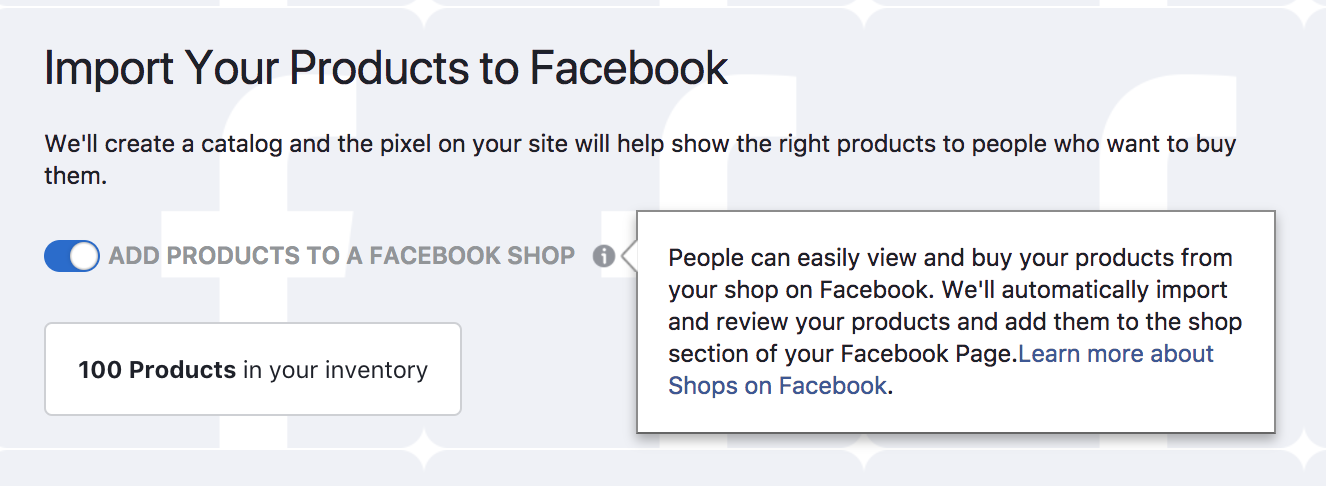
@Nibiko Did you toggle on this?
sammul
on 29 Dec 2017
Hi I checked my setting and I don't have the button which add products to a facebook shop.
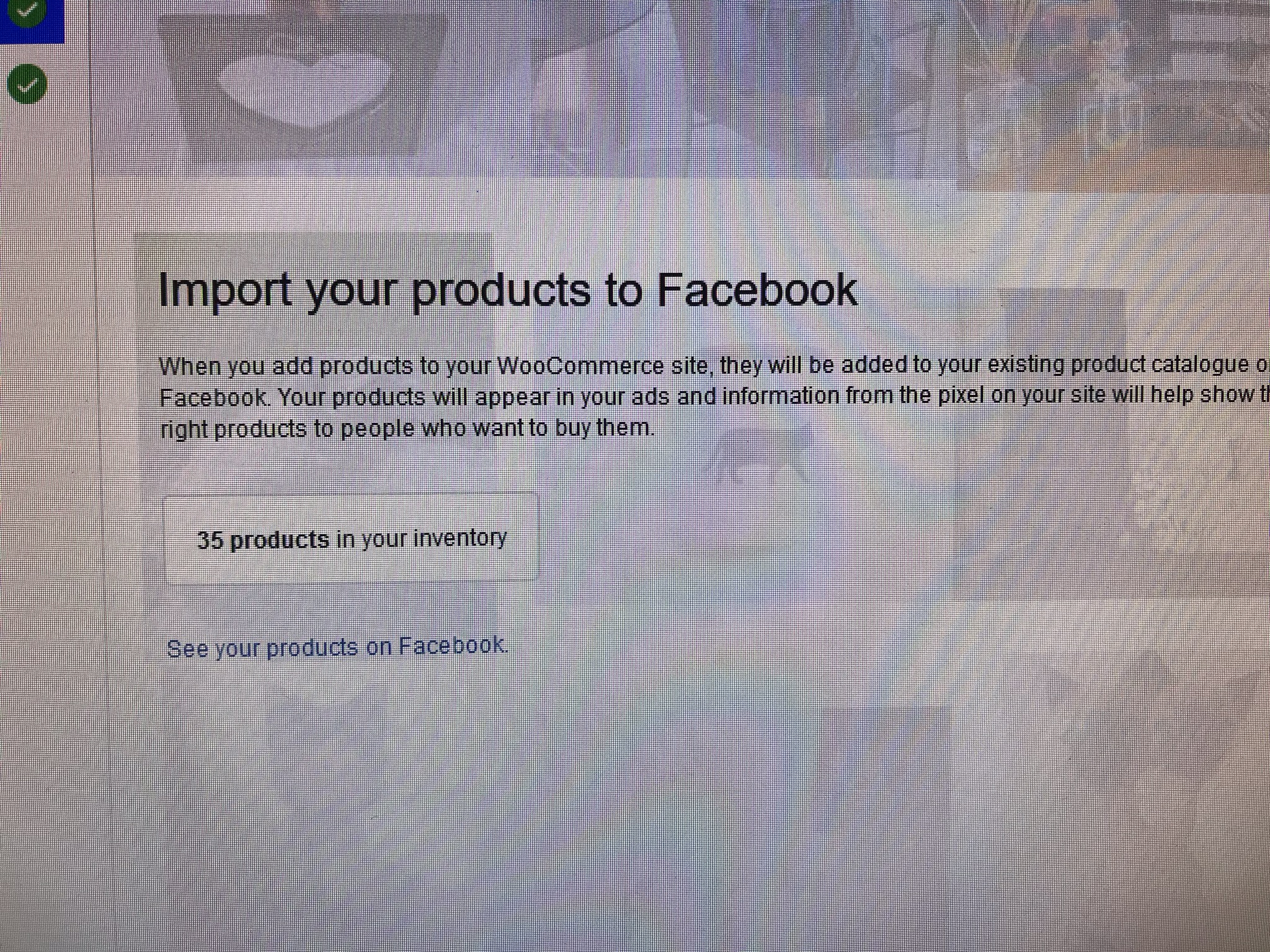
what have i done wrong??
Nibiko
on 29 Dec 2017
@Nibiko and @sammul I do not have that button neither. I have been passed back and forth bewtween FB help and woocommerce help each placing blame to the other. THIS IS THE FIRST I have seen this button with the option to push products to the facebook shop tab and not just into my fb ad manager catalog like everyone else is complaining about here. PLEASE tell me why we don't see that option? Here is my page https://www.facebook.com/ADRMOTOdotCOM/ however the shop tab is empty and only visible on my page but my products show only in my ad manager section. THANKS!
 adrenalinmototoys
on 29 Dec 2017
adrenalinmototoys
on 29 Dec 2017
@Nibiko the screenshot you sent is after setup, which is our control panel. What I sent in this thread is the screenshot for the initial setup. Would you mind to try to delete everything and set up again, and to see if the shop option comes up or not?
cc @adrenalinmototoys
sammul
on 2 Jan 2018
I disactivated and deleted the plugin, restart the computer, re-download
the file and activated it again.
Automatically it synced to my facebook page and I can't go initial setup.
Could you tell me how to delete complately and re-setup initialy again pls?
http://www.avg.com/email-signature?utm_medium=email&utm_source=link&utm_campaign=sig-email&utm_content=webmail
Virus-free.
www.avg.com
http://www.avg.com/email-signature?utm_medium=email&utm_source=link&utm_campaign=sig-email&utm_content=webmail
<#DAB4FAD8-2DD7-40BB-A1B8-4E2AA1F9FDF2>
Nibiko
on 3 Jan 2018
Hi Nibiko,
Thanks for your patience. Here's how you can completely reset the plugin.
- Click
Reconfigureon the configuration page. - In the popup, click 'Advanced Options'
- Click the button that says
Delete - Confirm
This will reset everything from scratch. Then, you should be able to set up from scratch. When you get to the final step, don't click Finish until you confirm you can see the slider in the screenshot that @sammul posted. It's easy to miss.
Hope that helps.
dmitridr
on 13 Jan 2018
My Facebook page is www.facebook.com/shahebbibi dotCom
Problem still persist.. Please help guys..
acmanbd
on 13 Jan 2018
Www.Facebook.com/shahebbibidotcom
acmanbd
on 13 Jan 2018
Finally its worked!! Thank you for your help, @sammul @dmitridr
Nibiko
on 14 Jan 2018
@acmanbd your shop looks fine to me here https://www.intern.facebook.com/pg/ShahebBiBidotcom/shop/
If there's a problem with the product sync no longer working, please open a new issue. Also we changed how sync works in v1.8.0 so doing an upgrade and a reset may fix the problem.
dmitridr
on 23 Mar 2018
Simply to say the transfer from my Woo shop to my FB business page may last forever and you'll never be warned if any issues in transfer / blacklisted products (even they all respect FB guidelines). The plugin does not show any upload progress I have only 210 products with a total of 4,7K variations and I'm on after 4 hours of sync I am on 45th variations loaded into my FB business page (and of course not all variations are loaded). Simple calculation is if the "progress" continue with the same speed It will be over in 47 days!! And what if a shop has 10,000 products ????
Shopify synced the same # of products in only few hours with all variations properly displayed on FB page. It seems the free plugin users are placed last in the queue.
 milosmili
on 24 Apr 2018
milosmili
on 24 Apr 2018
What is the speed of transfer from Woo to FB page sing the magic plugin ? 1 variation per 6 hours or 1 variation per 24 hours ? Thank you for your ever prompt reply.
milosmili
on 24 Apr 2018
is this a bug in 1.8.5 ?
Using Chrome and while logged into my FB profile / page plenty of my products have: "Your product is being processed. This usually takes a few minutes. We'll notify you when processing is complete and your product is visible.". Therefore cannot proceed to checkout on my Web site
However on the same PC using Firefox, and NOT logged in to FB, the same products do not carry the above message, CHECKOUT button is enabled.
Can someone advise if I can ignore the above message ? I want to make sure all products with all their variations are 100% synced, so that I ca disable plugin who's taking lots of resources (cca. 1MB in scripts and sever charge)
Pls advise.
Thx.
milosmili
on 26 Apr 2018
Just updated to ver. 1.8.6 and it crashes my site with Error 500 when trying to UPDATE a product. FB ID for the product failed to be created.
Many using the plugin are frustrated as we get no adequate support from FB. WooCommerce also denies any responsibility and forward all our inquiries to FB
milosmili
on 26 Apr 2018
Similar issue, using 1.8.7, Shop Syncs, but no products appear on my Facebook shop.
Website is www.abrv.co.uk
Facebook Store is facebook.com/ABRVClothing
Could I be checked on the white/Black list please.
 grabrail
on 4 May 2018
grabrail
on 4 May 2018
Is there any solution to this problem yet?
 kxplorer
on 17 May 2018
kxplorer
on 17 May 2018
looks like no one cares
 VonTalavang
on 20 May 2018
VonTalavang
on 20 May 2018
ok, following sammul instructions.
There's is a button now
VonTalavang
on 20 May 2018
https://www.facebook.com/laylooopakistan/
i am trying to sync my woocommerce products to fb. but its failing
 adilpasha123
on 23 May 2018
adilpasha123
on 23 May 2018
please help
adilpasha123
on 23 May 2018
I have the exact same issue. My products are synced to Facebook from Woocommerce. On my Facebook Business Account, Business Settings => Data Sources => Catalogs => Products, I can se my products, not all but some of them. But on my Facebook page shop (http://bit.ly/2sE2J7D) is empty. Any solutions, please?
 leodelto
on 7 Jun 2018
leodelto
on 7 Jun 2018
SOLVED: I deleted the shop tab on my Facebook page => Settings => Edit Page => Log Out => Log In and putted back again. Went to Woocommerce => Settings => Integration and clicked on Force Resync. Now all the products are showing on my catalog and on my Facebook page.
If you want to try this solution I recommend that first go to your Facebook Business Account, Business Settings => Data Sources => Catalogs => Products and delete all the products there and only then follow the previous steps. I say this because I don't know if the Force Resync will duplicate the products or not.
Hope I helped!
leodelto
on 7 Jun 2018
Great to hear to solve your problems @leodelto ! Yeap, there is problems with business page happened before. For others in this thread, if you still have this problem, please reopen a new issue to continue discussion.
 mengyingdu
on 28 Jun 2018
mengyingdu
on 28 Jun 2018
Hello!
I have the same problem. My page is https://www.facebook.com/DanferStoreAr/
I have in WooCommerce more than 700 products, on Facebook only 400. What should i do?
Thanks!
 FranciscoArauz
on 16 Jul 2018
FranciscoArauz
on 16 Jul 2018
Related issues
 Aprilhead
·
47Comments
Aprilhead
·
47Comments
 vverloop
·
26Comments
vverloop
·
26Comments
 sm7uge
·
37Comments
sm7uge
·
37Comments
 aluxh
·
48Comments
aluxh
·
48Comments
 bbihun12
·
31Comments
bbihun12
·
31Comments