Facebook-for-woocommerce: Your API key is no longer valid. Please click "Settings > Advanced Options > Update Token".
Hi,
I've read through all the other issues, but none of the proposed solutions helped. I've installed the plugin and gone through the setup after which none of my products get synced with the facebook shop.
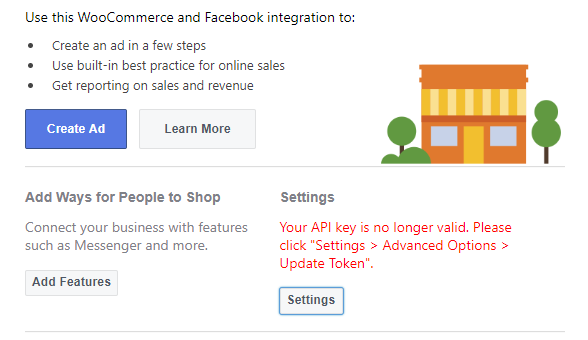
I've looked at the settings and see the following message at the settings page: "Your API key is no longer valid. Please click "Settings > Advanced Options > Update Token"."
I've tried updating the token, however it does not help and the same message reimains to be there. I've also tried deleting the settings in the Advanced Settings page of the plugin and repeating the set up, however it also did not help.
 Aprilhead
All 47 comments
I am having the exact same issue on v1.19.11, WordPress 5.1.1, WooCommerce 3.5.7. Tried multiple browsers, no extensions/ad blockers etc.
 kevindelaney
on 15 Apr 2019
kevindelaney
on 15 Apr 2019
I am having the exact same issue on v1.19.11, WordPress 5.1.1, WooCommerce 3.5.7. Tried multiple browsers, no extensions/ad blockers etc.
Exactly the same problem!
 Eliransokol
on 15 Apr 2019
Eliransokol
on 15 Apr 2019
I have exactly same versions: plugin v1.19.11, wordpress 5.1.1 and woo 3.5.7.
Aprilhead
on 15 Apr 2019
Same here!
Tried the set up multiple times and it always failes in the same way.
First it 's all green, but the product sync fails (Something wrong when uploading, please try again.), and after refreshing the page of my woocommerce shop I see the API warning in red (and of course updating the token doesn't do anything, after refresh it's the same).
I also tried the setup with all other (non-woo) plugins turned off, and the issue persists. No adblock, I've tried Chrome and Edge.
 ThomasWeaver2
on 15 Apr 2019
ThomasWeaver2
on 15 Apr 2019
Same here. I'm giving up for now.
 ColleenHutchins
on 15 Apr 2019
ColleenHutchins
on 15 Apr 2019
i have the same problem
 ackasarg
on 15 Apr 2019
ackasarg
on 15 Apr 2019
my page ists www.picaras.com.ar
and fthe facebook page https://www.facebook.com/picarasAR/
ackasarg
on 15 Apr 2019
Automated Support Message
Hello,
Thanks for your interest in our plugin! Our developer team tries to provide personal support on GitHub whenever possible.
If you have a feature request or feedback for the developers, reply with Feature Request or Feedback.
If you are a developer or have a question for the developers related to code, reply with Developer Question.
If you are running ads with us, reply with Advertiser.
If you have encountered a bug or a problem with the plugin, keep reading for information that can help you resolve the issue yourself or provide us details we need to help you.
Search Existing Issues
First, please search our issues to see if your problem has been reported before.
There may already be a workaround or a solution to your problem. You can use the search bar near the top of our issues page. Be sure to search both _open_ and _closed_ issues.
If you do find a similar issue, leave a comment on that issue instead of creating a new one. Your comment helps us prioritize which existing issues are important and urgent.
Common Resolution Methods
If you are experiencing a problem or bug and have not found any similar issue, please try the following:
- Upgrade to the latest version of the plugin
- Try to
Resyncproducts using the button on the plugin config page - Reset the plugin by selecting
Manage Settings > Advanced Options > Deletefrom the configuration page of the plugin and setting up again - Try deactivating other plugins that you think may be interfering, then reset and set up again
Necessary Information
If the above steps did not help, please provide the following information in your next comment in order for us to debug your problem:
- WooCommerce version
- WordPress version
- Plugin version (please note: we only support up-to-date versions of the plugin)
- A screenshot of where you see the problem (for example: if it is on Facebook, provide a screenshot of Facebook, if it is on WooCommerce, provide a screenshot of WooCommerce. You can provide multiple screenshots if the problem relates to different screens.)
- The URL of your website
- The URL of your Facebook Page
- The URL(s) of where you took your screenshot(s)
- If applicable, detailed steps you took in order to see the problem
Please include Debug Ready in your reply so our automated system can note your issue for manual review. Please be aware that due to a high volume of issues, we may not be able to respond immediately.
Response Time
We prioritize issues with the tags Advertiser or Multiple Reports.
For issues that have the tags Debug Ready, Feature Request or Developer Question, we aim to respond within 30 days.
If you have not responded to our automated message with one of the above phrases, such as Debug Ready, we may close your issue after 30 days. If a Feature Request is inactive (without new requests, messages or pull requests) for 6 months, we may close it.
Please note that we are not always able to provide support for issues related to interaction from other plugins with this plugin or related to the Facebook advertising interface. To get support related to Facebook ads, try visiting the Facebook Ads Help Center.
For more information on our response times, visit Facebook Support on GitHub.
Thank you,
The Facebook Dev Team
 yinghechen1993
on 15 Apr 2019
yinghechen1993
on 15 Apr 2019
Debug Ready
WooCommerce version: 3.5.7
WordPress version: 5.1.1
Plugin version (please note: we only support up-to-date versions of the plugin): 1.19.11
A screenshot of where you see the problem (for example: if it is on Facebook, provide a screenshot of Facebook, if it is on WooCommerce, provide a screenshot of WooCommerce. You can provide multiple screenshots if the problem relates to different screens.)
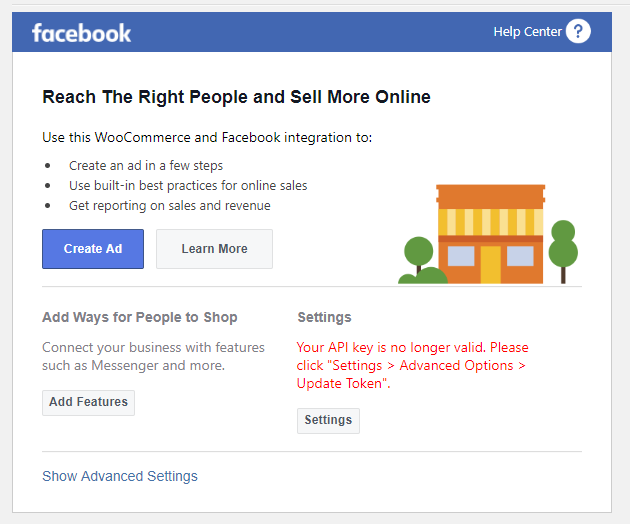
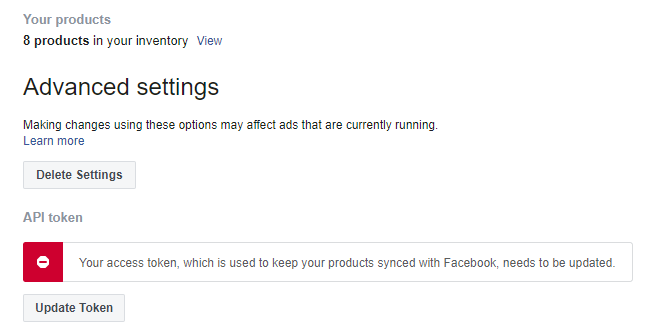
The URL of your website : https://www.pigilova.lt/Beta/
The URL of your Facebook Page: https://www.facebook.com/pigilova.lt/
The URL(s) of where you took your screenshot(s): https://www.pigilova.lt/Beta/
If applicable, detailed steps you took in order to see the problem
Aprilhead
on 15 Apr 2019
Same problem
 tomyjo99
on 15 Apr 2019
tomyjo99
on 15 Apr 2019
BTW I gave up and used a feed plugin instead - all products uploaded with no problem.
ThomasWeaver2
on 15 Apr 2019
BTW I gave up and used a feed plugin instead - all products uploaded with no problem.
Could you give me the name of the plugin? I would really like to get my shop ready asap.
Aprilhead
on 15 Apr 2019
I've used WooCommerce Product Feed
https://pl.wordpress.org/plugins/webappick-product-feed-for-woocommerce/
and I've left the FB plugin turned on for the pixel (that works).
ThomasWeaver2
on 15 Apr 2019
Debug Ready
Aprilhead
on 16 Apr 2019
I am really getting frustrated, can you get back on this please?
Aprilhead
on 17 Apr 2019
Judging by how other issues on this repo have (not) been addressed, I have
zero confidence that Facebook cares about this plugin. I would suggest
pursuing other options.
kevindelaney
on 17 Apr 2019
the worst of all is that you have no way for someone to contact you to help you with the problem
ackasarg
on 17 Apr 2019
We are experiencing the exact same issues. Tried resetting all settings, reinstalling plugins but we still get this message and we cannot sync our catalog.
 johngith1
on 18 Apr 2019
johngith1
on 18 Apr 2019
Same
 Theorian
on 18 Apr 2019
Theorian
on 18 Apr 2019
Now there is a new error on the plugin:
Catalog Can't Be Synced
A system error is preventing your catalog from syncing. You can still get website visitors and track sales, and we'll notify you when your catalog is ready to sync.
Theorian
on 18 Apr 2019
Please Help I have the same problem.
 Zakrazy
on 19 Apr 2019
Zakrazy
on 19 Apr 2019
Same!!
Someone got a good and easy replacement for this plugin? Don't think they gone fix this any time soon
 Precies
on 19 Apr 2019
Precies
on 19 Apr 2019
BTW I gave up and used a feed plugin instead - all products uploaded with no problem.
can you tell us the pluging name please we all can't add products
 nabilelm
on 19 Apr 2019
nabilelm
on 19 Apr 2019
try product feed pro
Aprilhead
on 19 Apr 2019
try product feed pro
thank you
nabilelm
on 19 Apr 2019
Also have this issue.
At first we had the error "Catalog Can't Be Synced A system error is preventing your catalog from syncing. You can still get website visitors and track sales, and we'll notify you when your catalog is ready to sync." PLUS the invalid API key error.
The customers page is now verified on FB and the catalog can't be synced error is gone. However, the API Key is still showing it's invalid. Following the instructions doesn't fix it.
Believe the developer needs to respond that this project is abandoned, there is an issue their working on, or directions on how to resolve.
 tkintenn
on 19 Apr 2019
tkintenn
on 19 Apr 2019
Debug Ready
Debug Ready
WooCommerce 3.6.1
Wordpress 5.1.1
Facebook for WooCommerce 1.9.11
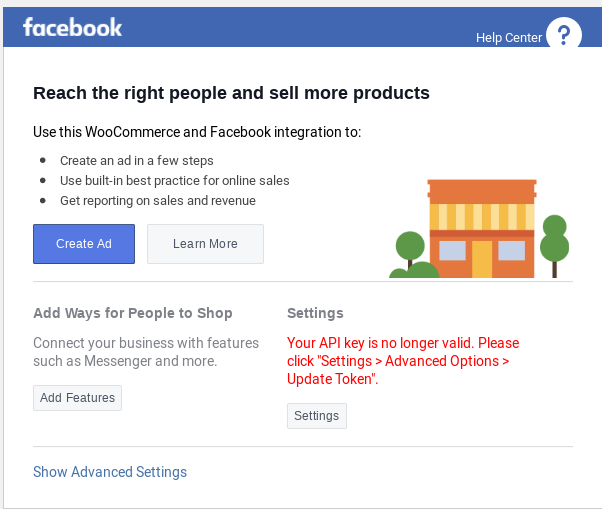
https://www.maesawlane.com
https://www.facebook.com/maesawlane/
https://www.maesawlane.com/wp-admin/admin.php?page=wc-settings&tab=integration§ion=facebookcommerce
Setup the plugin per the instructions by downloading the plugin from facebook.com. Click the settings button, goto advanced, and click "Update Token". Refresh the page in wordpress and it still says the API Token is no longer valid.
tkintenn
on 19 Apr 2019
exactly same problem . i tried fixing it for past 3 days...
i dont think we'll get any support from Facebook here.. need alternatives
 otel
on 20 Apr 2019
otel
on 20 Apr 2019
Yes, same problem and no solutions. Worse still, it leads me to an error page now.
 CakeArtelier
on 21 Apr 2019
CakeArtelier
on 21 Apr 2019
i have the same issue, when i go to settings it says...
 .
.
pls fix this
 riikzy
on 23 Apr 2019
riikzy
on 23 Apr 2019
try product feed pro
thank you
Did it work for you?
 Nabetsee
on 24 Apr 2019
Nabetsee
on 24 Apr 2019
Hello everyone,
I truly apologize for a late reply on this thread. We have made a fix to this issue, and it should now be working in the new version.
Please update Facebook for Woocommerce plugin, and keep Woocommerce plugin up to date as well. Comment on this thread if you're still having problems.
Thank you,
James
 jameskim0903
on 26 Apr 2019
jameskim0903
on 26 Apr 2019
I was able to update the token yesterday.
 chalkandmoss
on 26 Apr 2019
chalkandmoss
on 26 Apr 2019
Please update Facebook for Woocommerce plugin, and keep Woocommerce plugin up to date as well. Comment on this thread if you're still having problems.
It's work ! Perfect, a big thank's !
(No plugin update, need only a token refresh in woocommerce !)
 strati64
on 26 Apr 2019
strati64
on 26 Apr 2019
@jameskim0903 Thank you for fixing it. and Fu*k you for taking too long. Nevermind.
Zakrazy
on 26 Apr 2019
1.9.11 update: finally was able to get the API update to stick. Seems to be working again, for now.....
 briantetrault
on 26 Apr 2019
briantetrault
on 26 Apr 2019
Ici ça ne fonctionne pas. L'option "Update Token" n'existe tout simplement pas.
 MaestroMaestro
on 26 Apr 2019
MaestroMaestro
on 26 Apr 2019
Finally working on our side with last update. Thank's for the fix !
 wazoomstudio
on 27 Apr 2019
wazoomstudio
on 27 Apr 2019
@jameskim0903 thank you!
tkintenn
on 27 Apr 2019
Hello I gues I got a solution:
INSTALL THE FACEBOOK PIXEL IN HEADER.PHP FILE.
- Go to your bussines facebook account, search pixels an then configure, copy in the clipboard.
- Install "Insert Headers and Footers" plugin in wordpress.
- Go to settings-insert headers and footer and paste the code, save.
- Reset and Start agaaaaain the settings in the facebook for woocommerce.
DONE!
:-)
 louversky
on 27 Apr 2019
louversky
on 27 Apr 2019
It works for me too, but I've noticed that the FB Shop now displays products which were created as drafts. This isn't the way it should be. For example I'm having 127 products online in the shop, FB shows 152 products (published and draft ones) in the FB shop tab. Is there anything I can do about this so it only shows the products which were published?
Thanks in advance!
 arzu-poolie
on 29 Apr 2019
arzu-poolie
on 29 Apr 2019
Ça devrait être simple. Si ça devient compliqué on n'est sans doute pas sur la bonne voie. Quand l'application sera à jour on reviendra peut-être, en attendant on vend nos produits ailleurs.
MaestroMaestro
on 29 Apr 2019
Nope, worked once, then stopped working. Deleted settings and reconnected, not working at all.
Woocommerce is doing themselves a disfavor to promote this app. They rather do their own as this app is crap.
Is there another Facebook shop syncing app I can use, even if I have to pay?
otel
on 4 May 2019
Same problem here.. Please your help!
 ozgurcelebi
on 5 May 2019
ozgurcelebi
on 5 May 2019
Same here! Plugin version 1.9.11
 fxaviers
on 19 May 2019
fxaviers
on 19 May 2019
Same problem! Shameful!!
 nok91
on 19 May 2019
nok91
on 19 May 2019
Do you understand why Facebook is a terrible software company now? and they will never get close to Google. The plugin that is code by the ordinary encoder can work much more stable "THAN FACEBOOK SOFTWARE TEAM"
 eroliron
on 19 May 2019
eroliron
on 19 May 2019
Related issues
 vverloop
·
26Comments
vverloop
·
26Comments
 StefsterNYC
·
28Comments
StefsterNYC
·
28Comments
 NicoleParberry
·
46Comments
NicoleParberry
·
46Comments
 revendo
·
24Comments
revendo
·
24Comments
 sm7uge
·
37Comments
sm7uge
·
37Comments