Facebook-for-woocommerce: Your API key is no longer valid. Please click "Settings > Advanced Options > Update Token".
I keep getting the message 'Your API key is no longer valid. Please click "Settings > Advanced Options > Update Token".'
When I click Settings > Advanced Options > Update Token it says it's done & on wordpress says to refresh the page but the same message comes up. As a result products in my store have stopped syncing just as I was about to start an advertising campaign for them.
Have also tried Re-configure Facebook Settings > Advanced Settings > Delete Settings as well as completely removing the plugin & re-installing it along with removing any data in the wp_options table for this plugin. Still hasn't solved the issue... All in all using this plugin is kind of a mess.
 DeeJ
DeeJ
All 32 comments
Automated Support Message
Hello,
Thanks for your interest in our plugin! Our developer team tries to provide personal support on GitHub whenever possible.
If you have a feature request or feedback for the developers, reply with Feature Request or Feedback.
If you are a developer or have a question for the developers related to code, reply with Developer Question.
If you are running ads with us, reply with Advertiser.
If you have encountered a bug or a problem with the plugin, keep reading for information that can help you resolve the issue yourself or provide us details we need to help you.
Search Existing Issues
First, please search our issues to see if your problem has been reported before.
There may already be a workaround or a solution to your problem. You can use the search bar near the top of our issues page. Be sure to search both _open_ and _closed_ issues.
If you do find a similar issue, leave a comment on that issue instead of creating a new one. Your comment helps us prioritize which existing issues are important and urgent.
Common Resolution Methods
If you are experiencing a problem or bug and have not found any similar issue, please try the following:
- Upgrade to the latest version of the plugin
- Try to
Resyncproducts using the button on the plugin config page - Reset the plugin by selecting
Reconfigure > Advanced Options > Delete, and setting up this plugin again - Try deactivating other plugins that you think may be interfering, then reset and set up again
Necessary Information
If the above steps did not help, please provide the following information in your next comment in order for us to debug your problem:
- WooCommerce version
- WordPress version
- Plugin version (please note: we only support up-to-date versions of the plugin)
- A screenshot of where you see the problem (for example: if it is on Facebook, provide a screenshot of Facebook, if it is on WooCommerce, provide a screenshot of WooCommerce. You can provide multiple screenshots if the problem relates to different screens.)
- The URL of your website
- The URL of your Facebook Page
- The URL(s) of where you took your screenshot(s)
- If applicable, detailed steps you took in order to see the problem
Please include Debug Ready in your reply so our automated system can note your issue for manual review. Please be aware that due to a high volume of issues, we may not be able to respond immediately.
Response Time
We prioritize issues with the tags Advertiser or Multiple Reports.
For issues that have the tags Debug Ready, Feature Request or Developer Question, we aim to respond within 30 days.
If you have not responded to our automated message with one of the above phrases, such as Debug Ready, we may close your issue after 30 days. If a Feature Request is inactive (without new requests, messages or pull requests) for 6 months, we may close it.
Please note that we are not always able to provide support for issues related to interaction from other plugins with this plugin or related to the Facebook advertising interface. To get support related to Facebook ads, try visiting the Facebook Ads Help Center.
For more information on our response times, visit Facebook Support on GitHub.
Thank you,
The Facebook Dev Team
 Luther2010
on 1 Nov 2018
Luther2010
on 1 Nov 2018
Automated Support Message - Issue Closed
Hello,
Because it has been 30 days since this issue was updated and you have not included Debug Ready in your reply, our automated system will now close your issue.
If you are still having this problem, please open a new issue and reference this one.
For more information on our response times and support policy, visit Facebook Support on GitHub.
Thank you,
The Facebook Dev Team
 jameskim0903
on 4 Dec 2018
jameskim0903
on 4 Dec 2018
Debug Ready
Facebook for WooCommerce (latest installed): Version 1.9.11
WooCommerce (latest installed) : Version 3.5.7
WordPress (latest installed): version 5.1.1
The URL of my website : www.YouAndBeauty.com
The URL of my page : https://www.facebook.com/Shop.YouAndBeauty/
What did I do ?
I had to change the currency and the name of the ads account. As per the FB Help article, I created a new one (see screenshot) with the name as "You and Beauty" and it asked to deactivate the old one "Vijayendra Meshram"
For troubleshooting I uninstalled and reinstalled the plugin but issue persists.
When I click on Settings it does not show me my existing page but lets me create a new page.
Tried creating a new page "Testing" and only that shows up. The original page "You and Beauty" does not show up in the list.
Screenshots
https://user-images.githubusercontent.com/15442787/54887601-3783f800-4e95-11e9-87fa-cb14b667e326.jpg
https://user-images.githubusercontent.com/15442787/54887636-bd07a800-4e95-11e9-86fb-d96a14935ded.png
https://user-images.githubusercontent.com/15442787/54887695-51720a80-4e96-11e9-9b54-cbf6d0a03372.png
Same issue - Updated the post
https://github.com/facebookincubator/facebook-for-woocommerce/issues/591#issuecomment-476013472
Regards,
Vijayendra
 VijayendraM
on 25 Mar 2019
VijayendraM
on 25 Mar 2019
Fixed it : Unpublish the page and then re-publish

Once this is done
Settings in the FB for woocommerce plugin : now the page is there.
Select the option "update token" and all looks good. :)
Regards,
Vijayendra
VijayendraM
on 25 Mar 2019
I have the same issue.
I keep getting this message: Your API key is no longer valid. Please click "Settings > Advanced Options > Update Token
I then click "update token" in the advanced options, get a success message.
After that, i refresh the page, and i get the exact same message from the WP plugin, that i need to update the token.
It's running in a loop.
 boutzamat
on 16 Apr 2019
boutzamat
on 16 Apr 2019
Same!
 JimmyHowe
on 18 Apr 2019
JimmyHowe
on 18 Apr 2019
Same!!
 jonodonovan
on 18 Apr 2019
jonodonovan
on 18 Apr 2019
SAME!
 Theorian
on 18 Apr 2019
Theorian
on 18 Apr 2019
Same! :(
 claudiacruz85
on 19 Apr 2019
claudiacruz85
on 19 Apr 2019
Same! please help
 Precies
on 19 Apr 2019
Precies
on 19 Apr 2019
same problem :(
 nabilelm
on 19 Apr 2019
nabilelm
on 19 Apr 2019
:( same problem 👎
 D-flash
on 19 Apr 2019
D-flash
on 19 Apr 2019
same problem
 awwitzlexi
on 19 Apr 2019
awwitzlexi
on 19 Apr 2019
same problem here
 chalalotism
on 20 Apr 2019
chalalotism
on 20 Apr 2019
Any news on how to solve this?
 katiachumakova
on 20 Apr 2019
katiachumakova
on 20 Apr 2019
same
 lubomirhadziev
on 21 Apr 2019
lubomirhadziev
on 21 Apr 2019
the same problem nothing work for me !
 AMoktar
on 22 Apr 2019
AMoktar
on 22 Apr 2019
same... please fix it ....thanks
 Cheewingtan
on 22 Apr 2019
Cheewingtan
on 22 Apr 2019
same problem
 Omarzikry
on 23 Apr 2019
Omarzikry
on 23 Apr 2019
Same issue
 emizadesign
on 23 Apr 2019
emizadesign
on 23 Apr 2019
same problem
 mohsinht
on 24 Apr 2019
mohsinht
on 24 Apr 2019
same problem
 AltisCANNIBAL
on 24 Apr 2019
AltisCANNIBAL
on 24 Apr 2019
I have the same problem. Any update on a fix?
 davemx-5
on 25 Apr 2019
davemx-5
on 25 Apr 2019
Same issue here
 terrorfall
on 25 Apr 2019
terrorfall
on 25 Apr 2019
Ditto!
 lelas
on 29 Apr 2019
lelas
on 29 Apr 2019
Its fixed now. I had the same issue but now its fixed with the new update
mohsinht
on 29 Apr 2019
@mohsinht Which update? I'm not seeing any new plugin releases, still on 1.9.10.
Changelog
https://dzv365zjfbd8v.cloudfront.net/changelogs/facebook-for-woocommerce/changelog.txt
jonodonovan
on 29 Apr 2019
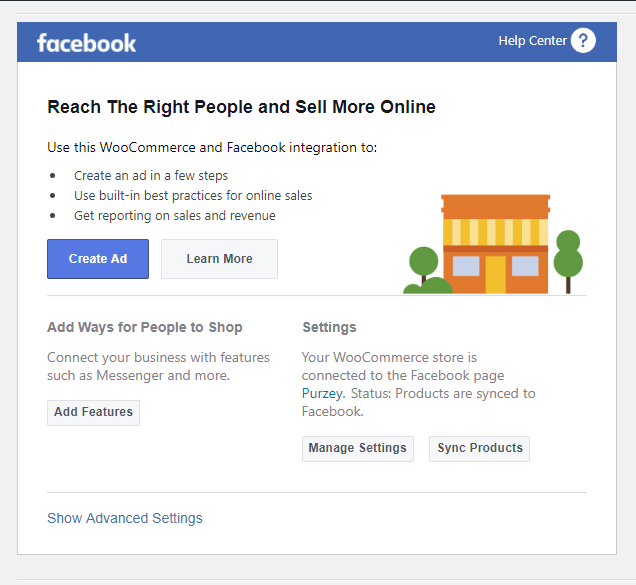
Recently, I got a notification that my WooCommerce has updates. The Facebook plugin started working after the WooCommerce update.
Here are the versions I'm using:


And the update was notified by another plugin called Wordfence. If you go to its tool option, you'll see all the recommended updates in the website.
Mine looked like this:
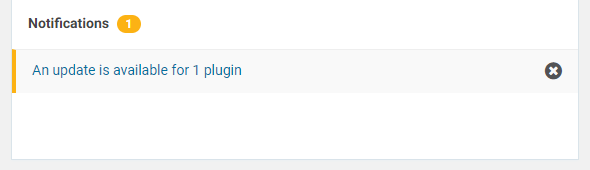
I know its kind of weird to solve the issue in this way but I followed these steps exactly. Moreover, I was using CloudFlare so I went to its dashboard and "Purged All Cache". And while on development mode on the CDN, I updated the token and it worked seamlessly.
mohsinht
on 29 Apr 2019
For those on 1.9.10, you may need to manually update. Best to delete the plugin entirely and install it again. Download it directly from here. The one on WooCommerce.com is outdated. Latest version since 5 hours ago is 1.9.12.
 michaeltieso
on 3 May 2019
michaeltieso
on 3 May 2019
Anyway, on version 1.9.12 nf is the same problem!
Your API key is no longer valid. Please click “Settings > Advanced Options > Update Token”.
What the hell are you programming something if you f#c#in?!
AltisCANNIBAL
on 3 May 2019
Fixed here after updating the plugin by clicking on 'Update token' (simply click on the link in error message) and then 'Update token' again after being redirected to Facebook.
lelas
on 3 May 2019
Remove plugin, it removed my catalog.
Не удалось подключиться
Убедитесь, что вы выполнили вход в свой магазин. Вы можете закрыть это окно и открыть плагин снова из панели администратора вашего магазина.
 ravilkg
on 6 May 2019
ravilkg
on 6 May 2019
Related issues
 StefsterNYC
·
28Comments
StefsterNYC
·
28Comments
 aluxh
·
48Comments
aluxh
·
48Comments
 neshby
·
39Comments
neshby
·
39Comments
 JEJSD
·
53Comments
JEJSD
·
53Comments
 revendo
·
24Comments
revendo
·
24Comments
Most helpful comment
Any news on how to solve this?