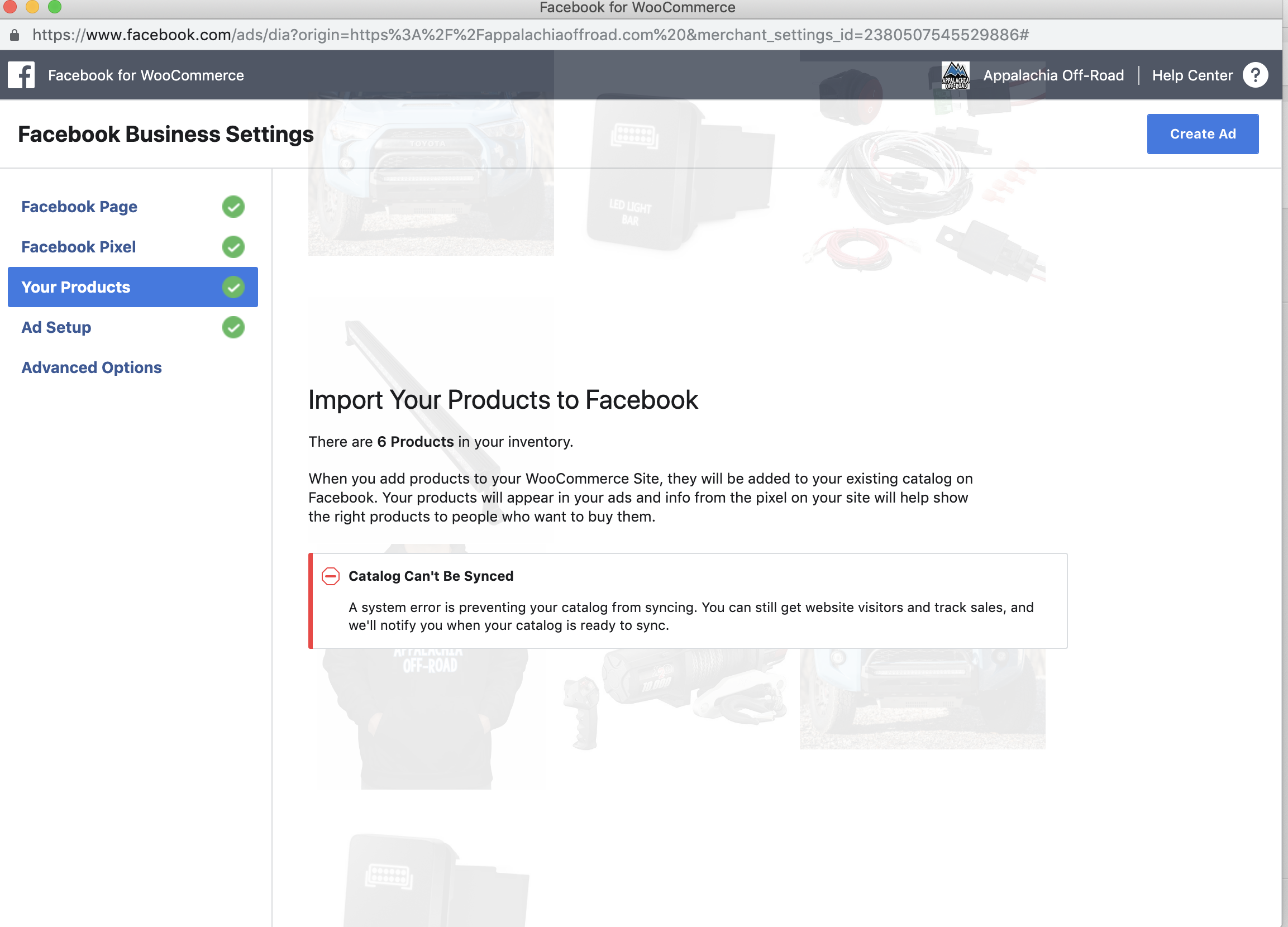
Facebook-for-woocommerce: A system error is preventing your catalog from syncing. You can still get website visitors and track sales, and we'll notify you when your catalog is ready to sync.
hey. I've installed, uninstalled, installed the plugin to reset the settings. Deleted the settings and started again but each time I am getting the below:
_Catalog Can't Be Synced
A system error is preventing your catalog from syncing. You can still get website visitors and track sales, and we'll notify you when your catalog is ready to sync._
The plugin is the latest version and WooCOmmerce is Version 2.6.0. We are unable to update WooCommerce at this time as it causes display issues. Wordpress is version 4.9.8.
Any suggestions here? Thanks
 JEJSD
JEJSD
All 53 comments
Automated Support Message
Hello,
Thanks for your interest in our plugin! Our developer team tries to provide personal support on GitHub whenever possible.
If you have a feature request or feedback for the developers, reply with Feature Request or Feedback.
If you are a developer or have a question for the developers related to code, reply with Developer Question.
If you are running ads with us, reply with Advertiser.
If you have encountered a bug or a problem with the plugin, keep reading for information that can help you resolve the issue yourself or provide us details we need to help you.
Search Existing Issues
First, please search our issues to see if your problem has been reported before.
There may already be a workaround or a solution to your problem. You can use the search bar near the top of our issues page. Be sure to search both _open_ and _closed_ issues.
If you do find a similar issue, leave a comment on that issue instead of creating a new one. Your comment helps us prioritize which existing issues are important and urgent.
Common Resolution Methods
If you are experiencing a problem or bug and have not found any similar issue, please try the following:
- Upgrade to the latest version of the plugin
- Try to
Resyncproducts using the button on the plugin config page - Reset the plugin by selecting
Manage Settings > Advanced Options > Deletefrom the configuration page of the plugin and setting up again - Try deactivating other plugins that you think may be interfering, then reset and set up again
Necessary Information
If the above steps did not help, please provide the following information in your next comment in order for us to debug your problem:
- WooCommerce version
- WordPress version
- Plugin version (please note: we only support up-to-date versions of the plugin)
- A screenshot of where you see the problem (for example: if it is on Facebook, provide a screenshot of Facebook, if it is on WooCommerce, provide a screenshot of WooCommerce. You can provide multiple screenshots if the problem relates to different screens.)
- The URL of your website
- The URL of your Facebook Page
- The URL(s) of where you took your screenshot(s)
- If applicable, detailed steps you took in order to see the problem
Please include Debug Ready in your reply so our automated system can note your issue for manual review. Please be aware that due to a high volume of issues, we may not be able to respond immediately.
Response Time
We prioritize issues with the tags Advertiser or Multiple Reports.
For issues that have the tags Debug Ready, Feature Request or Developer Question, we aim to respond within 30 days.
If you have not responded to our automated message with one of the above phrases, such as Debug Ready, we may close your issue after 30 days. If a Feature Request is inactive (without new requests, messages or pull requests) for 6 months, we may close it.
Please note that we are not always able to provide support for issues related to interaction from other plugins with this plugin or related to the Facebook advertising interface. To get support related to Facebook ads, try visiting the Facebook Ads Help Center.
For more information on our response times, visit Facebook Support on GitHub.
Thank you,
The Facebook Dev Team
 yinghechen1993
on 16 Apr 2019
yinghechen1993
on 16 Apr 2019
Developer Question
I'm having the same issue
Wordpress version: 5.1
Plugin version: 1.9.11
Website: https://mussi.mx
Facebook: https://www.facebook.com/MussiMx/
 quique-iterando
on 16 Apr 2019
quique-iterando
on 16 Apr 2019
Same here
 fernez
on 16 Apr 2019
fernez
on 16 Apr 2019
Same here too
 Kevkehz
on 17 Apr 2019
Kevkehz
on 17 Apr 2019
same here. i cant test how it would work
 aniphreak
on 17 Apr 2019
aniphreak
on 17 Apr 2019
I have the same problem as well
 hanseldeharo
on 17 Apr 2019
hanseldeharo
on 17 Apr 2019
same problem
 yx0106
on 17 Apr 2019
yx0106
on 17 Apr 2019
Developer Question
WooCommerce version : 3.5.8
WordPress version: 5.1.1
Plugin version (please note: we only support up-to-date versions of the plugin): 1.9.11
A screenshot of where you see the problem (for example: if it is on Facebook, provide a screenshot of Facebook, if it is on WooCommerce, provide a screenshot of WooCommerce. You can provide multiple screenshots if the problem relates to different screens.):
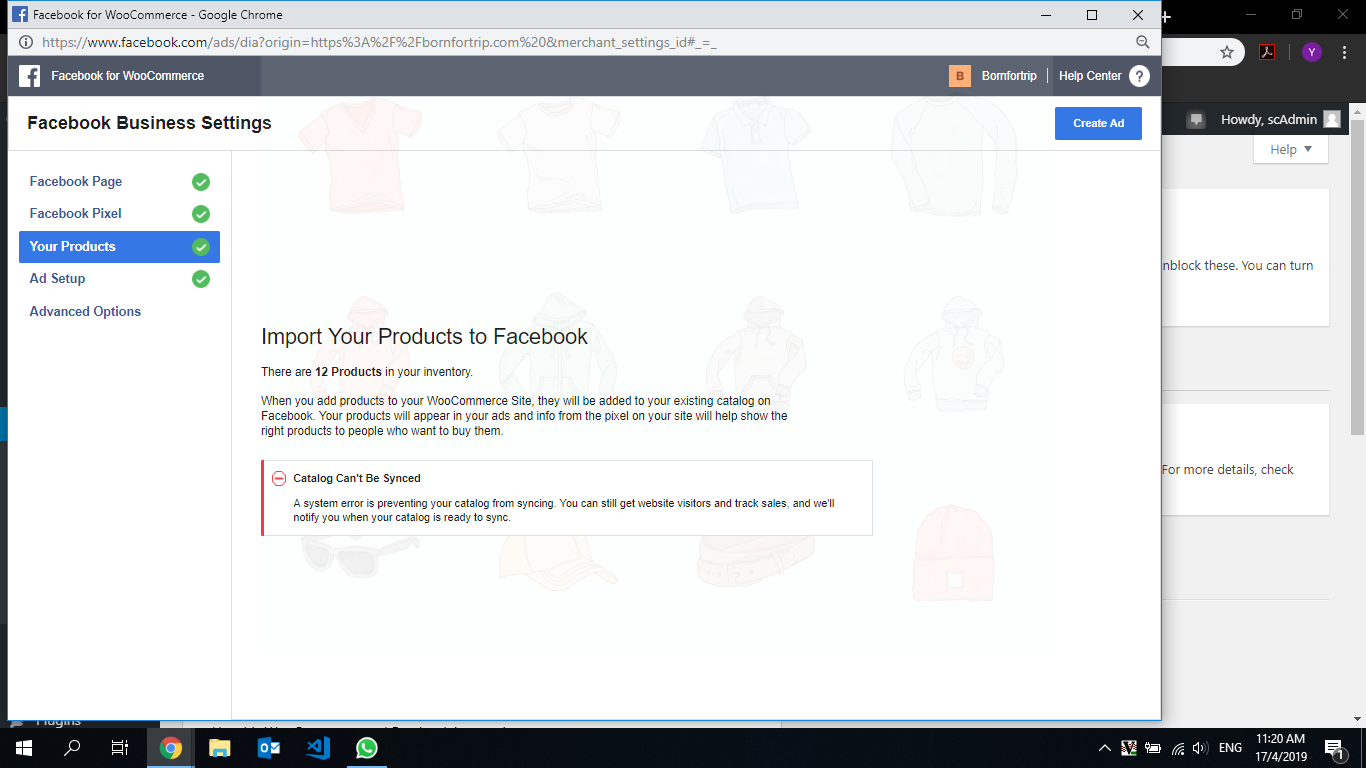
The URL of your website : www.bornfortrip.com/wordpress
The URL of your Facebook Page : https://www.facebook.com/bornfortrip/
Debug Ready
yx0106
on 17 Apr 2019
Developer Question
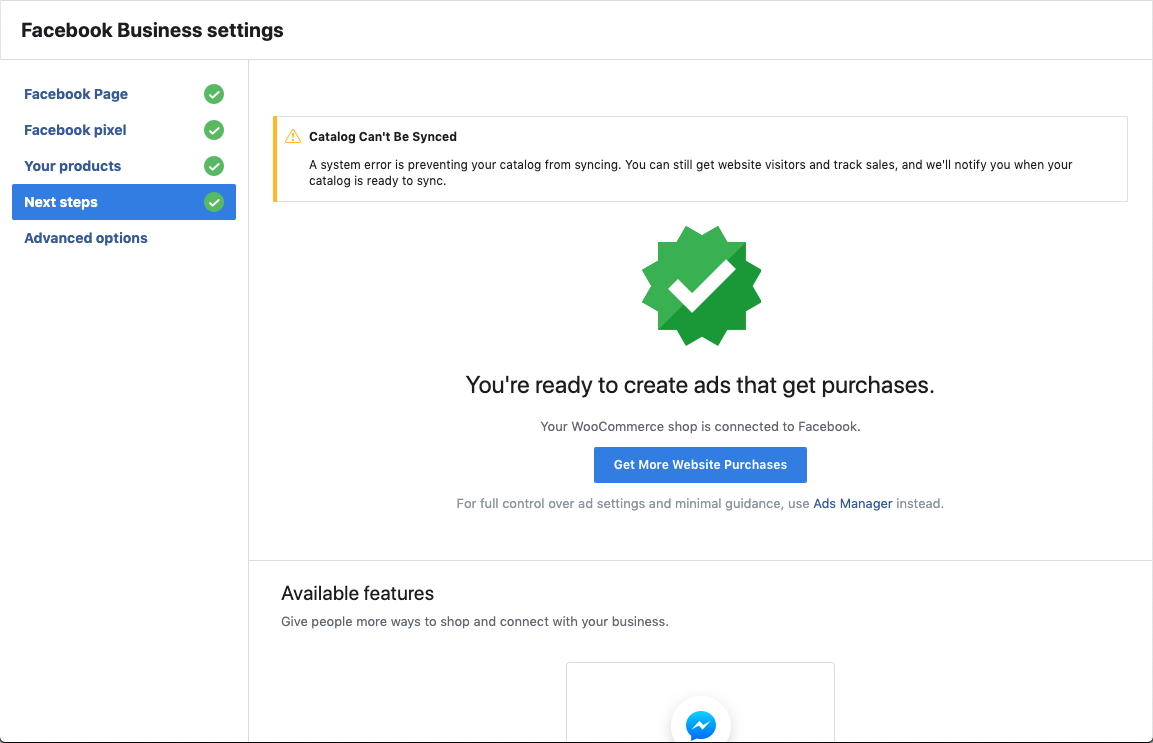
We are running the latest version of the plugin; Version 1.9.11. Please see screenshots of what is being displayed in our Wordpress CMS.
WooCommerce version : 2.6.0
WordPress version: 4.9.8
Each time we login to Wordpress CMS the message below appears;
_"Facebook for WooCommerce
Background syncing products to Facebook. Products remaining: 1109"_
Please help!
https://alexeagle.co.uk/
https://www.facebook.com/alexeagleofficial/
Debug Ready

JEJSD
on 17 Apr 2019
same here
 ghost
on 17 Apr 2019
ghost
on 17 Apr 2019
Same here!
 zartattack
on 17 Apr 2019
zartattack
on 17 Apr 2019
I am also having same problem
 chaitanysharan
on 17 Apr 2019
chaitanysharan
on 17 Apr 2019
Same here!
 Dimirolz
on 17 Apr 2019
Dimirolz
on 17 Apr 2019
Samesies.
 graveyardtom
on 17 Apr 2019
graveyardtom
on 17 Apr 2019
I am having the same issue with a new setup today
 lancems007
on 17 Apr 2019
lancems007
on 17 Apr 2019
same here!
 alepycom
on 17 Apr 2019
alepycom
on 17 Apr 2019
Same
 LucSpan
on 17 Apr 2019
LucSpan
on 17 Apr 2019
it seems like an error for all of the users of this plugin. from the looks of it, there may be a change on facebook and the developers needs to change the code in order for this to work again... but apparently they are busy on other stuff.... lets just wait for an update then.
aniphreak
on 17 Apr 2019
I reverted the version of the plugin to 1.9.10 and it worked again. If anyone needs to make their catalog working as soon as possible while waiting for a fix from FB team.
You can download that version here https://woocommerce.com/products/facebook/
quique-iterando
on 17 Apr 2019
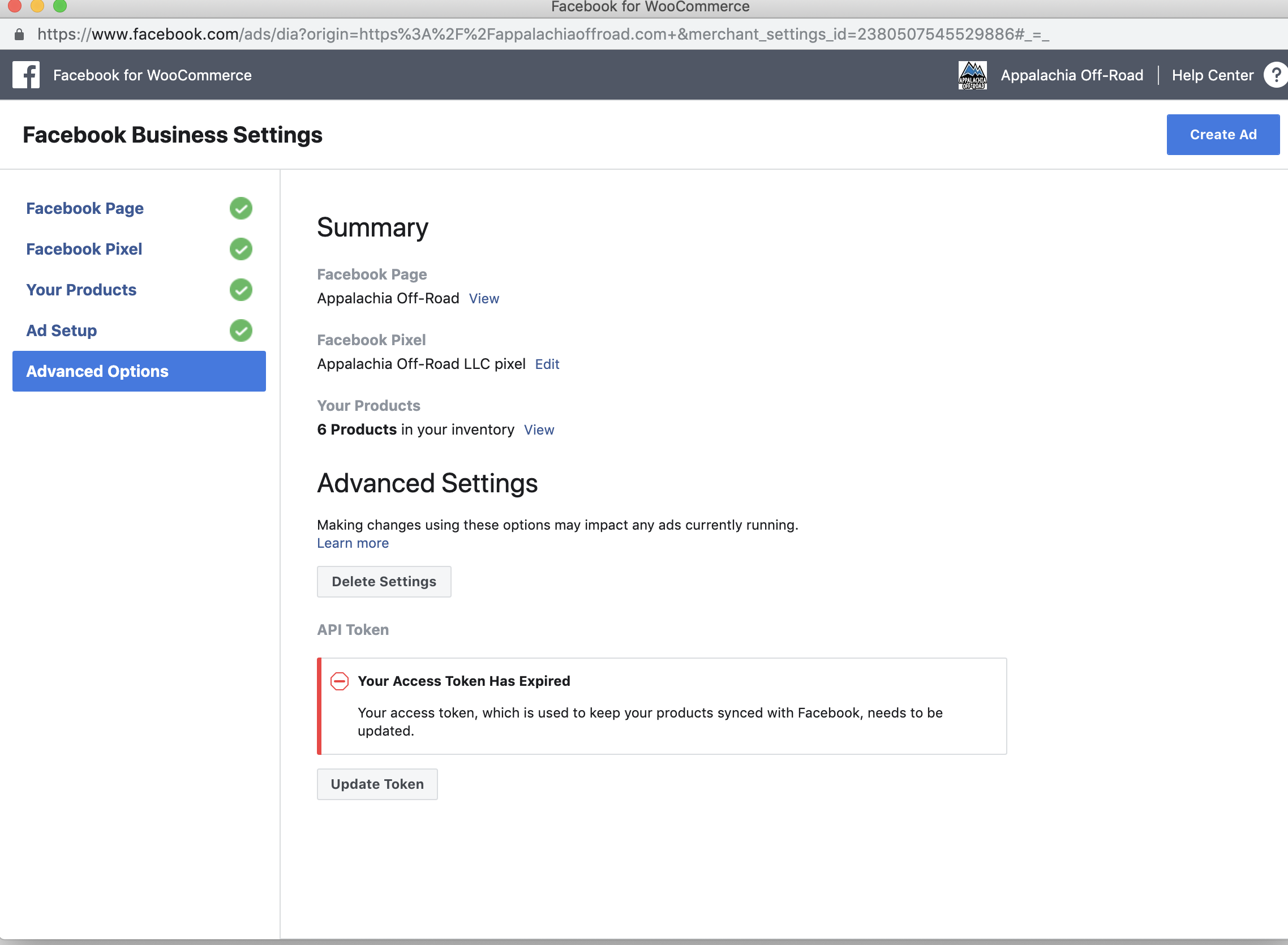
I uninstalled and tried reverting to 1.9.10 with no luck. It looks like it's all good and I can even see products greyed out in the background....but no luck.
lancems007
on 17 Apr 2019
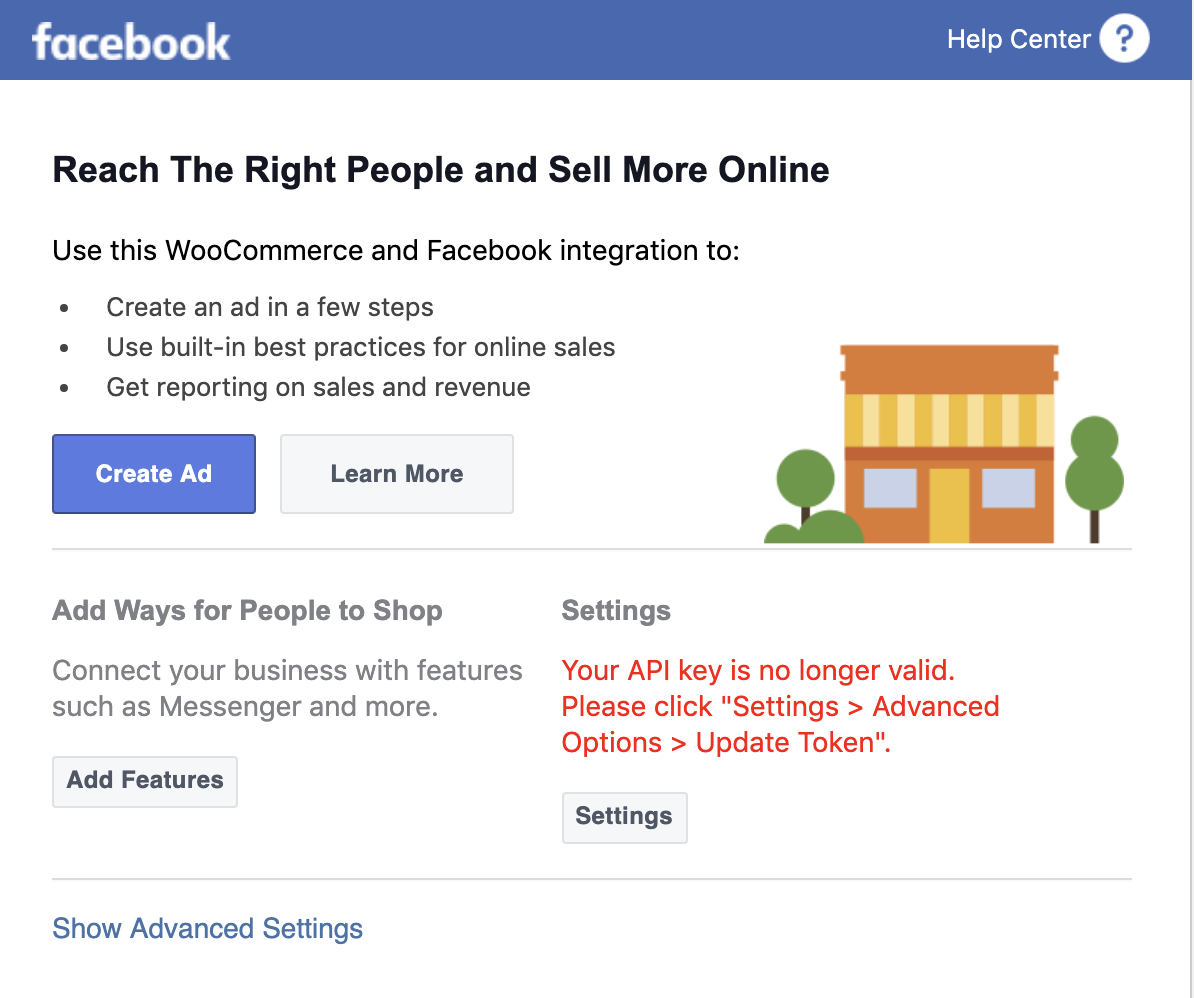
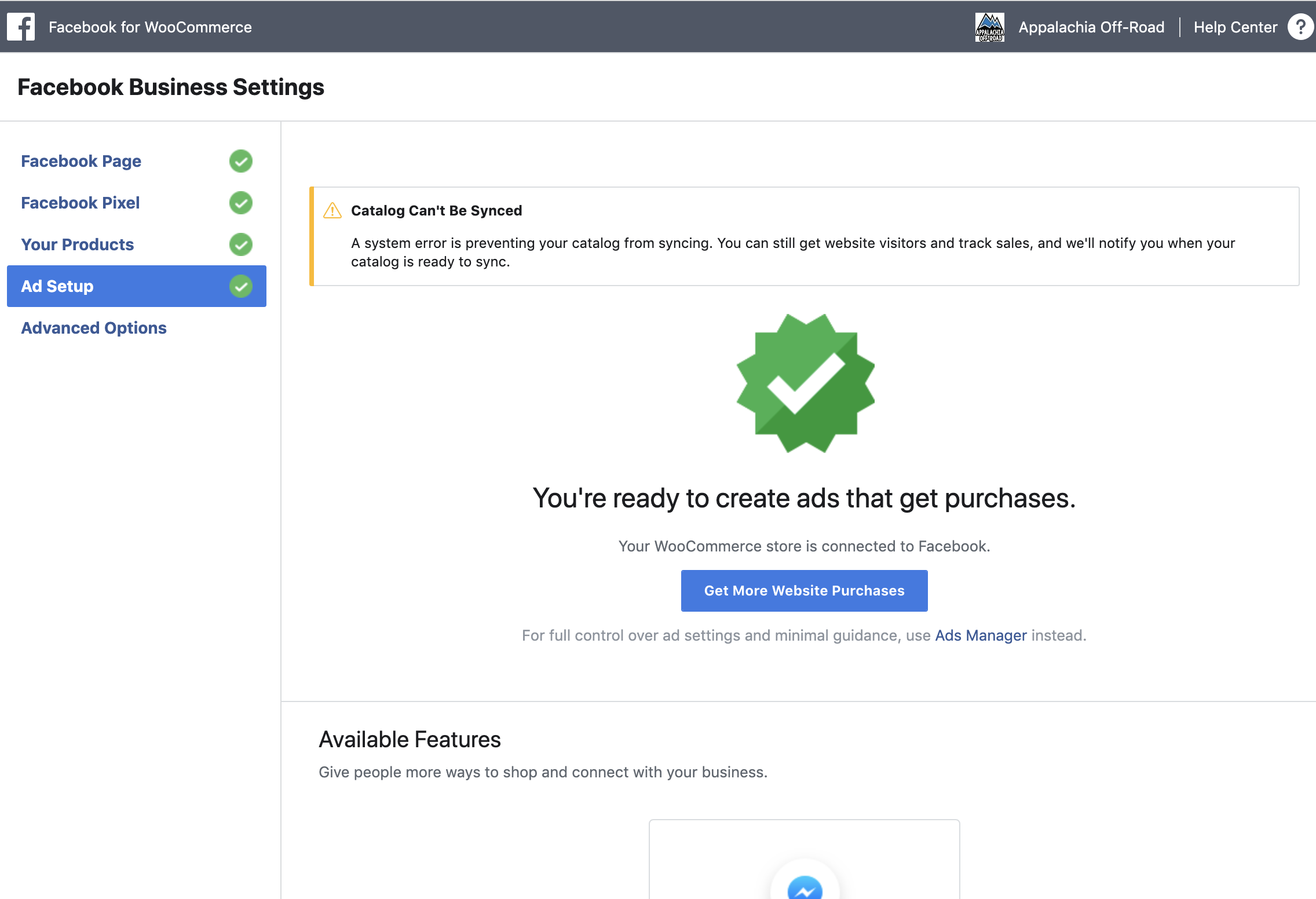
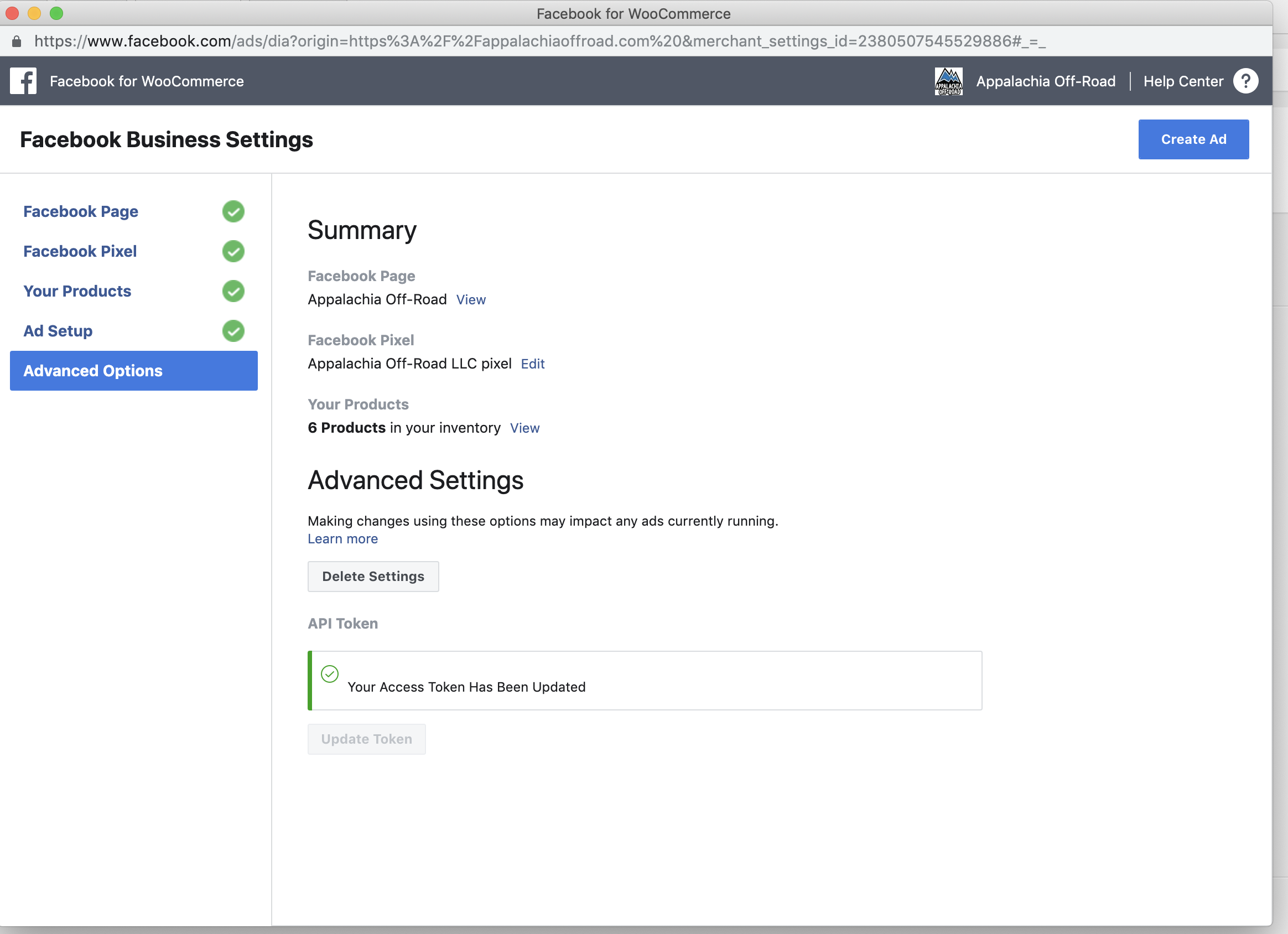
I downgraded to v1.9.10 but still get the same problem. See new messages I am receiving. The product begins to auto sync, even after deleting the latest version of the plugin and without connecting the account again. The crazy thing is it has created a catalog within Facebook Business Manager since the last sync, just without any products.
It seems like it is connecting, just not sending the products.
Hopefully someone finds a solution soon.

JEJSD
on 18 Apr 2019
same
 karabuluterkan
on 18 Apr 2019
karabuluterkan
on 18 Apr 2019
same issue here too
 nishitmorakhia
on 18 Apr 2019
nishitmorakhia
on 18 Apr 2019
Same.
Plugin version 1.9.11
Wordpress 4.9.10
WooCommerce 3.3.5
 bredon
on 18 Apr 2019
bredon
on 18 Apr 2019
Same issue here :(
 DanielMesteru
on 18 Apr 2019
DanielMesteru
on 18 Apr 2019
Ditto.
Facebook for WooCommerce: Version 1.9.10
WordPress: Version 5.1.1
WooCommerce: Version 3.5.7
 vivdlu
on 19 Apr 2019
vivdlu
on 19 Apr 2019
Same.
Facebook for WooCommerce: 1.9.11
WordPress: 5.1.1
WooCommerce: Version 3.5.5
The catalog has variable products each with their own stock.
 simpleshadow
on 19 Apr 2019
simpleshadow
on 19 Apr 2019
Same problem here
Facebook for WooCommerce: Version 1.9.11
WordPress: 5.1.1
WooCommerce Version 3.6.1
 chalalotism
on 19 Apr 2019
chalalotism
on 19 Apr 2019
I Have the same Fu*king Problem... and the worse is it also deleted my products from facebook page shop. about 60 products ;(
 Zakrazy
on 19 Apr 2019
Zakrazy
on 19 Apr 2019
Hello all!
Same issue for past 4 days...
Facebook for Woocommerce: Version 1.9.11
Woocommerce: Version 3.5.8
Wordpress: Version 5.1.1
I have installed, uninstalled, reinstalled, configured, deleted settings and reconfigured... done possibly everything available on internet and support forums related to this issue - to no avail or help!
After 4 days of disappointment of attempting to get my shop on FB I am still back to the square one!
It should supposedly be a straight forward and seamless plugin integration for FB Developers but it is not working.
After every attempt the shop does reflect all the products on FB shop tab/page and soon after some hours all my products just disappear, vanishes automatically!!!
 Mrinalvg
on 19 Apr 2019
Mrinalvg
on 19 Apr 2019
Debug Ready *
The URL of your website:
www.katimagoon.com
The URL of your Facebook Page: https://m.facebook.com/mirror11mirror/
 katimagoon
on 19 Apr 2019
katimagoon
on 19 Apr 2019
Same issue, new site set up for a WooCommerce store.
https://esprovisions.com/product-category/pretzels/
https://www.facebook.com/esprovisions/
Pixel having firing issues not matching anything, and catalog not syncing or uploading properly. Same issues as above.
 cyclingtolose
on 19 Apr 2019
cyclingtolose
on 19 Apr 2019
Have the same issue here, hope someone fix this soon. need the shop back :(
 Precies
on 19 Apr 2019
Precies
on 19 Apr 2019
No luck reverting to v1.9.10 here, has FB acknowledged this issue anywhere?
 lolfert
on 19 Apr 2019
lolfert
on 19 Apr 2019
We're experiencing the same issue across all clients who use FB for WC.
 RobWiddick
on 19 Apr 2019
RobWiddick
on 19 Apr 2019
same issue, hope it is resolved soon!
 mattnook
on 19 Apr 2019
mattnook
on 19 Apr 2019
Still not working
Dimirolz
on 22 Apr 2019
seems to work now!!
alepycom
on 23 Apr 2019
I'm not receiving the message below but running a sync has done nothing. I've installed, uninstalled, reinstalled, configured, deleted settings and reconfigured to try and force the product sync, but nothing new here.
_Catalog Can't Be Synced
A system error is preventing your catalog from syncing. You can still get website visitors and track sales, and we'll notify you when your catalog is ready to sync._
Anyone else seeing it working now?
JEJSD
on 23 Apr 2019
Still not working here.
 theprodigy83
on 24 Apr 2019
theprodigy83
on 24 Apr 2019
Still having the same issue. API key is no longer valid but there is no way to force it to update :(
 Pottypotsworth
on 30 Apr 2019
Pottypotsworth
on 30 Apr 2019
Anyone found a fix to this?
 dazze-studio-jd
on 15 May 2019
dazze-studio-jd
on 15 May 2019
Now I can not even go to the settings page. I see the Sorry page, something went wrong.
Dimirolz
on 20 May 2019
@mengyingdu @dmitridr @liyu1981 @Zyn3zZ - I know you guess are probably busy on other stuff but is there any news on a fix for this as it's a big issue for a lot of people?
 adamcollingburn
on 24 May 2019
adamcollingburn
on 24 May 2019
Also seeing these errors...can't even update my access token (options screen has no options!). Please look into this @mengyingdu @dmitridr @liyu1981 @Zyn3zZ
 btrfabrications
on 31 May 2019
btrfabrications
on 31 May 2019
Having the same issue.
Hoping a fix will be available soon
 cubus-rr
on 31 May 2019
cubus-rr
on 31 May 2019
Experiencing same issues. I'm curious, is there a quick workaround that can be implemented while we wait for a real fix?
 robindarlington
on 9 Jul 2019
robindarlington
on 9 Jul 2019
@robindarlington I was able to get it working eventually. The sync in WordPress admin only worked for me in Google Chrome (WIN), Firefox kept giving me issues.
FYI: After sync was successful I did need further support from Facebook to get the created catalog linked to the correct Facebook page, and also to get the shop reviewed (kept pending for 2 weeks). They are aware the plugin (and entire shop section) has issues.
cubus-rr
on 10 Jul 2019
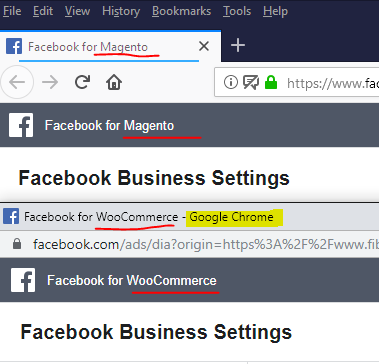
Having the same issue. I noticed that in Firefox it says Facebook for Magento in the title.
Switching to Chrome resolves the issue (I'm able to renew the access token and sync products).
Screenshot -
Chrome shows "Facebook for WooCommerce" but FireFox shows "Facebook for Magento"
 stellarnine
on 14 Aug 2019
stellarnine
on 14 Aug 2019
same issue
 pana1990
on 12 Oct 2019
pana1990
on 12 Oct 2019
Hey there! 👋
Lindsey here, from the SkyVerge product team! We recently took over development and support for the Facebook for WooCommerce extension.
In our recent 1.10 releases, we've fixed many issues impacting the store connection, pixel tracking, and product sync. Could you please update to the latest version of Facebook for WooCommerce and see if that resolves this issue?
If not, could you please contact our support team or open a new issue here? We'd be happy to help troubleshoot further with you.
Thank you!
 lgfogle
on 7 Apr 2020
lgfogle
on 7 Apr 2020
I'm also facing this issue
wp: latest 5.4
woo: latest 4.0.1
but I can't sync my all product correctly some product showing some product rejected and some are showing not published and some products don't show anything but exist on the FB page but not show for the customers. why we face all this problem and can't find any solution.
 sbmsajjad
on 10 Apr 2020
sbmsajjad
on 10 Apr 2020
Hi,
Have the latest plugin version and I was also getting the error within FireFox. I switched over to Chrome and my products uploaded to Facebook without issue.
 seeuhome
on 22 Jul 2020
seeuhome
on 22 Jul 2020
Related issues
 aluxh
·
48Comments
aluxh
·
48Comments
 MillenniumJim
·
32Comments
MillenniumJim
·
32Comments
 t9fdservices
·
37Comments
t9fdservices
·
37Comments
 neshby
·
39Comments
neshby
·
39Comments
 sm7uge
·
37Comments
sm7uge
·
37Comments