Facebook-for-woocommerce: Something went wrong when connecting to Facebook! Please try again.
I get this error when I try to connect my website to Facebook.
Something went wrong when connecting to Facebook! Please try again.


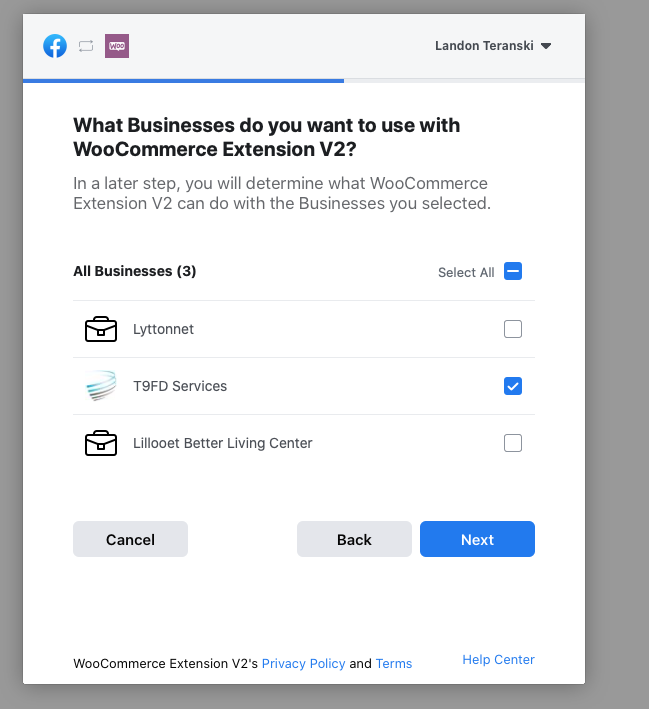
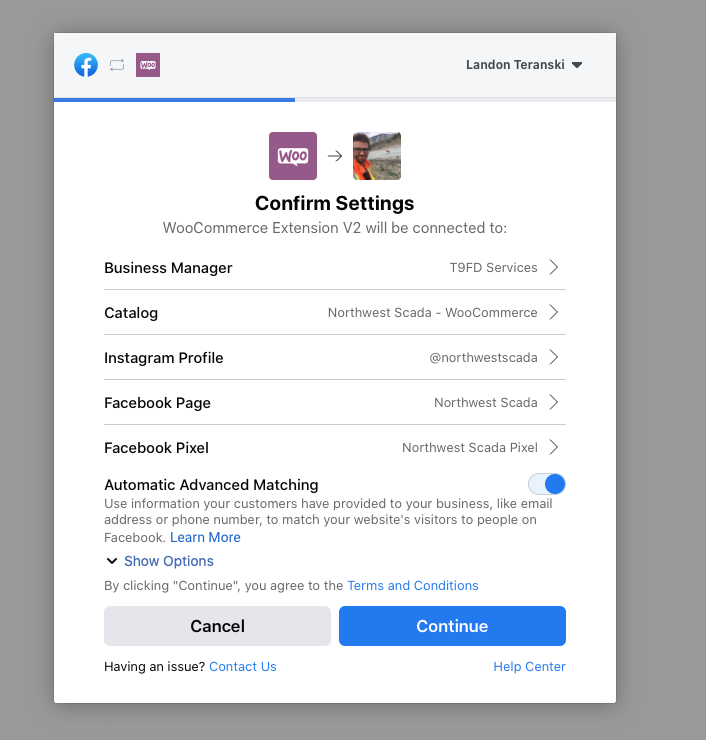
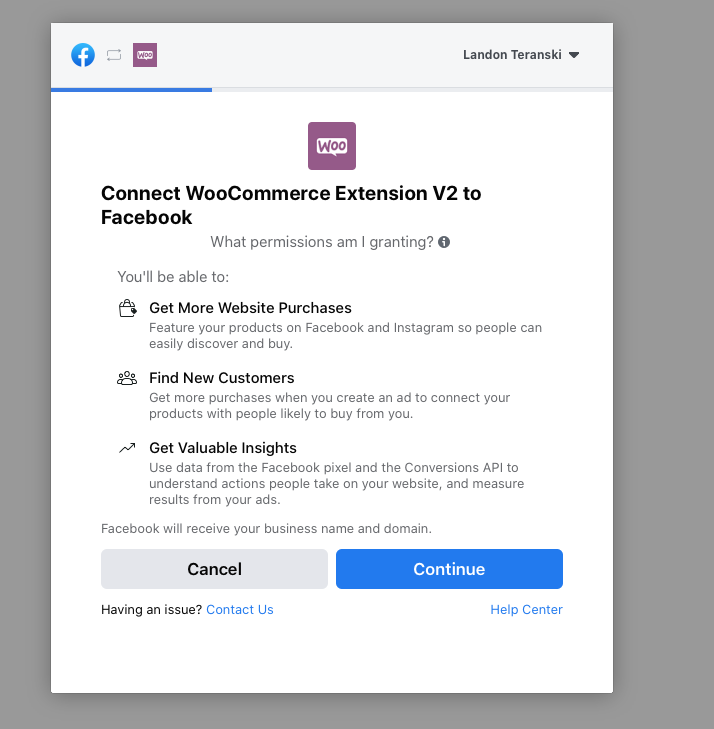

``
 t9fdservices
All 37 comments
Images are in backwards order. but yo get what's going on. it is a issue on all of our websites. V2 will not connect but the old version will
t9fdservices
on 4 Sep 2020
This is a duplicate of #1521
 sandrodz
on 7 Sep 2020
sandrodz
on 7 Sep 2020
Hey @t9fdservices,
Thanks for reaching out! I'm afraid a number of merchants have reported connection issues like the one you're experiencing - I'm so sorry about that! We are working closely with Facebook to identify and correct these issues in their connection process.
Would you also be willing to share the email address used for your Facebook account and your Business Manager ID? You can find the Business Manager ID by going to the Business Manager, selecting the business you want to connect to, and checking the URL for the business_id= value. You can use a QuickForget link to share this information. This will let the Facebook team look at the logs from your specific connection attempt.
Thank you!
Lindsey
P.S. @sandrodz, this is a different (though related) connection issue as what's been reported in #1521. I've followed up with you in that thread!
 lgfogle
on 7 Sep 2020
lgfogle
on 7 Sep 2020
Attached is the quick forget url. I believe ei got the correct information. Thank you for your help! I hope this can get resolved soon.
https://quickforget.com/s/bfa041a22f9fd122c2b7f35d52c4f6d1f9815bc85bd026c6
t9fdservices
on 7 Sep 2020
Got it! Thank you so much, @t9fdservices.
I will pass this information along to Facebook and follow up once I know more! Please don't hesitate to reach out with other questions in the meantime, and thank you for your patience.
lgfogle
on 7 Sep 2020
No problem! Thank you so much I look forward to hearing what we find out.
t9fdservices
on 7 Sep 2020
Try the solution below. It works for me.
 Leon0824
on 23 Sep 2020
Leon0824
on 23 Sep 2020
Try the solution below. It works for me.
Didn't work for me, I don't have any weird characters in that options value.
sandrodz
on 24 Sep 2020
Try the solution below. It works for me.
Didn't work for me, I don't have any weird characters in that options value.
Because your case is different with this one.
Leon0824
on 24 Sep 2020
Hey @t9fdservices,
The Facebook team recently made some updates that they believe may have fixed this issue. Could you please try connecting again and let me know how it goes?
Thank you,
Lindsey
lgfogle
on 28 Sep 2020
Hey @lgfogle,
it is still doing the exact same thing. no change
t9fdservices
on 30 Sep 2020
+1
 efoula
on 30 Oct 2020
efoula
on 30 Oct 2020
@lgfogle This is still a issue for me. what is the solution. i still cant get my products to sync with facebook.
I need this resolved ASAP! it is effecting my business.
Thanks
t9fdservices
on 1 Nov 2020
At step "What is Woocommerce Extension V2 allowed to do" make sure all fields are open inclusive "manage your bussiness" in this case it is open
but the default option is to be closed
he can help others with this advice even if in the case of this topoic he has all the fields open.
 decsu
on 3 Nov 2020
decsu
on 3 Nov 2020
Sorry for late reply.
I think we can solve this issue by 3 type.
Use latest Facebook for Woo-commerce plugin.
Don't use new Facebook account, wait at-least 1 day.
Below.
I often see this issue come up when there are non-ASCII characters in the page title. I took a look and noted that there are some non-ASCII characters in the title of the site. This data gets saved to Facebook in a field called wc_facebook_external_business_id and we will want to change this to see if it allows your connection to Facebook to complete successfully.
There is a method to change this within the site itself, so let’s start by trying out the steps to change this to see if it helps:
Go to https://pranavfulkari.com/ wp-admin/options.php
Search for wc_facebook_external_business_id
In the field next to it, change the data in that field to just the basic title of the page without any extra characters in place.
Scroll to the bottom of this page and click Save Changes.
In some cases, the data may not be saved due to larger databases and / or PHP settings, so after saving this, locate the wc_facebook_external_business_id field again and verify that the changes in place did save.
Once this is done, can you please try to connect to Facebook again and let me know if you get any further in the connection process?
Cheers,
Pranav Fulkari
 PProtonzz
on 3 Nov 2020
PProtonzz
on 3 Nov 2020
@PProtonzz
For a minute there I thought this would work but nope. tried changing the wc_facebook_external_business_id several times but would never take the changes.
t9fdservices
on 3 Nov 2020
Hi all,
I'm using WP 5.5.3 and I was the same issue.
I have overcame it only enabling the voice "manage your bussiness" at the step 5 (By default is disabled).
 devilmind81
on 3 Nov 2020
devilmind81
on 3 Nov 2020
@devilmind81 I have done the same thing but still no charge. always errors out
t9fdservices
on 4 Nov 2020
Anyone got this to work?
 diogoalmeidaribeiro
on 4 Nov 2020
diogoalmeidaribeiro
on 4 Nov 2020
Same issue here...
 royroosterz
on 5 Nov 2020
royroosterz
on 5 Nov 2020
some updates.....after completed succesfully the wizard, only enabling the "manage your bussiness" voice at step 5, it is completed fine but after some hours my Fb account is locked suddently for souspicious activity and only a products syncronizzation was done :-O
Please someone fix it....
devilmind81
on 5 Nov 2020
Honestly, why are you guys not showing us any useful error information in your error dialog?
The current error message is so usless and if you google it, you find hundres of entries everywhere.
This plugin is so frustrating..
 baba43
on 5 Nov 2020
baba43
on 5 Nov 2020
After hours and hours I finally got this to work. I looked the wc_facebook_external_business_id on the options table and replaced any characters after the name of the page. Initially this didn't work but after purging the cache, re-installing the plugin I got it to work.
diogoalmeidaribeiro
on 5 Nov 2020
At step "What is Woocommerce Extension V2 allowed to do" make sure all fields are open inclusive "manage your bussiness" in this case it is open
but the default option is to be closed
he can help others with this advice even if in the case of this topoic he has all the fields open.
This worked for me. Thanks!
 faolie
on 5 Nov 2020
faolie
on 5 Nov 2020
@baba43 - what do you want to see? I have no idea where to get other log information regarding the issue. Geeze
@diogoalmeidaribeiro - IDK what you did I have tried all of this and to no avail I CANNOT Get it to work. im so over it. screw Facebook
@faolie - No change for me I have done that a million times. its screwed.
t9fdservices
on 5 Nov 2020
so I fixed the issue for myself. finally!! I went to my business.facebook.com and under Business Settings > Apps I removed WooCommerce Extension V2. Tried it again and it worked. Magically. aha
@devilmind81 @diogoalmeidaribeiro @royroosterz
t9fdservices
on 5 Nov 2020
@t9fdservices, I'm happy for you, I'm still waiting that FB will unlock my account :(
devilmind81
on 6 Nov 2020
At step "What is Woocommerce Extension V2 allowed to do" make sure all fields are open inclusive "manage your bussiness" in this case it is open
but the default option is to be closed
he can help others with this advice even if in the case of this topoic he has all the fields open.
This also worked for me! (Nov 13, 2020)
 jpbacilio
on 13 Nov 2020
jpbacilio
on 13 Nov 2020
having the same error here, can't connect my account.
cannot find wc_facebook_external_business_id on options.php
do anybody have a solution?
 thiagomorello
on 21 Nov 2020
thiagomorello
on 21 Nov 2020
At step "What is Woocommerce Extension V2 allowed to do" make sure all fields are open inclusive "manage your bussiness" in this case it is open
but the default option is to be closed
he can help others with this advice even if in the case of this topoic he has all the fields open.
This worked for me. Thank you.
 gioramies
on 23 Nov 2020
gioramies
on 23 Nov 2020
some updates.....after completed succesfully the wizard, only enabling the "manage your bussiness" voice at step 5, it is completed fine but after some hours my Fb account is locked suddently for souspicious activity and only a products syncronizzation was done :-O
Please someone fix it....
that's work for me also, thanks
 racemsmaoui
on 24 Nov 2020
racemsmaoui
on 24 Nov 2020
At step "What is Woocommerce Extension V2 allowed to do" make sure all fields are open inclusive "manage your bussiness" in this case it is open
but the default option is to be closed
he can help others with this advice even if in the case of this topoic he has all the fields open.
This was it!!! THANK YOUUU!!!!
 alejoarosemena
on 29 Nov 2020
alejoarosemena
on 29 Nov 2020
At step "What is Woocommerce Extension V2 allowed to do" make sure all fields are open inclusive "manage your bussiness" in this case it is open
but the default option is to be closed
he can help others with this advice even if in the case of this topoic he has all the fields open.
worked for me! Thank you!
 Kesiunas
on 30 Nov 2020
Kesiunas
on 30 Nov 2020
Try the solution below. It works for me.
Worked for me!
 mrabro
on 12 Jan 2021
mrabro
on 12 Jan 2021
This one worked for me:
At step “What is Woocommerce Extension V2 allowed to do” make sure all fields are open. Facebook recently updated their settings to toggle “Manage your business” permission to Off by default.
 lucagrandicelli
on 17 Jan 2021
lucagrandicelli
on 17 Jan 2021
so I fixed the issue for myself. finally!! I went to my business.facebook.com and under Business Settings > Apps I removed WooCommerce Extension V2. Tried it again and it worked. Magically. aha
@devilmind81 @diogoalmeidaribeiro @royroosterz
I have same issue,but i tryed to do like you but not working! I also opened all fields manage your bussiness....same error Something went wrong when connecting to Facebook! Please try again.
Is a text to look back to set up bussiness if i open the field manage your bussiness.
Did somebody know something about this?
Please tell me ASAP...since a week ago i have this issue...
 LAURENTIU2021
on 18 Jan 2021
LAURENTIU2021
on 18 Jan 2021
Sorry for late reply.
I think we can solve this issue by 3 type.
- Use latest Facebook for Woo-commerce plugin.
- Don't use new Facebook account, wait at-least 1 day.
- Below.
I often see this issue come up when there are non-ASCII characters in the page title. I took a look and noted that there are some non-ASCII characters in the title of the site. This data gets saved to Facebook in a field called wc_facebook_external_business_id and we will want to change this to see if it allows your connection to Facebook to complete successfully.
There is a method to change this within the site itself, so let’s start by trying out the steps to change this to see if it helps:
Go to https://pranavfulkari.com/ wp-admin/options.php
Search for wc_facebook_external_business_id
In the field next to it, change the data in that field to just the basic title of the page without any extra characters in place.
Scroll to the bottom of this page and click Save Changes.
In some cases, the data may not be saved due to larger databases and / or PHP settings, so after saving this, locate the wc_facebook_external_business_id field again and verify that the changes in place did save.
Once this is done, can you please try to connect to Facebook again and let me know if you get any further in the connection process?Cheers,
Pranav Fulkari
is not working for me....still same error.
LAURENTIU2021
on 18 Jan 2021
Related issues
 revendo
·
24Comments
revendo
·
24Comments
 Aprilhead
·
47Comments
Aprilhead
·
47Comments
 aluxh
·
48Comments
aluxh
·
48Comments
 JEJSD
·
53Comments
JEJSD
·
53Comments
 boutzamat
·
72Comments
boutzamat
·
72Comments
Most helpful comment
At step "What is Woocommerce Extension V2 allowed to do" make sure all fields are open inclusive "manage your bussiness" in this case it is open
but the default option is to be closed
he can help others with this advice even if in the case of this topoic he has all the fields open.