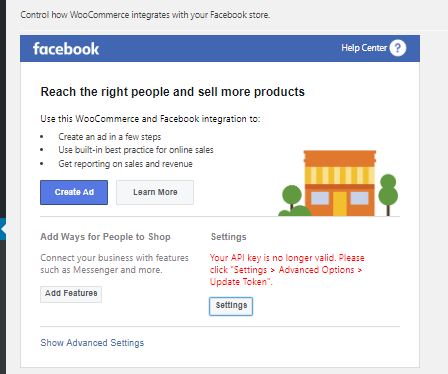
Facebook-for-woocommerce: Your API key is no longer valid. Please click "Settings > Advanced Options > Update Token
Found a similar issue - it was closed. No real solution.
Someone had a fix, which worked for him and not for me. (unpublish and publish the page again).
I keep getting this message:
Your API key is no longer valid. Please click "Settings - Advanced Options - Update Token"
I then go to Settings - Advanced Options, and i get the option to "Update Token".
I did this, and return to the plugins settings page, just to get this message:
Catalog Can't Be Synced
A system error is preventing your catalog from syncing. You can still get website visitors and track sales, and we'll notify you when your catalog is ready to sync.
I then try again from scratch and end up with the same result: Your API key is no longer valid. Please click "Settings - Advanced Options - Update Token"
I'm kind of stuck in a loop here.
I tried everything. Deleted the plugin settings from the Advanced Options page, Deleted everything in the Database that is related to this plugin. Nothing helps.
 boutzamat
All 72 comments
Automated Support Message
Hello,
Thanks for your interest in our plugin! Our developer team tries to provide personal support on GitHub whenever possible.
If you have a feature request or feedback for the developers, reply with Feature Request or Feedback.
If you are a developer or have a question for the developers related to code, reply with Developer Question.
If you are running ads with us, reply with Advertiser.
If you have encountered a bug or a problem with the plugin, keep reading for information that can help you resolve the issue yourself or provide us details we need to help you.
Search Existing Issues
First, please search our issues to see if your problem has been reported before.
There may already be a workaround or a solution to your problem. You can use the search bar near the top of our issues page. Be sure to search both _open_ and _closed_ issues.
If you do find a similar issue, leave a comment on that issue instead of creating a new one. Your comment helps us prioritize which existing issues are important and urgent.
Common Resolution Methods
If you are experiencing a problem or bug and have not found any similar issue, please try the following:
- Upgrade to the latest version of the plugin
- Try to
Resyncproducts using the button on the plugin config page - Reset the plugin by selecting
Manage Settings > Advanced Options > Deletefrom the configuration page of the plugin and setting up again - Try deactivating other plugins that you think may be interfering, then reset and set up again
Necessary Information
If the above steps did not help, please provide the following information in your next comment in order for us to debug your problem:
- WooCommerce version
- WordPress version
- Plugin version (please note: we only support up-to-date versions of the plugin)
- A screenshot of where you see the problem (for example: if it is on Facebook, provide a screenshot of Facebook, if it is on WooCommerce, provide a screenshot of WooCommerce. You can provide multiple screenshots if the problem relates to different screens.)
- The URL of your website
- The URL of your Facebook Page
- The URL(s) of where you took your screenshot(s)
- If applicable, detailed steps you took in order to see the problem
Please include Debug Ready in your reply so our automated system can note your issue for manual review. Please be aware that due to a high volume of issues, we may not be able to respond immediately.
Response Time
We prioritize issues with the tags Advertiser or Multiple Reports.
For issues that have the tags Debug Ready, Feature Request or Developer Question, we aim to respond within 30 days.
If you have not responded to our automated message with one of the above phrases, such as Debug Ready, we may close your issue after 30 days. If a Feature Request is inactive (without new requests, messages or pull requests) for 6 months, we may close it.
Please note that we are not always able to provide support for issues related to interaction from other plugins with this plugin or related to the Facebook advertising interface. To get support related to Facebook ads, try visiting the Facebook Ads Help Center.
For more information on our response times, visit Facebook Support on GitHub.
Thank you,
The Facebook Dev Team
 yinghechen1993
on 16 Apr 2019
yinghechen1993
on 16 Apr 2019
Hello @yinghec
Same with my woocommerce shop. I did the exact steps with @boutzamat and had the same result... Any suggestion on how to overcome this?
 zartattack
on 16 Apr 2019
zartattack
on 16 Apr 2019
i think theres a problem with their system recently. i cant test if this works well. please have time to fix it.
 aniphreak
on 17 Apr 2019
aniphreak
on 17 Apr 2019
We're having a similar issue recently. The difference is the problem ocurs every time i log out of facebook.
So for me it happens when
- open up the config page,
- see the error "Your API key is no longer valid. Please click "Settings > Advanced Options > Update Token"."
- Do as instructed
- Go to facebook.com
- Log out
- Go to the config page again. The same error is shown.
Any chance your issue is related to logging out of facebook?
Debug Ready
 glagonikas
on 17 Apr 2019
glagonikas
on 17 Apr 2019
Hello @yinghec !
We also have exactly the same problem and same error message. All is update, at the end of the day (don't know if its relate to log out) but the module disconnect from Facebook and we have the same error message :
Catalog Can't Be Synced
A system error is preventing your catalog from syncing. You can still get website visitors and track sales, and we'll notify you when your catalog is ready to sync.
On my side even if i update the token, that don't change anything. We see that problem since the 6 april, try to fix it yesterday and today without results.
Also trying to delete plugin / clean db don't change nothing.
 wazoomstudio
on 17 Apr 2019
wazoomstudio
on 17 Apr 2019
im having the exact same problem and my woocommerce catalog wont load to facebook. nobody can help
 idressmodest
on 18 Apr 2019
idressmodest
on 18 Apr 2019
getting the api token error and wazoomstudio's error
idressmodest
on 18 Apr 2019
I also Have this Problem
 Zakrazy
on 19 Apr 2019
Zakrazy
on 19 Apr 2019
Having the same problem since days, contacted everyone I possibly could and nobody can help. It's a new e-commerce store and I have not been able to load my products into Facebook so far. It's preventing me from launching our store and we're totally lost. If anyone has any solutions please share them, I have tried everything ..
 MickyLisonco
on 19 Apr 2019
MickyLisonco
on 19 Apr 2019
Ok can still create catalog on Facebook and upload pixel to your site then connect pixel with catalog on FB business . You can also activate IG shopping. I have to manually upload products into the catalog though
idressmodest
on 19 Apr 2019
Load a fb pixel to your store then create a catalog in fb business. Link catalog and pixel and you can upload your products to fb :)I learned after much reading and heartache
Wishing you a great day!
On Apr 19, 2019, at 6:28 AM, MickyLisonco notifications@github.com wrote:
Having the same problem since days, contacted everyone I possibly could and nobody can help. It's a new e-commerce store and I have not been able to load my products into Facebook so far. It's preventing me from launching our store and we're totally lost. If anyone has any solutions please share them, I have tried everything ..
—
You are receiving this because you commented.
Reply to this email directly, view it on GitHub, or mute the thread.
idressmodest
on 19 Apr 2019
@idressmodest Do I have to upload, all the products manually? and how about any update on product on my website ? Is it gonna change on fb as well?
Best,
Zakrazy
on 19 Apr 2019
got the same probleme, nothing works to fix this problem.
 Precies
on 19 Apr 2019
Precies
on 19 Apr 2019
the problem continued
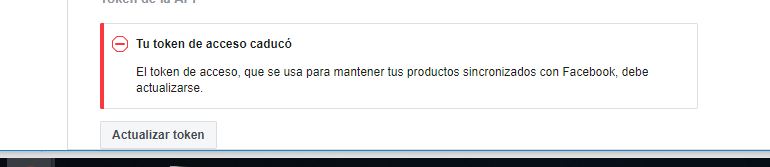

wordpress 5.1.1
www.picaras.com.ar
https://www.facebook.com/picarasAR
 ackasarg
on 19 Apr 2019
ackasarg
on 19 Apr 2019
So I don’t know what platform you’re using but woocommerce has a csv created on it. Then that can be exported to fb-they give a choice when you choose “data sources” whether you want to upload manually or through pixel or through a csv. Last choice can do a weekly update of your products. This is the best solution I found so far but I’m no expert. If you are able to add plugins or extensions to your store, there are ways to import/export products as a csv file. Hope that helps.
Wishing you a great day!
On Apr 19, 2019, at 7:14 AM, Zakrazy notifications@github.com wrote:
@idressmodest Do I have to upload, all the products manually? and how about any update on product on my website ? Is it gonna change on fb as well?
Best,
—
You are receiving this because you were mentioned.
Reply to this email directly, view it on GitHub, or mute the thread.
idressmodest
on 19 Apr 2019
Wishing you a great day!
On Apr 19, 2019, at 1:57 PM, Julie Price idressmodest@gmail.com wrote:
So I don’t know what platform you’re using but woocommerce has a csv created on it. Then that can be exported to fb-they give a choice when you choose “data sources” whether you want to upload manually or through pixel or through a csv. Last choice can do a weekly update of your products. This is the best solution I found so far but I’m no expert. If you are able to add plugins or extensions to your store, there are ways to import/export products as a csv file. Hope that helps.
Wishing you a great day!
On Apr 19, 2019, at 7:14 AM, Zakrazy notifications@github.com wrote:
@idressmodest Do I have to upload, all the products manually? and how about any update on product on my website ? Is it gonna change on fb as well?
Best,
—
You are receiving this because you were mentioned.
Reply to this email directly, view it on GitHub, or mute the thread.
idressmodest
on 19 Apr 2019
Yes. We can do that .but the idea is that all woocomerce shop we 100% INTEGRID WTIH FB.. WE NEED THAT FB MAKE TAHT THESE PLUG RUN
ackasarg
on 19 Apr 2019
Agree! The support is so bad
Wishing you a great day!
On Apr 19, 2019, at 3:42 PM, ackasarg notifications@github.com wrote:
Yes. We can do that .but the idea is that all woocomerce shop we 100% INTEGRID WTIH FB.. WE NEED THAT FB MAKE TAHT THESE PLUG RUN
—
You are receiving this because you were mentioned.
Reply to this email directly, view it on GitHub, or mute the thread.
idressmodest
on 19 Apr 2019
I have spoken with Facebook the will check the problem! Next week i will get more informations
 blacky32
on 19 Apr 2019
blacky32
on 19 Apr 2019
Same problem here.. Please fix!
 acquafamale
on 19 Apr 2019
acquafamale
on 19 Apr 2019
Thank you!
Wishing you a great day!
On Apr 19, 2019, at 4:17 PM, blacky32 notifications@github.com wrote:
I have spoken with Facebook the will check the problem! Next week i will get more informations
—
You are receiving this because you were mentioned.
Reply to this email directly, view it on GitHub, or mute the thread.
idressmodest
on 19 Apr 2019
Hi,
I have installed the Facebook for WooCommerce plugin however, it is not working as expected.
I have just 103 products that need to be synced with Facebook and Instagram but I can't get this to work. I am therefore unable to display my products and take advantage of all that Instagram shopping has to offer.
Steps taken to install the Facebook for WooCommerce plugin as follows:
Navigate to https://hashtagdeals.co.uk/wp-admin/plugins.php and locate the plugin.
Click on the settings link and navigate to the Facebook for WooCommerce Business Settings PopUp box.
Work my way through the setup procedure (Facebook Page, Facebook Pixel, Your Products, and Ad Setup). Some of the information seems to populate automatically as I am logged into my Facebook account on another browser tab. The 103 products are also displayed in the background of the Your Products page.
I return to the plugin on the WooCommerce page here https://hashtagdeals.co.uk/wp-admin/admin.php?page=wc-settings&tab=integration§ion=facebookcommerce# and I am shown a message that reads as follows:
Your API key is no longer valid. Please click "Settings > Advanced Options > Update Token".
I goto settings as instructed and see the following message:
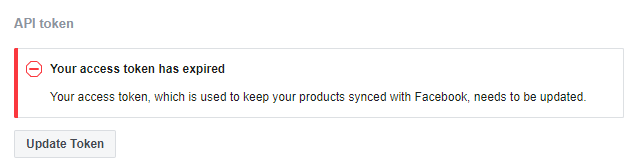
Your access token, which is used to keep your products synced with Facebook, needs to be updated.
I then press the update token button and am then show the following message:
Your access token has been updated
I return to the Plugin at https://hashtagdeals.co.uk/wp-admin/admin.php?page=wc-settings&tab=integration§ion=facebookcommerce# and am shown a message that says as follows:
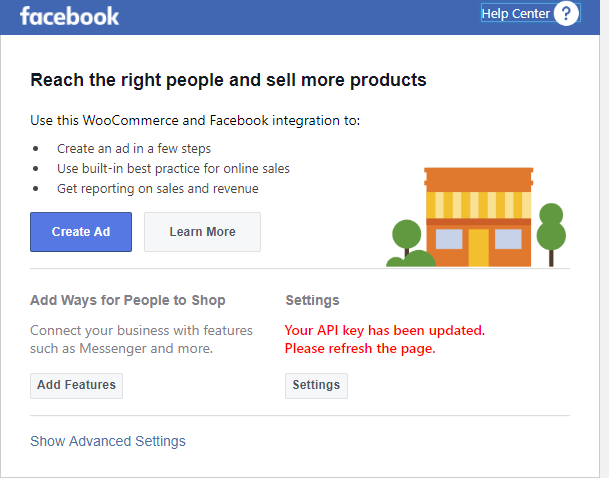
Your API key has been updated.
Please refresh the page.
I do as instructed and refresh the page. I am then shown the following message:
Your API key is no longer valid. Please click "Settings > Advanced Options > Update Token".
I then enter a loop of repeating the above steps until I have no hair left !!!
I have been advised by the WooCommerce support team that you require the following:
Facebook Page: https://www.facebook.com/hashtagoffers/
Wordpress version: 5.1.1
PHP Version: 7.2.17
WooCommerce Version: 3.6.1
Facebook for WooCommerce Version: 1.9.10
Product count: 103
Product type: Trainers / Sneaker (nothing too complicated)
There are no duplicate SKU's in my system.
A list of other plugins as follows:
Akismet Anti-Spam Version: 4.1.1 (NOT ACTIVATED)
Contact Form 7 Version: 5.1.1
Datafeedr API Version: 1.0.98
Datafeedr Comparison Sets Version: 0.9.26
Datafeedr Product Sets Version: 1.2.34
Datafeedr WooCommerce Importer Version: 1.2.35
Facebook for WooCommerce Version 1.9.10
GDPR Cookie Consent Version: 1.7.6
Hello Dolly Version 1.7.1 (NOT ACTIVATED)
Jetpack by Wordpress.com Version 7.2.1
Limit Login Attempts Reloaded Version: 2.7.4
Woo Title Limit Version: 1.4.4
WooCommerce Version: 3.6.1
WooCommerce Menu Cart Version: 2.7.4
WooCommerce Services Version: 1.19.0
WooCommerce Square Version: 1.0.37
WooCommerce Stripe Gateway Version: 4.1.16
WP Super Cache Version: 1.6.4
Yoast SEO Version: 11.0
Please advise further.
Regards
Chris
 Hashtag1975
on 20 Apr 2019
Hashtag1975
on 20 Apr 2019
I have this problem too. Already checked my pixel and it's working fine... The only problem is with woocommerce/wordpress connection error
 marcomarinho
on 20 Apr 2019
marcomarinho
on 20 Apr 2019
+1
 CKGrafico
on 20 Apr 2019
CKGrafico
on 20 Apr 2019
Yes my pixel seems to be working fine too. It's very frustrating that the Facebook dev team aren't spending some time trying to resolve this issue given the resources they have at their disposal.
Hashtag1975
on 20 Apr 2019
Yup, it's very sad a thing like this happens when it's from Facebook... Such an interesting and useful plugin which only works for 40% of the users... They need to resolve this urgently
marcomarinho
on 21 Apr 2019
The problem still persists, it successfully does all the steps and then throws the update token bug.
Waiting for a solution to this !
 dajasra
on 21 Apr 2019
dajasra
on 21 Apr 2019
Having the same issue! Tried deleting the settings as well.
 usamanoman
on 21 Apr 2019
usamanoman
on 21 Apr 2019
Obviously not a problem with our installations. It has to be either the plugin, or with Facebook.
Is there any expected timeframe for resolving the issue? @yinghec
boutzamat
on 21 Apr 2019
Same issues here. Hurry up and wait :)
 colourstone
on 21 Apr 2019
colourstone
on 21 Apr 2019
Exact same problem! Any luck with solutions?
Wishing you a great day!
On Apr 20, 2019, at 10:56 AM, Hashtag1975 notifications@github.com wrote:
Hi,
I have installed the Facebook for WooCommerce plugin however, it is not working as expected.
I have just 103 products that need to be synced with Facebook and Instagram but I can't get this to work. I am therefore unable to display my products and take advantage of all that Instagram shopping has to offer.
Steps taken to install the Facebook for WooCommerce plugin as follows:
Navigate to https://hashtagdeals.co.uk/wp-admin/plugins.php and locate the plugin.
Click on the settings link and navigate to the Facebook for WooCommerce Business Settings PopUp box.
Work my way through the setup procedure (Facebook Page, Facebook Pixel, Your Products, and Ad Setup). Some of the information seems to populate automatically as I am logged into my Facebook account on another browser tab. The 103 products are also displayed in the background of the Your Products page.
I return to the plugin on the WooCommerce page here https://hashtagdeals.co.uk/wp-admin/admin.php?page=wc-settings&tab=integration§ion=facebookcommerce# and I am shown a message that reads as follows:
Your API key is no longer valid. Please click "Settings > Advanced Options > Update Token".
I goto settings as instructed and see the following message:
Your access token, which is used to keep your products synced with Facebook, needs to be updated.
I then press the update token button and am then show the following message:
Your access token has been updated
I return to the Plugin at https://hashtagdeals.co.uk/wp-admin/admin.php?page=wc-settings&tab=integration§ion=facebookcommerce# and am shown a message that says as follows:
Your API key has been updated.
Please refresh the page.I do as instructed and refresh the page. I am then shown the following message:
Your API key is no longer valid. Please click "Settings > Advanced Options > Update Token".
I then enter a loop of repeating the above steps until I have no hair left !!!
I have been advised by the WooCommerce support team that you require the following:
Facebook Page: https://www.facebook.com/hashtagoffers/
Wordpress version: 5.1.1
PHP Version: 7.2.17
WooCommerce Version: 3.6.1
Facebook for WooCommerce Version: 1.9.10
Product count: 103
Product type: Trainers / Sneaker (nothing too complicated)
There are no duplicate SKU's in my system.A list of other plugins as follows:
Akismet Anti-Spam Version: 4.1.1 (NOT ACTIVATED)
Contact Form 7 Version: 5.1.1
Datafeedr API Version: 1.0.98
Datafeedr Comparison Sets Version: 0.9.26
Datafeedr Product Sets Version: 1.2.34
Datafeedr WooCommerce Importer Version: 1.2.35
Facebook for WooCommerce Version 1.9.10
GDPR Cookie Consent Version: 1.7.6
Hello Dolly Version 1.7.1 (NOT ACTIVATED)
Jetpack by Wordpress.com Version 7.2.1
Limit Login Attempts Reloaded Version: 2.7.4
Woo Title Limit Version: 1.4.4
WooCommerce Version: 3.6.1
WooCommerce Menu Cart Version: 2.7.4
WooCommerce Services Version: 1.19.0
WooCommerce Square Version: 1.0.37
WooCommerce Stripe Gateway Version: 4.1.16
WP Super Cache Version: 1.6.4
Yoast SEO Version: 11.0
Please advise further.
Regards
Chris
—
You are receiving this because you were mentioned.
Reply to this email directly, view it on GitHub, or mute the thread.
idressmodest
on 22 Apr 2019
https://www.gottemall.com/wp-admin/admin.php?page=wc-settings&tab=integration#
Please advise too, try recreating API but it's keep expiring..
 ignonoviano
on 22 Apr 2019
ignonoviano
on 22 Apr 2019
still the same for me!
lets hope they give us a fix soon!
 simon270893
on 23 Apr 2019
simon270893
on 23 Apr 2019
Having the same problem and the Facebook pexel seems to work fine
 Omarzikry
on 23 Apr 2019
Omarzikry
on 23 Apr 2019
Hi, Debug Ready
I have installed the Facebook for WooCommerce plugin however, it is not working as expected.
I have just 25 products that need to be synced with Facebook and Instagram but I can't get this to work. I am therefore unable to display my products and take advantage of all that Instagram shopping has to offer.
Steps taken to install the Facebook for WooCommerce plugin as follows:
Navigate to https://woocommerce.com/products/facebook/ and locate the plugin.
ERROR :
Your API key is no longer valid. Please click "Settings > Advanced Options > Update Token".
I goto settings as instructed and see the following message:
Your access token, which is used to keep your products synced with Facebook, needs to be updated.
I then press the update token button and am then show the following message:
Your access token has been updated
I return to the Plugin
Your API key has been updated.
Please refresh the page.
I do as instructed and refresh the page. I am then shown the following message:
Your API key is no longer valid. Please click "Settings > Advanced Options > Update Token".
I then enter a loop of repeating the above steps until I have no hair left !!!
I have been advised by the WooCommerce support team that you require the following:
URL : https://www.banabaloo.com
Facebook Page: https://www.facebook.com/banabaloo/
Wordpress version: 5.1.1
PHP Version: 7.2.17
WooCommerce Version: 3.6.1
Facebook for WooCommerce Version: 1.9.11
Product count: 25
Product type: kidswear
There are no duplicate SKU's in my system.
A list of active plugins as follows:
Advanced CF7 DB Versión 1.6.1
Akismet Anti-Spam Versión 4.1.1
Autoptimize .Versión 2.5.0
Code Snippets Versión 2.13.3
Contact Form 7 Versión 5.1.1
Easy FancyBox Versión 1.8.15
Easy WP SMTPA Versión 1.3.9.1
Editor clásico Versión 1.4
Facebook for WooCommerce Versión 1.9.11
GA Google Analytics Versión 20190311
Pluginception Versión 1.3
Protección de Datos RGPD Versión 2.2
Really Simple SSL Versión 3.1.5
SF Move Login Versión 2.5.3
Smush .Versión 3.2.0.1
SVG Support Versión 2.3.15
TinyMCE Advanced Versión 5.1.0
WooCommerce .Versión 3.6.1
WooCommerce Ceca Gateway Versión 1.0 |
WooCommerce Shipping By RulesSettings Versión 2.0.6
WP Fastest Cache Versión 0.8.9.2
WP Mail SMTP Versión 1.4.2
WPBakery Page Builder Versión 5.4.5
Thanks
 cuadruple
on 24 Apr 2019
cuadruple
on 24 Apr 2019
same issue, anyone got an answer?
 marito158
on 24 Apr 2019
marito158
on 24 Apr 2019
Same problem here.. Please your help!
 KraptorChile
on 24 Apr 2019
KraptorChile
on 24 Apr 2019
Same problem. Please your help!
 jehizon
on 24 Apr 2019
jehizon
on 24 Apr 2019
same problem here, waiting for support
 rikinhim
on 25 Apr 2019
rikinhim
on 25 Apr 2019
same problem, please fix this very soon!
 sebastianmatthiesen
on 25 Apr 2019
sebastianmatthiesen
on 25 Apr 2019
Exactly the same problem... so strange !
 strati64
on 25 Apr 2019
strati64
on 25 Apr 2019
@yinghec Can we please at least get a response so we know that it has been read by the staff?
boutzamat
on 25 Apr 2019
Same problem here...
 simetin
on 25 Apr 2019
simetin
on 25 Apr 2019
Same problem
 emizadesign
on 25 Apr 2019
emizadesign
on 25 Apr 2019
+1 and have tried everything possible including clean install.
 42kohd
on 25 Apr 2019
42kohd
on 25 Apr 2019
Même problème ici, me voilà rassuré de ne pas être seul dans cette situation. Je vais sagement attendre. Je n'ai jamais rien vendu avec Facebook mais on ne sait jamais.
 MaestroMaestro
on 25 Apr 2019
MaestroMaestro
on 25 Apr 2019
Hi
Me either:
Your API key is no longer valid. Please click "Settings > Advanced Options > Update Token".
Tried to reset, tried to update - nothing.
define( 'WP_DEBUG', true);
define( 'WP_DEBUG_DISPLAY', true);
and checked all data appeard below Facebook integration:
Debug Mode
Facebook Page ID - checked - OK
Product Catalog ID - checked - OK
Pixel ID- checked - OK
External Merchant Settings ID - any idea what is this
API Key - also dont't if it is valid.
Why this is NOT WORKING?!
I beg You - fix it, help to deal with it.
Wordpress v. 5.1.1
Woocommerce versio: 3.5.7
 RafalBla
on 25 Apr 2019
RafalBla
on 25 Apr 2019
Same thing for us as well.
Clicking update token says that it has been updated, but after refreshing the page we just get the error again.
We have tried uninstalling and reinstalling the plugin completely, and now none of our products are syncing to our facebook shop.
Is there any update from the facebook team? This seems like it's a pretty major issue affecting many of their users
 tanetwebteam
on 25 Apr 2019
tanetwebteam
on 25 Apr 2019
Same issue here
 terrorfall
on 25 Apr 2019
terrorfall
on 25 Apr 2019
Your API key is no longer valid. Please click "Settings > Advanced Options > Update Token". Please Fix this Error
Omarzikry
on 26 Apr 2019
By the way anyone can sync the shop items to fb page? I still cant..
On Fri, 26 Apr 2019 at 8:27 AM, Omar Zikry notifications@github.com wrote:
Your API key is no longer valid. Please click "Settings > Advanced Options
Update Token". Please Fix this Error
—
You are receiving this because you commented.
Reply to this email directly, view it on GitHub
https://github.com/facebookincubator/facebook-for-woocommerce/issues/948#issuecomment-486883300,
or mute the thread
https://github.com/notifications/unsubscribe-auth/AKLEP56XZMIMYSIUX5F4WPLPSJEADANCNFSM4HGHU37A
.
rikinhim
on 26 Apr 2019
Hello everyone,
We apologize for late reply on this thread. We have made a fix, and you will be able to sync products after re-generating the token.
Please keep your plugins up to date and try again.
Thanks,
James
merging with #944
 jameskim0903
on 26 Apr 2019
jameskim0903
on 26 Apr 2019
@jameskim0903 can you confirm if after this fix, the key is meant to persist after we logout from Facebook?
It works fine while i'm logged in, but the moment i hit the logout button on facebook.com, the same issue comes up.
{"error":{"message":"Error validating access token: The session has been invalidated because the user changed their password or Facebook has changed the session for security reasons.","type":"OAuthException","code":190,"error_subcode":452,"fbtrace_id":"XXXXXXX"}}
Also, worth noting that woocommerce.com has v1.9.10 whereas wordpress.org has v1.9.11
glagonikas
on 29 Apr 2019
Same problem here.. Please your help! Bad Support
 ozgurcelebi
on 5 May 2019
ozgurcelebi
on 5 May 2019
Same problem
 ravilkg
on 6 May 2019
ravilkg
on 6 May 2019
When will this ongoing issue be resolved? I have to be logged into Facebook for this to work. When I log out the Settings indicate:
Your API key is no longer valid. Please click "Settings > Advanced Options > Update Token".
Settings
 dcgraphics1
on 10 May 2019
dcgraphics1
on 10 May 2019
Here's what worked for me. I was getting the "API Key" Error everyone has been posting about. When I clicked the button it said something to the effect of "Something went wrong" and that was is.
Disclaimer, I only vaguely know what I am doing here so be warned, MAY SURE YOU BACKUP BEFORE TRYING for me no problems.
The API key and settings for this plugin are stored in wp_option under "woocommerce_facebookcommerce_settings" I simply cleared this and then went back to the settings page and clicked "Get started" to setup again...
- Backup your site
- Open myPHPadmin
- Select the database you WordPress site uses
- navigate to wp_options and click it.
- Select the number of rows: and set to 500.
- Search (ctrl-f) for "woocommerce_facebookcommerce_settings" You may have to to try more than one page to find it.
- Click edit.
- Clear the textarea called option_value
- Save your work
- In WooCommerce Setting navigate to the Facebook integration settings page and click "Get Started"
Again I have limited working knowledge of this but had figured this out myself and it worked in my case. At the time of writing this, the products have updated to facebook. I will keep you updated.
I hope I can help some of you out there
 McbainDist
on 15 May 2019
McbainDist
on 15 May 2019
Here's what worked for me. I was getting the "API Key" Error everyone has been posting about. When I clicked the button it said something to the effect of "Something went wrong" and that was is.
_Disclaimer, I only vaguely know what I am doing here so be warned, MAY SURE YOU BACKUP BEFORE TRYING_ for me no problems.
The API key and settings for this plugin are stored in wp_option under "woocommerce_facebookcommerce_settings" I simply cleared this and then went back to the settings page and clicked "Get started" to setup again...
1. Backup your site

2. Open myPHPadmin

3. Select the database you WordPress site uses

4. navigate to wp_options and click it.

5. Select the number of rows: and set to 500.

6. Search (ctrl-f) for "woocommerce_facebookcommerce_settings" You may have to to try more than one page to find it.

7. Click edit.

8. Clear the textarea called option_value

9. Save your work

10. In WooCommerce Setting navigate to the Facebook integration settings page and click "Get Started"
Again I have limited working knowledge of this but had figured this out myself and it worked in my case. At the time of writing this, the products have updated to facebook. I will keep you updated.
I hope I can help some of you out there
@McbainDist I tryyour method and don't work for me...
All work until I'm going to "get started" in Woocommerce Setting where I can choose my facebook page, I broke the actually link, and have a error message (...tempory problem, try later...). Continue to "my product", then click to "next", and nothing happen, I can't continue, and stay on this page...
 Spikulu
on 18 May 2019
Spikulu
on 18 May 2019
I'm having the same issue. I tried deleting the option in the DB under wp_option, but then I'm prompted to create a new pixel, and I definitely don't want that. Seems it's been an issue for a while. Is there no response from the developers??
 beezwings
on 21 May 2019
beezwings
on 21 May 2019
which tabel option wp_option , name of the tabel that handles the reset
option ?
On Tue, May 21, 2019, 9:21 PM beezwings notifications@github.com wrote:
I'm having the same issue. I tried deleting the option in the DB under
wp_option, but then I'm prompted to create a new pixel, and I definitely
don't want that. Seems it's been an issue for a while. Is there no response
from the developers??—
You are receiving this because you are subscribed to this thread.
Reply to this email directly, view it on GitHub
https://github.com/facebookincubator/facebook-for-woocommerce/issues/948?email_source=notifications&email_token=AELVJHQKRAJWNSU74JFQSH3PWRRVLA5CNFSM4HGHU37KYY3PNVWWK3TUL52HS4DFVREXG43VMVBW63LNMVXHJKTDN5WW2ZLOORPWSZGODV5HAXA#issuecomment-494563420,
or mute the thread
https://github.com/notifications/unsubscribe-auth/AELVJHQ56OLAPE23KG64SJ3PWRRVLANCNFSM4HGHU37A
.
 jacobabey1
on 21 May 2019
jacobabey1
on 21 May 2019
I too have Same problem here... What is the solution ???
 manibharathi1989
on 24 Jun 2019
manibharathi1989
on 24 Jun 2019
Here's what worked for me. I was getting the "API Key" Error everyone has been posting about. When I clicked the button it said something to the effect of "Something went wrong" and that was is.
_Disclaimer, I only vaguely know what I am doing here so be warned, MAY SURE YOU BACKUP BEFORE TRYING_ for me no problems.
The API key and settings for this plugin are stored in wp_option under "woocommerce_facebookcommerce_settings" I simply cleared this and then went back to the settings page and clicked "Get started" to setup again...
- Backup your site
- Open myPHPadmin
- Select the database you WordPress site uses
- navigate to wp_options and click it.
- Select the number of rows: and set to 500.
- Search (ctrl-f) for "woocommerce_facebookcommerce_settings" You may have to to try more than one page to find it.
- Click edit.
- Clear the textarea called option_value
- Save your work
- In WooCommerce Setting navigate to the Facebook integration settings page and click "Get Started"
Again I have limited working knowledge of this but had figured this out myself and it worked in my case. At the time of writing this, the products have updated to facebook. I will keep you updated.
I hope I can help some of you out there
This method is worked for me.
I have the same problem as everybody.
But follow @McbainDist can reset the connect and reconnect again the woocommerce with facebook page. Even if you want to change the page connect to the web
 thanhtantran
on 22 Jul 2019
thanhtantran
on 22 Jul 2019
One thing I found out that really blew everything up is to make sure you have permissions to the Facebook Page, Pixel, and Catalog from Facebook Business Settings. I had my permissions changed and everything went bonkers after that!
 alexkolodydesign
on 26 Jul 2019
alexkolodydesign
on 26 Jul 2019
- execute SQL
update wp_options set option_value='' where option_name ='woocommerce_facebookcommerce_settings' limit 1; - then page will show [Get Start]
 yuusee
on 26 Aug 2019
yuusee
on 26 Aug 2019
NO NEED for all of solutions above ,i tried all
FIXED! FIXED! FIXED!
just allow Outgoing Connections from your host cpanel
the problem was that the hot is blocking the Outgoing Connection
 yehyazeid
on 27 Aug 2019
yehyazeid
on 27 Aug 2019
Hey,
I'm completely confused at this, having the same issues.
I click Settings ...There is no Advanced Settings or any Update Token.
All there is is the same walk through to add a page, only this time, the page is missing from the drop down menu. It's driving me mad. Even if I uninstall the plugin and reinstall it, it's exactly the same, it seems to remember whatever previous setting was.
Any ideas?!
 DJSavill
on 3 Sep 2019
DJSavill
on 3 Sep 2019
Here's what worked for me. I was getting the "API Key" Error everyone has been posting about. When I clicked the button it said something to the effect of "Something went wrong" and that was is.
_Disclaimer, I only vaguely know what I am doing here so be warned, MAY SURE YOU BACKUP BEFORE TRYING_ for me no problems.
The API key and settings for this plugin are stored in wp_option under "woocommerce_facebookcommerce_settings" I simply cleared this and then went back to the settings page and clicked "Get started" to setup again...1. Backup your site 2. Open myPHPadmin 3. Select the database you WordPress site uses 4. navigate to wp_options and click it. 5. Select the number of rows: and set to 500. 6. Search (ctrl-f) for "woocommerce_facebookcommerce_settings" You may have to to try more than one page to find it. 7. Click edit. 8. Clear the textarea called option_value 9. Save your work 10. In WooCommerce Setting navigate to the Facebook integration settings page and click "Get Started"Again I have limited working knowledge of this but had figured this out myself and it worked in my case. At the time of writing this, the products have updated to facebook. I will keep you updated.
I hope I can help some of you out there@McbainDist I tryyour method and don't work for me...
All work until I'm going to "get started" in Woocommerce Setting where I can choose my facebook page, I broke the actually link, and have a error message (...tempory problem, try later...). Continue to "my product", then click to "next", and nothing happen, I can't continue, and stay on this page...
So, Spikulu's method above worked for resetting it for me.
However, when I go to "Get Started" now in the Facebook plugin in WooCommerce, my page isn't in the dropdown menu to select.
Really frustrating.
DJSavill
on 3 Sep 2019
same problem "Your API key is no longer valid. Please click "Settings > Advanced Options > Update Token". When I´m going to "setting" appears "Sorry, something went wrong.
We're working on getting this fixed as soon as we can."
https://estambulind.com/test-2/
https://www.facebook.com/Estambul-Indumentaria-107678403908277/
HELP PLEASE
 marieliaguirre
on 30 Sep 2019
marieliaguirre
on 30 Sep 2019
Had this issue multiple times - Keep updating the API token and it keeps becoming invalid almost randomly - is there any fix for this yet?
 Matt-Inventive
on 13 Nov 2019
Matt-Inventive
on 13 Nov 2019
I have the same isue, and i can´t conect.
Pls we need yo to repare this isue already, is dificoult to work with this kaind of problem in the way
https://wegamingshop.site/
https://www.facebook.com/We_GamingShop-107945950675098
HELP...!!!
 FranklinJD
on 1 Dec 2019
FranklinJD
on 1 Dec 2019
Ok, I've just fixed this problem after no support (except for @xodeqa comment).
The problem seems to be that the plugin has a stored facebook key in your SQL database and refuses to update it. It may be outdated or from another facebook account.
The fix is to delete the contents of the key in your database. This will reset the plugin, which will allow you to run a new connection like new.
Get to your PHPAdmin (cPanel) or whatever you use to manage your database.
- Browse table 'wpxb_options'.
- Under 'option_name' column, find 'woocommerce_facebookcommerce_settings'.
- Click Edit.
- Delete the contents in 'option_value'.
Save, and finish! That's it.
Go to your Plugin now and you will be guided through the setup process.
 silentmedia
on 22 Dec 2019
silentmedia
on 22 Dec 2019
@xodeqa
- execute SQL
update wp_options set option_value='' where option_name ='woocommerce_facebookcommerce_settings' limit 1;- then page will show [Get Start]
All good except an incorrect table name...
wp_options should be wpxb_options
silentmedia
on 22 Dec 2019
Related issues
 binnythap
·
29Comments
binnythap
·
29Comments
 cesneris
·
33Comments
cesneris
·
33Comments
 aluxh
·
48Comments
aluxh
·
48Comments
 sm7uge
·
37Comments
sm7uge
·
37Comments
 dragad
·
47Comments
dragad
·
47Comments
Most helpful comment
Here's what worked for me. I was getting the "API Key" Error everyone has been posting about. When I clicked the button it said something to the effect of "Something went wrong" and that was is.
Disclaimer, I only vaguely know what I am doing here so be warned, MAY SURE YOU BACKUP BEFORE TRYING for me no problems.
The API key and settings for this plugin are stored in wp_option under "woocommerce_facebookcommerce_settings" I simply cleared this and then went back to the settings page and clicked "Get started" to setup again...
Again I have limited working knowledge of this but had figured this out myself and it worked in my case. At the time of writing this, the products have updated to facebook. I will keep you updated.
I hope I can help some of you out there