Facebook-for-woocommerce: Updating Products Returns "(#200) Permissions error" After Updating to 1.7.10
Hello,
I just updated from 1.7.5 to 1.7.10 in order to fix the product variations with no descriptions error. That was fixed correctly, but now every time I update a product I get the following message:

The product still gets updated fine, both on my site and on my Facebook page. But obviously that error message shouldn't be showing up.
I already tried clearing my cache and cookies and the message still shows.
Any idea why this is happening?
Hope you can help, thanks.
 evenmed
All 19 comments
We are having the same issue since the update of WooCommerce yesterday and the Facebook Plugin. Products are not syncing to Facebook.
 Ampmedia-DEV
on 1 Feb 2018
Ampmedia-DEV
on 1 Feb 2018
Hello, thanks for flagging this. This was potentially caused by the WooCommerce update it seems?
 dmitridr
on 1 Feb 2018
dmitridr
on 1 Feb 2018
I didn't update WooCommerce, just the Facebook for WooCommerce plugin.
I think what @Ampmedia-DEV is describing is a different issue from mine though, products are still syncing to Facebook correctly in my case.
In fact, everything is working perfectly fine for me, just that the "(#200) Permissions error" message shows up every time I update a product.
For the record, I'm running WooCommerce 3.2.6
evenmed
on 1 Feb 2018
Really not sure about what is causing this. We have reinstalled WooCommerce this morning and also the Facebook plugin, but we are still experiencing this issue.
Ampmedia-DEV
on 1 Feb 2018
@evenmed Thanks for clarifying. Does downgrading to 1.7.5 fix the problem? We're debugging it now.
dmitridr
on 1 Feb 2018
Yes, downgrading to 1.7.5 fixes the issue.
evenmed
on 1 Feb 2018
Hi, where can I get hold of version 1.7.5?
Ampmedia-DEV
on 1 Feb 2018
@Ampmedia-DEV here: https://github.com/facebookincubator/facebook-for-woocommerce/tree/v1.7.5
You can download whatever version of the repository you want in Branch > Tags
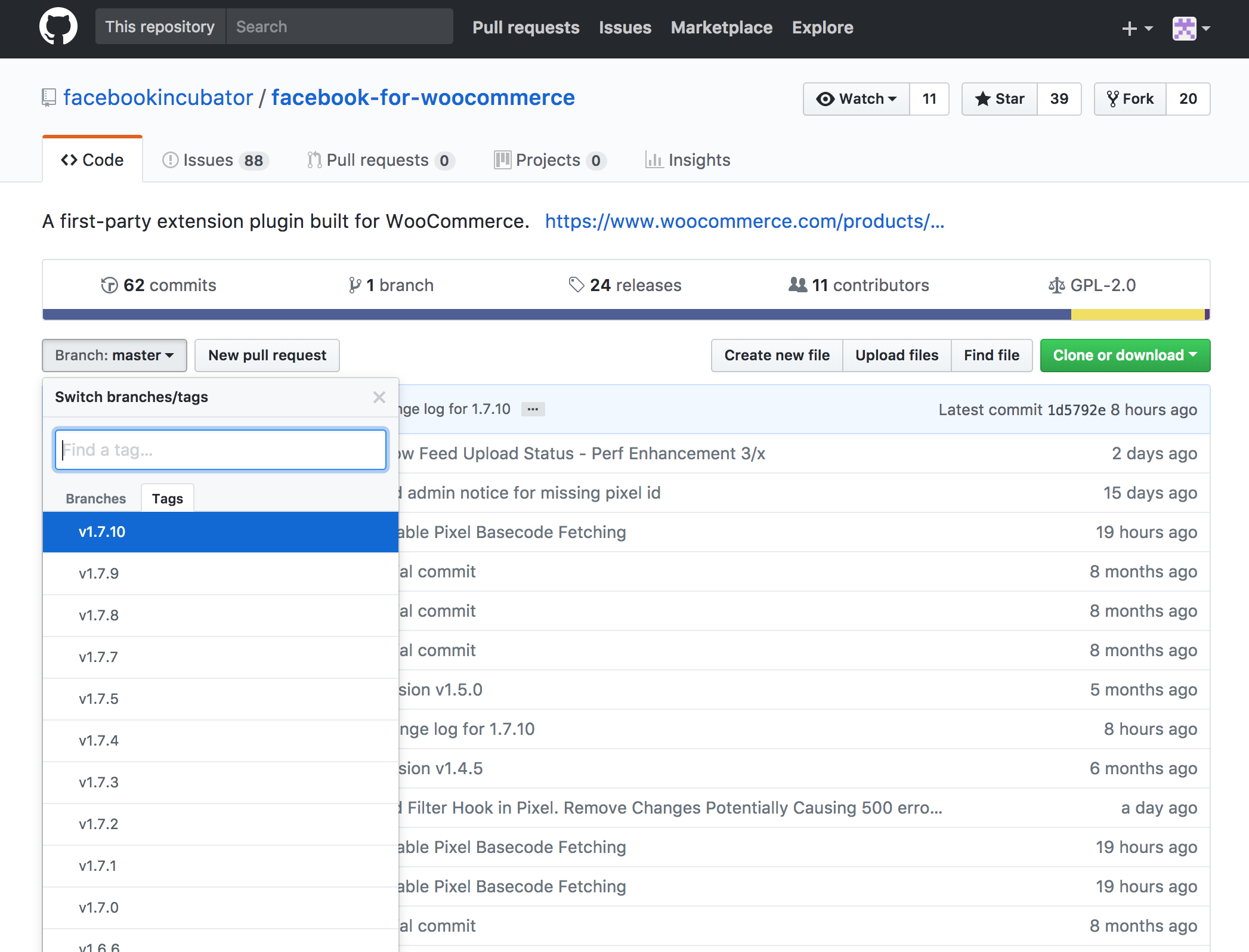
evenmed
on 1 Feb 2018
My bad, thanks
Ampmedia-DEV
on 1 Feb 2018
@dmitridr I tried it with different versions and the issue is present since 1.7.9, doesn't happen on 1.7.8 and below.
evenmed
on 1 Feb 2018
Great thanks for the tip, will try 1.7.8
Ampmedia-DEV
on 1 Feb 2018
This will greatly help us debug, thanks!
Also recommend using our releases section to downgrade :
https://github.com/facebookincubator/facebook-for-woocommerce/releases
If you just get the source files from the branch directly, you'll also include the other plugin we have in this repo, Facebook Pixel for Wordpress.
dmitridr
on 1 Feb 2018
We have a repro, working on isolating and fixing the code responsible, fix will be out in a few hours.
dmitridr
on 1 Feb 2018
Just an update, version 1.7.8 has fixed all of our issues and facebook Shop is now working again.
We were also have an issue with our Product Variants. We have high value items that have product variants with pricing ranging from $3,800 to $6,050. We had set the default variant to the lowest value variant, but Facebook shop kept picking up the highest value variant. By switching back to 1.7.8 this has also been resolved.
Hopefully the reworked latest version also addresses the variant issue.
Thanks guys.
Ampmedia-DEV
on 1 Feb 2018
Thanks for the report, we'll test to see if there is a regression in the default variant as well as you say. Will delay the fix until sometime tomorrow.
dmitridr
on 1 Feb 2018
Hi @evenmed ,
Thanks for your update and report. This was fixed in v1.7.11
 mengyingdu
on 1 Feb 2018
mengyingdu
on 1 Feb 2018
Hi @Ampmedia-DEV,
This was fixed in v1.7.11 .
I have tested this latest version and the default variant works correctly. The cause could be related to the one for permission error. Feel free to open a new issue if you still have this problem.
Thanks.
mengyingdu
on 1 Feb 2018
Hey @mengyingdu, thanks for fixing this but it looks like you just reuploaded 1.7.10 instead of 1.7.11...
I downloaded the zip straight from https://github.com/facebookincubator/facebook-for-woocommerce/releases/tag/v1.7.11 and installed it but the error is still there and the plugin says it's version 1.7.10:

evenmed
on 1 Feb 2018
I downloaded v1.7.11 straight from the master branch and the error was fixed. Hooray!
It's just the 1.7.11 release that wrongly contains 1.7.10 instead of 1.7.11
Thanks for fixing this so quickly.
evenmed
on 1 Feb 2018
Related issues
 sm7uge
·
37Comments
sm7uge
·
37Comments
 NicoleParberry
·
46Comments
NicoleParberry
·
46Comments
 AVTMBijouterieNomade
·
24Comments
AVTMBijouterieNomade
·
24Comments
 DeeJ
·
32Comments
DeeJ
·
32Comments
 bbihun12
·
31Comments
bbihun12
·
31Comments