Facebook-for-woocommerce: Woocommerce Booking Product Shows 0 Price & Products With Display Price show 0 price.
Hi There,
Recently I tried this plugin to synchronize the products from woocommerce to facebook page. Everything loads fine except that the price is not bringing forward under bookable product from woocommerce booking plugin. Is there anyway to solve this issue?
Thanks!
Gee


 gee-pako
All 13 comments
Hello,
That's not good. Can you confirm that you have a plugin version v1.6.0 or above? We did a bunch of price fixes in 1.6.0.
 dmitridr
on 22 Sep 2017
dmitridr
on 22 Sep 2017
Hi There,
Thanks for your prompt response.
Yes it is the latest one 1.6.0. I suspect few points so maybe it is helpful for you to troubleshoot.
- Although we key in the regular price field, it has "from" in front.
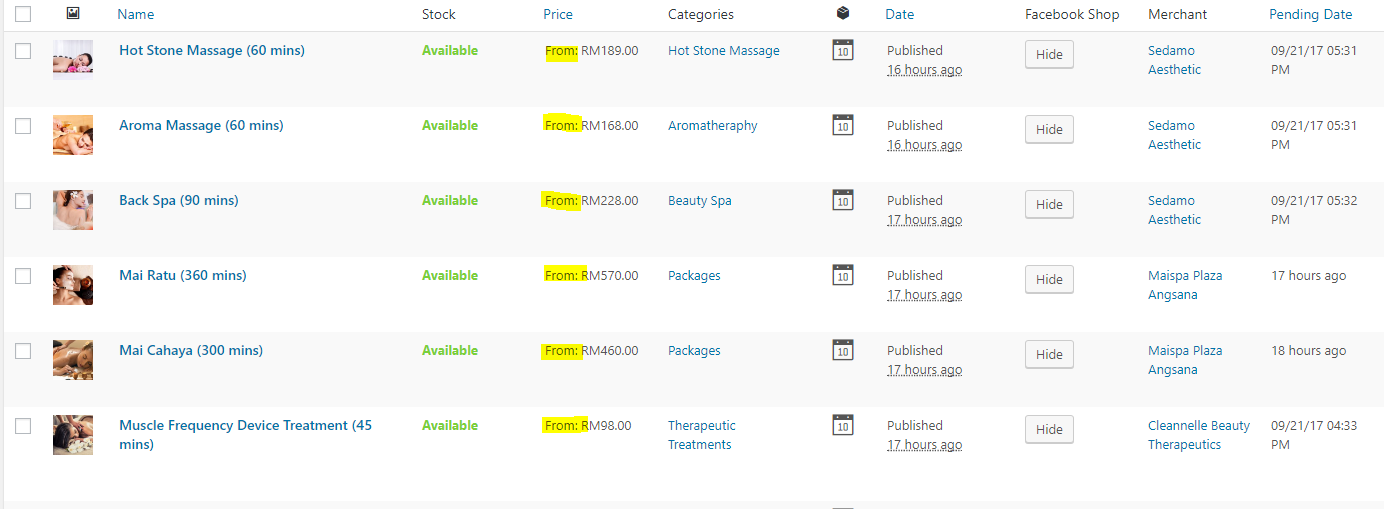
Each bookable product type has its own resources (from woocommerce booking plugin as well). Is it because I didn't set any price in the resources itself?
We use product vendors as well. Maybe not working when it is vendor who submitted the product and not admin?
gee-pako
on 23 Sep 2017
Hello again,
Thanks for the helpful suggestions. We pull the product price field and if it's not a number we do indeed set it to 0, that could be the issue. I wonder if the From is somehow being used in this case. If this is added by a 3rd party extension we recommend turning off that extension, integrating it with FB, then turning it back on, as a temporary workaround.
dmitridr
on 27 Sep 2017
One question :
- Is this the case for all products? Or just some? (If just some, what is the difference between the ones that work and the ones that don't, is it the 'From' ?)
dmitridr
on 27 Sep 2017
Hi There,
Thanks for your response. It is my fault that I didn't inform clearly that the price is set at Cost > Base Price. That's why it has the "from" in front of the price. (Please refer screenshot)
This issue applies to all my bookable products. My store only has this product type.
This product type (bookable product) is from woocommerce booking plugin https://woocommerce.com/products/woocommerce-bookings/. The resources also part of the plugin.
This may be the issue.
Thanks!
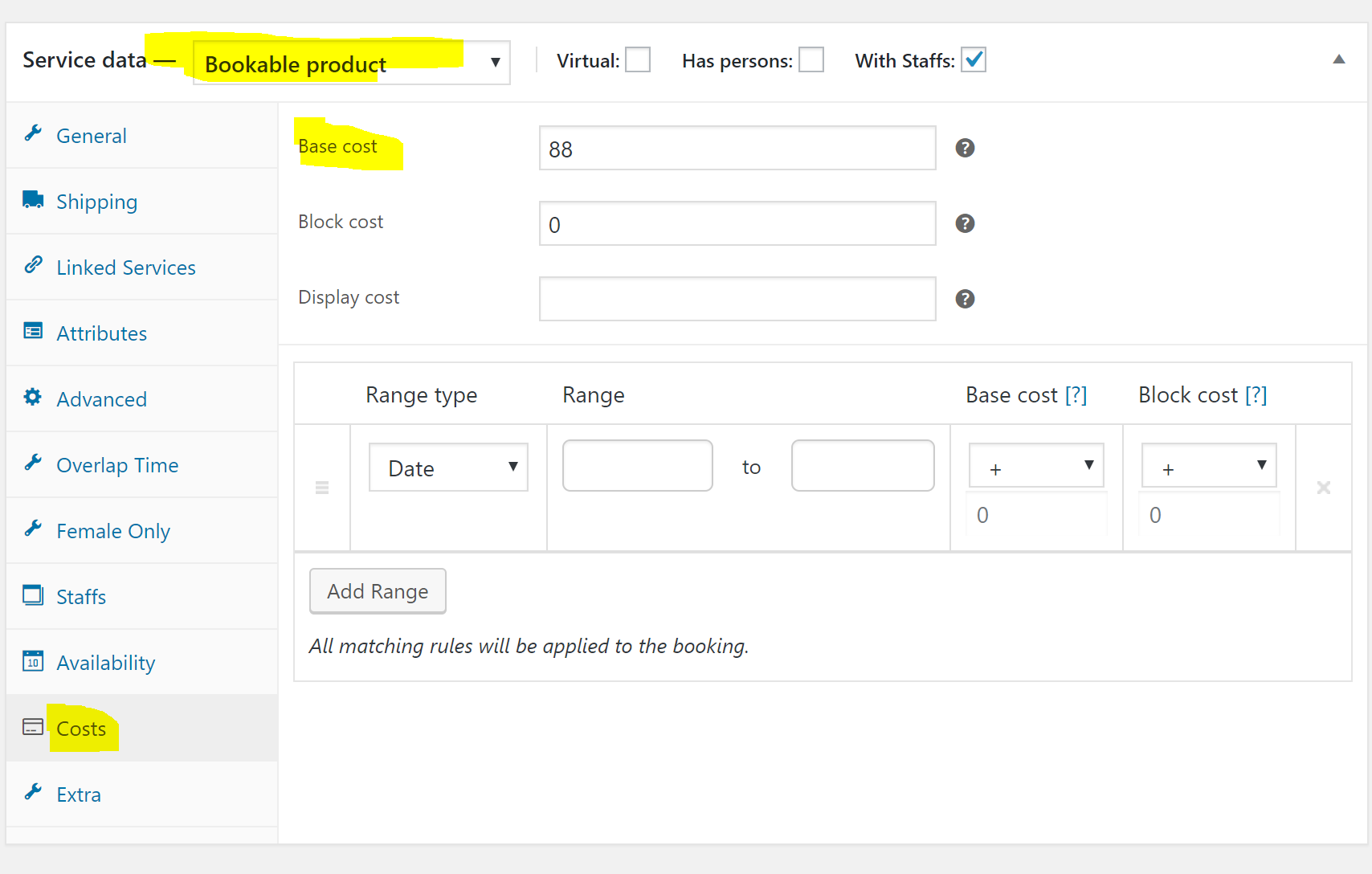
gee-pako
on 27 Sep 2017
Thanks for this info. This is very interesting, we can probably pull the "Base cost" if the price is 0 if we knew what the field was called in the DB. Looks like this is not a free plugin, but I found a forum post about how we can do it.
Should be an easy fix, but we won't be able to test it because the plugin is paid. We can probably release something safe for you to try though, to see if the fix worked.
If you want to have an immediate workaround and you're able to edit the plugin (Plugins > Editor > Facebook for WooCommerce), you could try testing the following, look for the file facebook-commerce.php and insert the following code after the line that starts with $price =.
if (!$price) { $price = $woo_product->wc_booking_cost; }
Disclaimer : I tested this on our demo servers and there was no crash, but editing plugins may in general crash your admin panel if you do it wrong, be careful.
Edit : Corrected code.
dmitridr
on 28 Sep 2017
We have a potential fix for you to try in the next release, v1.6.3. Should be out in a few days.
dmitridr
on 4 Oct 2017
I have this same issue where my prices are showing as $0, and I'm using the Display Cost field. Will this be fixed in the upcoming release?
Thanks! :)
 pananapple
on 4 Oct 2017
pananapple
on 4 Oct 2017
@dmitridr Thanks, looking forward to your next release.
gee-pako
on 5 Oct 2017
v1.6.3 is out, @gee-pako please try it and 'Force Resync', let us know if it works for you.
@pananapple Thanks for the feedback. I'll use the Display Cost field in the exported price (if the price is 0) in the next release, v1.6.4. Will keep this issue open for that.
dmitridr
on 6 Oct 2017
v1.6.4 is out and supports Bookable products with 'Display Cost' set.
If the display cost is not set in general whatever get_display_cost returns by the WC_Bookings plugin is used. (This appears to be base_cost + block_cost in the average case.)
Please try the new version and force resync. Feel free to re-open the issue if there's still a problem.
dmitridr
on 13 Oct 2017
You're the best! Thanks for fixing this so quickly!
pananapple
on 13 Oct 2017
Hello
I want to display discounted prices as well with Base Price Like 20% off. something like this.
Woocommerce Booking doesn't have this function, they said it's only possible with coding. Can someone Please give me the code for this???
Thanks a'lot
 Nabeelahmed55
on 28 Dec 2020
Nabeelahmed55
on 28 Dec 2020
Related issues
 Aprilhead
·
47Comments
Aprilhead
·
47Comments
 AVTMBijouterieNomade
·
24Comments
AVTMBijouterieNomade
·
24Comments
 Copterview
·
44Comments
Copterview
·
44Comments
 neshby
·
39Comments
neshby
·
39Comments
 binnythap
·
29Comments
binnythap
·
29Comments