Botframework-composer: LUIS intent recognition does not work for child dialogs
Describe the bug
I am using the terms as defined on Composer Docs. My main dialog has an intent, called DeveloperMode. The only string associated with it is Developer Mode. This intent is correctly inferred when the user types in developer mode. The intent starts a child dialog called Developer.
BeginDialog for Developer returns a message indicating that the user is in the developer dialog. There is an intent called SampleApiConnection with in the Developer child dialog. The only LUIS string attached is connect to an api.
When I type connect to an api into Composer, after first typing developer mode to be in the Developer child dialog, I get the message for BeginDialog for the Developer child dialog. I would expect to see the message for the intent SampleApiConnection.
This is the JSON as shown in the Bot Framework emulator:
{
  "recognizerResult": {
    "alteredText": null,
    "entities": {},
    "intents": {
      "Developer": {
        "score": 0.282138944
      }
    },
    "text": "connect to an api"
  }
}
Version
1.1.1
OS
Windows
To Reproduce
Steps to reproduce the behavior:
- Create a child dialog called Developer
- In the main dialog, add an intent called DeveloperMode, triggered by the phrase "developer mode"
- In the DeveloperMode intent, add an action to start the child dialog Developer
- Add a message in the BeginDialog event for the Developer child dialog
- Add an intent to the Developer child dialog triggered by the phrase "connect to an api"
- Add a message to the intent
Start the bot framework emulator and type developer mode followed by connect to an api. Observe that you get the message entered in step four twice.
Expected behavior
After typing "connect to an api" you should get the message entered in step 6.
 knightmeister
All 9 comments
@knightmeister I think I solved your issue... and one of mine.
There's a property on your Developer child dialog called "Auto end dialog." Set that to false and retest.

 kdubious
on 16 Oct 2020
kdubious
on 16 Oct 2020
@kdubious is correct; this is a simple way if you want to keep the user in this dialog until logic follows a flow to let them exit (like a global cancel, etc).
 dmvtech
on 17 Oct 2020
dmvtech
on 17 Oct 2020
Thanks @kdubious , this is exactly what I was after.
Now I need to figure out how to get back to the initial/parent dialog. If I add a "End this dialog" block, it does not return back to the initial dialog.
The above does not relate to the issue that I originally raised so please feel free to close this issue.
knightmeister
on 19 Oct 2020
@knightmeister, returning to the initial dialog worked for me:
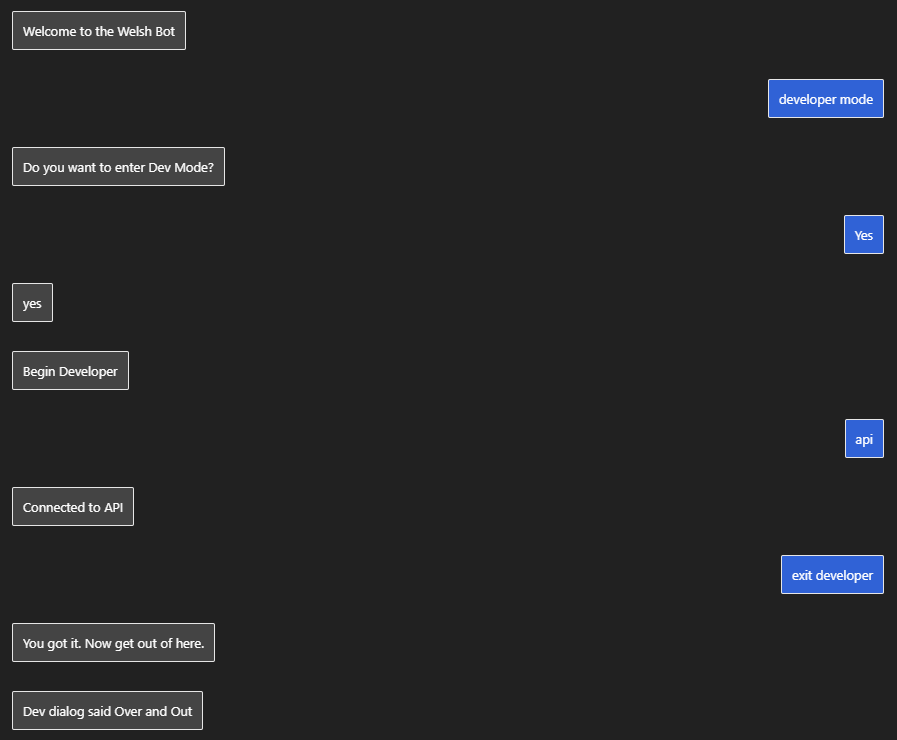
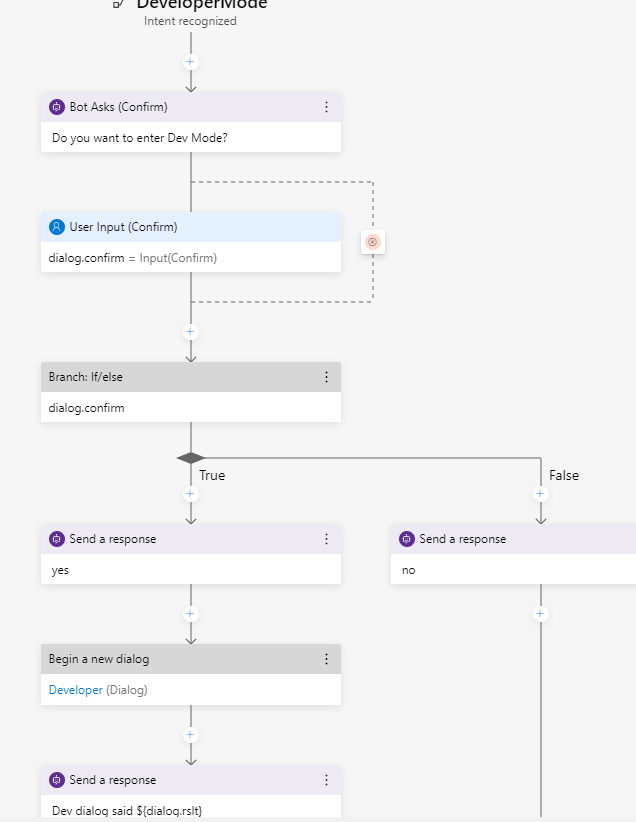
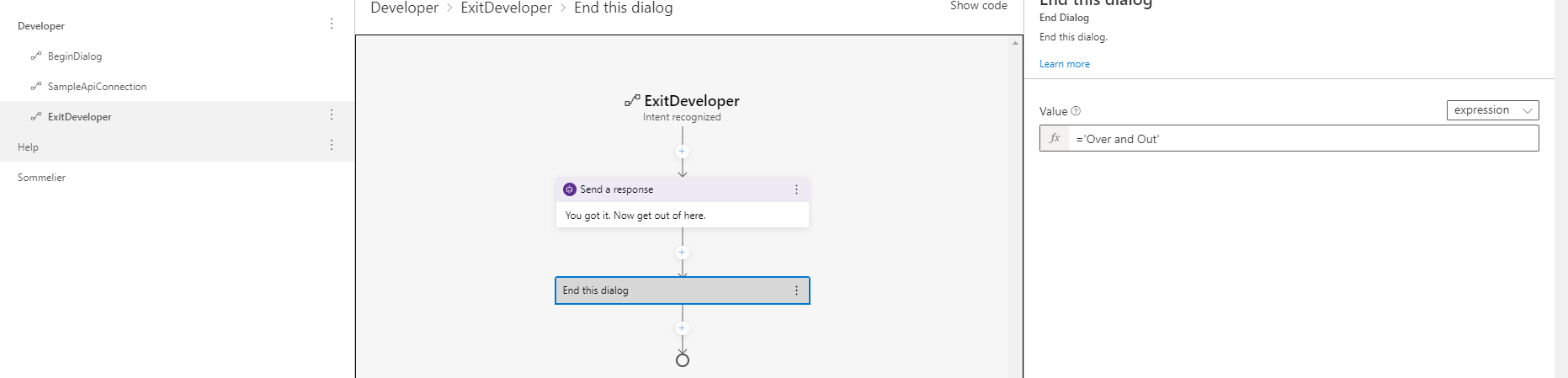
kdubious
on 19 Oct 2020
Thanks @kdubious. I had more or less the same flow, my problem was the intent recognizing developer mode didn't have a condition set so it was never not entering that intent (it was the only one). Now I have added the condition the unknown intent is firing as I would expect.
knightmeister
on 19 Oct 2020
@knightmeister sure thing, learning as I go here, too. Hoping to tackle the "human handoff" this week. I see that interests you, too?
kdubious
on 19 Oct 2020
@knightmeister sure thing, learning as I go here, too. Hoping to tackle the "human handoff" this week. I see that interests you, too?
Indeed it does. I don't think we can support the design pattern Microsoft have documented (although hope I'm wrong), but I have an idea as to how we can do our own ad-hoc hand-off. Be interested to see how #4404 goes.
knightmeister
on 19 Oct 2020
@knightmeister shoot me an email if you want to collaborate on this a bit. I've picked up a little insight on this topic, but I'm not entirely sure the best / easiest / highest value path forward.
kdubious
on 19 Oct 2020
@knightmeister shoot me an email if you want to collaborate on this a bit. I've picked up a little insight on this topic, but I'm not entirely sure the best / easiest / highest value path forward.
Will do
knightmeister
on 19 Oct 2020
Related issues
 kalebk
·
16Comments
kalebk
·
16Comments
 gbelenky
·
22Comments
gbelenky
·
22Comments
 jakeatmsft
·
21Comments
jakeatmsft
·
21Comments
 sujeongHeo
·
24Comments
sujeongHeo
·
24Comments
 cxbuilders
·
15Comments
cxbuilders
·
15Comments
Most helpful comment
@knightmeister I think I solved your issue... and one of mine.

There's a property on your
Developerchild dialog called"Auto end dialog."Set that to false and retest.