Botframework-composer: Bot with Luis throws 500 error once deployed on Azure
A bot that does not have Luis enabled runs fine on Azure once it has been deployed. However when switching on Luis as the recognizer type and deploying the bot to Azure, it fails with a status code 500:
_D:\homesite\wwwroot\ComposerDialogs\mybot.dialog error: Failed to find resource named mybot.lu.dialog or mybot.lu._
(Hunch) It seems it is missing the en-us in the filename, as that one does exist.
Version
d7499777
To Reproduce
Steps to reproduce the behavior:
- Create a new bot and enable Luis
- Create the Azure Resources
- Deploy the bot
- Fill in the setting for Luis
- Enable applications insights for the webapp in Azure
- Run the bot in the Azure Bot channels registration
- Check the 500 error in application insights
 cxbuilders
All 15 comments
I can repro this too. First part of the issue is that the deploy script for some reason is not publishing the generated folder up to Azure. Using kudu I was able to create a generated folder under ComposerDialogs and drag-drop the files which moved the problems forward.
Moved the issue further - configuration information seems not to be present now, get this when LuisRecognizer is called: "" is not a valid LUIS application id
 darrenj
on 4 May 2020
darrenj
on 4 May 2020
I am experiencing the same issue. I'm also not sure where I would add this configuration info, ex. the LUIS app ID.
This is tied to issue #2784.
 ericchansen
on 4 May 2020
ericchansen
on 4 May 2020
@cxbuilders @darrenj @ericchansen which deployment script are you using, we plan to deprecate the powershell script soon, you could try our new node js deployment script, which is placed in your created bot folder, please follow the readme and run scripts under script folder.
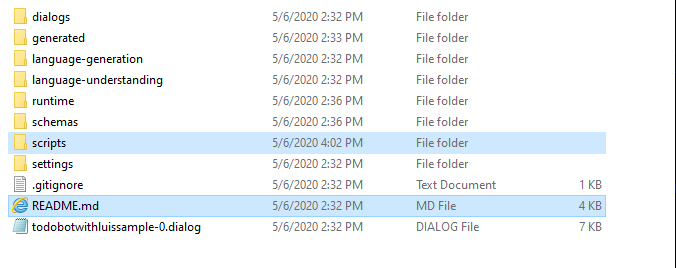
 luhan2017
on 6 May 2020
luhan2017
on 6 May 2020
@luhan2017 My default directory looks quite different from yours
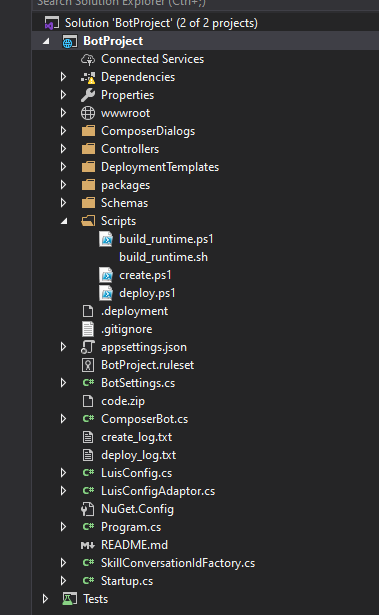
I don't see any Node.js deployment scripts.
ericchansen
on 6 May 2020
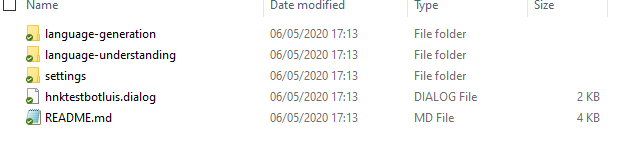
That's all I see after creating a new Empty Bot. The README.md in this folder does mention though:
- From this project folder, navigate to the scripts/ folder
Which is clearly not here.
I just updated to the latest master release
cxbuilders
on 6 May 2020
@cxbuilders , oh sorry, we have introduced a bug yesterday, @boydc2014 is preparing a PR #2934 for this, will let you know once it got merged. Or you can try an earlier version of master, just before this one https://github.com/microsoft/BotFramework-Composer/commit/d6c3d6129b73e5b02b667f28e3d6d83c1005aaef.
@ericchansen , we had some refactoring on the botproject recently, if you try on latest master, it will be updated.
luhan2017
on 7 May 2020
this should be addressed. @ericchansen & @cxbuilders can you verify on latest master ?
 cwhitten
on 7 May 2020
cwhitten
on 7 May 2020
The script folder is there with new bots. I ran the script like:
_node .\provisionComposer.js --subscriptionId=XXXXXXXX-XXXX-XXXX-XXXX-XXXXXXXXXXXX --name=MyBot --appPassword=XXXXXXXXXXXXXXXX_
Then successfully logged in using the devicelogin link and it always fails with the following error:
Creating App Registration ...
User was not found.
* Provision failed *
It fails on the graphClient.applications.create command. My Account is Admin on this subscription. All previous deployments were successful so it should not be a rights issue
cxbuilders
on 8 May 2020
Rebuilt everything using commit 9d221cf1d3825cf2271ee6a51263b37df56f2d15.
The new deployment script isn't compatible with my Azure subscriptions.
Here's the attempt with defaults. I replaced potentially sensitive information with variants of xxx.
PS C:\xxx\ToDoBotWithLuisSample\scripts> node provisionComposer.js --subscriptionId=xxx --name=EricBotComposerTest --appPassword=xxx
Login to Azure:
To sign in, use a web browser to open the page https://microsoft.com/devicelogin and enter the code xxx to authenticate.
> Creating App Registration ...
Insufficient privileges to complete the operation.
** Provision failed **
Here's when I created the appId myself. Note that the appId matched in my input xxx123 and the standard output xxx123. However, the subscriptionId that I provided xxxabc doesn't match the subscriptionId in the standard output xxxdef.
PS C:\xxx\ToDoBotWithLuisSample\scripts> node provisionComposer.js --subscriptionId=xxxabc --name=EricBotComposerTest --appPassword=xxx --appId=xxx123
Login to Azure:
To sign in, use a web browser to open the page https://microsoft.com/devicelogin and enter the code xxx to authenticate.
> Create App Id Success! ID: xxx123
> Creating resource group ...
The access token is from the wrong issuer 'https://sts.windows.net/xxxdef/'. It must match one of the tenants 'https://sts.windows.net/xxx1/,https://sts.windows.net/xxx2/' associated with this subscription. Please use any authority (URL) from 'https://login.windows.net/xxx1https://login.windows.net/xxx2' to get the token. Note, if the subscription is transferred to another tenant there is no impact to the services, but information about new tenant could take time to propagate (up to an hour). If you just transferred your subscription and see this error message, please try back later.
** Provision failed **
I don't have time to debug this deployment script.
ericchansen
on 8 May 2020
@ericchansen, Thanks for reporting the issue. Could you try this following step to work around this?
- https://ms.portal.azure.com/#blade/Microsoft_AAD_IAM/ActiveDirectoryMenuBlade/Properties, query this url you will see a Directory ID folder, copy the id.
- go to provisionComposer.js, search for this line: "const tenantId =", replace the existing id with the one you copied.
Please let me know if it still not works. Meanwhile we are working on a fix on this, will keep you posted.
luhan2017
on 9 May 2020
Any update on the issue I am facing? I really would like to test this new script, but whatever I try I fail on the user not found error.. I am using a subscription, with one user (me) who is administrator.
cxbuilders
on 11 May 2020
@cxbuilders , it looks like the error happens when creating the app registration, which is not related to the subscription yet. So could you try the following steps. It seems you are facing the same problem with Eric.
- https://ms.portal.azure.com/#blade/Microsoft_AAD_IAM/ActiveDirectoryMenuBlade/Properties, query this url you will see a Directory ID folder, copy the id.
- go to provisionComposer.js, search for this line: "const tenantId =", replace the existing id with the one you copied.
We have the PR ready for fix this, you can also refer to the update in the PR.
And if you don't want to do the above, you can manually create an appid and apppassword, and pass in as the parameters for the provision script.
Please let me know if it still not works.
luhan2017
on 12 May 2020
@luhan2017 With the Work Around you provided I just successfully deployed, published and tested in Azure a bot with Luis enabled. Very glad it is all working, thanks!
Please let me know when the PR for the dynamic tenant ID is added to the master?
cxbuilders
on 12 May 2020
cwhitten
on 14 May 2020
For me I just had to add my tenantId to the deploy URL as a parameter --tenantId=xxx
Got the ID from @luhan2017 advice in this thread.
 tschnoelzer
on 8 Jun 2020
tschnoelzer
on 8 Jun 2020
Related issues
 KoradaRajesh
·
25Comments
KoradaRajesh
·
25Comments
 sujeongHeo
·
15Comments
sujeongHeo
·
15Comments
 hraz-msft
·
21Comments
hraz-msft
·
21Comments
 Samirun
·
13Comments
Samirun
·
13Comments
 Laxmi30
·
16Comments
Laxmi30
·
16Comments
Most helpful comment
I can repro this too. First part of the issue is that the deploy script for some reason is not publishing the
generatedfolder up to Azure. Using kudu I was able to create ageneratedfolder under ComposerDialogs and drag-drop the files which moved the problems forward.Moved the issue further - configuration information seems not to be present now, get this when LuisRecognizer is called:
"" is not a valid LUIS application id