Botframework-composer: How to handle the adaptive card response in Composer
Github issues should be used for bugs and feature requests. Use Stack Overflow for general "how-to" questions.
Version
What package version of the SDK are you using.
Describe the bug
Give a clear and concise description of what the bug is.
To Reproduce
Steps to reproduce the behavior:
- Go to '...'
- Click on '....'
- Scroll down to '....'
- See error
Expected behavior
Give a clear and concise description of what you expected to happen.
Screenshots
If applicable, add screenshots to help explain your problem.
Additional context
Add any other context about the problem here.
[bug]
 KoradaRajesh
All 25 comments
@KoradaRajesh As far as I know (@vishwacsena, correct me if I'm wrong), there's no way to capture this through a prompt, since Adaptive Card input is sent through Activity.Value and not Activity.Text.
So, you need some way of capturing those. Here's what I did:
Adaptive card json:
{
    "type": "AdaptiveCard",
    "body": [
        {
            "type": "TextBlock",
            "text": "Text Input - id: textInput"
        },
        {
            "type": "Input.Text",
            "placeholder": "Enter some text",
            "id": "textInput"
        },
        {
            "type": "TextBlock",
            "text": "Number Input - id: numberInput"
        },
        {
            "type": "Input.Number",
            "placeholder": "Enter a number",
            "id": "numberInput"
        }
    ],
    "actions": [
        {
            "type": "Action.Submit",
            "title": "Submit"
        }
    ],
    "$schema": "http://adaptivecards.io/schemas/adaptive-card.json",
    "version": "1.0"
}
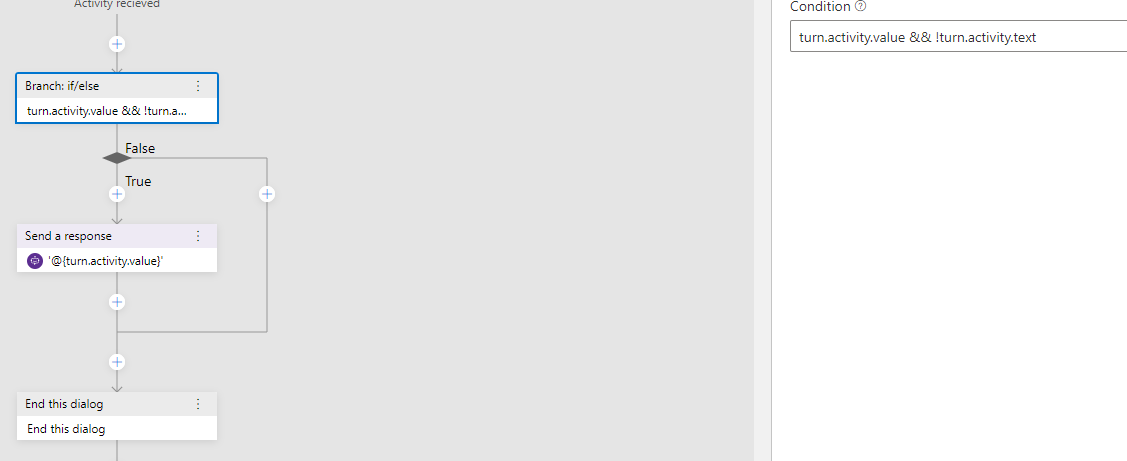
Then, construct a condition with turn.activity.value && !turn.activity.text and output the result with '@{turn.activity.value}':
 mdrichardson
on 2 Jan 2020
mdrichardson
on 2 Jan 2020
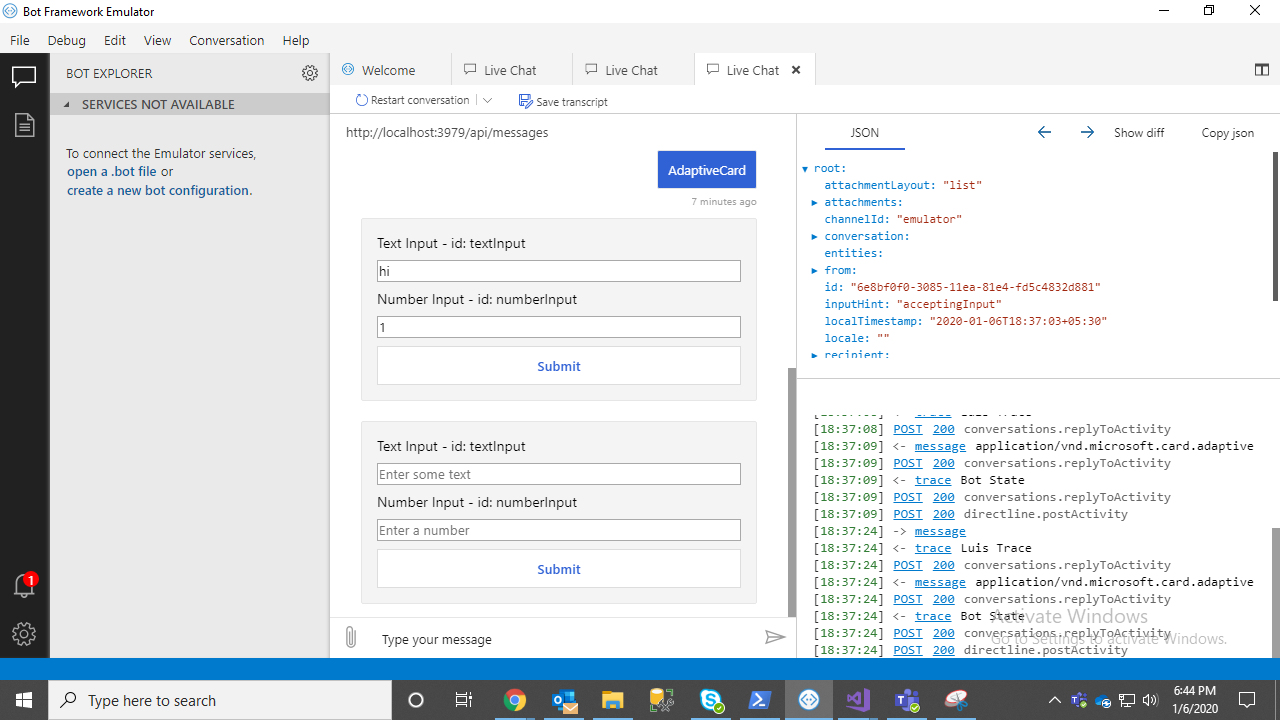
yeah i have tried it but @mdrichardson how do you sent the adaptive card , if we sent in prompts it not accepting the action and again it re prompting if we sent in the (send a response) it will not wait for the submission of card ,it will immediately check the if condition in the flow.

KoradaRajesh
on 6 Jan 2020
@KoradaRajesh I had to add it as a separate trigger. It's not ideal and it's difficult to get working in your flow, but that's the only way I was able to do it. If you want to point me to a copy of your bot, I might be able to help you implement it.
That being said, the Composer team marked this as an [Enhancement], so they'll work this into an actual feature. Targeted release is in March.
mdrichardson
on 6 Jan 2020
Adaptive dialogs automatically promote up adaptive card response as an intent if an intent = xxx is included in the data. See here for a code based sample
 vishwacsena
on 6 Jan 2020
vishwacsena
on 6 Jan 2020
thank you @mdrichardson and @vishwacsena
KoradaRajesh
on 7 Jan 2020
Adaptive dialogs automatically promote up adaptive card response as an intent if an
intent = xxxis included in thedata. See here for a code based sample
but in composer we can not trigger this as an intent, only .lu format intents it will accept
KoradaRajesh
on 7 Jan 2020
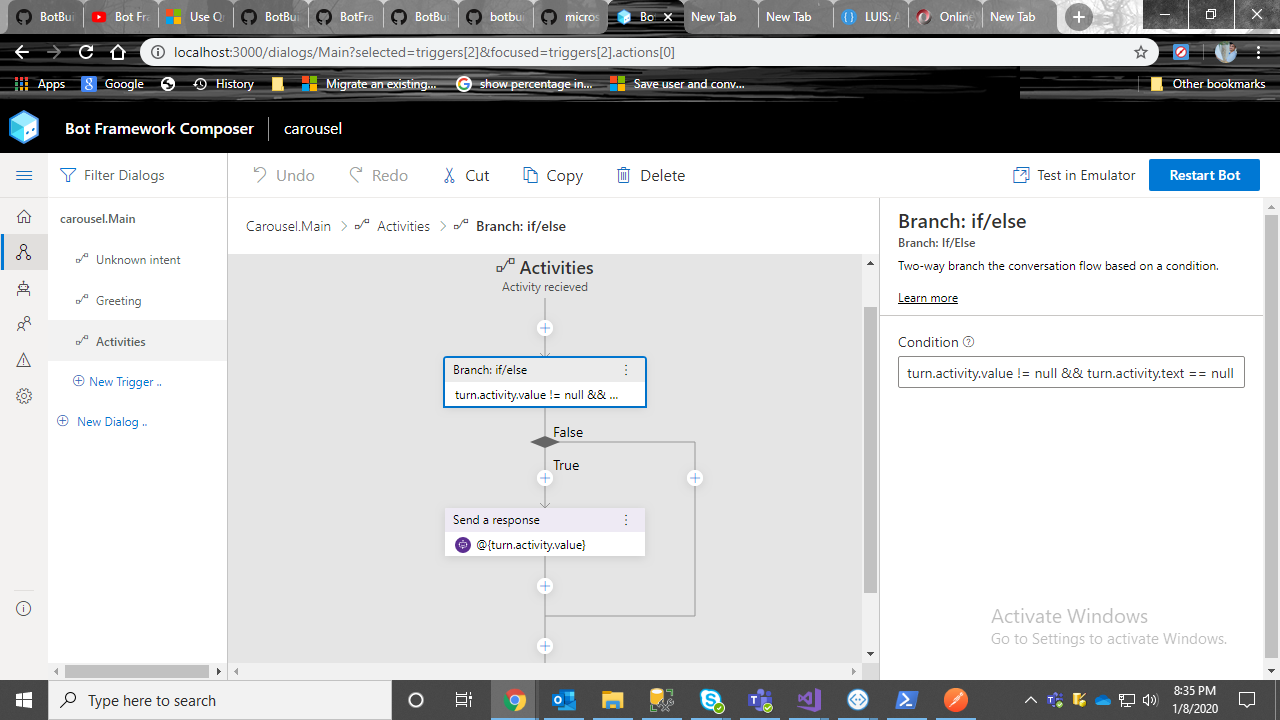
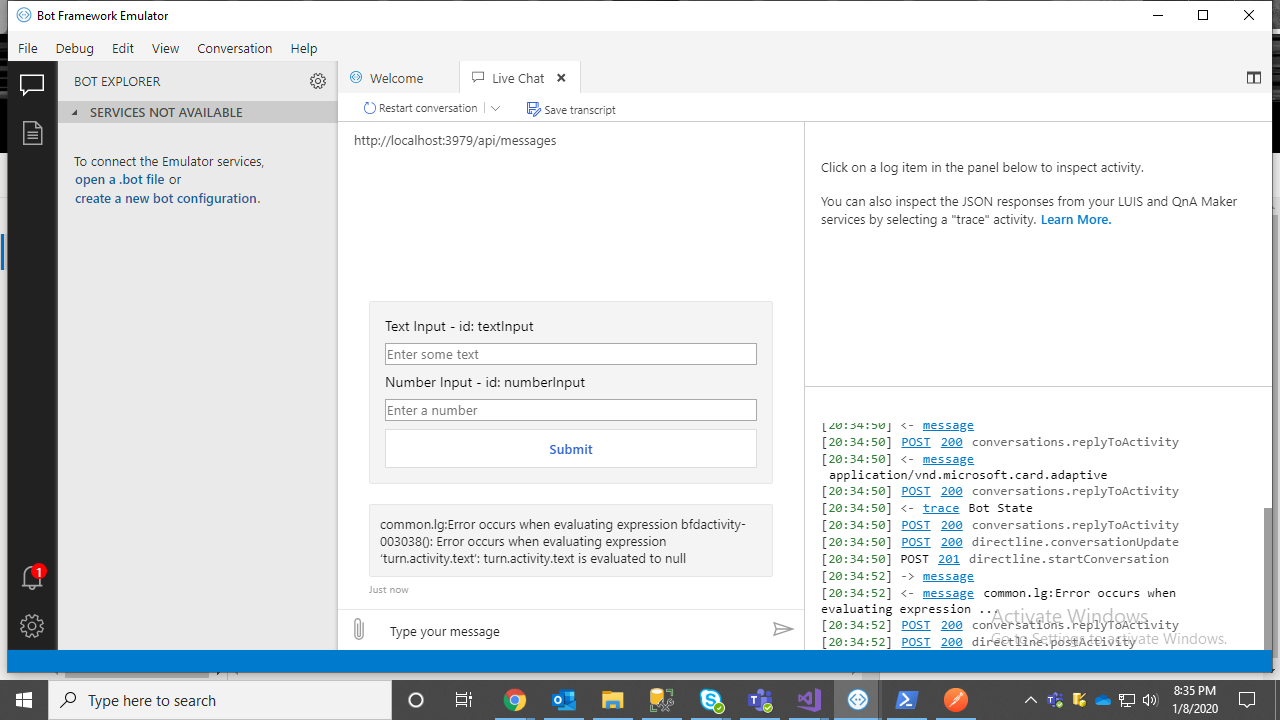
@mdrichardson i have tried by triggering an activity on submitting the adaptive card but it's not evaluating
KoradaRajesh
on 8 Jan 2020
@KoradaRajesh I used Activity trigger with message type. I'm not sure why your error is being given, but maybe try switching turn.activity.text == null to !turn.activity.text
mdrichardson
on 8 Jan 2020
@mdrichardson i have tried both but it throwing an error

Did you keep any condition here
It's triggering Unknown intent for me
KoradaRajesh
on 9 Jan 2020
- New Trigger
- Trigger type: Activities, Activity type: Activities (Activity received), Submit
- Click "Activities", leave Condition blank, type "message" for "Activity type"
- If condition, Condition:
turn.activity.value && !turn.activity.text
- If condition, Condition:
- On the True branch, Send a response:
- '@{turn.activity.value}'
That takes care of the adaptive card part. The trick is getting it to trigger something else if turn.activity.value && !turn.activity.text is false. For that, I have it launch a separate dialog on the False branch (which is a simpler copy of the RespondingWithCards sample):
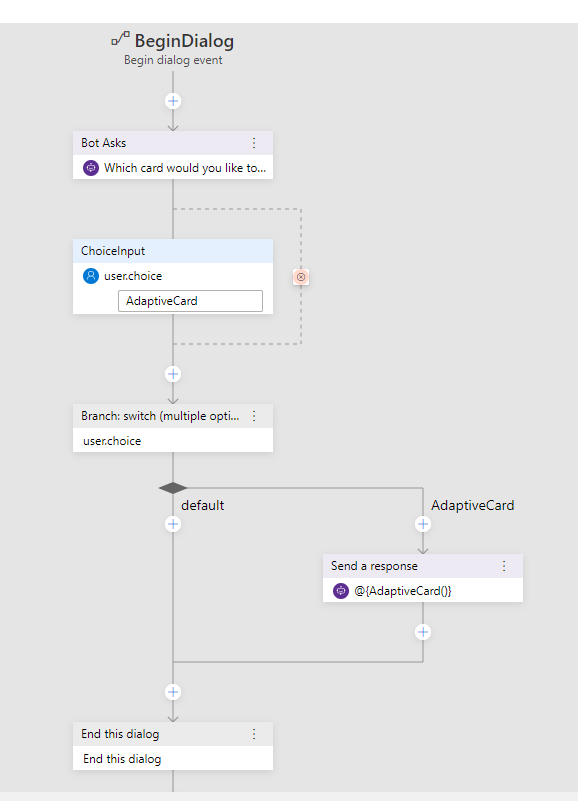
Here's a link to my repo of this
I wasn't able to get this to work in a non-code, Compose-only example. @vishwacsena Is this possible?
I tried adding ..."data": { "intent": "test" } to the submit action of the card, adding a regex intent for test, and then adding a trigger for the test intent. If I manually type "test", it triggers, but it doesn't seem to grab it from the card data.
mdrichardson
on 9 Jan 2020
@mdrichardson it's working i'm able to get the adaptive card response in activity received trigger but for text message also it's triggering that activity i want to trigger an activity only submitting the adaptive card.
In this scenario it's failing to trigger the OnIntent because it is not going to match the user text with any recognizer and it triggering the Activity received trigger.
Instead of this we can use the unknown intent trigger there we can handle the adaptive card response else we can keep a contion in Activity Received trigger turn.activity.value != null

KoradaRajesh
on 13 Jan 2020
Hi @KoradaRajesh - Could you please let me know how you have configured the adaptive card json in the bot messages and reading the card in the Flow. I am trying to send an adaptive card but unable to load the JSON. Thanks in Advance.
 prasadreddybv
on 16 Feb 2020
prasadreddybv
on 16 Feb 2020
@KoradaRajesh As far as I know (@vishwacsena, correct me if I'm wrong), there's no way to capture this through a prompt, since Adaptive Card input is sent through
Activity.Valueand notActivity.Text.So, you need some way of capturing those. Here's what I did:
Adaptive card json:
{
    "type": "AdaptiveCard",
    "body": [
        {
            "type": "TextBlock",
            "text": "Text Input - id: textInput"
        },
        {
            "type": "Input.Text",
            "placeholder": "Enter some text",
            "id": "textInput"
        },
        {
            "type": "TextBlock",
            "text": "Number Input - id: numberInput"
        },
        {
            "type": "Input.Number",
            "placeholder": "Enter a number",
            "id": "numberInput"
        }
    ],
    "actions": [
        {
            "type": "Action.Submit",
            "title": "Submit"
        }
    ],
    "$schema": "http://adaptivecards.io/schemas/adaptive-card.json",
    "version": "1.0"
}
Then, construct a condition with
turn.activity.value && !turn.activity.textand output the result with'@{turn.activity.value}':
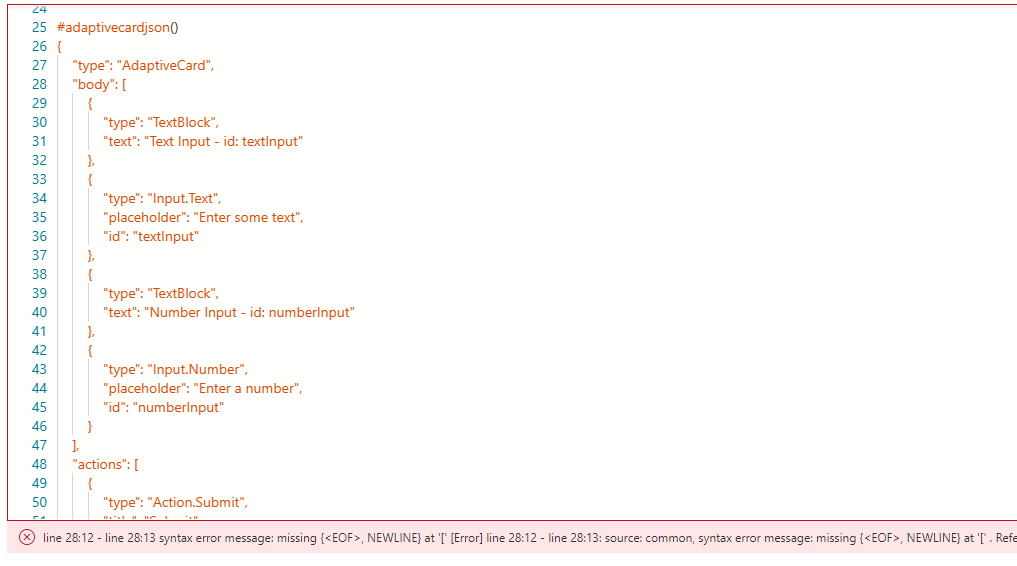
@mdrichardson - Could you please let me know how you have added the card JSON in bot messages as i am getting the Syntax error if i add the same json in my bot. PFB the screenshot for your reference.
prasadreddybv
on 18 Feb 2020
@prasadreddybv
I believe you need to format it more like:
@adaptivecardjson()
- ```
{
    "type"...
Note how you need the line: - ```
If that doesn't work, please open a new issue. I haven't worked with Composer is awhile and since it's in Preview, things may have changed.
mdrichardson
on 17 Mar 2020
@KoradaRajesh I had to add it as a separate trigger. It's not ideal and it's difficult to get working in your flow, but that's the only way I was able to do it. If you want to point me to a copy of your bot, I might be able to help you implement it.
That being said, the Composer team marked this as an
[Enhancement], so they'll work this into an actual feature. Targeted release is in March.
Is this issue resolved? Can you tell me, how to get the value from action.submit in adaptive card?
 GowthamDisys
on 19 Aug 2020
GowthamDisys
on 19 Aug 2020
@GowthamDisys see this sample. It shows both using adaptive card to collect input in an input action as well as to route to appropriate dialog. In short, adaptive dialog include a recognizer by default that transforms any payload posted by action.submit into intent + entities.
vishwacsena
on 24 Aug 2020
@vishwacsena thats a great example.. is there an example for multiple textbox fields from adaptivecard?
 mganeshphani
on 9 Sep 2020
mganeshphani
on 9 Sep 2020
@mganeshphani you can just add additional inputs. Just give them all unique IDs. Then you can access them via an entity @propertyId. Here is an example ..
{
    "type": "AdaptiveCard",
    "body": [
        {
            "type": "TextBlock",
            "size": "Medium",
            "weight": "Bolder",
            "text": "Fill in the form"
        },
        {
            "type": "Input.Text",
            "placeholder": "Enter your name",
            "id": "userName"
        },
        {
            "type": "Input.Number",
            "placeholder": "Placeholder text",
            "id": "userAge"
        },
        {
            "type": "ActionSet",
            "actions": [
                {
                    "type": "Action.Submit",
                    "title": "Submit"
                }
            ]
        }
    ],
    "$schema": "http://adaptivecards.io/schemas/adaptive-card.json",
    "version": "1.2"
}
Then you can access the data returned by adaptive card submit via @userName, @userAge etc.
vishwacsena
on 9 Sep 2020
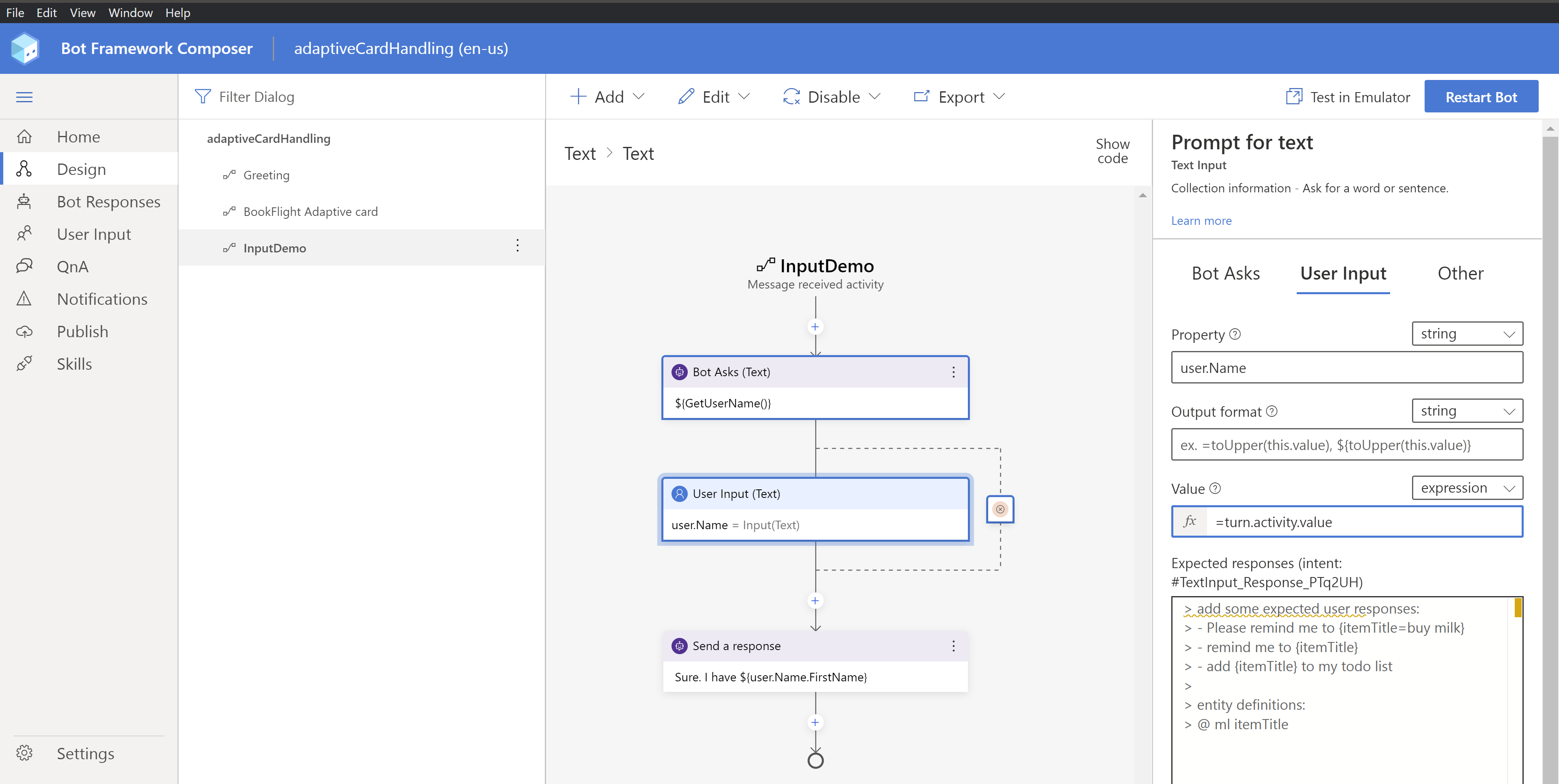
@vishwacsena where does the reading part go into?
I am going by template and would like to know where i can map @userName, @userAge to the properties in bot composer?
mganeshphani
on 9 Sep 2020
If you are asking for one piece of information at a time, you can simply set the value property in the input action to =@entityName.
If you are collecting multiple pieces of information, then it's better to just use set properties action right after the input to set them to what ever memory scope you want to set it to. E.g. user.name etc.
vishwacsena
on 10 Sep 2020
Got it.. thanks for the info. i will try.
On Wed, Sep 9, 2020 at 6:15 PM Vishwac Sena Kannan notifications@github.com
wrote:
If you are asking for one piece of information at a time, you can simply
set the value property in the input action to =@entityName.If you are collecting multiple pieces of information, then it's better to
just use set properties action right after the input to set them to what
ever memory scope you want to set it to. E.g. user.name etc.—
You are receiving this because you were mentioned.
Reply to this email directly, view it on GitHub
https://github.com/microsoft/BotFramework-Composer/issues/1820#issuecomment-689872517,
or unsubscribe
https://github.com/notifications/unsubscribe-auth/AFPMMIEIJQ3KEISUWTHRTJTSFAEC5ANCNFSM4KCFUCNA
.
--
Ganesh Phani Majeti.
mganeshphani
on 10 Sep 2020
I'm still trying to figure out how to collect multiple inputs. The single userName works. Adding an additional field and I keep getting an object error.
 CopenhagenJames
on 29 Sep 2020
CopenhagenJames
on 29 Sep 2020
@vishwacsena thats a great example.. is there an example for multiple textbox fields from adaptivecard?
Could you provide an example gathering multiple inputs. This works but for multiple you get an error with object to string conversions.
CopenhagenJames
on 29 Sep 2020
@vishwacsena thats a great example.. is there an example for multiple textbox fields from adaptivecard?
Could you provide an example gathering multiple inputs. This works but for multiple you get an error with object to string conversions.
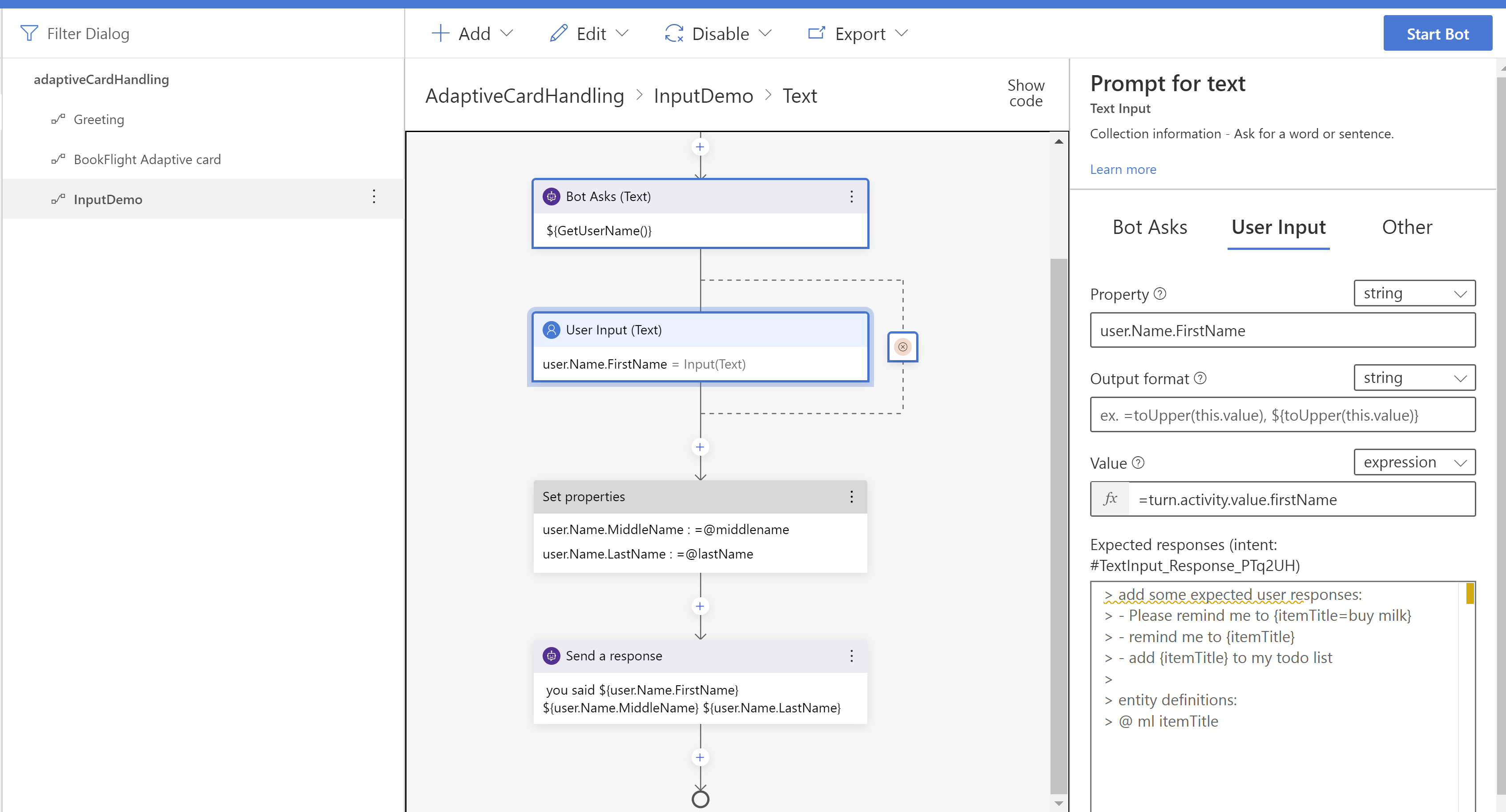
@CopenhagenJames as simple as this(this is just a modification of adaptivecardhandling example)
mganeshphani
on 30 Sep 2020
@vishwacsena thanks for the quick response greatly appreciated
CopenhagenJames
on 30 Sep 2020
Related issues
 yochay
·
15Comments
yochay
·
15Comments
 arafattehsin
·
15Comments
arafattehsin
·
15Comments
 Samirun
·
13Comments
Samirun
·
13Comments
 jakeatmsft
·
21Comments
jakeatmsft
·
21Comments
 Laxmi30
·
16Comments
Laxmi30
·
16Comments