Botframework-composer: Do composer bots support interaction through Direct Line App Service Extension?
Is your feature request related to a problem? Please describe.
Financial service customer wants the ease of use of the Composer tool, but the flexibility to deploy into an Internal App Service. Can this be achieved in the preview?
Describe the solution you'd like
Support for Direct Line App Service Extension
 jakeatmsft
All 21 comments
@luhan2017 @jakeatmsft
I follow the instructions on this doc: https://docs.microsoft.com/en-us/azure/bot-service/bot-service-channel-directline-extension-net-bot?view=azure-bot-service-4.0
But it doesn't work as expect,
the 'ib' and 'ob' is false {"k":true,"ib":false,"ob":false,"initialized":true}
Confirm Direct Line App Extension and the Bot are Initialized
In your browser, navigate to https://.azurewebsites.net/.bot. If everything is correct, the page will return this JSON content: {"k":true,"ib":true,"ob":true,"initialized":true}. This is the information you obtain when everything works correctly, where
k determines whether Direct Line App Service Extension (ASE) can read an App Service Extension Key from its configuration.
initialized determines whether Direct Line ASE can use the App Service Extension Key to download the bot metadata from Azure Bot Service
ib determines whether Direct Line ASE can establish an inbound connection with the bot.
ob determines whether Direct Line ASE can establish an outbound connection with the bot.
Need further investigation.
 zidaneymar
on 1 Apr 2020
zidaneymar
on 1 Apr 2020
@zidaneymar: Myself and @DDEfromOR can help you or continue this experiment to confirm whether directline ASE just works with composer or if something is needed.
 carlosscastro
on 6 Apr 2020
carlosscastro
on 6 Apr 2020
I'm not familiar with which version of packages Composer configures bots to use, but assuming the bot builds* after modifying the Startup.cs code in accordance to the steps in the doc linked above there shouldn't be any additional changes needed to have the bot work with DL ASE.
For general DL ASE troubleshooting, the JSON being returned by the .bot endpoint verifies DL ASE is up and running correctly, but unable to connect to the bot. Usually I'd ask the developer to try running their bot locally and confirm it's able to start up and talk with the Emulator over HTTP, just to rule out any errors preventing the bot from running at all. It can also sometimes be useful to manually run the bot from the Kudu console within the WebApp and watch for any errors during the startup sequence.
In some cases where users encounter the TFFT response from the .bot endpoint the issue is resolved by simply restarting the app service. This seems to be related to how the bot code was published to the app and if a full restart of the app was triggered or not.
*(I say this because the name of the method used to initiate the NamedPipe connection has changed with each version of the packages, so using the wrong method name for the installed packages will result in a build error.)
 DDEfromOR
on 6 Apr 2020
DDEfromOR
on 6 Apr 2020
I'm experiencing the same issue, I have deployed a Bot from Bot Composer and it works fine via Web Chat channel but Direct Line Channel is not working. I followed the instructions to add the DirectLineExtensionKey to the App Service config. The json response has ... "ib":false,"ob":false, ... which is not good. How can this be fixed? Is the Bot Composer not made for this scenario?
 rubit0
on 23 Jun 2020
rubit0
on 23 Jun 2020
Reopen it since this issue is not fixed by the above PR, @zidaneymar , could you please take a look?
 luhan2017
on 24 Jun 2020
luhan2017
on 24 Jun 2020
I'm contributing to a microsoft documentation where the Bot Framework Composer is used, so I like to know if there is in the meantime a workaround to get the bot running with Direct Line - any help is appreciated.
rubit0
on 24 Jun 2020
Are there any news on the issue?
rubit0
on 1 Jul 2020
For clarification, the hosted Direct Line channel and the Direct Line App Service Extension are two separate concepts. Composer bots will work with the hosted Direct Line channel out of the box with no modification, simply by adding the channel to the bot via the Channels blade in the portal.
To enable a Composer bot to work with the Direct Line App Service Extension you will need to follow the steps here and then the steps here to connect Web Chat to your Direct Line App Service Extension bot.
This is the same experience for bots based on samples or generated from templates. The reasoning behind this is due to the Direct Line App Service Extension only being available to bots deployed to an Azure App Service, and we don't want developers to be restricted to that option when creating a new bot via the samples, templates, or tools we provide. In contrast, bots using the hosted Direct Line channel only need to be registered with the Azure Bot Service, but may be deployed anywhere.
DDEfromOR
on 1 Jul 2020
No no, not Direct Line App Service Extension, it's about Direct Line channel.
(I had no idea that there is a difference, I'm 100% in the Bot Composer world)
I want to use the Bot via Direct Line RestAPI SDK (No WebChat, it's a c# Unity App). The Bot Framework Composer deploys everything but the Issue is, that the deployment out of the Box with Bot Framework Composer doesn't work with Direct Line Channel. Yes I add the Direct Line Channel, so far so good, but then we you initiate a conversation with the Bot, you only get the initial greeting and then it continues responding a message about a missing key (nothing can be found via google on that error and it doesn't say which key is missing). With the Web Chat channel, the bot works perfectly fine.
Again, this is very urgent since it is for a microsoft documentation.
Composer bots will work with the hosted Direct Line channel out of the box with no modification, simply by adding the channel to the bot via the Channels blade in the portal.
Sadly I can't confirm this. I'm publishing directly with the Bot Composer Framework.
I tried this several times, deleting the Resource Group with its content and starting fresh - everytime Direct Line is not working.
This is the same experience for bots based on samples or generated from templates. The reasoning behind this is due to the Direct Line App Service Extension only being available to bots deployed to an Azure App Service, and we don't want developers to be restricted to that option when creating a new bot via the samples, templates, or tools we provide. In contrast, bots using the hosted Direct Line channel only need to be registered with the Azure Bot Service, but may be deployed anywhere.
Well I can't comment on this since I'm exclusively using the Bot Framework composer, so I don't understand all those concepts. I just want once the Bot is published, be able to consume it in my App via a REST based API.
This is how it looks like after deploying from Bot Composer Framework.
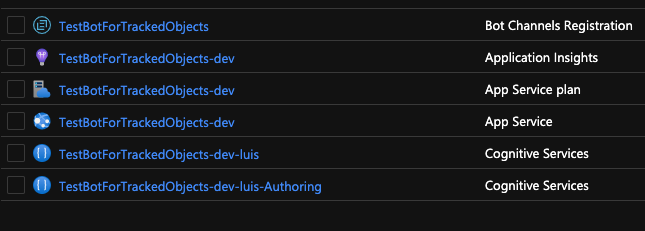
This is the (super short) tutorial about direct line that I used: https://docs.microsoft.com/en-us/azure/bot-service/bot-service-channel-connect-directline?view=azure-bot-service-4.0
rubit0
on 2 Jul 2020
Understood. The fact the welcome message is working (assuming the welcome message is from the bot and not part of your client) shows the bot is properly connected to the Direct Line channel and able to send and receive messages through it. That lets us rule out a number of variables.
I should encourage you to open a new ticket in this repo and specifically include the message about the missing key and where you are observing it, i.e. in a log or in the actual response from the bot. This ticket was originally related to the Direct Line App Service Extension and may take longer to get picked up by the Composer experts as a result.
I don't work on the Composer team but an issue was recently mentioned that causes the bot to respond with the message "Value cannot be null. (Parameter 'key')" that is related to Activity objects with missing fields. I'm told a mitigation until the fix is released is to go to Settings > Bot Settings and set the value of 'logActivities' under 'telemetry' to 'false'. You may give that a try first, then open a new ticket to get an expert from the Composer team engaged.
DDEfromOR
on 2 Jul 2020
@rubit0 How can I reproduce this? Just publish a bot to azure and enable it with Direct Line Channel? Did you customize your runtime?
luhan2017
on 2 Jul 2020
@rubit0 could you share more details on how are you using the Direct Line RestAPI SDK? I have not done that before. I just try to deploy a luis bot to azure and enable the Direct Line Channel, it works well. Is there any case that in your sdk you need to read some keys specific for direct Line channel, and those settings are not correctly loaded by composer runtime?
luhan2017
on 2 Jul 2020
@DDEfromOR
I tried out your recommendation about disabling 'logActivities' but I still get the "Value cannot be null. (Parameter 'key')" response from the bot.
rubit0
on 2 Jul 2020
@luhan2017
I'm doing nothing special, the errors come regardless if I test manually via Postman or in my c# app.
This is how a conversation looks like:
{
"activities": [
{
"type": "message",
"id": "70S4qS4aXPVKgagQD7r8pj-h|0000000",
"timestamp": "2020-07-02T12:06:56.1334174Z",
"channelId": "directline",
"from": {
"id": "TestBotForTrackedObjects",
"name": "TestBotForTrackedObjects"
},
"conversation": {
"id": "70S4qS4aXPVKgagQD7r8pj-h"
},
"text": "Greetings, I can help you with anything related to tracked objects.",
"speak": "Greetings, I can help you with anything related to tracked objects.",
"attachments": [],
"entities": [],
"replyToId": "1ScvUxVCyaR"
},
{
"type": "message",
"id": "70S4qS4aXPVKgagQD7r8pj-h|0000001",
"timestamp": "2020-07-02T12:08:07.5206567Z",
"channelId": "directline",
"from": {
"id": "TestBotForTrackedObjects",
"name": "TestBotForTrackedObjects"
},
"conversation": {
"id": "70S4qS4aXPVKgagQD7r8pj-h"
},
"text": "Greetings, I can help you with anything related to tracked objects.",
"speak": "Greetings, I can help you with anything related to tracked objects.",
"attachments": [],
"entities": [],
"replyToId": "DgxvvPWXMZQ"
},
{
"type": "message",
"id": "70S4qS4aXPVKgagQD7r8pj-h|0000002",
"timestamp": "2020-07-02T12:08:06.8925766Z",
"serviceUrl": "https://directline.botframework.com/",
"channelId": "directline",
"from": {
"id": "user1"
},
"conversation": {
"id": "70S4qS4aXPVKgagQD7r8pj-h"
},
"text": "sdfasdfassfsda"
},
{
"type": "message",
"id": "70S4qS4aXPVKgagQD7r8pj-h|0000003",
"timestamp": "2020-07-02T12:08:08.0717514Z",
"channelId": "directline",
"from": {
"id": "TestBotForTrackedObjects",
"name": "TestBotForTrackedObjects"
},
"conversation": {
"id": "70S4qS4aXPVKgagQD7r8pj-h"
},
"text": "Value cannot be null. (Parameter 'key')",
"inputHint": "acceptingInput",
"replyToId": "70S4qS4aXPVKgagQD7r8pj-h|0000002"
}
],
"watermark": "3"
}
rubit0
on 2 Jul 2020
This is tutorial and there you can download the bot composer project:
https://github.com/onginnovations/mixed-reality/blob/azure-develop/mixed-reality-docs/mrlearning-azure-05.md
rubit0
on 2 Jul 2020
@rubit0, I downloaded your bot, and tried to run it locally, here is what I see:
can you run it successfully locally? I've remove the Azure function steps ,still not works.

luhan2017
on 2 Jul 2020
@luhan2017 You are right, I was also having the same problem, I removed botId, luis-endpointKey and luis-endpoint in botsettings. Now the bot works again from the local emulator. Sadly this didn't help with the "Value cannot be null. (Parameter 'key')" issue.
Could it be that some additional App settings need to be provided?
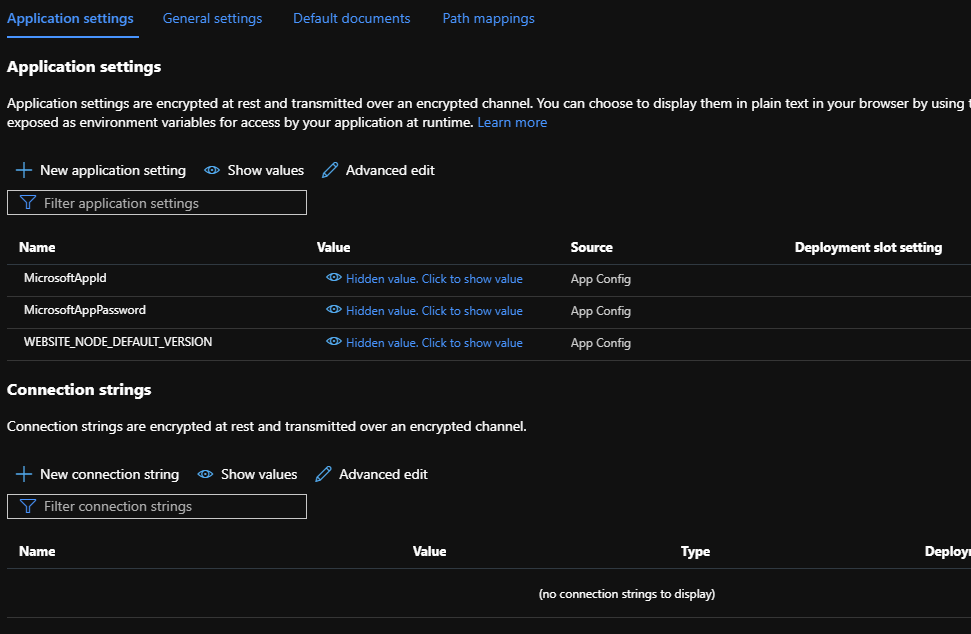
rubit0
on 2 Jul 2020
@DDEfromOR @luhan2017 I created a new issue -> https://github.com/microsoft/BotFramework-Composer/issues/3554
rubit0
on 2 Jul 2020
For clarification, the hosted Direct Line channel and the Direct Line App Service Extension are two separate concepts. Composer bots will work with the hosted Direct Line channel out of the box with no modification, simply by adding the channel to the bot via the Channels blade in the portal.
@DDEfromOR Could you provide any tutorial or link how exactly we can use Direct Line channel in Bot Framework Composer? I could not find any concrete information, how I can send messages and receive answers on the Direct Line channel. In a typical Bot Framework project I would have a function like this:
private async Task AnswerReceived(IDialogContext context, IMessageActivity message)
{
        var reply = ((Activity)message).CreateReply();
        reply.Type = ActivityTypes.Event;
        reply.Name = "MyReplyMessage";
        reply.Value = "MyMessageValue";
        var client = ConversationProvider.Resolve<IConnectorClient>();
        await client.Conversations.ReplyToActivityAsync(reply);
    }
 benjaminsommerfeld
on 8 Jul 2020
benjaminsommerfeld
on 8 Jul 2020
Hi @benjaminsommerfeld please open a new issue so an expert from the Composer team sees your question. This thread has strayed from the original question a bit, that was specific to the App Service Extension version of the channel which connects to the bot differently than the regular Direct Line channel.
DDEfromOR
on 24 Jul 2020
Please follow https://github.com/microsoft/BotFramework-Composer/issues/3841 for status on native DL-ASE support
 cwhitten
on 13 Aug 2020
cwhitten
on 13 Aug 2020
Related issues
 Samirun
·
13Comments
Samirun
·
13Comments
 gbelenky
·
22Comments
gbelenky
·
22Comments
 saikumaru
·
18Comments
saikumaru
·
18Comments
 KoradaRajesh
·
25Comments
KoradaRajesh
·
25Comments
 sujeongHeo
·
24Comments
sujeongHeo
·
24Comments