Botframework-composer: Unable to execute the bot on Azure functions
Describe the bug
Upon publishing the bot to Azure function, the Azure function goes down and doesnt respond to any request
I have followed the steps for publishing bot to Azure Function with resources created through the command line script
The Function App shows up the below error

And the status of the runtime shows as error

And the diagnosis says

Document Details
⚠ Do not edit this section. It is required for docs.microsoft.com ➟ GitHub issue linking.
- ID: b3462131-c17c-c9e1-106c-390e0bdb523d
- Version Independent ID: bd203f82-3725-6df6-1aef-9ffad92fa7fa
- Content: Publish a bot to Azure - Bot Composer
- Content Source: composer-docs/how-to-publish-bot.md
- Service: bot-composer
- GitHub Login: @zxyanliu
- Microsoft Alias: kamrani
Version
1.1.1
Browser
Chrome
- [ ] Electron distribution
- [ ] Chrome
- [ ] Safari
- [ ] Firefox
- [ ] Edge
OS
- [ ] macOS
- [x] Windows
- [ ] Ubuntu
To Reproduce
Follow steps for Azure function as provided here
https://docs.microsoft.com/en-us/composer/how-to-publish-bot
Expected behavior
The function should not error and the bot should reply over the bot channel registration test panel
Screenshots
Added above at relevant place
Additional context
The function apps were created through the commandline script as provided in the documentation
 saikumaru
All 18 comments
@carlosscastro Can you take a look at this?
 tdurnford
on 23 Sep 2020
tdurnford
on 23 Sep 2020
Any update please?
saikumaru
on 25 Sep 2020
@carlosscastro Any update on this?
 ninggao
on 29 Sep 2020
ninggao
on 29 Sep 2020
@saikumaru
Apologies for the delay in answering this. Azure Functions Bots are no longer supported. The architecture for putting bots on functions was for v3, not v4.
 jwiley84
on 1 Oct 2020
jwiley84
on 1 Oct 2020
Pardon me but the documents says Azure Function is in Preview rather than Depreciated.
Are we referring to the same piece, if so would you please mind correcting the document so that we aren't misled?
https://docs.microsoft.com/en-us/composer/how-to-publish-bot
Enter a name for your publish file and select where you would like to publish your bot: Publish bot to Azure Web App (Preview), or Publish bot to Azure Functions (Preview).
saikumaru
on 1 Oct 2020
My apologies. I didn't realize Composer was adding that functionality. I'll go ahead and reopen this issue, and reach out to a member of the composer team.
jwiley84
on 1 Oct 2020
@saikumaru I also tracked the issue here if it has to do with the docs.
https://github.com/MicrosoftDocs/composer-docs/issues/11
 zxyanliu
on 1 Oct 2020
zxyanliu
on 1 Oct 2020
team, would you have an update here please?
If we need to offer composer to our clients with Azure function as a PAYG option, this is just holding us down.
saikumaru
on 6 Oct 2020
Assigning to @v-kydela as I'm unable to run composer at the moment.
jwiley84
on 6 Oct 2020
@saikumaru - Have you tried this with an out-of-the-box echo bot?
 v-kydela
on 8 Oct 2020
v-kydela
on 8 Oct 2020
Yes, that is exactly what I have tried to start off with.
saikumaru
on 9 Oct 2020
@saikumaru - I get the same error from the function app: System.IO.FileSystem.Watcher: Error reading the D:\home\site\wwwroot\. directory.
I also notice that it says the function host is not running:
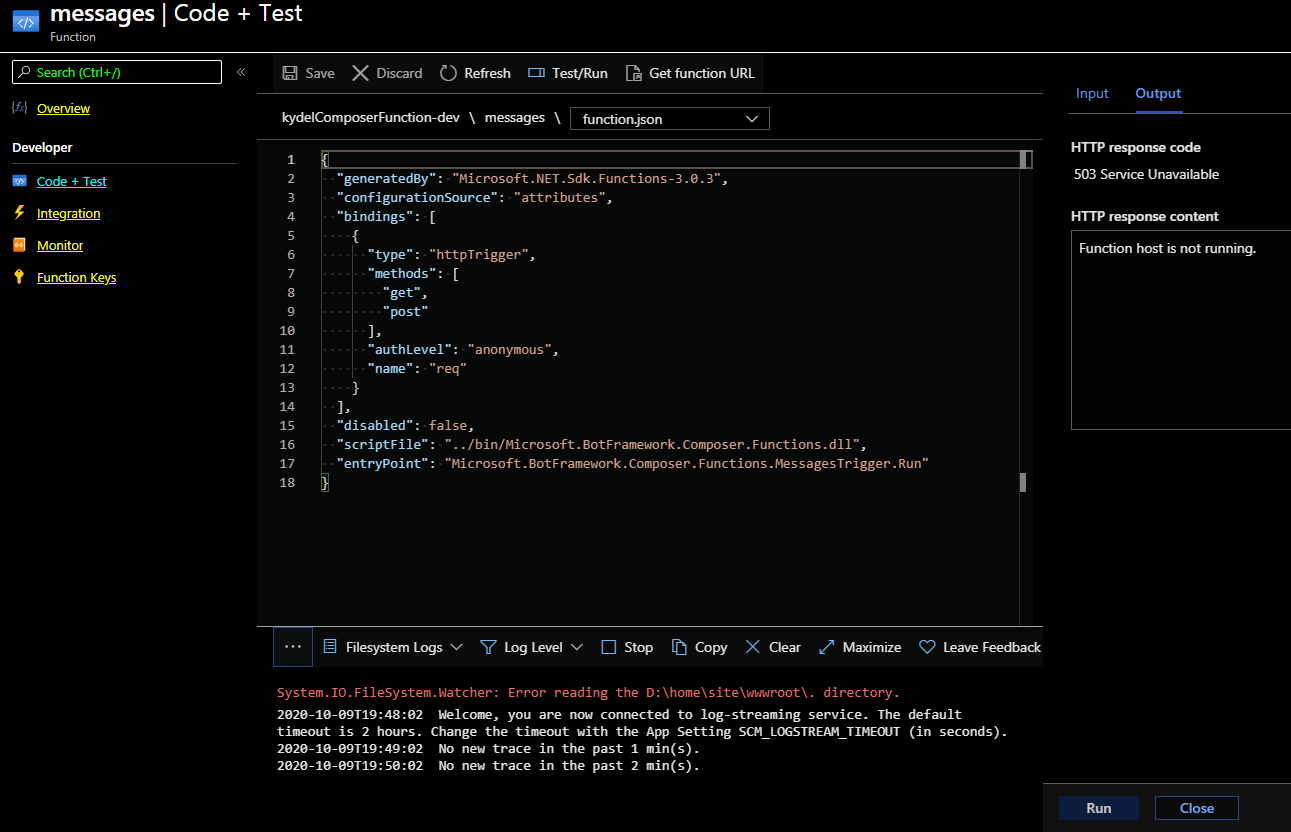
It appears that the Composer script does not deploy the function correctly
v-kydela
on 9 Oct 2020
That is correct and glad that you can replicate. Also, I have no way to debug and see what the issue could be even if I try to download that code from functions and test.
Can you also advise when this can be resolved?
saikumaru
on 10 Oct 2020
Any update team?
saikumaru
on 13 Oct 2020
Hello, sorry I missed this thread. I'll follow the steps and troubleshoot tonight.
 carlosscastro
on 13 Oct 2020
carlosscastro
on 13 Oct 2020
Was able to reproduce the bug. I'll work on a fix, most likely will go out on the next release of composer in early Nov. However once the change hits main, you could use composer from nightly build or from source. If the change only affects the runtime, then you could just update your runtime without updating composer. I won't be sure of the exact scope of the fix until I finish it. I'll update with details on how to get access when that happens.
carlosscastro
on 14 Oct 2020
This is an issue we are having as well with a bot we were hoping to put into production soon.
 joeliir
on 22 Oct 2020
joeliir
on 22 Oct 2020
If you check PR #4570 , it captures the fix to make functions work again and some improvements to have it work in more environemnts. Options to get this fix are 1) wait for the next composer release or 2) eject your runtime and apply that fix to unblock right away. I'd wait until the PR is closed to adopt the fix to make sure we are happy with the final code.
carlosscastro
on 28 Oct 2020
Related issues
 Samirun
·
13Comments
Samirun
·
13Comments
 arafattehsin
·
15Comments
arafattehsin
·
15Comments
 cxbuilders
·
16Comments
cxbuilders
·
16Comments
 gbelenky
·
22Comments
gbelenky
·
22Comments
 Kagigz
·
26Comments
Kagigz
·
26Comments
Most helpful comment
If you check PR #4570 , it captures the fix to make functions work again and some improvements to have it work in more environemnts. Options to get this fix are 1) wait for the next composer release or 2) eject your runtime and apply that fix to unblock right away. I'd wait until the PR is closed to adopt the fix to make sure we are happy with the final code.