Botframework-composer: Though I refer #3320 and #3300 i can't add my publishing profile
Describe the bug
Though I refer #3320 and #3300 i can't add my publishing profile
Version
BotFramework-Composer-1.0.1-linux-x86_64.AppImage
Browser
- [ ] Electron distribution
- [ O ] Chrome
- [ ] Safari
- [ ] Firefox
- [ ] Edge
OS
- [ ] macOS
- [ ] Windows
- [O] Ubuntu
To Reproduce
Steps to reproduce the behavior:
First way
- Generate publish config with the provisionComposer.js
- Create a new profile
- Paste the configuration, choose Publish bot to an Azure Web App (preview) and give a name
- Click Save
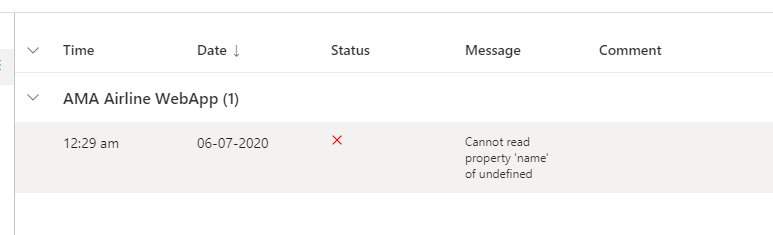
(Click OK on this error message #3320)
Click "Publish to selected profile"
Second way
- i also tried to deleting some elements of profile that are not in the given format.
for example, the given format of 'Publish bot to an Azure Web App(preview) look like this.
"accessToken": "<Access token from az account get-access-token>",
  "name": "<unique name in your subscription>",
  "environment": "dev",
  "settings": {
    "applicationInsights": {
      "InstrumentationKey": "<Instrumentation Key>"
    },
But in my publish profile, there is a "hostname". so i didn't paste it .
it also not works
Third way
I tried to make a file in /BotFrameworkComposer/publishBots/sth/deployment.appsettings.json.
and I just copy the one that i get from configuring provisionComposer.js, and paste on appsettings.json file that i made above
then I just click the button. 'Publish to selected profile'

But it doesn't work tooBut it doesn't work too.
Expected behavior
Publish success
Screenshots


Additional context
 sujeongHeo
All 24 comments
Hi @sujeongHeo, did you have a chance to read this doc about how to publish a bot to Azure?
 zxyanliu
on 5 Jun 2020
zxyanliu
on 5 Jun 2020
Hi @zxyanliu - I have the similar problem. I went through the docs!
 arafattehsin
on 6 Jun 2020
arafattehsin
on 6 Jun 2020
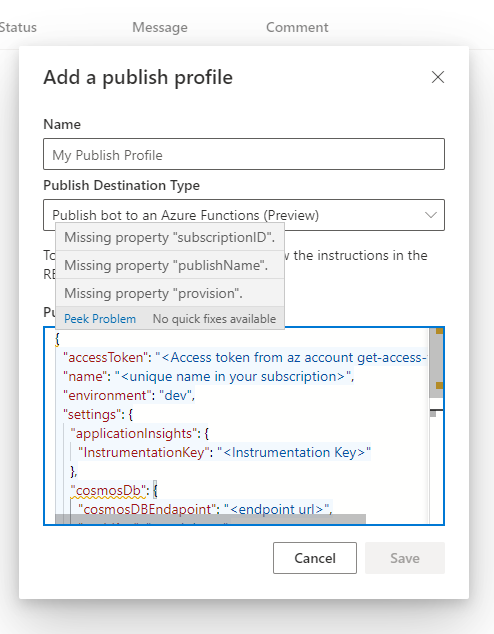
Just to add more information. While I was adding my details; I also noticed some required values which is neither mentioned in the docs (https://docs.microsoft.com/en-us/composer/how-to-publish-bot) nor we are aware what to put in that (except for Subscription ID)
arafattehsin
on 6 Jun 2020
@sujeongHeo and @arafattehsin Thanks for reporting the issue. We will look into the issue and update the doc soon if there is anything missing since we last tested and wrote the publish process.
zxyanliu
on 7 Jun 2020
@zxyanliu Can you please update as what should I put in these values?
{
"subscriptionID": "subscription ID of Azure",
"publishName": "",
"provision": "",
"name":""
}
arafattehsin
on 7 Jun 2020
Hi @sujeongHeo, did you have a chance to read this doc about how to publish a bot to Azure?
@zxyanliu Yeah, I also went through docs,
Ok, I'll wait for docs be updated :)
sujeongHeo
on 7 Jun 2020
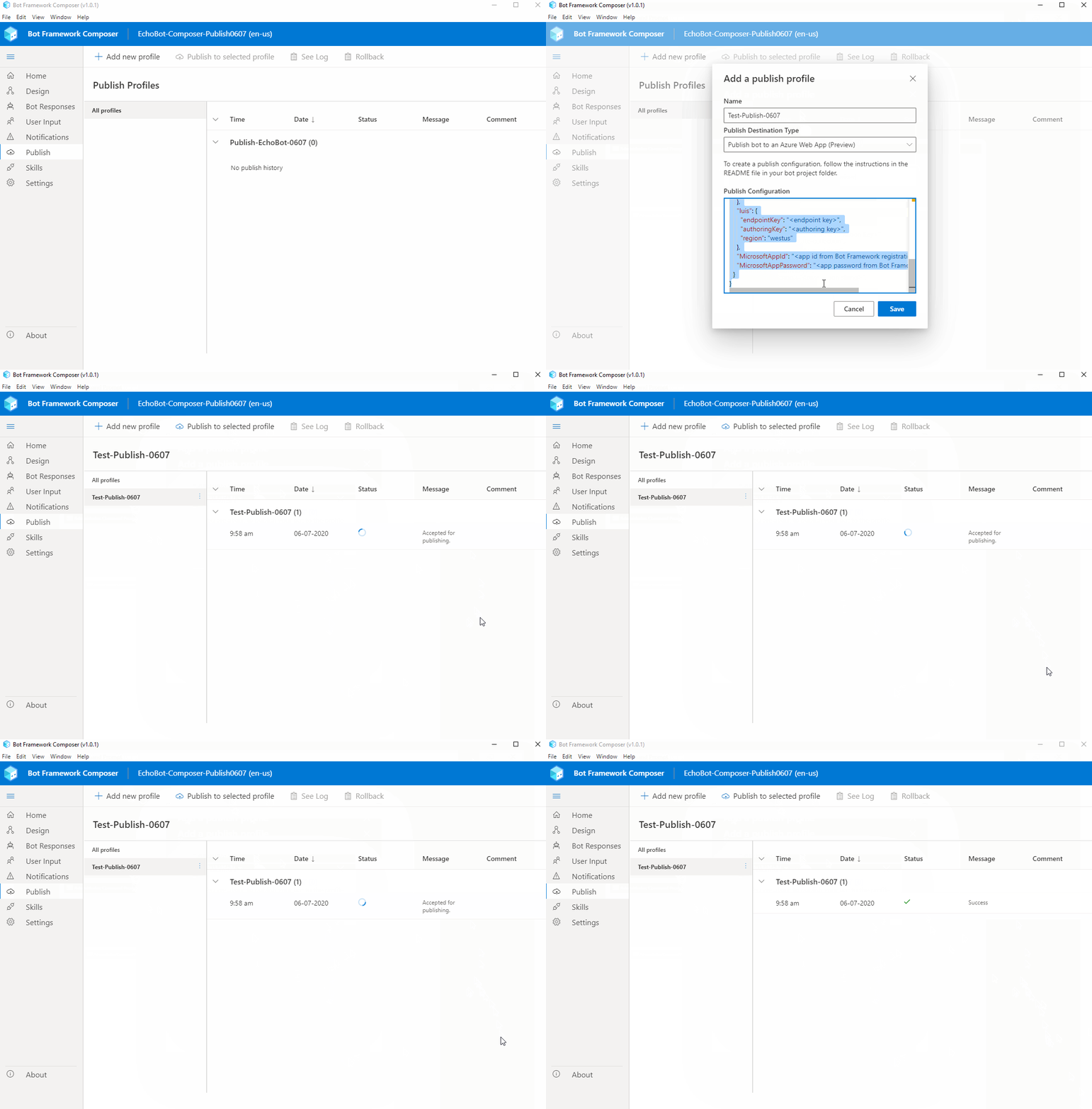
FYI. I just tested publishing a bot to Azure Web App and succeeded, following the instructions in this doc: https://docs.microsoft.com/en-us/composer/how-to-publish-bot
Here is a gif for your reference:
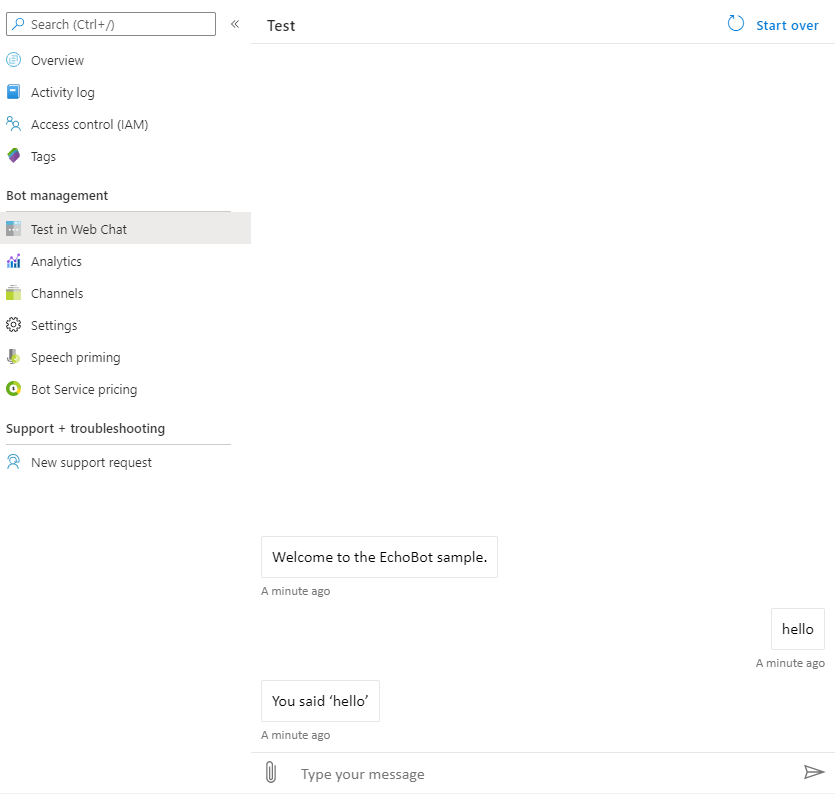
Then, tested in Web Chat in Azure:
Thanks!
zxyanliu
on 7 Jun 2020
@luhan2017 do you know what I should update in the doc for these?
@zxyanliu Can you please update as what should I put in these values?
{
"subscriptionID": "subscription ID of Azure",
"publishName": "",
"provision": "",
"name":""
}
zxyanliu
on 8 Jun 2020
Just to update the team that my issue is not about primarily creating / provisioning the resources from the script. My issue is that I already have the below resources and I want to what should I put in which tag? I've already created.
- Bot Channel Registration
- Web App
So the question is, how do I map my bot using Composer to this? The manifest should have some good description.
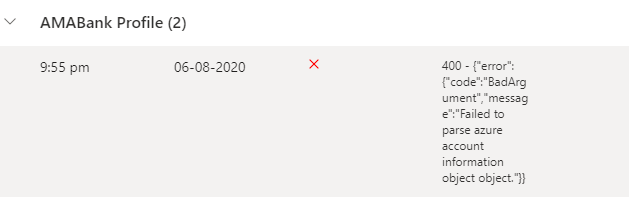
This is what I am getting.
arafattehsin
on 8 Jun 2020
@VanyLaw @zidaneymar Could you help to provide more info ?
 hibrenda
on 8 Jun 2020
hibrenda
on 8 Jun 2020
@arafattehsin
If you just want to deploy your bot to ABS without configuring any other services, you can just use a profile as the following:
{
  "accessToken": "<your access token>",
  "hostname": "<your web app name>",
  "settings": {
    "MicrosoftAppId": "<the appid of your bot channel registration>",
    "MicrosoftAppPassword": "<the app password of your bot channel registration>"
  }
}
If you have luis configured in your composer bot, you should use this:
{
  "accessToken": "<your access token>",
  "hostname": "<your web app name>",
  "luisResource": "<your luis service name>",
  "settings": {
    "luis": {
      "endpointKey": "<your luis endpointKey>",
      "authoringKey": "<your luis authoringKey>",
      "region": "<your luis region, for example westus>"
    },
    "MicrosoftAppId": "<the appid of your bot channel registration>",
    "MicrosoftAppPassword": "<the app password of your bot channel registration>"
  }
}
Or, you can always deploy your bot in visual studio by:
- copy your bot assets to ComposerDialogs folder in the runtime/azurewebapp or runtime/azurefunctions folder.
- update the appsettings.deployment.json
Please let me know if it works for you or not.
@zxyanliu let's work together offline to provide more info for provision profile in the doc .
 luhan2017
on 9 Jun 2020
luhan2017
on 9 Jun 2020
@sujeongHeo For your screenshot 1, this is a known issue, and it won't effect anything, just click OK to work around it. For your screenshot 2, I am wondering if you are using vscode so that composer have issues updating that file, could you close that and try again?
Please let me know if it still not works.
luhan2017
on 9 Jun 2020
@luhan2017 Yes I do have a LUIS associated with my Composer bot and I am really sorry but that was not helpful for me. I can understand why others are also really puzzled with this. Now let me write down something super simple for you and then you may advise what needs to be done.
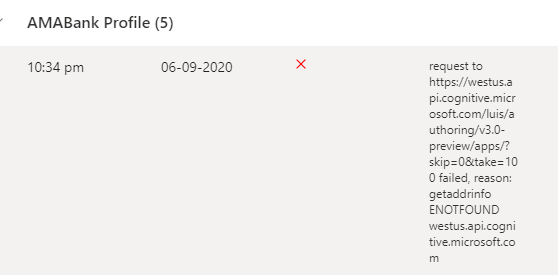
My LUIS Application name in LUIS Portal: AMABank(composer)-amabank.en-us.lu
My LUIS Resource name in Azure Portal: luisdemoservice-Authoring
My App Service (Web App) name created in Azure Portal: amabank
My Bot Channel Registration in Azure Portal: AMABank
Question # 1: When you write endpointKey, where do you get it from?
Question # 2: When you write authoringKey, where do you get it from?
I could only see the endpoint key in the LUIS Portals;
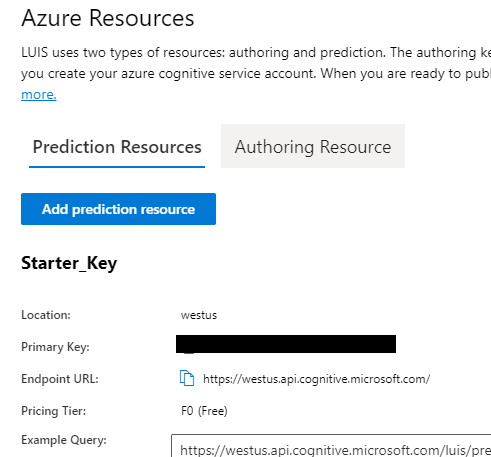
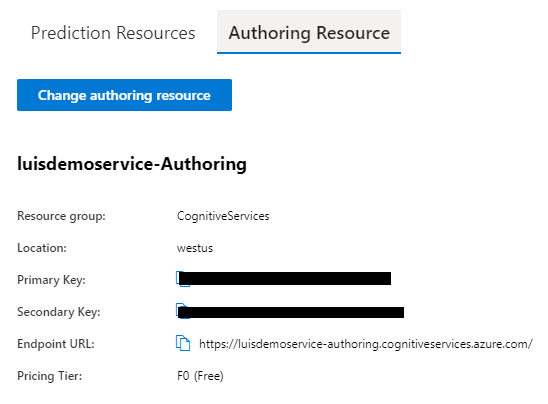
From my Azure Portal, here's the snapshot:
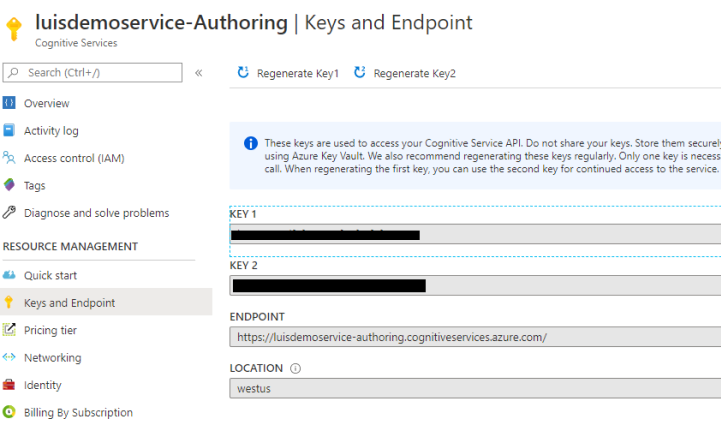
Coming to your Visual Studio publish part:
Unfortunately, I was not able to locate ComposerDialogs in my runtime folder which is there in %appdata\botframeworkcomposer\hostedBots% - I think another detailed walkthrough is needed there later on (in the docs hopefully).
My Request: I want to publish the Bot through Composer (also as a skill) so that I can demonstrate this to the audience that it really works. Appreciate your help in that!
arafattehsin
on 9 Jun 2020
@arafattehsin,
First, for the get address info error in your deployment, I suspect it is because the key and endpoint not match. It is a little bit tricky here, let me explain.
Previously in composer, we auto generated the luis authoring and prediction endpoint by this pattern: https://${luis.region}.api.cognitive.microsoft.com which works fine for a while.
But recently, there is a change in the luis side which update the naming pattern as this:
https://{your-resource-name}.api.cognitive.microsoft.com
see https://docs.microsoft.com/en-us/azure/cognitive-services/luis/developer-reference-resource as a reference.
We updated composer side and expose another field called "luis.endpoint" to fix the above issue, the fix is, if luis:endpoint is not null, just use luis.endpoint as the authoring and prediction endpoint.
But our fix missed one possible scenario like you reported, only authoring endpoint is migrated to this pattern, https://{your-resource-name}.api.cognitive.microsoft.com, the prediction endpoint stays the same as before https://${luis.region}.api.cognitive.microsoft.com.
We are working on another fix #3364 as a P0 item, hope this will unblock you. After this fix is in, you can configure your settings like this, sorry for the inconvenience, will keep you updated.
{
  "accessToken": "<your access token>",
  "hostname": "<your web app name>",
  "luisResource": "<your luis service name>",
  "settings": {
    "luis": {
      "endpointKey": "<your luis endpointKey>",
      "endpoint": "<your luis prediction endpoint>" // if this value is null, we will generate this https://${luis.region}.api.cognitive.microsoft.com
      "authoringKey": "<your luis authoringKey>",
      "authoringEndpoint": "<your luis authoring endpoint>" // if this value is null, we will generate this https://${luis.region}.api.cognitive.microsoft.com
      "region": "<your luis region, for example westus>"
    },
    "MicrosoftAppId": "<the appid of your bot channel registration>",
    "MicrosoftAppPassword": "<the app password of your bot channel registration>"
  }
}
@luhan2017 Thank you very much for this detailed explanation on what's going on behind the scenes. May I know which key do you refer as endpointKey and luisResource? It'd be great if I can get the screenshot or you can refer mine.
I just retried with your configuration and it gives me this error;
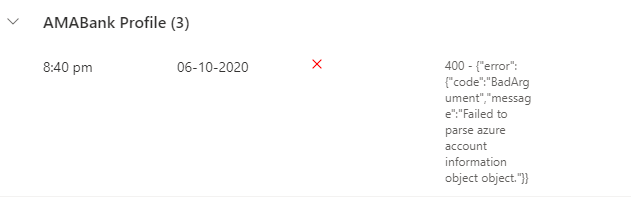
{
  "accessToken": "access token from azure",
  "name": "amabank",
  "settings": {
    "luis": {
      "endpointKey": "_authoring key from the screenshot 1_",
      "authoringKey": "_authoring key from the screenshot 2_",
      "region": "westus",
      "endpoint": "https://westus.api.cognitive.microsoft.com/",
      "authoringEndpoint": "https://luisdemoservice-authoring.cognitiveservices.azure.com/"
    },
    "MicrosoftAppId": "my app id",
    "MicrosoftAppPassword": "my app password"
  },
  "hostname": "amabank",
  "luisResource": "luisdemoservice-authoring"
}
Screenshot 1
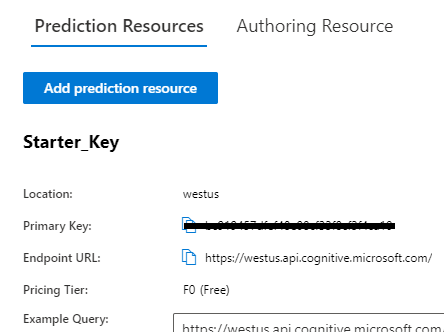
Screenshot 2
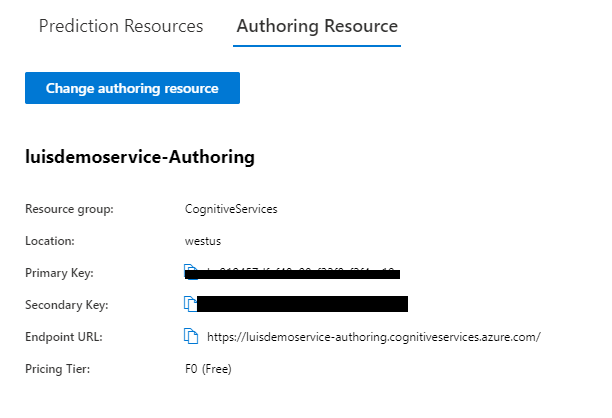
arafattehsin
on 10 Jun 2020
@arafattehsin Your configuration is totally correct, but our fix is still in PR and not merged in master yet. We will try to merge it tomorrow and let you know when it is ready. Sorry for the confusing.
luhan2017
on 10 Jun 2020
@arafattehsin I apologize for the content delay. I will work with @luhan2017 to update this article soon.
@arafattehsin @sujeongHeo Thanks again for your valuable feedback which helps us improve.
zxyanliu
on 10 Jun 2020
@luhan2017 No worries. I appreciate what you all as a team are doing. As I could see your PR - I'd like to make one more comment on it. You talked about the endpoint and authoring urls separately but are you considering the regions as well?
My prediction resource and authoring resource both have got different regions.
arafattehsin
on 11 Jun 2020
@arafattehsin , thanks for your feedback, but there is a limitation in luis that you must author and publish in the same region, that is why we keep the one region setting. please refer to this doc https://docs.microsoft.com/en-us/azure/cognitive-services/luis/luis-reference-regions for more details.
I've just merge the PR in master, could you please check if your scenario works in master now? Thank you very much for assistance and patience on resolving this issue.
luhan2017
on 11 Jun 2020
@luhan2017 Sure. Totally understood the region part. I will check and give it a go! 🤘
arafattehsin
on 11 Jun 2020
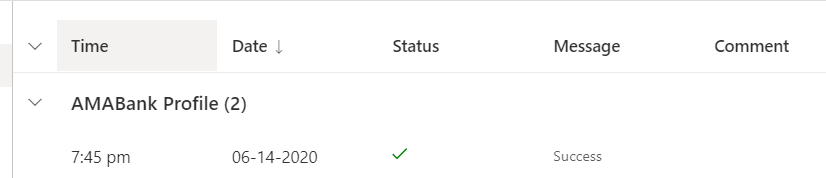
@luhan2017 This is to update you that it works absolutely fine now. I am also writing a blog post on this so folks who come across this issue can easily follow the guidelines. Appreciate your help. 💯
arafattehsin
on 14 Jun 2020
FYI. The doc has been updated in PR 133 which just got approved. The content will go live soon. Thanks again for your feedback.
zxyanliu
on 15 Jun 2020
Thanks @zxyanliu and @luhan2017 - I also wrote some of the detailed stuff here for our creators!
arafattehsin
on 15 Jun 2020
addressed in #3364
hibrenda
on 15 Jun 2020
Related issues
 kalebk
·
16Comments
kalebk
·
16Comments
 stephanbisser
·
21Comments
stephanbisser
·
21Comments
 hraz-msft
·
21Comments
hraz-msft
·
21Comments
 saikumaru
·
18Comments
saikumaru
·
18Comments
 cxbuilders
·
16Comments
cxbuilders
·
16Comments
Most helpful comment
Thanks @zxyanliu and @luhan2017 - I also wrote some of the detailed stuff here for our creators!