Botframework-composer: Get the user information from teams using Bot framework composer
I had created a bot using bot framework composer and integrated it with MS Teams with help of the azure web app. Now I need to get the login user(MS Team) information i.e. the user who using the bot. I need to get the user information and log it in the azure application insights using Bot Framework Composer.
Can I use the component shown below of Bot Framework Composer,

If yes than how can I implement it.
Can anyone help me with it.
 Laxmi30
All 16 comments
Hi @Laxmi30 How much user info do you need? Do you need just the name/username, or more?
 dmvtech
on 2 Nov 2020
dmvtech
on 2 Nov 2020
If you just need the name of the user, you can get that with ${turn.activity.from.name}. Then, you can use the Emit a telemetry track event action to log that into Application Insights. If you want other user properties, you might have to do additional steps depending on what information you are looking for.
dmvtech
on 2 Nov 2020
If you just need the name of the user, you can get that with
${turn.activity.from.name}. Then, you can use theEmit a telemetry track eventaction to log that into Application Insights. If you want other user properties, you might have to do additional steps depending on what information you are looking for.
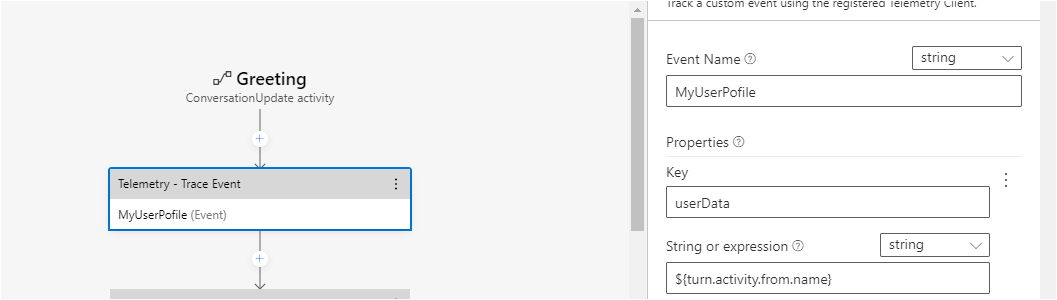
Thank you for your time. I hope the below I implemented is proper. Please correct me if I am wrong.
Laxmi30
on 4 Nov 2020
That should be it. You could also use expression instead of string and supply =turn.activity.from.name if you wish (they're both equivalent).
Were you able to test? Did it work for you?
dmvtech
on 4 Nov 2020
No its not working.
I had implemented it as below,

If I run it on emulator it is giving error as below,

Laxmi30
on 5 Nov 2020
Ok, let me test a couple of things.
dmvtech
on 6 Nov 2020
I am able to reproduce this. I'm not sure what is happening. Stand by.
dmvtech
on 11 Nov 2020
This is the same bug as identified here: https://github.com/microsoft/BotFramework-Composer/issues/4305
Essentially a mismatch with the schema. You can use the fix/workaround there by updating the kind in the dialog (code view) to be Microsoft.TelemetryTrackEventAction instead of Microsoft.TelemetryTrackEvent
dmvtech
on 11 Nov 2020
I didn't understand could you please explain to me.
Laxmi30
on 13 Nov 2020
Of course.
Go into the dialog that has your telemetry activity. Click on Show Code
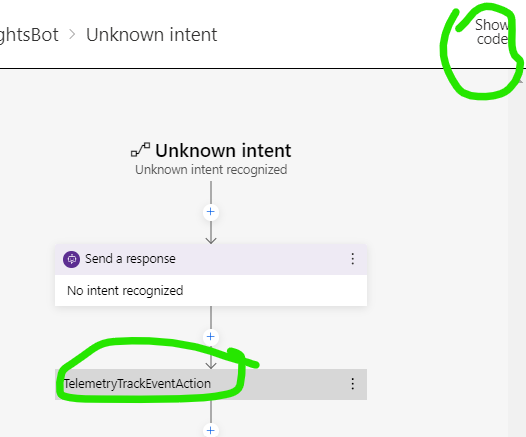
Then, find the action and change fromMicrosoft.TelemetryTrackEvent to Microsoft.TelemetryTrackEventAction :
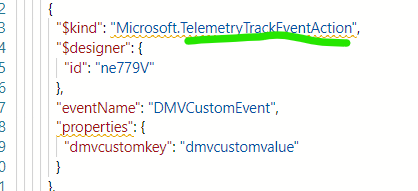
Then start/restart bot and test.
dmvtech
on 13 Nov 2020
Hi @Laxmi30 Just checking in. Were you able to get it working?
dmvtech
on 17 Nov 2020
Yes its working fine.
Thanks a lot.
Laxmi30
on 18 Nov 2020
Hi,
I am unable to retrieve the user info from the team to store it in application insights.
I had tried with ${turn.activity.from.name} in bot framework composer. But it's only working for emulator and not in ms teams.
Could u please help me with it?
Laxmi30
on 27 Nov 2020
That should work. It works for me in MS Teams. Does it not even work in a simple send activity? Can you share more about your dialog and how you are using it?
dmvtech
on 30 Nov 2020
Please find below,

And also the bot is not getting published as expected.
Could you please help me?
Laxmi30
on 1 Dec 2020
Hi @Laxmi30 My apologies! If you are doing that in the Greeting, that is a ConversationUpdate activity. And in MS Teams, this _only ever gets fired once_ for every user. See more info here:
You can easily test that that string interpolation/expression works is in another dialog (say in unknown intent). If you want to ensure it works in Greeting/ConversationUpdate, you can could create another test user in Teams (the other option is to create a brand new bot [bot registration], but that is a pain).
And also the bot is not getting published as expected.
Please take a look here and here for common (or uncommon) publishing issues related to publishing from Composer. If you don't find the answer there, please open a new issue or question with all the pertinent information.
dmvtech
on 1 Dec 2020
Related issues
 cxbuilders
·
16Comments
cxbuilders
·
16Comments
 kalebk
·
16Comments
kalebk
·
16Comments
 arafattehsin
·
15Comments
arafattehsin
·
15Comments
 stephanbisser
·
21Comments
stephanbisser
·
21Comments
 selmi5
·
17Comments
selmi5
·
17Comments