Botframework-composer: Unable to execute because the specified command or file could not be found error when running Echo bot example
When I run the Echo Bot example I get this error message : Unable to execute because the specified command or file could not be found. Possible reasons: * You misspelled an integrated dotnet command. * You intended to run a .NET Core program, but dotnet-bin / Debug / netcoreapp2.1 / BotProject.dll does not exist. * You intended to run a global tool, but the executable with the name indicated above dotnet was not found in the PATH.
I have all the prerequisites:
Node.js: version 12.13.0
Yarn: latest stable version
Bot Framework Emulator: latest stable version
.NET Core SDK 2.2: required to test your bot
I have also .Net Core v3.1 & v 3.0 installed in my machine
 selmi5
All 17 comments
I had a same error in my environment.
Windows Server 2016 1607
Node.js: v12.14.1
.Net Core SDK 3.2.202
Yarn 1.21.1
 yomikakokei
on 3 Feb 2020
yomikakokei
on 3 Feb 2020
It seems like a dotnet build failure. I met this problem too when I try to start a bot which is created last month. Could you try to create a new bot to see whether this still happens?
If that still not works, you can try to open and build the botproject in the bot folder and paste your detailed error message here.
 luhan2017
on 3 Feb 2020
luhan2017
on 3 Feb 2020
When I run the Echo Bot example I get this error message : Unable to execute because the specified command or file could not be found. Possible reasons: * You misspelled an integrated dotnet command. * You intended to run a .NET Core program, but dotnet-bin / Debug / netcoreapp2.1 / BotProject.dll does not exist. * You intended to run a global tool, but the executable with the name indicated above dotnet was not found in the PATH.
I have all the prerequisites:
Node.js: version 12.13.0
Yarn: latest stable version
Bot Framework Emulator: latest stable version
.NET Core SDK 2.2: required to test your botI have also .Net Core v3.1 & v 3.0 installed in my machine
Do you run it by clicking start in composer? If so, you need to use SDK version bigger than 3.0. If it still throw exception, maybe it's because dotnet build failed with some package version compatibility. you can check it by running dotnet build command under your samplebot folder.
 VanyLaw
on 3 Feb 2020
VanyLaw
on 3 Feb 2020
I'm getting this when I click on "Start Bot".

I have the following .NET Core versions installed:
Runtimes
Microsoft.AspNetCore.All 2.1.12 [C:\Program Files\dotnet\shared\Microsoft.AspNetCore.All]
Microsoft.AspNetCore.All 2.1.14 [C:\Program Files\dotnet\shared\Microsoft.AspNetCore.All]
Microsoft.AspNetCore.All 2.1.15 [C:\Program Files\dotnet\shared\Microsoft.AspNetCore.All]
Microsoft.AspNetCore.All 2.2.8 [C:\Program Files\dotnet\shared\Microsoft.AspNetCore.All]
Microsoft.AspNetCore.App 2.1.12 [C:\Program Files\dotnet\shared\Microsoft.AspNetCore.App]
Microsoft.AspNetCore.App 2.1.14 [C:\Program Files\dotnet\shared\Microsoft.AspNetCore.App]
Microsoft.AspNetCore.App 2.1.15 [C:\Program Files\dotnet\shared\Microsoft.AspNetCore.App]
Microsoft.AspNetCore.App 2.2.8 [C:\Program Files\dotnet\shared\Microsoft.AspNetCore.App]
Microsoft.AspNetCore.App 3.0.0-preview9.19424.4 [C:\Program Files\dotnet\shared\Microsoft.AspNetCore.App]
Microsoft.AspNetCore.App 3.1.0-preview2.19528.8 [C:\Program Files\dotnet\shared\Microsoft.AspNetCore.App]
Microsoft.AspNetCore.App 3.1.0 [C:\Program Files\dotnet\shared\Microsoft.AspNetCore.App]
Microsoft.AspNetCore.App 3.1.1 [C:\Program Files\dotnet\shared\Microsoft.AspNetCore.App]
Microsoft.NETCore.App 2.1.12 [C:\Program Files\dotnet\shared\Microsoft.NETCore.App]
Microsoft.NETCore.App 2.1.14 [C:\Program Files\dotnet\shared\Microsoft.NETCore.App]
Microsoft.NETCore.App 2.1.15 [C:\Program Files\dotnet\shared\Microsoft.NETCore.App]
Microsoft.NETCore.App 2.2.8 [C:\Program Files\dotnet\shared\Microsoft.NETCore.App]
Microsoft.NETCore.App 3.0.0-preview9-19423-09 [C:\Program Files\dotnet\shared\Microsoft.NETCore.App]
Microsoft.NETCore.App 3.1.0-preview2.19525.6 [C:\Program Files\dotnet\shared\Microsoft.NETCore.App]
Microsoft.NETCore.App 3.1.0 [C:\Program Files\dotnet\shared\Microsoft.NETCore.App]
Microsoft.NETCore.App 3.1.1 [C:\Program Files\dotnet\shared\Microsoft.NETCore.App]
Microsoft.WindowsDesktop.App 3.0.0-preview9-19423-09 [C:\Program Files\dotnet\shared\Microsoft.WindowsDesktop.App]
Microsoft.WindowsDesktop.App 3.1.0-preview2.19525.6 [C:\Program Files\dotnet\shared\Microsoft.WindowsDesktop.App]
Microsoft.WindowsDesktop.App 3.1.0 [C:\Program Files\dotnet\shared\Microsoft.WindowsDesktop.App]
Microsoft.WindowsDesktop.App 3.1.1 [C:\Program Files\dotnet\shared\Microsoft.WindowsDesktop.App]
SDKs
2.1.803 [C:\Program Files\dotnet\sdk]
2.2.207 [C:\Program Files\dotnet\sdk]
3.0.100-preview9-014004 [C:\Program Files\dotnet\sdk]
3.1.100-preview2-014569 [C:\Program Files\dotnet\sdk]
3.1.101 [C:\Program Files\dotnet\sdk]
3.1.200-preview-014883 [C:\Program Files\dotnet\sdk]
 aalmada
on 3 Feb 2020
aalmada
on 3 Feb 2020
Running into the same issue with newly created Bots as well:

Note, my exception message is translated to German somehow, I guess due to my OS language.
 InDieTasten
on 4 Feb 2020
InDieTasten
on 4 Feb 2020
hi @selmi5, I found this issue is because the original version package references were remove from myget/nuget, so it will make the build failed. Try to use 4.7.2 version to bypass this issue. We will update it ASAP.
FYI.
you can change the botproject.csproj under your sample bot folder like this to bypass.

VanyLaw
on 4 Feb 2020
I had a same error in my environment.
Windows Server 2016 1607
Node.js: v12.14.1
.Net Core SDK 3.2.202
Yarn 1.21.1
I could run it to use workaround which VanyLaw wrote. (I needed to install .Net Core 2.2 too.)
yomikakokei
on 5 Feb 2020
@yomikakokei we will update to netcoreapp3.1 soon. At that time .Net Core 2.2 require will be removed.
VanyLaw
on 5 Feb 2020
I'm also having the same issue. I wonder why the message is in Spanish. My OS is in Spanish, but the language of my browser (Chrome) is set to English.
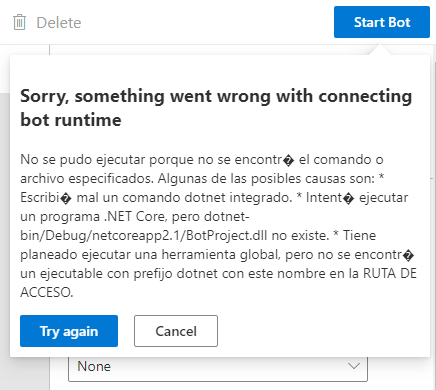
On the other hand, when I open the solution with Visual Studio, the following errors are found:

The errors are found no matter the template I use.
 hinojosachapel
on 7 Feb 2020
hinojosachapel
on 7 Feb 2020
I am also having same issue , anyone has solutions
 jssuthahar
on 7 Feb 2020
jssuthahar
on 7 Feb 2020
@jssuthahar
This issue is related with the output solution not able to compile.
Go the location of your generated bot (The one you set when creating a new bot, defaults to User Documents > Composer).
Run dotnet build in your bot directory and see the errors.
Then try to resolve the build errors. There can be a range of sources for the build not to run.
Wrongly configured Nuget sources, misaligned package version etc.
This thread has a couple of suggestions which seem to cover all the cases.
Once the build succeeds, launching the bot via Composer also works.
Good luck
InDieTasten
on 8 Feb 2020
@InDieTasten, yes I have open Project in VS 2019 and modified Target version to .Net Core 2.2 and it's started Build and run the application in VS, but trying to"Start Run" in composer, its give same issue
"You intended to execute a .NET Core program, but dotnet-bin/Debug/netcoreapp2.1/BotProject.dll does not exist. * You intended to run a global tool, but a dotnet-prefixed executable with this name could not be found on the PATH."
jssuthahar
on 8 Feb 2020
Hi, Ignore my previous steps, I have just followed below one started working, I have open the project and updated ,CS project reference like below
<PackageReference Include="Microsoft.AspNetCore.All" Version="2.1.4" />
    <PackageReference Include="Microsoft.Bot.Builder" Version="4.7.1" />
    <PackageReference Include="Microsoft.Bot.Builder.ApplicationInsights" Version="4.7.1" />
    <PackageReference Include="Microsoft.Bot.Builder.Azure" Version="4.7.1" />
    <PackageReference Include="Microsoft.Bot.Builder.Dialogs.Adaptive" Version="4.7.1-preview" />
    <PackageReference Include="Microsoft.Bot.Builder.Dialogs.Debugging" Version="4.7.1-preview" />
    <PackageReference Include="Microsoft.Bot.Builder.Dialogs.Declarative" Version="4.7.1" />
    <PackageReference Include="Microsoft.Bot.Builder.Integration.ApplicationInsights.Core" Version="4.7.0-preview-191208-1" />
    <PackageReference Include="Microsoft.Bot.Builder.Integration.AspNet.Core" Version="4.7.0-preview-191208-1" />
    <PackageReference Include="Microsoft.Bot.Builder.Dialogs" Version="4.7.1" />
    <PackageReference Include="Microsoft.Bot.Connector" Version="4.7.1" />
    <PackageReference Include="MSTest.TestFramework" Version="1.4.0" />
    <PackageReference Include="StyleCop.Analyzers" Version="1.2.0-beta.66">
@team: Please update Project template nuget packages, its may resolve for all the issue
jssuthahar
on 8 Feb 2020
I build correct project (2.1 current), then I update all packages and build on 2.2.
I have update this line:
https://github.com/microsoft/BotFramework-Composer/blob/028775b3c5fcf8345c52203bd11269bfed558378/Composer/packages/server/src/models/connector/csharpBotConnector.ts#L153-L157
2.1 and 2.2 build correct on dotnet, but file not found.
dir is not correct, dir selected is where I save my files, not where WebApp is.
My folder projects

 andreatosato
on 10 Feb 2020
andreatosato
on 10 Feb 2020
@andreatosato : You are correct Please don't change dot net core version .
1.Go the location of your generated bot (The one you set when creating a new bot, defaults to User Documents > Composer).
- Open project in visual studio
- Edit your .csproject for now(@team : maybe they will update project template later )
- modify following
<PackageReference Include="Microsoft.AspNetCore.All" Version="2.1.4" /> <PackageReference Include="Microsoft.Bot.Builder" Version="4.7.1" /> <PackageReference Include="Microsoft.Bot.Builder.ApplicationInsights" Version="4.7.1" /> <PackageReference Include="Microsoft.Bot.Builder.Azure" Version="4.7.1" /> <PackageReference Include="Microsoft.Bot.Builder.Dialogs.Adaptive" Version="4.7.1-preview" /> <PackageReference Include="Microsoft.Bot.Builder.Dialogs.Debugging" Version="4.7.1-preview" /> <PackageReference Include="Microsoft.Bot.Builder.Dialogs.Declarative" Version="4.7.1" /> <PackageReference Include="Microsoft.Bot.Builder.Integration.ApplicationInsights.Core" Version="4.7.0-preview-191208-1" /> <PackageReference Include="Microsoft.Bot.Builder.Integration.AspNet.Core" Version="4.7.0-preview-191208-1" /> <PackageReference Include="Microsoft.Bot.Builder.Dialogs" Version="4.7.1" /> <PackageReference Include="Microsoft.Bot.Connector" Version="4.7.1" /> <PackageReference Include="MSTest.TestFramework" Version="1.4.0" /> <PackageReference Include="StyleCop.Analyzers" Version="1.2.0-beta.66"> - Build the solutions for now
- Try maybe it will work
jssuthahar
on 10 Feb 2020
<PackageReference Include="StyleCop.Analyzers" Version="1.2.0-beta.66">
      <PrivateAssets>all</PrivateAssets>
      <IncludeAssets>runtime; build; native; contentfiles; analyzers</IncludeAssets>
</PackageReference>
 cwhitten
on 13 Feb 2020
cwhitten
on 13 Feb 2020
Related issues
 yochay
·
15Comments
yochay
·
15Comments
 jakeatmsft
·
21Comments
jakeatmsft
·
21Comments
 sujeongHeo
·
24Comments
sujeongHeo
·
24Comments
 cxbuilders
·
16Comments
sujeongHeo
·
15Comments
cxbuilders
·
16Comments
sujeongHeo
·
15Comments