Woocommerce: Unable to retrieve tax rate row when buyer's country has a county with a space in it
Describe the bug
Certain countries (e.g. GB) have counties which are treated as states for the purposes of things like tax rates.
If you attempt to create an entry in the tax table for such a county, and that county includes spaces in its name (e.g. Isle of Wight), after saving the tax rate table, the state code loses its spaces (e.g. becomes ISLEOFWIGHT)
Unfortunately, this means that buyers that enter "Isle of Wight" for their County during checkout will NOT see the tax rate you have set up for them in the tax table. (Not surprisingly, if they enter ISLEOFWIGHT in the checkout form, that works.)
Screenshots

Expected behavior
A clear and concise description of what you expected to happen.
Isolating the problem (mark completed items with an [x]):
- [x] I have deactivated other plugins and confirmed this bug occurs when only WooCommerce plugin is active.
- [x] This bug happens with a default WordPress theme active, or Storefront.
- [x] I can reproduce this bug consistently using the steps above.
WordPress Environment
WooCommerce 3.7 RC1
 allendav
All 56 comments
This happens because expect a "State code" instead of a name, since there's no list of "states" for UK, and we don't include that list on WooCommerce like we does for other countries.
 claudiosanches
on 29 Aug 2019
claudiosanches
on 29 Aug 2019
@allendav @claudiosan - Is there any workaround that we can offer the customer? Is this slated for fixing in a future version of WC? I'm asking as I don't see anything with regards to version numbers.
 RiaanKnoetze
on 15 Sep 2019
RiaanKnoetze
on 15 Sep 2019
@RiaanKnoetze I have not looked at this in detail, but this seems hard to fix. How feasible would it be to use only zip codes as a workaround for setting tax? Does the UK have different zip code ranges for different counties?
 vedanshujain
on 2 Oct 2019
vedanshujain
on 2 Oct 2019
@vedanshujain - I somehow missed the follow up question here :(
How feasible would it be to use only zip codes as a workaround for setting tax? Does the UK have different zip code ranges for different counties?
Not particularly feasible imo - each country deal with that differently. As for UK zipcodes, they're based around towns/cities rather than counties or regions.
RiaanKnoetze
on 10 Dec 2019
Hi there!
I created a PR as a proof of concept to address the problem. It seems like the removal of space is only applicable to US and Canada. If so, then https://github.com/woocommerce/woocommerce/pull/25205 will allow UK rates to be inserted and search via find_rates correctly.
This breaks the "2 letter state code" requirement though.
 harriswong
on 10 Dec 2019
harriswong
on 10 Dec 2019
How quickly can this be patched please? This bug is costing me money every day.
 snooplewand
on 12 Dec 2019
snooplewand
on 12 Dec 2019
Any update Automatic or Woo-Commerce, I'm managing 2 more projects in January and will not be able to use WordPress if this issue isn't fixed, I've built similar platforms on Shopify, Big-Commerce and not encountered this bug, please advise back.
 Wassmo1
on 17 Dec 2019
Wassmo1
on 17 Dec 2019
What if I hide the field, and just add another box within the address section where a customer could enter the information, as it wouldn't be linked to the "State-County" field it shouldn't trigger the bug, but allow me to collect the "county" with the address fields?
Wassmo1
on 17 Dec 2019
I was hoping for an update too. Any news? @Wassmo1, it isn’t a wordpress issue it’s just jetpack. I guess you could always use woocommerce and taxjar which would achieve essentially the same thing but taxjar is an additional monthly subscription. I already pay for jetpack so am expecting them to fix it. It not soon I’ll have to cancel and move to taxjar.
snooplewand
on 17 Dec 2019
Hey @snooplewand I have a business plan with woo-commerce so have jetpack included, I don't mind subscribing to taxjar if that will fix the problem? tks
Wassmo1
on 17 Dec 2019
Also, does this only affect UK Counties? so say for instance a U.S.A customer inputs "North Carolina" would it work as expected?
Wassmo1
on 17 Dec 2019
@Wassmo1 if states/counties are listed in here https://github.com/woocommerce/woocommerce/blob/master/i18n/states.php, then the dropdown should populate. North Carolina is in that file and will map to NC.
harriswong
on 17 Dec 2019
Hi @harriswong, I'm not sure what that means, "the drop-down should populate" , does that mean it would work correctly if they input it as a two-word state? tks
Wassmo1
on 17 Dec 2019
@Wassmo1 https://github.com/Automattic/woocommerce-services/issues/1600#issuecomment-564261947
The dropdown for the counties/states in the screenshot I pasted in the above comment.
harriswong
on 17 Dec 2019
Hi @harriswong, I'm not sure what that means, "the drop-down should populate" , does that mean it would work correctly if they input it as a two-word state? tks
The issue only relates to manually entered counties, such as in the UK. For countries where counties are pre-selectable from the dropdown it isn't an issue. I reported this back in February to Taxjar also and my understanding is that it has since been fixed. Just not through Jetpack :(
snooplewand
on 17 Dec 2019
Thanks @harriswong & @snooplewand , can you advise if subscribing to taxjar fixes the problem? and do you need to unsubscribe from jetpack or is it ok to keep alongside taxjar?
tks
Wassmo1
on 18 Dec 2019
Thanks @harriswong & @snooplewand , can you advise if subscribing to taxjar fixes the problem? and do you need to unsubscribe from jetpack or is it ok to keep alongside taxjar?
tks
Taxjar told me months back that the issue was fixed within their platform but not within Jetpack. If you wanted to go down the Taxjar route you wouldn't necessarily need to cancel Jetpack, as Jetpack offers more than just the auto tax calculation, but I certainly wouldn't have both running the tax calculations together. Just disable the tax calculation within Jetpack and let Taxjar calculate it for you instead. Alternatively, if Jetpack can give us an indication of when this will be sorted you won't need to do any of this!
snooplewand
on 20 Dec 2019
Another month has passed. Any news JetPack?
snooplewand
on 7 Jan 2020
We're still waiting Jetpack, can you update us with this issue which has been outstanding for nearly 1 year now, ...isn't Jetpack a part of Automatic/Wordpress/WooCommerce?
Wassmo1
on 7 Jan 2020
Another JetPack update (8.1), another let down. Still no patch. What's going on JetPack? Communication also seems to have stopped again. When can we expect an update please?
snooplewand
on 16 Jan 2020
Hi Woocommerce/Automatic, can we please get an update on this, it needs to get resolved quickly, it's been outstanding for nearly 1 year now!!
Wassmo1
on 21 Jan 2020
@Wassmo1 this issue have already passed on our triage, we confirmed that we intent to fix it, and we'll fix as soon as possible, but it's a low priority right now.
claudiosanches
on 21 Jan 2020
Hi Claudio, it isn't a low priority for me and my client, we currently have to check every transaction to check if the Tax has been missed correctly furthermore this has been outstanding for nearly 1 year, how long does it take for you to address "low priority" issues?
Wassmo1
on 21 Jan 2020
@Wassmo1 this issue have already passed on our triage, we confirmed that we intent to fix it, and we'll fix as soon as possible, but it's a low priority right now.
"It's a low priority?" You have to be joking right? This is costing business owners like us thousands of pounds. Plus you confirmed that we 'intent' to fix it back in February 2019 when I first reported this bug. The fact you are telling us now that you still intend to fix it doesn't fill me with confidence. We need this fixed now as a matter of urgency! I guess it's time to take this to social media so everyone using JetPack are fully aware of the risks. Not only the risks that this bug poses financially to store owners, but also the risks of how poor, slow and irresponsible JetPack support are to react to major bugs like this.
snooplewand
on 21 Jan 2020
@Wassmo1 This is open since "Aug 7, 2019", so not even close to an 1 year as you are reporting, if you give me the chance to fix, we probably can as soon as possible.
claudiosanches
on 21 Jan 2020
@snooplewand I'm on it already, I understand that for you is a matter of urgency, if you can be calm we can come to a solution.
claudiosanches
on 21 Jan 2020
It is hard to remain calm when the system is causing us a lot of issues and for so long even if it was August, it's now nearly February the Next Year, It also seems like the solution shouldn't be too difficult.
Can you advise what you will be doing to fix this, and also how long it will take to fix, I hope this matter is no longer a low priority fix but being addressed right now.
Wassmo1
on 21 Jan 2020
@Wassmo1 we are currently releasing 3.9, so we can fix it now for 3.10, that will get a beta version on February, so we can fix it right now, but I like again to ask you both to remain calm, I'm just trying to solve it and help. I said that on the overall of all issues it is a low priority, this doesn't mean that we don't care or don't intent to fix, so please, be calm and let me fix it.
claudiosanches
on 21 Jan 2020
@claudiosanches This particular ticket may be dated August but I actually reported this directly to JetPack Support myself back in February 2019, so yes we are in fact coming up to a full year now! You shouldn't be surprised to hear that there have been numerous conversations outside of this ticket. For example, this ticket here which dates back to April: Automattic/woocommerce-services#1600 which was then consolidated into this ticket.
snooplewand
on 21 Jan 2020
@snooplewand still not listed in here, so we are talking action now, if it started in this repository back in February, for sure we should fixed it already, if is not on this repository makes hard for us to calculate the resources we need to fix it, so feel free to start an issue directly here next time you come across some bug on WooCommerce.
claudiosanches
on 21 Jan 2020
Thank you @claudiosanches. We are all eagerly awaiting an update and hope that you can address this as a matter of urgency. Whilst it's reassuring to know you are now looking at this it's disappointing that JetPack didn't themselves open the issue in this repository back in February. It shouldn't be expected of the customer to do this.
snooplewand
on 21 Jan 2020
@snooplewand I agree with you, sadly we didn't got our attention before on Automattic/woocommerce-services#1600, probably someone got confuse about reporting it to Jetpack instead of WooCommerce, but as I said in WooCommerce we are only aware of it since August, and I'm looking to fix it for the next release circle.
claudiosanches
on 21 Jan 2020
@snooplewand @Wassmo1 While I'm checking on how to make this field more flexible, it seems that I ended up finding something that can help you now.
For GB there's only one tax, so the correct way to set it is just one single line for the whole country like:
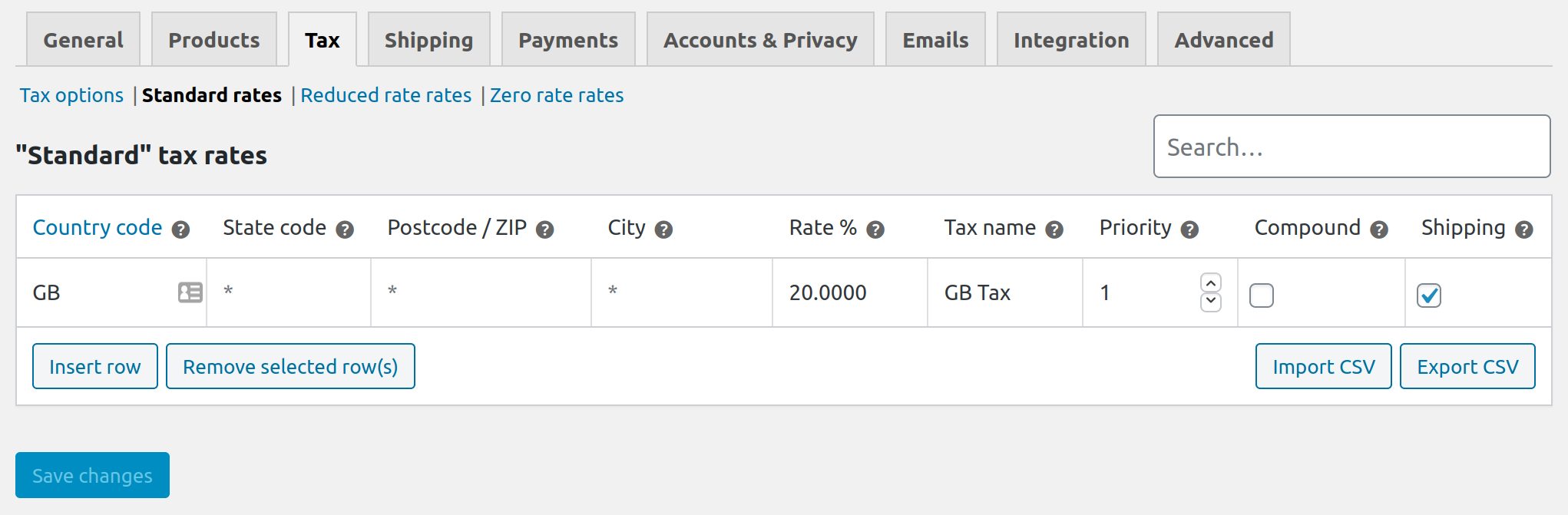
Can you please confirm if it solves the problem with GB for now?
claudiosanches
on 23 Jan 2020
Hi Claudio,
I'm afraid to say that doesn't work no. This is something I tried myself a long time ago and for peace of mind I have just tested again. The VAT still clears as soon as there's a space followed by a letter/word in the county.
Plus, it is not true that there is only one rate for GB. Goods exported to the Islands can be zero-rated, such as Guernsey and Jersey for example.
snooplewand
on 23 Jan 2020
Hi Claudio, I've just tested it as snooplewand did and unfortunately as soon as you enter a two worded county it removes the Tax.
Thanks for making a move on this now and keeping us posted.
Wassmo1
on 24 Jan 2020
@snooplewand @Wassmo1 But you both understand that is overkill to fill state, city and postcode? You can just set one of those, mostly because on the format that it's been reported, looks like that there's one postcode per city, you could just set those taxes per city name or postcode.
So you don't need to fill the state, you don't are required to fill all those fields, it aren't intend to be set with all that information, it's just a overkill and bad for performance.
For what both of you are reporting, seems like the biggest problem is the understanding of how to proper set tax rows. Solving it probably should be easier than wait for a fix in the next release, because just allowing spaces in the "county/state" field will not fix the fact that you both seems to be setting it incorrect.
claudiosanches
on 24 Jan 2020
Not overkill in the slightest Claudio. Very common practice and REQUIRED by every courier company I have ever worked with. To say the software isn't 'intended' to collect a City, Postcode and County all at once is, well, wow, just wow. I'm speechless 😂. I can't imagine anyone at WooCommerce agreeing, but I will ask them on Twitter 🙂👍.
snooplewand
on 24 Jan 2020
@snooplewand
Very common practice and REQUIRED by every courier company I have ever worked with.
For sure for "Courier companies" it's just fine, you will need to fill all information so they can collect and ship your goods, but we are talking about calculating taxes on WooCommerce. Where you don't need to set all address fields in the tax settings, so I don't understand what you are relating different subjects on it...
Also not sure why, but seems like everything I say it's funny for you without trying to understand... I'm just trying to help here, and understand why you both are setting it incorrectly.
Let's try again, it there's NOTHING related to any "courier companies", it is only for calculate taxes on WooCommerce in the follow screen, okay? At least the subject of this issue is about setting taxes and not courier companies.
There's no need to fill all those fields:
If there's 20% tax for all GB, the format above will already cover all conties/states.
Also why fill city and postcode at the same time? On GB postcodes doesn't represent conties/states and cities like in other parts of the world?
Also note that * placeholder, it indicates that matches with any entry, this don't means or indicate that are required fields.
claudiosanches
on 27 Jan 2020
Hi Claudio,
I'll answer your questions, but first I think you need to test the bug your side before accusing us of using the software incorrectly. It's clear from yoru comments above that you haven't tested this for yourself as by doing so you will see that it doesn't work.
Even if you have the asterisk placeholders you will find that as soon as you enter a county followed by a space and a letter it will break the tax calculation. The tax rates isn't the issue here.
In answer to your questions:
1) "For sure for "Courier companies" it's just fine, you will need to fill all information so they can collect and ship your goods, but we are talking about calculating taxes on WooCommerce. Where you don't need to set all address fields in the tax settings, so I don't understand what you are relating different subjects on it..."
I ship worldwide, not just in the UK, and as you know taxes vary across states, so collecting the state field at checkout is required. Plus, if I don't collect a state, I won't be able to generate shipping labels as the state is required with the courier.
2) "Also not sure why, but seems like everything I say it's funny for you without trying to understand... I'm just trying to help here, and understand why you both are setting it incorrectly."
This isn't funny for me. Quite the opposite. This is serious and something I have spent a lot of my time trying to help others and WooCommerce diagnose so that we can work towards a fix. It seems however that you have resorted to accusing us of using the software "incorrectly" rather than focusing on fixing the problem. Leaving the state code empty like that doesn't work. We have confirmed this several times before.
3) "Also why fill city and postcode at the same time? On GB postcodes doesn't represent conties/states and cities like in other parts of the world?"
Again, I have to collect the county at checkout for shipping labels, even within the UK couriers require a county. In terms of filling it in at the tax rates screen, I can clear all the tax rates and leave asterisk placeholders but as soon as you put a county with a space followed by a letter it will still break.
I'm concerned by the questions you're asking me here as it demonstrates that you don't fully understand the problem. I don't know how else to explain it. I can only advise that you try what we have already discussed and using your standard tax rates choose UK at checkout and then manually enter a county such as "TEST TEST". You'll find the tax clears to zero.
snooplewand
on 27 Jan 2020
I'll answer your questions, but first I think you need to test the bug your side before accusing us of using the software incorrectly. It's clear from yoru comments above that you haven't tested this for yourself as by doing so you will see that it doesn't work.
I have tested! That's why I found this inconsistency of how you both are setting those taxes. That's why I'm checking it with you.
I ship worldwide, not just in the UK, and as you know taxes vary across states, so collecting the state field at checkout is required. Plus, if I don't collect a state, I won't be able to generate shipping labels as the state is required with the courier.
You can keep selling and shipping worldwide, and you can keep collecting the state field at the checkout. I didn't say in any moment that you don't need to, I don't know if you dislike me, or you are only angry because the whole problem, but I haven't said in any moment that you don't need to collect state on the checkout, so please, stop it.
I'm saying that when you are setting a tax on WooCommerce settings that you don't need to set a row per city + postcode + state. Doing it, it's a overkill, postcode suppose to indicate already a state and city, this is how works in most places of the world.
Leaving the state code empty like that doesn't work. We have confirmed this several times before.
Please show me examples. And show how you are trying to set those taxes, that I can help you set it properly.
Again, I have to collect the county at checkout for shipping labels, even within the UK couriers require a county. In terms of filling it in at the tax rates screen, I can clear all the tax rates and leave asterisk placeholders but as soon as you put a county with a space followed by a letter it will still break.
Again, since this part is where seems like you are struggling to understand, you will keep collecting county/state or any other information that you want on checkout for shipping labels, I NEVER SAID that you should stop collection those fields, not sure why you keep pushing it.
I can clear all the tax rates and leave asterisk placeholders but as soon as you put a county with a space followed by a letter it will still break.
This happens because on the tax settings you can only enter "CODES" and not "NAMES", you don't have a code for the counties/states that you are entering on this setting, so you are trying to enter the "NAME" what is incorrect! If the field calls for a code, you can't use a name, there's no way to it to be correct.
So you don't suppose to fill it with a county name, also as I tried to say in previous comments, you don't need to fill all information in the TAX ROW, if on GB all counties have the same 20% tax, there's no need to fill all information in the TAX ROW you can set for the whole country in just one row.
I'm concerned by the questions you're asking me here as it demonstrates that you don't fully understand the problem. I don't know how else to explain it.
My concern is that you are creating a problem setting tax rows incorrectly, please show me how you are setting those tax rows.
claudiosanches
on 27 Jan 2020
Hi, sorry I have been too busy this weekend, I will supply Screenshots of my current settings shortly but Claudio, my taxes are set to the WooCommerce default settings, so I'm not entering anything manually for any Country, also I'm confused over the how we could remove the County field front end as isn't it a default WooCommerce field which we have no control over? tks
Wassmo1
on 27 Jan 2020
@Wassmo1 I don't want anyone to remove anything from the front-end, I never said it. Everything that I'm saying is related to the tax row settings screen only.
Please show me how you setting those taxes, even that the county field doesn't work for you right now.
claudiosanches
on 27 Jan 2020
Hi Claudio, I mean the fields are there by default when a customer is completing checkout (frontend), it asks them for their address and it is here that the county/state field appears which are default WooCommerce fields?
I will send you screenshots of this and my settings tomorrow as I need to get customer orders shipped out today.
tks
Wasim
Wassmo1
on 27 Jan 2020
@Wassmo1
I mean the fields are there by default when a customer is completing checkout (frontend), it asks them for their address and it is here that the county/state field appears which are default WooCommerce fields?
Please, you don't need to change anything on the front-end.
I'm talking exclusively about this screen:
Look that both rows have the same 20% VAT/tax?
If all states on GB takes 20% VAT, so this single row suppose to solve all for GB:
There's no need to fill State code, Postcode / ZIP and City if you are going to charge the same VAT/TAX for all places in GB.
This is what I'm saying, how you both are setting those taxes, there's nothing related with the fields you ask on the checkout process, I'm exclusively talking about tax settings/tax row settings, so please let's forget about the fields on the front-end for a minute.
claudiosanches
on 27 Jan 2020
Hi all! Apologies for the misunderstandings, there seems to be some confusion around the problem here, so let's maybe start from the beginning so we can troubleshoot this properly and sort out this problem quickly, as we all want to.
Gentlemen @Wassmo1 and @snooplewand, can you please provide your WC tax settings and explain what you're trying to achieve?
I tried to test myself with the following tax settings, which taxes all GB customers at 20%, except Isle of Man customers are taxed at 10% and Guernsey at 0%:
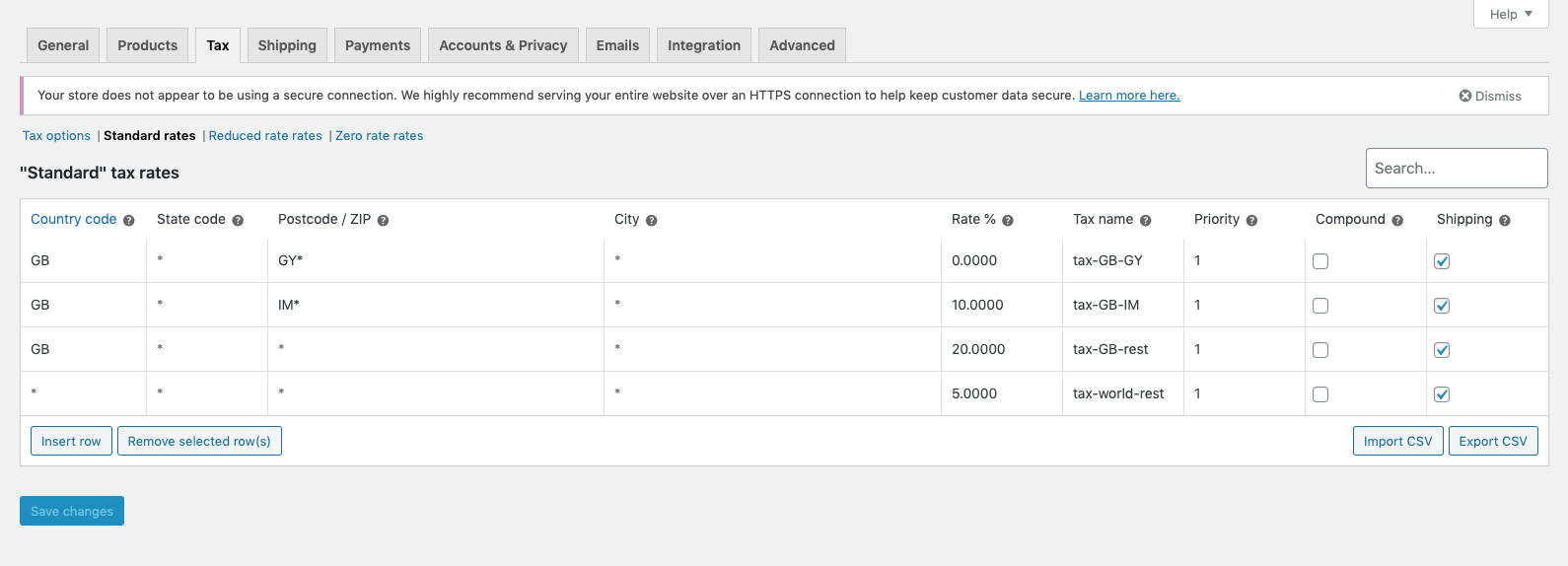
and using the following tax settings:
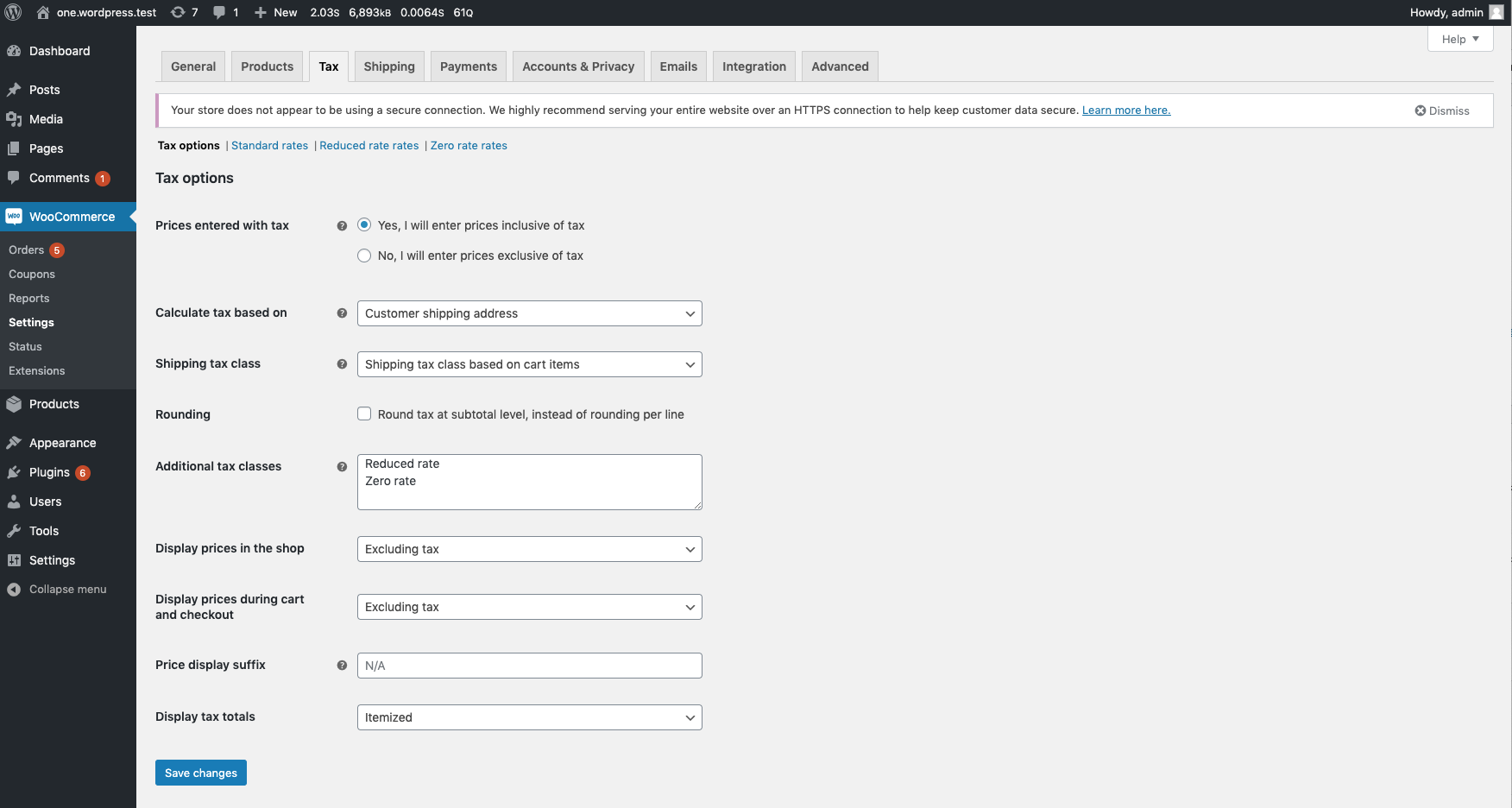
Now submitting test orders for London, Guernsey and Isle of Man, both with and without County set to "TEST TEST", I can see both orders with and without county behaving the same with respect to taxes (I added 1 product with constant reduced tax rate and 1 with standard tax rate):
London (tax-GB-rest standard tax rate applied for product Cap, which is 20%):
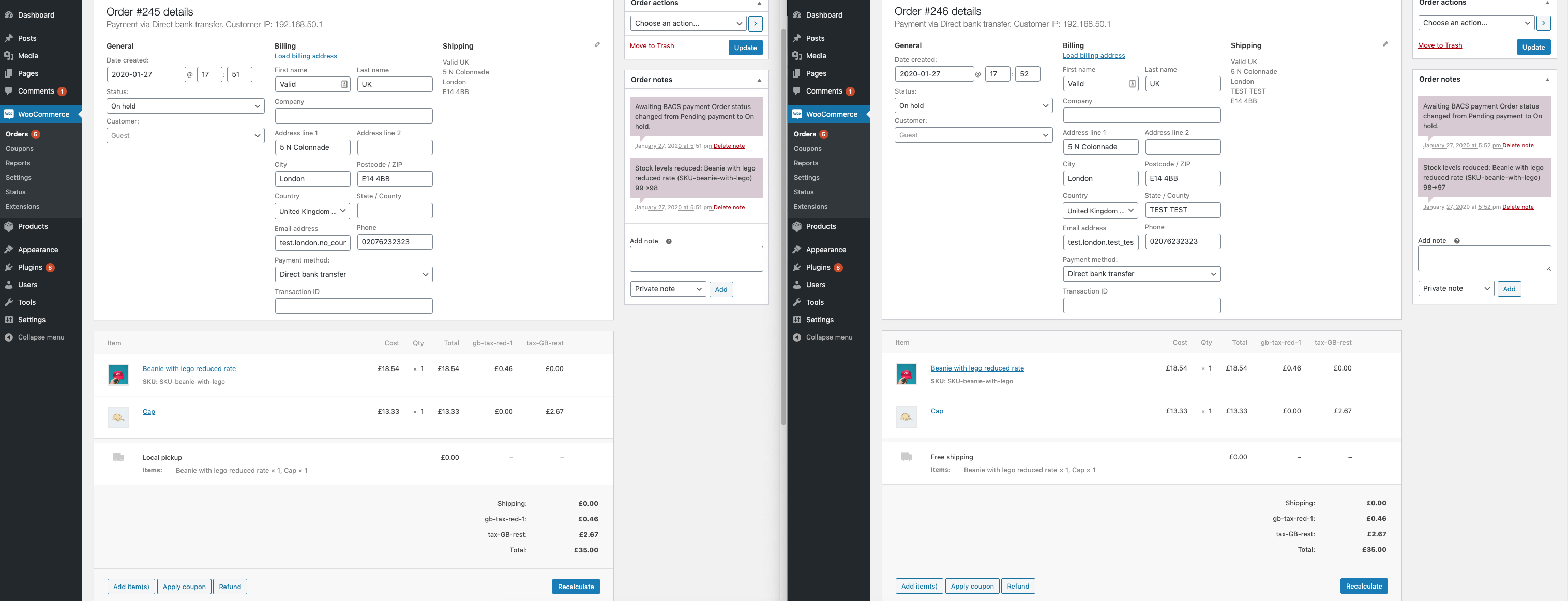
Guernsey (tax-GB-GY standard tax rate applied for product Cap, which is 0%):
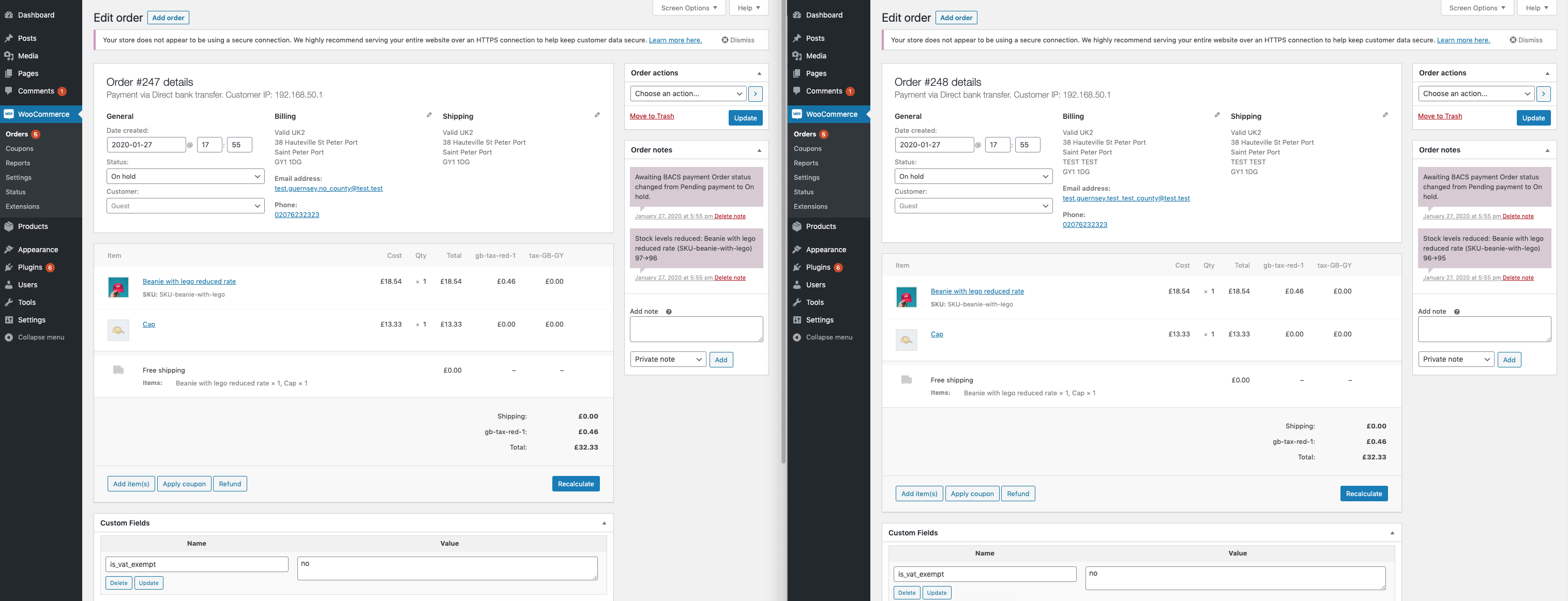
Isle of Man (tax-GB-IM standard tax rate applied for product Cap, which is 10%):
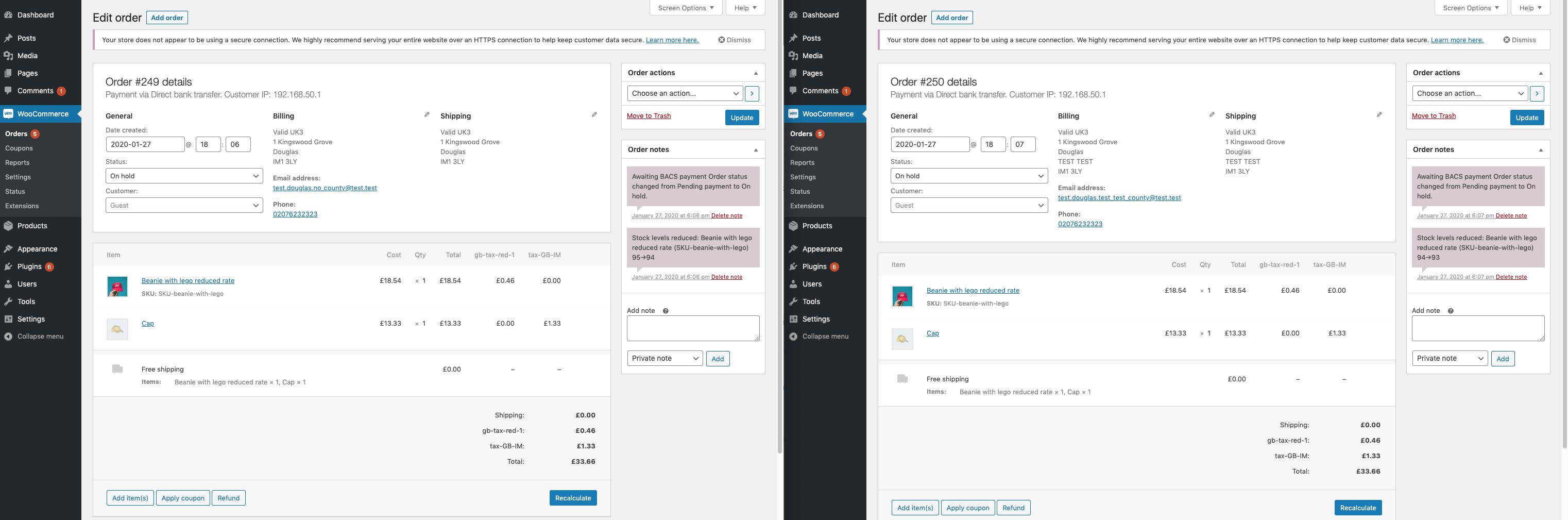
Do we need to install Jetpack or Taxjar to see the problem? In case I misunderstand your problem, can you please include steps to reproduce?
Lastly, can you please verify on a pre-production/testing site, that if you disable other plugins and leave only WooCommerce active, this error still happens for you? Posting your system status report would also help us quite a bit in order for us to see other plugins you have installed.
Thanks!
 peterfabian
on 27 Jan 2020
peterfabian
on 27 Jan 2020
Hi Guys. Ok so starting fresh. For the record Claudio I have no issue with you whatsoever. Apologies if anything came across as a personal attack. Please don't take anything personally. Thank you for trying to help. Starting over, I think there has been some misunderstanding on A) What the issue is, and B) How we are using the software. I'll try to clarify. In my scenario I use 'Enable Automated Taxes' within Jetpack. Standard rates and tax codes aren't touched manually. The comments about adding all the tax fields as overkill isn't relevant to me as it's not me adding them, it's the software. When a customer enters their county at checkout the tax rows are automatically created. I am not filling in the State code, Postcode / ZIP and City. I'm guessing JetPack or WooCommerce is adding these based off the information collected at checkout. For testing purposes though I have on numerous occasions cleared the tax rows and added blank tax rows purely with a tax code as advised above, with * placeholders for county etc but the problem remains. Again, in basic terms, this is the problem. With JetPack installed, Automated Tax enabled, if someone enters a GB county at checkout with a space followed by a letter it will clear the tax. That could be anything from 'Greater Manchester', to 'South Devon', or even to made up names like 'hdhd dhsjk'. It will always fail. I hope this helps clarify the issue and what I am and am not doing?
snooplewand
on 27 Jan 2020
@snooplewand Just to make clear, we got the issue, we are trying to fix on WooCommerce and also on WooCommerce Services, and note that I made a suggestion for you both to update the tax rows as a solution for now only, or at least just while we are looking into a fix, I only suggested it because you both stressed that this issue is a problem for you from at least one year, so I just wanted to give a fast solution while we don't release a new version of WooCommerce with this fix.
Since the start I'm only here trying to help, my only intention is to help.
claudiosanches
on 28 Jan 2020
Thank you Claudio, although like I say updating the tax rows doesn't work either.
snooplewand
on 28 Jan 2020
If you have a testing site available, maybe you can take the proposed PR for a spin to see if it solves the issue for you?
peterfabian
on 28 Jan 2020
Hi, do you guys have an update on a patch for this? I'm still losing money every day to this bug. I just had a sale to West Yorkshire not collect the tax.
snooplewand
on 14 Feb 2020
Woohoo! It actually appears to work! Thank you so much @harriswong. I can't believe it's taken over a year but what a relief! It's running on my live environment as we speak and I'll keep an eye on it, but first impressions are that it works just fine! Thanks a million!
snooplewand
on 14 Feb 2020
As this problem should be solved by WooCommerce Services 1.23.0, I'm closing it in our repository.
peterfabian
on 18 Feb 2020
Hi @peterfabian @harriswong, although this fix has worked when frontend customers order, I raise a lot of manual orders through the admin, and it is now not applying the tax to any newly registered UK customers regardless of whether a single or 2 worded county is entered, it's applying it to UK customers registered prior to the update on the 11th March but not to any registered after that date?!!
Wassmo1
on 18 Mar 2020
Hi @Wassmo1,
Thanks for reaching out to us. From the description, it sounds like the order through the admin does not have tax applied to newly registered UK customers. This could be a different problem unrelated to having a space character in the county. Please reach out to our support https://woocommerce.com/contact-us/. Our customer support team can help you diagnose the problem and create a new ticket for us if needed.
harriswong
on 18 Mar 2020
Hi @harriswong, @Wassmo1 's issue is related to this ticket #2793721-zen. I've tested on my site and could confirm the same. Tax doesn't seem to apply for a 2-worded county but it worked fine on a 1-worded county.
 thuautp
on 18 Mar 2020
thuautp
on 18 Mar 2020
@thuautp I created an issue in WooCommerce Services so we don't forget this.
harriswong
on 21 Apr 2020
Related issues
 mikejolley
·
50Comments
mikejolley
·
50Comments
 melindahelt
·
65Comments
melindahelt
·
65Comments
 prikhi
·
47Comments
prikhi
·
47Comments
 MitchEff
·
68Comments
peterfabian
·
73Comments
MitchEff
·
68Comments
peterfabian
·
73Comments