Woocommerce: Order details page not displaying variation/attribute name
The other bug report for this was closed incorrectly and is being ignored, but the bug is very much present.
On numerous of my client's sites, the order details do not say the variation's name in the title. I've tested this on WC 3.2.6 and 3.8, they both have the same issue. Occasionally it'll display the variation's name, and occasionally not. I can't work out why this happens sporadically.
To Reproduce
Check your order details. If it's happening to several of our sites it'd presumably appear on yours too.
The below screenshots are 2 separate stores. You can clearly see there's a variation ID, but no variation name in the title. I'm getting angry emails from my clients and I haven't a clue what to suggest:
https://i.imgur.com/oqfZ13r.png
https://i.imgur.com/5OlvvgQ.png
Expected behavior
...that it'd say what the variation is in the title.
Isolating the problem (mark completed items with an [x]):
- [x] I have deactivated other plugins and confirmed this bug occurs when only WooCommerce plugin is active.
- [x] This bug happens with a default WordPress theme active, or Storefront.
- [x] I can reproduce this bug consistently using the steps above.
I'm leaving out the status report as this is affecting numerous WC instances on different versions/themes/etc. It's everywhere.
 MitchEff
All 68 comments
For anyone else running into this annoying bug, I've done the following in the interim:
At line 31 of /plugins/woocommerce/includes/admin/meta-boxes/views/html-order-item.php:
$variationId = $item->get_variation_id();

$variation = new WC_Product_Variation($variationId);
$variationName = implode(" / ", $variation->get_variation_attributes());

echo esc_html( $item->get_variation_id().' ('.$variationName.')');
This'll at least show the variation slug underneath. Not perfect, but does the trick for now...
MitchEff
on 28 Nov 2019
Thank you opening the issue @MitchEff. I can't open the screenshots you submitted - they both lead to an empty GitHub page. However, I think I know what you mean. Can you please check https://github.com/woocommerce/woocommerce/issues/25054 and my comment with an explanation there to see if you are reporting the same issue?
 juliaamosova
on 28 Nov 2019
juliaamosova
on 28 Nov 2019
Same issue here
On the order page of the admin Panel, when a customer place an order and we have to know the product variation to process the order, woocommerce shows only variation ID but not the variation in plain text. Pretty annoying.
@juliaamosova the issue you mentioned has nothing to do with this one.
 pvnct
on 28 Nov 2019
pvnct
on 28 Nov 2019
@juliaamosova Just copy the url to the browser, then you'll see the screenshots.
https://i.imgur.com/oqfZ13r.png
https://i.imgur.com/5OlvvgQ.png
 thomas-zg
on 28 Nov 2019
thomas-zg
on 28 Nov 2019
Yeah that's spot on @pvnct. It also affects 'New order' emails.
They occasionally say the variation name, but most of the time not. The above fix kind-of helps, but it's very much a temporary solution.
MitchEff
on 28 Nov 2019
@MitchEff @pvnct
It sounds very similar to the issue @juliaamosova referenced above. If the product has more than 3 attributes or the attributes are 2 or more words, then it'll be displayed as it did in v2.6 (https://github.com/woocommerce/woocommerce/blob/master/includes/data-stores/class-wc-product-variation-data-store-cpt.php#L285-L300). In cases where this is happening, does the product have more than 3 attributes or are there 2 or more words?
 rynaldos
on 29 Nov 2019
rynaldos
on 29 Nov 2019
Interesting, I can't seem to reproduce this problem. The first item is a variable product with 1 attribute, the second item a variable product with 4 attributes:
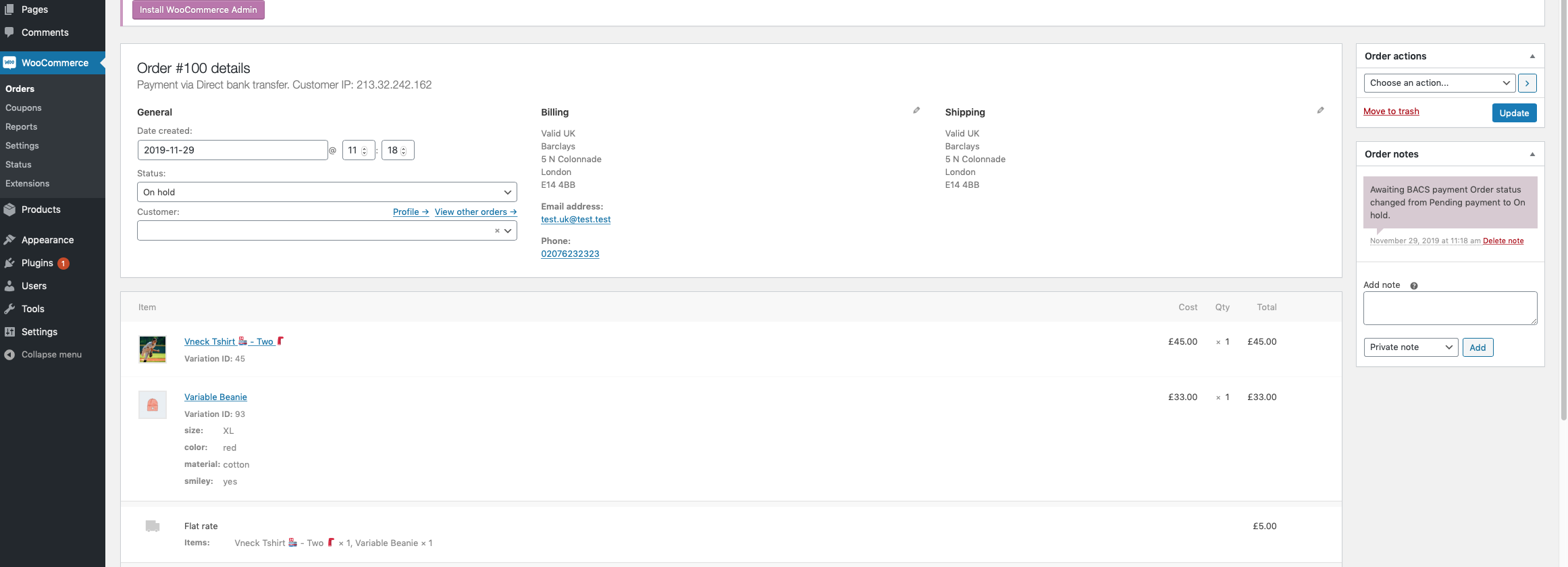
Can you please test this with WooCommerce core only, i.e. disabling other plugins?
 peterfabian
on 29 Nov 2019
peterfabian
on 29 Nov 2019
Also can't reproduce this so far. Tried it with 2 and 3 variations products:
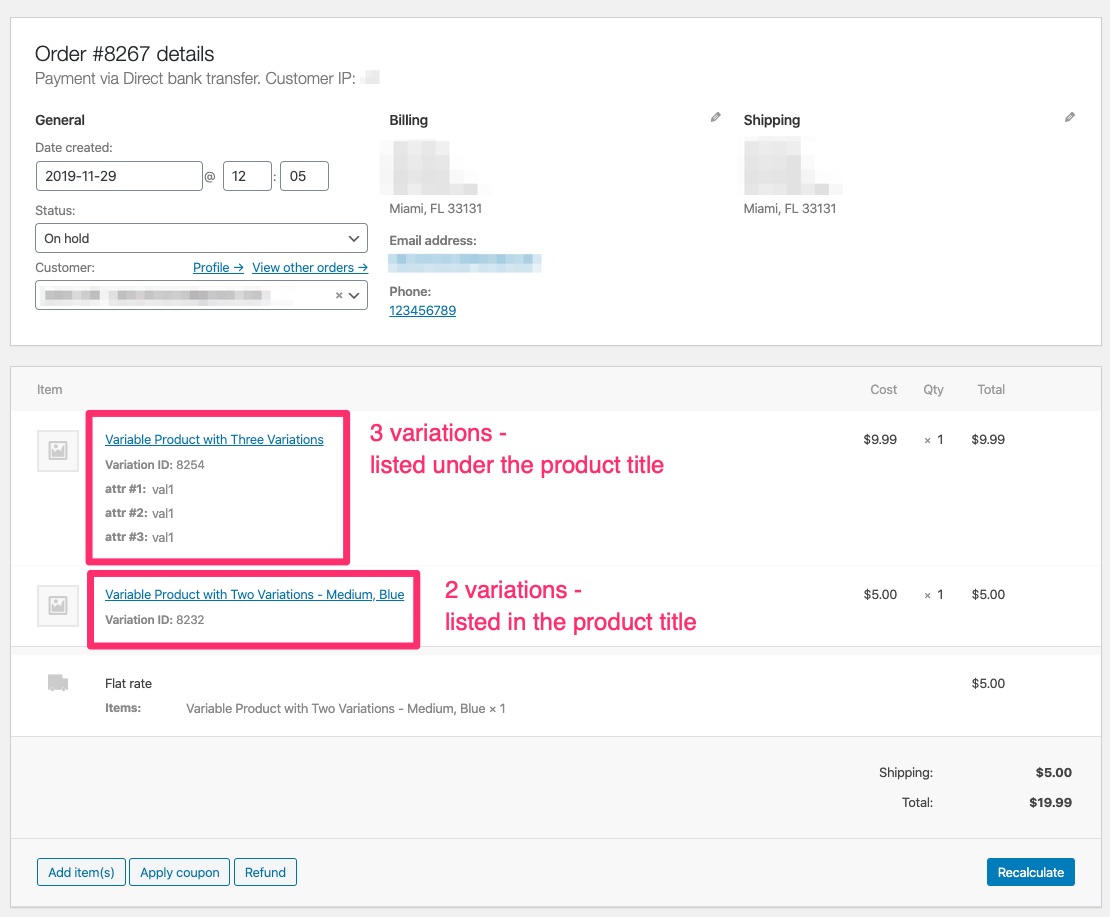
@MitchEff as @peterfabian mentioned, please test for theme and plugins conflict.
juliaamosova
on 29 Nov 2019
Hey guys,
Yeah, I've deactivated every plugin except WC, and it's still happening. Tested on 3.2.6 and 3.8 with 2 separate stores.
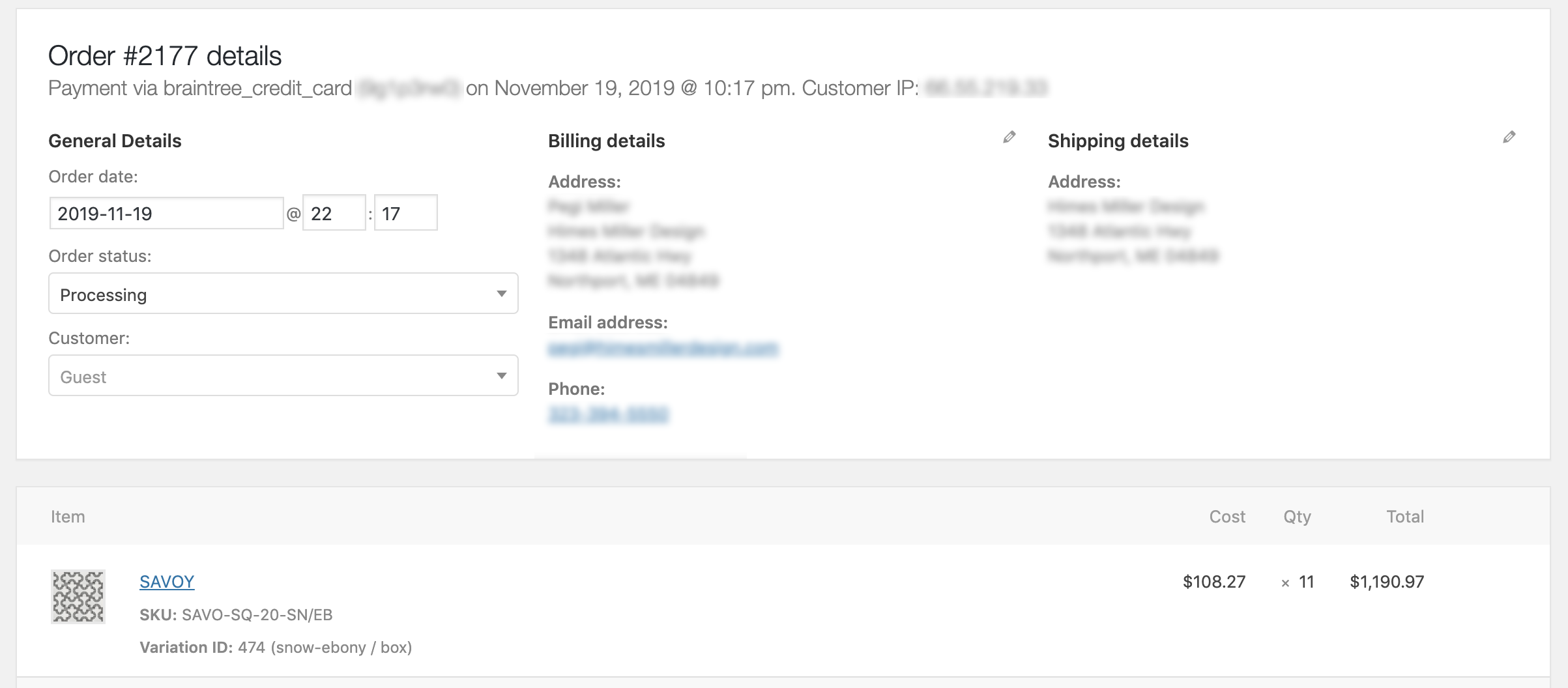
Product in the screenshot above only has 2 attributes.
(Note I've hacked the plugin a little to show the variation name next to the variation ID as a temporary measure)
I can't see how it'd make any difference, but products are added to cart via an AJAX request rather than the standard method, if that helps?
MitchEff
on 29 Nov 2019
(My first posting on GitHub!) I'm having the same issue with woo commerce on my website. Starting in early November, it's only listing the variation ID when you go into the order details and it is leaving off the variation names/details on emails to customers. Started happening with the new update to Woocommerce. Please let me know if a fix is available. 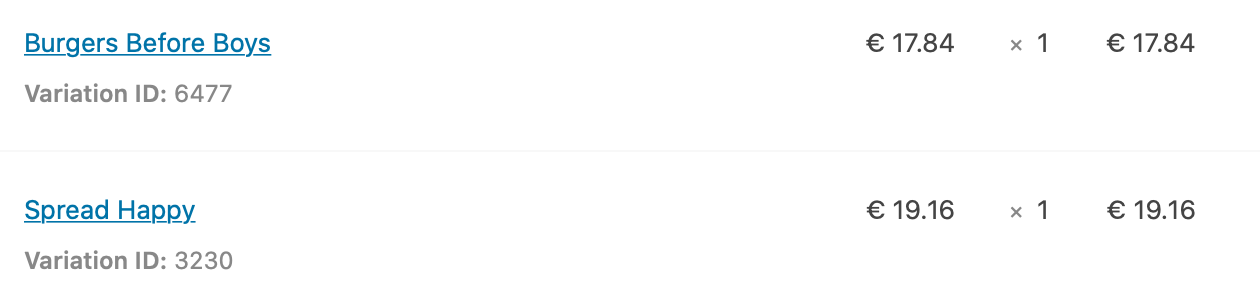
 JustinCAdams
on 9 Dec 2019
JustinCAdams
on 9 Dec 2019
(My first posting on GitHub!) I'm having the same issue with woo commerce on my website. Starting in early November, it's only listing the variation ID when you go into the order details and it is leaving off the variation names/details on emails to customers. Started happening with the new update to Woocommerce. Please let me know if a fix is available.
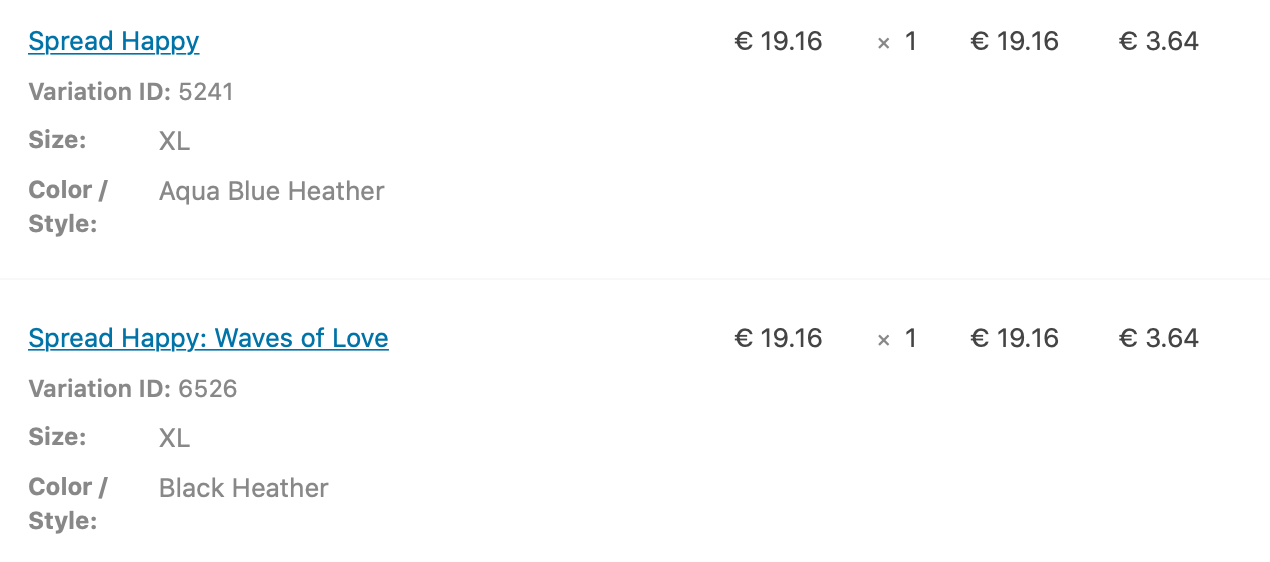
A comparison of what was showing up pre-November.
JustinCAdams
on 9 Dec 2019
This issue could be connected although a bit different: https://github.com/woocommerce/woocommerce/issues/25185
juliaamosova
on 9 Dec 2019
For anyone else running into this annoying bug, I've done the following in the interim:
At line 31 of /plugins/woocommerce/includes/admin/meta-boxes/views/html-order-item.php:
$variationId = $item->get_variation_id();

$variation = new WC_Product_Variation($variationId);
$variationName = implode(" / ", $variation->get_variation_attributes());

echo esc_html( $item->get_variation_id().' ('.$variationName.')');
This'll at least show the variation slug underneath. Not perfect, but does the trick for now...
This worked to at least show me what the customer had ordered (size and color) - so thank you!! It still doesn't fix the issue of the variable descriptions being included and sent to the customers in email, but hopefully that fix is in the works.
JustinCAdams
on 10 Dec 2019
Yeah, it's far from perfect - I presume a similar fix could be added to the email templates, but I haven't looked into it just yet.
MitchEff
on 10 Dec 2019
It’s very much appreciated!
On Dec 10, 2019, at 7:31 AM, Mitch Furlong notifications@github.com wrote:
Yeah, it's far from perfect - I presume a similar fix could be added to the email templates, but I haven't looked into it just yet.
—
You are receiving this because you commented.
Reply to this email directly, view it on GitHub https://github.com/woocommerce/woocommerce/issues/25133?email_source=notifications&email_token=AN7YDCPMKYJSLOHQQ7HRRB3QX4ZVVA5CNFSM4JSNVUTKYY3PNVWWK3TUL52HS4DFVREXG43VMVBW63LNMVXHJKTDN5WW2ZLOORPWSZGOEGODTKI#issuecomment-563886505, or unsubscribe https://github.com/notifications/unsubscribe-auth/AN7YDCIZ5HPTSPWOW26HYVDQX4ZVVANCNFSM4JSNVUTA.
JustinCAdams
on 10 Dec 2019
Also to add have got a client site experiencing this today.
The product is variable, with one colour attribute, set to 'any'. Oddly on the same day, same product - one order shows the attribute, the other doesn't. Can't see much difference between the orders either, same payment and shipping method used. Is the only order thus far affected.


Running a slightly older version of WooCommerce (3.7.1) ( haven't had a chance to test on a clean install with default theme yet.)
 addedlovely
on 19 Dec 2019
addedlovely
on 19 Dec 2019
Same issue here - products with 3 custom attributes, only one variation in which they can select any of the options for each attribute. No way of telling what the customer ordered - still looking for it.
 Jamman
on 26 Dec 2019
Jamman
on 26 Dec 2019
Seems to be an odd glitch though - I cannot reproduce it, but still cannot recover what the customer ordered - so maybe the glitch is that the customer manages (at times) to add the product without making a selection?
Jamman
on 26 Dec 2019
Even stranger is that this data is not only missing from the frontend but also from the order_meta in the database and I can never seem to reproduce what the client does to get this bug. I started collecting data on what browser, time, OS, etc. the client was using just in case.
 DACbyJS
on 7 Mar 2020
DACbyJS
on 7 Mar 2020
Interesting, please keep us posted if you found out more information about the issue.
peterfabian
on 9 Mar 2020
Sadly, this bug is still happening in April 2020. Just launched a new store and got three orders this morning.
- One order shows only the variation ID on the order page, no data in the item title
- One order shows no variation data whatsoever, and variation stock quantities did not update on order.
- One order is showing variation data perfectly.
¯_(ツ)_/¯
 brandonsings
on 14 Apr 2020
brandonsings
on 14 Apr 2020
Yes, occurred for me again the other day - same product as on other orders that work fine, and then one order out of the blue with no options showing - had to email the customer to find out what they wanted.
Jamman
on 14 Apr 2020
Still happening.
 POGgg42
on 24 Apr 2020
POGgg42
on 24 Apr 2020
Same. Just happened to me. Missing one option but the other is present in the order.
I was able to reference the Variation ID, so I could figure out their options. It's just more annoying that way rather than it just displaying the options.
 BarryMode
on 25 Apr 2020
BarryMode
on 25 Apr 2020
Hi all, based on what I saw when looking at #26237, I think the issue might be happening when using links, such as ?add_to_cart=$variation_id without specifying the attribute values.
Can you folks check if you by any chance have spots on your site that use shortcode/link without parameters to add items to your carts? When we merge the linked PR, it should take care of that problem.
peterfabian
on 28 Apr 2020
Hi! I don't think this issue has to do with linking as I am using the npm package for the WooCommerce API from a Node/Express server and passing the data as a parameter to a post route. Perhaps, internally, the API converts this into a link like you are describing but I am not manipulating routes myself.
I can post my code usage of the API if we think it will help. It's just super long because of how long the data object for an order is so I'm avoiding creating a text wall if possible. 😀
Expected Behavior
This is an example from a WooCommerce site that we have that doesn't use the API. Everything is built directly on top of WP/WC. This is what I was hoping to see when I passed attributes through the API.
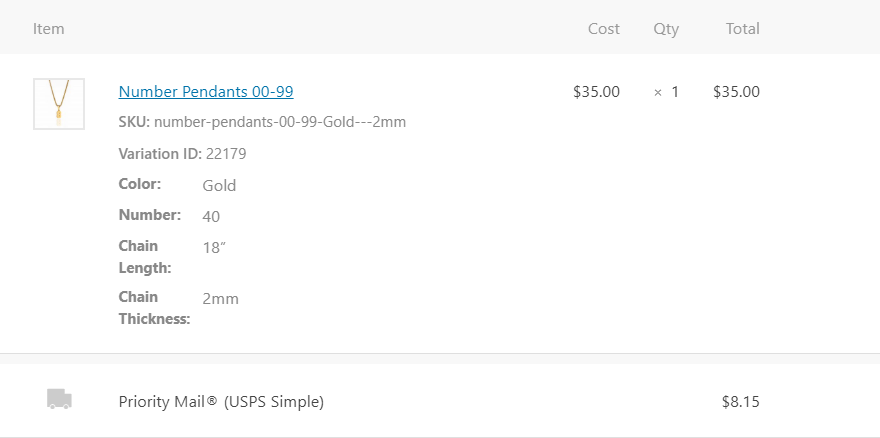
First Example of Bug
Here's me trying to add a product with two attributes. For the first one, nothing shows up at all for attribute information when there were two attributes supplied. The second two products matched a declared variation on the product so the variation id is shown and the matched attribute is appended to the title - but the other attribute is not present. For all three of these products, I supplied a "Color" attribute and a "Size" attribute.
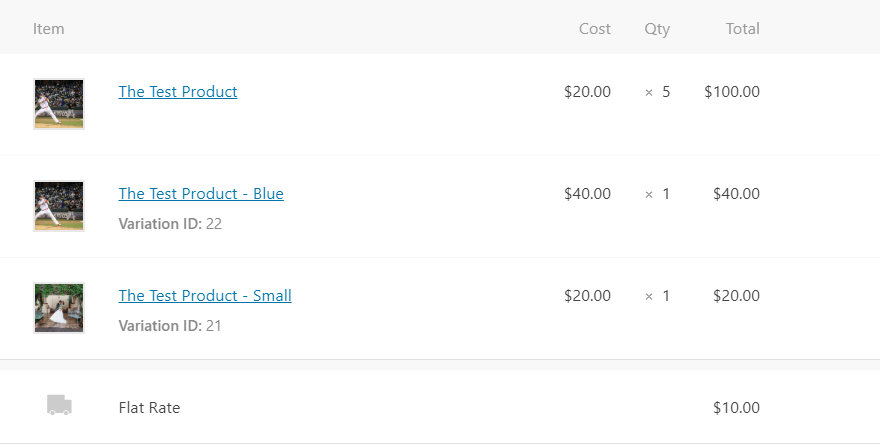
Second Example of Bug
I saw in the above comment chain that changing the amount of attributes can affect behavior so I went ahead and tried. I edited my product to have four attributes and, sure enough, this was the first time I saw success on getting an attribute listed below the variation id in the Wordpress UI. However, it only happened on the product that matched a declared variation of the product and it only showed me the specific attribute that matched. On both of these products, I expect to see four product attributes.
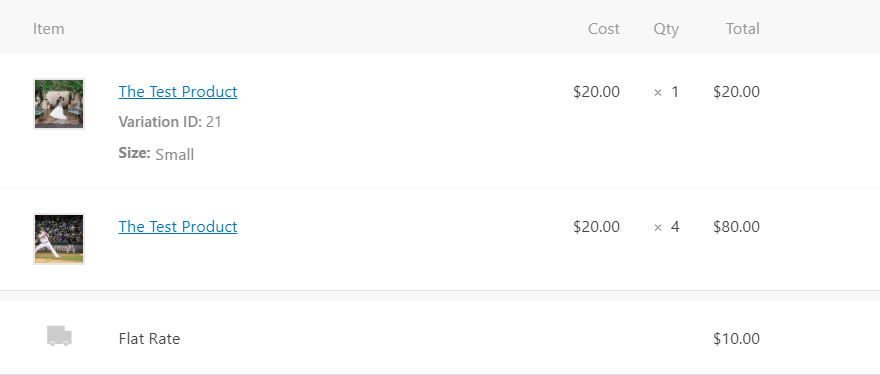
Hope this helps in some way because this is a gamebreaker for me! 😁
 anthonyshew
on 6 May 2020
anthonyshew
on 6 May 2020
Thanks for the additional info, @anthonyshew!
Sure, if you can share your code that triggers this bug via API, that would be very helpful! We are developers, we love walls of code :D
peterfabian
on 7 May 2020
@peterfabian
router.post(`/checkout`, (req, res) => {
    const data = {
        payment_method: "bacs",
        payment_method_title: "Direct Bank Transfer",
        set_paid: true,
        billing: {
            first_name: "John",
            last_name: "Doe",
            address_1: "969 Market",
            address_2: "",
            city: "San Francisco",
            state: "CA",
            postcode: "94103",
            country: "US",
            email: "[email protected]",
            phone: "(555) 555-5555"
        },
        shipping: {
            first_name: "John",
            last_name: "Doe",
            address_1: "969 Market",
            address_2: "",
            city: "San Francisco",
            state: "CA",
            postcode: "94103",
            country: "US"
        },
        line_items: {
  "lineItems": [
    {
      "product_id": "10",
      "variation_id": 21,
      "quantity": 1,
      "attributes": [
        {
          "name": "Color",
          "option": "Red"
        },
        {
          "name": "Shape",
          "option": "Square"
        },
        {
          "name": "Size",
          "option": "Small"
        },
        {
          "name": "Texture",
          "option": "Soft"
        }
      ]
    },
    {
      "product_id": "10",
      "variation_id": 0,
      "quantity": 1,
      "attributes": [
        {
          "name": "Color",
          "option": "White"
        },
        {
          "name": "Shape",
          "option": "Rectangle"
        },
        {
          "name": "Size",
          "option": "Big"
        },
        {
          "name": "Texture",
          "option": "Hard"
        }
      ],
        shipping_lines: [
            {
                method_id: "flat_rate",
                method_title: "Flat Rate",
                total: "10"
            }
        ]
    }

    woo.post("orders", data)
        .then((response) => {
            console.log(response.data)
        })
        .catch((error) => {
            console.log(error.response.data)
        })
})
We've only recently (in the last week) observed this issue in MultiSite configured group of stores on different templates (everything updated to current levels except WP version - scheduled for this weekend). We're not seeing any consistency and have not been able to manually reproduce it. I have check in the woocommerce_order_itemmeta table and the items that lacks the variation have a _variation_id with meta_value of 0 (zero). So it seems to be recording the parent record in the order.
I understand the "priority:low" from a macro project perspective but every time we look like idiots and have to ask "uh, what did you order?" it doesn't _feel_ like "low" to us. ;)
Note for anyone following along in the future: Since it's not recording any variation with the order item maybe the solution for displaying presented by @MitchEff is a different issue or a previous release problem.
 AverageJeff
on 17 May 2020
AverageJeff
on 17 May 2020
Thanks for the update, @AverageJeff , very useful to know how the order looks in the database for you. It is possible that we're seeing multiple problems resulting in the same symptom.
I was able to trigger this problem with an incorrect add to cart link (@jonathansadowski has a PR for this which we'll ship soon), @anthonyshew could trigger it via REST API and we're looking into that one now, so we'll solve those ones that we can reproduce.
If you find out how to trigger it in your specific case, please let us know!
peterfabian
on 18 May 2020
Seconding @AverageJeff 's thoughts on the "priority:low" tag. I understand the tag in context of the repository but we're having to hold up a site deployment because of how variation dependent our products are. Can't really sell our stuff without using a variation - meaning we gotta know what it is. :)
anthonyshew
on 19 May 2020
Understand. I'm bumping the priority of this one to high.
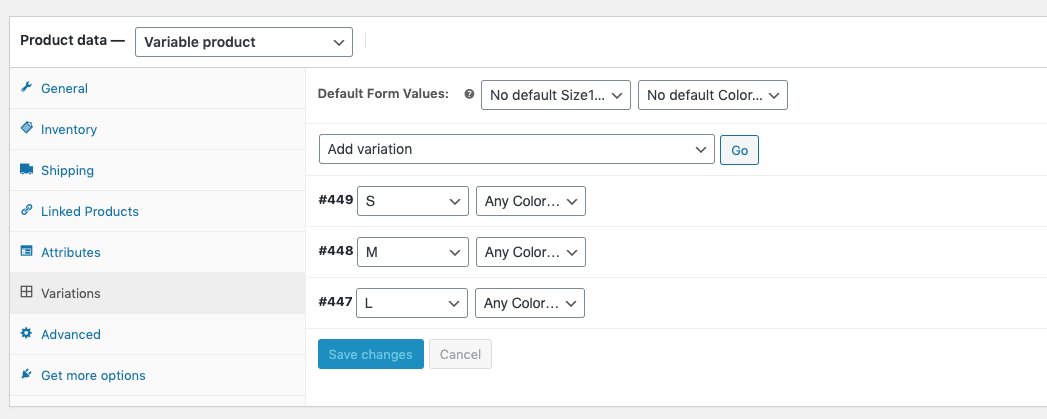
Quick question: do you folks use variations with any 'Any' attributes (like in the picture below) or only fully specified ones?
peterfabian
on 20 May 2020
We're using fully specified variations.
Since the programatic angle seem to be in process I'll dig in to "stupid user tricks" and try to marry the web logs to the orders.
Aren't these types of problems fun!?! I've always told people that problem solving in technology isn't like finding a needle in a haystack, it's like finding a specific needle in a needlestack.
AverageJeff
on 20 May 2020
Understand. I'm bumping the priority of this one to high.
Quick question: do you folks use variations with any 'Any' attributes (like in the picture below) or only fully specified ones?
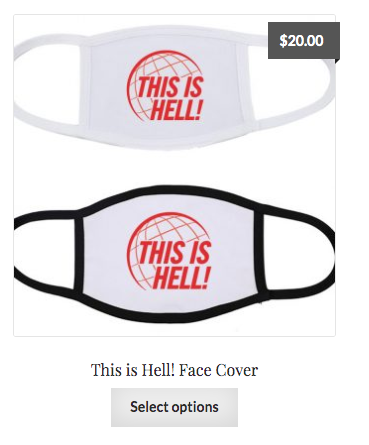
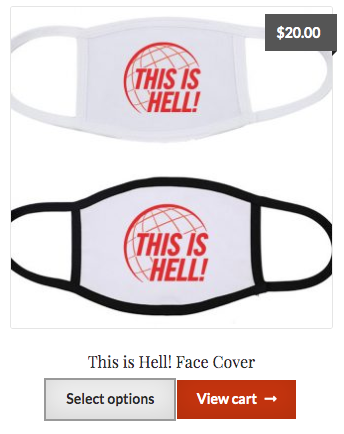
I think I found something. From different stores with one using the Boutique child theme of Storefront and the other Renden Business, when you choose the "Select options" button on the store home page under an item it adds the item directly to the cart as the parent item immediately. See images below for before and after clicking the button. No other actions were performed.
The example item only has one variation with two different sizes available (M or L)
AverageJeff
on 20 May 2020
To work around this behavior I created a snippet using the code below to redirect the click to single product page.
AverageJeff
on 20 May 2020
@peterfabian The variations I've been getting this issue with do feature "any" attributes. However, I was having differing combinations of the attributes that would show up on the order. Sometimes it is an "any" attribute that is present. Sometimes it is a "declared" attribute. I can't quite identify a pattern. Would it help you if I tried to recreate the behavior once again with all "declared" attributes on a variation?
anthonyshew
on 20 May 2020
Understand. I'm bumping the priority of this one to high.
Quick question: do you folks use variations with any 'Any' attributes (like in the picture below) or only fully specified ones?
Yes that is exactly the issue we are having,. The "ANY" attribute does not show up in the order. The attribute _is_ correctly displayed in the cart, but never comes through in the order or in the order email.The _meta_key_ row makes it to _woocommerce_order_itemmeta_ but the _meta_value_ for the row is empty.
 ofm
on 27 May 2020
ofm
on 27 May 2020
when you choose the "Select options" button on the store home page under an item it adds the item directly to the cart as the parent item immediately.
This sounds quite odd. Have you been able to confirm this happens with only WooCommerce plugin active?
peterfabian
on 29 May 2020
This sounds quite odd. Have you been able to confirm this happens with only WooCommerce plugin active?
Unfortunately I'll need to spin up a new dev clone to test. Perhaps this weekend.
AverageJeff
on 29 May 2020
Sorry, don't know if I am asking this in correct area. We have just made our online store and I have the same issue with the variations and was wondering if there is somewhere I can get a list of the variations with their ID number to save having to continuously look up the variation to see what has been ordered. In most cases I have noticed it is happening when there is more than 2 variations if this helps at all. We have only just started so can't tell you yet if this is the consistent rule for the variations not showing and I have no experience at all except that I added the products and variations to the site so can't talk tech with you...... lol
UPDATE: JUST FIGURED HOW TO GET A LIST USING YITH BULK EDITING.. PLEASE IGNORE ME... LOL
The export I just made I think confirms that it isn't liking more than 2 categories... I will attach it here and if you want me to add anything else to the export,
Variation List 20200604.zip
let me know.... but you can see which variations don't show the variations but if you scroll across to where they are broken down, they are there in the individual columns... I don't know, maybe just seeing it this way will give someone a lightbulb moment and hope I haven't wasted anyone's time by posting
 Wendyms
on 4 Jun 2020
Wendyms
on 4 Jun 2020
Hi! I don't think this issue has to do with linking as I am using the npm package for the WooCommerce API from a Node/Express server and passing the data as a parameter to a post route.
Hi @anthonyshew. Thanks for the code you provided! Which npm package are you using for the WooCommerce API and which version of the API are you using?
 jonathansadowski
on 8 Jun 2020
jonathansadowski
on 8 Jun 2020
@jonathansadowski
I'm using @woocommerce/woocommerce-rest-api at version 1.0.1.
Thanks for your attention to this issue, guys! Looking forward to this fix. If I end up prepared for my deployment and this issue is still lurking, I'll pour some time into helping find the fix. Hoping you guys will get it before then, though! :)
anthonyshew
on 9 Jun 2020
Thanks for the info @anthonyshew. I was looking over the code you provided, and the data format looked a bit off. Would you be able to try formatting the data for your request like this?:
const data = {
    payment_method: "bacs",
    payment_method_title: "Direct Bank Transfer",
    set_paid: true,
    billing: {
        first_name: "John",
        last_name: "Doe",
        address_1: "969 Market",
        address_2: "",
        city: "San Francisco",
        state: "CA",
        postcode: "94103",
        country: "US",
        email: "[email protected]",
        phone: "(555) 555-5555"
    },
    shipping: {
        first_name: "John",
        last_name: "Doe",
        address_1: "969 Market",
        address_2: "",
        city: "San Francisco",
        state: "CA",
        postcode: "94103",
        country: "US"
    },
    line_items: [
        {
            "product_id": "10",
            "variation_id": 21,
            "quantity": 1,
            "meta_data": [
                {
                    "key": "Color",
                    "value": "Red"
                },
                {
                    "key": "Shape",
                    "value": "Square"
                },
                {
                    "key": "Size",
                    "value": "Small"
                },
                {
                    "key": "Texture",
                    "value": "Soft"
                }
            ]
        },
        {
            "product_id": "10",
            "variation_id": 0,
            "quantity": 1,
            "meta_data": [
                {
                    "key": "Color",
                    "value": "White"
                },
                {
                    "key": "Shape",
                    "value": "Rectangle"
                },
                {
                    "key": "Size",
                    "value": "Big"
                },
                {
                    "key": "Texture",
                    "value": "Hard"
                }
            ],
        }
    ],
    shipping_lines: [
        {
            method_id: "flat_rate",
            method_title: "Flat Rate",
            total: "10"
        }
    ]
};
@jonathansadowski Hot damn! That worked!
Honestly, I remember trying a bunch of different ways to get this working but I'm not sure I would have ever known to try this route. If you look at the docs here, there's really nothing for declaring this meta_data in that way (or really at all). Is the documentation open source? I'd love to clear this up for future users.
anthonyshew
on 9 Jun 2020
Hi, I'm having a similar issue, and can't seem to figure it out.
My variations have 2 attributes each, and the order details only show the first attribute. So, if the order is based on color and size, for example, only the color is listed.
Any ideas what the problem might be?
 nautilus-emc
on 12 Jun 2020
nautilus-emc
on 12 Jun 2020
Same here, only show the first attribute, not the second or third. (ex: Size, color and height - all are filled), it only show Size in cart/checkout/email.
adasdfasdasadadasd
 mb-joakim
on 18 Jun 2020
mb-joakim
on 18 Jun 2020
Im also having the Issue with a variable Product with 4 Attributes and 3 being ANY and one being actually set with a value in my few variations. its only been happening since a recent automatic update of wordpress as far as i remember, but could also have been a woocommerce update
This is pretty critical, i have already had issues with 15 customers and missing attributes due to it
 FireRedDev
on 21 Jun 2020
FireRedDev
on 21 Jun 2020
I'm having the same issue only with variations attribute set on 'Any'
woocommerce version 4.2.2
 alessandra-b
on 25 Jun 2020
alessandra-b
on 25 Jun 2020
We'll be looking into this more next week. If anyone has good steps to replicate, please share them with us.
peterfabian
on 3 Jul 2020
Does anyone else with the problem use Autooptimize, Cache Enabler or Additional Product Input Fields for woocommerce?
FireRedDev
on 5 Jul 2020
You said you woukd look at it the past week, any updates? I can also rule out plugins as the reason, i deactivated them and it didnt help
FireRedDev
on 12 Jul 2020
Its been almost 3 weeks, is the issue more severe to fix?
Im sorry to be writing so often, but as mentioned beforehand its really disrupting
FireRedDev
on 22 Jul 2020
Yes, annoying is the least. We have to email every single customer asking what color they picked. And we dont get 10, 30 orders per day. We get around 100.
mb-joakim
on 22 Jul 2020
@claudiosanches Have you had a chance to look into possible causes for this please?
peterfabian
on 23 Jul 2020
I'm working on it, I should post some PRs today.
@FireRedDev can you give more details and steps to reproduce it? It will helps a lot fixing this problem, since I'm finding different ways to trigger it, you giving full details of how to reproduce will help me fix it as soon as possible.
 claudiosanches
on 23 Jul 2020
claudiosanches
on 23 Jul 2020
There is not a lot i could tell you sadly. I thought some of my plugins
might have caused it, but i removed those and the issue still happens. It
started happening after a woocommerce update, so its maybe related to some
of your recent changes.
Claudio Sanches notifications@github.com schrieb am Do., 23. Juli 2020,
15:24:
I'm working on it, I should post some PRs today.
@FireRedDev https://github.com/FireRedDev can you give more details and
steps to reproduce it? It will helps a lot fixing this problem, since I'm
finding different ways to trigger it, you giving full details of how to
reproduce will help me fix it as soon as possible.—
You are receiving this because you were mentioned.
Reply to this email directly, view it on GitHub
https://github.com/woocommerce/woocommerce/issues/25133#issuecomment-663005005,
or unsubscribe
https://github.com/notifications/unsubscribe-auth/AI5HAWNLGTVXM3BIBTN7YJLR5A22RANCNFSM4JSNVUTA
.
FireRedDev
on 23 Jul 2020
Hello @FireRedDev,
I have some questions, I hope you can help me.
It started happening after a woocommerce update
Do you remember what version were you using before upgrading and what did you upgrade to?
Do you managed to reproduce it even without having plugins installed?
Could you provide me a staging environment where I can test your set up?
Currently I'm about to fix the validation on the REST API and also a bug in the Form Handler that doesn't trigger errors when sending empty attributes (but this one is hard to reproduce in a regular cart flow), yet those may not be related to the issue you are reporting, note that in here no one could provide steps to reproduce through the interface, only with the REST API, so any help for your will be great for us to nail down this issue.
claudiosanches
on 23 Jul 2020
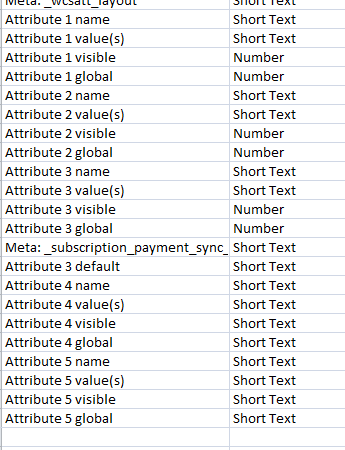
Hi, I am a total dummy with all this and have been exporting the Variations into MS Access database so I can get picking lists for the boys. There are some inconsistencies with the field formats when it gets to the fields past the second attribute. May mean nothing, but just clutching at straws that I have noticed something that is different. This is how the fields exported from Woocommerce to Excel and then to MS Access.
Wendyms
on 23 Jul 2020
Hello @Wendyms
This is how the fields exported from Woocommerce to Excel and then to MS Access.
For what you are saying, you exported all products using the Product CSV exporter on WooCommerce.
Note that the CSV doesn't try to reflect anything from the database, also all attributes on the database are strings by default.
Also those keys like Attribute N XXXX doesn't match any key in the database, so the results for sure will be unexpected if you try to use those in the MS Access.
claudiosanches
on 23 Jul 2020
Hi Claudio, I exported it using Yith as that was the only place I could figure out for myself where I could download a list of the variations (remember, I am a dummy at all this... lol). It Exports from there as CSV through Excel, I then Save As an Excel Workbook. What I have been doing at the moment until I create an Update Query is just deleting the rows from the Access Table and copy and pasting the data from the Excel spreadsheet. The actual Access table was created from importing this spreadsheet initially though so I have not chosen the field types. That is how they imported. But, the fact that it showed differences in the field types when it got to Attribute 3 is what I wanted to highlight, not knowing if it would be helpful or not. I know I know nothing... lol ... but I know from building Access databases, sometimes when something isn't working it can often be caused by overlooking field types. I am actually thinking that the Attribute 3 Default column may only be there due to me mucking around with default fields in the Variations but have got rid of them now so can't tell you what the data was in that column, I am just guessing. I am actually using the SKU as my primary link, I made the Primary Key in my Inventory table the SKU for Woocommerce.
Wendyms
on 24 Jul 2020
@Wendyms
That is how they imported. But, the fact that it showed differences in the field types when it got to Attribute 3 is what I wanted to highlight, not knowing if it would be helpful or not.
Sounds like MS Access tried to guess what was the type of each key based on the values, you probably can check it in the CSV you exported, that why for some shows as number and another as short text.
I understand your intention, but the CSV will not generate a correct result in MS Access, since the CSV doesn't represent on WooCommerce save data into the data base, all columns on the CSV are user-friendly.
claudiosanches
on 24 Jul 2020
I started a PR that could solve this issue by stopping of this to happen in the first place, any help testing will be appreciated #27115
I'll soon submit another PR to solve the issue on the REST API.
claudiosanches
on 24 Jul 2020
Seems like for the REST API is fine, the report in here have many errors, so for now #27115 should be a fix for this issue.
claudiosanches
on 27 Jul 2020
Hi! Will this fix the issue for past orders too or only future orders?
FireRedDev
on 17 Aug 2020
Only for future orders. No one could give me proper steps to reproduce it, but by my tests seems that it's possible to build some requests where you can insert variations missing some attribute to the cart and after create an order with missing those attributes too, and in those cases there's no entry in the database, we can't try to guess what suppose to be the attribute, because it will cause only more problems.
claudiosanches
on 17 Aug 2020
Has anyone managed to solve this? I am currently struggling with the same problem...
 cigaai
on 16 Sep 2020
cigaai
on 16 Sep 2020
Has anyone managed to solve this? I am currently struggling with the same problem...
@cigaai - when you are browsing your store do you see something like "Select Options" under a variation product? If so, when you click that does it immediately just add that to the cart - i.e. you get a "View Cart" message immediately? That's what I found was triggering it on my site. To work around this behavior I created a snippet using the code below to redirect the click to single product page.
AverageJeff
on 16 Sep 2020
I have this issue and it’s really strange, it only does it on some orders. I sell limited edition artwork and each variation is a print number of 50. So I’m my example people choose a size of print and a number, there is only one of each number so then the item goes out of stock. It works great.
100s of orders but then recently on a product that is exactly the same as all other products this issue happened.
Two orders came through within a week, in-between numerous orders that were exactly the same (but a different variation), and they did not display the variation name (in my case the print number).
What made this weirder was it displayed the variation ID so I used that, and found that it was the same variation for both of these orders.
So one person had chose. Print size A4 and the. The variation id was print number 3, and the second person had chosen print size A3 and the print number 3.
This makes me think that it’s either something to do with a certain variation (in my case number 3) or it’s the way the user is selecting the print.
The only thing troubling me is that one of the customers said they did not choose number 3 and selected a different variation.
I’ll be doing more tests on this to see if I can find anything else that helps but I don’t really have any options other than to just hope it doesn’t happen too often!
The first thing I’ll try today is putting the variation back in stock, buying it myself and seeing if the same thing happens.
It’s a really odd one this! I wouldn’t mind if I knew I could trust the variation ID!m to double check...
 AdamPalethorpe
on 25 Sep 2020
AdamPalethorpe
on 25 Sep 2020
Related issues
 hannahswain
·
97Comments
hannahswain
·
97Comments
 elliotcondon
·
44Comments
elliotcondon
·
44Comments
 ryanr14
·
55Comments
ryanr14
·
55Comments
 melindahelt
·
65Comments
melindahelt
·
65Comments
 jondavy
·
59Comments
jondavy
·
59Comments
Most helpful comment
For anyone else running into this annoying bug, I've done the following in the interim:
At line 31 of /plugins/woocommerce/includes/admin/meta-boxes/views/html-order-item.php:
This'll at least show the variation slug underneath. Not perfect, but does the trick for now...