Woocommerce: Redesign the Checkout Flow
We'd like to improve the checkout flow and make it quicker to enter details and place orders.
Checkout Flow:
- Remove coupon and login notices above the checkout screen.
- Collect customer email (with login or create account) as the first step on the page.
- Collect customer shipping address for regular orders or nothing if order is virtual.
- Then allow shipping method selection.
- Select billing method.
- Based on billing method, either collect billing address (or allow user to choose 'same as shipping').
- Review order - add coupons, add order note, place.
Other considerations:
- Needs to work with checkout field editor.
- Restyle inputs/labels/placeholders to remove visual noise.
- [?] Keep legacy checkout option and allow switch to new flow.
- A/B test flows, maybe use feature plugin idea.
- Virtual/downloadable orders still need an 'address' for taxes. Use billing address after payment method selection for this.
- Checkout should be clearly halted if shipping cannot occur and is needed.
- Should be used for 'order pay' 10764
Flow diagram:

@claudiosmweb @coderkevin @jameskoster @justinshreve
 mikejolley
All 50 comments
Should also cover #8297
mikejolley
on 11 Apr 2016
Great job considering all the pieces to this, @mikejolley.
I would like to suggest dealing with account creation after the order is placed and paid for. The reason is that account creation can be off-putting and cause cart abandonment, yet it is still often important to have or even require. If nothing else, it adds clutter to the screens that may take attention away from the main goal of checking out.
Here's my real-life scenario: One type of product I sell is e-books. It's really important for customers to create an account so they can come back and re-download their books. If they don't create an account then we often have to spend customer service time to deal with customers who have lost their file and need a new one. We also have to find customer orders by e-mail and associate past purchases with their account.
I know that in my store requiring account creation causes cart abandonment. This may not be true for other stores but I have the customer feedback to know for sure in my specific case. Because of this, I have left account creation optional but modified the template to pre-check the box and add additional benefit explanation. I suspect few take the time to read the extra text, though.
But what if accounts were always created automatically behind the scenes? Then after checkout is finished the buyer can be given the account information and optionally change the auto assigned user name and password.
Could this same mechanism also associate orders from a particular e-mail address together automatically instead of making them no account orders?
Then if a customer doesn't create an account but wants it later, he or she can use the forgotten password link to reset and claim the account.
Obviously, we couldn't just give purchases from a particular e-mail address to anyone checking out with that e-mail address. They would have to be verified as having control over that address and logged in before that could happen.
 douglsmith
on 12 Apr 2016
douglsmith
on 12 Apr 2016
hmmmmm......
Hey, honest question: Does Woo have like a total NON coder type of person to run things through? Like a behavioral psychologist or something along those lines that analyzes how people think about some of these Woo processes?
 BurlesonBrad
on 12 Apr 2016
BurlesonBrad
on 12 Apr 2016
FWIW, my background is in cognitive psych and UI... but more importantly, I've got 100,000 customers and we hear from them every day about our order flow ;-)
That said, let me first describe our current situation, and how we got here... then I'll add a comment or two about the specific flow you described, Mike:
When we gave people the option of guest checkout or creating an account, the VAST majority used guest checkout. We also turned off account creation at /my-account/ since that was getting hammered by spammers/hackers.
We saw much lower abandonment when we removed the Guest/Account step and went to a one page checkout.
But, this created 4 problems:
- If the new GUEST-customer wanted to check order status, they couldn't do so... but, worse, they didn't understand why they couldn't somehow log into their account.
- In a related note, when they used "forgot password", they would receive an email with password reset instructions that wouldn't work (let's just say, this didn't make them happy)
- If they tried to place a subsequent order, AFTER they selected Place Order, they would get an error saying they needed to log in which, per #2, they could not do (this is when we would get REALLY nasty emails about how unfriendly our site is)
- We could not fix this in the back-end -- we have no way (that we know of) to convert their guest account to a customer account, and no way to create a new account and link the original order to it. (BTW, if you have a solution for this, especially one we can do en masse, I'm all ears).
To speed up the checkout process -- reducing friction for checkout -- and help reduce future friction, we started creating accounts for new users automatically upon successful checkout, emailing them their auto-generated password.
NOW the problems that we have are these:
- People, of course, forget their password
- They aren't prompted to log in until AFTER they have filled out and submitted the ENTIRE checkout form, and assuming they remember their password, they have to re-fill the entire form (a suggestion to improve this follows)
- They have no way to order without logging in (we get emails daily complaining about this)
- If they need to reset their password, they're taken away from Checkout (more friction, more abandonment).
At the moment, then, we're living in the worst of both worlds -- old customers who CAN'T log in. New customers who have trouble logging in and placing orders.
SO... my suggestions for minimizing friction IF you're not going to prompt them to select Guest Checkout/Create Account:
1) Don't prompt the user to create an account. Do it for them automatically.
2) If you MUST force them to log in, make the email field the first one and check for an existing email address and/or account immediately upon leaving that field
3) If there's an existing account and you MUST make them log in, have everything happen ON the checkout screen in some way
4) If possible, give them the OPTION to log in... should they choose not to (and you can display a message telling them why they SHOULD), just create another account with the same email, or automatically merge them. It'll be less effortful for us to to merge them in the back end (if you create a new account) or split them (if you automatically merge them) when necessary, frankly. Or, if you create a second account, there should be a way for the user to merge accounts to do this on their own if they can successfully confirm both accounts.
That's my ideal scenario... but to comment on the flow presented:
The goal, frankly, is to display shipping costs as late in the flow as possible. That way the customer has made micro-commitments all along the way and is less likely to abandon when they see any shipping costs.
Similarly, you'll want to apply coupons/discounts BEFORE collecting billing info. The customer needs to see the accurate order total before entering payment details.
Since billing and shipping are the same in most cases, we start with Billing and then prompt "Ship to a different address?" I'd suggest that this will lead to fewer AVS mismatches than collecting shipping address first (from people simply overlooking the need to enter a different billing address) if Billing/Shipping are collected on the same page.
I don't know the tax law related to virtual products (do you tax based on billing address or use address, neither of which may match the "shipping" address), so I'm assuming that it's based on billing address. If it's not, though, then you'll have to address the Virtual Product path differently than your version or mine.
BTW, a progress bar -- from cart through confirmation -- makes a big difference.
Oh, I didn't adjust the login/password flow in my chart, below... I'll do that later and amend it.

 xeroshoes
on 12 Apr 2016
xeroshoes
on 12 Apr 2016
Based on years of conversion rate optimization experience (we are https://conversionxl.com), including both developing and optimizing multiple WC shops, I confirm @xeroshoes is hitting bullseye with everything he wrote above. Every single action item proposed there can pretty much be called a scientifically validated tactic (== enough controlled e-commerce checkout split test results exist for proof) that will help stores make more money, guaranteed. Here's hoping all of it makes it into the rework. Thanks for writing it up.
 lkraav
on 12 Apr 2016
lkraav
on 12 Apr 2016
....dear Lord... if Steven wasn't so successful with shoes, I'd ask him if he was a professional content writer. :stuck_out_tongue_winking_eye:
BurlesonBrad
on 12 Apr 2016
Well let's pile it on here :stuck_out_tongue_winking_eye: If we'll be digging into the checkout flow, it also may be a good time to make adjustments for improved free cart handling.
- Free cart, contains shippable items: This could happen if you offer free items + free shipping. We probably don't _need_ to make changes to the checkout fields here, but most billing fields could be unset so only the requisite shipping fields are shown. I'd be more curious to see changes for the next point than this one, but something to think about.
- Free cart, contains only virtual items: This is a _completely_ free checkout -- no billing or shipping needed. In this case, it would be nice to only show the minimum required fields for the checkout process (I'd go with customer name, email, password if account is created, and perhaps check if phone is required, show it if so) -- shipping fields are already removed for virtual-only carts, so we'd just be removing billing info if
! WC()->cart->needs_payment()
We've seen this most frequently with free site memberships, and ended up writing a pretty popular tutorial to unset most checkout fields for free+virtual carts, but it could probably warrant inclusion in core (or at least have a filter to do this with a one-line snippet if desired).
e.g.: add_filter( 'woocommerce_simplify_free_checkout', '__return_true' );
 bekarice
on 12 Apr 2016
bekarice
on 12 Apr 2016
This is great. Tagging @garymurray and @avivapinchas - any input based on your experience with NUX / retention?
 MarinaWoo
on 13 Apr 2016
MarinaWoo
on 13 Apr 2016
@xeroshoes pretty much covers it all in his great write up and @lkraav can back it up - you can see more of the things ConversionXL recommend in this post: http://conversionxl.com/how-to-design-an-ecommerce-checkout-flow-that-converts/
It would be great if we could offer users the ability to test/try one-page checkouts vs multi-step checkouts - both have advantages.
 garymurray
on 13 Apr 2016
garymurray
on 13 Apr 2016
Rather than guessing or using rules of thumb why not test it ourselves?
If it really is that much of a stumbling block it will help us on WooThemes.com and we can prove it's usefulness one way or the other. If we only get a marginal lift then we can choose to _not_ implement it since it will probably break some 3rd party functionality.
And if we get a big lift then we have a very good reason for changing things. Seems better than all of us wp-arm-chairing.
 BFTrick
on 13 Apr 2016
BFTrick
on 13 Apr 2016
Agreed with @BFTrick and @garymurray - much of what I'd suggest is summed up here and I definitely think we should test it on woo.com. Checkout flow is one of the most important elements of CRO and we should be quite mindful with what changes we make here.
 avivapinchas
on 13 Apr 2016
avivapinchas
on 13 Apr 2016
Just to echo we were indeed hoping to test this out in feature plugin first on Woo and other volunteer sites like Xero if they want to :)
mikejolley
on 14 Apr 2016
Happy to help, of course... but it's best for us if we start with something that our experience suggests is our best possible course of action to start.
In fact, our current checkout process is very similar to what I've suggested, with the exception of the email/account verification issues I previously mentioned.
xeroshoes
on 14 Apr 2016
Great feedback and ideas. We're experiencing some of the same problems and I love the idea of testing our assumptions before final implementation.
One comment regarding the excellent feedback from @xeroshoes…
2) If you MUST force them to log in, make the email field the first one and check for an existing email address and/or account immediately upon leaving that field
The convenience of this would be fantastic, but it could possibly be used by an attacker to determine if an account for a particular e-mail address exists for further hacking. That small leakage of information can have large implications.
douglsmith
on 16 Apr 2016
it could possibly be used by an attacker to determine if an account for a particular e-mail address exists for further hacking
True, but that information is already available from the account page:
There was a discussion on this in the WP trac forums a while back, and if I recall correctly, it was decided that this information is very beneficial to users, while not really that useful to hackers.
Edit: Here's the trac ticket: https://core.trac.wordpress.org/ticket/12129
 WPprodigy
on 16 Apr 2016
WPprodigy
on 16 Apr 2016
There is always a balance between security and convenience. Given that is the behavior of WordPress itself, then it makes no difference to reveal that same information, of course.
douglsmith
on 17 Apr 2016
Just to add on to this:
we should add the autocompletetype, x-autocompletetype and autocomplete (bc different browsers, different things unfortunately) to the default checkout fields to insure perfect mapping from e.g. Chrome autofill, lastpass,... (custom added it some years ago):
From my functions (added autocompletetype/autocomplete in wc core):
$fields['billing']['billing_email']['autocompletetype'] = 'email';
$fields['billing']['billing_first_name']['autocompletetype'] = 'given-name';
$fields['billing']['billing_last_name']['autocompletetype'] = 'surname';
$fields['billing']['billing_company']['autocompletetype'] = 'organization';
$fields['billing']['billing_postcode']['autocompletetype'] = 'postal-code';
$fields['billing']['billing_address_1']['autocompletetype'] = 'street-address';
$fields['billing']['billing_city']['autocompletetype'] = 'city';
$fields['billing']['billing_country']['autocompletetype'] = 'country';
$fields['shipping']['shipping_first_name']['autocompletetype'] = 'given-name';
$fields['shipping']['shipping_last_name']['autocompletetype'] = 'surname';
$fields['shipping']['shipping_company']['autocompletetype'] = 'organization';
$fields['shipping']['shipping_postcode']['autocompletetype'] = 'postal-code';
$fields['shipping']['shipping_address_1']['autocompletetype'] = 'street-address';
$fields['shipping']['shipping_city']['autocompletetype'] = 'city';
$fields['shipping']['shipping_country']['autocompletetype'] = 'country';
$fields['billing']['billing_email']['autocomplete'] = 'email';
$fields['billing']['billing_first_name']['autocomplete'] = 'given-name';
$fields['billing']['billing_last_name']['autocomplete'] = 'family-name';
$fields['billing']['billing_company']['autocomplete'] = 'org';
$fields['billing']['billing_postcode']['autocomplete'] = 'postal-code';
$fields['billing']['billing_address_1']['autocomplete'] = 'street-address';
$fields['billing']['billing_city']['autocomplete'] = 'city';
$fields['billing']['billing_country']['autocomplete'] = 'country-name';
$fields['shipping']['shipping_first_name']['autocomplete'] = 'given-name';
$fields['shipping']['shipping_last_name']['autocomplete'] = 'family-name';
$fields['shipping']['shipping_company']['autocomplete'] = 'org';
$fields['shipping']['shipping_postcode']['autocomplete'] = 'postal-code';
$fields['shipping']['shipping_address_1']['autocomplete'] = 'street-address';
$fields['shipping']['shipping_city']['autocomplete'] = 'city';
$fields['shipping']['shipping_country']['autocomplete'] = 'country-name';
 kkmuffme
on 2 Jun 2016
kkmuffme
on 2 Jun 2016
Also bc I just saw: why do we add a "Want to create account?" at all? It would be much easier & 1 less click (& people more willing) if we just included a PW field (e.g. after email or billing address) with label "Enter a password to create an account - this is optional"
Also why not show an additional PW field on order received page. "Set a password to track your order status in your account:" (adjustment of the sentence that is there now) - works pretty well for us (especially since the Woocommerce Social Login plugin does this too!)
Thirdly, creating ghost accounts for internal tracking of orders without passwords, for users who have multiple orders (=> CRM) is a neat feature we have implemented, you might want to consider when you start with the CRM part (I saw on trello)
@bekarice we have implemented this too in our branch, just as an additional gateway if order is free (to hide all gateways & enable checkout)
kkmuffme
on 10 Jun 2016
Everything I would like to see has been described by @xeroshoes !
For the reasons described earlier I have forced account creation and we receive a lot of mail/requests of people frustrated : after they have filled out and submitted the entire checkout they are being shown an error message + having to redirect to login page and then restarting checkout process.
Appart from the conversion optimisation that would clearly save a lot of time for our support team (and frustration from clients).
Thanks for the great work with WC !
 louis2b
on 15 Jun 2016
louis2b
on 15 Jun 2016
Any word on where this is at? I have a development team I can throw at this or collaborate with anyone if they are interested.
 pclick
on 29 Aug 2016
pclick
on 29 Aug 2016
@mikejolley mikejolley added the Feature Plugin label on 11 Jul
Where can this feature plugin be found?
lkraav
on 29 Aug 2016
I would recommend taking into account the recent developments around the Payment Request API which is bound to be the future of paying for stuff on the web. It allows WooCommerce to complete a payment and get all the necessary information to ship a product to the user in a single step. For more information see the related issue.
 jonkoops
on 29 Aug 2016
jonkoops
on 29 Aug 2016
@DuckDagobert I added support for the autocomplete attribute some time ago. I don't see any benefit in adding vendor specific code here to something that already has been standardized. If there are vendors that have implemented their own vendor specific version or have no implementation at all we should encourage them to move to a standards based solution and not implement theirs.
jonkoops
on 29 Aug 2016
@pclick @lkraav this feature is scheduled for 3.0 and we've not done any work on it yet. Since it's a _epic_ we'll very likely post about it on the dev blog once we've something significant to share, so subscribe there if you haven't already :)
 jameskoster
on 2 Sep 2016
jameskoster
on 2 Sep 2016
@mikejolley any reason why this was removed from 3.0 milestone?
pclick
on 22 Nov 2016
Just a different workflow.
mikejolley
on 23 Nov 2016
what is the reason of this #11814 I have that too
 marti1125
on 16 Jan 2017
marti1125
on 16 Jan 2017
@mikejolley - thank you! This is an excellent first step in helping us recover & convert previously abandoned carts! Thanks for marking it for 2.7.
 MattyLB
on 19 Jan 2017
MattyLB
on 19 Jan 2017
Hi @matt, what is included in woocommerce 2.7 that helps recover or convert
more carts ? I have gone through the blog post but cannot find anything
related ? Thanks à lot
Louis
Le jeu. 19 janv. 2017 à 06:23, Matt notifications@github.com a écrit :
@mikejolley https://github.com/mikejolley - thank you! This is an
excellent first step in helping us recover & convert previously abandoned
carts! Thanks for marking it for 2.7.—
You are receiving this because you commented.
Reply to this email directly, view it on GitHub
https://github.com/woocommerce/woocommerce/issues/10672#issuecomment-273685105,
or mute the thread
https://github.com/notifications/unsubscribe-auth/AQJ9EEQXQEznBxnQ_BHWmf8kblR4qB5Gks5rTvNigaJpZM4IE1ul
.
louis2b
on 19 Jan 2017
Hello I've been reading many posts about inline error message in checkout page and it's not implemented yet. Is there any news about this? Posts are old and we still have the same functionality of showing all errors first.
Thanks
Afua
 kwafoawua
on 20 Jan 2017
kwafoawua
on 20 Jan 2017
We'll update this issue when we're ready. It's not coming in the next release. I'm closing comments until we're ready to resume..
mikejolley
on 20 Jan 2017
I hope this is the right place to report this, if not feel free to silently remove this again.
Street name gets skipped when using Google Chrome Auto Fill.
Screencast: http://recordit.co/AjK1I5ZX4s
See how when I type my street name and then click on an entry the street name gets skipped and not auto filled. This happens with Chrome Auto Fill only. Reproduced on two different computers, did my conflict check etc.
Gracias,
 conschneider
on 20 Mar 2017
conschneider
on 20 Mar 2017
 mikejolley
on 15 Jul 2017
mikejolley
on 15 Jul 2017
I've unlocked this for additional feedback. The design team will review this prior to starting work!
mikejolley
on 15 Aug 2017
I read an article on Smashing Magazine a while back that I thought was extremely relevant to this discussion. It aligns well with a lot of what's already been said.
 EmilEriksen
on 15 Aug 2017
EmilEriksen
on 15 Aug 2017
@ Emil, thank you for sharing that article! I'm 100% on board with those
theories and results.
I believe the ability to track each stage of the checkout process and
capture a user's email address in the beginning of the checkout process
will exponentially help us understand why people abandon carts and make
changes to address them, as well as an ability to contact the user with
options or updates on their order to do our best to convert them.
Thanks again for sharing. @ WooCommerce development team, the methods in
this article are a great starting point for any checkout process redesign
you may be considering. In fact, I believe Shopify uses a similar flow with
better conversion results, according to a close friend who I was trying to
convince to switch to WooCommerce from that platform.
- Matt
On Tue, Aug 15, 2017 at 1:06 PM Emil Kjær Eriksen notifications@github.com
wrote:
I read an article
https://www.smashingmagazine.com/2017/05/better-form-design-one-thing-per-page/
on Smashing Magazine a while back that I thought was extremely relevant to
this discussion. It aligns well with a lot of what's already been said.—
You are receiving this because you commented.
Reply to this email directly, view it on GitHub
https://github.com/woocommerce/woocommerce/issues/10672#issuecomment-322543010,
or mute the thread
https://github.com/notifications/unsubscribe-auth/AG5aAHVRtk51K2CF_C3kvOEdyKkjlrcfks5sYd40gaJpZM4IE1ul
.
MattyLB
on 15 Aug 2017
Actually there is not much to add I think. The current checkout flow is not well optimized, it takes a few plugins and a lot of custom code to make it more efficient. Even with a good theme.
Is there any chance this gets done before the holiday season @mikejolley ? Maybe Santa comes early to WooCommerce users this year? :)
 tonybahama
on 5 Sep 2017
tonybahama
on 5 Sep 2017
Fwiw, we spent a great deal of time optimizing our checkout flow on ribbedtee(dot)com.
While we don't use WC on that site, we get compliments from our shoppers all the time at how easy it was to complete the order, so it may be a good reference point for the folks here.
Thoughts:
- One step checkout is a ridiculous concept, and just puts too much information on one screen for a shopper to deal with.
- We use a slide out cart that is ever-present, hidden, but easily accessed -- and can be accessed nearly anywhere during the shopping experience.
- The slide-out cart provides the shopper with the ability to get shipping quotes and enter coupon codes
- First page of checkout, we direct shoppers to a page where they can decide whether or not they want to login, create an account, or simply checkout as guest. Giving THEM the choice.
- Asking for email first allows us to utilize cart abandonment tools, which btw, work incredibly well
- We use a tool to help populate the address information for the shopper, speeding the experience. There are new options for the address population that are better now, but in general this is a good practice.
- Give them the opportunity to create an account, but make it super simple. We don't care if shoppers make multiple accounts, or checkout as guest or login -- we have the ability to merge account if/when necessary -- which is almost never
- Distraction free checkout - we remove all the options that would incentivize a shopper to leave checkout
- Upsell subtly
- Skip shipping when needed
- Make prefilling CC information easy
We do have more opportunities to make checkout better & faster, including smart-skipping some steps when using some alt payments.
We also are looking at building support for mobile payments, which is top on our radar -- but not requested too much yet. That will change this year though.
Look forward to seeing a better checkout experience in WC.
 rtddev
on 26 Mar 2018
rtddev
on 26 Mar 2018
I agree with most of that @rtddev, but I don't think one-page checkout is all bad. It depends a lot on the implementation and design. You just need to be extra conscious about every element you add to the experience.
Personally I get a bit scared when I see that checkout. On the first step it looks like a really long process with a lot of choices.
We have also made a really nice one-page checkout experience here(Yes, it's WooCommerce): https://idealofsweden.us/?add-to-cart=90073#checkout
The conversion skyrocketed compared to the standard WooCommerce checkout, especially on mobile devices. The only thing that distracts the user is the cross-sell, but that works extremely well to increase the average cart value so that is definitely worth it. With autofill in your browser you can complete that checkout in than 30-60 seconds without stress even if you've never seen it before.
I have started making a generic plugin out of this, but that project is on hold at the moment.
 pelmered
on 26 Mar 2018
pelmered
on 26 Mar 2018
One thing that I think would be great is to think a lot about customisability of the new checkout. For example making a REST API for validating fields, getting payment and shipping methods based on user input and submitting the order. This would make is much easier to enhance the checkout with javascript.
I would like to see a more pluggable checkout where the users can install checkout plugins to get the checkout they like. For example if they prefer a multi-step or a one-page checkout they could just install a plugin. This is very common in for example Magento where there are many great checkout modules.
I would like to work with you on this to add a plugin maker's perspective.
pelmered
on 26 Mar 2018
Some relevant research here; p6q8Tx-Ii-p2.
jameskoster
on 11 Apr 2018
@jameskoster the link you posted seems to be incomplete?
lkraav
on 11 Apr 2018
@lkraav sorry that was for internal purposes, the link is to a private post which we'll circle back to when we commence work on this.
jameskoster
on 11 Apr 2018
@pelmered - Nicely done on your checkout experience. Although all checkout information is on one page, you've laid it out in a way that very user friendly.
I also like the "Complete Your Purchase" object at the top, which hides all other navigational elements (i.e. distraction free), Cart info on the checkout page, and sticky order summary.
I didn't see the option of creating an account or logging in with an existing account, which adds some additional elements of choice required, but overall the experience you created is very clean.
If you'd ever like to collab on your generic plugin, do let me know.
rtddev
on 11 Apr 2018
Request in https://github.com/woocommerce/woocommerce/issues/19694 to tweak the login messages in checkout and avoid hardcoded messages in the template file. Messages may not even be needed if the login process is more tightly integrated with checkout with this redesign.
mikejolley
on 17 Apr 2018
Thanks for the suggestion @mikejolley.
We'll keep an eye on the popularity of this request :)
 woocommercebot
on 9 May 2018
woocommercebot
on 9 May 2018
I think Tictail's checkout can serve as inspiration both UX and UI wise.
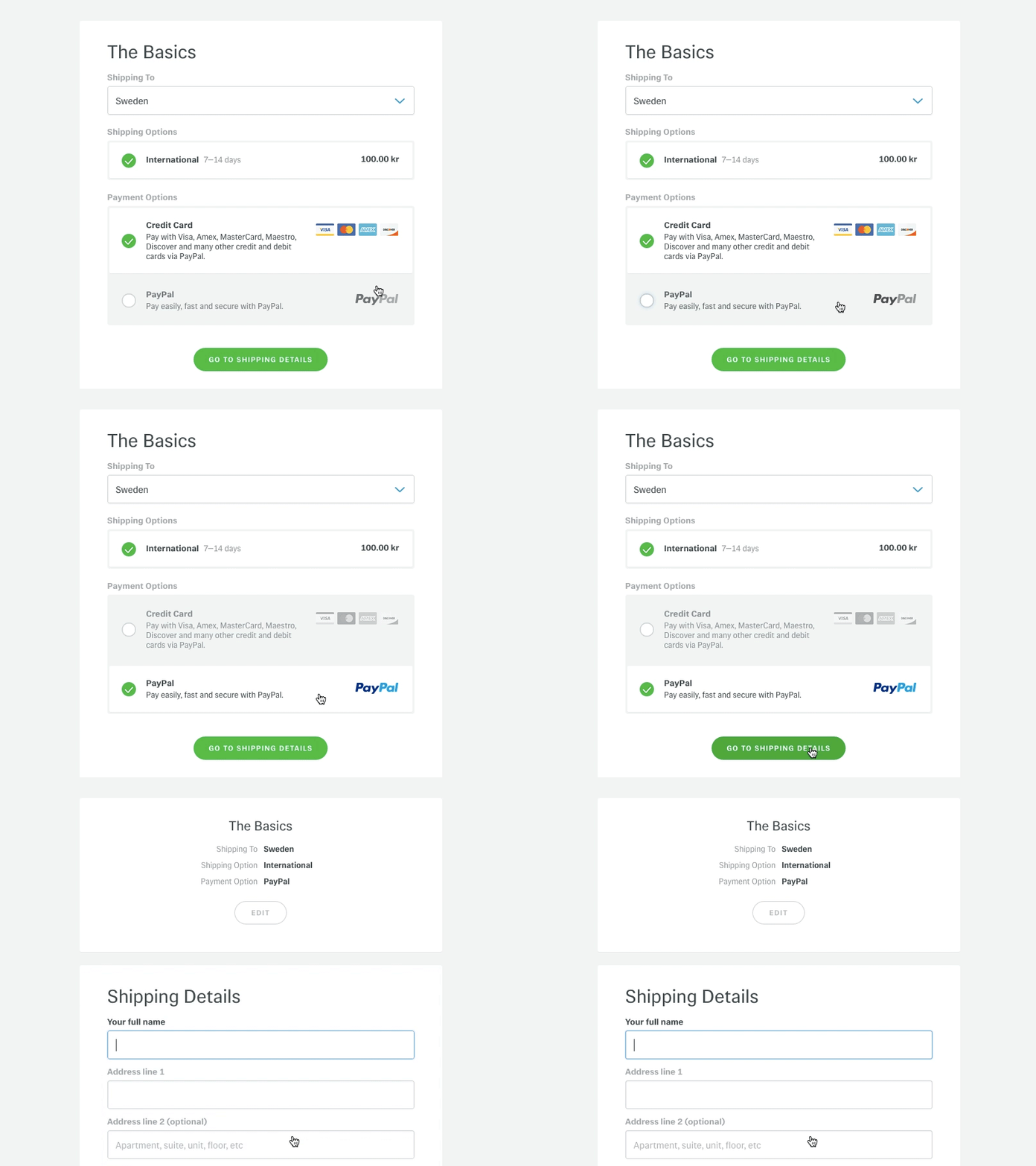
 boboz
on 16 May 2018
boboz
on 16 May 2018
Let's please keep this on topic. @boboz I've removed some off-topic comments. Just to say, whilst this is closed for voting/feedback, it's not open because development has not started. The design team however have been doing user research and doing some early mocks.
mikejolley
on 16 May 2018
For people following this thread, new cart and checkout blocks preview might be of interest: https://woocommerce.wordpress.com/2020/05/27/available-for-testing-a-block-based-woocommerce-cart-and-checkout/
 peterfabian
on 3 Jun 2020
peterfabian
on 3 Jun 2020
I’ll give it a try as soon as other payment methods are supported!
 Buzut
on 3 Jun 2020
Buzut
on 3 Jun 2020
Related issues
 prikhi
·
47Comments
prikhi
·
47Comments
 justlevine
·
52Comments
justlevine
·
52Comments
 allendav
·
56Comments
peterfabian
·
49Comments
allendav
·
56Comments
peterfabian
·
49Comments
 melindahelt
·
65Comments
melindahelt
·
65Comments
Most helpful comment
FWIW, my background is in cognitive psych and UI... but more importantly, I've got 100,000 customers and we hear from them every day about our order flow ;-)
That said, let me first describe our current situation, and how we got here... then I'll add a comment or two about the specific flow you described, Mike:
When we gave people the option of guest checkout or creating an account, the VAST majority used guest checkout. We also turned off account creation at /my-account/ since that was getting hammered by spammers/hackers.
We saw much lower abandonment when we removed the Guest/Account step and went to a one page checkout.
But, this created 4 problems:
To speed up the checkout process -- reducing friction for checkout -- and help reduce future friction, we started creating accounts for new users automatically upon successful checkout, emailing them their auto-generated password.
NOW the problems that we have are these:
At the moment, then, we're living in the worst of both worlds -- old customers who CAN'T log in. New customers who have trouble logging in and placing orders.
SO... my suggestions for minimizing friction IF you're not going to prompt them to select Guest Checkout/Create Account:
1) Don't prompt the user to create an account. Do it for them automatically.
2) If you MUST force them to log in, make the email field the first one and check for an existing email address and/or account immediately upon leaving that field
3) If there's an existing account and you MUST make them log in, have everything happen ON the checkout screen in some way
4) If possible, give them the OPTION to log in... should they choose not to (and you can display a message telling them why they SHOULD), just create another account with the same email, or automatically merge them. It'll be less effortful for us to to merge them in the back end (if you create a new account) or split them (if you automatically merge them) when necessary, frankly. Or, if you create a second account, there should be a way for the user to merge accounts to do this on their own if they can successfully confirm both accounts.
That's my ideal scenario... but to comment on the flow presented:
The goal, frankly, is to display shipping costs as late in the flow as possible. That way the customer has made micro-commitments all along the way and is less likely to abandon when they see any shipping costs.
Similarly, you'll want to apply coupons/discounts BEFORE collecting billing info. The customer needs to see the accurate order total before entering payment details.
Since billing and shipping are the same in most cases, we start with Billing and then prompt "Ship to a different address?" I'd suggest that this will lead to fewer AVS mismatches than collecting shipping address first (from people simply overlooking the need to enter a different billing address) if Billing/Shipping are collected on the same page.
I don't know the tax law related to virtual products (do you tax based on billing address or use address, neither of which may match the "shipping" address), so I'm assuming that it's based on billing address. If it's not, though, then you'll have to address the Virtual Product path differently than your version or mine.
BTW, a progress bar -- from cart through confirmation -- makes a big difference.
Oh, I didn't adjust the login/password flow in my chart, below... I'll do that later and amend it.