Woocommerce: ActionScheduler actions table doesn't exist
ref: https://wordpress.org/support/topic/fatal-error-on-last-version-4-0/#post-12531873
Table alexandr121131_wp_2h3tp.TOTscth0_actionscheduler_actions doesn’t exist in /var/www/vhosts/headplus.gr/httpdocs/wp-content/plugins/woocommerce/packages/action-scheduler/classes/migration/ActionScheduler_DBStoreMigrator.php:44
Stack trace:
- /var/www/vhosts/headplus.gr/httpdocs/wp-content/plugins/woocommerce/packages/action-scheduler/classes/data-stores/ActionScheduler_HybridStore.php(225): ActionScheduler_DBStoreMigrator->save_action(Object(ActionScheduler_Action), NULL)
- /var/www/vhosts/headplus.gr/httpdocs/wp-content/plugins/woocommerce/packages/action-scheduler/classes/ActionScheduler_ActionFactory.php(177): ActionScheduler_HybridStore->save_action(Object(ActionScheduler_Action))
- /var/www/vhosts/headplus.gr/httpdocs/wp-content/plugins/woocommerce/packages/action-scheduler/classes/ActionScheduler_ActionFactory.php(84): ActionScheduler_A in /var/www/vhosts/headplus.gr/httpdocs/wp-content/plugins/woocommerce/packages/action-scheduler/classes/migration/ActionScheduler_DBStoreMigrator.php on line 44
after that i rolled back on 3.9.3 version and everything works…
Another customer reported seeing this on WP Engine, so maybe we'd be able to reproduce there?
 peterfabian
All 73 comments
cc @rrennick
peterfabian
on 12 Mar 2020
Hello,
let me know if you need any help debugging that on my WP Engine install ? I can spin a dev environment up for you with a clone. But would need a way to send you the credentials privately then...
Note it uses the PHP engine 7.3 (not the newer 7.4).
FYI I upgraded from woocommerce 3.9.2 (Not 3.9.3) on WP 5.3.2.
Thanks.
 davidcommarmond
on 12 Mar 2020
davidcommarmond
on 12 Mar 2020
More reports here: https://wordpress.org/support/topic/can-not-update-my-database/
peterfabian
on 12 Mar 2020
@davidcommarmond Can you reproduce this in an install with only WC active?
 rrennick
on 12 Mar 2020
rrennick
on 12 Mar 2020
Same error in 19353630-hc - no cause or fix yet
 dougaitken
on 12 Mar 2020
dougaitken
on 12 Mar 2020
@rrennick no I can't
I tried to clone the production site to staging as well on WPE and. did the upgrade just after cloning it, but it didn't produce the error on the staging clone after updating, which is strange...
Only happening with the production site...
davidcommarmond
on 12 Mar 2020
@davidcommarmond Might it be related to object caching or similar?
rrennick
on 12 Mar 2020
I'm facing the same issue, even with all plugins and themes deactivated + without object cache.
Runs almost every minute!
2020/03/12 21:33:29 [error] 3227#3227: *259635 FastCGI sent in stderr: "PHP message: خطأ Table 'redshirtsstore.a' doesn't exist في قاعدة بيانات ووردبريس للاستعلام SELECT a.action_id FROM a WHERE a.hook='action_scheduler/migration_hook' AND a.status='in-progress' ORDER BY scheduled_date_gmt DESC LIMIT 1 القادم من shutdown_action_hook, do_action('shutdown'), WP_Hook->do_action, WP_Hook->apply_filters, Action_Scheduler\Migration\Controller->schedule_migration, Action_Scheduler\Migration\Scheduler->is_migration_scheduled, as_next_scheduled_action, ActionScheduler_HybridStore->find_action, ActionScheduler_DBStore->find_actionPHP message: خطأ Table 'redshirtsstore.a' doesn't exist في قاعدة بيانات ووردبريس للاستعلام SELECT a.action_id FROM a WHERE a.hook='action_scheduler/migration_hook' AND a.status='pending' ORDER BY scheduled_date_gmt ASC LIMIT 1 القادم من shutdown_action_hook, do_action('shutdown'), WP_Hook->do_action, WP_Hook->apply_filters, Action_Scheduler\Migration\Controller->schedule_migration, Action_Scheduler\Migration\Scheduler->is_migration_scheduled, as_next_scheduled_action, ActionScheduler_HybridStore->find_action, ActionScheduler_DBStore->find_actionPHP message: خطأ Table 'redshirtsstore.a' doesn't exist في قاعدة بيانات ووردبريس للاستعلام SELECT a.action_id FROM a WHERE a.hook='action_scheduler/migration_hook' AND a.status='in-progress' ORDER BY scheduled_date_gmt DESC LIMIT 1 القادم من shutdown_action_hook, do_action('shutdown'), WP_Hook->do_action, WP_Hook->apply_filters, Action_Scheduler\Migration\Controller->schedule_migration, Action_Scheduler\Migration\Scheduler->schedule_migration, as_next_scheduled_action, ActionScheduler_HybridStore->find_action, ActionScheduler_DBStore->find_actionPHP message: خطأ Table 'redshirtsstore.a' doesn't exist في قاعدة بيانات ووردبريس للاستعلام SELECT a.action_id FROM a WHERE a.hook='action_scheduler/migration_hook' AND a.status
 Updula
on 12 Mar 2020
Updula
on 12 Mar 2020
@Updula Your error messages are not the same as the others reported in this issue. Please do a conflict test https://docs.woocommerce.com/document/how-to-test-for-conflicts/ and create a new issue if you still have the issue with no other plugins active on a default theme.
rrennick
on 13 Mar 2020
Action Scheduler PR https://github.com/woocommerce/action-scheduler/pull/492
rrennick
on 13 Mar 2020
@rrennick I have tried all of this with the support team. The AS keep trying to action action_scheduler/migration_hook and fail, then does it again and again until suddenly stops. (after 1500 runs)
The tables already exist in the DB. I have tried clearing all complete and cancelled actions which made things better for a sec, then it returned to run.
Host is Kinsta
Updula
on 13 Mar 2020
Error also reported here - asking for more information about site set up: 2785749-zen
 EricaKuschel
on 13 Mar 2020
EricaKuschel
on 13 Mar 2020
So I work at a web hosting company, not sure if I'm allowed to place this here but I have encountered two clients with this issue. The only troubleshooting step that resolved the issue was installing WP Rollback and rolling back to version 3.9.3 from 4.0.
 arufasari
on 13 Mar 2020
arufasari
on 13 Mar 2020
I too have the exact same error.
I can no longer add photos to the products in my catalog and this is causing me a lot of damage.
How should I go about solving?
I deactivated all the plugins but nothing to do, I deactivated the theme but nothing.
This is the error log, I put the xxxxx instead of the name of the database and the site.
2020-03-15T18:08:03+00:00 CRITICAL Uncaught RuntimeException: Impossibile richiedere azioni. Errore del database. in /home/xxxxx/public_html/xxxxx/wp-content/plugins/woocommerce/packages/action-scheduler/classes/data-stores/ActionScheduler_DBStore.php:674
Stack trace:
0 /home/xxxxx/public_html/xxxxx/wp-content/plugins/woocommerce/packages/action-scheduler/classes/data-stores/ActionScheduler_DBStore.php(598): ActionScheduler_DBStore->claim_actions(0, 25, NULL, Array, ”)
1 /home/xxxxx/public_html/xxxxx/wp-content/plugins/woocommerce/packages/action-scheduler/classes/ActionScheduler_QueueRunner.php(154): ActionScheduler_DBStore->stake_claim(25)
2 /home/xxxxx/public_html/xxxxx/wp-content/plugins/woocommerce/packages/action-scheduler/classes/ActionScheduler_QueueRunner.php(133): ActionScheduler_QueueRunner->do_batch(25, ‘WP Cron’)
3 /home/xxxxx/public_html/xxxxx/wp-includes/class-wp-hook.php(288): ActionScheduler_QueueRunner->run(‘WP Cron’)
4 /home/xxxxx/public in /home/xxxxx/public_html/xxxxx/wp-content/plugins/woocommerce/packages/action-scheduler/classes/data-stores/ActionScheduler_DBStore.php alla riga 674
2020-03-15T18:09:34+00:00 CRITICAL Uncaught RuntimeException: Impossibile richiedere azioni. Errore del database. in /home/xxxxx/public_html/xxxxx/wp-content/plugins/woocommerce/packages/action-scheduler/classes/data-stores/ActionScheduler_DBStore.php:674
Stack trace:
0 /home/xxxxx/public_html/xxxxx/wp-content/plugins/woocommerce/packages/action-scheduler/classes/data-stores/ActionScheduler_DBStore.php(598): ActionScheduler_DBStore->claim_actions(0, 25, NULL, Array, ”)
1 /home/xxxxx/public_html/xxxxx/wp-content/plugins/woocommerce/packages/action-scheduler/classes/ActionScheduler_QueueRunner.php(154): ActionScheduler_DBStore->stake_claim(25)
2 /home/xxxxx/public_html/xxxxx/wp-content/plugins/woocommerce/packages/action-scheduler/classes/ActionScheduler_QueueRunner.php(133): ActionScheduler_QueueRunner->do_batch(25, ‘WP Cron’)
3 /home/xxxxx/public_html/xxxxx/wp-includes/class-wp-hook.php(288): ActionScheduler_QueueRunner->run(‘WP Cron’)
4 /home/xxxxx/public in /home/xxxxx/public_html/xxxxx/wp-content/plugins/woocommerce/packages/action-scheduler/classes/data-stores/ActionScheduler_DBStore.php alla riga 674
2020-03-15T18:10:56+00:00 CRITICAL Uncaught RuntimeException: Impossibile richiedere azioni. Errore del database. in /home/xxxxx/public_html/xxxxx/wp-content/plugins/woocommerce/packages/action-scheduler/classes/data-stores/ActionScheduler_DBStore.php:674
Stack trace:
0 /home/xxxxx/public_html/xxxxx/wp-content/plugins/woocommerce/packages/action-scheduler/classes/data-stores/ActionScheduler_DBStore.php(598): ActionScheduler_DBStore->claim_actions(0, 25, NULL, Array, ”)
1 /home/xxxxx/public_html/xxxxx/wp-content/plugins/woocommerce/packages/action-scheduler/classes/ActionScheduler_QueueRunner.php(154): ActionScheduler_DBStore->stake_claim(25)
2 /home/xxxxx/public_html/xxxxx/wp-content/plugins/woocommerce/packages/action-scheduler/classes/ActionScheduler_QueueRunner.php(133): ActionScheduler_QueueRunner->do_batch(25, ‘WP Cron’)
3 /home/xxxxx/public_html/xxxxx/wp-includes/class-wp-hook.php(288): ActionScheduler_QueueRunner->run(‘WP Cron’)
4 /home/xxxxx/public in /home/xxxxx/public_html/xxxxx/wp-content/plugins/woocommerce/packages/action-scheduler/classes/data-stores/ActionScheduler_DBStore.php alla riga 674
2020-03-15T18:12:01+00:00 CRITICAL Uncaught RuntimeException: Impossibile richiedere azioni. Errore del database. in /home/xxxxx/public_html/xxxxx/wp-content/plugins/woocommerce/packages/action-scheduler/classes/data-stores/ActionScheduler_DBStore.php:674
Stack trace:
0 /home/xxxxx/public_html/xxxxx/wp-content/plugins/woocommerce/packages/action-scheduler/classes/data-stores/ActionScheduler_DBStore.php(598): ActionScheduler_DBStore->claim_actions(0, 25, NULL, Array, ”)
1 /home/xxxxx/public_html/xxxxx/wp-content/plugins/woocommerce/packages/action-scheduler/classes/ActionScheduler_QueueRunner.php(154): ActionScheduler_DBStore->stake_claim(25)
2 /home/xxxxx/public_html/xxxxx/wp-content/plugins/woocommerce/packages/action-scheduler/classes/ActionScheduler_QueueRunner.php(133): ActionScheduler_QueueRunner->do_batch(25, ‘WP Cron’)
3 /home/XXXX/public_html/XXXX/wp-includes/class-wp-hook.php(288): ActionScheduler_QueueRunner->run(‘WP Cron’)
4 /home/XXXX/public in XXXXXXX/wp-content/plugins/woocommerce/packages/action-scheduler/classes/data-stores/ActionScheduler_DBStore.php alla riga 674
Errore sul database di WordPress: [Table ‘xxxxx_wp894.wp8r_actionscheduler_actions’ doesn’t exist]
SELECT a.action_id FROM wp8r_actionscheduler_actions a WHERE a.hook=’action_scheduler/migration_hook’ AND a.status=’in-progress’ ORDER BY scheduled_date_gmt DESC LIMIT 1
Errore sul database di WordPress: [Table ‘xxxxx_wp894.wp8r_actionscheduler_actions’ doesn’t exist]
SELECT a.action_id FROM wp8r_actionscheduler_actions a WHERE a.hook=’action_scheduler/migration_hook’ AND a.status=’pending’ ORDER BY scheduled_date_gmt ASC LIMIT 1
Errore sul database di WordPress: [Table ‘xxxxx_wp894.wp8r_actionscheduler_actions’ doesn’t exist]
SELECT a.action_id FROM wp8r_actionscheduler_actions a WHERE a.hook=’action_scheduler/migration_hook’ AND a.status=’in-progress’ ORDER BY scheduled_date_gmt DESC LIMIT 1
Errore sul database di WordPress: [Table ‘xxxxx_wp894.wp8r_actionscheduler_actions’ doesn’t exist]
SELECT a.action_id FROM wp8r_actionscheduler_actions a WHERE a.hook=’action_scheduler/migration_hook’ AND a.status=’pending’ ORDER BY scheduled_date_gmt ASC LIMIT 1
Errore sul database di WordPress: [Table ‘xxxxx_wp894.wp8r_actionscheduler_groups’ doesn’t exist]
SELECT group_id FROM wp8r_actionscheduler_groups WHERE slug=’action-scheduler-migration’
Errore sul database di WordPress: [Table ‘xxxxx_wp894.wp8r_actionscheduler_groups’ doesn’t exist]
SHOW FULL COLUMNS FROM wp8r_actionscheduler_groups
Errore sul database di WordPress: [Table ‘xxxxx_wp894.wp8r_actionscheduler_actions’ doesn’t exist]
SHOW FULL COLUMNS FROM wp8r_actionscheduler_actions
 andreaguerra80
on 16 Mar 2020
andreaguerra80
on 16 Mar 2020
FWIW, this issue https://github.com/woocommerce/woocommerce/issues/25862 also happened on WP Engine.
After the initial error, and reactivating WooCommerce, there were no further symptoms that I noticed.
 GlennMartin1
on 16 Mar 2020
GlennMartin1
on 16 Mar 2020
@andreaguerra80 install https://github.com/woocommerce/action-scheduler/archive/master.zip. using the plugin installer. Once it's active, go to Tools -> Scheduled Actions. You should see a notice indicating that it attempted to create the tables for you. Once you update to WC 4.0.1 you can remove the plugin.
rrennick
on 16 Mar 2020
andreaguerra80
on 16 Mar 2020
now I see this message after updating the page, is it correct?
andreaguerra80
on 16 Mar 2020
If you refresh the screen is the message still shown? If it is then you will need to contact your hosting support to determine why WP isn't able to create tables.
rrennick
on 16 Mar 2020
@rrennick It did the above too but it created 3 tables now only wp_actionscheduler_logs is missing yet it is still attempting for a while now
Updula
on 17 Mar 2020
@rrennick Please note I have manually dropped the previously created AS tables so I can trigger the new recreation. Should have not done that?
Updula
on 17 Mar 2020
@rrennick Hi also to me did not create the table _actionscheduler_logs
how to do?
andreaguerra80
on 17 Mar 2020
now only wp_actionscheduler_logs is missing yet it is still attempting for a while now
@Updula sorry, that has been fixed in https://github.com/woocommerce/action-scheduler/archive/master.zip.
I have manually dropped the previously created AS tables so I can trigger the new recreation. Should have not done that?
No, you don't need to drop the existing tables.
rrennick
on 17 Mar 2020
@rrennick Hi also to me did not create the table _actionscheduler_logs
how to do?
andreaguerra80
on 17 Mar 2020
@andreaguerra80 Did you install the zip I linked to in my previous comment (replacing the 3.1.3 version)?
rrennick
on 17 Mar 2020
ok, I didn't understand that I had to install the latest master.
Forgive me my English.
In Tools -> Scheduled Actions it still returns 1 pending and if I go to www.miosito.com/wp-admin/maint/repair.php?repair=1 it still tells me that the table _actionscheduler_logs' doesn't exist
andreaguerra80
on 17 Mar 2020
ok perfect now everything works.
Thanks so much :-)
andreaguerra80
on 17 Mar 2020
I tried the same thing, installed AS 1.3.1 and then updated from WC 3.9.3 to the latest master from GitHub just 1 hour ago, and it bricked my admin access. My store was accessible, but wp-admin only returned a critical error. Even in incognito mode on Chrome, wich nothing in the cache, and purged website caches as well. I am just in the process of restoring my full backup from yesterday, then I will try again. Something I did about 50 times within the last 7 days fighting all these issues. Extremely frustrating and time consuming.
 Universal-Solder
on 18 Mar 2020
Universal-Solder
on 18 Mar 2020
@rrennick Thank you, latest AS solved issue for me too and now am just waiting for migration to finish. Please note that I still saw the issue "PHP message: Error Table 'sitename.a' doesn't exist upon initial migration but after I disabled WP Rocket plugin, this no longer occurred!
Updula
on 18 Mar 2020
Thank you, yes it worked. After installing AS 3.1.3 (sorry I said 1.3.1 in my former post) I was able to update to WC 4.0.0 (the latest available through plugin installer), and the database update went through with no problems.
Universal-Solder
on 18 Mar 2020
after I disabled WP Rocket plugin, this no longer occurred!
@Updula Thanks for that follow up.
rrennick
on 18 Mar 2020
Hello, can u help me please?
meException: Error saving action: Error saving action: Table 'b10850.wp0z_actionscheduler_actions' doesn't exist in /www/wp-content/plugins/action-scheduler-master/classes/migration/ActionScheduler_DBStoreMigrator.php:44 Stack trace: #0 /home/www/wp-content/plugins/action-scheduler-master/classes/data-stores/ActionScheduler_HybridStore.php(225): ActionScheduler_DBStoreMigrator->save_action(Object(ActionScheduler_Action), NULL) #1 /web/htdocs4w/wp-content/plugins/action-scheduler-master/classes/ActionScheduler_ActionFactory.php(177): ActionScheduler_HybridStore->save_action(Object(ActionScheduler_Action)) #2 /web/htdocs4/shome/www/wp-content/plugins/action-scheduler-master/classes/ActionScheduler_ActionFactory.php(84): ActionScheduler_ActionFactory->store(Object(ActionScheduler_Action)) #3 /web/htdocs4/home/www/wp-content/plugins/action-scheduler-master/func in /web/htdocs4/home/www/wp-content/plugins/action-scheduler-master/classes/migration/ActionScheduler_DBStoreMigrator.php on line 44
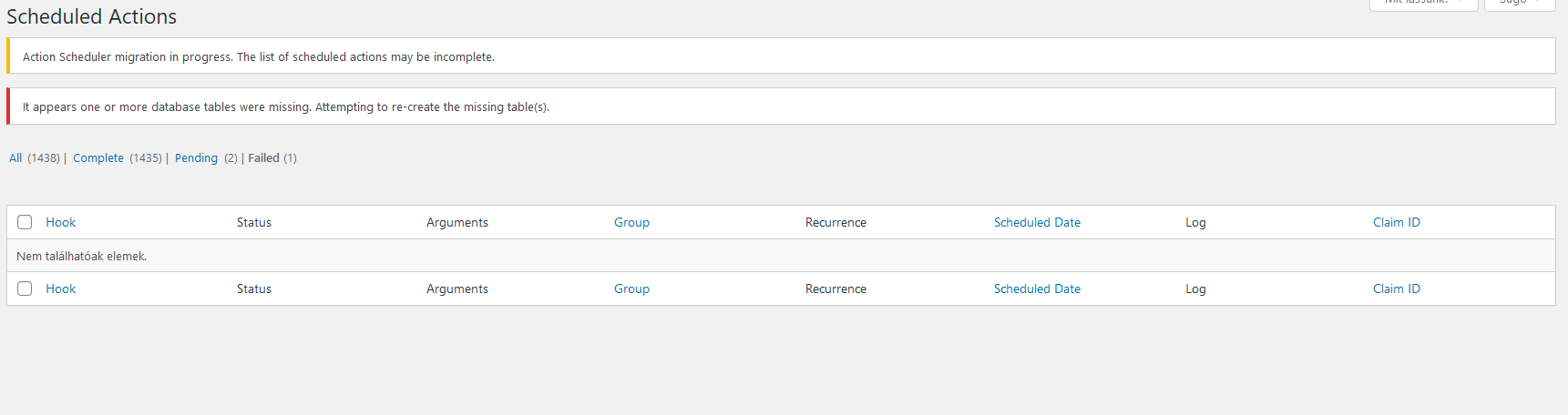
And
wp0z_actionscheduler_actions: Table 'b10850.wp0z_actionscheduler_actions' doesn't exist
wp0z_actionscheduler_claims: Table 'b10850.wp0z_actionscheduler_claims' doesn't exist
wp0z_actionscheduler_groups: Table 'b10850.wp0z_actionscheduler_groups' doesn't exist
wp0z_actionscheduler_logs: Table 'b10850.wp0z_actionscheduler_logs' doesn't exist
 LGx0
on 20 Mar 2020
LGx0
on 20 Mar 2020
@LGx0 There is a new WooCommerce release 4.0.1 coming soon which will address this.
Until then, you may wish to install this Action Scheduler plugin: https://github.com/woocommerce/action-scheduler/archive/3.1.4.zip
After WooCommerce 4.0.1 is released and you've updated, you can deactivate & uninstall that plugin.
Please provide feedback if this works for you.
GlennMartin1
on 20 Mar 2020
Hi @rrennick @GlennMartin1 I after launching the plug in, I disabled and deleted the plug in and everything completed well.
Shouldn't I uninstall and delete it?
andreaguerra80
on 20 Mar 2020
Shouldn't I uninstall and delete it?
As long as you have WC 4.0 or higher installed removing it once the issue is fixed is okay.
rrennick
on 20 Mar 2020
ah ok i have WC 4.0.0 thnx
andreaguerra80
on 20 Mar 2020
@LGx0 There is a new WooCommerce release 4.0.1 coming soon which will address this.
Until then, you may wish to install this Action Scheduler plugin: https://github.com/woocommerce/action-scheduler/archive/3.1.4.zip
After WooCommerce 4.0.1 is released and you've updated, you can deactivate & uninstall that plugin.
Please provide feedback if this works for you.
Doesn't work.
LGx0
on 20 Mar 2020
@LGx0 There is a new WooCommerce release 4.0.1 coming soon which will address this.
Until then, you may wish to install this Action Scheduler plugin: https://github.com/woocommerce/action-scheduler/archive/3.1.4.zip
After WooCommerce 4.0.1 is released and you've updated, you can deactivate & uninstall that plugin.
Please provide feedback if this works for you.
The problem persists on Woo 4.0.1
Fatal error: Uncaught RuntimeException: Error al guardar la acción: Error al guardar la acción: Table 'db4kpfq58e5qqz.wp_actionscheduler_actions' doesn't exist in /home/customer/www/miaumiau.co/public_html/wp-content/plugins/woocommerce/packages/action-scheduler/classes/migration/ActionScheduler_DBStoreMigrator.php:44 Stack trace: #0 /home/customer/www/miaumiau.co/public_html/wp-content/plugins/woocommerce/packages/action-scheduler/classes/data-stores/ActionScheduler_HybridStore.php(225): ActionScheduler_DBStoreMigrator->save_action(Object(ActionScheduler_Action), NULL) #1 /home/customer/www/miaumiau.co/public_html/wp-content/plugins/woocommerce/packages/action-scheduler/classes/ActionScheduler_ActionFactory.php(177): ActionScheduler_HybridStore->save_action(Object(ActionScheduler_Action)) #2 /home/customer/www/miaumiau.co/public_html/wp-content/plugins/woocommerce/packages/action-scheduler/classes/ActionScheduler_ActionFactory.php(84): ActionScheduler_ActionFactory->store(Object(ActionScheduler_Action)) #3 /home/custom in /home/customer/www/miaumiau.co/public_html/wp-content/plugins/woocommerce/packages/action-scheduler/classes/migration/ActionScheduler_DBStoreMigrator.php on line 44
 nachoserna
on 27 Mar 2020
nachoserna
on 27 Mar 2020
Hello, Action Scheduler plugin update didn't help us either. Still getting persistent DB calls in 2.0.1:
[Fri Mar 27 12:05:37.225479 2020] [lsapi:error] [pid 228781:tid 139652593686272] [client 107.180.56.153:53184] [host www.powmiamemorial.org] Backend fatal error: PHP Fatal error: Uncaught RuntimeException: Error saving action: Error saving action: Table 'n43341505425393.d8d_actionscheduler_actions' doesn't exist in /home/xb7nfs0siyf2/public_html/wp-content/plugins/woocommerce/packages/action-scheduler/classes/migration/ActionScheduler_DBStoreMigrator.php:44\nStack trace:\n#0 /home/xb7nfs0siyf2/public_html/wp-content/plugins/woocommerce/packages/action-scheduler/classes/data-stores/ActionScheduler_HybridStore.php(225): ActionScheduler_DBStoreMigrator->save_action(Object(ActionScheduler_Action), NULL)\n#1 /home/xb7nfs0siyf2/public_html/wp-content/plugins/woocommerce/packages/action-scheduler/classes/ActionScheduler_ActionFactory.php(177): ActionScheduler_HybridStore->save_action(Object(ActionScheduler_Action))\n#2 /home/xb7nfs0siyf2/public_html/wp-content/plugins/woocommerce/packages/action-scheduler/classes/ActionScheduler_ActionFactory.php(84): ActionScheduler_ActionFactory->store(Object(ActionScheduler_Action))\n#3 /home/xb7nfs0siyf2/public_html/wp-content/plugins/woocommerce/packages/act in /home/xb7nfs0siyf2/public_html/wp-content/plugins/woocommerce/packages/action-scheduler/classes/migration/ActionScheduler_DBStoreMigrator.php on line 44\n, referer:
 rngeer
on 28 Mar 2020
rngeer
on 28 Mar 2020
@nachoserna @rngeer Do you have MySQL 5.7? If so, see https://github.com/woocommerce/action-scheduler/issues/437#issuecomment-605147523
rrennick
on 30 Mar 2020
9528268-hc showing the same issue. They used the plugin recommended by @rrennick and it fixed things
 phillipcornwell
on 11 Apr 2020
phillipcornwell
on 11 Apr 2020
Hi, I tried to use https://github.com/woocommerce/action-scheduler/archive/3.1.4.zip but the error persisted. So I followed the arufasari approach and the error was solved.
So I work at a web hosting company, not sure if I'm allowed to place this here but I have encountered two clients with this issue. The only troubleshooting step that resolved the issue was installing WP Rollback and rolling back to version 3.9.3 from 4.0.
 rafaelfigueiredo-l
on 14 Apr 2020
rafaelfigueiredo-l
on 14 Apr 2020
ok perfect now everything works.
Thanks so much :-)
Hello i have the same issue here action schedule table does not exist, I installed the latest version 3.1.4 now if the plugin provided, and go to tools-Scheduled actions and this is what i get. Now i just have to wait?
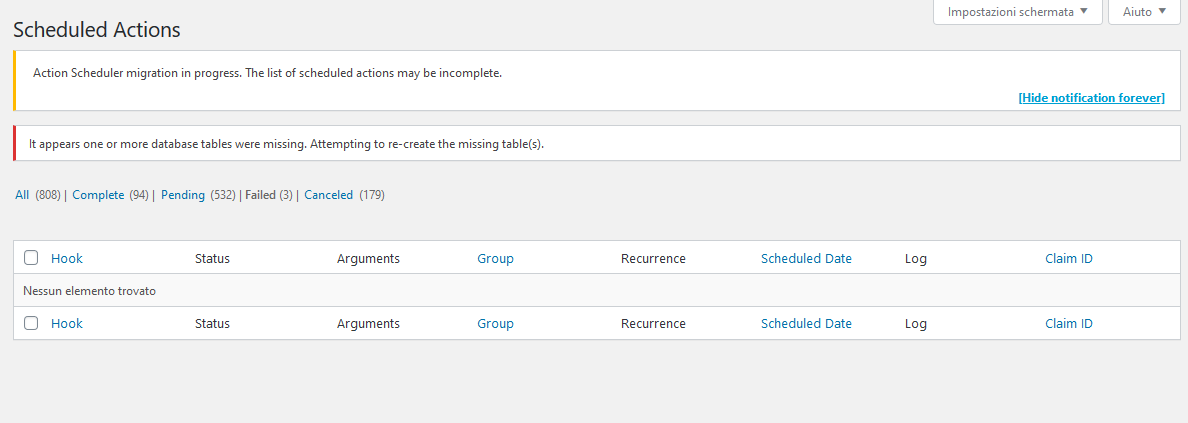
 sasel57
on 16 Apr 2020
sasel57
on 16 Apr 2020
I too can confirm that I've seen this issue with just Woo active on a site with the 2020 theme.
When working on a client's site I rolled back to 3.9.2 and had no issues with seeing the action scheduler page. However, updating to 4.0.1 causes the items to go missing with the same 'ActionScheduler_Store' error people are reporting.
Running MySQL 5.7 but not seeing the issue mentioned in: https://github.com/woocommerce/action-scheduler/issues/437#issuecomment-605147523
Installing the Action Scheduler plugin also does not allow the actions to show up. Running version 3.4.1 of that plugin.
Woo's logs show this error:
2020-04-16T07:07:39+00:00 CRITICAL Uncaught Error: Class 'ActionScheduler_Store' not found in /var/www/dasbuilder/wp-content/plugins/woocommerce/includes/libraries/action-scheduler/classes/ActionScheduler.php:20
Stack trace:
#0 /var/www/dasbuilder/wp-content/plugins/woocommerce/includes/libraries/action-scheduler/classes/ActionScheduler.php(93): ActionScheduler::store()
#1 /var/www/dasbuilder/wp-content/plugins/woocommerce/includes/libraries/action-scheduler/action-scheduler.php(44): ActionScheduler::init('/var/www/da...')
#2 /var/www/dasbuilder/wp-content/plugins/woocommerce/includes/libraries/action-scheduler/classes/ActionScheduler_Versions.php(59): action_scheduler_initialize_2_dot_2_dot_5()
#3 /var/www/dasbuilder/wp-includes/class-wp-hook.php(285): ActionScheduler_Versions::initialize_latest_version()
#4 /var/www/dasbuilder/wp-includes/class-wp-hook.php(311): WP_Hook->apply_filters(NULL, Array)
#5 /var/www/dasbuilder/wp-incl in /var/www/dasbuilder/wp-content/plugins/woocommerce/includes/libraries/action-scheduler/classes/ActionScheduler.php on line 20
File system doesn't have the file:
~ /var/www/dasbuilder$ stat /var/www/dasbuilder/wp-content/plugins/woocommerce/includes/libraries/action-scheduler/classes/ActionScheduler.php
stat: cannot stat '/var/www/dasbuilder/wp-content/plugins/woocommerce/includes/libraries/action-scheduler/classes/ActionScheduler.php': No such file or directory
 dasbuilder
on 16 Apr 2020
dasbuilder
on 16 Apr 2020
Uncaught RuntimeException: Error saving action: Error saving action: Table 'pantheon.wp_actionscheduler_actions' doesn't exist in /srv/bindings/d2dc6e4a15964e02b4d3cbc155b1d290/code/wp-content/plugins/woocommerce/packages/action-scheduler/classes/migration/ActionScheduler_DBStoreMigrator.php:44
Stack trace:
#0 /srv/bindings/d2dc6e4a15964e02b4d3cbc155b1d290/code/wp-content/plugins/woocommerce/packages/action-scheduler/classes/data-stores/ActionScheduler_HybridStore.php(225): ActionScheduler_DBStoreMigrator->save_action(Object(ActionScheduler_Action), NULL)
#1 /srv/bindings/d2dc6e4a15964e02b4d3cbc155b1d290/code/wp-content/plugins/woocommerce/packages/action-scheduler/classes/ActionScheduler_ActionFactory.php(177): ActionScheduler_HybridStore->save_action(Object(ActionScheduler_Action))
WooCommerce release 4.x.x is absolutely broken... had to revert to 3.9.2 can't believe you guys shipped with a fatal error of that magnitude, almost nuked a client store if it wasn't because pantheon dev environments catched that.
 Esteban-Rocha
on 16 Apr 2020
Esteban-Rocha
on 16 Apr 2020
FWIW, I just attempted to update my site from 3.9.0 to 4.0.1, and hit this error, so I'm not sure it is actually fixed in 4.0.1, unless my circumstances are somehow different. In my case, it is preventing the DB update from completing when I try to use the update database button after upgrading to 4.0.1
WordPress version 5.4
Current theme: Storefront (version 2.5.3)
Current plugin: WooCommerce (version 4.0.1)
PHP version 7.3.11
Error Details
=============
An error of type E_ERROR was caused in line 44 of the file /usr/home/millerkc/public_html/wp-content/plugins/woocommerce/packages/action-scheduler/classes/migration/ActionScheduler_DBStoreMigrator.php. Error message: Uncaught RuntimeException: Error saving action: Error saving action: Table 'millerkc_wpbackend.wp_actionscheduler_actions' doesn't exist in /usr/home/millerkc/public_html/wp-content/plugins/woocommerce/packages/action-scheduler/classes/migration/ActionScheduler_DBStoreMigrator.php:44
Stack trace:
#0 /usr/home/millerkc/public_html/wp-content/plugins/woocommerce/packages/action-scheduler/classes/data-stores/ActionScheduler_HybridStore.php(225): ActionScheduler_DBStoreMigrator->save_action(Object(ActionScheduler_Action), NULL)
#1 /usr/home/millerkc/public_html/wp-content/plugins/woocommerce/packages/action-scheduler/classes/ActionScheduler_ActionFactory.php(177): ActionScheduler_HybridStore->save_action(Object(ActionScheduler_Action))
#2 /usr/home/millerkc/public_html/wp-content/plugins/woocommerce/packages/action-scheduler/classes/ActionScheduler_ActionFactory.php(84): ActionScheduler_ActionFactory->store(Object(ActionScheduler_
 millerkc
on 18 Apr 2020
millerkc
on 18 Apr 2020
Also reported in 2861312-zen. Updating to 4.0.1 doesn't resolve things, site is on 5.5.5-10.2.31-MariaDB rather than regular MySQL - would this be of influence?
 iMazed
on 20 Apr 2020
iMazed
on 20 Apr 2020
Reported in 8104983-HC as well - User was updating to 4.0.1 and had this issue
 keninbassart
on 20 Apr 2020
keninbassart
on 20 Apr 2020
Now i just have to wait?
@sasel57 When you revisit the page do you still see the table missing notice?
File system doesn't have the file:
@dasbuilder Can you manually re-install/re-upload WooCommerce?
site is on 5.5.5-10.2.31-MariaDB rather than regular MySQL - would this be of influence?
@iMazed MariaDB should be fine. We use it in some of our testing environments.
@Esteban-Rocha @millerkc @keninbassart Some hosting environments have permissions where WordPress cannot create new tables. If the DB tables aren't being created, the hosting side needs to be checked to determine where the issue is.
rrennick
on 20 Apr 2020
Im getting the same issues as well and have been trying to solve this for a week or so now, with the help of WPEngine support. I have over 7000 pending actions that I cant clear.
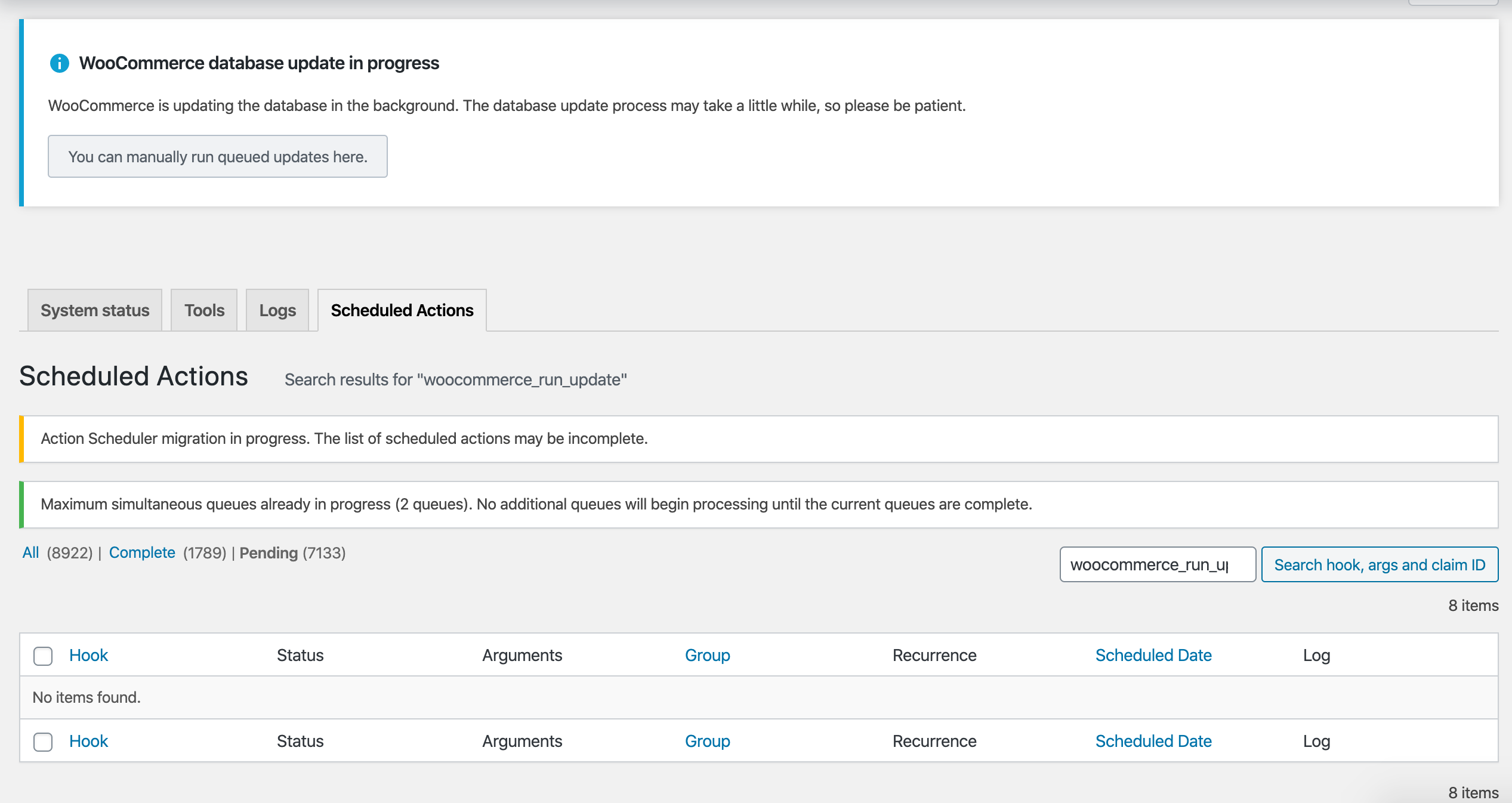
Testing on legacy staging hasn't made any difference. I also tried removing the completed and cancelled items to see if this made a difference, but it did not.
I have the AS 3.1.4 plugin installed, as well the latest Woo 4.0.1
 chillybin
on 23 Apr 2020
chillybin
on 23 Apr 2020
@chillybin This issue is related to the database table being missing vs the list table being empty. Install https://github.com/woocommerce/action-scheduler/archive/master.zip and if your issue still exists create an issue at https://github.com/woocommerce/action-scheduler/issues/new
rrennick
on 23 Apr 2020
With the action scheduler plugin my DB updated to version 4.0.0 but wocommerce is version 4.0.1. Is it a problem? What about wp cron should it be enabled?
sasel57
on 3 May 2020
Hi @sasel57 ,
Your db version should match your WC version. You can update the database by going to WooCommerce > Status > Tools > Update database.
It is usually a good idea to enable wp cron as WC uses it for background processing (although it added a different triggering mechanism in version 4).
peterfabian
on 4 May 2020
@chillybin This issue is related to the database table being missing vs the list table being empty. Install https://github.com/woocommerce/action-scheduler/archive/master.zip and if your issue still exists create an issue at https://github.com/woocommerce/action-scheduler/issues/new
I have multisite installed and after installing this plugin on network I can not access secondary dashboard. I get whitescreen of death message. Works on primary dashboard. What could be problem
 fongreecss
on 13 May 2020
fongreecss
on 13 May 2020
@frasaleksander
Please check your server and PHP logs to see the reason you're getting the white screen of death. Please open a new issue if you manage to find relevant messages in the log or reproduce the problem.
peterfabian
on 13 May 2020
I am facing this error. Please help
Fatal error: Uncaught RuntimeException: Error saving action: Error saving action: Table 'poetilsh_shopaxcu_wp940.wpbg_actionscheduler_actions' doesn't exist in /home/poetilsh/public_html/pomento.in/wp-content/plugins/woocommerce/packages/action-scheduler/classes/migration/ActionScheduler_DBStoreMigrator.php:44 Stack trace: #0 /home/poetilsh/public_html/pomento.in/wp-content/plugins/woocommerce/packages/action-scheduler/classes/data-stores/ActionScheduler_HybridStore.php(242): ActionScheduler_DBStoreMigrator->save_action(Object(ActionScheduler_Action), NULL) #1 /home/poetilsh/public_html/pomento.in/wp-content/plugins/woocommerce/packages/action-scheduler/classes/ActionScheduler_ActionFactory.php(177): ActionScheduler_HybridStore->save_action(Object(ActionScheduler_Action)) #2 /home/poetilsh/public_html/pomento.in/wp-content/plugins/woocommerce/packages/action-scheduler/classes/ActionScheduler_ActionFactory.php(84): ActionScheduler_ActionFactory->store(Object(ActionScheduler_Action)) #3 /home/poetilsh/public_html/pomento.in in /home/poetilsh/public_html/pomento.in/wp-content/plugins/woocommerce/packages/action-scheduler/classes/migration/ActionScheduler_DBStoreMigrator.php on line 44
There has been a critical error on your website. Please check your site admin email inbox for instructions.
Learn more about debugging in WordPress.
 thepomento
on 21 May 2020
thepomento
on 21 May 2020
@thepomento What version of WooCommerce do you have installed?
rrennick
on 21 May 2020
I experienced this after deploying from staging to live. I was trying not to overwrite WC order tables so I excluded:
wp_posts
wp_postmeta
wp_woocommerce_order_items
wp_woocommerce_order_itemmeta
wp_users
wp_usermeta
When I deployed again using 'all tables' the error was resolved.
 seanbelly
on 22 May 2020
seanbelly
on 22 May 2020
@seanbelly Thanks for the followup. Closing this as resolved.
rrennick
on 22 May 2020
@rrennick, Please help me.
wordpress version: 5.4.1
woocommerce: 4.1.1
but error: Fatal error: Uncaught RuntimeException: Hiba Hiba Table 'b10850.wp0z_actionscheduler_actions' doesn't exist feladat mentésekkor feladat mentésekkor in /web/htdocs4/szegedicukraszdainfo/home/www/wp-content/plugins/woocommerce/packages/action-scheduler/classes/migration/ActionScheduler_DBStoreMigrator.php:44 Stack trace: #0 /web/htdocs4/szegedicukraszdainfo/home/www/wp-content/plugins/woocommerce/packages/action-scheduler/classes/data-stores/ActionScheduler_HybridStore.php(242): ActionScheduler_DBStoreMigrator->save_action(Object(ActionScheduler_Action), NULL) #1 /web/htdocs4/szegedicukraszdainfo/home/www/wp-content/plugins/woocommerce/packages/action-scheduler/classes/ActionScheduler_ActionFactory.php(177): ActionScheduler_HybridStore->save_action(Object(ActionScheduler_Action)) #2 /web/htdocs4/szegedicukraszdainfo/home/www/wp-content/plugins/woocommerce/packages/action-scheduler/classes/ActionScheduler_ActionFactory.php(84): ActionScheduler_ActionFactory->store(Object(ActionScheduler_Action)) #3 /web/htdocs4/szegedicukr in /web/htdocs4/szegedicukraszdainfo/home/www/wp-content/plugins/woocommerce/packages/action-scheduler/classes/migration/ActionScheduler_DBStoreMigrator.php on line 44
and not loaded admin page
LGx0
on 26 May 2020
How we can solve this error? i upgraded to 4.1.1 but error actionscheduler_actions table does n't exist
 stackprogramer
on 1 Jun 2020
stackprogramer
on 1 Jun 2020
I have found out a solution to this.
The plugin does not create the 4 needed tables if they do not exist.
All 4 actionsheduler_ tables that are needed are not available.
By any kind of upgrade, there is nothing that can initiate new tables if they do not exist.
You will have to do it manually by creating a new WordPress page, and then copy the same tables in phpMyAdmin into the webpage you use. After you've installed WooCommerce 4.0+
 Dealazer
on 2 Jun 2020
Dealazer
on 2 Jun 2020
The plugin does not create the 4 needed tables if they do not exist.
@Dealazer Action Scheduler checks for the tables on every load of the AS admin screen and attempts to create them if they don't exist. If the tables are not being created then there is something in your hosting environment preventing them from being created. Contact your hosting support to investigate what is preventing the table creation.
rrennick
on 2 Jun 2020
Hi, I tried to use https://github.com/woocommerce/action-scheduler/archive/3.1.4.zip but the error persisted. So I followed the arufasari approach and the error was solved.
So I work at a web hosting company, not sure if I'm allowed to place this here but I have encountered two clients with this issue. The only troubleshooting step that resolved the issue was installing WP Rollback and rolling back to version 3.9.3 from 4.0.
[SOLVED] After install https://github.com/woocommerce/action-scheduler/archive/3.1.4.zip and active this plugin and visit from Tools > Action Scheduler and wait for creating tables everything goes normal. 🎉
 amastaneh
on 24 Jun 2020
amastaneh
on 24 Jun 2020
SOLVED!
OK, I had exactly the same issue in my database here is the message I received,
Error Details
=============
An error of type E_ERROR was caused in line 75 of the file /home/XXX/public_html/wp-content/plugins/woocommerce/packages/action-scheduler/classes/data-stores/ActionScheduler_DBStore.php. Error message: Uncaught RuntimeException: Error saving action: Table 'XXX_actionscheduler_actions' doesn't exist in /home/XXX/public_html/wp-content/plugins/woocommerce/packages/action-scheduler/classes/data-stores/ActionScheduler_DBStore.php:75
Stack trace:
#0 /home/XXX/public_html/wp-content/plugins/woocommerce/packages/action-scheduler/classes/ActionScheduler_ActionFactory.php(177): ActionScheduler_DBStore->save_action(Object(ActionScheduler_Action))
#1 /home/XXX/public_html/wp-content/plugins/woocommerce/packages/action-scheduler/classes/ActionScheduler_ActionFactory.php(84): ActionScheduler_ActionFactory->store(Object(ActionScheduler_Action))
#2 /home/XXX/public_html/wp-content/plugins/woocommerce/packages/action-scheduler/functions.php(36): ActionScheduler_ActionFactory->single('woocommerce_upd...', Array, 1591830898, '')
#3 /home/XXX/public_html/wp-content/plugins/woocommerce/includes/queue/class-wc-action-queue.php(44): as_schedule_single_action(1591830898, 'woocommerce_upd...', Array,
Steps:
Activate it and than go to the options page, in the options page you will see the error message saying that database tables are not existing and trying to reproduce.
Refresh the page.
Done.
 eristavi
on 24 Jun 2020
eristavi
on 24 Jun 2020
Another report from the forums.
 kylemcph
on 10 Jul 2020
kylemcph
on 10 Jul 2020
I too just encountered this error and it broke my site. I am not using wpengine . I am on digital ocean using a vps. Details are:
Ubuntu server 18.04 & apache 2.4 (lamp)WordPress version 5.4.2
Current theme: BizPlus Pro (version 1.0.3)
Current plugin: WooCommerce (version 4.3.0)
PHP version 7.4.5
mysql 8
It seemed to happen as I was deactivating and deleting Contact Form 7. Right before that I had added a plugin "404 Solution" which was working fine. I've since deleted it and contact for 7. Then deleted WC and reinstalled it. Still the same error. Also, WC Memberships then broke too so I've had to get rid of that temporarily too.
Error Details
An error of type E_ERROR was caused in line 44 of the file /var/www/html/wp-content/plugins/woocommerce/packages/action-scheduler/classes/migration/ActionScheduler_DBStoreMigrator.php. Error message: Uncaught RuntimeException: Error saving action: Error saving action: Table 'wordpress.wp_actionscheduler_actions' doesn't exist in /var/www/html/wp-content/plugins/woocommerce/packages/action-scheduler/classes/migration/ActionScheduler_DBStoreMigrator.php:44
Stack trace:
0 /var/www/html/wp-content/plugins/woocommerce/packages/action-scheduler/classes/data-stores/ActionScheduler_HybridStore.php(242): ActionScheduler_DBStoreMigrator->save_action()
1 /var/www/html/wp-content/plugins/woocommerce/packages/action-scheduler/classes/ActionScheduler_ActionFactory.php(177): ActionScheduler_HybridStore->save_action()
2 /var/www/html/wp-content/plugins/woocommerce/packages/action-scheduler/classes/ActionScheduler_ActionFactory.php(84): ActionScheduler_ActionFactory->store()
3 /var/www/html/wp-content/plugins/woocommerce/packages/action-scheduler/functions.php(36): ActionScheduler_ActionFactory->single()
4 /var/www/html/wp-content/plugins/woocommerce/includes/queue/class-wc-action-queue.php(44): as_schedule_single_ac
 jsfry
on 12 Jul 2020
jsfry
on 12 Jul 2020
I had this issue when trying to utilize HyperDB and doing digging I found these options are checked before the tables are attempted to be created:
schema-ActionScheduler_StoreSchema
schema-Action_Scheduler\Custom_Tables\DB_Store_Table_Maker
schema-Action_Scheduler\Custom_Tables\DB_Logger_Table_Maker
After removing those options and disabling HyperDB I was able to get the site functional again, not sure if it's some kind of race condition or what, i'll do more debugging in the morning.
Just for those who may be debugging this issue, make sure you remove those options otherwise when you activate WooCommerce it will just throw fatal error instead of trying to create the tables if it for some reason "thinks" they were already created.
 tripflex
on 21 Oct 2020
tripflex
on 21 Oct 2020
Hi, i have probleme with my woocommerce after the update.
Une erreur de type E_ERROR a été causée dans la ligne 44 du fichier /home/moncoachen/www2/wp-content/plugins/woocommerce/packages/action-scheduler/classes/migration/ActionScheduler_DBStoreMigrator.php. Message d’erreur : Uncaught RuntimeException: Erreur lors de l’enregistrement de l’action : Erreur lors de l’enregistrement de l’action : Table 'mcb_sandbox.mod441_actionscheduler_actions' doesn't exist in /home/moncoachen/www2/wp-content/plugins/woocommerce/packages/action-scheduler/classes/migration/ActionScheduler_DBStoreMigrator.php:44 Stack trace: #0 /home/moncoachen/www2/wp-content/plugins/woocommerce/packages/action-scheduler/classes/data-stores/ActionScheduler_HybridStore.php(242): ActionScheduler_DBStoreMigrator->save_action(Object(ActionScheduler_Action), NULL) #1 /home/moncoachen/www2/wp-content/plugins/woocommerce/packages/action-scheduler/classes/ActionScheduler_ActionFactory.php(177): ActionScheduler_HybridStore->save_action(Object(ActionScheduler_Action)) #2 /home/moncoachen/www2/wp-content/plugins/woocommerce/packages/action-scheduler/classes/ActionScheduler_ActionFactory.php(84): ActionScheduler_ActionFactory->store(Object(ActionScheduler_Action)) #3 /home/moncoachen/www2/wp-content/plugins/woocommerc
Any help?
thank you in advance
 Mysterikkrimkss
on 23 Oct 2020
Mysterikkrimkss
on 23 Oct 2020
I don't know which mess is behind this, but I had the same issue this morning on a NetworkSite...
I recreated the mysterious missing table :
CREATE TABLE `{!!!!XXXX!!!!!}_actionscheduler_actions` (
    `action_id` bigint(20) unsigned NOT NULL AUTO_INCREMENT,
    `hook` varchar(191) COLLATE utf8mb4_unicode_520_ci NOT NULL,
    `status` varchar(20) COLLATE utf8mb4_unicode_520_ci NOT NULL,
    `scheduled_date_gmt` datetime NOT NULL DEFAULT '0000-00-00 00:00:00',
    `scheduled_date_local` datetime NOT NULL DEFAULT '0000-00-00 00:00:00',
    `args` varchar(191) COLLATE utf8mb4_unicode_520_ci DEFAULT NULL,
    `schedule` longtext COLLATE utf8mb4_unicode_520_ci,
    `group_id` bigint(20) unsigned NOT NULL DEFAULT '0',
    `attempts` int(11) NOT NULL DEFAULT '0',
    `last_attempt_gmt` datetime NOT NULL DEFAULT '0000-00-00 00:00:00',
    `last_attempt_local` datetime NOT NULL DEFAULT '0000-00-00 00:00:00',
    `claim_id` bigint(20) unsigned NOT NULL DEFAULT '0',
    `extended_args` varchar(8000) COLLATE utf8mb4_unicode_520_ci DEFAULT NULL,
    PRIMARY KEY (`action_id`),
    KEY `hook` (`hook`),
    KEY `status` (`status`),
    KEY `scheduled_date_gmt` (`scheduled_date_gmt`),
    KEY `args` (`args`),
    KEY `group_id` (`group_id`),
    KEY `last_attempt_gmt` (`last_attempt_gmt`),
    KEY `claim_id` (`claim_id`)
) ENGINE=InnoDB AUTO_INCREMENT=10 DEFAULT CHARSET=utf8mb4 COLLATE=utf8mb4_unicode_520_ci
Just replace the {!!!!XXXX!!!!!} by your eventually wordpress prefix.
Not sure to that my charset and collate is correct for everyone...
 ecappa
on 10 Nov 2020
ecappa
on 10 Nov 2020
@ecappa Tried everything your solution fixed it for me thank you.
 zanderi
on 29 Nov 2020
zanderi
on 29 Nov 2020
I had this issue. I have the latest WordPress 5.6. What helped me was this:
- disable all plugins including WooCommerce 4.8.0 after tried to update from 3.9.1 and failed (I had to enter Recovery Mode and perform the following under it)
- install the old(er) Action Scheduler https://github.com/woocommerce/action-scheduler/archive/3.1.4.zip (I simply guessed this might help after reading the comments here)
- activate Action Scheduler 3.1.4 and let it do its thing
- at first, I tried to update the Action Scheduler 3.1.4 to version 3.1.6 but it failed with a similar error, so I deleted it and reinstalled and activated it again
- activate WooCommerce 4.8.0 and proceed with updating the database (it went OK this time)
- updating Action Scheduler 3.1.4 to version 3.1.6 (it went OK this time)
That was all, I am now running the latest WooCommerce 4.8.0 and it seems OK.
 beckos
on 10 Dec 2020
beckos
on 10 Dec 2020
Below fix seems to be working - https://rankmath.com/kb/fatal-error-after-1-0-49-update/
For a multisite, use the following files:
https://github.com/rankmath/_repair-action-scheduler-multisite
On the GitHub page, we linked, click on the green “Code” button and then on “Download ZIP”. Then upload that ZIP file to your site on this admin page: Plugins > Add New > Upload Plugin
Repair Action Scheduler Error Plugin
Once you activate the plugin, it should do its thing and then deactivate itself automatically. The following messages might show up:
Created table: actionscheduler_actions
Created table: actionscheduler_claims
Created table: actionscheduler_groups
Created table: actionscheduler_logs
The Repair Action Scheduler plugin has been automatically deactivated.
 Neenu-Chandran
on 22 Dec 2020
Neenu-Chandran
on 22 Dec 2020
Related issues
 ifede84
·
57Comments
ifede84
·
57Comments
 mikejolley
·
50Comments
peterfabian
·
49Comments
mikejolley
·
50Comments
peterfabian
·
49Comments
 arunsathiya
·
62Comments
arunsathiya
·
62Comments
 justlevine
·
52Comments
justlevine
·
52Comments
Most helpful comment
I don't know which mess is behind this, but I had the same issue this morning on a NetworkSite...
I recreated the mysterious missing table :
Just replace the {!!!!XXXX!!!!!} by your eventually wordpress prefix.
Not sure to that my charset and collate is correct for everyone...