Web-bugs: j-novel.club - Page redirection is faulty
URL: https://j-novel.club/c/walking-my-second-path-in-life-volume-1-part-1/read
Browser / Version: Firefox Mobile 75.0
Operating System: Android
Tested Another Browser: Yes
Problem type: Site is not usable
Description: Pagination of j-novel club reader is broken in Fenix (usually works in Fennec)
Steps to Reproduce:
The way the reader is supposed to work is that the content is split across multiple pages, and the arrows at the bottom of the screen switch pages.
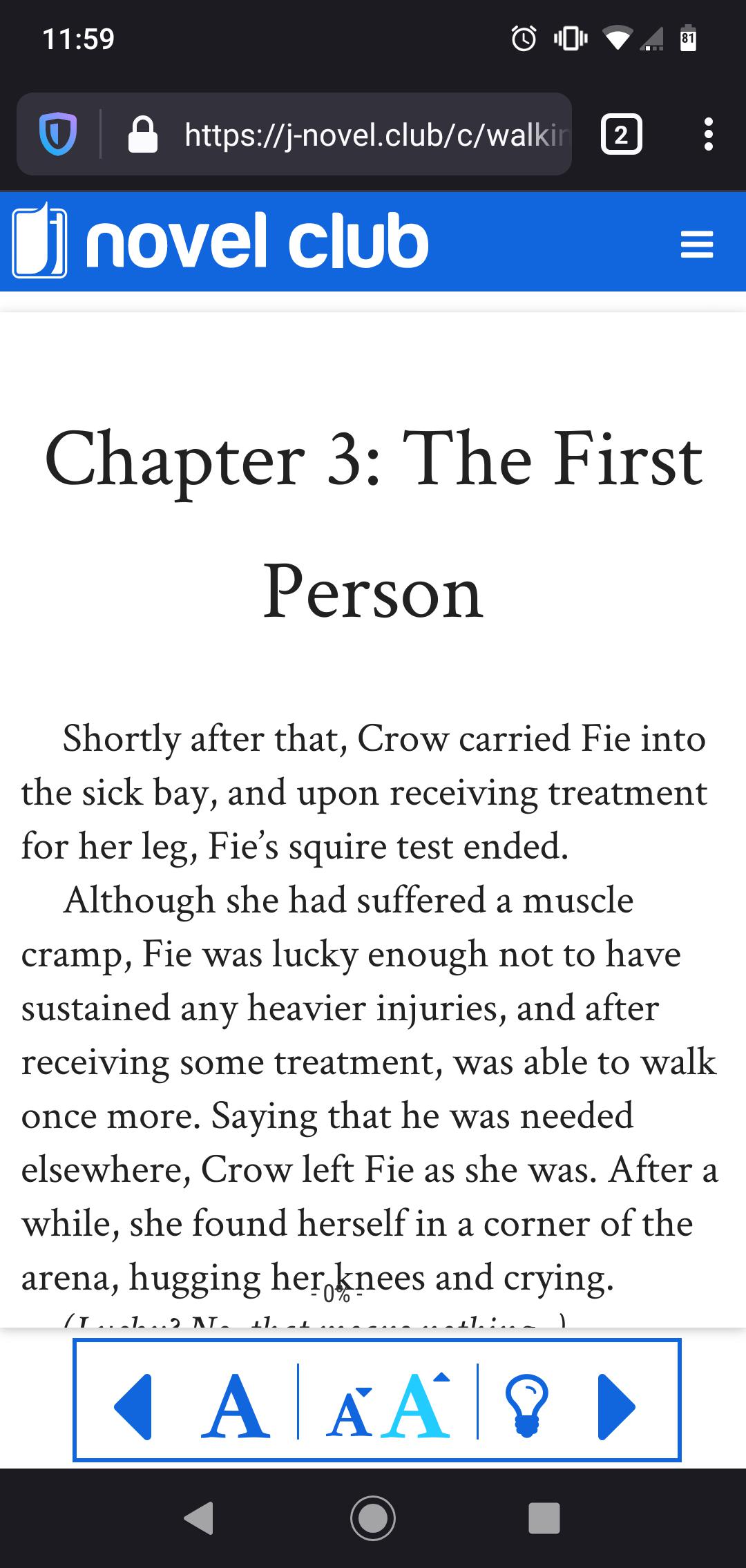
In Fenix nightly, and sometimes in Fennec, there is only a single page with all of the content, cut off by the bottom pf the frame.
In Fennec, if the issue occurs, the site can be fixed by changing the viewer text size using the controls at the bottom of the frame. In Fenix, changing the text size doesn't help.
This is probably a bug in the website, but as the behaviour is worse with the newer version of FF, it may be worth a look.
Works in Chrome mobile.
I have ublock origin enabled.
View the screenshot
Browser Configuration
- None
_From webcompat.com with ❤️_
 samlh
samlh
All 11 comments
Thanks for the report.
I was indeed able to reproduce the issue. I am redirected to the end of the story after I tap the next page button.
Tested with:
Browser / Version: Firefox Preview Nightly 200309 (🦎: 75.0a1-20200306094739), Chrome Mobile 80.0.3987.132
Operating System: Huawei P10 (Android 9.0) - 1080 x 1920 pixels (~432 ppi pixel density)
This is the web page displayed in Firefox Preview Nightly after tapping the next page button:

And this is the web page displayed in Chrome:

Moving the issue to needsdiagnosis.
 cipriansv
on 9 Mar 2020
cipriansv
on 9 Mar 2020
on the pixel 2 I don't even see the right arrow, probably hidden in an overflow.
They rename most of the events with top, so click becomes topClick: 'click',
when we log the event it seems to do that pagination
.$0 .$1 .$2 and so on.
which is the value of e
i._handleDoneLeaving = function (e, t) {
t.componentDidLeave && t.componentDidLeave(),
delete i.currentlyTransitioningKeys[e];
var n = (0, u.getChildMapping) (i.props.children);
n && n.hasOwnProperty(e) ? i.keysToEnter.push(e) : i.setState(function (t) {
var n = r({
}, t.children);
return delete n[e],
{
children: n
}
})
},
```
each time we tap the arrow, it modifies the style attribute here on chrome. but it doesn't on firefox.
```html
<div class="_1zL8fpy6UQ5YbHbsuUOngG"
style="right: 1263px; font-size: 20px; font-family: "Crimson Text"; column-width: 406px; writing-mode: horizontal-tb;">
The initial value also for the column-width is not initialized on firefox, while it is on chrome.
Initial state
FIrefox
<div class="_1zL8fpy6UQ5YbHbsuUOngG"
     style="
     right: 0px;
     font-size: 20px;
     font-family: Crimson Text;
     writing-mode: horizontal-tb;">
Chrome
<div class="_1zL8fpy6UQ5YbHbsuUOngG"
style="
right: 0px;
font-size: 20px;
font-family: "Crimson Text";
column-width: 406px;
writing-mode: horizontal-tb;">
Let's tap once on the arrow.
chrome says right: 421px and let's set that value on firefox and let's add the column-width.
And magically it is working. So the only reason this is not working now is that the values on this style attributes are not set.
ah found!
here
 c.default.createElement('div', {
                    ref: this.setTotalPages,
                    className: f.default.content,
                    style:
                    {
                      right: G,
                      fontSize: m,
                      fontFamily: g,
                      WebkitColumnWidth: R - 20,
                      MozColumnWidth: R - 20,
                      writingMode: !I && this.state.superAuthenticMode ? 'vertical-rl' : 'horizontal-tb'
                    },
                    dangerouslySetInnerHTML: {
                      __html: s.dataHTML
                    }
MozColumnWidth is undefined. so that's the first issue but probably not the only one.
Something is probably not adjusting the right value later on. The render is not called anymore after this initial rendering.
 karlcow
on 11 Mar 2020
karlcow
on 11 Mar 2020
@samlh could you report the bug in their forum, given that you are a user?
https://forums.j-novel.club/category/3/blogs
And you can point them to here for the discussion.
Thanks.
karlcow
on 11 Mar 2020
Sure, will do
On Wed, Mar 11, 2020, at 1:38 AM, Karl Dubost wrote:
@samlh https://github.com/samlh could you report the bug in their forum, given that you are a user?
https://forums.j-novel.club/category/3/blogs
And you can point them to here for the discussion.
Thanks.
—
You are receiving this because you were mentioned.
Reply to this email directly, view it on GitHub https://github.com/webcompat/web-bugs/issues/49895?email_source=notifications&email_token=AAA43HLFBBUAIANGFWXEMX3RG5EX3A5CNFSM4LECO5T2YY3PNVWWK3TUL52HS4DFVREXG43VMVBW63LNMVXHJKTDN5WW2ZLOORPWSZGOEOOUDDY#issuecomment-597508495, or unsubscribe https://github.com/notifications/unsubscribe-auth/AAA43HNCNERS2Q2VXS63UQ3RG5EX3ANCNFSM4LECO5TQ.
samlh
on 11 Mar 2020
Hi,
The issue was that the reader was only using CSS rules for columns with prefixes (-moz and -webkit). I patched the code to include a vendorless rule, so the bug should be fixed.
 chocolatkey
on 12 Mar 2020
chocolatkey
on 12 Mar 2020
@samlh could you double check if it's solved for you?
@chocolatkey thanks a lot for a very quick turnaround.
karlcow
on 12 Mar 2020
@chocolatkey Thanks again! I can confirm the column width is now getting successfully applied :).
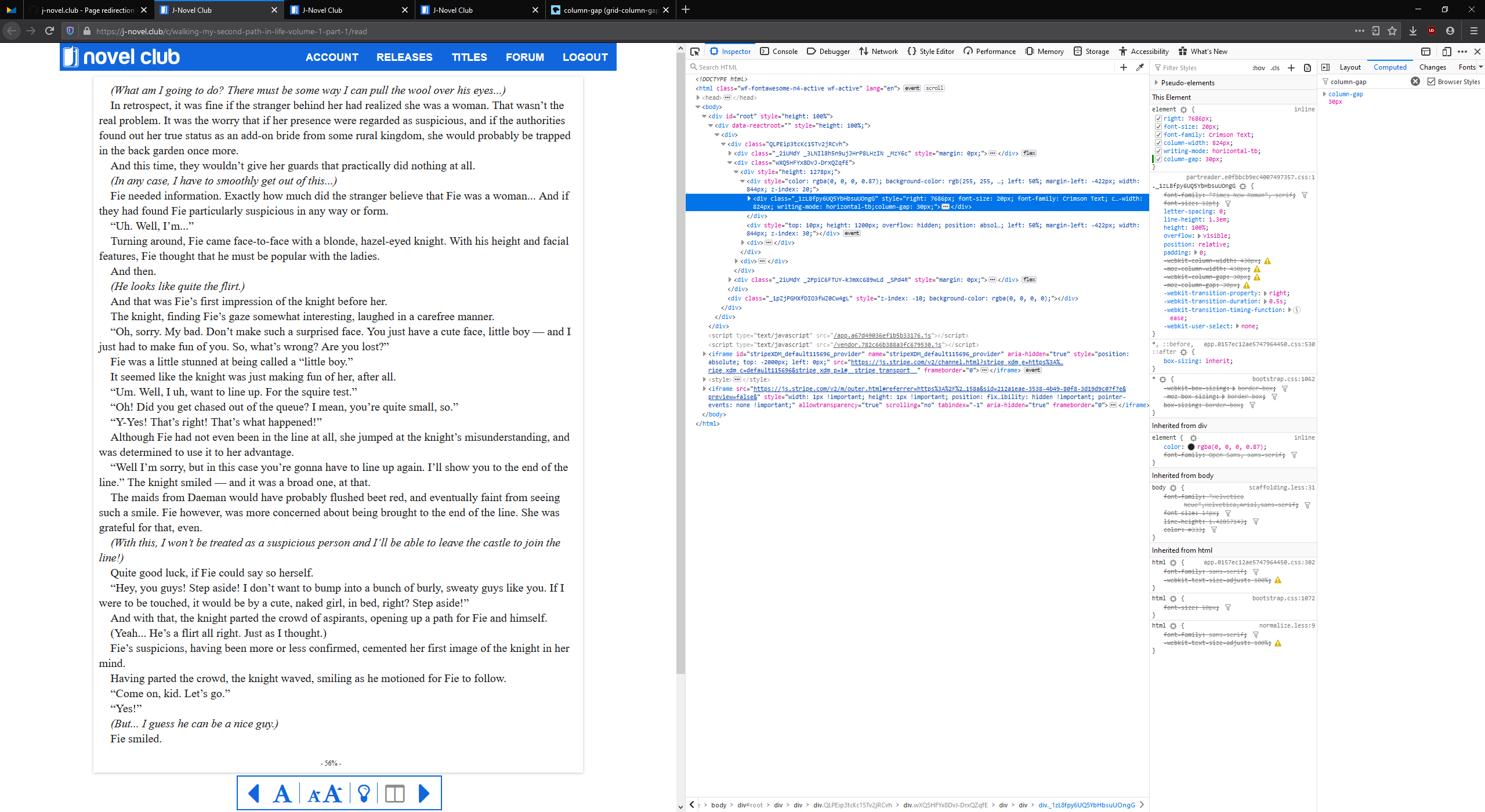
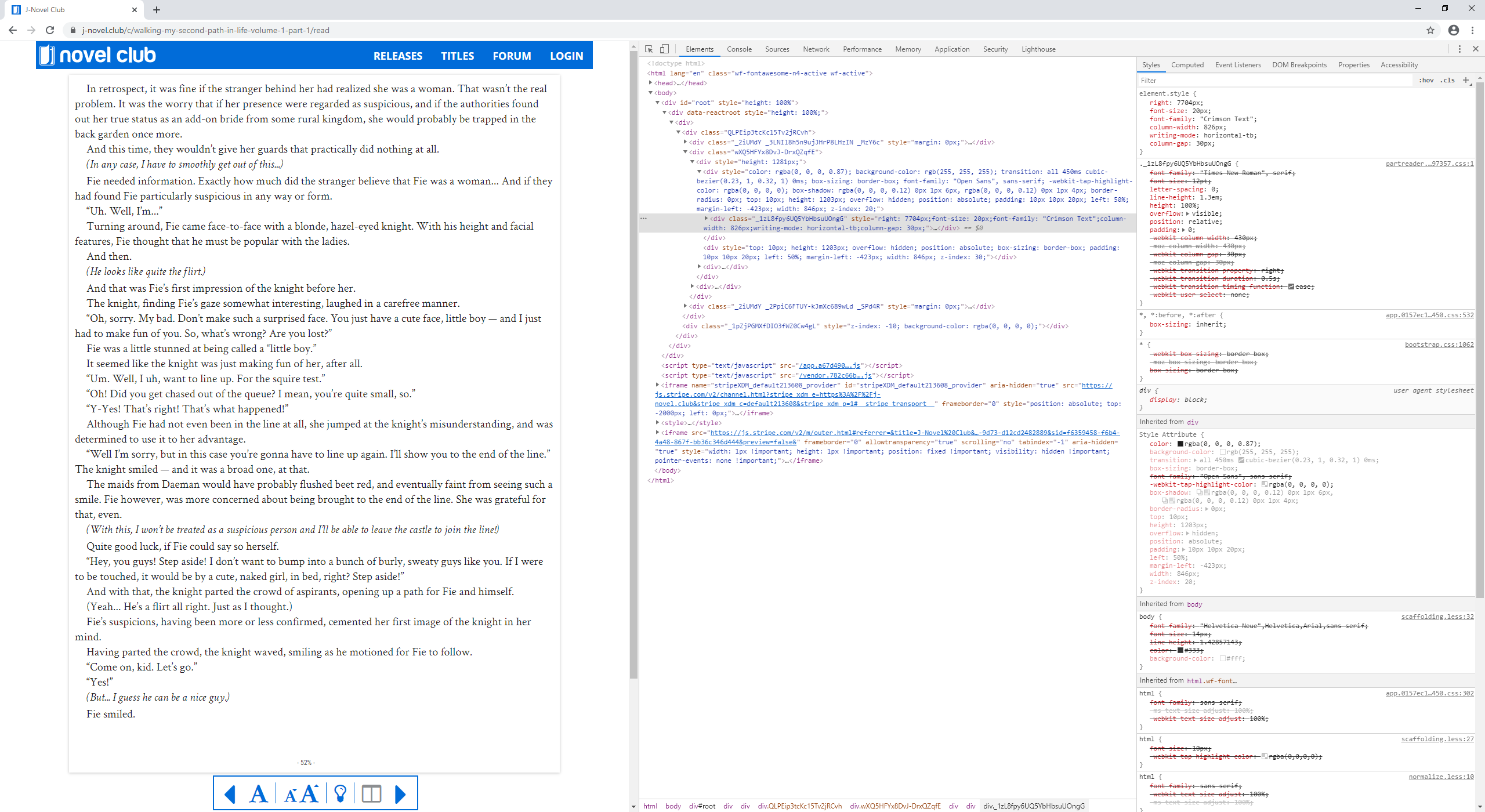
There is one remaining issue, where the Firefox default column-gap (20px?) is different from Chrome's default column-gap (30px).
This leads to the the content getting shifted too far to the left in Firefox.
Adding an explicit column-gap: 30px using the dev tools seems to fix the problem for me.
Screenshots:
Without column-gap: 30px

With column-gap: 30px
Chrome with column-gap: 30px (still works)
samlh
on 12 Mar 2020
@samlh fixed as well. Was some more old css prefixes in the reader styling. This reader is really showing its age...
chocolatkey
on 12 Mar 2020
Great - thank you!
I can confirm everything is working perfectly now - cheers!
samlh
on 12 Mar 2020
Thanks everyone. really cool!
karlcow
on 12 Mar 2020
This issue has been automatically locked since there has not been any recent activity after it was closed. Please open a new issue at https://webcompat.com/issues/new if you are experiencing a similar problem.
![lock[bot] picture](https://avatars1.githubusercontent.com/in/6672?v=4&s=40) lock[bot]
on 21 Mar 2020
lock[bot]
on 21 Mar 2020
Related issues
 Ezio916
·
4Comments
Ezio916
·
4Comments
 vickychin
·
4Comments
vickychin
·
4Comments
 webcompat-bot
·
5Comments
webcompat-bot
·
5Comments
 scheinercc
·
6Comments
scheinercc
·
6Comments
 GeorgeWL
·
5Comments
GeorgeWL
·
5Comments
Most helpful comment
Hi,
The issue was that the reader was only using CSS rules for columns with prefixes (
-mozand-webkit). I patched the code to include a vendorless rule, so the bug should be fixed.