Web-bugs: www.freecharge.in - site is not usable
URL: https://www.freecharge.in/mobile/auth/login?login=true
Browser / Version: Firefox Mobile 68.0
Operating System: Android 5.1
Tested Another Browser: Yes
Problem type: Site is not usable
Description: Unable To Log In with Firefox Android
Steps to Reproduce:
Freecharge Login is not possible with Firefox Android. After typing your email and clicking that little arrow icon to the right of input column just doesn't work. It just shows a 'loading' screen for a second or two and then nothing happens.
But with Chrome in Android, a column for password appears. This doesnt happen in Android Firefox.
Please Check into this issue and report the web devs.
Screenshot
Browser Configuration
- gfx.webrender.all: false
- gfx.webrender.blob-images: true
- gfx.webrender.enabled: false
- image.mem.shared: true
- buildID: 20191230131429
- channel: beta
- hasTouchScreen: true
- mixed active content blocked: false
- mixed passive content blocked: false
- tracking content blocked: true (basic)
_From webcompat.com with ❤️_
 Ezio916
All 4 comments
Thanks for the report, but I'm not able to reproduce the issue. I'm redirected to sign up page after filling in the email address and tapping the arrow.
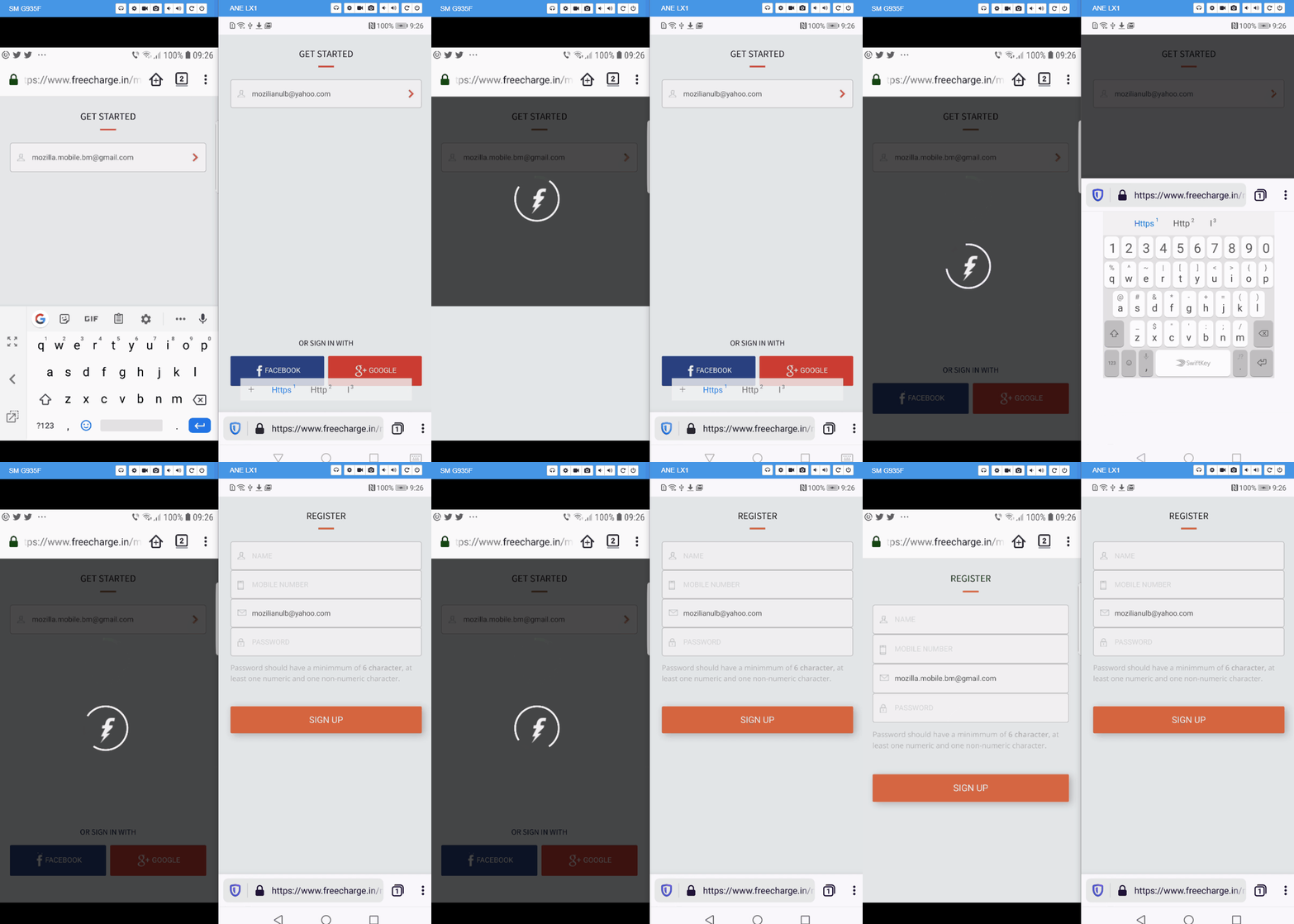
Note: Unfortunately I don't have a valid Indian phone number, thus I'm unable to complete the sign up process.
Tested with:
Browser / Version: Firefox Preview Nightly 200106 (🦎: 73.0a1-20200105094728), Firefox Nightly 68.4a1 (2020-01-03)
Operating System: Huawei P20 Lite (Android 8.0.0) - 1080 x 2280 pixels, 19:9 ratio (~432 ppi density), Samsung Galaxy S7 Edge (Android 8.0.0) - Resolution 1440 x 2560 pixels (~534 ppi pixel density)
@Ezio916 could you try clearing cache/data/cookies, disable Ad-blocker (if available), or use a clean profile, and check again?
 softvision-oana-arbuzov
on 7 Jan 2020
softvision-oana-arbuzov
on 7 Jan 2020
Thanks for the report, but I'm not able to reproduce the issue. I'm redirected to sign up page after filling in the email address and tapping the arrow.
Note: Unfortunately I don't have a valid Indian phone number, thus I'm unable to complete the sign up process.
Tested with:
Browser / Version: Firefox Preview Nightly 200106 (🦎: 73.0a1-20200105094728), Firefox Nightly 68.4a1 (2020-01-03)
Operating System: Huawei P20 Lite (Android 8.0.0) - 1080 x 2280 pixels, 19:9 ratio (~432 ppi density), Samsung Galaxy S7 Edge (Android 8.0.0) - Resolution 1440 x 2560 pixels (~534 ppi pixel density)@Ezio916 could you try clearing cache/data/cookies, disable Ad-blocker (if available), or use a clean profile, and check again?
Thank you very much. Disabling uBlock extension did the trick. Now the password column appears.
Maybe that ad block extension mistook their script as 'Ad'.
Once again thank you very much,
Ezio916
on 7 Jan 2020
Thanks @Ezio916 for your investigation and finding the culprit.
softvision-oana-arbuzov
on 7 Jan 2020
This issue has been automatically locked since there has not been any recent activity after it was closed. Please open a new issue at https://webcompat.com/issues/new if you are experiencing a similar problem.
![lock[bot] picture](https://avatars1.githubusercontent.com/in/6672?v=4&s=40) lock[bot]
on 14 Jan 2020
lock[bot]
on 14 Jan 2020
Related issues
 vickychin
·
4Comments
vickychin
·
4Comments
 webcompat-bot
·
5Comments
webcompat-bot
·
5Comments
 IngrownMink4
·
3Comments
IngrownMink4
·
3Comments
 massic80
·
5Comments
massic80
·
5Comments
 bull500
·
5Comments
bull500
·
5Comments
Most helpful comment
Thanks for the report, but I'm not able to reproduce the issue. I'm redirected to sign up page after filling in the email address and tapping the arrow.

Note: Unfortunately I don't have a valid Indian phone number, thus I'm unable to complete the sign up process.
Tested with:
Browser / Version: Firefox Preview Nightly 200106 (🦎: 73.0a1-20200105094728), Firefox Nightly 68.4a1 (2020-01-03)
Operating System: Huawei P20 Lite (Android 8.0.0) - 1080 x 2280 pixels, 19:9 ratio (~432 ppi density), Samsung Galaxy S7 Edge (Android 8.0.0) - Resolution 1440 x 2560 pixels (~534 ppi pixel density)
@Ezio916 could you try clearing cache/data/cookies, disable Ad-blocker (if available), or use a clean profile, and check again?