Web-bugs: www.w3schools.com - Missing "x" (Clear) button
URL: https://www.w3schools.com/tags/tryit.asp?filename=tryhtml5_input_type_search
Browser / Version: Firefox Mobile 80.0
Operating System: Android
Tested Another Browser: Yes Chrome
Problem type: Something else
Description: HTML type search not to specification: missing clear button
Steps to Reproduce:
The current HTML5 spec states that <input type='search'/> elements should have a "clear" pseudo-element which empties the value of the input Edit: If there is content in the input
I can't seem to see one on the current version of Firefox Nightly
View the screenshot
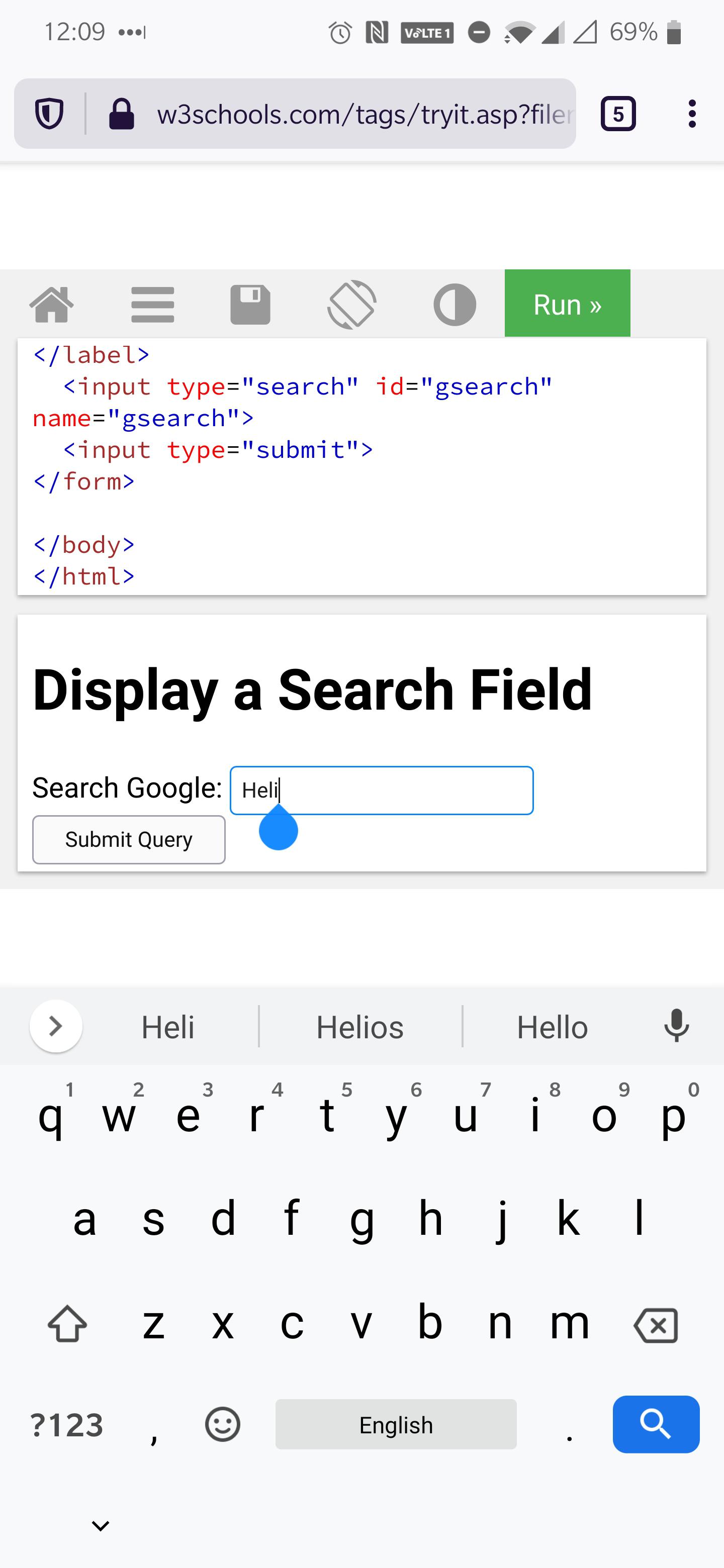
Browser Configuration
- gfx.webrender.all: false
- gfx.webrender.blob-images: true
- gfx.webrender.enabled: false
- image.mem.shared: true
- buildID: 20200702094606
- channel: nightly
- hasTouchScreen: true
_From webcompat.com with ❤️_
 GeorgeWL
All 5 comments
Thanks for the report, but I get the same result both on Firefox and Chrome.

Tested with:
Browser / Version: Firefox Nightly 200713 (🦎 80.0a1-20200711092223), Chrome 83.0.4103.106
Operating System: Huawei P20 Lite (Android 8.0.0) - 1080 x 2280 pixels, 19:9 ratio (~432 ppi density), Samsung Galaxy S6 Edge (Android 7.0) - 1440 x 2560 pixels (~577 ppi pixel density)
For this project we try to focus our effort on layouts, features or content that works as expected in one browser but not in another. Closing the issue as Non-compat.
 softvision-oana-arbuzov
on 14 Jul 2020
softvision-oana-arbuzov
on 14 Jul 2020
Thanks for the report, but I get the same result both on Firefox and Chrome.
Tested with:
Browser / Version: Firefox Nightly 200713 (🦎 80.0a1-20200711092223), Chrome 83.0.4103.106
Operating System: Huawei P20 Lite (Android 8.0.0) - 1080 x 2280 pixels, 19:9 ratio (~432 ppi density), Samsung Galaxy S6 Edge (Android 7.0) - 1440 x 2560 pixels (~577 ppi pixel density)For this project we try to focus our effort on layouts, features or content that works as expected in one browser but not in another. Closing the issue as Non-compat.
the way it should work is the cross isn't visible unless there's content in the input.
On chrome the cross shows if content in the input
GeorgeWL
on 15 Jul 2020
Oh, ok thanks @GeorgeWL for that info, indeed "x" button is not available on Firefox, but it is available on Chrome while the field is in focus.

Tested with:
Browser / Version: Firefox Nightly 200714 (🦎 80.0a1-20200711092223)
Operating System: Samsung Galaxy S6 Edge (Android 7.0) - 1440 x 2560 pixels (~577 ppi pixel density)
Reopening and moving to Needsdiagnosis for further investigation.
softvision-oana-arbuzov
on 15 Jul 2020
Also can say I tested this in Edge and Brave (for mobile) now and they show the same behaviour as Chrome
GeorgeWL
on 15 Jul 2020
Edge and brave share the same rendering engine than chrome: Blink.
Blink and WebKit share almost the same convention for text inside the input.
- Blink/Webkit with search focused,
xinside - WebKit with search non focused,
xinside - Firefox never has
xinside
This is not a webcompat issue. Different UI conventions.
It's easy to test with a bare input in multiple browsers.
data:text/html,<input type='search'/>
if you feel strongly about it, it should be reported
https://bugzilla.mozilla.org/enter_bug.cgi?product=Core&component=Layout%3A%20Form%20Controls
 karlcow
on 16 Jul 2020
karlcow
on 16 Jul 2020
Related issues
 IngrownMink4
·
3Comments
IngrownMink4
·
3Comments
 webcompat-bot
·
5Comments
webcompat-bot
·
4Comments
IngrownMink4
·
3Comments
webcompat-bot
·
5Comments
webcompat-bot
·
4Comments
IngrownMink4
·
3Comments
 Gravydigger
·
4Comments
Gravydigger
·
4Comments