Web-bugs: itunes.apple.com - design is broken
URL: https://itunes.apple.com/us/app/mindix/id595081194?l=en&ls=1&mt=12
Browser / Version: Firefox 57.0
Operating System: Mac OS X 10.11
Tested Another Browser: Yes
Problem type: Design is broken
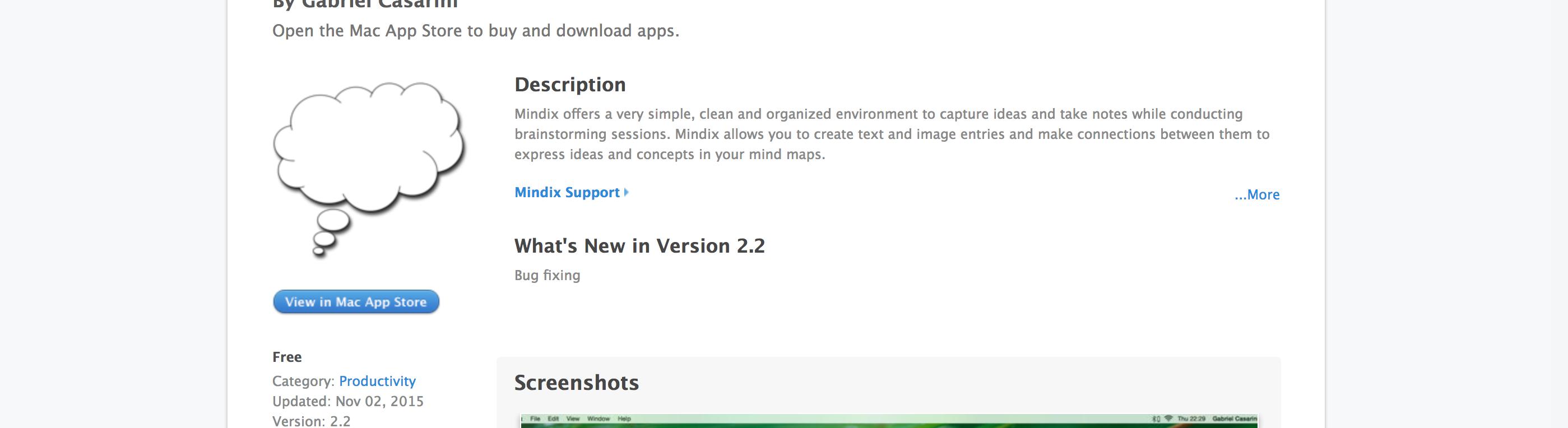
Description: Button very blurry in Firefox
Steps to Reproduce:
Design is "broken" is a bit exaggerated - it seems there is a media query with the proprietary -webkit-min-device-pixel-ratio, but missing a min-resolution addition.
In the file https://s.mzstatic.com/htmlResources/9c33d3e/web-storefront-macpreview.css, instead of
@media only screen and (-webkit-min-device-pixel-ratio: 2) {
    background-image: url(web-storefront/images/view_in_macappstore@2x/[email protected])
}
the media query should be changed to:
@media only screen and (min-resolution: 2dppx), only screen and (-webkit-min-device-pixel-ratio: 2){}
Tested: https://codepen.io/scheinercc/pen/dzdELw?editors=0100#0
(see also https://css-tricks.com/snippets/css/retina-display-media-query/)
_edits: remove obsolete brackets; highlight code_
layout.css.servo.enabled: true
_From webcompat.com with ❤️_
 scheinercc
All 6 comments
Thanks for the thorough report, @scheinercc! I've confirmed with mitmproxy that your proposed fix should work with their live site as well, so I'm marking this issue as a duplicate of bug 1176968 and setting it to needscontact.
Note that they're using the webkit-prefix in two places in that file alone; I suspect they will need to survey their code for other places to fix as well.
 wisniewskit
on 21 Aug 2017
wisniewskit
on 21 Aug 2017
@adamopenweb could you get in touch with Apple on this one please?
 miketaylr
on 21 Aug 2017
miketaylr
on 21 Aug 2017
Contacted via the mailing list.
 adamopenweb
on 23 Aug 2017
adamopenweb
on 23 Aug 2017
They have filed an issue internally.
adamopenweb
on 23 Aug 2017
The issue is still there
@media only screen and (-webkit-min-device-pixel-ratio: 2){
  #main #content #title a.view-in-appstore span,#main #content #left-stack a.view-in-appstore span{
     background-image:url(web-storefront/images/view_in_macappstore@2x/[email protected])
   }

…}
 karlcow
on 25 Sep 2017
karlcow
on 25 Sep 2017
Apple has recently changed the design, and the issue is fixed.

 reinhart1010
on 10 Mar 2018
reinhart1010
on 10 Mar 2018
Related issues
 bull500
·
5Comments
bull500
·
5Comments
 webcompat-bot
·
5Comments
webcompat-bot
·
5Comments
 christantoan
·
4Comments
christantoan
·
4Comments
 lolrepeatlol
·
4Comments
lolrepeatlol
·
4Comments
 oksas
·
5Comments
oksas
·
5Comments
Most helpful comment
Apple has recently changed the design, and the issue is fixed.
