Signal-desktop: Signal desktop would not import contacts. Tried searching for a contact after import claimed to be successful but none were there.
- [x] I have searched open and closed issues for duplicates
Bug description
When I use the import contacts option on Signal Desktop (chrome app, ) no contacts are imported. My contacts imported correctly into the Signal app on my android device but they will not import into the desktop app. I've tried several times.
Steps to reproduce
- Launch Signal Desktop app
- choose settings
- click on import now
- wait
-See message "last import on 9/22/2017 2:24:43 PM
-no contacts listed
Actual result: no contacts listed, no contacts found during search for contact
Expected result: have contacts imported and be able to see and/or search for contacts
Screenshots
Platform info
Operating System: Windows 7 Pro SP1, current on updates
Browser: Google Chrome 61.0.3163.100
Signal version: 0.43.4
Link to debug log
https://gist.github.com/anonymous/2bd07d3eca9651c6d0e274258d314b76
 Bnutz455
All 55 comments
I also just tried sending a text from my mobile device to someone and it did not sync with the desktop app. Does the desktop app ONLY sync with people who also have signal installed? The text I sent was to a person who does not have Signal installed on their phone.
Bnutz455
on 22 Sep 2017
Hi there, @Bnutz455, it looks like we're going through the right motions on desktop - we send a message for contact information, and then we get something we download and process. We'll need the log on the Android side to figure out what's going on.
Also, about people with signal accounts. Only messages on the signal service (not SMS) will be sync'd to your desktop instance. Similarly, only contacts who are on the signal service (more than just a phone number, that phone number is signed up for Signal) will be imported into desktop.
Perhaps that's part of the problem? If you turn off the SMS mode in Android, who shows up in your contact list?
 scottnonnenberg
on 22 Sep 2017
scottnonnenberg
on 22 Sep 2017
I can reproduce this as well. Here are the logs on the Android side: https://gist.github.com/anonymous/abe819938bdb4ca4c70fbfbc5f00d7be
 mutantmonkey
on 21 Oct 2017
mutantmonkey
on 21 Oct 2017
This is intended behavior. See the below support article.
https://support.signal.org/hc/en-us/articles/360007319011
Specifically:
Only Signal contacts will be shown on Signal Desktop.
 NicholasDM
on 18 Aug 2018
NicholasDM
on 18 Aug 2018
@NicholasDM is right. This is only a bug in Signal Desktop if you are sure that all of your missing contacts in Signal Desktop have Signal accounts, and are NOT SMS-only contacts.
Another thing may have happened as well - if you select 'Delete messages' in the top-right of the conversation, that conversation will not be shown in the left pane any longer. But you can find it by searching in the top-left. Also, if another message is sent or received in that conversation, it will be restored to the left pane.
 scottnonnenberg-signal
on 27 Aug 2018
scottnonnenberg-signal
on 27 Aug 2018
Same here, I just installed Signal Desktop on Windows 10, and I don't see any contacts or messages. I have got 4 Signal contacts on my phone, none of them show up.
I waited for Signal Desktop to do the import after installation, then I also used the Import button in the settings... still nothing.
 dinosmm
on 18 Sep 2018
dinosmm
on 18 Sep 2018
@DonDino2 What app are you using? If you're using Android and have enabled SMS support, keep in mind that only non-SMS contacts will be imported to Signal Desktop. Additionally a debug log from Signal Desktop and your mobile app would help track this down.
scottnonnenberg-signal
on 18 Sep 2018
I had to uninstalled Signal, turn off my VPN, reinstall and it worked fine. (Both connected to same wifi)
 Raistlin69
on 21 Sep 2018
Raistlin69
on 21 Sep 2018
I have just installed "Ubuntu touch" + "Signal" on my phone only 3 contacts were discovered .....!!!!
What is going on ...???
 phishphoood
on 25 Oct 2018
phishphoood
on 25 Oct 2018
@phishphoood We won't be able to do much about your bug report without a debug log (View -> Debug Log). Also, keep in mind that if some contacts appear in Desktop, the overall process has worked and there's likely something else at play (like not all of your Android contacts have Signal accounts - you're exchanging SMS with them, not encrypted signal messages).
scottnonnenberg-signal
on 25 Oct 2018
Hi, I have the same issue.
Just did a fresh Signal Desktop (v1.19.0) installation but after it finished with "syncing contacts" only groups appeared. Not a single signal Contact I have on my phone is there. Also if someone posts something in a group (which is discovered/synced) the number is not resolved to the contact.
[update]
I have the same issues when using a self-built version of the current development branch (3f78a3c466db2d8e3803b9ad45dba764b37e667f) with the patch from https://github.com/signalapp/Signal-Desktop/issues/2662#issuecomment-434586998 applied (which I need because otherwise the application stops with a segfault at startup).
[/update]
If you need any additional information from me please just drop me a line and I will provide it. Thanks!
 g0hl1n
on 28 Dec 2018
g0hl1n
on 28 Dec 2018
@g0hl1n As I mentioned up-thread, we need debug logs to make progress on these issues.
scottnonnenberg-signal
on 2 Jan 2019
@scottnonnenberg-signal please find the debug log here: https://debuglogs.org/4730a962537fb06f109edbdd839b4b0e8c50f58d76cc7d4cfa8ee0d31a21f1a9
I've done a fresh build on top of the current development branch, started it, linked it to my signal account and waited for the sync to complete. Now I see only my groups and no contacts (like already reported before).
If you need anything else please just ask! Thanks!
g0hl1n
on 3 Jan 2019
@g0hl1n Thanks for that debug log. It appears as if contact and group syncs were successfully sent, and you did get a group sync message. But you didn't get a contact sync. Now it's time to grab the log from your mobile device, and hopefully that will tell us why it didn't send a contact sync.
scottnonnenberg-signal
on 3 Jan 2019
@scottnonnenberg-signal , I just wanted to grab that log but saw that the contact names got synced over night...
Maybe something got fixed within the mobile app (Got the v4.31.8 update)?
g0hl1n
on 15 Jan 2019
Closing this. Future readers: please enter a new bug if you run into it again.
scottnonnenberg-signal
on 15 Jan 2019
I am having this issue on Windows 10. I scan the code and it goes to import but doesn't pull over all my contacts? I think I have an idea of what is going on. Does this only pull over Signal contacts and messages and not all contacts and messages?
 Kartereo
on 12 May 2020
Kartereo
on 12 May 2020
@Kartereo Signal Desktop only pulls Signal contacts, not SMS contact, and does not pull messages. After you link your Desktop instance it will behave as its own standalone device and receive new messages from that point forward.
 kenpowers-signal
on 13 May 2020
kenpowers-signal
on 13 May 2020
Same for me. Fails to Import Contacts on desktop. Log shows error 413 Payload Too Large but I only have 1 Signal contact. Got another family member to install Signal on both Android phone and desktop and they had exactly the same problem, it fails to import any contacts on the desktop.
 scott-vincent
on 9 Jan 2021
scott-vincent
on 9 Jan 2021
Same for me. Fails to Import Contacts on desktop. Log shows error 413 Payload Too Large but I only have 1 Signal contact. Got another family member to install Signal on both Android phone and desktop and they had exactly the same problem, it fails to import any contacts on the desktop.
Same here.
Probably the big hype from Papa Elon and What's App. I'd imagine their servers are on fire
 PreyK
on 9 Jan 2021
PreyK
on 9 Jan 2021
Hey I had this bug today but rebooting my phone fixed it.
Phone runs Android 10 and desktop runs Debian 10.
 Xylon2
on 10 Jan 2021
Xylon2
on 10 Jan 2021
Iphone 7 and signal desktop for windows. after an hour i gave up trying to get contacts on phone into my pc. this is a non starter as i need to messge people from my pc (screengrabs from pc etc). Serious bug by looks of it. I guess ill have to use telegram instead - none of these issues and runs flawlessly.
 recessionalert
on 11 Jan 2021
recessionalert
on 11 Jan 2021
Iphone 7 and signal desktop for windows. after an hour i gave up trying to get contacts on phone into my pc. this is a non starter as i need to messge people from my pc (screengrabs from pc etc). Serious bug by looks of it. I guess ill have to use telegram instead - none of these issues and runs flawlessly.
UPDATE - Closed the iPhone app and restarted it. Contacts now appear in desktop. Something they ought to fix to keep users less determined than me in trying to resolve the issue.
recessionalert
on 11 Jan 2021
Force stop Android App and started it again - now contacts have synced.
When the issue persisted, I was able to send a note message which appeared went through to the application on my desktop, so the connections were OK.
 bcelary
on 11 Jan 2021
bcelary
on 11 Jan 2021
I have the same problem using the latest windows app and latest signal app. Everytime I click Import Now button it says 'Import failed. Make sure your computer and your phone are connected to the internet.' And I can confirm both are connected.
If such basic functionalities do not work as expected on first try users will just delete the app as they feel this app is not stable at all. Can somebody check this problem ?
Currently I am using Samsung Note 10 +.
 rajmondburgaj
on 13 Jan 2021
rajmondburgaj
on 13 Jan 2021
Same thing.. I installed the Desktop app, clicked Import Contacts, and nothing comes over.
 duanestorey
on 14 Jan 2021
duanestorey
on 14 Jan 2021
a new windows program update was released this morning try it now. in any case closing the app on phone and restarting seems to fix the problem
recessionalert
on 14 Jan 2021
Same happening on OSX app. Also, no message history is transferred over when linking a new device. I'll be staying with Telegram for now.
 ilium007
on 14 Jan 2021
ilium007
on 14 Jan 2021
Correct, same happens on macOS App and the Linux Desktop client as well
 Benzer1406
on 14 Jan 2021
Benzer1406
on 14 Jan 2021
Same happening on OSX app. Also, no message history is transferred over when linking a new device. I'll be staying with Telegram for now.
See solution from @recessionalert. Force close the app on your phone and reopen it and the Mac App will populate all the contacts and groups.
 tekfranz
on 14 Jan 2021
tekfranz
on 14 Jan 2021
Installed the latest desktop (1.39.5) for the first time on Windows 10 and had the same issue.
As suggested by @recessionalert, the fix was to close the app on the iPhone (5.2.0.4). Synched immediately.
A year after closure, multiple users hitting the same issue. A definite bug.
Such a simple fix, but will frustrate users.
 paulwarwicker
on 14 Jan 2021
paulwarwicker
on 14 Jan 2021
Same happening on OSX app. Also, no message history is transferred over when linking a new device. I'll be staying with Telegram for now.
See solution from @recessionalert. Force close the app on your phone and reopen it and the Mac App will populate all the contacts and groups.
This doesn't fix the sync though. Any message I send on my phone is synced to the Desktop app, but any message I send on the desktop app is not synced to my phone. Restarting either/both apps is not working.
 lisannevdl
on 14 Jan 2021
lisannevdl
on 14 Jan 2021
Confirmed, that fixes it for me. Thanks @paulwarwicker !
To be clear: on iOS you need to go to the app switch screen, drag the app up so it's gone, then open it again.
 bgeron
on 14 Jan 2021
bgeron
on 14 Jan 2021
Hm, so now my contacts are synced, but I still cannot send a note to self from Ubuntu to iOS.
bgeron
on 14 Jan 2021
@bgeron A debug log would be helpful: View -> Debug Log. Thanks!
scottnonnenberg-signal
on 15 Jan 2021
@scottnonnenberg-signal I just reproduced the other issue with sending messages from the desktop not syncing to the phone reported by @lisannevdl
https://debuglogs.org/ceb115296a86ccf248ef756029ddb07d2973b1f6e0abcac69485aa9523e2e5ff
- Send a Message using Signal for Mac Desktop.
- Check to see if the message is also sent on your phone. It is not.
- Return to the phone and force close the Signal App and open it again. Now the messages sync.
tekfranz
on 15 Jan 2021
Same problem here..
Windows 10 64 bit
iPhone 7 with latest update
Rebooted phone
Relinked with desktop app
Sits saying "Syncing contacts" for about 90 seconds then nothing appears.
IT'S A BUG!!!
 fdl333
on 15 Jan 2021
fdl333
on 15 Jan 2021
fdl333
on 15 Jan 2021
fdl333
on 15 Jan 2021
Also having issues. It worked earlier when I set it up on another laptop at another location
Edit: Tried an import a few minutes ago and working for me now. (Signal-desktop on Arch Linux)
 Swipe650
on 16 Jan 2021
Swipe650
on 16 Jan 2021
I have been using Signal for years now on Android and Mac OS. I recently also installed it on iPadOS and Windows 10 Professional. My experience with Android, iPadOS, and Mac OS have been excellent. While the conversation history doesn't come over with those apps, the contacts automatically import. After installing the app on Windows today, I was perplexed. Where were my SIgnal contacts (I do not use SMS with Signal at all). I finally found the Import Contacts option in the Preferences menu. However, when I
I have attempted the proposed workaround of force closing the Signal app on Android and then attempting to import the contacts on Windows. This did not work for me.
I also unlinked the Windows computer from the Android mobile app and deleted the data from the Windows app -- and reregistered the Windows machine again. The contacts did not import automatically this time, either, and using the Import Contacts option in Preferences did not work.
At this point, I cannot use Signal on Windows 10 Professional at all since all of my contacts are empty/do not exist there.
 jennbriden
on 17 Jan 2021
jennbriden
on 17 Jan 2021
Yes, also not working on Mac. Works on iPhone and iPad, but the contacts are not imported on desktop, no matter if I quit or do not quit Signal on iPhone. At this point, Signal is not really usable for me.
 lucadealfaro
on 17 Jan 2021
lucadealfaro
on 17 Jan 2021
For me the following from @klynchatl in #1208 worked:
- Quit app on both phone and desktop
- Start app on phone
- Send message to a contact
- Start app on desktop
After Step 4, all of my contacts appeared in the desktop app
It populated my contacts and groups. However, without step 3 it did not seem to work for me. Maybe a message was sent during the steps described by @recessionalert and @paulwarwicker ?
Also can confirm the following message sync effect, as described by @lisannevdl:
This doesn't fix the sync though. Any message I send on my phone is synced to the Desktop app, but any message I send on the desktop app is not synced to my phone. Restarting either/both apps is not working.
It does seem to be related to and discussed in #4852.
 chrische
on 17 Jan 2021
chrische
on 17 Jan 2021
for me @chrische solutions seems to be working.
Also try serching by phone nr in de desktop app triggers to download the list
 Bar-T67
on 17 Jan 2021
Bar-T67
on 17 Jan 2021
I just wanted to report that Mac App had an update this morning. I cleared my data and my phone resynced immediately. It appears the issues are fixed. Thanks @scottnonnenberg-signal !
tekfranz
on 20 Jan 2021
Same for Windows App. Problems seem to be resolved now. Good Work!
Bar-T67
on 20 Jan 2021
38d3d77a662a88518283fb1e1b2fc232a1f3353e523ef5827dc0a576cb82e789.gz
No Contacts Windows Signal.
4c1ca8c34284863eeeffaf9b9b14e9820da6ea98b7521ac9c0199b47527b3aa4.gz
https://debuglogs.org/38d3d77a662a88518283fb1e1b2fc232a1f3353e523ef5827dc0a576cb82e789
https://debuglogs.org/4c1ca8c34284863eeeffaf9b9b14e9820da6ea98b7521ac9c0199b47527b3aa4
 WacoJohn
on 27 Jan 2021
WacoJohn
on 27 Jan 2021
@WacoJohn When you provide just a debug log, it makes it very hard to determine what to do with it. I just looked at your first log, and it looked like contacts came across from your phone when you linked.
scottnonnenberg-signal
on 28 Jan 2021
@WacoJohn When you provide just a debug log, it makes it very hard to determine what to do with it. I just looked at your first log, and it looked like contacts came across from your phone when you linked.
No offence, but it’s your log. If it doesn’t have enough context then add some other information to it to make it more useful.
duanestorey
on 28 Jan 2021
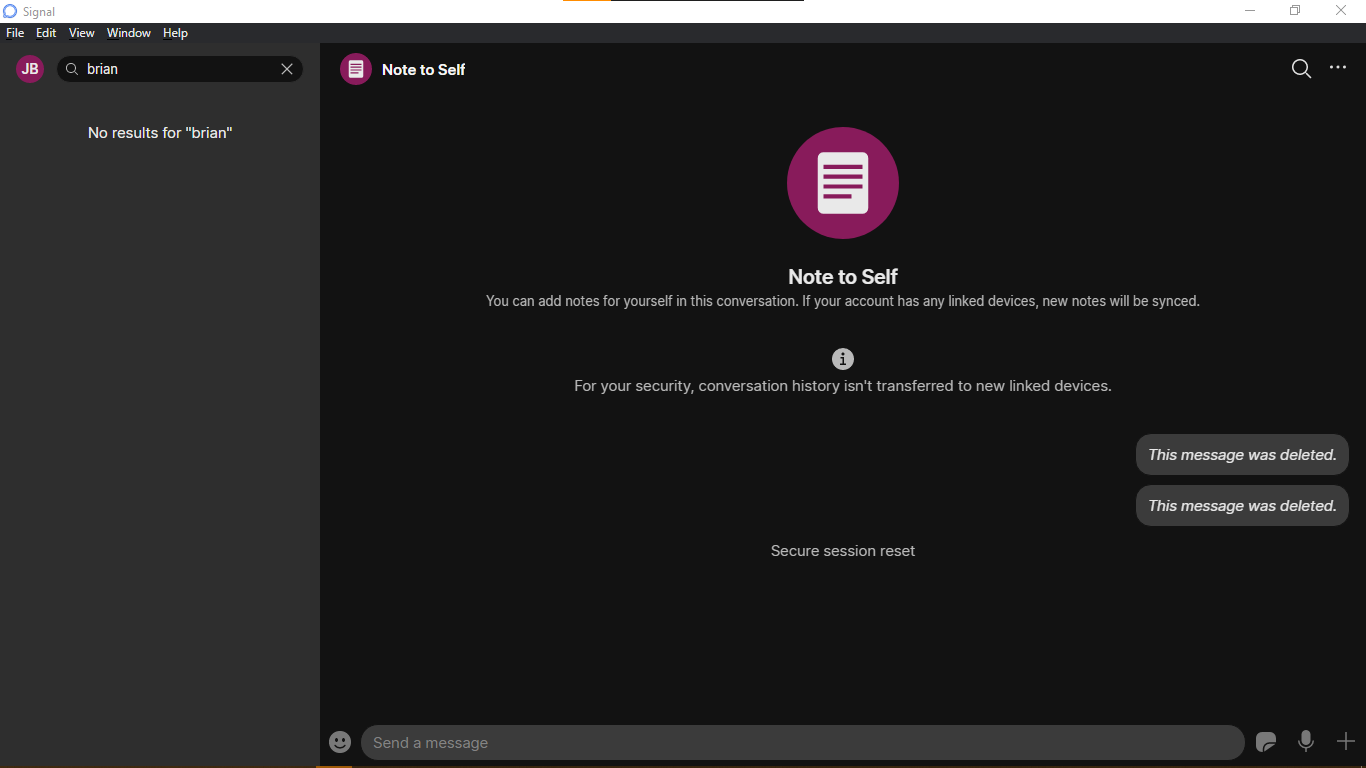
No offence taken. Thank you for the reply .... both of you. Not sure what more info is needed. As I posted ... Windows (Desktop) Signal does not list contacts. I will be happy to provide more info. Works fine on phone. Notes to self seems to work on both.
WacoJohn
on 28 Jan 2021
@WacoJohn The bug template leads you through what we need, which is why we often ask people to enter new bugs instead of adding minimal comments to existing ones.
Do you have any contacts in the left pane if you're not searching? If you go to Preferences, then click the Import Now button at the bottom, what happens? Does it show an error, or does it succeed?
If you have contacts in the left pane, or if that import succeeds, and your expected contacts still aren't in Desktop, then they may not actually be signal contacts. Signal Android allows you to use it as an SMS app, and therefore message people who don't have Signal accounts. Signal Desktop will only receive contacts with Signal accounts from your phone, since that's all it supports.
scottnonnenberg-signal
on 28 Jan 2021
Signal Desktop will only receive contacts with Signal accounts from your phone, since that's all it supports.
And there is the explanation. I have no Signal contacts .... yet. Thank you! We can close this topic ,,, If I knew how.`
What bug template? I am new here.
WacoJohn
on 28 Jan 2021
@WacoJohn When you enter a new bug, it will lead you through the information we need. That's the 'bug template.'
scottnonnenberg-signal
on 29 Jan 2021
OK ... I see 'new issue' ... I do not see "create bug report" here in this forum ... upper right corner.
Is that in the phone app or desktop? I don't know where 'create bug report" is. On phone, I see "Submit Debug Log". I used it to create those attachments in my opening post.
WacoJohn
on 29 Jan 2021
@WacoJohn This is where you could create a new issue: https://github.com/signalapp/Signal-Desktop/issues/new/choose
scottnonnenberg-signal
on 30 Jan 2021
Thank you for this, Sir. I had no idea.
WacoJohn
on 30 Jan 2021
Related issues
 demux4555
·
3Comments
demux4555
·
3Comments
 bcsga
·
3Comments
bcsga
·
3Comments
 cmdrogogov
·
3Comments
cmdrogogov
·
3Comments
 ploum
·
3Comments
ploum
·
3Comments
 github-cygwin
·
3Comments
github-cygwin
·
3Comments
Most helpful comment
UPDATE - Closed the iPhone app and restarted it. Contacts now appear in desktop. Something they ought to fix to keep users less determined than me in trying to resolve the issue.